
















How to Build an Application Like ChatGPT: A Full Guide

KEY TAKEWAYS:
- A ChatGPT-like app is a focused AI product, not a model clone; it combines chat UX, model access, approved knowledge, tools, safety, evaluation, and operations.
- Most teams should start with a hosted model API and a narrow workflow before considering custom model hosting or fine-tuning.
- Production quality depends on RAG, permission-aware data, tool validation, testing, monitoring, and human escalation, not prompts alone.
- Cost planning should include model usage, infrastructure, data preparation, integrations, security, evaluation, and maintenance rather than API tokens only.
- A dependable release moves from prototype to pilot to production with clear success metrics, rollback paths, evidence-based evaluations, and ongoing improvement.
Learning how to build an application like chatgpt starts with a product decision, not a model-training project. A useful ChatGPT-like app combines a conversational interface with a language model, trusted knowledge, business tools, safety controls, evaluation, and monitoring. The goal is not to copy ChatGPT. It is to create a focused AI product that helps specific users complete valuable tasks reliably.
This guide explains the architecture, build sequence, cost drivers, and technical risks behind that product. It favors a narrow production system over an impressive but uncontrolled demo. Current implementation details are linked to primary documentation so teams can confirm model, platform, and policy behavior when they build.
Recommended for you:
- How To Use ChatGPT Effectively For Beginners
- ChatGPT-5 Is Worse? Why Users Say It Feels Slower And Harder To Use
- ChatGPT Vs Generative AI: What Is The Difference?
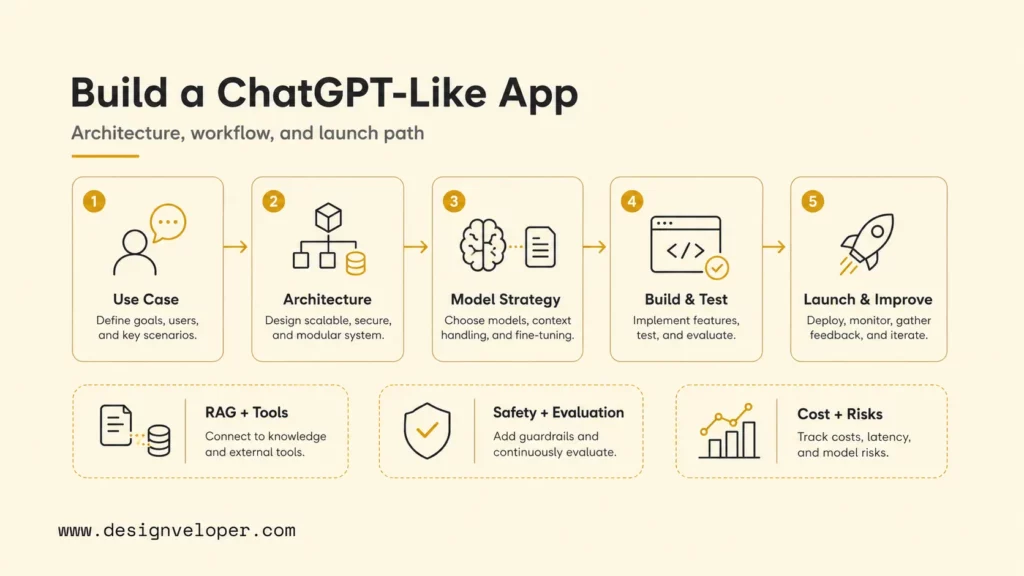
What Is A ChatGPT-Like Application?
A ChatGPT-like application is a conversational software product that accepts natural-language input, sends relevant instructions and context to a large language model, and returns a useful response through a chat interface. It may answer questions, draft content, analyze documents, search a private knowledge base, call software tools, or guide a user through a workflow.
The application is more than the model. A model generates language, but the product determines who can use it, which information it can access, what actions it may take, how conversation state is stored, and what happens when it is uncertain. Product behavior comes from the whole system: interface, orchestration, retrieval, tools, policies, tests, and operations.
Scope should be expressed as jobs and boundaries. For example, an assistant may help employees find approved policy passages and draft a response, but it may not alter payroll records. A customer assistant may explain an order and prepare a return request, while a person approves the refund. These boundaries are more actionable than a broad instruction to be helpful.
A focused application can outperform a general chat experience for its intended workflow because it has purpose-built context, interface controls, integrations, and evaluation criteria. The defensible value normally comes from workflow design, proprietary knowledge, user experience, and reliable execution rather than from reproducing a general-purpose chatbot.
The model writes the response, but the product architecture decides whether that response is useful, permitted, and dependable.
Related reading:
- Can ChatGPT Really Build An App? What ChatGPT Can And Cannot Do
- Alternatives To ChatGPT: Best Tools For Different Use Cases
- ChatGPT 4 Vs 5: Full Comparison Breakdown And What Has Changed
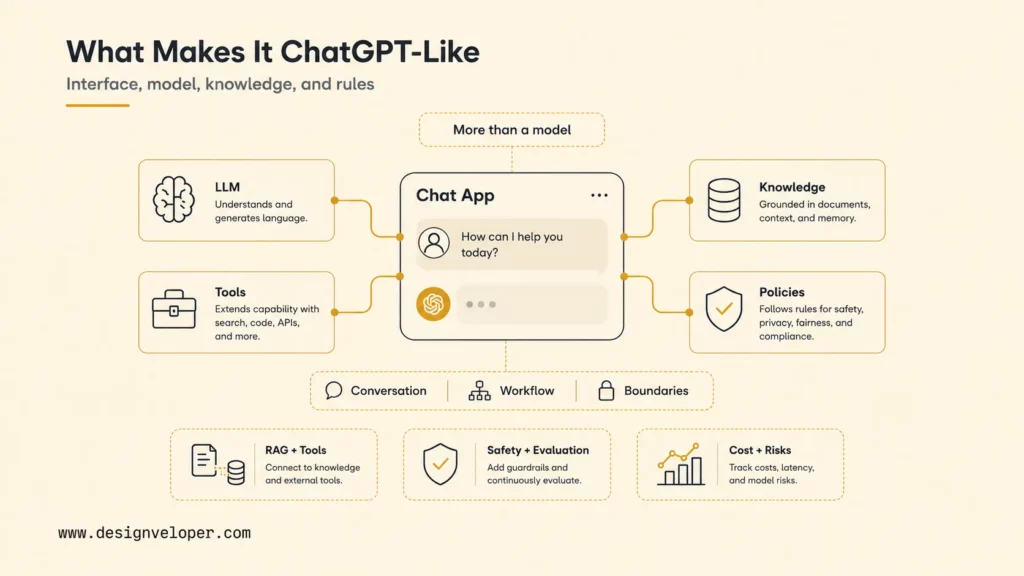
ChatGPT-Like App Architecture And Core Components
A production architecture separates the user experience from model access. The client sends a message to an application backend. The backend authenticates the user, applies rate limits, loads approved context, selects tools, creates model instructions, and sends the request. It then validates the result, records operational data, and streams or returns a response.
User input, streaming output, sources, feedback, and accessible controls.
Identity, policies, orchestration, state, budgets, and integrations.
Model API, retrieval, memory, and controlled tool calls.
Guardrails, evaluation, logs, monitoring, review, and improvement.
| Component | Role | What To Decide |
|---|---|---|
| LLM or model API | Interprets input and generates language or structured output. | Quality, context limits, latency, availability, pricing, and version policy. |
| Prompt layer | Combines system rules, task instructions, examples, and context. | Ownership, versioning, injection defenses, and test coverage. |
| Conversation memory | Preserves useful state across turns or sessions. | What to store, summarize, expire, delete, and expose to users. |
| RAG or knowledge base | Retrieves approved information relevant to a request. | Sources, chunking, metadata, permissions, freshness, and citations. |
| Tool or function calling | Lets the model request controlled application actions. | Tool schemas, authorization, validation, confirmation, and failure handling. |
| Backend APIs | Orchestrate models, data, policies, and business systems. | Language, framework, queues, caching, rate limits, and resilience. |
| Frontend chat UI | Collects input and presents responses, progress, and errors. | Web or mobile stack, streaming, accessibility, sources, and feedback. |
| Authentication | Identifies users and applies access rules. | Identity provider, roles, tenant boundaries, and session security. |
| Analytics and evaluation | Measure usage, task quality, and failure patterns. | Metrics, datasets, rubrics, reviewers, and release gates. |
| Guardrails | Reduce unsafe input, output, or actions. | Moderation, policy checks, refusal rules, and human escalation. |
| Logging and monitoring | Expose errors, latency, cost, retrieval, and tool behavior. | Redaction, retention, alerts, traces, dashboards, and incident ownership. |
Retrieval-augmented generation, or RAG, is useful when answers must reflect private or frequently changing material. The system searches an approved collection, passes relevant passages to the model, and can show sources to the user. Our guide to retrieval-augmented generation explains the pattern in more detail. Retrieval still needs evaluation: a fluent answer is not proof that the right passage was found.
Tool calling connects conversation to software capabilities. OpenAI’s current function-calling guide describes a multi-step exchange: the model requests a function, the application executes it, and the result returns to the model. The model should never hold broad credentials or execute arbitrary code simply because a user asked. The application remains responsible for authorization and validation.
Conversation state also deserves its own design. A request may depend on the previous turn, an active document, a selected account, or a workflow status, but not every old message should remain in context forever. Store authoritative workflow state in the application database, keep model-facing context small, and distinguish a user preference from a temporary conversational detail. OpenAI’s conversation-state guide describes current platform options, while the application still owns retention, deletion, and access decisions.
Observability should connect one user request across every component. A trace can record retrieval queries and document identifiers, model and prompt versions, tool requests and responses, latency by stage, token usage, policy decisions, and the final user outcome. Sensitive content should be minimized or redacted. This evidence lets engineers distinguish a model-quality problem from a missing document, a slow integration, a permission error, or a confusing interface.
Explore more:
- AI Chatbot Integration: Benefits, Use Cases, And Implementation Steps
- AI Agent Architecture Diagram: Key Components And Workflows
- Agentic AI Architecture: Components, Workflow, And Design Patterns
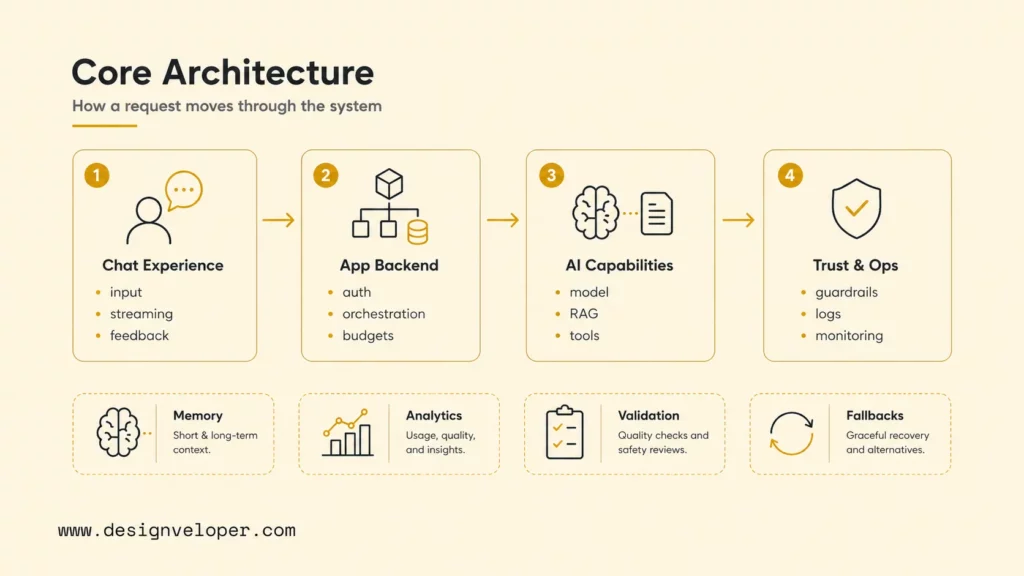
API-Based Vs Custom Model Development
An API-based approach uses a hosted model through a vendor endpoint. It is usually the fastest way to validate product value because the team avoids managing model weights, accelerators, inference servers, and model-serving updates. The application team can focus on workflow, data, retrieval, integrations, safety, and user experience.
A hosted open-source model offers more control over deployment, customization, and infrastructure location, but it adds operational work. Teams must select a model and serving engine, provision compute, manage scaling and quantization, monitor performance, patch dependencies, and plan upgrades. The Hugging Face Inference Endpoints documentation illustrates the serving components that managed deployments coordinate.
Training a foundation model from scratch is rarely the sensible starting point for an application. It requires large datasets, specialized research talent, extensive compute, safety work, and continuing model operations. Fine-tuning is narrower, but it should follow a measured need. Better instructions, examples, retrieval, tool design, or a different model may solve the problem with less risk.
Choose with a benchmark, not with a brand preference. Build a representative evaluation set, test multiple models and configurations, record output quality and latency, estimate unit economics, and confirm data-handling requirements. A hybrid architecture can route simple requests to an economical model, complex requests to a stronger model, and regulated or offline workloads to a controlled deployment.
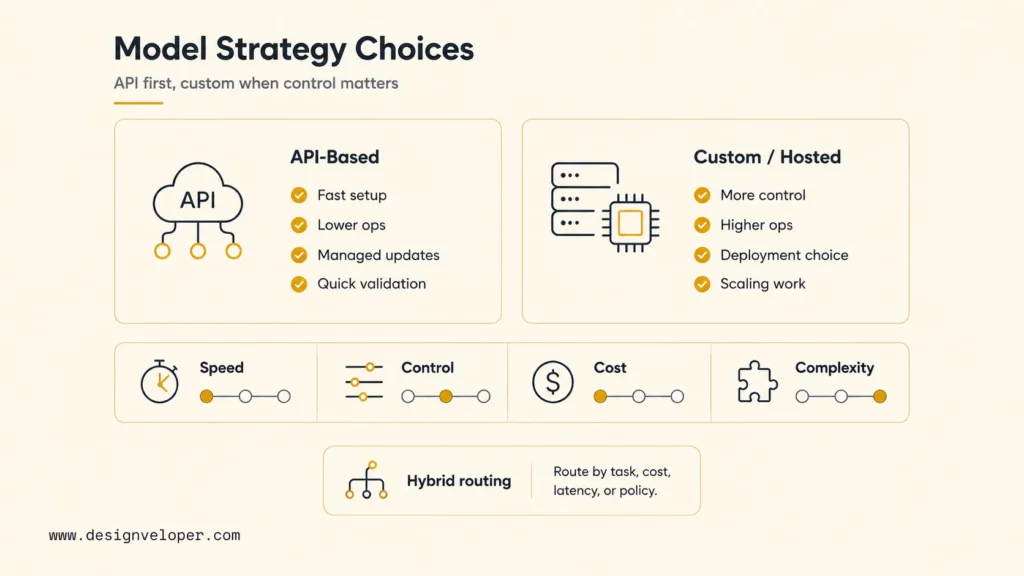
How To Build A ChatGPT-Like App Step By Step
Step 1. Define The Use Case, Users, And Success Metrics
Start with one user group and one recurring job. Interview users, review the present workflow, identify the source of truth, and document the decisions the assistant may support. Define inputs, desired outputs, prohibited behavior, escalation paths, and the point where a human must take control.
Success metrics should cover value and risk. Measure task completion, grounded-answer accuracy, time saved, user effort, escalation rate, latency, cost per successful task, and severe error rate. Establish a manual baseline before development. A target such as “reduce first-response time while preserving approved-answer accuracy” is more useful than “build an intelligent chatbot.”
Step 2. Choose The Model, API, Or Open-Source LLM Approach
Create a small test set that includes normal requests, ambiguous wording, long context, unsupported questions, adversarial instructions, and expected refusals. Compare candidates using the same instructions and rubric. Record output quality, time to first token, total latency, token use, tool-call accuracy, and operational constraints.
For OpenAI integrations, the current text-generation documentation recommends the Responses API for direct model requests. Teams should still consult current model and pricing pages at implementation time because capabilities and prices change. Pin model versions where available and rerun evaluations before upgrades.
Step 3. Design Conversation Flow, Prompting, And Response Rules
Map the conversation as states rather than relying on a single long prompt. Define the welcome path, required information, clarification questions, answer format, source display, tool confirmation, refusal, error recovery, and human handoff. Structured UI elements such as buttons, forms, and file selectors can reduce ambiguity and improve completion.
Keep system instructions concise, prioritized, and testable. Separate stable policies from task instructions and retrieved content. Treat user text and external documents as untrusted data, not as higher-priority commands. Ask the model for structured output when downstream code needs fields, and validate that output before it affects another system.
Step 4. Add RAG, Knowledge Base, Memory, Or Tool Calling
Only add capabilities the target workflow needs. For RAG, inventory approved sources, remove obsolete duplicates, split content into meaningful units, attach permission and freshness metadata, and test whether retrieval finds the correct evidence. OpenAI’s current file-search guide documents a hosted retrieval option; custom vector databases are another route when teams need different control.
Memory should be explicit. Short-term state may preserve the active task, while durable preferences require consent, visibility, deletion, and tenant isolation. Do not feed an unlimited transcript into every request. Summarize useful state, expire irrelevant details, and avoid retaining sensitive data without a defined purpose.
Tools should begin read-only and narrow. Give each tool a clear schema, check the authenticated user’s permission in application code, validate every argument, and return predictable errors. Require confirmation before a consequential change. OWASP identifies excessive agency as a major LLM application risk; limiting functionality, permissions, and autonomy reduces the potential impact.
Step 5. Build The Backend, Frontend Chat UI, And Integrations
The backend should centralize model credentials, orchestration, authorization, rate limiting, request budgets, retrieval, tool execution, logging, and fallbacks. Never expose a provider key in browser or mobile code. Use secret management, separate development and production environments, and set per-user or per-tenant limits.
The interface should make system state visible. Stream responses when appropriate, show when the assistant is searching or using a tool, provide source links, preserve user drafts, and present recoverable errors. Include feedback and escalation controls without making users repeat the conversation. Test keyboard navigation, screen readers, contrast, narrow screens, long code blocks, tables, and multilingual text.
Integrations need timeouts, retries, idempotency, and audit records. A tool call that creates a ticket or sends a message must not run twice because of a retry. Queues help long jobs, while circuit breakers and fallbacks prevent a failing dependency from blocking every conversation.
Step 6. Test Accuracy, Safety, Security, Latency, And Cost
Build an evaluation set from real, sanitized tasks and known edge cases. Score factual grounding, instruction adherence, retrieval relevance, citation correctness, tool arguments, refusal behavior, tone, and task completion. OpenAI’s evaluation guide recommends defining the task, running test inputs, and analyzing results. Keep important tests as release gates.
Security testing should include prompt injection, data exfiltration attempts, cross-tenant access, malicious files, oversized input, forged tool parameters, and secrets in logs. Apply normal web security practices alongside AI-specific controls. Use moderation where appropriate, redact sensitive logs, encrypt data, validate uploads, and conduct threat modeling for every integration.
Measure latency and cost by stage: retrieval, model input, model generation, tools, and post-processing. Reduce unnecessary context, cache stable results, parallelize independent work, and use smaller models for bounded tasks after evaluations confirm quality. Cost per request is incomplete; cost per successful task accounts for retries, escalations, and failed answers.
Step 7. Deploy, Monitor, Evaluate, And Improve Continuously
Launch through an internal test, a limited pilot, and a gradual rollout. Define owners, user support, incident severity, rollback, and kill-switch procedures before traffic grows. Version prompts, retrieval indexes, tool schemas, and model choices so a change can be traced and reversed.
Monitor availability, latency percentiles, token use, spend, retrieval misses, tool failures, refusals, user feedback, and safety events. Sample conversations for authorized human review with privacy controls. Convert repeated failures into evaluation cases and product fixes. Model monitoring without workflow outcomes can hide a system that sounds good but does not finish the job.
Further reading:
- How To Build RAG: A Practical Step-By-Step Guide
- Build A RAG Chatbot: Architecture, Steps, And Best Practices
- RAG Pipeline Diagram: How Retrieval-Augmented Generation Works
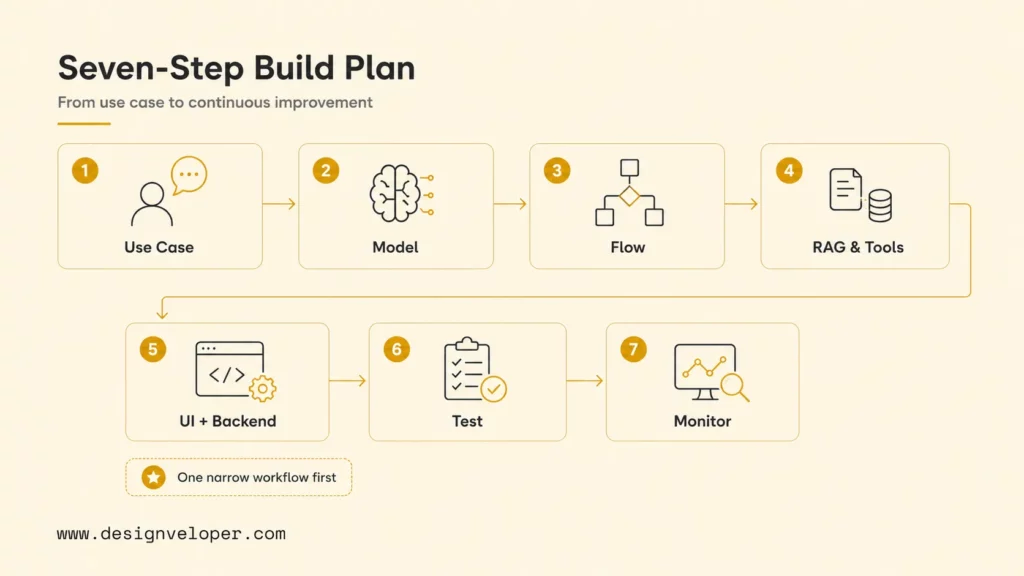
A production AI release is the beginning of an evaluation loop, not the end of a development checklist.
Cost, Timeline, And Technical Risks To Plan For
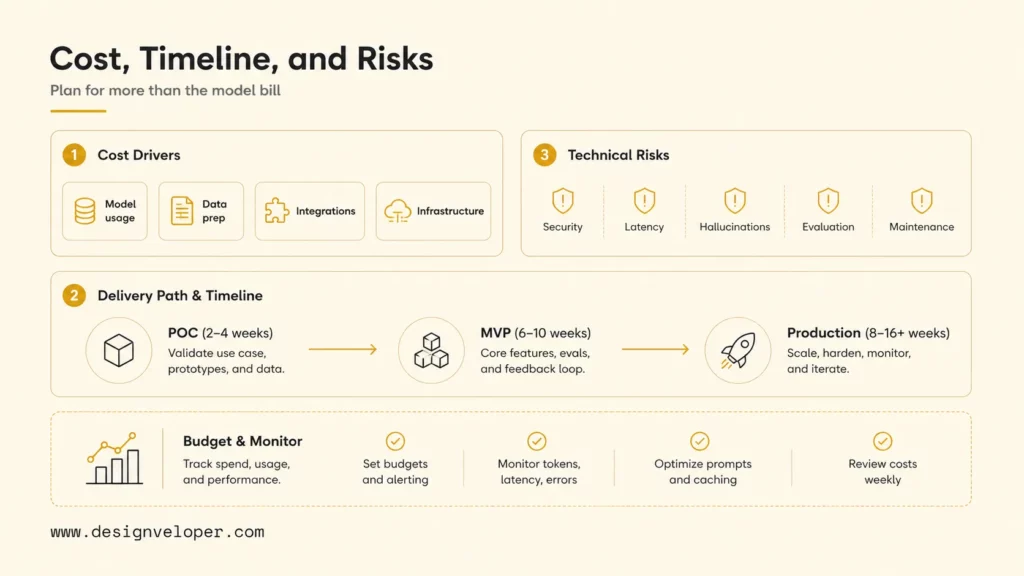
Total cost includes discovery, product design, application engineering, data preparation, integration, quality assurance, security, cloud infrastructure, model usage, monitoring, and ongoing improvement. The model bill may be visible, but weak data, complex permissions, or unreliable integrations often consume more engineering time.
| Factor | Why It Matters | What To Control |
|---|---|---|
| Model or API usage | Input, output, cached tokens, tools, and model choice affect unit cost. | Budgets, routing, context size, caching, and current pricing. |
| Hosting | Backends, workers, databases, and self-hosted inference must scale. | Autoscaling, capacity tests, environments, and idle resources. |
| Vector database | Index size and query volume add storage and compute. | Collection scope, metadata, retention, and retrieval quality. |
| Data preparation | Poor or obsolete knowledge produces unreliable answers. | Source owners, cleaning, permissions, freshness, and governance. |
| Integrations | Every external system adds authentication and failure modes. | Scope, contracts, test environments, retries, and ownership. |
| User volume and latency | Concurrency changes infrastructure and support requirements. | Rate limits, streaming, caching, queues, and service targets. |
| Security and privacy | Sensitive data and actions increase control and audit work. | Minimization, encryption, access, retention, review, and compliance. |
| Hallucinations | Unsupported answers damage trust and may cause harm. | Grounding, citations, refusal, validation, and human escalation. |
| Evaluation | Quality cannot be managed without repeatable evidence. | Representative datasets, rubrics, release gates, and reviewers. |
| Maintenance | Models, sources, dependencies, and workflows change. | Versioning, monitoring, incident response, and improvement capacity. |
Use scenarios rather than one false-precision estimate. A proof of concept may cover one channel, one model, and sample data. An MVP adds real identity, approved knowledge, analytics, and a limited pilot. A production release adds resilience, security testing, evaluations, operational dashboards, support, and governance. Each stage should have an exit criterion tied to evidence.
OpenAI publishes current token and tool charges on its API pricing page. Estimate monthly model cost from realistic input and output sizes, request volume, retries, and peak usage, then add infrastructure and human operations. Recalculate when prompts, models, traffic, or tools change.
Plan risk reduction in the delivery budget rather than treating it as a final audit. Early threat modeling can change the tool design before integrations are expensive to rewrite. Early retrieval evaluation can expose weak source data before a team tunes prompts around it. Load testing can reveal that a seemingly accurate workflow misses its user-experience target under concurrency. Privacy review can reduce unnecessary collection before sensitive information spreads through logs and analytics.
Technical risks also interact. Larger prompts may improve one evaluation but increase latency and cost. More memory may make conversations convenient but increase privacy exposure and irrelevant context. More tools may improve task completion but expand the authorization surface. Use guardrail metrics alongside quality targets so an optimization cannot silently move the product beyond its accepted operating boundary.
For practical examples, check out:
- AI Agent Pricing: Cost Factors, Models, And Budget Planning
- Prompt Engineering For Developers: Practical Techniques And Examples
- Prompt Engineering Best Practices: Practical Tips For Better AI Outputs
From ChatGPT-Like Prototype To Production-Ready AI Product
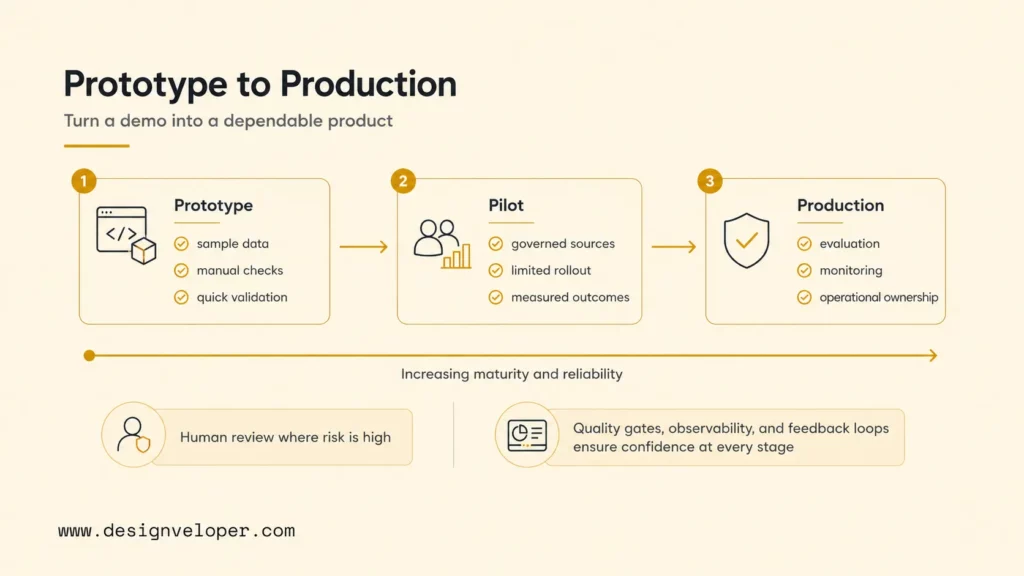
A prototype proves that a model can respond. A product proves that the full system can help intended users repeatedly within acceptable quality, cost, latency, security, and support limits. The transition requires replacing sample data with governed sources, informal prompts with versioned assets, manual checks with repeatable evaluations, and developer observation with operational ownership.
Keep a human in the loop wherever an error is costly or difficult to reverse. Show users what the system knows, cite important sources, communicate uncertainty, and offer an escalation path. The NIST AI Risk Management Framework provides a voluntary structure for managing AI risks across design, development, deployment, and use.
At Designveloper, we start with the user’s workflow and the evidence required for a safe release. Our teams can help shape the architecture, build the web or mobile experience, connect approved data and tools, and establish evaluation and monitoring. Explore our AI development services if you need a practical route from use-case discovery to a production system.
The strongest plan remains intentionally narrow: validate one job, design the system boundaries, test representative failures, launch gradually, and improve from measured outcomes. That is how to build an application like chatgpt without confusing a polished demo with a dependable product.
FAQs About Building An App Like ChatGPT
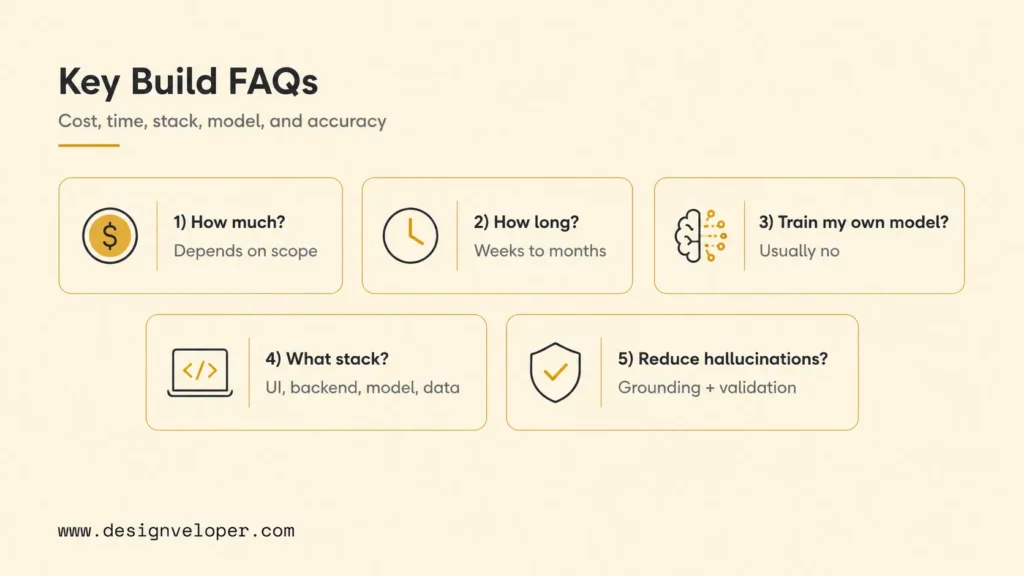
How Much Does It Cost To Build An App Like ChatGPT?
There is no universal price. A focused API-based prototype costs far less than a multi-tenant production platform with private data, several integrations, advanced permissions, and high availability. Estimate discovery and design, engineering, data work, security and testing, cloud infrastructure, model usage, monitoring, and ongoing improvement separately. Validate assumptions with a small pilot before committing to scale.
How Long Does It Take To Build A ChatGPT-Like App?
A narrow prototype can take weeks, while a dependable production product commonly takes months. Schedule depends on workflow complexity, data readiness, integration access, compliance, evaluation requirements, and team availability. Use phased delivery with explicit exit criteria instead of promising a launch date before testing the riskiest assumptions.
Do I Need To Train My Own AI Model?
Usually not. Most teams should begin with a capable hosted API or existing open-source model, then improve the application through instructions, retrieval, tools, and workflow design. Consider fine-tuning only when evaluations show a persistent, well-defined behavior gap. Training a foundation model from scratch is a separate research and infrastructure program.
What Tech Stack Is Needed For A ChatGPT-Like App?
A typical stack includes a web or mobile frontend, an application backend, a model API or inference server, a relational database, optional vector search, authentication, object storage, queues or background workers, analytics, logging, and monitoring. Choose technologies your team can operate well. Architecture and controls matter more than a particular framework name.
How Do You Reduce Hallucinations In A ChatGPT-Like App?
Narrow the task, provide clear instructions, retrieve approved evidence, require sources, validate structured output, and let the system abstain when evidence is missing. Test representative failures and monitor real usage. For high-impact decisions, use deterministic checks and human review rather than trusting generated text as the final authority.
Also published on

Share post on










Related Articles


AI Agent Case Studies: 10 Real-World Examples Across Industries
AI Agent Case Studies: 10 Real-World Examples Across Industries Published October 21, 2026
How Will AI Affect Software Development? Complete Guide In 2026
How Will AI Affect Software Development? Complete Guide In 2026 Published October 21, 2026
How To Build A RAG System: Step-By-Step (New Guide)
How To Build A RAG System: Step-By-Step (New Guide) Published October 19, 2026


















