
















What Is RAG in AI? How Retrieval-Augmented Generation Works

KEY TAKEWAYS:
- RAG helps AI systems answer with external knowledge by retrieving relevant context before the model generates a response.
- RAG is useful when answers need fresh, private, or source-grounded information that a base model may not know or may answer incorrectly.
- A reliable RAG system depends on the whole pipeline: documents, chunking, embeddings, vector search, retrieval logic, prompt design, citations, and evaluation.
- RAG and fine-tuning solve different problems; RAG is usually better for changing knowledge, while fine-tuning is better for stable behavior, style, or task patterns.
- Production RAG needs governance and monitoring, including access control, source freshness, no-answer behavior, retrieval quality checks, and human escalation for risky cases.
Many teams still ask what is rag and whether it is just another AI buzzword. It is not. RAG solves a real problem. Large language models can write fluent answers, but they often miss fresh facts, private business knowledge, and source-grounded evidence. That matters even more now because 88% of organizations report regular AI use in at least one business function, and 23% say they are already scaling agentic AI.
This guide explains what is RAG in AI, how a RAG system works, when to use it instead of fine-tuning, and how to build a RAG chatbot that gives more useful answers. It also shows where RAG fits into real business products such as chatbots, internal knowledge tools, and enterprise search.
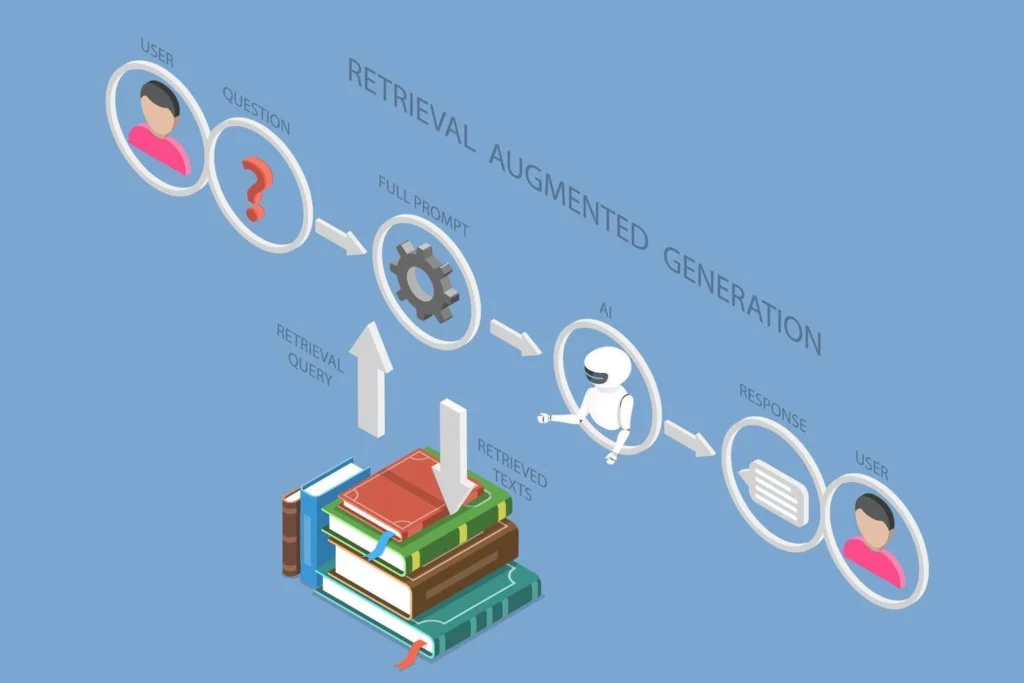
What Is Retrieval-Augmented Generation (RAG) in AI?
1. What Retrieval-Augmented Generation Means for LLMs
RAG stands for Retrieval-Augmented Generation. In simple terms, it lets a language model look up relevant information before it answers. So, instead of relying only on what it learned during training, the model can use documents, databases, policies, manuals, or web content at runtime.
That is why RAG is a technique used to augment an LLM with external data such as a company’s internal documents. It gives the model context for the current question. As a result, the answer can match the user’s actual data, not just the model’s old memory.
If someone asks “what is RAG in LLM,” this is the core idea. A standard LLM generates. A RAG-enabled LLM retrieves first, then generates.
2. Why RAG Matters in Modern AI Applications
Modern AI apps need more than good wording. They need trustworthy answers. That is especially true in support, operations, finance, legal review, healthcare, and internal knowledge management.
RAG matters because businesses often work with data that changes fast. Product catalogs change. Policies change. Pricing changes. New tickets arrive every minute. Internal documentation grows every week. A model trained months ago cannot know those updates unless a system feeds them in at response time.
That is why grounded generation is more accurate, up-to-date, and relevant to your specific needs. RAG gives AI a working memory that can reflect current business reality.
3. How RAG Supports More Grounded AI Responses
Grounded answers start with evidence. A good RAG pipeline retrieves the best passages, adds them to the prompt, and tells the model to answer from that context. If the evidence is weak or missing, the system can ask a follow-up question or say it does not know.
This makes the answer more traceable. It also makes it easier to show citations, quote the right passage, or point users to a source document. That is a major reason why teams choose RAG for enterprise tools.
Microsoft describes this clearly: RAG retrieves relevant information from external sources to inform and enhance the generation of responses. That is what makes the response grounded instead of guessed.
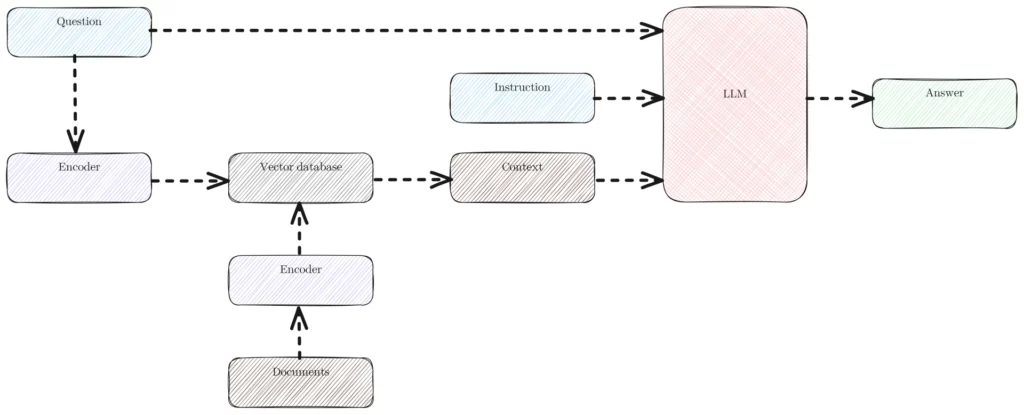
Why Retrieval-Augmented Generation Matters in the AI Era
Why Retrieval-Augmented Generation Matters in the AI Era
1. Why Standalone LLMs Are Not Enough
Standalone LLMs are powerful, but they have limits. First, their knowledge can go stale. Second, they do not automatically know a company’s private documents. Third, they can sound sure even when the underlying answer is weak.
Those limits do not always matter. If a user wants brainstorming, tone rewriting, or generic drafting, a standalone model may be enough. But if a user asks for a refund policy, a compliance rule, an invoice status, or an answer from an internal handbook, the model needs retrieval.
That is why RAG has become a baseline pattern for many serious AI products. It connects language ability with evidence.
2. How RAG Improves Accuracy, Reliability, And Trust
RAG improves accuracy because it narrows the model’s attention to relevant context. It improves reliability because the model no longer has to invent missing details from memory. It improves trust because users can inspect the source material behind the answer.
That trust layer matters more than many teams expect. A user may forgive a short answer. They will not forgive a confident wrong answer in a policy workflow, support chat, or business dashboard.
RAG also helps teams create guardrails. They can restrict retrieval to approved repositories, rank passages by relevance, and log which documents supported each answer. That makes QA, debugging, and governance much easier.
3. How RAG Helps Reduce Hallucinations
RAG does not eliminate hallucinations. However, it can reduce them when retrieval works well and the prompt tells the model to stay inside the evidence.
AWS states that RAG reduces hallucination risk and is a strong starting point for question answering over custom documents. That is why many teams start with RAG before they consider more expensive model customization.
Still, retrieval quality matters. If the system pulls irrelevant chunks, the model can still answer badly. So the goal is not “use RAG and relax.” The goal is “use RAG and design retrieval well.”
4. Why RAG Matters for AI Chatbots And Assistants
AI chatbots and assistants often live or die on answer quality. Users ask about orders, pricing, policies, product details, onboarding steps, and account rules. These are retrieval-heavy questions. They depend on current data, not just language fluency.
That is why the trend is moving fast. According to Salesforce, 30% of service cases were resolved by AI in 2025, and 50% are expected to be resolved by AI by 2027. As that shift grows, grounding becomes more important. A chatbot that sounds smart but gives the wrong policy answer creates more work, not less.
RAG helps assistants answer from the latest help center, CRM notes, SOPs, and internal knowledge. That makes them far more useful in production.
How Does Retrieval-Augmented Generation Work in AI?
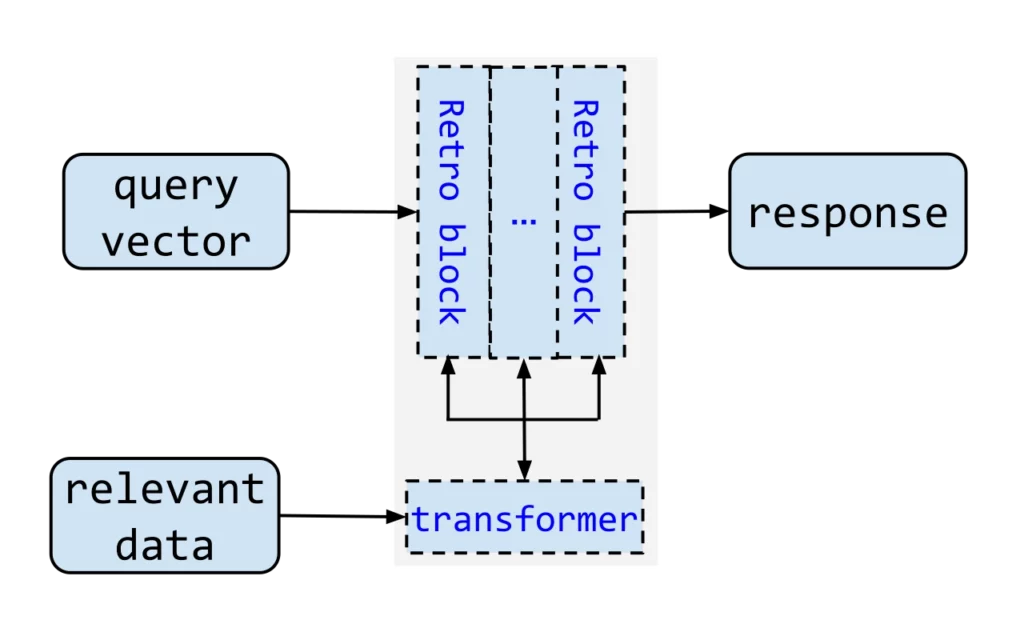
At a high level, a RAG pipeline connects knowledge sources to retrieval, prompt assembly, and generation. The diagram below shows how those stages fit together before the following steps explain each one.
Further reading:
- How To Build A RAG System: Step-By-Step (New Guide)
- Chroma Vs FAISS Vs Pinecone: Which Vector Solution Fits Your Use Case Best?
- Vector Databases vs Traditional Databases: Key Components Comparison
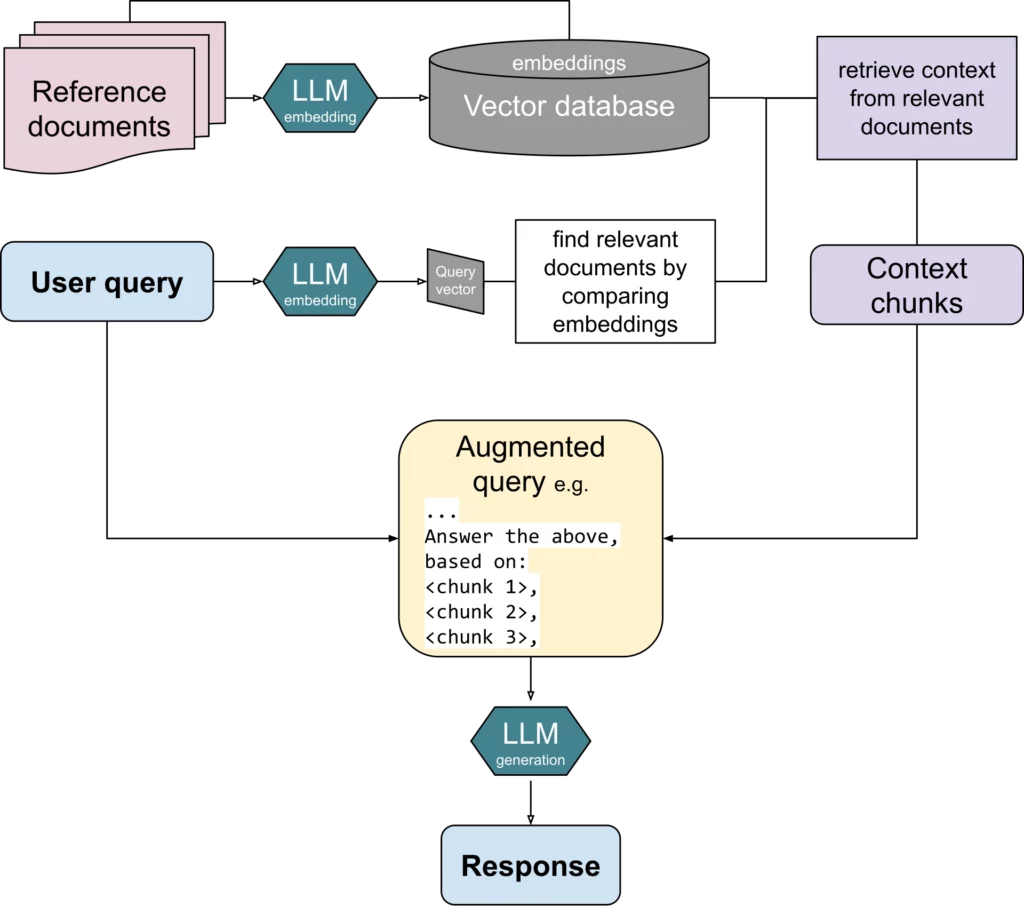
1. Retrieving Relevant Data From External Sources
The process starts with data. A team collects documents such as FAQs, manuals, PDFs, product specs, support macros, meeting notes, or database records. Then the system cleans and splits that content into smaller chunks.
Next, the system turns those chunks into vector embeddings. In plain language, embeddings are numeric representations of meaning. OpenAI explains this simply: vector embeddings turn text into numbers. Once the chunks become vectors, the system can search by semantic similarity instead of exact keyword match.
Those vectors usually live in a vector store or a search index. When a user asks a question, the retriever compares the query vector with stored vectors and returns the most relevant chunks. Metadata can improve this step. For example, the system can filter by department, product line, document type, or date.
2. Adding Retrieved Context To The Prompt
After retrieval, the system assembles a prompt. It includes the user’s question, the retrieved context, and clear instructions. A strong prompt might say: answer only from the provided sources, cite them, and admit uncertainty when evidence is missing.
This step is simple in theory but important in practice. If the prompt is too loose, the model may ignore the evidence, if it is too long, the context may become noisy. Finally, if it mixes weak and strong passages, the answer quality may drop.
Good prompt assembly also respects token limits. Teams often rank, re-rank, or compress context before sending it to the LLM.
3. Generating A Grounded Response With The LLM
Once the prompt is ready, the LLM produces the final answer. It uses the retrieved passages as evidence. At this point, the model is not “thinking from scratch.” It is synthesizing from supplied context.
OpenAI describes retrieval as a way to perform semantic search over your data. That search layer is what makes the generation step useful. The LLM handles language, structure, tone, and explanation. The retrieval layer handles evidence.
Many production systems add one more step after generation. They may validate citations, score faithfulness, or check whether the answer really matches the retrieved text. This is how mature RAG pipelines become more dependable over time.
What Is A RAG System?
1. Core Components Of A RAG System
A RAG system is more than one model call. It is a small architecture. Most RAG system design patterns include the same core parts:
- Knowledge sources such as documents, databases, tickets, web pages, or policy files.
- An ingestion pipeline to clean, chunk, tag, and update the content.
- An embedding model to turn chunks into vectors.
- A vector database or search engine to store and retrieve chunks.
- A retriever, and often a re-ranker, to find the best evidence.
- A prompt builder to combine user intent with retrieved context.
- An LLM to generate the final answer.
- An evaluation layer to test relevance, faithfulness, latency, and user satisfaction.
When people ask “what is a RAG system,” they usually mean this full stack, not just retrieval by itself.
2. How A RAG System Connects Retrieval And Generation
The connection between retrieval and generation is the whole point. Retrieval alone gives ranked passages. Generation alone gives fluent text. A RAG system combines them into one answering loop.
A simple version works like this: the user asks a question, the system retrieves top passages, the LLM answers from those passages, and the interface shows both answer and source. A stronger version adds hybrid search, metadata filters, re-ranking, caching, and answer verification.
Some teams go further with a multi-agent RAG system. One agent rewrites the query. Another retrieves, or checks citations. Another formats the final answer. This can improve complex workflows, but it also adds design overhead.
3. RAG System Design Basics For AI Applications
Good RAG system design starts with the use case. Then it moves to data quality. Then it focuses on retrieval quality. Many teams reverse that order and fail early.
A useful design checklist includes the following questions:
- What questions should the system answer well?
- Which sources are trusted enough to use?
- How often does the data change?
- How should chunks be split?
- Which metadata fields matter?
- What should happen when evidence is weak?
- How will the team evaluate answer quality over time?
If these basics are weak, even a strong model will underperform. If these basics are strong, a modest model can still deliver useful results.
Benefits Of RAG in AI
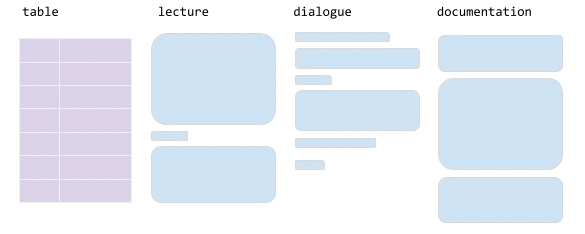
The business value of RAG comes from more accurate answers, controlled knowledge sources, and responses users can verify. The diagram summarizes the main benefits, while the numbered sections explain when those gains appear.
Related reading:
- Advanced RAG Techniques For Production-Grade AI Search
- RAG Best Practices Start Before Your Model Generates An Answer
- Best Open-Source Vector Databases: Top Options Compared
1. Provides More Accurate And Relevant Answers
RAG improves answer quality by giving the model targeted evidence. That helps it stay relevant to the user’s exact question.
This is not just theory. In a Microsoft Research case study, RAG increased accuracy by 5 percentage points further on top of gains from fine-tuning. That result came from a domain-specific setting, but the lesson is broad. Retrieval can add measurable value when the task depends on external knowledge.
2. Supports Private, Proprietary, And Domain-Specific Knowledge
Most businesses care about their own knowledge first. That includes SOPs, contracts, support notes, catalog rules, audit workflows, and internal wikis. A public model does not know that material by default.
RAG solves this by bringing private knowledge into the prompt at runtime. So the model can answer from internal content without retraining on every update. That is a major reason why RAG is common in enterprise search, copilots, and support tools.
3. Helps AI Systems Use Up-To-Date Information
Freshness is one of RAG’s biggest strengths. If the source changes, the answer can change too, as long as the index is updated.
Google Cloud notes that RAG supports fresh data, private data, and large-scale multimodal data. That makes it practical for live business environments where knowledge does not stay still.
4. Improves Cost-Effectiveness Compared With Retraining
Retraining or fine-tuning a model every time a policy or document changes is slow and expensive. RAG usually avoids that problem. Teams update the data layer, not the model weights.
That does not mean RAG is always cheap. Large prompts, poor chunking, and repeated retrieval can raise cost. Still, for many question-answering systems, RAG is the faster path to useful output because it shifts effort toward data operations instead of repeated model training.
5. Improves Chatbot Performance And User Experience
Users care about fast, relevant, trustworthy answers. RAG helps chatbots do that. A strong RAG chatbot can quote policy text, surface account steps, and answer product questions with less guesswork.
It also improves the user experience when the system shows sources, asks clarifying questions, and says “I could not find that in the knowledge base” instead of making something up.
Retrieval-Augmented Generation Vs Fine-Tuning
1. Key Differences Between RAG And Fine-Tuning
RAG and fine-tuning solve different problems. RAG changes what the model sees at runtime. Fine-tuning changes how the model behaves by adjusting it with training examples.
So, use RAG when the challenge is knowledge access. Use fine-tuning when the challenge is behavior, format, style, or task specialization. For example, if a team wants a model to follow a strict output schema, fine-tuning may help. If the team wants answers from a changing policy library, RAG is usually the better fit.
Microsoft Learn explains that fine-tuning fits stable content and task-specific performance. That is the clearest mental model. Stable behavior points toward tuning. Dynamic knowledge points toward RAG.
2. RAG Vs LLM Comparison Table
| Factor | RAG | Fine-Tuning |
|---|---|---|
| Main goal | Add external knowledge at answer time | Teach the model a task, style, or response pattern |
| Best for | Search, Q&A, grounded chatbots, internal knowledge tools | Classification, formatting, domain behavior, output consistency |
| Data freshness | Strong, because retrieval can use updated content | Weak for fast-changing knowledge unless retrained |
| Private knowledge | Good fit when tied to secured retrieval | Possible, but harder to keep current |
| Infrastructure | Needs indexing, retrieval, prompt assembly, and evaluation | Needs training data, tuning pipeline, and model management |
| Typical weakness | Fails when retrieval is poor | Fails when knowledge changes often |
3. When To Use Which
Start with RAG when the application must answer from documents, databases, or current business knowledge. Start with fine-tuning when the application must learn a stable task or response style.
Many strong systems use both. The model may be tuned for better task behavior while the RAG layer feeds it fresh evidence. This hybrid pattern is often the best choice for high-value enterprise workflows.
Common Use Cases Of RAG in AI
1. RAG For AI Chatbots And Virtual Assistants
General assistants become more useful when they can search a trusted knowledge layer. That lets them answer from product docs, SOPs, user guides, and internal playbooks.
This is where what is RAG retrieval augmented generation becomes practical, not theoretical. RAG turns a chat interface into a knowledge interface.
2. RAG For Customer Support Chatbots
Support bots often need current content. They must know policies, returns, pricing, plan limits, setup flows, and escalation rules. RAG helps them retrieve the right article and answer in natural language.
That lowers repetitive ticket volume. It also helps agents. An internal support assistant can suggest the right macro, policy quote, or troubleshooting step in seconds.
3. RAG For Enterprise Search
Traditional enterprise search returns documents. RAG can return direct answers plus document links. That saves time when employees need one fact fast.
Examples include searching contracts, HR handbooks, compliance manuals, audit notes, research reports, or vendor docs. Instead of opening five files, the user gets a grounded summary with source passages.
4. RAG For Internal Knowledge Bases
Internal knowledge is often fragmented. It lives in wikis, chat logs, ticket systems, file drives, and outdated docs. RAG can pull that knowledge into one retrieval layer.
This is useful for onboarding, policy lookup, process guidance, and cross-team knowledge sharing. It also creates a better base for AI agents that need reliable context before they take action.
How To Build A RAG Chatbot
A RAG chatbot works best when its knowledge scope, retrieval path, prompt rules, and evaluation set are designed together. The diagram below outlines the build sequence before the implementation steps.
For a deeper dive, read:
- How To Train A Chatbot With Your Own Data For Better Business Support
- AI Chatbot Integration: How To Connect Chatbots With Business Systems
- AI Chatbot Development: A Step-By-Step Guide
1. Choose And Prepare Your Knowledge Sources
Start with scope. Do not load every document you own. Pick the sources that truly matter for the chatbot’s job.
If the goal is support, begin with help articles, macros, return policies, and product docs. If the goal is internal enablement, begin with handbooks, SOPs, and approved guides. Remove duplicates. Clean bad formatting. Add metadata such as owner, date, and product line.
This step sets the ceiling for quality. A chatbot cannot retrieve what is missing or trust what is messy.
2. Create Embeddings And Store Them In A Vector Database
Next, split content into useful chunks. Then create embeddings and store them in a vector database or retrieval index. The chunk size should match the task. Tiny chunks lose context. Huge chunks add noise.
You should also store metadata with each chunk. That makes filtering easier later. For example, the retriever can return only documents from the correct product, department, or date range.
This stage is the backbone of retrieval quality. If the index is weak, the chatbot will look smart but miss the right evidence.
3. Build The Retrieval And Response Pipeline
Now connect the pieces. The user sends a question. The retriever finds the best chunks. The prompt builder assembles the evidence. Then the LLM answers from that evidence.
A good first version should also include simple rules:
- Answer from the retrieved documents only.
- Show source links or source names.
- Ask a follow-up question when the query is vague.
- Say that the answer is unavailable when evidence is missing.
These rules make a build a RAG chatbot project far more stable from day one.
4. Test And Improve Chatbot Answer Quality
Testing matters as much as building. Create a question set from real user requests. Then score the system on relevance, faithfulness, completeness, latency, and user satisfaction.
Common fixes include better chunking, improved metadata, hybrid search, re-ranking, stronger prompt instructions, and better fallback behavior. Teams should also test edge cases such as conflicting documents, outdated content, and missing answers.
Do not judge a RAG chatbot only by demo quality. Judge it by repeatable evaluation.
How Designveloper Supports RAG And AI Development
Designveloper treats RAG as part of broader AI software development, not as a standalone prompt demo. The related guides below cover the agent architecture, governance, and scaling decisions that often surround a RAG build.
Continue reading:
- A Practical Guide To AI Agent Architecture With Diagrams
- Enterprise AI Agents: Use Cases, Tools, And Implementation Guide
- Agentic AI Security: Risks, Core Architecture, Solutions
Designveloper supports RAG work as part of broader AI product delivery. The company has more than a decade of delivery experience, so it brings product, engineering, and delivery expertise to AI implementation instead of treating RAG as a one-off experiment.
That matters because a production RAG system needs more than a prompt. It needs data preparation, retrieval design, interface logic, testing, security, and iteration. Designveloper also brings a track record from 100+ projects across 20+ industries, which is useful when AI has to fit into real workflows.
On the service side, Designveloper offers AI software development focused on robust and scalable software applications. That fits well with RAG projects because most clients do not need a demo. They need an AI feature inside a working product, internal tool, or customer-facing assistant.
The company has also publicly shared that it is experimenting with RAG techniques in Lumin, which shows practical interest in document-centric AI experiences. For businesses that want to move from concept to usable workflow, that kind of product grounding matters.
FAQs About Retrieval-Augmented Generation (RAG)
1. Why Is RAG Better Than A Standalone LLM?
RAG is better when the answer depends on fresh, private, or source-specific knowledge. A standalone LLM is still useful for general drafting, summarizing, and brainstorming. But when users need accuracy tied to real documents, RAG is usually the safer choice.
2. What Is Prompt RAG?
Prompt RAG usually refers to a lightweight setup where retrieved text is inserted straight into the prompt without a heavy orchestration layer. It can work for small systems. However, it often breaks down when data volume grows, retrieval needs metadata filters, or answer quality must be measured at scale.
3. Is ChatGPT A RAG?
Not by default. ChatGPT is not one single RAG system in every mode. However, it can behave like a retrieval-augmented system when it can search, reference, and work with connected data sources. So the right answer is nuanced: the base chat experience is not “just RAG,” but some ChatGPT features and connected workflows use retrieval patterns.
4. What Is RAG Used For?
RAG is used for support chatbots, internal assistants, enterprise search, document Q&A, policy lookup, research copilots, and many domain-specific tools. Any workflow that needs grounded answers from changing knowledge is a strong candidate.
5. What Is A RAG System?
A RAG system is an AI architecture that retrieves relevant information from external sources and then uses that information to generate the final answer. It usually includes ingestion, embeddings, a retrieval layer, prompt assembly, an LLM, and evaluation.
6. What Is The Difference Between LLM And RAG?
An LLM is the language model itself. RAG is a system pattern built around a model. The LLM writes the answer. RAG decides what evidence the model gets before it writes. So an LLM is a component, while RAG is an architecture.
RAG matters because it closes the gap between language fluency and usable knowledge. It helps AI move from sounding smart to being reliably helpful. For teams asking what is RAG in AI, that is the real answer: it is the practical bridge between powerful models and real business truth.
When built well, RAG can improve chatbots, search tools, assistants, and internal workflows without forcing constant retraining. That makes it one of the most useful patterns in modern AI development, especially for companies that need grounded answers, current data, and production-ready systems.
Conclusion
So, if you still ask what is rag, the practical answer is simple. RAG helps AI move beyond fluent text and toward grounded, useful, and business-ready output. It gives language models access to the right knowledge at the right time. As a result, teams can build chatbots, assistants, search tools, and internal workflows that are more accurate, more relevant, and easier to trust.
At Designveloper, we see that shift as more than a technical upgrade. We see it as a product and operations advantage. We were founded in 2013, and we have delivered 100+ projects across 20+ industries. That experience helps us build AI features that fit real products and real workflows, not just demo environments. Our work also spans a 100+ person team working across 50+ technologies, so we can support RAG projects from planning and UX to engineering, testing, and release.
More importantly, we do not treat RAG as an isolated feature. We connect it to the systems businesses already need. That includes AI development services, custom software development, web and mobile app development, and workflow automation. We have also worked on products such as Song Nhi, a virtual financial assistant, and Lumin, a document platform that shows how AI and document-centered experiences can create real value for users. So, when companies need RAG, AI agents, or knowledge-based assistants that work inside production-ready software, we are ready to help turn that idea into a system people can actually use.
Also published on

Share post on










Related Articles


Agentic AI Impact On The Workforce: Changing Tasks, Jobs, And Skills
Agentic AI Impact On The Workforce: Changing Tasks, Jobs, And Skills Published October 02, 2026
13 Best Vibe Coding Tools for Building Apps and Editing Codebases
13 Best Vibe Coding Tools for Building Apps and Editing Codebases Published September 30, 2026
Can ChatGPT Create an App? What It Can Build and What to Check
Can ChatGPT Create an App? What It Can Build and What to Check Published September 30, 2026



















