
















Agentic AI Architecture: Components, Patterns, And Workflows

KEY TAKEAWAYS:
- Keep control outside the model. The model can propose a plan, while the runtime enforces agent governance, permissions, and business rules.
- Use the least complex pattern that works. Start with fixed steps or one agent, then add parallel or multi-agent coordination only when the workload needs it.
- Check every action before it changes data. Validate tool inputs, user authority, scope, and results; require human review for high-impact or irreversible work.
- Make each run traceable. Record inputs, tool calls, decisions, retries, costs, and handoffs so teams can test failures and improve the workflow.
A software agent that can update records or send messages needs more than a capable model. It needs a clear boundary between the action the model proposes and the action the application permits. That boundary affects whether a task needs an agent at all, how information moves between components, and what happens when a step fails. This article follows agentic AI architecture from its core responsibilities through a bounded workflow, pattern choices, frameworks, and production checks. The aim is not to maximize autonomy; it is to match the system’s control level to the work and its consequences.
What Is Agentic AI Architecture?
Agentic AI architecture connects a model to tools, data, runtime controls, and monitoring so it can pursue a goal through approved steps. The system can check results, stop, or hand work to a person. The model may suggest what to do next, but the surrounding software decides whether that action is allowed.
Not every system that uses an LLM is agentic. A chatbot can answer from a prompt. A retrieval-augmented generation (RAG) app retrieves documents before the model answers. A fixed workflow follows known steps without model-selected actions. An agent adds model-directed decisions within a defined task boundary. These approaches can also work together: a fixed application flow may call an agent for one open-ended step, then validate its result with ordinary code.
Ask which decisions need model judgment and which should stay deterministic. The AI agents vs. LLMs comparison clarifies the difference between a model and the application behavior built around it.
| System type | How the next step is chosen | Good fit |
|---|---|---|
| LLM response | The model creates an answer from the prompt and available context. | Drafting, summarizing, or answering a question without external action. |
| RAG application | Application code retrieves selected sources, then the model uses them to answer. | Answers that need current or organization-specific documents. |
| Deterministic automation | Rules and configured steps select the next action. | Stable processes with known branches and clear inputs. |
| Agentic workflow | The model can propose a step, while runtime rules constrain, validate, and execute it. | Bounded work with uncertain inputs that benefits from model judgment. |
These categories are not competing labels for an entire product. A support workflow might use deterministic rules to route a ticket, RAG to find policy, and an agent to draft a response. A person can approve the response before the system sends it. The architecture should make those boundaries visible.
For a deeper dive, read:
- What Is An LLM Agent? How It Works, Architecture, And Examples
- AI Agent Vs Chatbot: Key Differences, Use Cases, And Best Fit
- Why AI Agents Need MCP: How AI Systems Connect To Tools And Data
Core Components Of Agentic AI Architecture
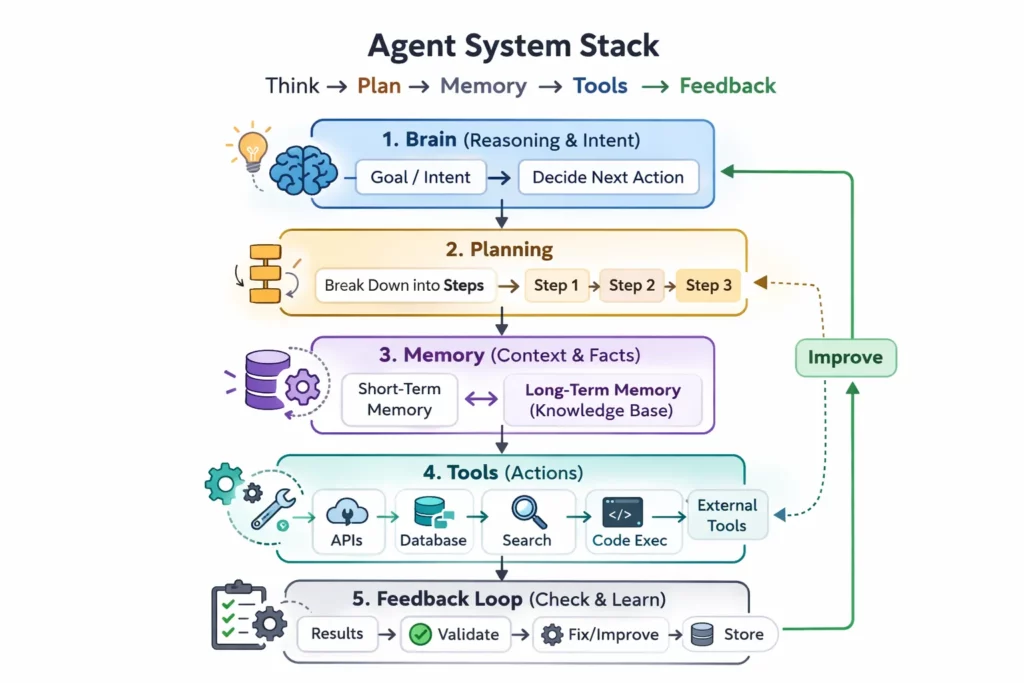
A production design separates responsibilities so that a model suggestion cannot silently become an unrestricted action. The exact modules vary, but these six responsibilities should have clear owners.
1. Model And Task Interpretation
The model interprets the request, extracts useful details, and may propose a plan or response. It can classify intent, identify entities such as an order number, and produce a structured tool request. These outputs are proposals: a fluent answer does not prove that the request is authorized or that the proposed action is correct.
Model choice should follow the task. A small model may be enough for classification, while a harder reasoning step may need a stronger model. Teams should compare quality, latency, cost, data handling, and failure behavior on representative tasks rather than assuming one model should control every step.
2. Orchestration Runtime And State
The orchestration runtime owns the execution path. It tracks the current step, passes approved context, applies timeouts, handles tool responses, and decides whether to continue, stop, retry, or ask for review. A workflow graph, a task queue, or ordinary application code can provide this control; a multi-agent framework is not required by default.
State should record only what later steps need. Keep a run identifier, task status, relevant inputs, tool outputs, and decisions. Separate short-lived run state from longer-term memory so that a summary or stored fact does not quietly become permanent truth.
3. Tools And Integration Layer
Tools connect the workflow to APIs, databases, search, or internal services. Each tool needs a narrow purpose, a defined input schema, and a documented result. For example, a renewal workflow might read account details through a CRM API and retrieve usage through an analytics service. A SQL data source should expose only the records and operations the task needs.
Structured tool calling makes requests easier for software to parse, but it does not make them safe by itself. OpenAI’s function-calling guide describes how a model can return tool names and arguments against a schema. The application must still check the caller, resource scope, business rules, and expected side effects before execution.
4. Identity, Policy, And Human Review
Identity answers who initiated the task; authorization answers what that person may access or change. The runtime should pass the user’s identity and task scope to each tool rather than rely on a broad service account. Policy checks should run in application code or a trusted policy service, not only in a system prompt.
Human review belongs before actions that can create material harm or are hard to reverse. Examples include sending a binding offer, issuing a refund, changing a patient’s record, or transferring sensitive data. The review screen should show the proposed action, source information, and relevant uncertainty so the reviewer can make a real decision.
5. Knowledge, Retrieval, And Memory
Retrieval can give the model relevant documents, while memory can preserve context across steps or sessions. Neither guarantees correctness. Retrieved passages can be outdated, incomplete, or outside the user’s permission scope, so every source needs provenance, access checks, and freshness rules.
For a document-grounded task, a LangChain RAG pattern can retrieve passages for a response. The application should keep source identifiers and timestamps, limit retrieval to authorized collections, and check that the answer is supported. Store durable memory only when there is a clear owner, retention policy, and way to correct stale facts.
6. Validation, Telemetry, And Recovery
Validation checks whether inputs and outputs meet the task’s rules. Telemetry records what happened, and recovery defines how the system responds to timeouts, partial results, or invalid output. Useful traces connect the request, model call, tool call, policy result, and final handoff under one run identifier.
Model-generated reflection can flag a possible problem, but it is not an independent safety check. Use deterministic checks for required fields, allowed values, totals, and permissions. Define a stop condition and a human owner for cases the system cannot resolve.
These roles form the practical boundary between reasoning and control. For a broader agentic AI security review, include identity, retrieval, tool execution, and recovery in the same threat model.
How An Agentic Workflow Moves From Request To Result
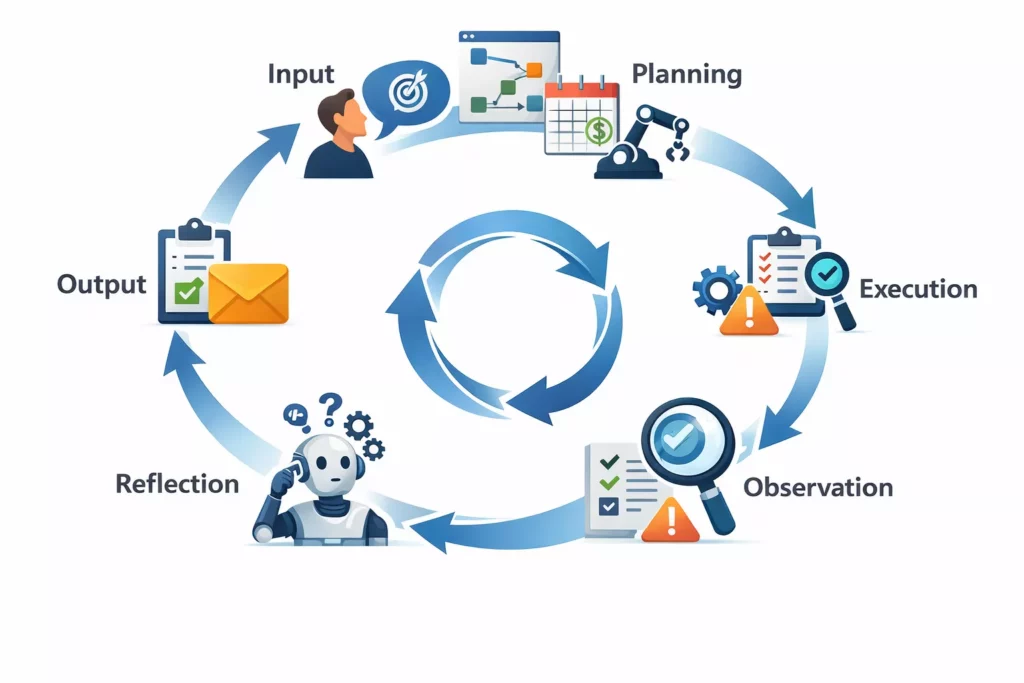
A common agentic workflow combines fixed application steps with model decisions inside a bounded task. The following sequence makes its control points visible; it is a useful pattern, not a requirement that every application must use a loop.
- Receive and scope the request. Capture the user’s goal, relevant objects, time or budget limits, and what the system must not do. Ask for clarification when a missing detail could change the action.
- Check identity and authorization. Confirm who is asking, which records are in scope, and what actions are allowed. Reject or narrow a request before exposing protected data.
- Build a bounded plan. The model may propose steps, but the runtime checks that the plan uses approved tools and stays within step, time, and cost limits.
- Retrieve the minimum needed context. Fetch only authorized records or documents. Keep source references and timestamps so a later reviewer can inspect what informed the result.
- Execute an approved step. Validate tool arguments and business rules before the call. Use read-only access where possible, and require approval before a high-impact write or external commitment.
- Check the result. Test the response against explicit acceptance criteria. Handle a retryable error differently from a permission failure, invalid result, or partial response.
- Stop, escalate, or deliver. Stop when the goal is met, a limit is reached, or evidence is insufficient. Return the result with sources and assumptions, or route the next action to a named human owner.
Consider a renewal-proposal assistant. A sales manager asks for a draft for a named customer. The runtime checks the manager’s account access, reads approved CRM fields and usage data, and asks the model to prepare a proposal. A rules layer checks dates, product names, and discount limits. The assistant saves a draft, but a manager must approve it before sending. If usage data is missing or the suggested discount exceeds policy, the workflow stops and explains why instead of inventing a value.
Teams can reuse this kind of bounded handoff in AI business process automation, but the permission and review rules must match each process.
For practical examples, check out:
- How To Build An AI Agent: A Beginner’s Step-By-Step Python Example
- How To Build A RAG Chatbot: Steps, Code & Best Practices
- AI Agent Orchestration: How Multi-Agent Workflows Work In Practice
Agentic AI Architecture Patterns: How To Choose
Architecture patterns are choices on separate axes, not one list of alternatives. A system can use one agent, central coordination, and a bounded loop at the same time. Start with the task’s predictability, then add only the coordination the work requires.
Choose The Number Of Agents
Use one agent when a single role can complete the work with one coherent context and tool set. Add multiple agents only when tasks need meaningfully different knowledge, tools, or permissions, or when independent work can happen in parallel. More agents also add message passing, reconciliation, and failure points.
Choose A Coordination Topology
A centralized coordinator assigns tasks and combines results. This makes budgets, permissions, and audit paths easier to manage. Peer-to-peer coordination can suit a genuinely collaborative problem, but it is harder to constrain and trace. Keep the topology as simple as the task allows.
Choose An Execution Mode
Fixed sequences work when steps and branches are known. Parallel execution helps when subtasks are independent and the system can reconcile partial answers. Event-triggered runs start from a schedule, queue, or webhook. A bounded loop is useful when the next step depends on intermediate results, but it needs retry, time, and stop limits.
| Workload | Starting pattern | Why it fits | Trade-off to manage |
|---|---|---|---|
| Known steps and stable rules | Deterministic workflow | Behavior is easy to test and explain without model-directed routing. | Less flexible when inputs or next steps are open-ended. |
| One bounded task with uncertain inputs | Single agent with approved tools | One context and permission set keep orchestration simpler. | A single model can still misread a request or return a weak result. |
| Independent research or analysis tasks | Parallel workers with a result checker | Independent tasks can run at once and be reconciled before delivery. | Conflicts, partial results, and extra model/tool cost need handling. |
| Next step depends on results or an event | Coordinator with event trigger and bounded loop | The runtime can route work using checked state while preserving limits. | State, latency, retries, and escalation rules become more complex. |
| Distinct specialist roles with separate access | Multi-agent workflow with centralized policy | Roles can use scoped context and tools for different parts of the task. | More handoffs make permission checks and final reconciliation essential. |
These recommendations align with current Google Cloud pattern guidance, which compares workload structure, performance, cost, and human involvement. The AWS workflow-pattern guide also shows how a model-directed step can sit within a larger application flow. Neither source implies that an agent is the right choice for every process.
Frameworks To Evaluate For Agentic AI
A framework supplies building blocks for state, tools, routing, or agent collaboration. It does not supply a complete safety model. Compare frameworks against the workflow you need: control flow, persistence, approvals, observability, deployment fit, and current maintenance status.
LangChain And LangGraph
LangChain provides components for model and tool use; LangGraph is aimed at applications that need explicit graph-based control and state. Consider LangGraph when work has branches, retries, durable state, or human review points. For a short, fixed sequence, ordinary application code may be easier to inspect and maintain. Check the LangGraph documentation against the persistence and interruption needs of your application.
Microsoft Agent Framework And AutoGen
Microsoft Agent Framework is Microsoft’s current development path for building agents and agent workflows. Its fit depends on your language, model providers, hosting environment, and integration needs, so check the current Microsoft Agent Framework documentation before choosing it.
AutoGen remains available for existing systems, but the official AutoGen repository describes it as being in maintenance mode and points new projects toward Microsoft Agent Framework. Treat migration as a separate decision: review existing dependencies, support needs, and the cost of moving before replacing a working application.
CrewAI
CrewAI offers a role-and-task model for coordinating agent work. That structure can help teams describe who handles a task, but role labels do not guarantee isolated expertise or safe execution. Confirm how the chosen version handles state, tool permissions, approvals, tracing, and errors before placing it in a production path. Its agent documentation is one starting point for that review.
A useful comparison is about operating needs, not brand popularity. Keep one record of the required control flow, state lifetime, approval points, observability, and ownership. Then prototype the smallest workflow that can meet those needs.
Recommended for you:
- Best AI Agent Frameworks For Building Smarter AI Systems
- LangChain Vs LangGraph Vs Langflow Vs LangSmith: Which Is Better?
- Enterprise AI Agents: Use Cases, Platforms, And Safe Deployment
Production Risks And Controls
Production risks come from the whole path between request and side effect. A model can misunderstand a goal, retrieved content can contain hostile instructions, and a valid tool call can still target the wrong record. Controls should match the impact of the action.
Treat Retrieved Content As Untrusted
Documents, web pages, and tool results can contain instructions that conflict with the user’s request or system policy. Keep retrieved text separate from trusted instructions, label its source, and do not let content grant new permissions. Test with hostile or misleading inputs as part of your OWASP LLM application risk review.
Enforce Permissions Before Tool Execution
Use the narrowest access needed for the task. Validate the identity, resource, operation, and business limits for every call. A structured schema can reject malformed arguments, but the application must also confirm the user may perform that action and that the target record is in scope.
Keep read and write operations separate where practical. A draft may be created automatically while sending, deleting, purchasing, or changing a record requires approval. This follows the same least-privilege logic used in application security.
Measure Quality And Failure, Not Just Completion
A successful API response does not prove that the user’s goal was met. Define task-level acceptance criteria, such as required fields present, source citations attached, or a calculation matching a trusted rule. Test normal cases, missing data, conflicting sources, denied access, and tool errors before release.
Track completion quality, escalation rate, tool error rate, retries, latency, and human correction. Set a baseline for the current process and name an owner and review interval. Stop or narrow the pilot if quality falls below its agreed threshold; do not infer business value from a high task-completion count alone.
Bound Cost, Retries, And Recovery
Each model call, retrieval, and tool attempt adds cost and delay. An AI agent pricing estimate should include prompt and output volume, retries, model changes, tool charges, monitoring, and human review. Use request, time, and iteration caps; retry only errors that can recover; and avoid repeating a failed action without a changed input or plan.
For an unresolved case, preserve the run state and send a concise handoff: the original goal, what was checked, what failed, what remains uncertain, and what decision is needed. A clear stop is safer than a loop that appears busy but cannot make progress.
How To Design A First Agentic AI Pilot
A pilot should test one valuable workflow and expose its failure modes before the system can affect users or records. Keep its scope small enough that a person can review the results and the team can compare them with the current process.
- Choose one bounded task. Pick work with a clear start, expected output, owner, and stop condition. Compare it with a non-agent baseline; a rule-based workflow may already be sufficient.
- Map data and authority. List the records, APIs, and user roles involved. Decide what the agent may read, what it may draft, and what needs approval. Exclude unrelated tools and sensitive fields.
- Write acceptance and failure checks. Define what a correct result must contain, which sources count, what errors can be retried, and when the system must stop or escalate.
- Test in a controlled mode. Start with sample or read-only data, then run in shadow mode beside the current process. Compare outputs with human decisions and record corrections before allowing any write action.
- Release with an owner and limits. Set a budget, time limit, retry cap, approval rule, and rollback path. Review quality and cost at a fixed interval, and pause the workflow when a threshold is missed.
For example, a support-ticket pilot could classify incoming requests and draft a reply from approved help content. A reviewer checks policy, tone, and cited sources before sending. The team can measure correct routing, accepted drafts, review time, and escalation reasons against the existing process. This is a practical way to scope AI software development without assuming that model autonomy is the goal.
Designveloper’s AI development services can help teams scope AI-enabled products. For an agentic feature, define the task boundary, approved tools, review points, and success measures before estimating a production build.
Also published on

Share post on










Related Articles


ERP AI Chatbot: Turn Operational Data Into Safe Actions At Scale
ERP AI Chatbot: Turn Operational Data Into Safe Actions At Scale Published October 14, 2026
13 Best Agentic AI Tools For Building And Operating Agents
13 Best Agentic AI Tools For Building And Operating Agents Published October 12, 2026
Top Agentic AI Companies: 18 Vendors By Product Layer And Fit
Top Agentic AI Companies: 18 Vendors By Product Layer And Fit Published October 07, 2026


















