
















How To Train A Chatbot With Your Own Data For Better Business Support

KEY TAKEWAYS:
- Training a chatbot with your own data is usually a knowledge operations project, not just a model configuration task.
- Most teams should start with RAG, retrieval, file search, or knowledge-base connections before considering fine-tuning.
- Good chatbot data needs clear ownership, current sources, access controls, sensitive-data cleanup, and realistic evaluation questions.
- Accuracy improves after launch through failure review, better source documents, retrieval tuning, escalation paths, and feedback loops.
- A business-ready chatbot should connect to trusted systems, answer within scope, admit uncertainty, and handoff safely when the question is risky or unclear.
To train chatbot with your own data, a business should first clean and separate its knowledge, choose a build approach, connect approved sources, test with real questions, and keep improving the bot after launch. The best business chatbots rarely come from model training alone. They usually combine retrieval-augmented generation, clear prompt rules, escalation workflows, and human review so customer support, sales, onboarding, and internal teams can answer questions from trusted company knowledge.
That distinction matters because many teams use the word “training” loosely. A company may upload help articles into a no-code chatbot, build a retrieval-augmented generation system over product documentation, or fine-tune a model with examples of approved answers. Each path can work, but each path solves a different problem. OpenAI describes retrieval as semantic search over a company’s data through vector stores and file search, while supervised fine-tuning changes model behavior by training on example prompts and desired outputs, as explained in the OpenAI retrieval guide and OpenAI supervised fine-tuning guide. This guide explains where custom-data chatbots create value, how to choose an approach, how to prepare knowledge, and how to improve accuracy after launch.
You might also like:
- Chatbot Vs. Conversational AI: Key Differences and Complete Guide
- 11 Best AI Chatbot Platforms to Use
- AI Agent Vs. Chatbot: Key Differences & Which One Do You Need?
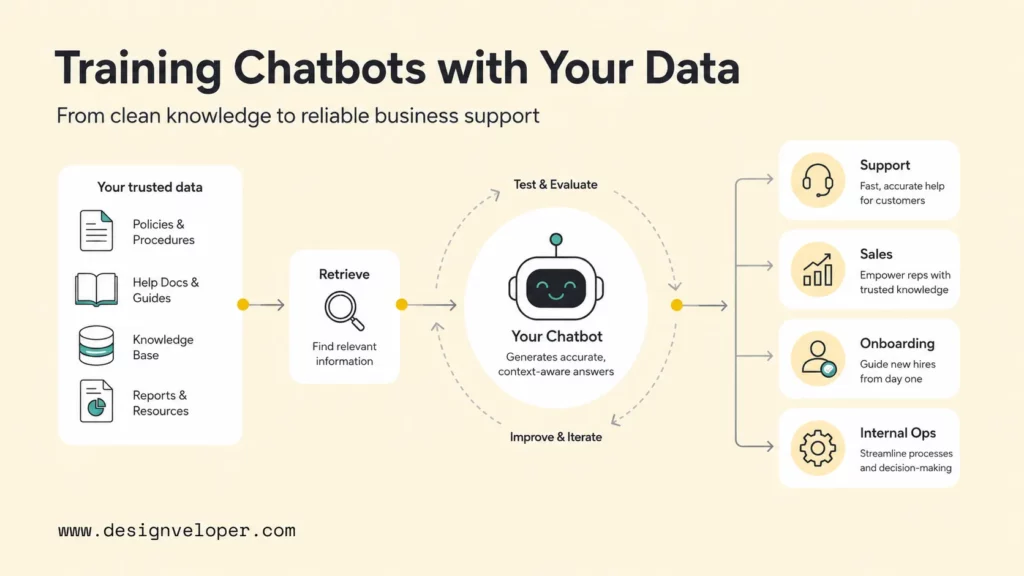
Where Custom Data Chatbots Create The Most Value In A Business
Custom data chatbots create the most value when employees or customers ask repeated questions that already have trusted answers somewhere in the business. A chatbot trained on company data is useful when the answer depends on a product catalog, pricing rule, policy, support history, onboarding guide, standard operating procedure, or internal knowledge base.
Customer support is the most visible use case. A support chatbot can search help center articles, resolved tickets, order policies, troubleshooting guides, warranty rules, and escalation procedures. McKinsey’s 2025 State of AI survey notes that organizations are using AI for information capture, processing, delivery through conversational interfaces, and contact-center or customer-service automation. The business benefit is not only faster replies. A well-designed support chatbot can reduce repetitive tickets, standardize answers, and hand complex cases to human agents with better context.
Sales teams use custom-data chatbots in a different way. Sales representatives often need quick access to product comparisons, qualification rules, implementation notes, case examples, contract language, and pricing policies. A sales chatbot can answer questions such as “Which plan supports SSO?”, “What integrations are available for healthcare clients?”, or “Which case study fits a logistics buyer?” The chatbot should cite source content and avoid inventing commitments that legal, finance, or delivery teams have not approved.
Internal operations teams can also benefit because employee knowledge is usually fragmented across shared drives, wikis, Slack threads, ticketing systems, HR portals, and onboarding documents. A chatbot connected to approved SOPs and policies can help employees ask about leave rules, procurement steps, incident response, release checklists, or data-handling procedures. That use case resembles an internal help desk, but the chatbot must respect role-based access and make escalation easy when an answer affects payroll, security, compliance, or customer commitments.
Onboarding and training teams are another strong fit. New hires need answers to repeated questions about tools, process ownership, review cadences, security practices, product terminology, and team rituals. A chatbot can surface the right document, summarize the next step, and point the employee to the owner. The advantage is consistency: new team members receive answers from the same approved knowledge, not from whichever message was easiest to find.
The strongest opportunities usually share four traits:
- High question volume: the same questions appear across tickets, chats, calls, or onboarding sessions.
- Stable source material: the business has documents, articles, policies, or records that can become trusted context.
- Clear scope: the chatbot knows which topics it should answer and which topics need a human handoff.
- Measurable outcomes: the team can track deflection, resolution quality, handoff rates, customer satisfaction, or employee time saved.
Explore more:
- AI Chatbot Development: A Step-By-Step Guide
- Best AI Chatbots For Businesses: Top Picks By Use Case
- Top 10 Best AI Chatbots We’ve Tried And Tested
The Main Ways Teams Train Chatbots On Their Own Data
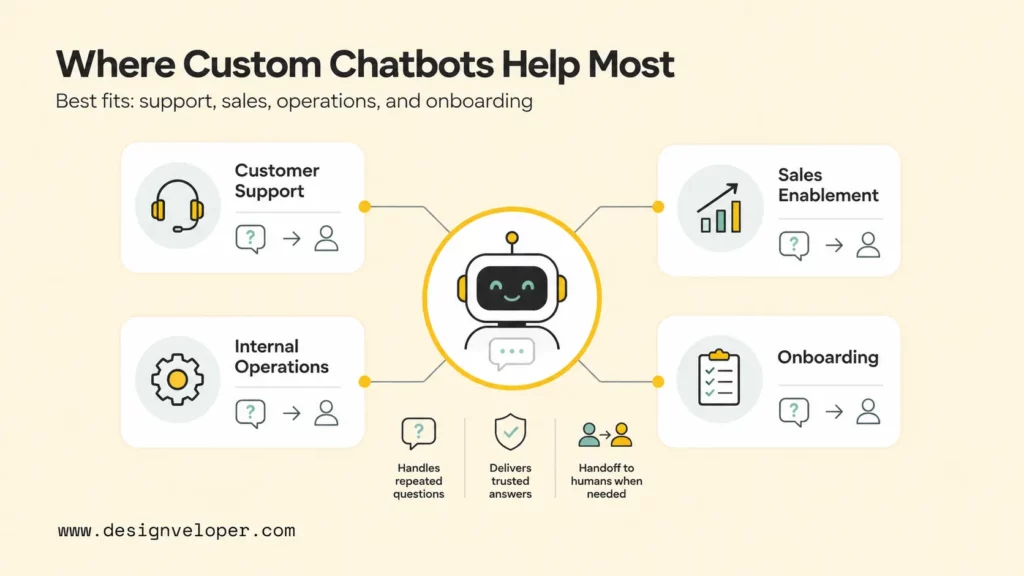
Teams usually train chatbots on company data through no-code knowledge upload, retrieval-augmented generation, fine-tuning, or a combination of those methods. The right choice depends on data volume, update frequency, technical control, compliance requirements, and the quality bar for answers.
No-code chatbot tools are the fastest route for simple business cases. A team can upload PDFs, website pages, FAQ documents, or help center content, then configure answer style, allowed topics, and handoff rules. No-code tools work well when the knowledge base is modest, the workflow is straightforward, and the team needs a proof of concept before investing in a custom system. The limitation is control. Many tools hide chunking, retrieval behavior, evaluation, and integration details, so advanced teams may struggle to debug accuracy or enforce custom governance.
Retrieval-augmented generation, often called RAG, is the common approach for larger or frequently changing knowledge bases. A RAG chatbot retrieves relevant passages from company sources at question time, then asks a language model to answer using that context. LangChain’s retrieval documentation describes retrieval as the foundation of RAG: the application finds context-specific information and uses that context to improve the model’s answer. The LlamaIndex documentation also treats data ingestion, indexing, retrieval, and evaluation as core building blocks for knowledge assistants. OpenAI’s retrieval documentation similarly centers on vector stores and semantic search for surfacing relevant data.
Fine-tuning solves a different problem. Fine-tuning teaches a model to follow a desired style, format, classification behavior, or specialized response pattern by training on examples. The OpenAI fine-tuning guide recommends building realistic demonstrations, using evaluation data, and starting with good examples before expanding the dataset. Fine-tuning is useful when the chatbot must respond in a precise tone, classify cases consistently, follow a structured format, or call tools in a repeatable way. Fine-tuning is usually not the best first answer for a knowledge base that changes every week because updating facts through retrieval is easier than repeatedly retraining a model.
A practical comparison helps teams avoid choosing the wrong method:
| Approach | Best for | Strength | Main risk |
|---|---|---|---|
| No-code tools | FAQ bots, simple support, fast pilots | Quick setup with less engineering | Limited control over retrieval, testing, and integrations |
| RAG | Large help centers, internal wikis, product docs, SOPs | Answers can use fresh source documents at runtime | Poor chunking or weak source quality can retrieve the wrong context |
| Fine-tuning | Tone, format, classification, tool-use patterns, specialist behavior | More consistent behavior for repeated tasks | Not ideal as the only method for fast-changing facts |
| Hybrid RAG plus fine-tuning | Production assistants with both current knowledge and strict behavior | Combines fresh retrieval with consistent response rules | Requires evaluation, monitoring, and stronger engineering ownership |
Recommended for you:
- How To Build A RAG System: Step-By-Step (New Guide)
- RAG Pipeline Diagram: Components, Workflow, And Production Design
- Advanced RAG Techniques For Production-Grade AI Search
Choosing The Right Approach For Your Team
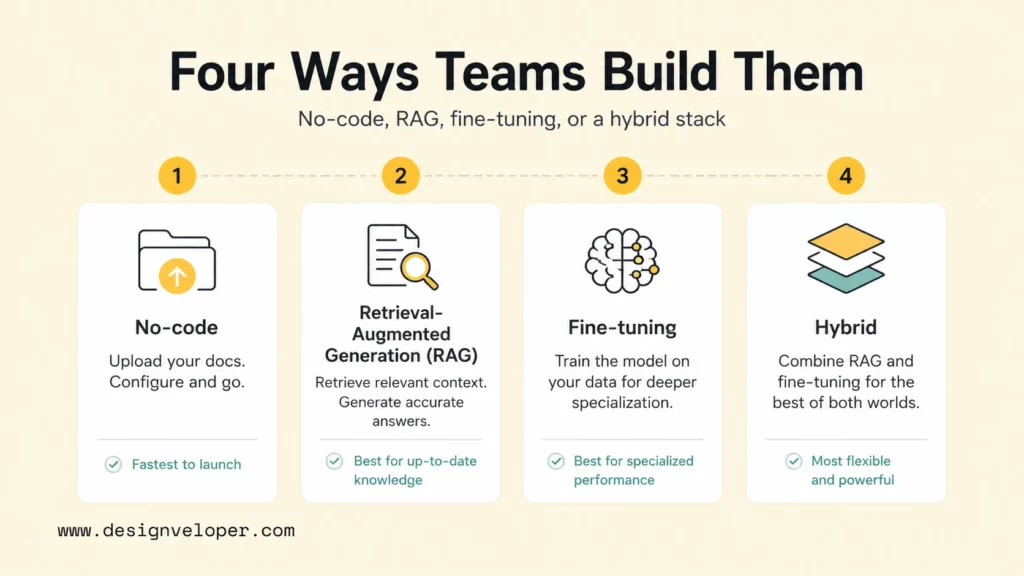
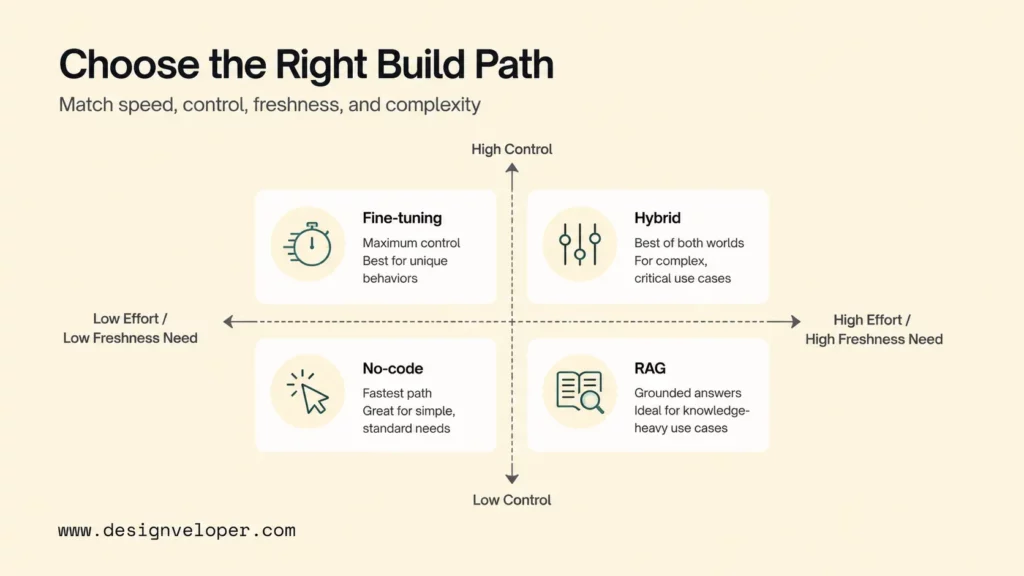
The right approach depends on how much control the team needs and how often the knowledge changes. A business should choose the simplest option that can meet accuracy, security, integration, and maintenance requirements.
No-code tools fit fast rollout and simple business use cases. A small customer support team may need a chatbot that answers basic shipping, returns, account, and product questions from public help articles. A no-code tool can be enough when the team accepts vendor defaults, keeps content public or low-risk, and has a clear human handoff. The pilot should still include test questions, source review, and escalation rules because a quick chatbot can still produce wrong or overconfident answers.
RAG is better for larger and frequently changing knowledge bases. Product documentation, internal policies, technical runbooks, and sales enablement libraries change often. RAG lets the team update source documents without retraining the model. OpenAI’s file search documentation explains that vector stores parse, chunk, embed, and store files for keyword and semantic search. That workflow is useful when a chatbot must cite or ground answers in current documents.
Fine-tuning is better for tone, format, and specialized behavior. A financial services team may want every answer to follow a specific disclosure style. A support team may want the chatbot to classify ticket intent, sentiment, product area, and urgency in a strict JSON format. A sales team may want a standard qualification summary. Those are behavior problems, not only knowledge problems. Fine-tuning can help when prompt rules alone are brittle and the team has enough high-quality examples.
Many teams combine RAG and fine-tuning because production chatbots need both current knowledge and consistent behavior. RAG supplies the facts; prompt rules and fine-tuning shape how the assistant speaks, refuses unsafe requests, formats answers, and decides when to escalate. Anthropic’s tool use documentation also shows why production assistants often need tool access, clear schemas, and controlled actions, not only free-form text. OpenAI’s Agents guide makes the same practical point by grouping models, tools, knowledge, guardrails, and orchestration into one agent-building workflow.
A useful decision rule is simple: use RAG when the answer depends on facts in documents, use fine-tuning when the answer pattern must become more reliable, and use no-code tools when the workflow is narrow enough that speed matters more than deep customization. Use a custom build when the chatbot touches sensitive data, multiple systems, strict permissions, or revenue-critical workflows.
Preparing Company Knowledge Before You Build The Chatbot
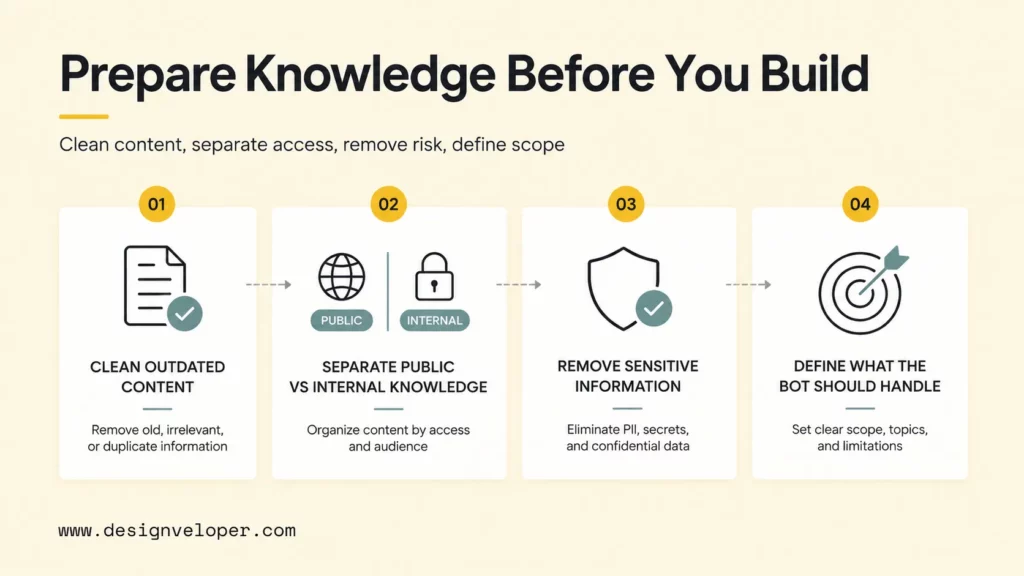
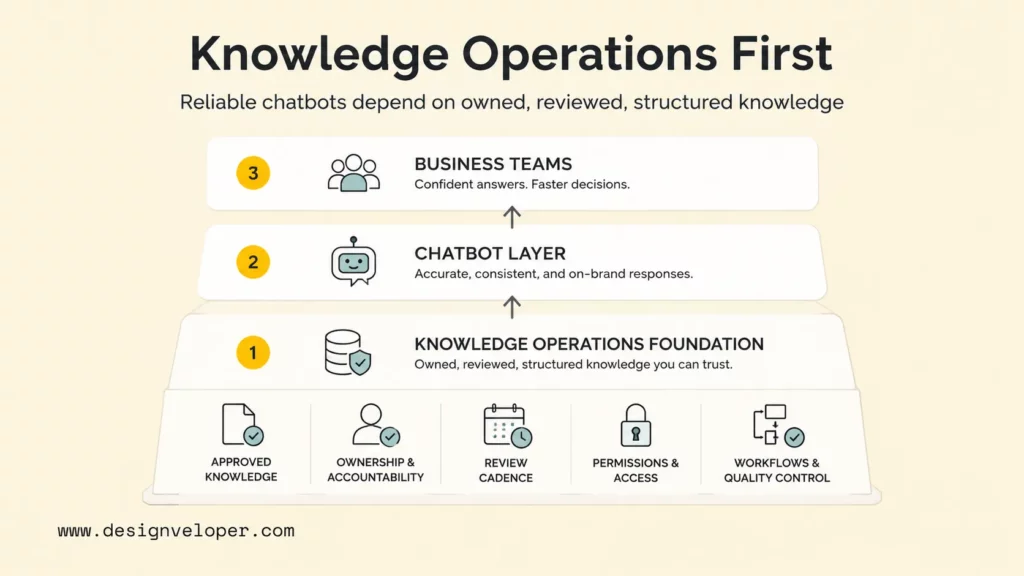
Company knowledge preparation is the work that most improves chatbot quality before any model or vendor choice. A chatbot cannot reliably answer from messy, conflicting, outdated, or restricted documents. The team should treat the knowledge base as a product dependency, not as a folder dump.
Clean Up Outdated And Conflicting Content
Outdated and conflicting content creates the most common avoidable chatbot failures. If one document says refunds take 14 days and another says refunds take 30 days, a retrieval system may surface either answer. The model may also merge both into a confusing response. Before building the chatbot, assign owners to high-value knowledge areas and remove duplicates, expired policies, old pricing pages, and abandoned drafts.
A practical cleanup pass should label each source as approved, draft, archived, or restricted. The team should also record ownership, last review date, region, product version, and audience. Those metadata fields improve filtering later. For example, a customer-facing bot should retrieve public help articles and approved policy pages, not internal escalation notes or old sales training decks.
Separate Public Knowledge From Internal Knowledge
Public and internal knowledge should live in separate collections because a chatbot’s answer permissions depend on the audience. Public support bots can answer from help pages, product docs, public pricing notes, and approved FAQ pages. Employee assistants can use HR policies, SOPs, onboarding guides, and internal runbooks. Sales assistants may need controlled access to pricing, competitive notes, and qualification rules.
Separation also makes audits easier. A support manager can review a public knowledge base for customer-facing accuracy, while legal, security, HR, or operations owners review restricted content. OpenAI’s documentation on retrieval and vector stores highlights metadata and vector-store organization as part of retrieval design, which is why source separation should happen before ingestion rather than after a mistake appears in production.
Remove Sensitive And Restricted Information
Sensitive information should be removed, masked, or isolated before ingestion. Customer records, health information, payment data, credentials, private contracts, unreleased pricing, and internal incident reports should not be casually uploaded into a chatbot system. The NIST AI Risk Management Framework and its generative AI profile encourage teams to govern, map, measure, and manage AI risks, which is especially relevant when chatbot answers can expose confidential data or create compliance issues.
A business should define what the bot is allowed to know and what the bot is allowed to reveal. A support chatbot may need order status through a secured API, but the bot should not retrieve raw customer notes from a shared folder. An employee assistant may explain the expense policy, but the bot should not disclose another employee’s salary information. Access control belongs in the architecture, not only in the prompt.
Define Which Questions The Bot Should Handle
Scope definition prevents the chatbot from acting like an all-purpose oracle. A clear scope says which questions the chatbot answers, which questions it refuses, and which questions it routes to a human. The scope should be written as use cases and non-use cases, not only as broad topics.
For example, a support chatbot can answer “How do I reset my password?” and “Which plan includes the analytics dashboard?” The same support chatbot should escalate “Please delete another user’s account,” “Can you guarantee this legal interpretation?”, or “Give me a custom discount.” A clean scope document becomes the basis for prompt rules, retrieval filters, evaluation questions, and handoff logic.
How Teams Train A Chatbot With Their Own Data
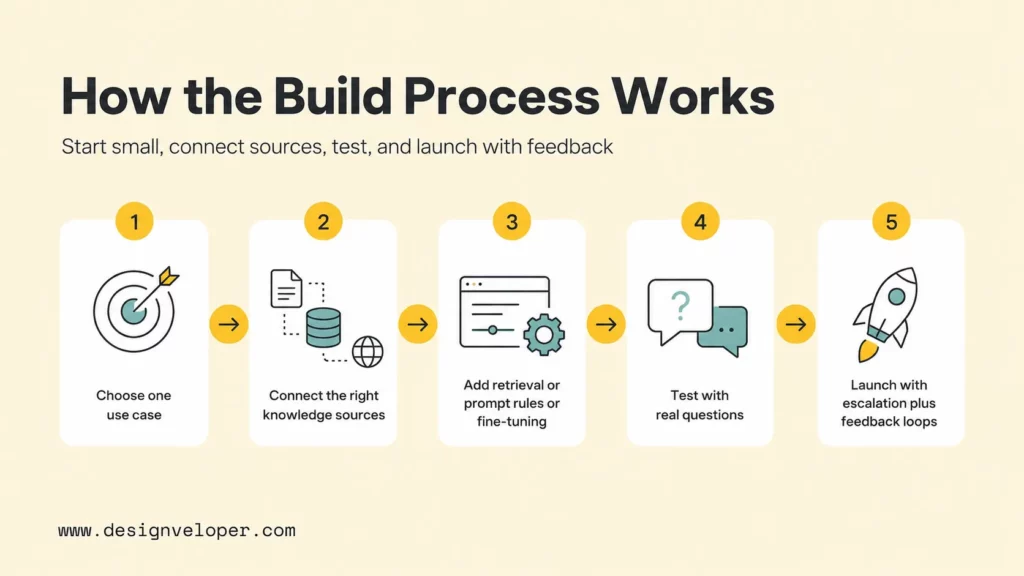
Teams train a chatbot with their own data by starting with a narrow use case, connecting trusted knowledge sources, adding retrieval or behavior rules, testing against real questions, and launching with human escalation. The workflow should feel like product development, not a one-time upload.
Start With One Clear Team Use Case
One clear use case keeps the first chatbot measurable. “Answer customer refund questions from the help center and policy documents” is better than “answer all customer support questions.” “Help new employees find HR policy answers” is better than “be an internal company assistant.” A narrow use case gives the team a defined source set, owner, risk profile, and success metric.
The first use case should include user type, source data, allowed actions, handoff path, and target outcome. A support use case may define the user as an authenticated customer, the sources as public help articles plus order status APIs, the allowed action as answer and escalate, the handoff path as Zendesk or Intercom, and the outcome as lower repetitive ticket volume without lower satisfaction.
Connect The Right Knowledge Sources
The next step is connecting source systems that contain trusted answers. Common sources include website pages, PDFs, help centers, product documentation, CRM notes, support tickets, Confluence pages, Notion databases, Google Drive folders, databases, and internal APIs. The ingestion process should preserve source titles, URLs, owners, dates, product versions, and access levels.
RAG systems usually convert source documents into chunks, create embeddings, store the chunks in a vector database, and retrieve relevant chunks when a user asks a question. LangChain’s RAG tutorial and OpenAI’s retrieval guide both describe this retrieval-and-generation pattern. The important implementation choice is not only which framework to use. The team must decide chunk size, overlap, metadata filters, freshness rules, source citations, and fallback behavior when retrieval confidence is low.
Add Retrieval, Prompt Rules, Or Fine-Tuning
After the knowledge source is connected, the team adds the control layer. Retrieval decides which documents the chatbot sees. Prompt rules tell the chatbot how to answer, cite sources, refuse unsafe requests, and escalate. Fine-tuning can improve format, tone, classification, or repeated behavior when the team has enough high-quality examples.
A practical chatbot instruction set should include answer boundaries, source citation requirements, confidence behavior, escalation triggers, data privacy rules, and output format. If the chatbot uses tools, the tool schemas should define exactly what the bot can read or change. Structured output can help because OpenAI’s structured outputs guide explains how schemas can constrain model responses for predictable application behavior.
Test With Real Team Or Customer Questions
Testing should use real questions from tickets, chats, search logs, onboarding sessions, sales calls, and internal help desk requests. Synthetic questions can help fill gaps, but real user language reveals ambiguity, incomplete context, spelling errors, and edge cases. The test set should include easy questions, hard questions, out-of-scope questions, adversarial prompts, sensitive data requests, and questions with no answer in the knowledge base.
A useful evaluation rubric scores the chatbot on answer correctness, source grounding, completeness, tone, policy compliance, refusal quality, escalation behavior, and response speed. The team should also inspect retrieved chunks. If the answer is wrong because retrieval found the wrong document, prompt editing alone will not fix the root cause. If retrieval is correct but the answer format is unreliable, prompt rules or fine-tuning may be the better fix.
Launch With Escalation And Feedback Loops
A business chatbot should launch with a human handoff path, not as a sealed automation. The handoff should pass conversation history, retrieved sources, user identity where allowed, and the bot’s confidence or reason for escalation. Human agents should be able to mark the answer as correct, incomplete, risky, outdated, or out of scope.
The launch plan should define an owner for weekly review during the first month. That owner reviews failed answers, updates source content, adjusts retrieval filters, improves prompt rules, and adds new test cases. The feedback loop turns chatbot deployment into an operating system for knowledge quality.
Discover more here:
- Build A RAG Agent With LangChain: Step-By-Step Tutorial
- How To Build A Chatbot With LangChain Step-By-Step Guide
- Best Open-Source Vector Databases: Top Options Compared
How Teams Improve Chatbot Accuracy After Launch
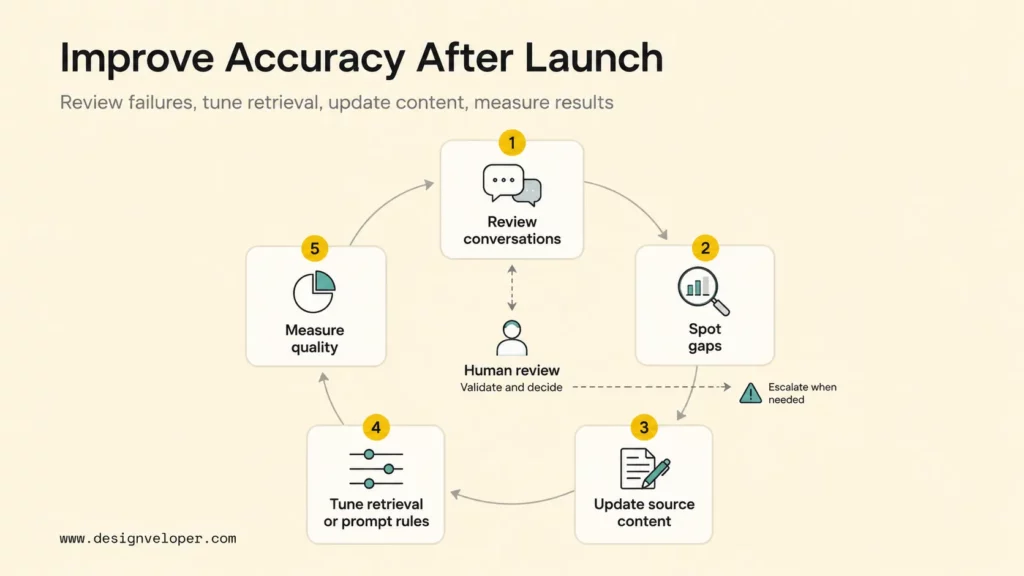
Teams improve chatbot accuracy after launch by reviewing failures, strengthening source content, tightening retrieval and response rules, and measuring both automation and support quality. Accuracy is not a fixed model property. Accuracy is the result of model behavior, source quality, retrieval design, business rules, and human governance working together.
Failed and escalated conversations are the best improvement data. A weekly review should ask whether the chatbot misunderstood the question, retrieved the wrong source, used an outdated document, answered outside scope, missed an escalation trigger, or lacked source material. Each failure should become one of four actions: update a document, adjust retrieval, refine instructions, or add an evaluation case.
Better source content often improves accuracy more than model changes. A vague policy page creates vague answers. A clear policy page with examples, exceptions, and owner contact details gives the chatbot better material. Support teams should turn repeated human answers into approved help articles or snippets. Operations teams should convert informal process notes into maintained SOPs.
Retrieval tuning is the technical part of the improvement loop. Teams may adjust chunk size, metadata filters, keyword plus vector search, reranking, source priority, or freshness weighting. Retrieval logs should show which documents were retrieved, which passages were used, and whether the final answer cited the right source. Without retrieval observability, the team cannot separate knowledge gaps from model behavior problems.
Response rules also need iteration. A chatbot may need a stricter refusal when a user asks for legal advice, a clearer handoff when an order is missing, or a shorter answer when the user asks a simple FAQ. The improvement loop should track accuracy, deflection, first-contact resolution, customer satisfaction, agent handle time, escalation rate, source coverage, and review backlog. Customer service teams should avoid optimizing for deflection alone because a bot that blocks human contact can reduce cost while damaging trust.
Current industry signals make that caution important. McKinsey’s 2025 survey describes broad AI use but uneven movement from pilots to scaled impact. Recent customer-service discussions also show that governance, hallucination, and auditability failures can force teams to roll back AI agents. The reader-facing lesson is clear: a chatbot trained on company data needs measurement, ownership, and escalation as much as it needs model capability.
Learn more in:
- How To Build An AI Chatbot With Long-Term Memory? (Guide)
- Best Conversational AI Platform for Enterprise Review
- Chatbot Vs ChatGPT: Differences, Features, And Which Is Better
Common Mistakes Teams Make When Training Chatbots On Company Data
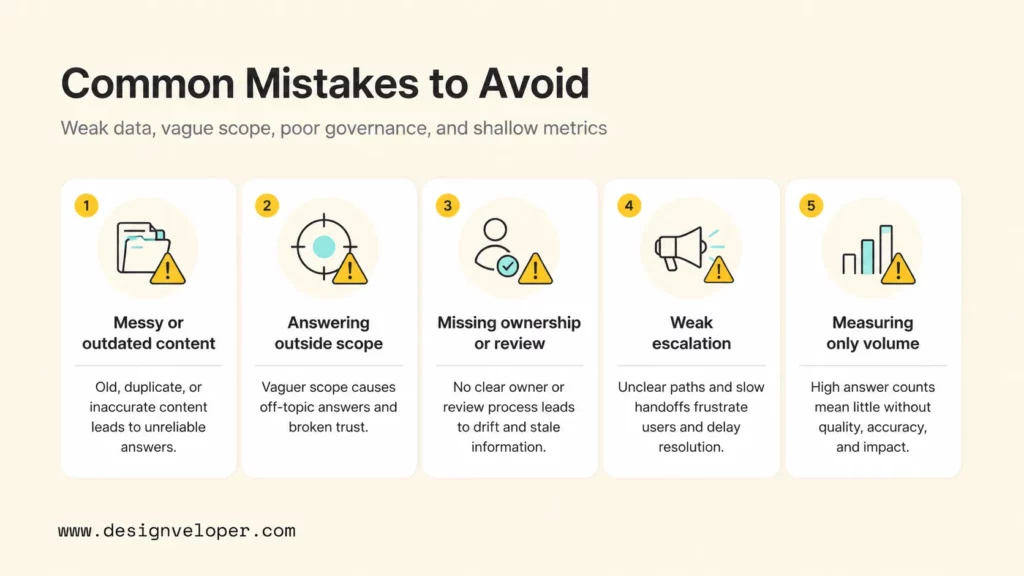
The most common mistakes come from treating a chatbot as a model-only project instead of a knowledge, workflow, and governance project. A business can buy a powerful model and still ship a weak chatbot if the source data is messy, the scope is vague, or no team owns improvement after launch.
The first mistake is treating retrieval as if it were model training. Uploading documents into a vector store does not teach the model permanent facts. Retrieval gives the model context at runtime. That means the chatbot can still fail if the wrong chunk is retrieved, if the context is incomplete, or if the model ignores part of the context. Teams should evaluate retrieval quality separately from answer quality.
The second mistake is feeding the chatbot messy or low-trust documents. Old PDFs, duplicate policy pages, partial meeting notes, outdated price sheets, and draft SOPs are not harmless. The chatbot can surface them with confidence. Knowledge cleanup should happen before ingestion, and document owners should approve high-risk content before launch.
The third mistake is letting the bot answer outside approved business scope. A customer support bot should not invent refund exceptions, promise delivery dates, interpret contracts, or answer private account questions without authentication. An internal HR bot should not answer medical, legal, or payroll questions beyond approved policy text. Scope limits should appear in prompt rules, retrieval filters, UI copy, and escalation workflows.
The fourth mistake is skipping ownership, review, and escalation workflows. A chatbot will drift as products, policies, prices, and processes change. The team should assign owners for knowledge areas, define review cadences, and make failed conversations visible. NIST’s AI RMF framing is useful here because risk management is an ongoing practice across governance, mapping, measurement, and management, not a checkbox before launch.
The fifth mistake is measuring only volume. Deflected tickets and lower contact volume are useful metrics, but they do not prove that the chatbot is helping customers. A better measurement set combines automation metrics with quality metrics:
- Answer correctness and source grounding from human review samples.
- Escalation quality and whether the human agent received enough context.
- Customer satisfaction after chatbot-only sessions and after handoffs.
- Resolution rate for the use cases the bot is approved to handle.
- Knowledge-gap trends that show which documents need improvement.
Better Business Chatbots Usually Start With Better Knowledge Operations
Better business chatbots usually start with better knowledge operations because the chatbot exposes the quality of the company’s existing knowledge. If policies are fragmented, support answers vary by agent, and product details live in private messages, the chatbot will make those weaknesses visible. If knowledge is owned, reviewed, structured, and connected to workflows, the chatbot can become a reliable interface to the business.
Knowledge operations means the company knows where approved answers live, who owns them, when they were reviewed, which audience can see them, and how gaps become new content. That foundation supports no-code tools, RAG systems, and fine-tuned assistants. It also supports human teams because agents, sales representatives, HR staff, and operations leads can use the same trusted source material.
Designveloper approaches custom AI chatbot work as both a software engineering and workflow design problem. As an AI-first software and automation partner, we help teams map use cases, prepare knowledge sources, design RAG and LLM integrations, review security and permissions, test with real user questions, and plan post-launch improvement. Our AI development services include AI software development and AI chatbot integration, while our software development services cover full-cycle support from discovery to production and maintenance.
That engineering judgment matters when a chatbot touches business systems. A production support bot may need a retrieval layer, authentication, CRM or ticketing integration, observability, content approvals, rate limits, fallback messages, and human handoff. An internal assistant may need role-based access, audit logs, policy ownership, and review workflows. Designveloper’s Agile and Scrum delivery process supports that iteration because chatbot quality improves through repeated review, testing, and release cycles.
Teams that want to train a chatbot with their own data should start with a small, high-value workflow and a clean knowledge base. After the pilot proves answer quality, the team can expand source coverage, add integrations, strengthen evaluation, and automate more tasks. The best chatbot is not the one with the biggest upload. The best chatbot is the one that answers approved questions reliably, knows when to stop, and keeps getting better as the company learns from real conversations.
For a deeper dive, read:
- What Is AI Integration? How to integrate AI successfully?
- Enterprise AI Agents: Use Cases, Tools, And Implementation Guide
- Agentic AI Security: Risks, Core Architecture, Solutions
FAQs About Training A Chatbot With Your Own Data
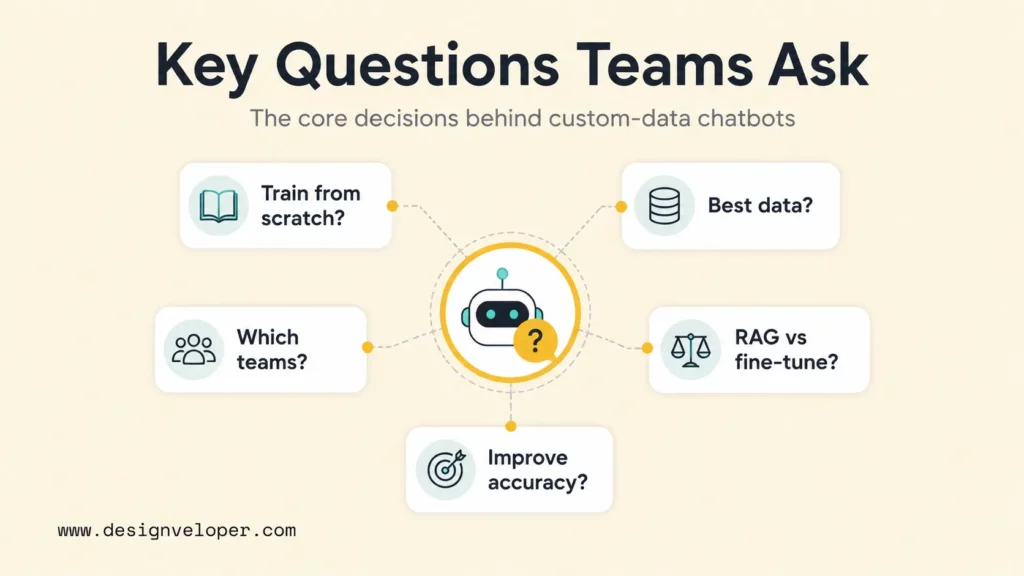
The questions below cover the decisions teams usually face before training chatbot with your own data for support, sales, onboarding, or internal operations.
Can A Business Train A Chatbot Without Training A Model From Scratch?
Yes. Most businesses do not need to train a language model from scratch. A company can use no-code knowledge upload, retrieval-augmented generation, prompt rules, tool integrations, and sometimes supervised fine-tuning on top of an existing model. RAG is usually the best first technical path when the chatbot needs to answer from company documents that change over time.
What Company Data Works Best For A Custom Chatbot?
The best company data is approved, current, well-structured, and owned by a responsible team. Good sources include help center articles, product documentation, SOPs, HR policies, onboarding guides, sales enablement content, API documentation, resolved ticket summaries, and knowledge-base articles. Raw chat logs, private customer records, outdated PDFs, and unapproved drafts should be cleaned or excluded before ingestion.
Which Teams Benefit Most From Chatbots Trained On Internal Data?
Customer support, sales, HR, IT, operations, onboarding, and product teams often benefit most. The strongest fit is a team that answers repeated questions from known sources and can measure outcomes such as faster resolution, fewer repetitive tickets, better employee self-service, higher answer consistency, or improved handoff quality.
What Is The Difference Between RAG And Fine-Tuning For Business Chatbots?
RAG retrieves relevant company knowledge at question time and gives that context to the model. Fine-tuning changes model behavior by training on examples of desired inputs and outputs. RAG is better for facts that change, while fine-tuning is better for consistent style, format, classification, or specialized behavior. Many production systems combine RAG, prompt rules, tool access, and fine-tuning where each method fits.
How Do Teams Improve Chatbot Accuracy Over Time?
Teams improve chatbot accuracy by reviewing failed conversations, updating weak source content, tuning retrieval, adding evaluation questions, tightening prompt rules, and improving escalation workflows. The review loop should include product, support, operations, legal, security, or HR owners when their knowledge areas affect the answer. Accuracy improves when the knowledge base and chatbot behavior are maintained together.
Also published on

Share post on










Related Articles


Best Claude Model in 2026: Fable, Opus, Sonnet and Haiku
Best Claude Model in 2026: Fable, Opus, Sonnet and Haiku Published September 18, 2026
Generative AI Applications: 20 Practical Use Cases Across Industries
Generative AI Applications: 20 Practical Use Cases Across Industries Published September 18, 2026
Best ChatGPT Models in 2026: GPT-6 Astra and GPT-5.6 Guide
Best ChatGPT Models in 2026: GPT-6 Astra and GPT-5.6 Guide Published September 16, 2026



















