
















RAG Pipeline Diagram: Components, Workflow, And Production Design

A RAG pipeline diagram is a visual map of how enterprise data becomes evidence for an LLM response. It shows where content enters, how it is prepared and retrieved, what context reaches the model, and where citations, permissions, evaluation, and fallbacks belong. For an internal policy assistant, separate offline knowledge preparation from the live query path. This separation makes the design easier to review before development and operate after launch.
This guide explains how to read the flow, connect architecture components, choose tools, and plan production controls. In this guide, the pipeline diagram focuses on data and query flow, while the architecture diagram also shows system boundaries, controls, and ownership.
What A RAG Pipeline Diagram Shows
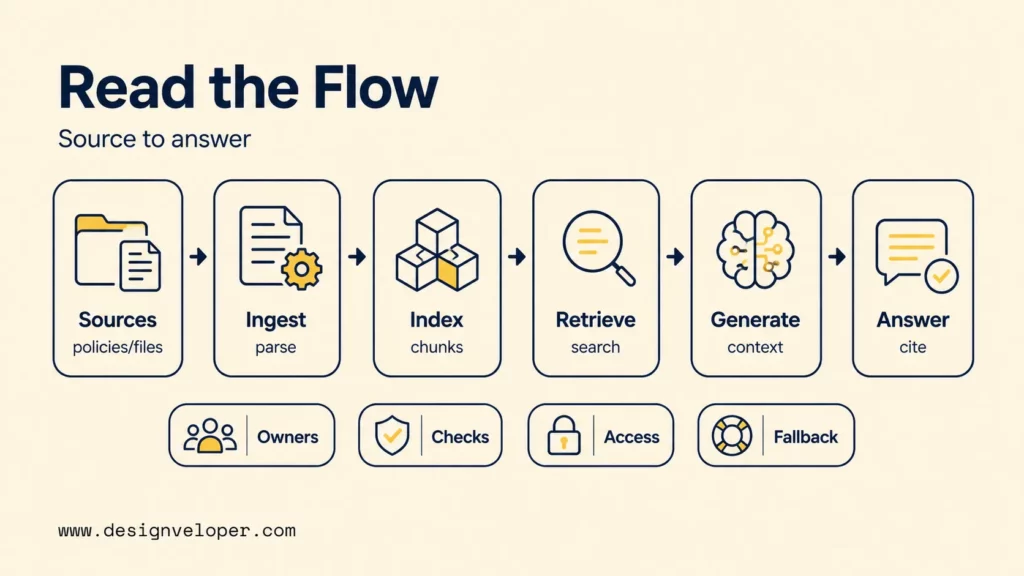
To review the diagram, start by checking whether it makes the source-to-answer path and its control points visible. The goal is to see the decisions a team must make before coding, not only the services connected by arrows.
At a high level, retrieval-augmented generation connects an LLM to external knowledge at answer time. Microsoft’s Azure AI Search RAG guidance identifies multi-source data access, token constraints, response-time expectations, and granular access control as design concerns for RAG systems.
Read the following strip from left to right. The preparation blocks show how approved knowledge becomes searchable, while the later blocks show what happens after a live query arrives.
Use the visual as a review checklist. The same decisions should also be readable without the custom HTML block:
- Confirm the source. Identify which repositories are authoritative and how freshness will be handled.
- Inspect preparation. Check parsing, metadata, chunking, and indexing before discussing model behavior.
- Trace retrieval. Show how the query becomes candidate evidence and where filters or ranking change the result set.
- Trace context and generation. Make clear what evidence reaches the model and what instructions shape the answer.
- Check verification and fallback. Show citations, no-answer behavior, and the response boundary when evidence is weak.
- Mark ownership and tests. Assign responsible teams and likely failure points to the blocks that can change independently.
A diagram also aligns people, not only services. Product teams can define acceptable answers, data owners can approve sources, engineers can identify dependencies, and security teams can mark access boundaries. A useful review should reveal ownership and likely failure points before implementation starts.
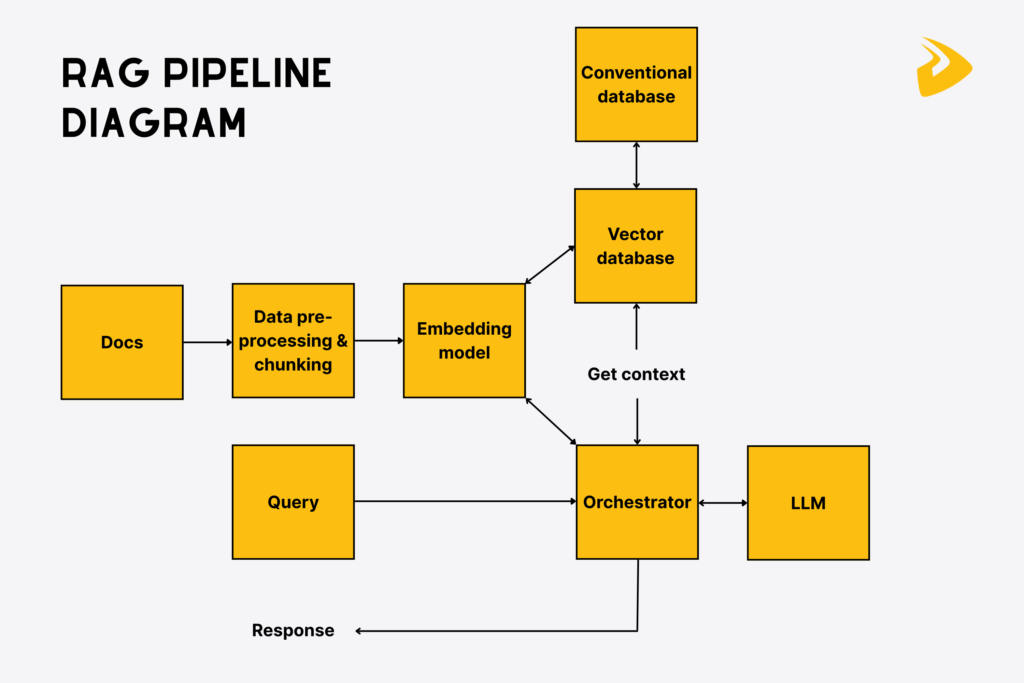
Core Components In A RAG Architecture Diagram
The architecture should show what each block receives, what it produces, and what can go wrong. That view prevents teams from discussing a “RAG layer” as if ingestion, retrieval, generation, and governance were one responsibility.
| Component | Input | Output | Main risk |
|---|---|---|---|
| Source and ingestion | Files, pages, records, tickets | Parsed content with metadata | Stale, duplicate, missing, or unreadable content |
| Chunking and embeddings | Parsed content | Retrievable chunks and vectors | Chunks lose meaning or split key facts |
| Search or vector index | Chunks, vectors, metadata | Candidate results | Relevant evidence is not retrieved |
| Filters and reranking | Query plus candidate results | Final context set | Unauthorized or weak evidence survives selection |
| Prompt assembly | User request and selected context | Grounded model input | Context is too large, conflicting, or poorly ordered |
| LLM and guardrails | Prompt and context | Answer, citation, refusal, or fallback | Unsupported claims or unsafe output |
| Evaluation and monitoring | Queries, retrievals, outputs, feedback | Quality signals and alerts | Regressions remain invisible after changes |
The table is a design review tool. If a team cannot name an input, output, and failure mode for a block, that block is probably not defined well enough for implementation.
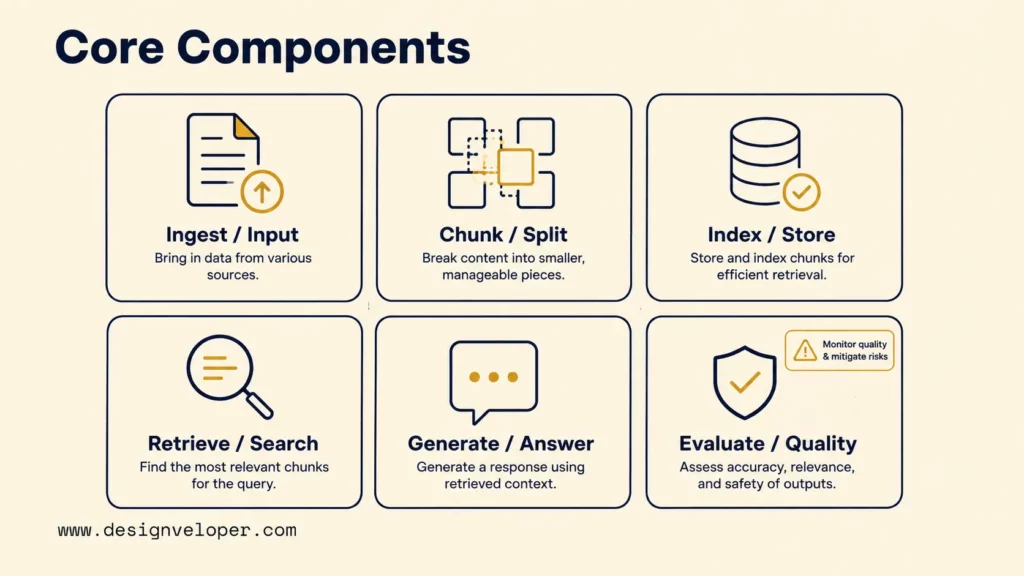
Data Ingestion, Content Types, And Document Chunking
Ingestion turns source material into content that retrieval can use. A pipeline may pull PDFs, web pages, database rows, shared files, or support tickets through connectors. Parsing then extracts text and structure, while cleaning removes noise and duplicate material.
Consider an internal policy assistant that must answer leave questions. A policy PDF should enter with metadata such as policy title, version, effective date, department, and source URL. The system can then split the text into coherent chunks before generating embeddings. Metadata remains available for filtering and citations.
Chunking is not a fixed number that works everywhere. A short policy clause, a table, and a multi-page procedure have different boundaries. Teams should test whether each chunk preserves the fact a user needs and enough surrounding text to interpret it. Our guide to building a RAG system explains why retrieval tests should happen before teams judge the final answer.
Stale or duplicate content creates a harder problem than model choice. If two policy versions remain active, retrieval may surface both. If the parser drops headings or table labels, a semantically similar chunk can still be misleading. Source ownership and refresh rules therefore belong in the architecture from the start.
A vector database can store and search embeddings by similarity, but it does not make weak source preparation disappear. Index quality still depends on what entered the pipeline and how the content was represented.
Hybrid Retrieval, Reranking, And Context Assembly
Retrieval should produce a strong candidate set before the LLM sees anything. Semantic search is useful for meaning-based matches, while keyword search is stronger for exact titles, codes, dates, names, and specialized terms.
Microsoft’s Azure AI Search hybrid-search documentation states that hybrid search runs full-text and vector queries in parallel and merges their results with Reciprocal Rank Fusion. The same guidance notes that exact identifiers, product codes, dates, and specialized terms can benefit from keyword search.
For the policy assistant, a query such as “What does POL-HR-017 say about carry-over?” contains an exact code and a natural-language intent. A hybrid path can preserve both signals. Metadata can then exclude expired versions or policies the user cannot access.
The flow below separates candidate retrieval from final context selection. That distinction matters because retrieval can return a broader evidence set than the model should receive.
The same retrieval path should remain readable without the visual:
- Read the query signals. Preserve meaning as well as exact codes, dates, names, or titles.
- Retrieve candidates. Run the available vector, keyword, or hybrid retrieval path.
- Apply filters. Use metadata, dates, source state, or permissions to remove ineligible results.
- Rerank the candidates. Promote the passages that best answer the current query.
- Assemble final context. Send only the selected evidence needed for generation.
More context is not automatically better. Irrelevant chunks use tokens, increase latency, and can distract the model from stronger evidence. Reranking and context assembly should therefore optimize relevance, not document volume. Teams that need deeper techniques can review our guide to advanced RAG techniques.
LLM Generation, Citations, And Guardrails
The generation block should show more than an LLM logo. It receives the user request, selected evidence, response instructions, and any system rules. It should return either a grounded answer, a refusal, or a controlled fallback when evidence is weak.
For example, a hypothetical leave-policy answer could read: “Employees may carry over up to five unused leave days into the next calendar year [Example HR Leave Policy, section 4.2].” The source reference lets the user verify the claim. The application should also preserve enough metadata to open the cited passage.
Citations do not guarantee correctness. The model can still misread a retrieved passage, combine conflicting sources, or overstate what the evidence says. Guardrails should define what the model may answer, when it should refuse, and what happens when retrieval returns no reliable evidence.
RAG Workflow Diagram: Offline Indexing And Online Query Flow
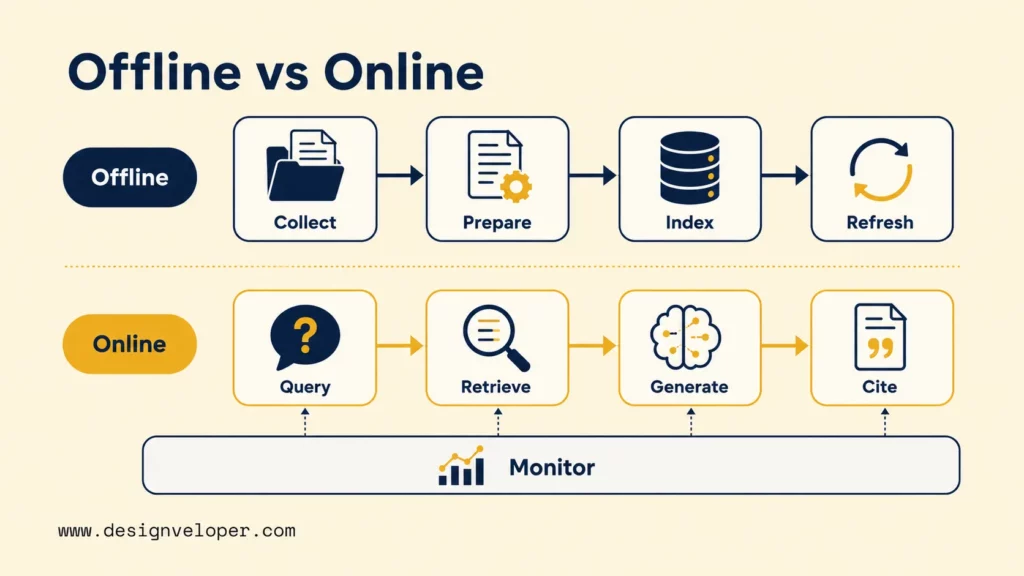
Use this RAG workflow diagram as an implementation checklist rather than a second architecture explanation. The RAG flow diagram should make owners and tests visible at each handoff. Google Cloud’s RAG reference architecture models separate data-ingestion and serving subsystems, which supports that assignment.
Translate the visual into an implementation sequence. Each step should have an owner and a test that can fail independently:
- Collect approved sources. Owner: source or data owner. Test: every source is approved, reachable, and assigned a refresh rule.
- Prepare and chunk content. Owner: data or platform engineer. Test: parsing preserves headings, tables, metadata, and citation fields on representative documents.
- Create and test the index. Owner: retrieval engineer. Test: expected passages appear for a small labeled query set before generation is connected.
- Handle the live query. Owner: application engineer. Test: identity and source filters are applied before candidate evidence becomes model context.
- Rerank and assemble context. Owner: retrieval engineer. Test: the final context removes weak or unauthorized candidates while preserving the expected evidence.
- Generate, cite, and fall back. Owner: AI application team. Test: supported answers cite the expected source, while weak evidence triggers the defined no-answer or escalation path.
- Observe and refresh. Owner: operations team. Test: feedback, latency, retrieval failures, and source updates can be traced to a change in the pipeline.
In an employee self-service scenario, the design may apply permission checks before sensitive policy or HR records enter the model context. The exact control depends on the system’s threat model and compliance requirements. The diagram should also show what happens when a user lacks permission, when no result meets the relevance threshold, or when a source becomes outdated.
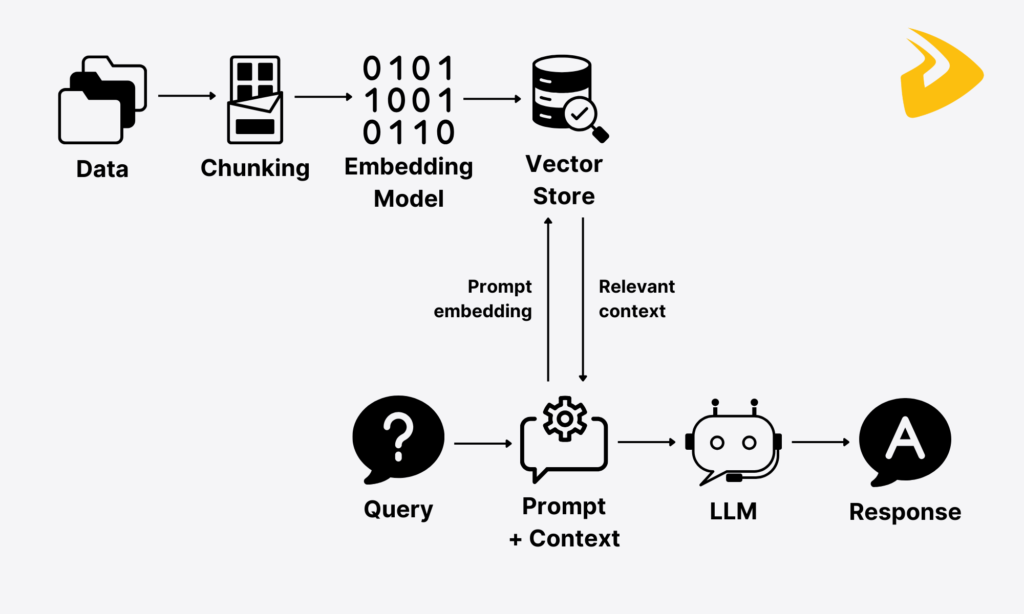
A production RAG diagram is incomplete if it shows the happy path but hides permissions, refresh rules, evaluation, and fallback behavior.
Choose Tools For Your RAG System Architecture
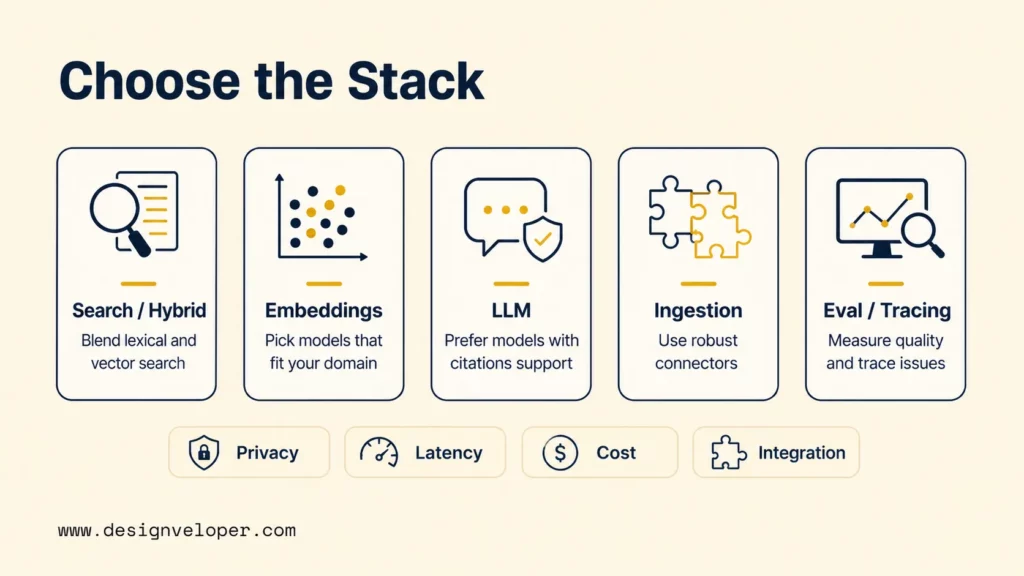
Choose tools from the constraints in the diagram, not from a generic RAG stack. Source types, exact-search needs, privacy rules, latency targets, integrations, team skills, and operating cost should drive the decision.
The following table is a selection framework rather than a vendor ranking. It helps teams identify what capability is required before comparing products.
| Decision area | Questions to ask | What changes the choice |
|---|---|---|
| Search or vector layer | Do users need semantic search, exact terms, filters, or both? | Hybrid retrieval, metadata filtering, scale, and compatibility with existing databases |
| Embedding model | Does it retrieve the right passages for the actual language and domain? | Language coverage, domain fit, retrieval quality, latency, and usage cost |
| LLM | Can it follow evidence, cite correctly, and refuse when context is weak? | Answer quality, context limit, latency, privacy requirements, and token cost |
| Ingestion layer | Can it parse the files and systems the business already uses? | Supported sources, refresh frequency, document structure, and connector maintenance |
| Evaluation and observability | Can the team see which stage failed and compare changes over time? | Trace detail, test coverage, production feedback, and integration with existing monitoring |
| Orchestration framework | Does the workflow need reusable connectors, tracing, tool calls, or multi-step control? | Workflow complexity, framework lock-in, team familiarity, and the amount of custom retrieval logic |
A policy assistant that must match exact policy codes should not rely on vector similarity alone. A search layer with keyword and vector retrieval is a better fit. A RAG system with one small, stable document set may not need the same infrastructure as a multi-region enterprise knowledge platform.
Framework choice follows the same rule. Use an orchestration framework when reusable connectors, traces, tool calls, or multi-step control reduce implementation work. A small retrieval service with a narrow workflow may be easier to test and maintain with direct SDK calls. Teams evaluating framework-heavy designs can also review our LangChain RAG implementation guide.
Existing systems matter too. If a company already stores structured metadata in a relational database, keeping that system in the architecture may be simpler than moving every field into a new vector platform. Our vector database selection guide covers trade-offs among scale, filtering, operations, and governance.
Choose a tool because it matches the data and operating constraints, not because it appears in a reference architecture.
Production RAG Pipeline Architecture
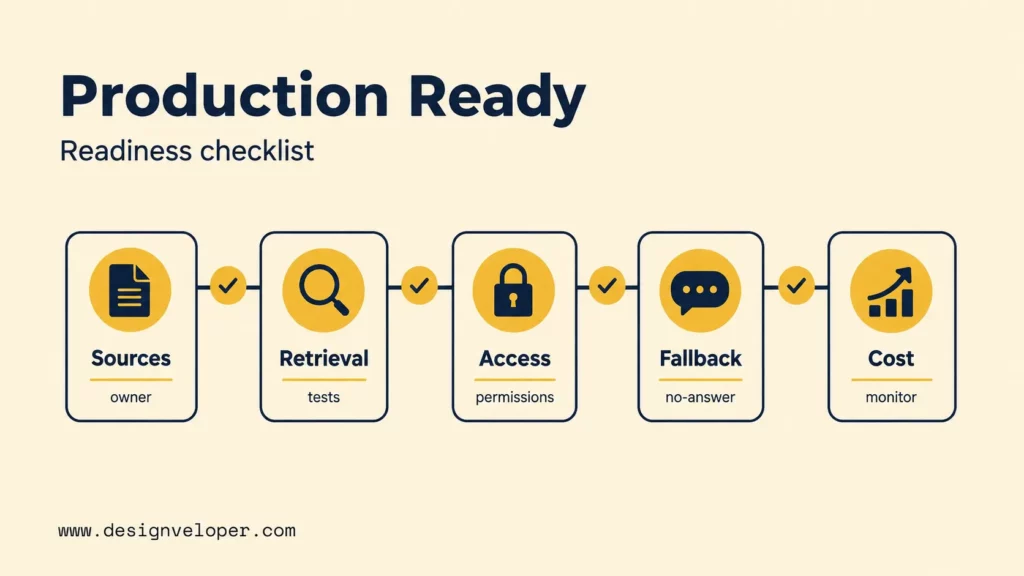
Production RAG pipeline architecture starts when the diagram includes ownership, evaluation, security, cost, and maintenance. These concerns interact after launch because a source update can change retrieval quality, latency, permissions, and model behavior at the same time.
Use the following readiness checklist before moving from a prototype to a live service. Each item describes an observable condition rather than a generic “enterprise-ready” label.
The same readiness criteria should also exist in semantic HTML so they remain easy to scan and reuse outside the visual block:
| Readiness area | Evidence to review | Launch question |
|---|---|---|
| Source governance | Owner, approval status, refresh cadence, stale-content rule | Who fixes the source when the answer is wrong because the document changed? |
| Retrieval evaluation | Labeled queries, expected passages, relevance checks, regression results | Can the team prove that the right evidence is retrieved before scoring the answer? |
| Security and access | Identity flow, source permissions, sensitive-data rules, audit scope | Can protected content be excluded before it reaches model context? |
| Fallback behavior | No-answer rule, escalation path, conflicting-source handling | What happens when no evidence is reliable enough to answer? |
| Operating cost | Latency, token use, storage, indexing frequency, maintenance work | Which cost rises when retrieval depth, context size, or refresh frequency increases? |
Evaluation should test retrieval separately from the generated response. Microsoft Foundry’s RAG evaluator documentation calls these process evaluation and system evaluation. Retrieval and Document Retrieval assess retrieval quality. Groundedness, Relevance, and Response Completeness (preview) assess the final response. Document Retrieval can report Fidelity, NDCG, XDCG, Max Relevance, and Holes when labeled ground truth is available.
A small evaluation artifact can be concrete enough for developers to reproduce. The example below is intentionally generic rather than a claim about a real policy:
| Test field | Hypothetical example | Pass signal |
|---|---|---|
| Query | What is the approved refund window? | The same query can be rerun after retrieval or model changes |
| Expected source | Refund Policy v3, section 2 | The expected source appears in the retrieved context |
| Expected behavior | Answer with citation | The response stays within the source and links to it |
| No-answer case | Question outside the approved corpus | The system refuses or escalates instead of inventing an answer |
| Permission case | User lacks access to an internal document | The protected source does not enter the model context |
For systems with private or regulated data, access-control and logging choices should follow the product’s threat model, data sensitivity, and compliance requirements. One option is to enforce eligible-source permissions before context assembly. Logging scope should also be deliberate. Teams may record source identifiers, retrieval decisions, and outcomes while avoiding unnecessary copies of sensitive content.
Cost is architectural too. Larger candidate sets can increase retrieval work, longer context increases token use, and frequent refreshes add indexing work. Track those variables with quality metrics so a cheaper configuration does not silently reduce retrieval coverage or answer reliability.
RAG Use Cases And Business Value
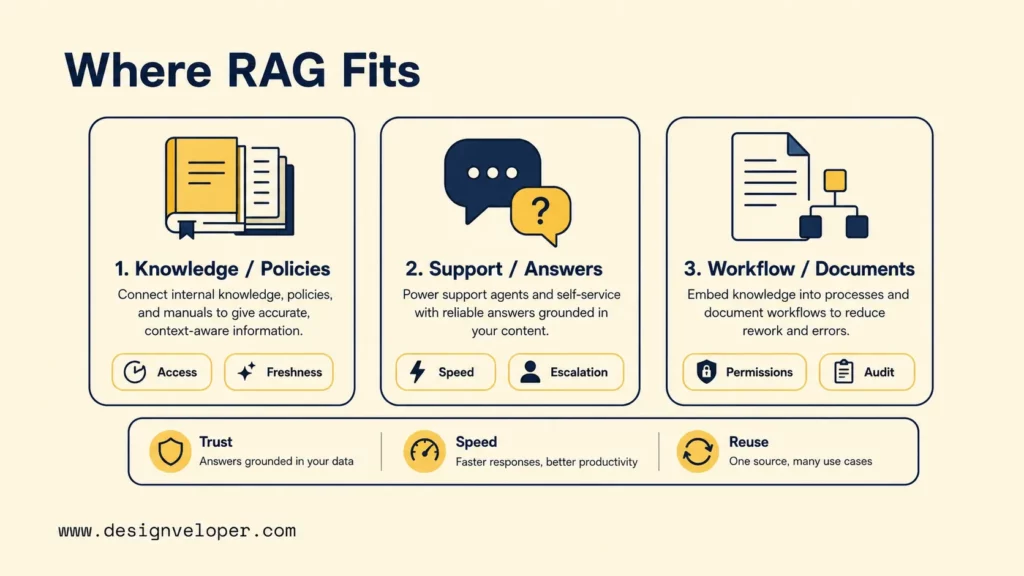
A diagram becomes more useful when it is tied to a business question. Compare the three use cases across the same four decision fields:
| Use case | Business question | Source data | Pipeline emphasis | Expected outcome |
|---|---|---|---|---|
| Internal knowledge assistant | What policy applies to this employee? | Policy files, handbooks, approved internal pages | Access control, freshness, version metadata, citations | A source-backed answer or a clear no-answer path |
| Customer support search | Which approved answer should an agent use for this case? | Help-center content, product documentation, approved case knowledge | Retrieval quality, escalation rules, freshness, response latency | Faster evidence discovery with a path to human escalation |
| Document-centric workflow | Which approved document supports the next workflow step? | Shared files, document metadata, permissions, approval records | Source references, permission checks, workflow state, auditability | The right document context reaches the right user at the right step |
The business value is not simply “adding RAG.” The value comes from making trusted information easier to find, verify, and use inside an existing decision or workflow. A good diagram makes the required source controls, retrieval behavior, and fallback path visible before the team commits to implementation.
FAQs About RAG Pipeline Diagram
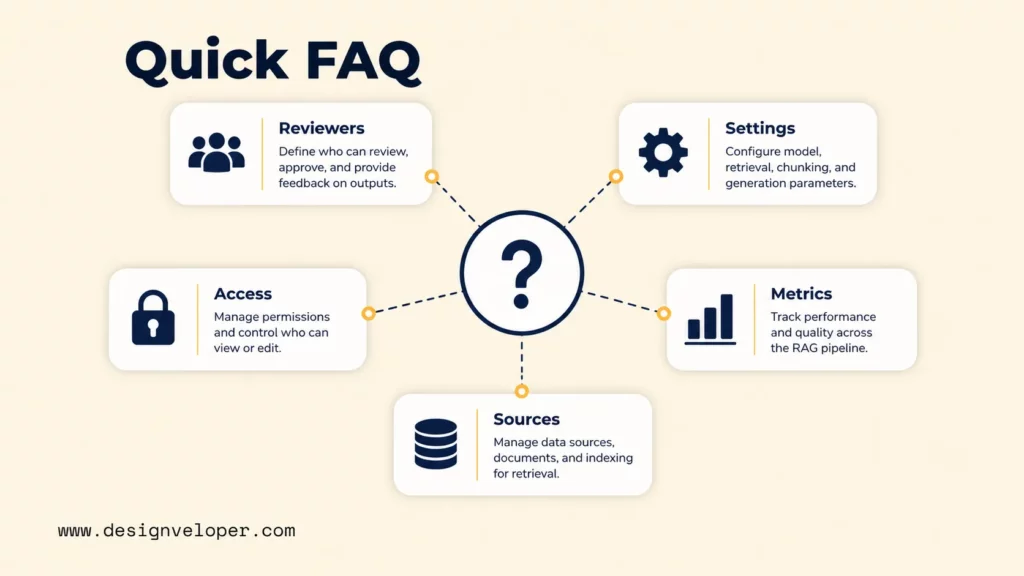
Who Should Review A RAG Pipeline Diagram Before Development?
Product, engineering, data, security, and source owners should review it before development. Do not start the build until each major boundary has an owner, an approved source decision, and a test that can show when the block fails.
Should The Diagram Include Prompt Templates And Chunk Sizes?
Include exact prompt templates or chunk sizes only when reviewers need them to make an architecture decision. Otherwise, show where those settings live and keep their current values in a technical specification or experiment log.
How Do You Show Access Control In A RAG Pipeline Diagram?
Show the identity or role check before protected retrieval results become model context. Keep the diagram at the decision-rule level, then place detailed authorization logic, audit scope, and compliance controls in the security design.
What Evaluation Nodes Belong In A RAG System Architecture Diagram?
Show retrieval evaluation near search and reranking, and response evaluation after generation. Keep exact metric formulas and pass thresholds in the evaluation plan so the architecture stays readable while the test criteria can evolve.
Can One RAG Diagram Cover Multiple Data Sources?
Yes. One RAG pipeline diagram can cover multiple data sources when the shared path is clear and source-specific refresh, permission, or parsing rules remain visible. Use separate annotations or branches when two sources have materially different controls.
If a team has agreed on its sources and user questions, the next challenge is turning the diagram into tested retrieval and secure integrations. Our AI development services can support implementation and release checks. Our public project pages document a virtual assistant, employee self-service HR software, and a document collaboration platform. Those projects provide adjacent product experience, but they are not evidence that the systems used RAG.
Also published on

Share post on










Related Articles


Agentic AI Impact On The Workforce: Changing Tasks, Jobs, And Skills
Agentic AI Impact On The Workforce: Changing Tasks, Jobs, And Skills Published October 02, 2026
13 Best Vibe Coding Tools for Building Apps and Editing Codebases
13 Best Vibe Coding Tools for Building Apps and Editing Codebases Published September 30, 2026
Can ChatGPT Create an App? What It Can Build and What to Check
Can ChatGPT Create an App? What It Can Build and What to Check Published September 30, 2026



















