
















What Is A Context Window In AI? How LLMs Process And Retain Information

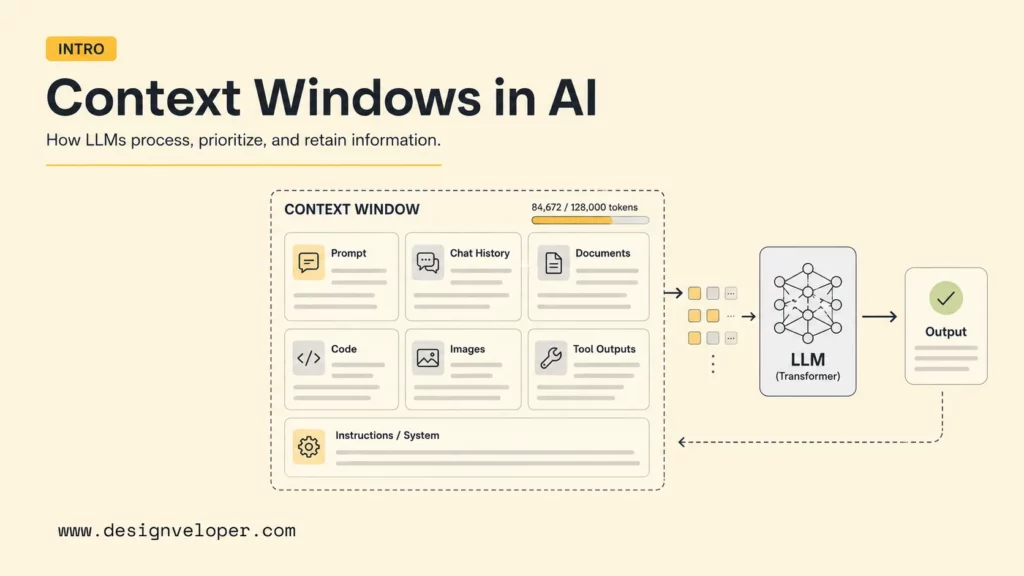
What is context window in AI? A context window is the maximum amount of text, code, images, tool results, conversation history, and instructions that a large language model can consider at one time when generating a response. The window is measured in tokens, not pages or words. A larger window lets an LLM process longer conversations, documents, codebases, and retrieved passages, but it does not guarantee better reasoning or perfect recall.
For builders, the practical question is not only which model has the biggest window. It is what the application should send: recent chat turns, selected passages, relevant files, retrieved knowledge, or summarized history. This guide explains how context windows work, what they include, how they affect chatbots, document analysis, coding assistants, and RAG systems, and how teams manage limits through chunking, retrieval, summarization, and prompt pruning.
Context windows matter because every AI application has to decide what the model should see right now. That decision often sits inside broader AI business process automation design. A chatbot may need recent conversation turns. A document assistant may need selected passages from a report. A coding assistant may need relevant files, error logs, and task instructions. A RAG system may need retrieved chunks plus the user’s current question. For teams building assistants, AI chatbot integration and retrieval design often decide what the model can see. Good context management often matters more than simply choosing the model with the largest advertised window.
See more:
- Best Chatbot Platforms for Teams That Need More Than a Website Widget
- Chatbot Vs. Conversational AI: Key Differences and Complete Guide
- AI Agent Vs. Chatbot: Key Differences & Which One Do You Need?
What Is A Context Window?
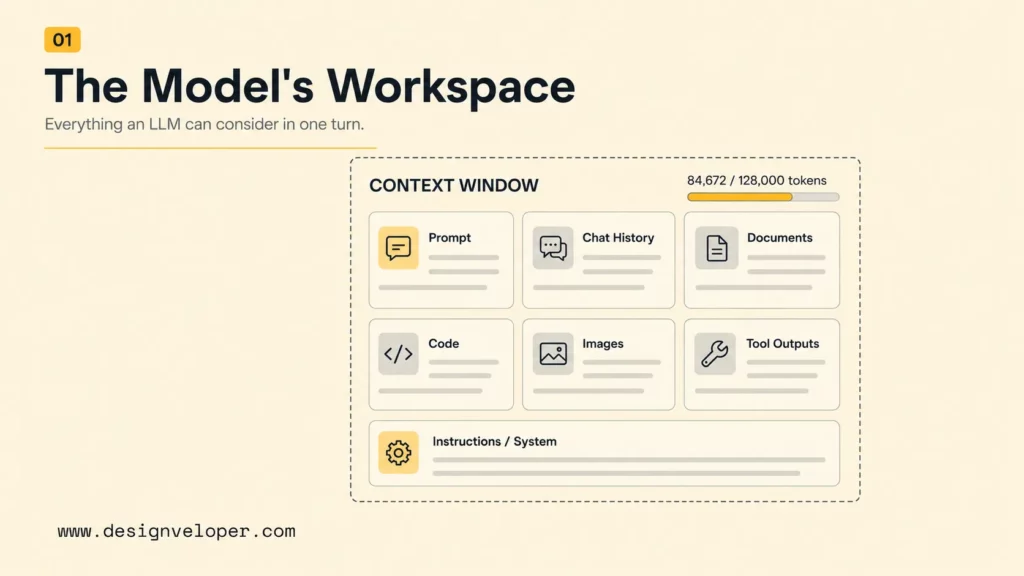
A context window is the model’s temporary working space for one request or conversation turn. The context includes the user’s prompt, system or developer instructions, prior chat messages that are still included, uploaded content, retrieved passages, tool outputs, function schemas, images when supported, and any generated tokens that count against the same limit. Once the combined input and output exceed the model’s limit, some content must be removed, summarized, retrieved selectively, or never sent in the first place. For product teams, AI integration is usually where these context choices get implemented.
Official model pages show how different providers expose this limit. OpenAI’s model comparison documentation lists context windows such as 400,000 tokens for GPT-5.2 and 1,047,576 tokens for GPT-4.1. Anthropic’s Claude context window documentation describes a 200,000-token window for many Claude API workflows.
Those numbers are useful, but they are capacity limits rather than quality guarantees. A model can technically accept a long input and still miss an important sentence, overweigh recent instructions, or use irrelevant context. Teams should treat context length as one design constraint inside a broader system for retrieval, prompting, summarization, evaluation, and user experience. That is one reason AI business process automation projects often need context rules as much as model choice.
How A Context Window Works In LLMs
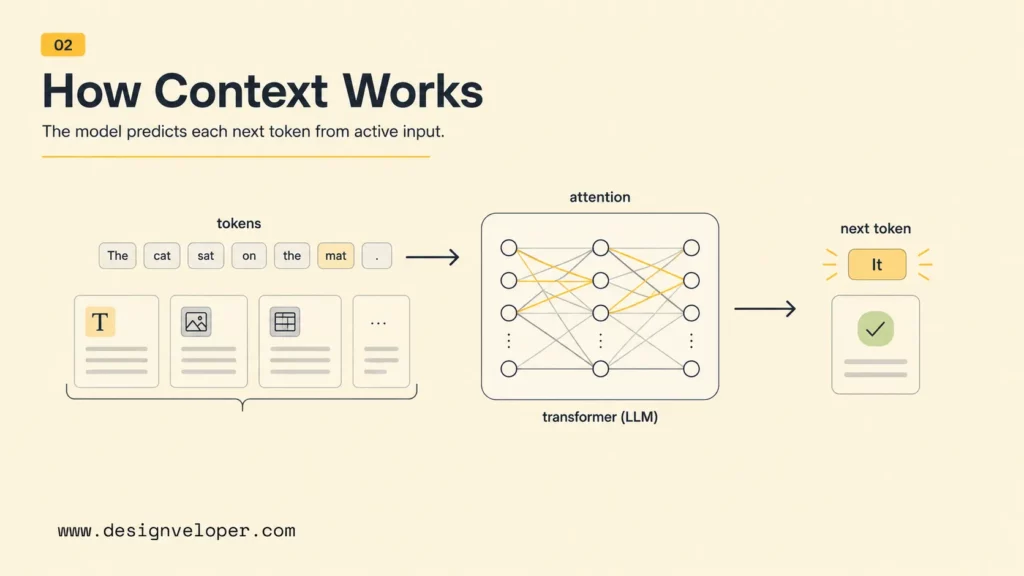
A context window works by giving the model a sequence of tokens and asking it to predict the next token based on that sequence. The model does not “remember” outside the content supplied to the current request unless the application adds memory, retrieval, stored profile data, or previous conversation state. For practical builders, the key point is simple: if important information is not inside the current context, the model cannot reliably use it. This is also why AI agent orchestration matters when several tools and steps share the same workflow.
Context Windows Are Measured In Tokens
Tokens are the units LLMs use to process text. A token may be a whole word, part of a word, punctuation, whitespace, or a fragment of code. Tokenization varies by model family, language, and content type. English prose often maps roughly to fewer tokens than characters, while code, tables, non-English text, and unusual formatting may use tokens differently.
Teams should estimate token use before building long-context workflows. A 100-page PDF, a full repository, or a transcript from a long meeting can consume far more context than expected. Output tokens also matter because a model needs room to produce the answer. A prompt that fills the entire context window may leave little or no capacity for a useful response.
What Counts Inside The Context Window
The context window usually includes every piece of content sent to the model for that request. System instructions, developer instructions, user messages, conversation history, retrieved chunks, files, images, tool outputs, function definitions, and expected output formats can all consume capacity. OpenAI’s Responses API text guide is useful because it shows how conversation state and previous response IDs can affect what is present in context.
Hidden application behavior can also matter. Some chat interfaces automatically summarize earlier turns. Some API workflows require developers to pass conversation history manually. Other tools inject long search results, database rows, or code snippets. A production AI team should log token usage and inspect prompt payloads because the model can only reason over what the application actually sends.
How The Model Uses Context To Generate The Next Token
An LLM uses attention mechanisms to relate the current token-generation step to prior tokens in the context. The model does not read context like a human rereading a document with perfect focus. It weighs patterns, positions, instructions, examples, and retrieved evidence to produce likely next tokens. That is why prompt order, section labels, source formatting, and relevance filtering can affect output quality. In document-grounded workflows, this structure can be the difference between a helpful summary and a noisy one.
Related reading:
- What Is RAG in AI? How Retrieval-Augmented Generation Works
- RAG Pipeline Diagram: Components, Workflow, And Production Design
- Advanced RAG Techniques For Production-Grade AI Search
Why Context Window Size Matters
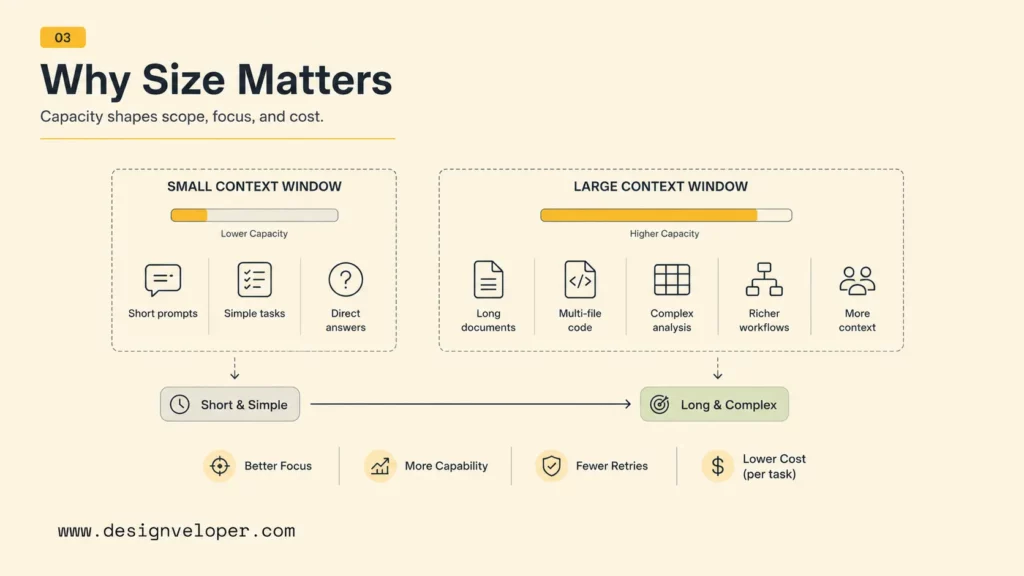
Context window size matters because it defines how much information an LLM can consider in a single request. A larger window enables longer chats, larger uploads, multi-file code work, long reports, and more retrieved context. However, context size should be matched to task complexity. A small, well-selected context can outperform a huge, noisy context.
Small Windows For Short And Simple Tasks
Small context windows are enough for short prompts, simple classification, concise rewriting, small FAQ answers, and narrow extraction tasks. A small window can also be cheaper and faster. If the user asks for a one-paragraph summary of a short email, sending a whole knowledge base is wasteful and can introduce irrelevant details.
Short-context workflows are strongest when the input is already focused. For example, a customer support macro generator may only need the current ticket, a few policy rules, and a desired tone. The model does not need months of conversation history or unrelated product documentation.
Large Windows For Long Documents, Code, And Multi-Step Work
Large context windows are useful when the task genuinely depends on many related details. Document analysis, due diligence, contract review, multi-file code refactoring, research synthesis, agent planning, and long meeting analysis can benefit from more capacity. Long-context models can reduce the need for aggressive chunking when the source material is cohesive and the question requires cross-document reasoning.
Large context windows are also helpful for coding assistants because code often depends on file relationships, type definitions, tests, logs, configuration, and prior edits. Still, a coding assistant should not blindly load an entire repository if the bug only touches three files. Selective context keeps the model focused and reduces cost.
Bigger Windows Increase Capacity, Not Guaranteed Accuracy
Bigger windows increase capacity, but accuracy still depends on model quality, retrieval relevance, prompt clarity, position effects, and evaluation. The paper Lost in the Middle: How Language Models Use Long Contexts found that model performance can degrade when relevant information appears in the middle of long input contexts. Later long-context research has continued to explore position bias, attention behavior, and retrieval quality.
The practical implication is that teams should not solve every problem by pasting more content into the prompt. Long windows help, but the most important context should be prioritized, labeled, deduplicated, and placed where the model can use it. Evaluation should include cases where critical evidence appears at different positions inside the input.
The Limits And Tradeoffs Of Context Windows
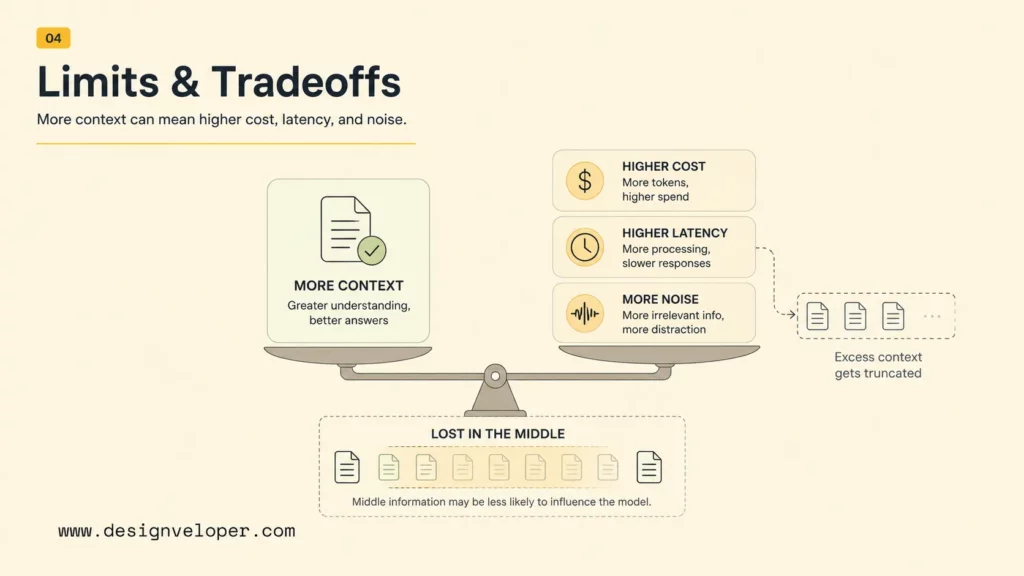
Context windows have limits and tradeoffs because every token increases the amount of information the model must process. More context can improve coverage, but it can also raise cost, slow responses, and dilute attention. Production systems need a context strategy, not only a large model.
What Happens When The Window Fills Up
When the context window fills up, the application or model interface must stop accepting more input, truncate content, summarize older material, drop earlier conversation turns, or retrieve a smaller subset of information. In an API system, the request may fail if the payload exceeds the model limit. In a chat product, older messages may disappear from the active context even though they remain visible in the interface.
This behavior can surprise users. A user may assume the model remembers a decision from 200 messages ago, while the active prompt no longer includes that message. Teams should design AI interfaces that make memory and context behavior understandable when the workflow is long or high-stakes.
Lost In The Middle
Lost in the middle describes the tendency for models to miss or underuse relevant information placed in the middle of a long context. The beginning and end of the input often receive more effective attention in many tasks. This does not mean every model always fails in the middle, but it does mean long prompts should be tested for position sensitivity.
A practical mitigation is to repeat or summarize critical facts near the user’s current task, use clear section headers, keep irrelevant content out, and place decision-critical evidence close to the instruction that uses it. RAG systems can also rerank retrieved passages so the most relevant chunks appear in a high-signal order.
Higher Cost And Slower Responses
Longer context usually costs more because token-based pricing charges for input and output tokens. Longer prompts can also increase latency because the model has more content to process. OpenAI’s OpenAI’s GPT-4.1 model page shows separate input and output pricing alongside a 1,047,576-token context window, which illustrates why capacity and cost must be evaluated together.
Cost and latency affect product design. A customer-facing assistant that sends a full manual on every turn may feel slow and expensive. A better design retrieves only relevant passages, caches stable context, summarizes earlier turns, and uses smaller models for simple steps where appropriate.
Why Large Windows Still Need Better Context Management
Large windows still need context management because real AI applications contain messy information. Documents may be outdated, duplicated, contradictory, private, or irrelevant. Conversation history may include abandoned ideas. Code repositories may include generated files, dependencies, and logs that distract from the bug. Sending everything increases the chance that irrelevant information competes with the useful context.
Good context management chooses what to include, what to exclude, how to order evidence, how to label sections, and when to summarize. The goal is to give the model the smallest complete context needed for the job.
Context Window Vs Memory
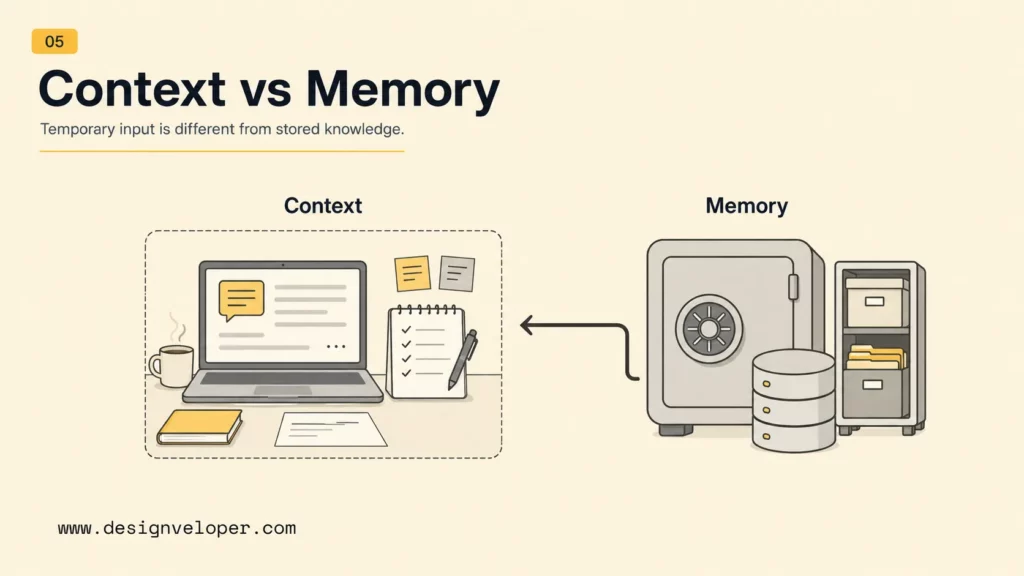
A context window is temporary working space. Memory is stored or reused information that the application can bring back later. The distinction matters because many users think a model remembers everything in a conversation, while many systems only remember what is included in the active context or stored through a separate memory feature.
Context Window As Temporary Working Space
The context window is active only for the current model call. It is like the material placed on a desk before asking the model to work. If a document, instruction, or earlier message is not on the desk, the model cannot reliably use it. After the call, the application may decide what to keep, summarize, store, or discard.
This temporary nature is useful because it gives developers control. A healthcare assistant, HR assistant, or finance assistant should not automatically carry sensitive details into unrelated tasks. Context can be scoped to the current workflow.
Memory As Stored Or Reused Information
Memory is information stored outside the immediate prompt and reused later by the application. It can be a user preference, a project fact, a customer profile, a vector database record, a CRM field, or a summarized conversation state. It becomes useful when the system retrieves or injects it into the context window at the right time.
Memory also creates governance responsibilities. Teams should decide what may be stored, how users can inspect or delete it, how long it persists, and whether it is appropriate for the model to use in a given workflow.
Why The Two Are Often Confused
Context window and memory are often confused because chat interfaces make conversation feel continuous. The user sees earlier messages on screen, so the user expects the model to remember them. In reality, the model may receive a full transcript, a partial transcript, a summary, retrieved memories, or only the latest prompt depending on the application.
The safest product copy avoids vague claims such as “the AI remembers everything.” A better explanation says which information is included in the current session, which information can be stored, and how the user controls it.
How Context Windows Affect Real AI Applications
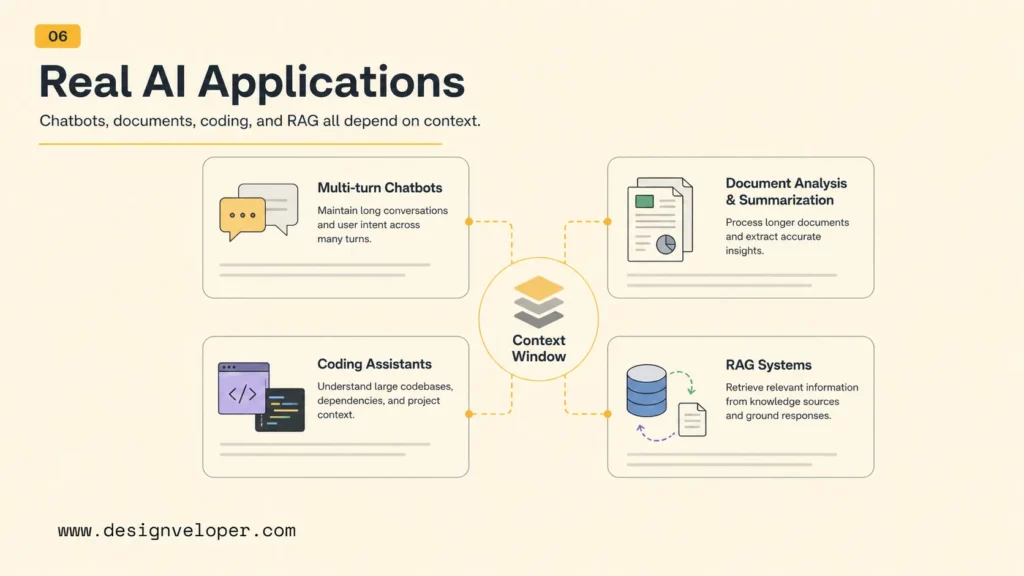
Context windows affect real AI applications by shaping what the model can see, how much the workflow costs, and how reliable the answer is. The impact is most visible in multi-turn chatbots, document analysis, coding assistants, and RAG systems.
Multi-Turn Chatbots
Multi-turn chatbots need enough context to follow the conversation, remember user intent, avoid repeating questions, and respect instructions. As the conversation grows, the system must decide which earlier turns still matter. A support chatbot may keep the current issue, product version, customer plan, and recent troubleshooting steps while dropping casual greetings or resolved branches.
Document Analysis And Summarization
Document analysis depends on fitting or retrieving the right parts of a document. A long context window can help summarize long reports, contracts, transcripts, or policy manuals. However, summarization quality still depends on document structure, source conflicts, and prompt design. A strong workflow may ask for section-by-section summaries first, then a final synthesis, rather than asking for one answer over a massive document.
Coding Assistants Working Across Large Files
Coding assistants need context from files, tests, error messages, package versions, requirements, and recent edits. Larger windows help with cross-file reasoning, but too much code can distract the model. A better coding workflow selects relevant files, includes failing tests, describes the expected behavior, and keeps generated artifacts or vendor folders out of the prompt.
RAG Systems That Inject Retrieved Context
RAG systems use retrieval to inject relevant context into the prompt instead of sending every possible document. The system embeds documents, stores them in a vector database, retrieves likely relevant chunks, and sends those chunks with the user’s question. This approach helps teams work around context limits while keeping prompts focused. For multi-step systems, AI agent orchestration is often what keeps the context flow organized.
Explore more:
- RAG Best Practices Start Before Your Model Generates An Answer
- How To Build A RAG System: Step-By-Step (New Guide)
- Build A RAG Chatbot From Local Prototype To Production Deployment
Designveloper often treats RAG as a product and data workflow, not only a model feature. Our AI development services help teams map source data, permissions, retrieval quality, context packaging, evaluation, and human review before launching AI assistants that depend on long or private knowledge.
How Teams Work Around Context Window Limits
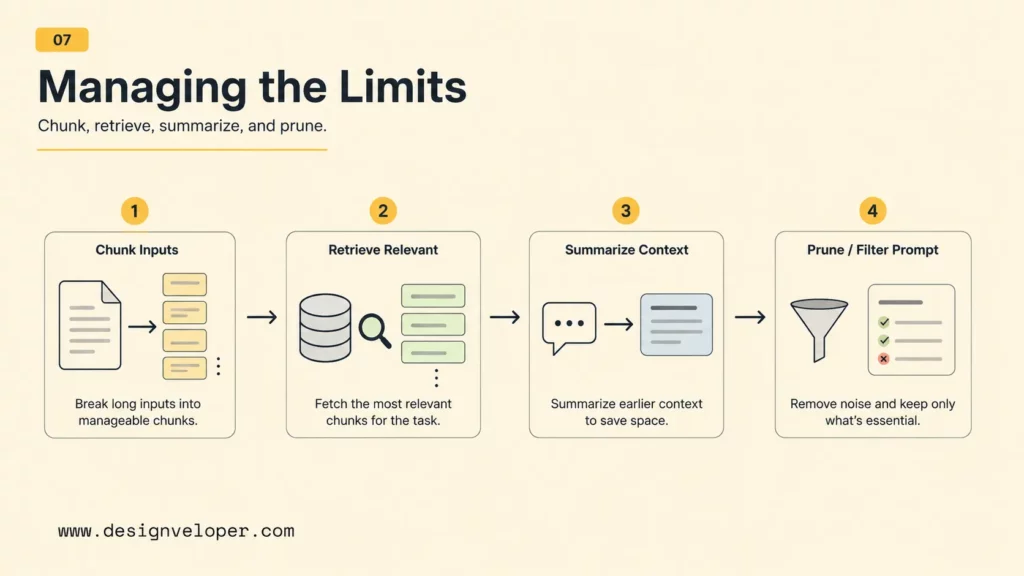
Teams work around context window limits by selecting, retrieving, compressing, and organizing context. The goal is not to fit everything. The goal is to fit the right information with enough structure that the model can use it.
Chunking Long Inputs
Chunking splits long documents, transcripts, or code into smaller pieces. Good chunks preserve meaning, headings, source IDs, and metadata. Bad chunks cut important context in half or mix unrelated ideas. Teams should test chunk size, overlap, and metadata because chunking affects retrieval quality more than many teams expect.
Retrieval Instead Of Sending Everything
Retrieval sends only the most relevant pieces of information into the context window. A vector database, keyword search engine, or hybrid search system can find candidate passages. A reranker can then order them by likely usefulness. Retrieval is especially important when a knowledge base contains thousands or millions of documents.
Summarizing Earlier Context
Summarization compresses earlier conversation turns, documents, or tool results into a shorter form. Summaries help long-running workflows continue without sending every prior token. The risk is information loss. A summary should preserve decisions, constraints, unresolved questions, facts, and source references rather than only producing a vague narrative.
Prompt Design That Keeps Only Relevant Information
Prompt design keeps the model focused by separating instructions, user goals, source context, examples, constraints, and output format. Useful prompts label sources, put critical rules near the task, and remove unrelated information. For long-context work, teams should prefer structured sections, concise source snippets, and explicit decision criteria over one large unformatted block of text.
| Context strategy | Best use | Main risk |
|---|---|---|
| Chunking | Long documents, policies, code, transcripts | Important meaning split across chunks |
| Retrieval | Large knowledge bases and RAG systems | Wrong or incomplete evidence retrieved |
| Summarization | Long conversations and multi-step workflows | Loss of exact facts or constraints |
| Prompt pruning | Any production AI workflow | Removing context that was actually needed |
FAQs About Context Windows
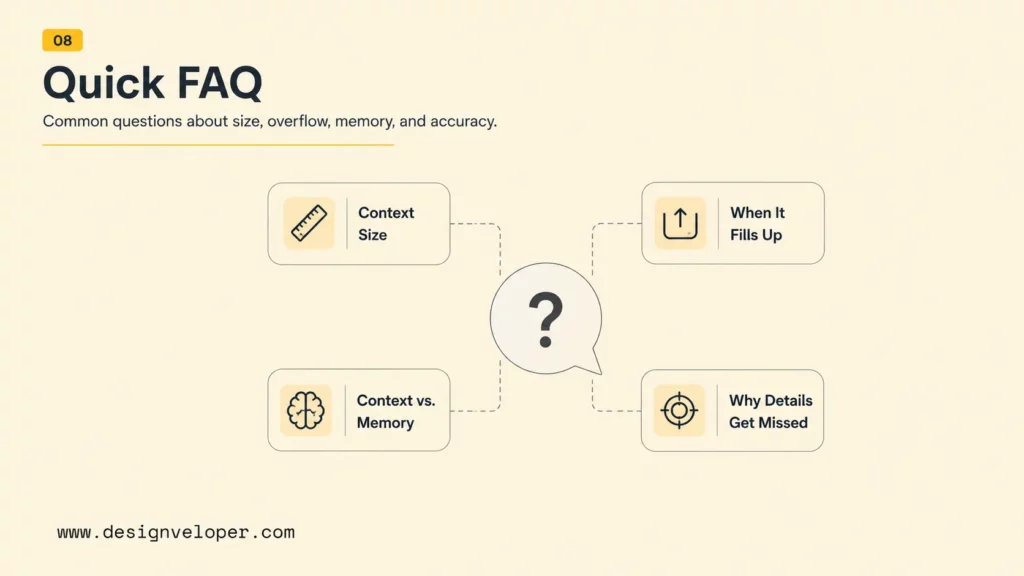
These questions summarize the practical meaning of context windows for users, developers, and product teams building with LLMs.
What Is A Context Window In AI?
A context window in AI is the maximum amount of information an LLM can consider at one time when generating a response. It includes the prompt, instructions, conversation history, retrieved context, tool outputs, and generated output tokens that fit within the model’s token limit.
Why Does Context Window Size Matter In LLMs?
Context window size matters because it limits how much information the model can use in one request. Larger windows can support longer documents, chats, codebases, and RAG workflows, but larger windows also increase cost and do not guarantee perfect attention or accuracy.
What Happens If A Prompt Is Longer Than The Context Window?
If a prompt is longer than the context window, the request may fail, older content may be truncated, or the application may summarize or remove earlier context. The exact behavior depends on the product or API. Developers should measure token usage and design fallback behavior before users hit the limit.
What Is The Difference Between Context Window And Memory?
The context window is temporary working space for the current model call. Memory is stored or reused information outside the current prompt that the application may retrieve later. Memory only helps the model when the application brings the relevant stored information back into context.
Why Can Models Still Miss Information In Very Long Context Windows?
Models can miss information in very long context windows because attention is imperfect, relevant facts may be buried in noisy input, and some models show position sensitivity such as lost-in-the-middle behavior. Teams should prioritize, label, retrieve, summarize, and evaluate context instead of assuming a larger window solves every problem.
Also published on

Share post on










Related Articles


10 Best Alternatives To ChatGPT In 2026: Compare By Use Case
10 Best Alternatives To ChatGPT In 2026: Compare By Use Case Published September 11, 2026
Best AI Chatbot In 2026: 10 Tools For Writing, Research And Work
Best AI Chatbot In 2026: 10 Tools For Writing, Research And Work Published September 09, 2026
RAG Status In Project Management: Meaning, Colors, And Examples
RAG Status In Project Management: Meaning, Colors, And Examples Published September 09, 2026



















