
















AI Agent Pricing: Monthly Costs, Models, Hidden Fees, And ROI

KEY TAKEAWAYS:
- AI agent pricing can be billed by seat, agent, conversation, resolution, outcome, token, credit, or custom project scope.
- A monthly budget should combine vendor charges with model use, integrations, hosting, monitoring, maintenance, and human review.
- Compare low, expected, and peak usage, then measure cost per accepted outcome instead of relying on a starting price.
- Outcome-based pricing needs clear quality, escalation, refund, and reopened-task rules in the contract.
An AI agent quote rarely shows the full monthly bill. Vendors may charge by seat, conversation, resolution, outcome, token, or credit, while hosting, integrations, monitoring, and human review can sit outside the headline rate. A useful comparison starts with one defined workflow, totals every recurring cost, and checks the price against each accepted result.
AI Agent Pricing Models And How They Work
AI agents are sold as customer-service, sales, and internal-workflow systems, hosted platforms, or custom projects. Adjacent products include customer-service chatbots and AI tools for developers, but those labels do not determine how a vendor bills. Compare the billing unit and included services instead of treating one price as a market-wide rate.
A team should compare pricing by unit, not by headline price. The unit may be an agent, seat, conversation, resolution, credit, token, workflow, or delivered outcome. Each unit moves cost risk to a different side of the contract. Seat pricing is predictable but may not reward automation. Usage pricing is granular but can grow quickly. Outcome pricing is attractive when outcomes are defined clearly, but it needs careful QA because a low-quality automated resolution can still damage the customer experience.
For a deeper dive, read:
- AI Agent Vs AI Assistant: Differences, Use Cases, And Choice
- Why AI Agents Need MCP: How AI Systems Connect To Tools And Data
- Types of AI Agents: Key Categories and When to Use Each
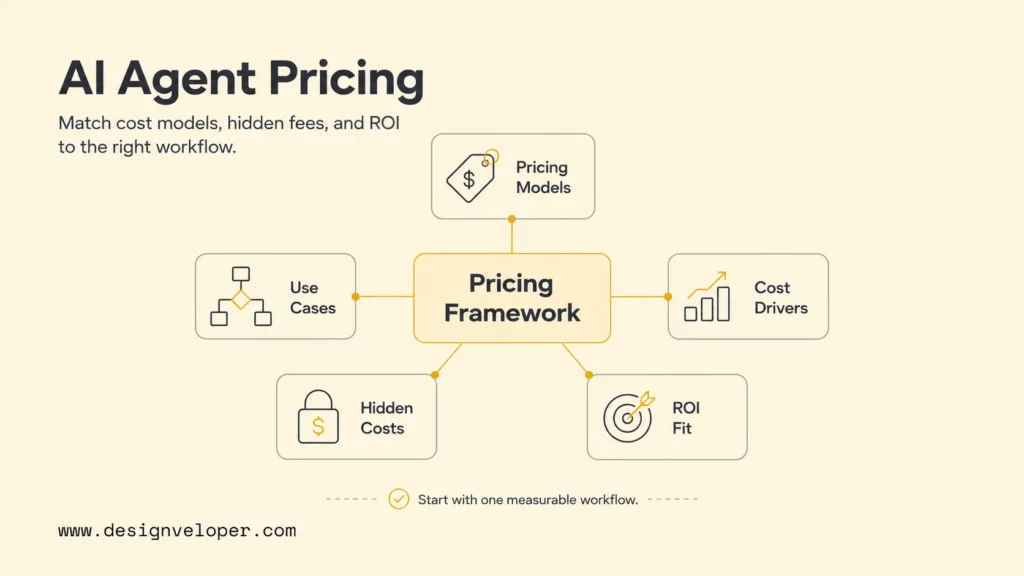
Start by identifying what the vendor actually meters. The model below separates predictable subscription fees from variable usage and custom delivery work.
Fixed Fee Per Agent
Fixed fee pricing charges a monthly or annual amount for each deployed AI agent, teammate, workspace, or package. This model is easiest to budget because finance teams can forecast the number of agents or seats. It fits internal assistants, early pilots, and teams that want a stable subscription before optimizing per-task economics.
The tradeoff is that fixed fees can hide usage ceilings. A plan may include a certain number of conversations, workflow runs, channels, knowledge sources, or integrations, then charge overages. Before choosing this model, ask whether the fee includes production support, analytics, test environments, security controls, and access to higher-quality models.
Usage-Based Pricing
Usage-based pricing charges for metered work such as tokens, API calls, messages, tool calls, compute time, or credits. Model APIs may list separate rates for input, cached input, and output tokens, so check current OpenAI API pricing and Claude API pricing before estimating. Model choice, prompt length, and repeated tool calls can matter more to the bill than the orchestration framework alone.
Usage pricing is fair when tasks vary in complexity. A short routing agent should cost less than a research agent that reads documents, calls tools, and writes a long report. However, usage pricing requires controls. Developers should track token usage, tool-call counts, retries, and failed runs. The OpenAI Agents SDK usage documentation notes that token usage can be tracked for every run, which is exactly the kind of telemetry needed for cost governance.
Per Conversation Or Per Resolution Pricing
Per-conversation pricing bills for a customer interaction, while per-resolution pricing bills only when the interaction meets the vendor’s contract definition of a resolved issue. Both are common in support because teams already track contacts and tickets, but they create different incentives and should not be compared as if they were the same unit.
The contract must define what counts as resolved, including reopened tickets, partial answers, low-satisfaction outcomes, refunds, and human escalations. Check whether an unresolved conversation can still be billable and how disputes are reviewed. For broader outcome pricing, apply the same safeguards to results such as a booked meeting, qualified lead, or completed workflow.
To distinguish the interaction from the automation behind it, review what a chatbot can do before comparing a conversation fee with an agent’s billable resolutions or workflow actions.
Credit-Based Pricing
Credit-based pricing converts different actions into a vendor-specific unit. One credit may represent a message, model call, workflow run, enrichment step, or premium feature. Credits are flexible for vendors because they can price several features with one unit. Credits are harder for buyers because the relationship between credits and actual work may be opaque.
Credit pricing needs a usage simulator. Before signing, estimate credits for best case, expected case, and high-volume case. Include retries, long context, file uploads, retrieval, function calls, and human review actions. A cheap credit pack can become expensive if a single successful workflow consumes many credits.
Outcome-Based Pricing
Outcome-based pricing charges for a verified business result, such as a booked meeting, qualified lead, processed claim, or completed workflow. It is broader than support-specific per-resolution pricing: the billable unit can be any agreed business result, not only a resolved customer contact.
Outcome pricing can still create risk. If the outcome is too easy to count, the agent may optimize for closure rather than quality. If the outcome is too hard to verify, disputes increase. Teams should define outcome rules, quality thresholds, sampling review, exception handling, and the authority of human reviewers before production rollout.
Custom Development Pricing
Custom development pricing covers the software work needed to build an agent for a specific workflow. The budget may include discovery, architecture, prompt and tool design, RAG, database work, API integrations, workflow automation, testing, security review, analytics, deployment, training, and maintenance. This model is common when the agent must connect to private systems or operate inside business processes that generic tools cannot model safely. For an AI-specific project reference, see How Much Does It Cost To Develop An AI App?, then scope agent tools and human review separately.
Before commissioning a custom agent, agree on the workflow, quality threshold, tool permissions, data boundary, and escalation route. Those choices shape the acceptance tests and the work required after launch. Model routing and retry limits should be judged on measured cost and quality, not assumed savings.
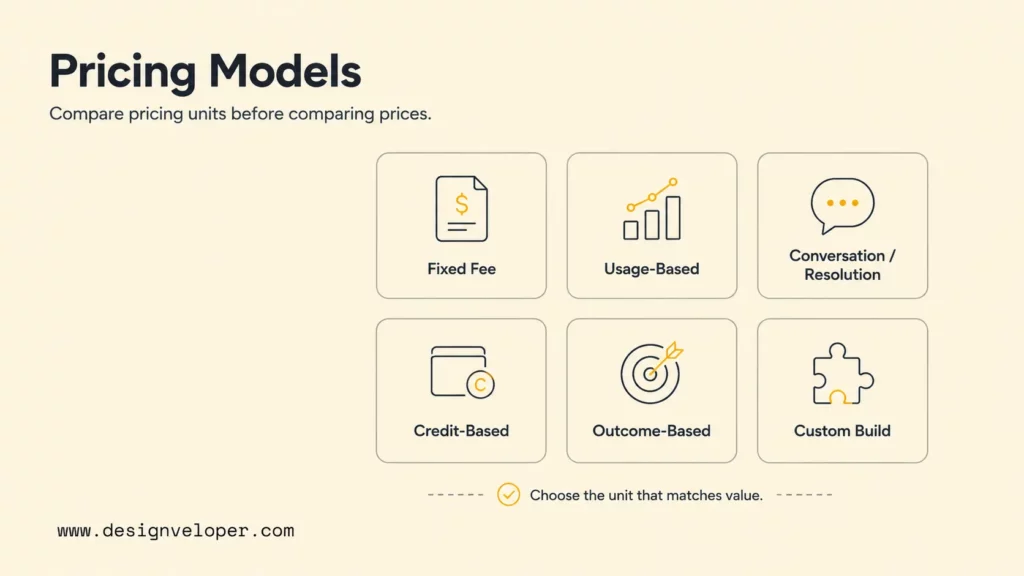
Once the billing unit is clear, project it against the workflow’s monthly volume and the services the quoted plan leaves out.
AI Agent Cost Per Month By Use Case
Monthly AI agent cost depends on how much work the system handles and what each run requires. A support agent may process many short conversations, while a research agent may run less often but read long documents and call several tools. Estimate each use case from its own volume, model, integration, and review needs.
| Use case | Typical pricing model | Main cost drivers | Best fit |
|---|---|---|---|
| Customer service agents | Per outcome, per resolution, per seat, or platform tier. | Conversation volume, channels, help-center quality, handoff rules, and QA sampling. | Teams with repeat support questions and clear resolution definitions. |
| Sales and CRM agents | Seat, workflow, lead, or usage-based pricing. | CRM integration, lead enrichment, email volume, meeting booking, and compliance review. | Teams that can measure qualified meetings or pipeline impact. |
| Shopping or ecommerce agents | Conversation, order, recommendation, or custom workflow pricing. | Catalog size, inventory access, returns workflows, promotions, and checkout handoff. | Retailers that need guided search, product matching, and order support. |
| Internal workflow automation agents | Custom development plus recurring platform, API, and hosting cost. | Identity, permissions, approvals, business-system integrations, and monitoring. | Operations teams with repetitive tasks and clear process owners. |
| Research or analysis agents | Token, credit, compute, or project-based pricing. | Long context, document retrieval, citations, tool calls, and review time. | Analysts who need traceable research rather than instant chat answers. |
| Custom enterprise AI agents | Discovery plus build plus monthly maintenance. | Security, governance, data pipelines, observability, uptime, and support. | Organizations with private data, regulated workflows, or multi-system operations. |
Further reading:
- Best AI Agent Frameworks For Building Smarter AI Systems
- How To Build An AI Agent: A Beginner’s Step-By-Step Python Example
- Top AI Agent Companies: Industry Leaders To Watch
Public support plans illustrate why the billing unit and package must be read together. Fin lists $0.99 per outcome with a 50-outcome monthly minimum. At its displayed entry rate, 50 outcomes equal $49.50 for that month’s outcome charges. Other applicable services and operating work are extra. Zendesk lists Suite Team at $55 per agent per month when billed yearly and includes AI agent capabilities in the helpdesk suite. That is a bundled suite price, not a standalone agent rate. Vendor prices checked 27/10/2026; confirm current tiers, minimums, billing terms, included usage, and overages before budgeting.
Monthly recurring cost = platform or seat fees + billable conversations, outcomes, or workflows + model/API usage + hosting and storage + integrations + monitoring and support + human review. Add only the components that apply, but do not assume the advertised unit price includes them.
Keep one-time discovery, custom development, migration, and security assessment separate from recurring spend. For API usage, estimate input, cached input when available, and output tokens separately, then multiply each by the current rate and expected volume. Build low, expected, and peak scenarios for traffic and retries. Divide recurring cost by accepted tasks to compare cost per successful outcome instead of cost per conversation alone.
The cheapest AI agent is not the one with the lowest platform fee. It is the one that completes the right workflow with the fewest failed retries, escalations, and hidden operating costs.
For internal agents, estimate the full cost of operating the workflow, then compare it with capacity actually redeployed, fewer errors, faster turnaround, or another measured benefit. Time saved is not automatically cash savings; name the team and process that will use the recovered capacity.
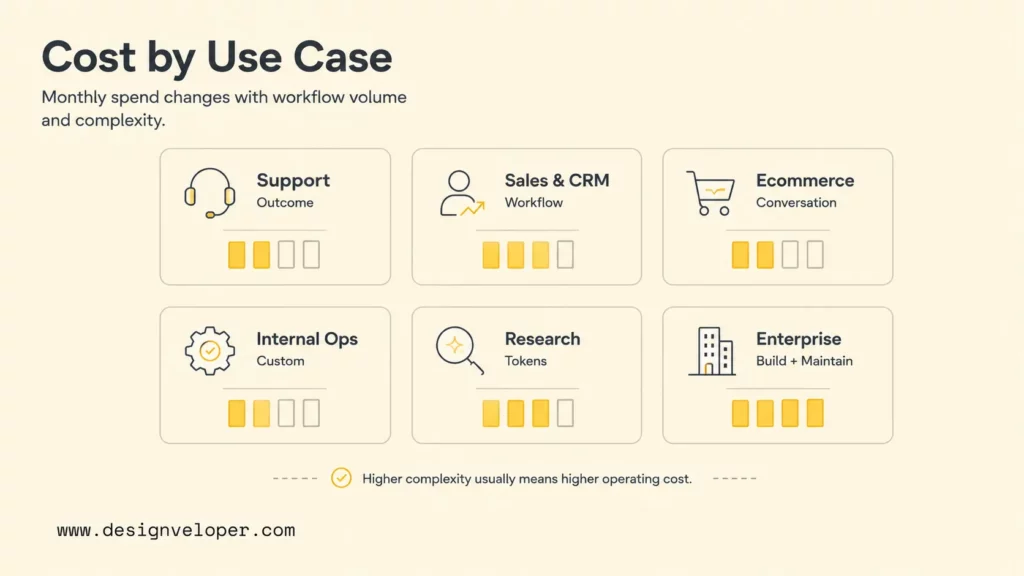
These use cases share a common cost stack, but their largest variable differs: model usage, integration depth, or the effort needed to review exceptions.
What Drives AI Agent Costs
AI agent costs depend on model choice, usage volume, workflow steps, integrations, data, monitoring, and human review. Two agents with the same interface can have very different bills: one may answer short questions with a small model, while another processes long documents and makes several tool calls.
- Model choice and API usage: premium models cost more but may reduce retries for hard tasks. Compare official API pages such as OpenAI model pricing, Claude model pricing, and Azure OpenAI pricing before estimating run cost.
- Token consumption and context length: long prompts, large retrieved documents, verbose tool outputs, and long answers increase input and output tokens.
- Task volume, conversations, credits, or resolutions: monthly traffic turns a cheap unit price into a real bill. Always model low, expected, and high-volume scenarios.
- Tool calls, retries, and multi-step reasoning: agents often call search, databases, CRMs, calendars, payment systems, or internal APIs. Each call can add latency, cost, and failure paths.
- Workflow complexity and integrations: private business systems require authentication, permissions, schema mapping, testing, and fallback behavior. These duties are part of broader AI in software development, not only model setup.
- Memory, vector search, and orchestration: persistent memory and RAG add storage, indexing, retrieval, reranking, evaluation, and deletion requirements. Complex AI agent orchestration can also increase tool calls and testing effort.
- Security, monitoring, and human escalation: agent logs, trace review, guardrails, and escalation queues are operating costs, not optional extras. The OpenAI Agents SDK tracing documentation describes trace records for LLM generations, tool calls, handoffs, guardrails, and custom events, which are the same artifacts teams need for debugging and governance.
Cost control should be designed into the architecture. Use smaller models for classification and routing, cache stable context, cap maximum steps, summarize long documents before repeated use, and route high-risk actions to humans. Also create budget alerts per agent, tenant, workflow, and customer segment. A single global AI budget is too blunt for production operations.
AI agent cost stack
Seats, agents, channels, workspace, support plan.
Input tokens, output tokens, cached input, premium reasoning.
Tool calls, retries, integrations, approvals, escalations.
Cleanup, embeddings, vector storage, sync, retention.
Monitoring, QA, prompt updates, security review, maintenance.
Use this cost stack to estimate the full operating cost before comparing vendor prices. Include model usage, retries, data work, monitoring, security review, and the staff time needed to handle exceptions.
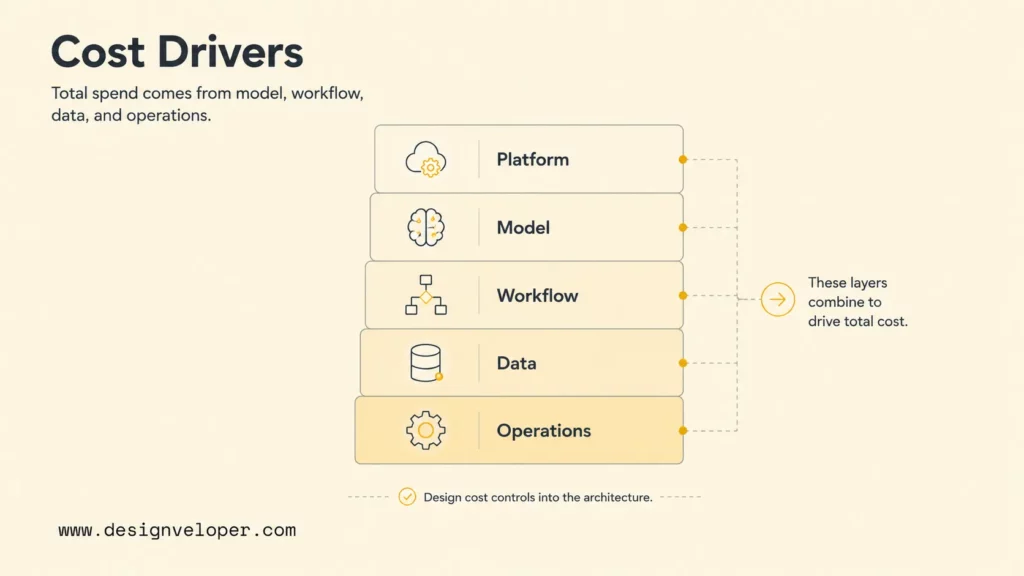
Once these components are visible, compare vendor quotes on the same workload and service boundary. A platform-only rate and a fully operated workflow are not equivalent offers.
Hidden AI Agent Costs Teams Often Miss
Hidden AI agent costs often emerge when a controlled pilot meets real users, variable traffic, and incomplete business data. Production budgets need to account for retries, exceptions, review queues, security work, and integration failures—not just the model calls in a successful demo.
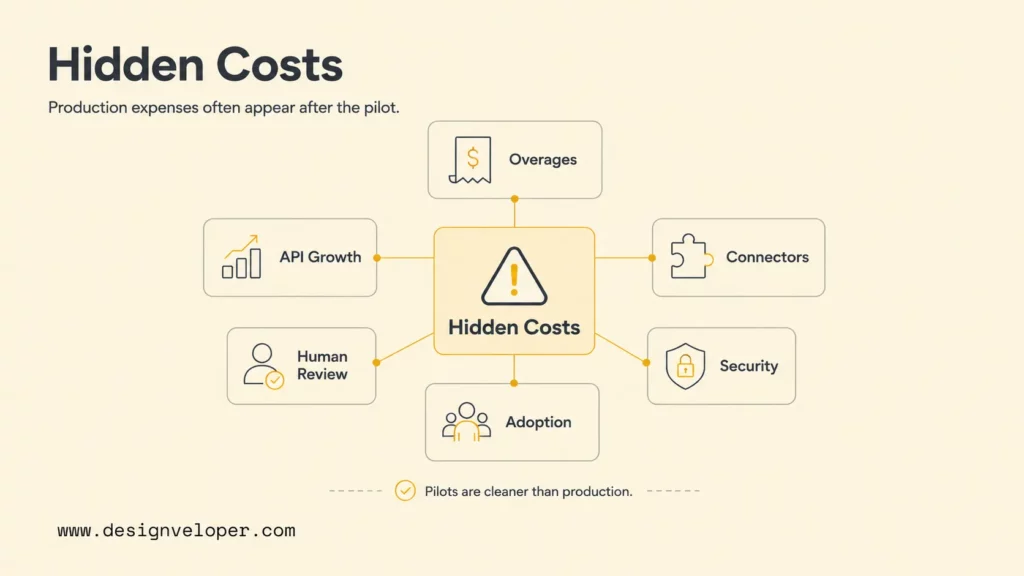
- Overage fees from task, credit, or conversation limits: volume spikes, seasonal support, or repeated retries can push usage past included limits.
- Rising API costs as usage scales: longer prompts, bigger models, and more output tokens can make a popular agent materially more expensive.
- Premium integrations or connector limits: CRM, ERP, ecommerce, ticketing, voice, analytics, and warehouse connectors may be priced separately.
- Failed resolutions that still trigger charges: a conversation may count as an outcome even when the customer returns later or a human fixes the issue.
- Human escalation and review time: safe agents need exception handling, QA sampling, and review workflows for high-impact actions.
- Poor adoption or workflow mismatch: an agent that employees or customers avoid still costs money through subscriptions, maintenance, and opportunity cost.
Security is another hidden cost. The OWASP Top 10 for LLM Applications 2025 includes risks such as sensitive information disclosure, prompt injection, vector and embedding weaknesses, excessive agency, and unbounded consumption. AI agents touch tools and business systems, so security review must cover permissions, audit logs, prompt-injection resistance, data retention, and emergency shutoff.
Related reading:
- Agentic AI Security: Risks, Core Architecture, Solutions
- Agentic AI Architecture: Components, Workflow, Design Patterns
- A Practical Guide To AI Agent Architecture With Diagrams
A pilot proves that an agent can answer. Production pricing must prove that the agent can answer, act, fail safely, and stay affordable under real traffic.
Use this list to check whether a quote includes the work needed to operate the agent, not just to configure its first response.
Off-The-Shelf Vs Custom AI Agent Costs
Off-the-shelf AI agents are faster to start and easier to budget. They work best when the business process already matches the vendor’s product shape, such as helpdesk automation, sales qualification, ecommerce support, scheduling, or knowledge-base answers. The buyer pays for speed, packaged integrations, vendor support, and standard analytics.
Free or open-source agents can reduce platform fees, but they do not remove setup, hosting, model API, vector database, security, integration, and maintenance work. A no-license prototype can still become expensive if engineers spend weeks wiring authentication, retrieval, monitoring, and exception handling. Open-source is strongest when the team has engineering capacity and wants architectural control.
Custom AI agents cost more upfront but fit private data, complex workflows, integrations, and governance needs better. A custom build can choose cheaper models for easy steps, expensive models only for hard steps, and deterministic code for operations that should not depend on LLM judgment. It can also integrate with existing dashboards, approval flows, CRM records, finance systems, or internal tools.
For general engineering scope, use Software Development Costs: Guide to Estimate Your Project as a separate reference. Add agent-specific model usage, evaluations, and human review as their own cost lines.
| Option | Upfront cost | Recurring cost | Use when | Main risk |
|---|---|---|---|---|
| Off-the-shelf platform | Low to medium. | Subscription, outcome, seat, or usage fees. | The workflow matches standard support, sales, or ecommerce patterns. | Vendor limits and overage fees. |
| Open-source or self-hosted stack | Medium engineering time. | Hosting, model APIs, storage, maintenance, and security. | The team needs control and has technical capacity. | Hidden maintenance workload. |
| Custom AI agent | Medium to high discovery and development. | Infrastructure, model usage, monitoring, support, and iteration. | The workflow uses private systems, approvals, or regulated data. | Scope creep without a clear ROI metric. |
When a custom agent must fit into a larger product or operational workflow, Designveloper’s AI development services can support workflow discovery, system integration, human approval design, testing, and post-launch monitoring. The right build decision depends on whether those capabilities solve a real gap that packaged tools cannot safely cover.
For a deeper dive, read:
- How To Build And Use AI Business Process Automation Effectively
- AI Chatbot Integration: A Practical Guide to Connecting Your Systems
- AI Chatbot Development: Types, Process, Costs, And Use Cases
To compare bids, hold the workflow, expected volume, contract length, quality threshold, and support window constant. Separate one-time discovery and integration from recurring spend.
Also name who owns connector updates, data export, security patches, incident response, and exit support. A packaged plan may assign some work to the vendor; self-hosting shifts it to the in-house team, while a custom build should state those duties in its scope.
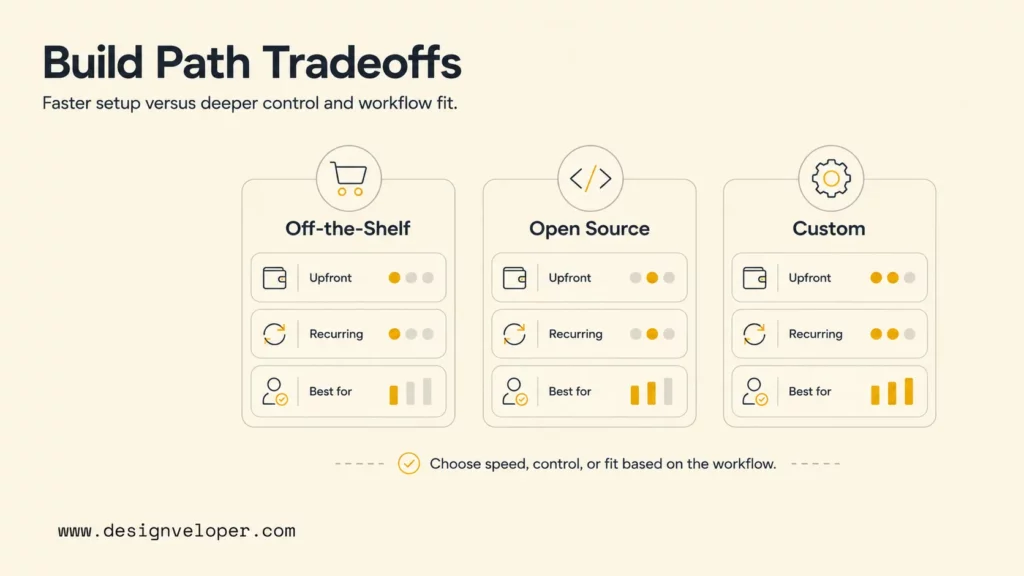
Compare options only after aligning scope: a subscription quote and a custom-build estimate may assign integration, security, and ongoing support to different parties.
AI Agent ROI Depends On Workflow Fit
AI agent ROI depends on workflow fit and a baseline measured before launch. Count task volume, handling time, completion quality, rework, escalations, and labor cost. Financial value comes from capacity that is actually redeployed, measurable cost avoided, or improved revenue or quality—not from assuming every saved minute becomes cash savings.
- Start with one high-impact workflow. Choose a workflow with measurable volume, repeatable steps, available data, and a clear owner. Avoid starting with vague “AI assistant” scope.
- Estimate the full monthly cost. Include platform fees, API usage, hosting, setup, maintenance, monitoring, human review, and escalation time.
- Track cost per successful task, resolution, or workflow outcome. Do not stop at conversations handled. Measure whether the agent actually completes the work to an acceptable quality level.
- Optimize prompts, model choice, tools, and escalation rules over time. Use traces, analytics, and human review to reduce expensive retries and low-value automation.
- Compare savings with adoption and quality. An agent that saves labor but frustrates customers or creates manual cleanup does not have durable ROI.
AI agent ROI scorecard
| Question | Healthy signal | Warning signal |
|---|---|---|
| Workflow volume | Enough repeated tasks to amortize setup. | Low volume or constantly changing work. |
| Success metric | Cost per accepted outcome is tracked. | Only response count or demo quality is tracked. |
| Data readiness | Knowledge, systems, and permissions are maintained. | Answers depend on stale documents or manual copy-paste. |
| Escalation | Human handoff is defined and measured. | The agent fails silently or loops. |
Monthly net value is the verified value created by the workflow minus the full monthly agent cost. If your finance team uses a percentage ROI, calculate (verified value − full agent cost) ÷ full agent cost × 100. Keep the value assumptions separate from cost reductions that are only theoretical, and review the calculation with actual adoption, accepted outcomes, rework, and human-review time after launch.
Use the scorecard to test workflow fit before committing to a vendor rate or custom build estimate.
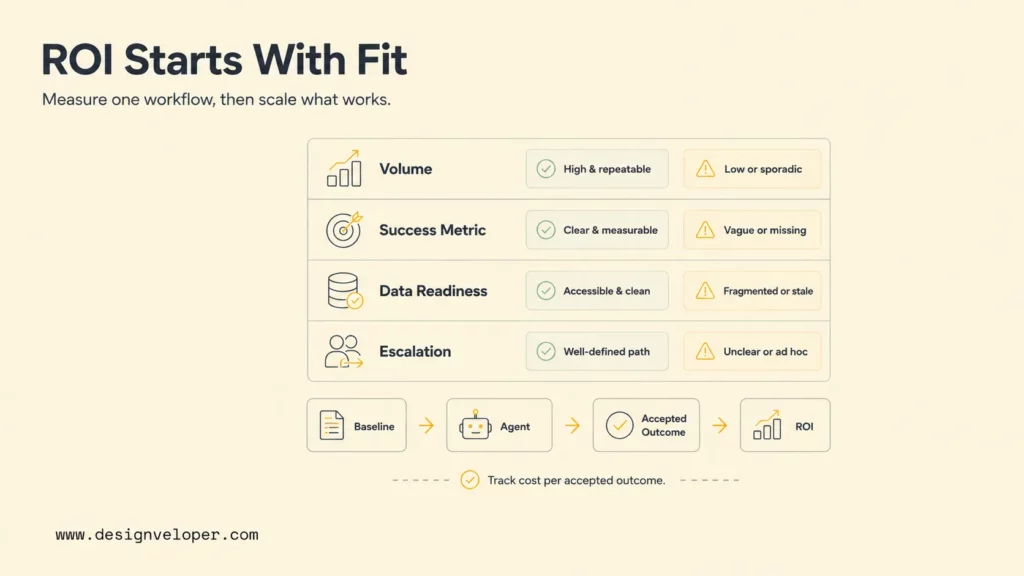
A pilot decision is stronger when the team can explain both the expected cost per accepted outcome and the conditions that would make the estimate change.
FAQs About AI Agent Pricing
A quote is meaningful only when the billing unit, included services, and quality rules match the workflow. These answers cover the remaining budget questions without repeating the pricing-model overview.
How Expensive Is An AI Agent?
There is no single market-wide price because vendors bill different units and include different services. A packaged plan may charge by seat or outcome, while a custom agent also requires discovery and engineering. Compare the full recurring cost and any one-time build work with the cost per accepted task, not just the starting rate.
How Much Does An AI Agent Cost Per Month?
Use the monthly formula above and include platform fees, billable volume, model usage, hosting, integrations, monitoring, support, and human review where applicable. At Fin’s displayed entry rate and minimum, the outcome component alone calculates to $49.50 for the month; it is not a market average or a full operating budget.
Is An AI Agent Free?
An AI agent can be free to test when a vendor offers a trial or when developers use open-source tools. A production AI agent is rarely free because model calls, hosting, data preparation, security review, integrations, monitoring, and maintenance still cost money. Free tools are useful for learning, but buyers should estimate the operating cost before putting an agent into a business workflow.
What Costs Are Often Excluded From An AI Agent Quote?
Quotes may exclude model usage, overages, setup, data cleanup, connectors, hosting, monitoring, security review, maintenance, and human handling of exceptions. Ask the vendor to state what is included, what triggers an extra charge, and how failed or reopened tasks are billed.
Treat a quote as an assumption set, not a total. Confirm billable units, minimums, overages, included integrations, and review responsibilities in writing; compare measured cost per accepted outcome with the current workflow, then revisit the estimate using pilot data.
Also published on

Share post on










Related Articles


AI Agent Case Studies: 10 Real-World Examples Across Industries
AI Agent Case Studies: 10 Real-World Examples Across Industries Published October 21, 2026
How Will AI Affect Software Development? Complete Guide In 2026
How Will AI Affect Software Development? Complete Guide In 2026 Published October 21, 2026
How To Build A RAG System: Step-By-Step (New Guide)
How To Build A RAG System: Step-By-Step (New Guide) Published October 19, 2026


















