
















What Is Web Design? Principles, Process, And Practical Examples

KEY TAKEAWAYS:
- Web design plans a website’s content hierarchy, layout, visual interface, navigation, interactions, and user experience; development makes those decisions work in the browser.
- The first design test is a real task: can a visitor find the right information, use the page on a phone or keyboard, and recover from an error?
- Design quality depends on readable content, responsive layouts, accessible controls, useful feedback, and performance, not visual polish alone.
- Start with audience and page goals, sketch the content and flow, test a prototype, then hand off states and measure task success after launch.
A visitor opens a service page on a phone, scans the first screen, looks for proof, and tries to ask a question. The colors may look polished, yet a buried form or unclear menu can still end the visit. Web design is concerned with these choices: what information appears first, how people move through it, and how the interface responds when something goes wrong. For a beginner, the useful distinction is between planning the experience and building it in a browser. For a business, it is between a page that merely looks finished and one whose main task can be tested. The sections that follow connect the definition to visible page decisions, published project contexts, design principles, and a practical workflow.
What Is Web Design?
Web design is the planning and creation of a website’s structure, visual appearance, content presentation, and user experience. Designers organize what people see and how they move or act across pages, then express those decisions in wireframes, prototypes, interface rules, and tested layouts. Web development implements those decisions in a working site; the two roles often collaborate.
Consider a service homepage: the first screen must tell a visitor what is offered, proof needs an understandable place in the page, and an enquiry form must explain errors on a narrow screen. A content map sets the order; a wireframe tests hierarchy; a responsive prototype shows navigation and form states. A developer then builds and tests that experience in the browser. That sequence makes the design/development boundary tangible without treating the two as isolated phases.
The right design depends on the website’s purpose. A marketing website may guide a visitor from a service explanation to proof and a contact form. An ecommerce website must support product discovery, comparison, checkout, payment, and order updates. A web application may need onboarding, permissions, dashboards, notifications, and recovery from failed actions. These are UX design questions about the journey as well as UI design questions about the visible controls.
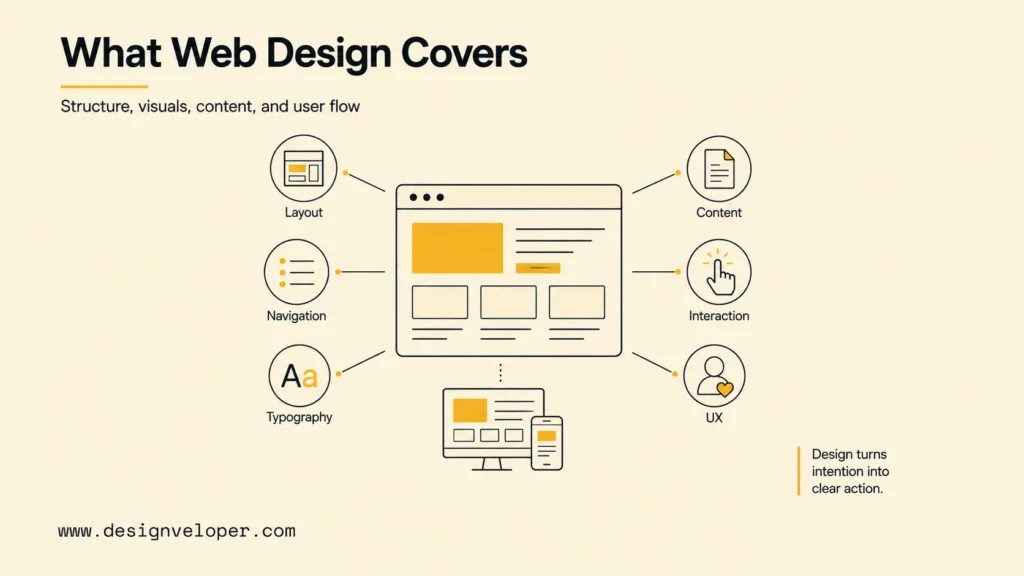
In practice, web design usually brings together these connected disciplines:
- User experience (UX): the structure, flow, and decisions that help people complete a goal.
- User interface (UI): the visual and interactive parts that people see, read, and operate.
- Information architecture: the organization of pages, content, labels, navigation, and relationships.
- Content design: the words, images, media, and messages that explain what users need to know.
- Interaction design: the behavior of controls, forms, menus, loading states, success states, and errors.
- Responsive and accessible design: an experience that remains usable across screens, input methods, and assistive technologies.
Web design can be done with a template, a content management system, or a custom product interface. The tool or platform matters less than whether the chosen design supports the content, users, technical constraints, and business goal.
Explore more:
- 9 Web Design Principles Must Be Obeyed
- 6 Key Web Design Recommendations and Best Practices
- 5 Skills for Web Design Every Designer Should Know to Grow in Your Career
Types Of Web Design By Website Goal
There is no single web design pattern that fits every site. The website’s goal changes the content hierarchy, navigation, interaction states, and evidence users need before they act.
| Website type | Primary design job | Useful evidence to review |
|---|---|---|
| Marketing or B2B website | Explain the offer, build trust, and guide qualified visitors to an enquiry or consultation. | Message clarity, proof visibility, form completion, qualified leads, and sales feedback. |
| Ecommerce website | Help people discover, compare, buy, and track products with confidence. | Search refinement, product comparison, checkout errors, payment recovery, and support requests. |
| Content or publishing website | Make a large body of information findable, readable, and connected. | Navigation success, internal-link use, search exits, reading behavior, and editorial maintenance. |
| Web application | Support repeatable workflows with accounts, data, permissions, feedback, and recovery. | Task completion, error recovery, permission clarity, support load, and repeated use. |
A portfolio site may prioritize visual storytelling, while a dashboard may prioritize density and speed. The correct choice comes from the user task, not from whether a pattern is currently popular.
Web Design Examples By Website Goal
These examples show how the website’s main job changes the design work. The first three are illustrative scenarios, while the two linked project pages document actual product contexts; neither is a claim of measured conversion improvement.
- B2B service website: The design should explain the problem, show credible proof, answer scope questions, and guide qualified visitors to a clear enquiry or consultation path.
- Ecommerce website: The experience should help shoppers discover products, compare options, understand delivery and payment, complete checkout, and recover when an item or payment is unavailable.
- Web application: The interface should support repeat tasks through dashboards, forms, permissions, notifications, empty states, and clear feedback when data changes.
The published Aha ecommerce project describes a high-performance, customizable shopping platform with cost constraints. Its public solution notes layered caching, reusable web components, and configurable content conditions. The page documents the technical and content-management decisions, not a before-and-after conversion test. For a designer, the lesson is to define component and content behavior with editors and engineers before promising a polished shopping experience.
The public Lumin document platform addresses PDF editing and collaboration where paper-based processes and access to documents were obstacles. Its documented workflow includes viewing, editing, sharing, and signing files. That context calls for designers to specify tool states, document status, permissions, and error recovery rather than reuse a marketing-page layout. The project page supports the context and capabilities; it does not prove a particular UI change increased task completion.
Web Design Vs. Web Development
Web design defines the intended experience and the rules behind it. Web development implements and operates that experience with code, content systems, data, integrations, hosting, and maintenance. The two areas overlap, but they answer different primary questions.
| Area | Web Design | Web Development |
|---|---|---|
| Main question | How should the website look, communicate, and guide the user? | How should the website work reliably in a real browser and production environment? |
| Typical outputs | Research findings, user flows, wireframes, visual screens, prototypes, content rules, and component states. | Frontend and backend code, CMS setup, APIs, databases, infrastructure, tests, deployment, and monitoring. |
| Core concerns | Hierarchy, navigation, readability, interaction, accessibility, responsive behavior, and brand expression. | Rendering, security, data integrity, integrations, performance, scalability, and maintenance. |
| Technical role | HTML and CSS knowledge helps designers make realistic, buildable decisions. | Production code turns design decisions into a working and maintainable website. |
A strong project connects design and development early. A handoff should include more than polished screenshots. Developers also need component variants, breakpoints, content limits, image behavior, focus states, loading rules, error messages, analytics events, and acceptance criteria.
For a closer comparison, read Web Design Vs. Web Development. Early collaboration helps teams find conflicts between visual ideas, data, performance, accessibility, and the actual delivery budget.
Further reading:
- What Is Website Development? Basics For Beginners
- What HTML Is: Everything You Need To Know
- What Is CSS? How It Styles Websites And Where AI CSS Tools Fit In
What Makes Good Web Design? Key Quality Elements
Good web design makes the main task clear and usable across devices. A polished page can still fail if its navigation hides information, its form never explains errors, or its text becomes difficult to read on a phone. The four elements below show where to check that experience.
Layout, Content, And Navigation
Layout gives a page an order. Visual hierarchy uses position, size, spacing, contrast, and grouping to show what matters first. A user-friendly page should answer three questions quickly: Where am I? What is this page about? What can I do next?
Content and navigation should reflect the questions users bring to the website. A service page may need a clear problem statement, proof, process, scope, and next action. A product page may need specifications, availability, delivery information, reviews, and support. Organizing pages around internal departments often forces visitors to translate the site’s structure before they can act.
Navigation labels should describe the destination in user language. Read web navigation examples for patterns that make page relationships easier to understand.
Visual UI And Interaction Design
Color, imagery, buttons, forms, and spacing create the visible interface. The goal is not to make every element stand out. The goal is to create a clear order so users know what to read, what to select, and what will happen next.
Interaction design covers the states that are easy to miss in a static mockup. A search may return no results. A payment may fail. A form may need to explain a missing field. A long request may need a progress state. Small micro-interactions, such as a clear focus change or loading message, can make these moments easier to understand without adding visual noise. A good interface gives people feedback and a way to recover instead of leaving them to guess.
Typography And Readable Content
Typography should balance brand expression with legibility. Choose type sizes, line lengths, spacing, and contrast that help people scan headings and read the main copy without strain.
Content also needs a clear shape. Use short paragraphs, descriptive headings, useful lists, and familiar words where they fit. Check the same content on desktop, laptop, tablet, and mobile screens so the message remains readable and functional across devices.
Responsive, Accessible, And Fast Design
Responsive design lets a website adapt its layout, media, content, and controls to different screen sizes. It is not simply a smaller desktop page. Designers need to decide how columns collapse, how menus open, which content stays visible, and how users complete the main task when space is limited. MDN’s responsive design guidance explains the role of flexible layouts, media, and CSS rules. See What Is Responsive Web Design? for a deeper explanation.
Accessibility should be part of the design system from the start. The Web Content Accessibility Guidelines (WCAG) 2.2 organize accessibility around content that is perceivable, operable, understandable, and robust. A practical review checks keyboard access, visible focus, text alternatives, form labels, contrast, zoom, reflow, motion, and screen-reader behavior.
Performance also begins before code is written. Large hero videos, too many font files, heavy animations, and complex components can increase page weight. Google’s Core Web Vitals focus on loading, responsiveness, and visual stability through LCP, INP, and CLS. Google’s mobile-first indexing guidance also makes mobile content and behavior important to the design plan. Design decisions should leave room for those goals.
Why Professional Web Design Matters For Business Results
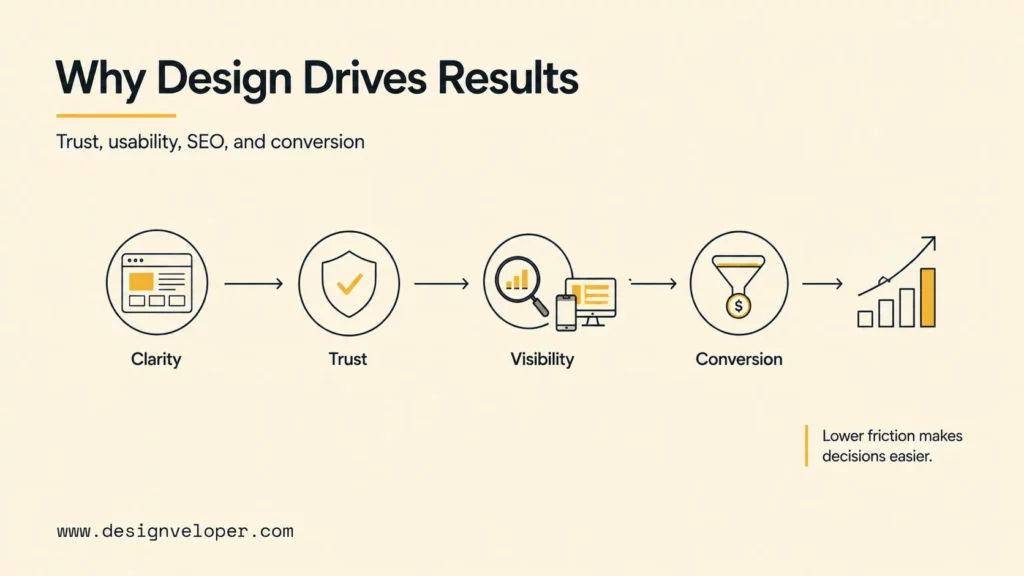
Professional web design affects business results because every page asks users to spend attention and make decisions. A clear, credible experience helps visitors understand an offer, find evidence, complete a form, or finish a purchase. Poor design creates friction even when the underlying product or service is strong.
- Offer clarity: Ask a new visitor to explain what the organization provides and who the service is for, without prompting.
- Task completion: Observe whether the target visitor can find proof, choose a product, book a call, or complete checkout; record errors, not just button clicks.
- Inclusive access: Check keyboard navigation, readable text, focus, and form labels so a separate path is not required to complete the same task.
- Delivery fit: Test realistic content, small screens, and failure states before development locks a fragile layout into code.
For example, a lead-generation page should not measure success only by clicks on a large button. The team should check whether qualified visitors understand the service, complete the form, receive useful confirmation, and reach the next sales step. An ecommerce redesign should consider search refinement, product comparison, checkout errors, payment recovery, and post-purchase support.
Choose a small set of measures before launch. Depending on the website, those measures may include qualified enquiries, completed purchases, bookings, task completion, form error rate, search refinement, support requests, accessibility findings, or Core Web Vitals. A baseline, an owner, and a review cycle turn design feedback into a decision process.
Web Design Process For A Business Website
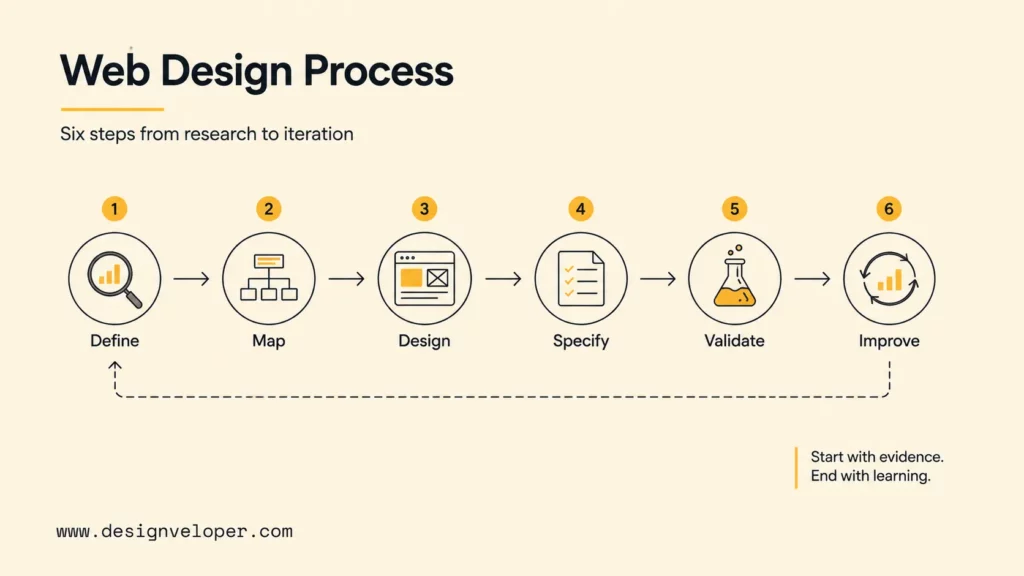
A reliable web design process moves from evidence to structure, then from structure to a tested experience. The exact number of phases can vary, but the sequence below gives a business website a clear path from discovery to improvement.
Example: From Business Goal To Design Evidence
Suppose a software company wants more qualified consultation requests from its website. The design team should not start with a hero section alone. It should connect the business goal to observable evidence and a named reviewer.
| Project question | Design artifact | Review owner and signal |
|---|---|---|
| Who is the page for, and what do they need to understand? | Audience notes, search-intent map, message hierarchy, and content brief. | Product or marketing owner reviews clarity; test users can state the offer and fit. |
| What path should a qualified visitor follow? | User flow, wireframe, navigation labels, proof modules, and form states. | Sales owner checks qualification questions; UX reviewer checks task completion and recovery. |
| Can the design be built and maintained? | Responsive screens, component rules, content limits, analytics plan, and handoff notes. | Developer checks states and constraints; content owner checks publishing effort and reuse. |
| Did the launch improve the intended task? | Baseline, event definitions, QA checklist, and post-launch review plan. | Marketing and product owners review qualified enquiries, form errors, and user feedback on a fixed cadence. |
1. Define Audience, Goals, And Conversion Actions
Start by identifying the people the website must serve and the decision each important page should support. Review customer questions, sales conversations, support tickets, search queries, analytics, and existing content where available.
Set one primary goal for each key page. The goal may be to request a quote, compare products, book a call, read a guide, start a trial, or complete a task. Clear goals prevent the design from giving equal weight to every message.
2. Map Content, User Flows, And SEO Requirements
Turn audience needs into a content map and information architecture. Group related pages, name navigation items in user language, define internal links, and identify which page should answer each search intent.
Map the main path from entry to completion. Include the questions users may ask, the proof they need, and the points where they may leave. Add edge cases such as empty search results, unavailable items, invalid input, failed payments, permission limits, and users who need human help.
3. Create Wireframes And Responsive UX/UI Designs
Use wireframes to test hierarchy, content priority, page order, and navigation before visual polish makes weak decisions harder to change. A wireframe should show the main message, supporting evidence, content modules, and primary action.
Move into responsive UX and UI design after the structure is clear. Define type, color, spacing, imagery, components, breakpoints, interaction states, and motion with realistic copy. Test long headings, missing images, dense content, translated labels, and actual error messages.
4. Prepare Design Handoff For Development
A design handoff should explain how the experience behaves, not only how one screen looks. Document component variants, content limits, breakpoints, image rules, loading states, focus behavior, validation, errors, analytics events, and acceptance criteria.
Review complex interactions with developers before approval. A design may need to change when an API returns variable data or a permission rule hides an action. The same applies when a page must meet a performance budget or a third-party system limits the available flow.
5. Test Usability, Accessibility, Speed, And Conversion Paths
Test representative tasks with realistic content and devices. Watch where users hesitate, misunderstand a label, miss evidence, or fail to recover from an error. Use the findings to prioritize a small number of changes rather than redesigning everything at once.
Run technical and accessibility checks before launch. Review keyboard operation, focus order, contrast, zoom, reflow, screen-reader labels, form errors, link behavior, mobile layouts, image weight, loading, responsiveness, and visual stability.
6. Launch, Measure, And Improve With Analytics
Launch with a baseline for the page and product goals. Define which events matter, who owns the review, and how often the team will inspect the data. A measurement plan may include form completion, checkout success, task completion, search refinement, support requests, or performance signals.
Use live behavior to guide the next design decision. Segment results by device, audience, traffic source, or task when those differences affect the experience. Protect useful content and working URLs during a redesign so a visual change does not create avoidable SEO or navigation problems.
How AI Can Support Web Design
AI can support parts of the web design workflow, but it does not replace user research, design judgment, technical review, or accountability. The most useful applications reduce repetitive work while leaving important decisions with the team.
- Research synthesis: summarize interviews, support tickets, survey responses, and usability notes into themes that the team can review.
- Content and hierarchy exploration: suggest page structures, navigation labels, content groupings, and alternative calls to action for human evaluation.
- Prototype exploration: create early layout or visual directions that help a team discuss an idea before investing in detailed screens.
- Accessibility checks: flag unclear labels, missing states, reading-order risks, or copy that may need a simpler explanation.
- Edge-case planning: draft test cases for empty states, slow responses, validation errors, permissions, and recovery paths.
- Documentation and handoff: organize component notes, content rules, design decisions, and analytics event descriptions.
Human review remains necessary for factual accuracy, brand decisions, accessibility, privacy, licensing, bias, security, and production quality. A generated screen is an idea to test. It is not evidence that users understand the page or that the design can be maintained in production.
Teams that use AI in web design should also define what data may be shared, where outputs are stored, who approves generated content, and how the team records changes. See our guide to web design tools for a broader view of the tools that support research, design, handoff, and testing.
Clear feedback, accessible layouts, semantic page structure, and task-focused design are lasting fundamentals, not trends tied to a year. AI-assisted search or recommendations may help a specific task, but ordinary navigation should remain available. Explain uncertainty, protect user data, and test whether the feature actually helps visitors finish their work.
Choosing The Right Web Design Approach
The right approach depends on content complexity, publishing needs, differentiation, integrations, ownership, risk, and the expected life of the website. Choose the least complex option that can support the current goal and credible near-term needs.
| Approach | Good Fit When | Main Trade-Off |
|---|---|---|
| Website builder or template | The site is small, content is stable, and integrations are limited. | Faster setup can come with limits on customization, ownership, performance, or future migration. |
| CMS-based website | Editors need regular publishing, reusable templates, and content control. | Governance, roles, extensions, security, and content quality need ongoing ownership. |
| Custom website | Brand, content, user journeys, or integrations need a tailored experience. | Discovery, engineering, maintenance, and technical ownership require more planning. |
| Web app or product interface | Signed-in users manage data, collaborate, or complete repeatable workflows. | Permissions, data states, onboarding, support, and failure recovery add design scope. |
For example, a five-page service site with infrequent updates may fit a builder. A publication with several editors needs a CMS and content governance. A signed-in document workspace demands custom interaction states, permissions, and a plan for engineering ownership. Make that choice against actual publishing and user tasks rather than a visual demo.
Before work begins, agree on who owns content, accessibility review, design-system updates, analytics, integrations, support, and future experiments. A fast launch becomes difficult to maintain when nobody owns the experience after release.
When a project includes accounts, workflows, data, or third-party systems, review design alongside implementation. Designveloper’s web development services can support the engineering work needed to turn a design into a maintainable website or product interface.
FAQs About Web Design
What Does A Web Designer Do?
A web designer plans the structure, content presentation, visual system, interactions, and user experience of a website. Depending on the team, the role may include user research, UX design, UI design, content planning, prototyping, design systems, responsive states, accessibility, and usability testing.
Is Web Design Hard To Learn?
Web design is learnable, but it combines several skills. Beginners usually need to practice visual hierarchy, typography, layout, responsive behavior, accessibility, content structure, and basic HTML and CSS. Progress comes faster when each project solves a clear user problem instead of focusing only on visual effects.
How Do I Start Learning Web Design?
Start by studying how websites organize content and guide a task. Recreate simple page layouts, learn basic HTML and CSS, practice responsive design, and review real websites for hierarchy, navigation, forms, and accessibility. Build small projects, test them with other people, and use the feedback to improve one decision at a time.
What Is The Difference Between UI And UX Design?
UX design focuses on the user’s goals, structure, flow, and ease of use. UI design focuses on the interface’s visual and interactive presentation. UI is part of the wider web design process, while UX decisions influence the journey from entry to task completion.
Do Web Designers Need To Know How To Code?
Web designers do not always need to write production code, but basic HTML, CSS, responsive layout, accessibility, and browser behavior are valuable skills. Technical knowledge helps designers create realistic components, explain states, and collaborate with developers.
Start With One Page And One User Task
Pick an important page and write down what its visitor needs to understand or do. Sketch the content order, prototype the main path on a phone, test it with someone outside the team, and record where the task breaks. Those observations give designers and developers a useful brief and a baseline for improvement after launch.
If you are planning a larger redesign, contact Designveloper with the page goal, content needs, and required integrations so the team can scope the work against a real workflow.
Also published on

Share post on










Related Articles


What Is Web Design? Principles, Process, And Practical Examples
What Is Web Design? Principles, Process, And Practical Examples Published September 24, 2026
Web Design Vs. Web Development: What’s the Difference?
Web Design Vs. Web Development: What’s the Difference? Published August 03, 2026
Web Design Process: 7 Steps That You Need to Know
Web Design Process: 7 Steps That You Need to Know Published April 23, 2026


















