
















Full Guide of Ecommerce Website Development 2026

Not only does a well-designed eCommerce site look nice, but it also works well. If you do it right, it’ll lead to real sales and profits. No matter the size of your business, eCommerce success can make the order process easier for your customers. It also helps build brand loyalty, which will grow your company. Knowing the ins and outs of eCommerce website development is extremely important in this day and age.
Here, we’ll show you how to make a proper eCommerce website and what you need to do to start your own online business, from branding to shipping. Let’s dive in!
What is Ecommerce Website Development?
eCommerce stands for electronic commerce. It refers to buying and selling products or even services over the Internet. Amazon, eBay, Alibaba, and Etsy are considered outstanding eCommerce platforms for both individual customers and business clients.
So, when it comes to eCommerce website development, we often think of steps, tools, and skills needed to craft an eCommerce site. This involves developing front-end and back-end features, like check-out systems, payment processing, and site security.
Today, eCommerce website development is in high demand. Why does this happen?
As such worldwide internet adoption is increasingly high, the number of online buyers will increase accordingly. Emarketer predicted that global retail eCommerce sales will reach $6.88 trillion by 2026.
Unsurprisingly, the growing popularity of eCommerce led to an increase in its websites. Around 30.7 million eCommerce sites are recorded in 2025, dominated by the United States and China with key players like Amazon and Alibaba.
As eCommerce websites are so popular with customers, having one for your business can help you increase conversions and profits. However, a poorly-developed website can ruin your audience’s trust for your company. But how can you design the best website while standing out among a myriad of eCommerce websites?
This concern encouraged the rapid growth of website development services. Accordingly, their market will be worth more than USD 130 billion by 2032. These services give your business enough tools and power to create websites that get closer to your current and potential customers.
Recommended reading: 6 Best eCommerce App Development Companies
Options When Building an Ecommerce Website
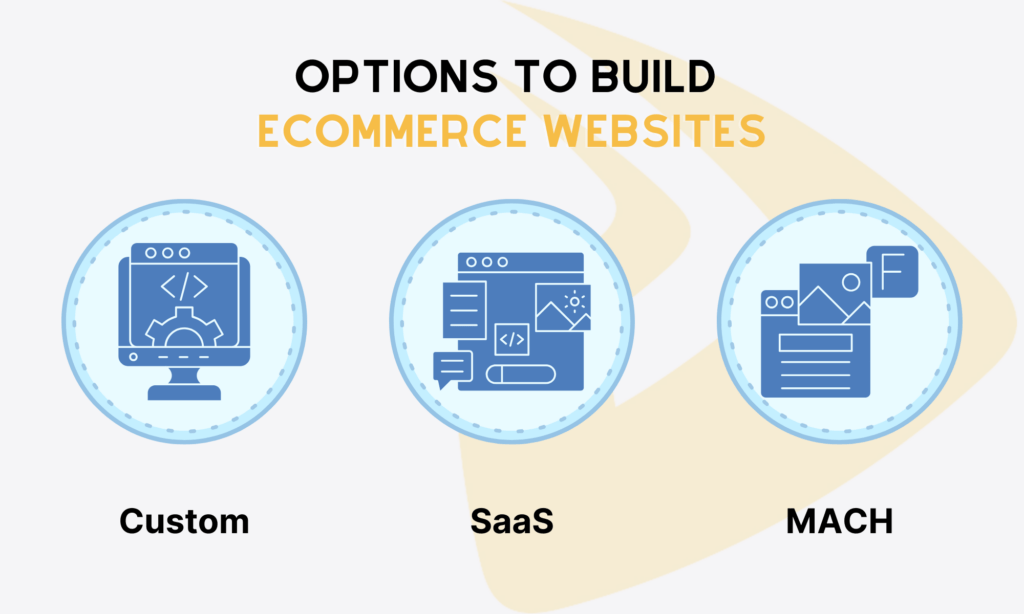
Before learning about feature lists, why don’t we stop and look at how many options you can choose to develop an eCommerce website? They include:
Build From Scratch
As the name states, building an eCommerce website from scratch means having a development team to build the architecture and code your site from A to Z. No templates or pre-built UI components are needed.
Do you have very specific requirements for you site, like unique pricing logic, custom checkout flows, or custom integrations with your existing infrastructure? If so, we encourage you to build a custom website instead of choosing off-the-shelf builders. Tailoring allows the site to align exactly with your business goals and visions.
But there’s some drawback. Building everything from zero requires significant time, money, and even strong technical skills. Not only every feature demands your attention, but your team also has web hosting, PCI compliance, security handling, and more on their hand.
For this reason, building from scratch is more ideal for large enterprises, tech-heavy brands, or those with very specific demands that SaaS solutions can’t meet. This approach gives you long-term control over your site as well.
Employ SaaS
SaaS (Service-as-a-Software) platforms reduce your burden on eCommerce website development. These platforms, typically Wix or BigCommerce, offer pre-built templates to build a website faster and with an affordable price. Instead of burying yourself in code, you can customize these templates and move design elements around the visual canvas to create an online store full of popular eCommerce features – shopping carts, product catalogues, inventory management, etc.
The big plus? These SaaS solutions – or eCommerce website builders – handle most of the heavy technical stuff on your behalf. In other words, the providers process the codebase, hosting, security patches, PCI compliance, and updates.
But the trade-off is customization. These platforms still let you to tailor your site and add more custom features, but only up to a point. You still work within their rules.
There’s vendor lock-in as well. Moving to another platform in the future is difficult, as the codebase belongs to the provider.
MACH (Microservices, API-first, Cloud-native, and Headless)
Instead of one large system doing everything, MACH breaks the eCommerce stack into smaller, independent services. Product management here. Payments there. And frontend somewhere else. All are connected through APIs. This setup allows your business to change or upgrade parts of the eCommerce system without tearing everything down.
Many love MACH for its flexibility. You can experiment, change tools, or scale specific services without touching the rest.
But it’s not for everyone. MACH is more ideal for growing brands and enterprises looking ahead, as it requires technical maturity and careful planning. If you don’t have the right development team, the architecture can become chaotic easily.
Checklist of Features and Functionality to Consider When Developing an eCommerce Website

An eCommerce website often includes some common features to work effectively:
- User-Friendly Navigation and Search
If users struggle to navigate around your site or use the search bar to find their favorite items, your eCommerce site fails for sure. So, make sure categories are clear, filters actually work, and search understands what your users mean.
- Secure and Flexible Payment Options
Your customers expect different payment choices – credit cards, digital wallets, pay on delivery, etc. Besides, they don’t want their card or bank credentials to be leaked by insecure checkout flows. So, secure payments are a must, not an option. Strong security not only protects your users’ data but also builds their trust.
- Mobile Optimization
Do you know mobile eCommerce is on the rise and will reach $2.74 trillion in 2026? Mobile designs are a must, as most users now browse on their phones. If your site can load fast and adapt smoothly on mobile gadgets, it’s a big plus.
- Product Pages That Actually Sell
Good product pages don’t just list specs, but they show clear images (with zoom if possible), authentic reviews, and descriptions that answer real questions. This helps users know whether your offerings meet their demands, hence reducing hesitation.
- Order Tracking and Customer Accounts
After checkout, your users want to know where their order is, when it arrives, and how to handle returns. So, your site needs simple dashboards and easy access to order history to facilitate order tracking.
AI is also a crucial functionality these days. It’s used to build, maintain, and manage your eCommerce website easily. Accordingly, AI can improve and streamline some eCommerce aspects as follows:
– Demand forecasting and inventory planning
– Price and promotion optimization
– Personalized product display
– Image-based search
– AI-assisted catalog and content management
– Customer service
– Fraud prevention and payment security
How to Build eCommerce Website (Step by Step Guide)
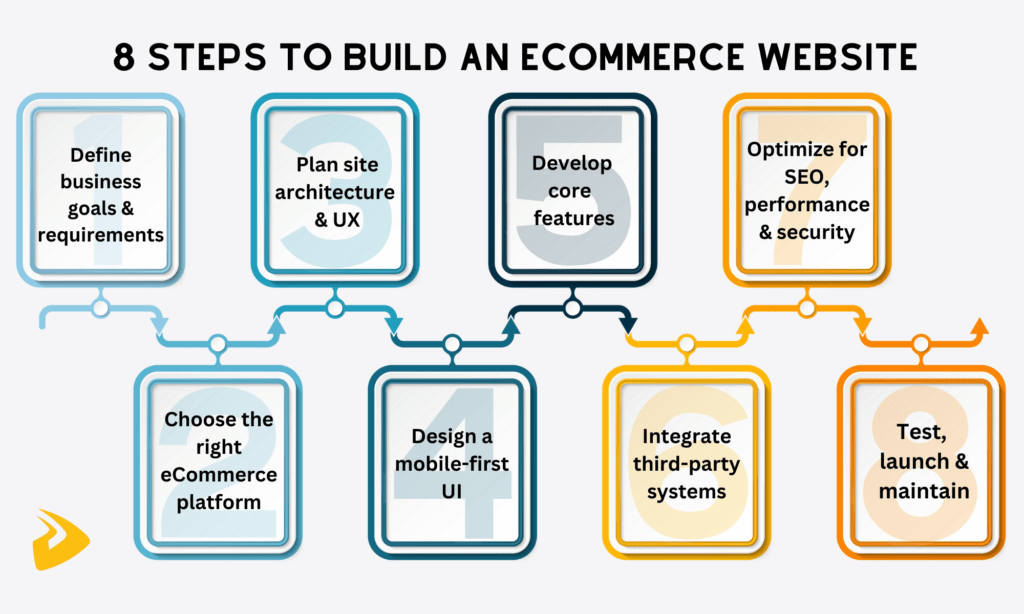
Now, we’ll move to the detailed steps of building an eCommerce website. This process can vary depending on the project’s scale and development teams. But a typical one often covers the following steps:
Step 1: Define Business Goals and Ecommerce Requirements
Clear business goals and eCommerce requirements can help your business achieve revenue more easily, as they can map out the clear path to the ultimate goal. So, in this phase, you need to do the following things:
- Write the business case by asking: What does your online store actually do? How much revenue is it expected to achieve? What profit margin is acceptable? How long will it take to earn back the investment? The answers help you create a shared target that guides smart decisions.
- Identify scope to avoid creep. This requires you to ask these questions: Which markets does your online store mainly serve? How many languages and currencies will it support? What fulfillment options are required? And more. The more specific your answers are, the more your team can focus on the final goal.
- Set budget limits, launch deadlines, compliance requirements, and other boundaries to help your team make practical choices.
- Learning about industry benchmarks (e.g., conversion rates or cart abandonment). Also, research your competitors to know how fast their sites load, which payout options they offer, and more. These actions help you understand whether the current eCommerce market meets user expectations and find an opportunity to stay competitive.
Step 2: Choose the Right Ecommerce Platform (SaaS vs Open-Source vs Custom-built)
Next, choose the right eCommerce platform to build your eCommerce website. There’re many options, including:
- SaaS platforms offering pre-built components and hence ensuring fast time-to-market. But you have to work in their systems and may encounter vendor lock-in. Some popular SaaS platforms include BigCommerce, Shopify Plus, and Wix.
- Open-source platforms (e.g., WooCommerce, PrestaShop, or Magento) promising no vendor lock-in and flexibility. But they demand technical skills.
- Custom builds giving you full control over your eCommerce website and its codebase. You need a dedicated development team to build a tailored site from scratch and handle ongoing maintenance and compliance requirements. The cost is higher, and the timeline is longer, of course.
There’s no one-size-fits-all choice here. The choice depends heavily on your project complexity, budget limits, launch deadlines, and more. No matter what you choose, compare their features, ability to handle traffic surges, integration fit, security handling, and maintenance support.
Step 3: Plan Website Architecture and User Experience
This phase requires your team to draw clear website architecture and map out customer journeys on your site.
This architecture visually shows pages, navigation, flows, and logic. It tells you how your potential customers move around your site and how they can reach the right destination (product pages, checkout screens, or FAQ sections). Also, you anticipate what will likely make them hesitate and where they likely visit the most.
Your users can tell whether your site’s architecture is good or bad. If you don’t plan website architecture well, users may get lost in your site and immediately leave it without second thoughts. And your team may face expensive rework and upgrade later.
Step 4: Design a Mobile-First Ecommerce Interface

Most people are using mobile devices to surf eCommerce websites. So prioritizing a mobile-responsive design isn’t an option, but a must. This allows your team to approach a wider audience on a small screen, but not give up desktop users.
Here’s something you should remember in this phase:
- Prioritize the most important features and actions on the mobile’s user interface (UI). Space on mobile is limited. So, just focus on what users care most about: browsing products, viewing details, adding to cart, and checking out.
- Design for thumbs, not cursors. Mobile users often tap with one hand. So, buttons need to large and spaced out enough for their thumbs to reach naturally.
- Create simple, clear, and vertical layouts. Accordingly, your team should focus on organizing content logically to encourage vertical scrolling and avoid complex grids or unnecessary components.
- Ensure text readability by using readable font sizes, sufficient line spacing, good contrast, and concise product descriptions.
- Compress large images and lazy-load content to increase loading speed.
- Ensure that mobile checkout requires minimal input by using autofill, saved addresses, and simple forms.
Once the mobile-responsive design works well, scale up to desktop later.
Whether you build for mobile or desktop, you still must ensure design elements align with your brand’s identity. However, each designer may have a visual preference, leading to inconsistency among design elements. To resolve this issue, for example, we at Designveloper leverage Google Material 3 to ensure all design elements are consistent and to create effective UI/UX designs.
Recommended reading: 10 Best eCommerce Website Design Services for Success
Step 5: Develop Core Ecommerce Features
Now the real building begins. In this phase of eCommerce website building, you should focus on the most crucial eCommerce features, like product listings, search & filters, shopping carts, checkout flows, and user accounts.
Further, your team needs to build a robust and scalable back-end infrastructure to support your site’s functionality and performance. This includes database management, API development, order & inventory management, etc. You also should adopt strong security measures like data encryption and secure authentication to safeguard user data and transactions.
If possible, you can leverage cutting-edge techs like AI to personalize product recommendations, to enable advanced search filters, etc. Most importantly, all these features need to well-designed and directly support buying.
Recommended reading: How To Develop A Mobile-Friendly eCommerce Website?
Step 6: Integrate Payment, Shipping and Third-Party Systems

Your eCommerce website doesn’t work alone. It needs to connect with other external services, like payment gateways, shipping vendors, inventory management tools, and more to facilitate data transfer and transactions. Otherwise, your site may face mismatches between systems.
Choose services that handle transactions securely, align with regional preferences, and comply with regional regulations (e.g., GDPR). Careful integration ensures smooth operations behind the scenes: Orders flow correctly, payments settle, and customers receive accurate updates.
Step 7: Optimize for SEO, Performance and Security
Many shoppers know your eCommerce website when they type specific keywords on search engines, like Google. So, creating a SEO-friendly structure helps your website rank high on page results and approach a wider audience. This involves optimizing keywords, building an internal & external linking structure, compressing images, using concise URLs, and adopting content marketing strategies.
Additionally, your team should optimize the website to ensure short loading times and secure activities (data transfer plus transactions). These practices all contribute to trust and visibility.
Recommended reading: How To Outsource SEO & Web Design Processes?
Step 8: Testing, Launch and Continuous Optimization
Before making your website public, you should test it thoroughly. This makes sure that all eCommerce parts work as intended. At Designveloper, we perform testing using some methods like white box testing, black box testing, and API testing. Moreover, we also use automated testing tools like Jest, Mocha, or Cypress to write test cases, avoid bugs, and ensure the quality of websites.
Once all have been tested, it’s time to launch your website. Don’t forget to devise a marketing campaign to promote your website and products and bring in more money.
Ecommerce website development doesn’t stop there. Your website still needs regular updates so that it can align with any changes in your eCommerce operations, customer demands, and market shifts. Continuous maintenance also allows you to fix bugs, update security patches, and improve features to ensure good performance and security all the time.
Recommended reading: Top 12 Software Consulting Companies
Custom vs Template-Based Ecommerce Website Development

“Should I choose custom or template-based eCommerce website development?” This may be a common question when people choose the right development approach.
The choice depends on many factors: Do you have budget limits and short time-to-market? How’s your team’s technical expertise? Do you want full control over the codebase and other technical stuff (e.g., security handling, web hosting, or PCI compliance)? Answer these questions, and you’ll define eCommerce requirements.
Next, you need to know how different custom and template-based development is.
Many choose template-based development because it allows them to build and launch eCommerce websites faster. Just choose a suitable template, change colors, upload brand identity packages, add products, and then launch. What you need to care is the frontend to ensure it aligns with your business goals. And the heavy lifting? The service providers handle that.
But templates come with invisible limits, which mainly revolve around customization. When requirements grow, customizing the template is possible but limited.
Custom eCommerce development, on the other hand, is slower and more expensive upfront. You’re building features from scratch and handle web hosting, security & compliance, and maintenance. This, in turn, lets you fully control over the codebase and flexibly customize the site.
Take a quick look at the table below to see clearly their differences:
| Aspect | Template-Based Development | Custom Development |
| Time to launch | Very fast | Slower, phased |
| Initial cost | Lower | Higher |
| Customization | Limited | High |
| Scalability | Moderate | Strong |
| Maintenance effort | Lower | Higher |
| Best for | Startups, small teams | Growing or complex businesses |
Ecommerce Website Development Cost and Timeline
Those planning eCommerce website development wonder about possible costs and timeline. It’s hard to give you exact numbers, as eCommerce website development involves many stages and components. The total cost and timeline will be affected by your eCommerce platform choice, feature complexity, integrations, and more.
Still, there are rough estimates:
| Store Type | Estimated Cost | Estimated Timeline |
| Simple/Small Store | $2,000 – $20,000 | 1 – 4 months |
| Medium Store | $20,000 – $80,000 | 4 – 6 months |
| Large/Enterprise Store | $80,000 – $300,000+ | 6+ months |
FURTHER READING: |
1. How to Save Big on eCommerce App Development Cost? |
2. How to Build an eCommerce Website Fastest in 2023 |
When Should You Hire an Ecommerce Website Development Company?

Using eCommerce website builders is a good way to speed up your development. This is especially helpful if you just want to build a simple, small store and don’t require significant technical expertise.
But not all the time off-the-shelf options are perfect. In some cases, outsourcing the project to external experts is better and brings more value.
Below are some use cases when you should hire an eCommerce website development company instead of using SaaS solutions alone:
- When your project requires custom functionality and features that go beyond the capability of website builders. These features may be custom business logic, complex integrations with your legacy software, unique AI chatbots, advanced security measures, etc.
- When you plan to scale, expand globally or migrate to newer architectures. Vendor lock-in and over-dependence on pre-built templates may impede your scaling plan. Therefore, when your eCommerce website grows beyond what off-the-shelf solutions can offer, outsource the project to experts.
- When your website is under time pressure. This may be opposite to what we discussed throughout this article, right? Custom web development is considered slower because a development team has to build everything from scratch. But it’s not always true. If your project still requires technical skills yet suffer tight deadlines, an external agency already has processes, tools, and people to speed up development.
- When in-house skills aren’t enough. Building an eCommerce website is more complicated than a traditional website at times. So, if your online stores need some advanced features that an internal team can’t offer (like AI integrations), outsourcing is the best option.
Ecommerce Website Development Services by Designveloper
If you fall into one of the above cases and look for a trusted partner, Designveloper is here to help. Based in Vietnam, we’re a leading software and web development company that offers top-notch solutions for your eCommerce business. Whether you want a full build, AI integrations, cybersecurity consulting, or maintenance, we here have the right expertise and people to realize your idea.
Our eCommerce website development services cover:
- SaaS-based development: Our experts use prebuilt components, reusable frameworks, and modern SaaS accelerators, paired with technologies like React or Node.js to shorten your time-to-market.
- Custom development: Our team builds tailored eCommerce websites from scratch, improve existing features, and modernize legacy backends.
- Support and maintenance services: We continuously manage and maintain your eCommerce website to ensure its excellent performance and security, even under heavy load. Our services also cover protecting your data from possible cyberattacks by repairing bugs, offering security patches, and monitoring servers.
Our successful eCommerce projects prove our top-notch capabilities and services. We modernized the local eCommerce website Aha.is. Particularly, we use multiple caching layers, Kubernetes paired with resource tracking tools, and self-hosted, open-source third-party services to boost performance, reduce unnecessary costs, and manage content better.
We also helped another eCommerce business build an AI chatbot. The chatbot gives detailed product information, suggests items based on real demands, and auto-sends confirmation emails when users share their contact details.
Ready to build an eCommerce website that actually performs? Contact us and turn your idea into a working solution.
Also published on

Share post on










Related Articles


10 Best eCommerce Website Design Services for Success
10 Best eCommerce Website Design Services for Success Published April 22, 2026
ECommerce Business: Different Types, eCommerce Environment
ECommerce Business: Different Types, eCommerce Environment Published April 22, 2026
The 10 Best Examples of B2B eCommerce Website Development
The 10 Best Examples of B2B eCommerce Website Development Published April 22, 2026Read more topics

AI Development
AI Development
AI/Machine Learning
AI/Machine Learning

Automation Technologies & Solutions
Automation Technologies & Solutions

Back-End Development
Back-End Development

Best Companies
Best Companies

Blockchain Technology and Applications
Blockchain Technology and Applications

Business Analyst Role & Skills
Business Analyst Role & Skills

Chatbot Development
Chatbot Development

Cloud Technology Revolution
Cloud Technology Revolution

CMS Platforms Development
CMS Platforms Development










