
















DevOps Tools: Best Tools For Every Stage Of The DevOps Lifecycle

KEY TAKEAWAYS:
- DevOps tools support every stage of the delivery lifecycle, from planning and coding to deployment, operations, monitoring, and security.
- The strongest DevOps stacks usually combine version control, CI/CD, infrastructure as code, containers, observability, and security tooling rather than relying on one platform alone.
- The right toolset depends on team maturity, workflow bottlenecks, scalability needs, integration quality, and budget, not just on what is most popular.
- Teams get better outcomes when they keep the toolchain practical and connected, so planning, code, testing, deployment, and feedback all reinforce each other.
To implement a DevOps pipeline effectively, understanding its fundamentals, core practices, and lifecycle is only part of the job. Teams also need the right tooling to keep each stage running smoothly, reduce manual friction, and support consistent releases.
That is why choosing DevOps tools deserves more than a generic checklist. In this guide, you will see where tools fit across the delivery lifecycle, which categories matter most, and how to pick a stack that matches your team instead of overcomplicating it. If you need the broader foundation first, it helps to understand how a DevOps pipeline works in practice before evaluating tools.
Related articles:
- What Is DevOps? The DevOps Lifecycle And How It Works
- DevOps Best Practices: 10 Ways To Improve Speed And Reliability
- What Is A DevOps Engineer? Skills And How To Become One
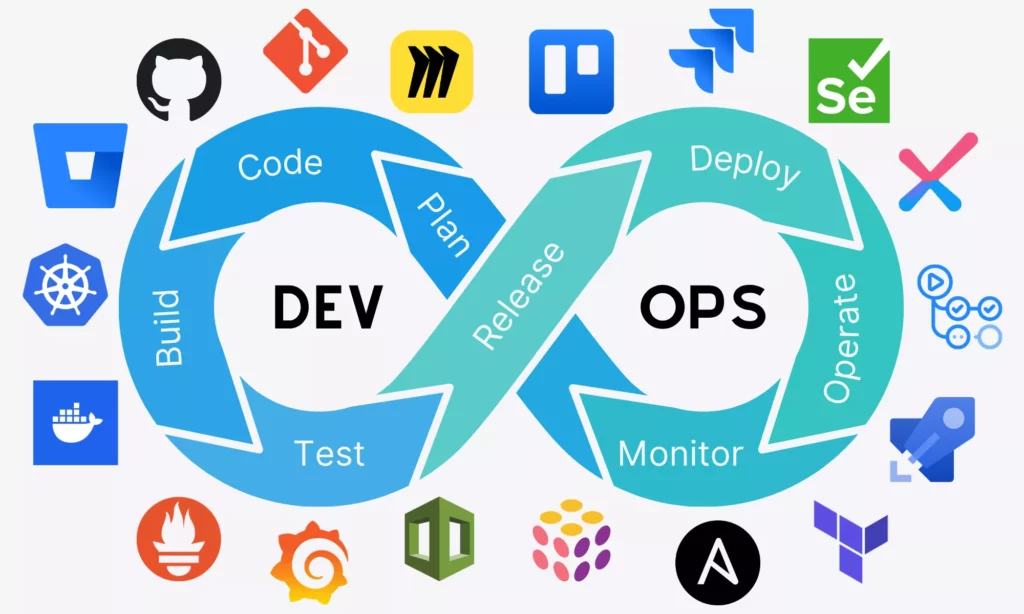
Start with the lifecycle, then match each stage to the tool category that supports it.
What Are DevOps Tools?
DevOps tools include the technologies teams use to build, test, release, operate, and monitor software more effectively. For many teams, that definition also extends to communication and project management tools that help development and operations stay aligned around the same delivery goals.
That range is why DevOps toolchains are so broad. Some tools handle source control and code collaboration. Others support automation, containers, observability, or security. Many also sit directly inside the release flow, especially where CI/CD pipelines build, test, and move changes forward automatically.
Benefits Of DevOps Tools to Learn
Learning DevOps tools matters because modern delivery depends on repeatability and speed, not just on individual engineering effort. According to Mordor Intelligence, the global DevOps market is expected to reach around that size by 2026, reflecting how heavily organizations now invest in faster release workflows and infrastructure automation.
A big part of that momentum also comes from teams combining automation with Agile software development practices to release smaller increments more frequently without sacrificing quality.
These tools create several practical benefits:
- Faster time to market: DevOps tools automate pipeline steps from integration to deployment, so features and fixes can move into production much faster.
- Improved collaboration: Shared workflows and visibility reduce misunderstandings between development and operations teams.
- Higher software quality: Continuous integration and testing help catch issues earlier and keep standards more consistent.
- Greater scalability and flexibility: Containerization and infrastructure as code make it easier to scale environments up or down without rebuilding everything manually.
- More reliable releases: Automated pipelines and standardized environments reduce deployment risk and make releases more predictable.
- Better monitoring and faster recovery: Observability tooling helps teams detect issues quickly and respond before those issues become larger incidents.
The DevOps Lifecycle And Where Tools Fit
DevOps tools make more sense when you see them inside the lifecycle they support. Teams plan, code, build, test, release, operate, and monitor in a continuous loop, and each stage usually depends on a different category of tooling.
Further reading:
- What Is a CI/CD Pipeline? How Modern Teams Turn Code Into Reliable Releases
- What Is DevSecOps? Shift‑Left Security in Modern DevOps
- What Is MLOps? Understanding MLOps Lifecycle and How It Works
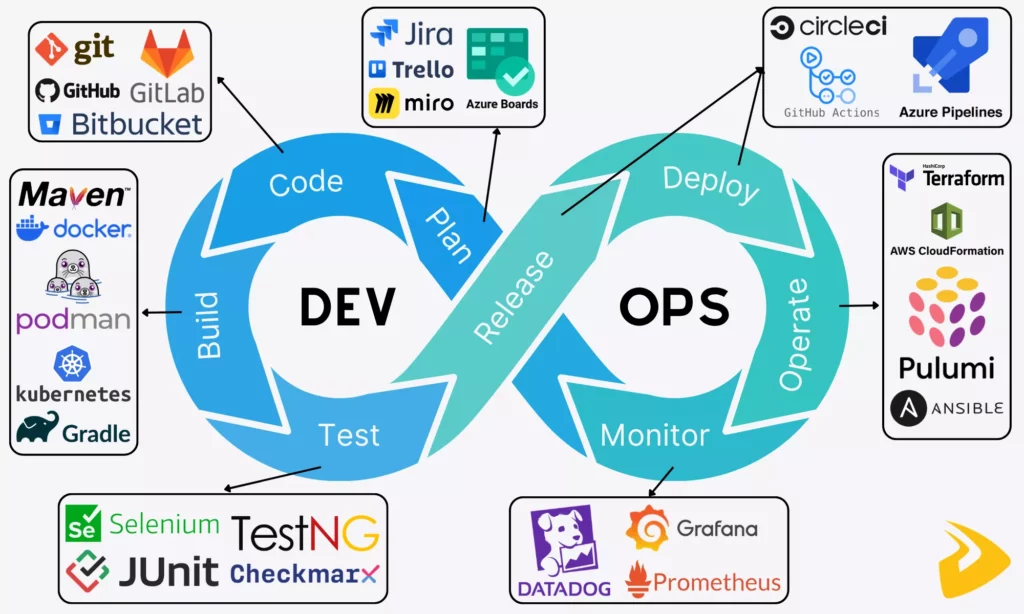
The stages below show how these tool categories connect across a working delivery flow.
That does not mean every team needs a huge stack. It means the right tools should reinforce specific activities at each stage instead of creating disconnected islands of work.
Step 1: Plan (Continuous Development)
In the planning phase, product managers, developers, QA, and stakeholders align on requirements, priorities, and delivery scope. Because this stage is conversation-heavy, teams need tools that keep planning visible and decisions easy to share.
- Planning and project management tools: Jira, Trello, Azure Boards, Asana, Miro
These tools help break large initiatives into smaller tasks, assign ownership, and track progress over time. They support planning structure before the delivery pipeline starts moving.
- Communication tools: Slack, Microsoft Teams, Confluence, Lark
These tools support ongoing coordination, documentation, and day-to-day collaboration across distributed or cross-functional teams. That is one reason many planning stacks overlap with delivery tooling such as Jira for Agile project management.
Step 2: Code (Continuous Development)
Once priorities are clear, developers move into implementation. They usually write code in editors such as VS Code, then manage collaboration and quality through source control workflows.
When version control comes up, many teams start with Git, an open-source distributed version control system that helps developers save commits, track changes, and roll back safely when needed.
They also use cloud repository platforms such as GitHub, GitLab, and Bitbucket for code review, pull or merge requests, approvals, and collaboration across teams and projects.
Step 3: Build (Continuous Integration – CI)
Once code changes are ready, teams need to build them into usable artifacts and prepare those artifacts for further testing and release steps.
- Automate builds
Tools like Maven and Gradle automate application builds so teams can generate packages or services consistently from source code.
- Write automation scripts
DevOps engineers often write automation scripts in languages such as Python, Bash, or Go to connect systems, automate repetitive jobs, and support pipeline execution.
- Containerize and orchestrate
When applications become more complex, consistency across environments becomes harder to preserve manually. Containerization tools such as Docker, Podman, and Buildah package applications with their runtime dependencies so deployments behave more predictably.
Teams then use orchestration platforms, most commonly Kubernetes (K8s), to handle scaling, scheduling, networking, and cluster-level management. Managed services such as GKE, EKS, and AKS reduce part of that operational burden.
Step 4: Test (Continuous Testing)
Before software reaches users, teams need to validate functionality, integration behavior, performance, and security continuously. Manual testing alone cannot keep up with modern DevOps delivery speed, so test automation becomes essential.
Common tools here include Selenium, JUnit, TestNG, Cypress, Checkmarx, Snyk, and Aqua Security. Together, they help teams automate functional checks, code-quality validation, and vulnerability scanning, especially when security is treated as part of DevSecOps rather than as a final checkpoint.
Step 5: Release & Deploy (Continuous Delivery/Deployment – CD)
Once the code passes testing, teams need a repeatable way to release updates into staging or production without creating new manual risks every time.
Many teams rely on unified CI/CD platforms or specialized deployment tools to handle this stage:
- Unified CI/CD platforms: GitHub Actions, GitLab, Azure Pipelines, CircleCI, Bitbucket Pipelines, Harness
- Specialized CD tools: Octopus Deploy, Argo CD, Spinnaker
These tools automate releases, infrastructure changes, and deployment strategies such as blue-green or progressive rollout patterns.
Step 6: Operate (Continuous Operations)
After deployment, the application still needs stable infrastructure, clean configuration, and operational consistency. That is where infrastructure automation and configuration management take over.
Teams use Infrastructure as Code (IaC) and provisioning tools such as Terraform, AWS CloudFormation, and Pulumi to define and provision environments through code. They then use configuration management tools such as Ansible, Chef, and Puppet to maintain those systems reliably over time.
Step 7: Monitor & Feedback (Continuous Monitoring)
Once applications are live, teams need real-time visibility into system health, reliability, and user impact so they can react before issues become outages.
That is why many teams use observability platforms such as Datadog, Prometheus, and Grafana to define dashboards, alerts, SLIs, and SLOs. These tools help collect metrics, logs, and signals that feed delivery improvements back into the next release cycle.
Best DevOps Tools By Category
The DevOps lifecycle shows where tools fit. The next step is to look at the most common categories teams actually build their stacks around.
Recommended for you:
- What Are Git Concepts and Architecture?
- Web Application Architecture: Types, Components, and Tools
- Agile Methodology Testing: Lifecycle, Quadrants And Best Practices
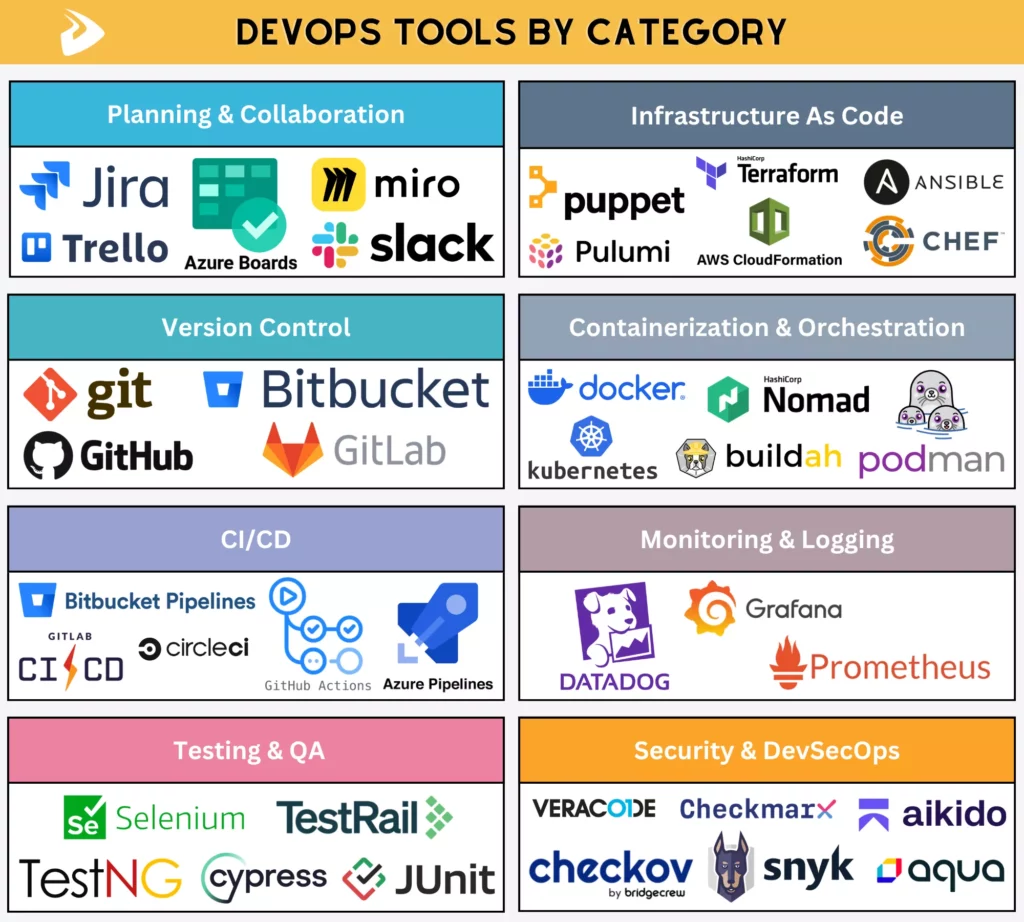
The categories below turn the lifecycle into practical choices for a connected toolchain.
Planning And Collaboration Tools
Planning and collaboration tools help teams organize work, align priorities, and keep communication visible across the delivery lifecycle. They are especially useful for turning larger projects into manageable tasks and keeping stakeholders informed.
Common tools in this category include:
- Jira: Widely used for Agile project management, sprint planning, and issue tracking.
- Trello: A lighter Kanban-style option that works well for smaller or less complex project flows.
- Azure Boards: A Microsoft-centric option for Agile planning, work tracking, and reporting.
- Miro: A collaborative whiteboard for brainstorming, workflow mapping, and early-stage planning sessions.
- Slack: A messaging hub that keeps conversations, alerts, and tooling notifications connected.
Version Control Tools
Version control and source code management tools help teams track changes, manage branches, review code, and collaborate safely on the same codebase.
Below are some common systems in this category:
- Git: A distributed version control system that lets developers track changes locally and merge code efficiently.
- GitHub: A Git-based hosting and collaboration platform with pull requests, repository management, and integrated automation.
- GitLab: A broader DevOps platform that combines source control, CI/CD, and security features in one environment.
- Bitbucket: A Git-based repository platform that integrates well with the Atlassian ecosystem and supports Bitbucket Pipelines.
CI/CD Tools
CI/CD platforms help teams automatically build, test, and deploy code whenever changes are committed. That makes delivery faster and more repeatable while reducing the risk tied to manual release steps.
Some widely used platforms include:
- GitHub Actions: Workflow automation built directly into GitHub repositories.
- GitLab CI/CD: Pipeline automation built into GitLab using simple configuration files.
- Azure Pipelines: A Microsoft-oriented option for cross-platform builds and deployments.
- CircleCI: Known for fast setup and strong parallel testing support.
- Bitbucket Pipelines: Built-in CI/CD for Bitbucket repositories with Docker-based workflow stages.
Testing And QA Tools
Testing and QA tools help validate that applications behave as expected before release. They automate functional, integration, and performance checks so teams can find issues earlier.
Several common tools include:
- Selenium: A widely used framework for browser-based web testing across multiple environments.
- JUnit: A standard Java testing framework for fast unit-level validation.
- TestNG: A more flexible testing option that adds parallel execution and richer configuration patterns.
- Cypress: A modern end-to-end testing tool designed especially for web applications.
- TestRail: A test management platform for tracking cases, plans, and QA reporting.
Infrastructure As Code Tools
Infrastructure as Code tools let teams define, provision, and manage infrastructure through code instead of manual setup. That makes environments more consistent, repeatable, and easier to scale.
Common IaC tools include:
- Terraform: A flexible option for defining infrastructure across multiple cloud providers.
- AWS CloudFormation: A native AWS tool for provisioning and managing AWS environments.
- Pulumi: A developer-friendly option that lets teams define infrastructure in familiar programming languages.
Teams often complement IaC tools with configuration management platforms that automate server setup and system consistency after provisioning.
Widely used options include:
- Ansible: An agentless automation tool known for readable YAML playbooks and simpler server configuration workflows.
- Chef: A code-driven configuration platform that offers strong flexibility but often comes with a steeper learning curve.
- Puppet: A long-established tool focused on maintaining configuration consistency at scale.
Containerization And Orchestration Tools
Containerization and orchestration tools help applications run consistently across environments and scale more smoothly in production.
Common containerization tools include:
- Docker: The most widely used platform for packaging applications into portable containers.
- Podman: A daemonless alternative to Docker that supports rootless containers and Docker-compatible workflows.
- Buildah: A tool often paired with Podman to build images without needing a full container runtime.
Common orchestration options include:
- Kubernetes (K8s): The dominant orchestration platform for managing containers at scale.
- Docker Swarm: A simpler orchestration layer built into the Docker ecosystem.
- HashiCorp Nomad: A scheduler that can manage both containerized and non-containerized workloads.
- Red Hat OpenShift: A Kubernetes-based platform with enterprise-oriented tooling and controls.
- Rancher: A platform for managing multiple Kubernetes clusters more efficiently.
Monitoring And Logging Tools
Monitoring and logging tools provide teams with visibility into runtime performance, incidents, and system behavior in production.
Several common observability tools include:
- Datadog: A unified platform for monitoring, logging, analytics, and infrastructure visibility.
- Prometheus: A widely used open-source metrics and alerting tool, especially in cloud-native environments.
- Grafana: A dashboarding and visualization platform that works with many monitoring data sources.
Security And DevSecOps Tools
Security in DevOps should not be saved for the last release gate. Teams increasingly integrate security scanning and policy checks throughout the pipeline to catch issues earlier.
Some common tools in this category include:
- Aikido Security: A combined platform for code, dependency, cloud, and application security checks in one interface.
- Checkmarx: A widely used enterprise tool for static application security testing.
- Snyk: A developer-friendly platform for dependency and vulnerability scanning in software supply chains.
- Aqua Security: A cloud-native security platform focused on containers and runtime protection.
- Veracode: A platform that supports multiple testing modes, including static and dynamic security testing.
- Checkov by Bridgecrew: A tool for scanning Infrastructure as Code for misconfigurations and security risks.
Best DevOps Tools Based On Use Cases And Team Needs
There is no single perfect DevOps tool. The better question is which tools fit a specific team context, delivery model, and maturity level.
The best fit changes with team size, technical maturity, and delivery constraints.
Best DevOps Tools For Beginners
Beginners should focus less on using everything and more on learning how the major pieces fit together. That usually means starting with a smaller stack that is easier to reason about.
Some practical guidance looks like this:
- Start with Git. Learning Git through GitHub helps many beginners understand branching, commits, and collaborative workflows before they touch more advanced automation.
- Focus on one tool at a time. A common learning path is Docker first, then CI/CD through GitHub Actions or Jenkins, then infrastructure automation after the basics feel stable.
- Explore Infrastructure as Code gradually. Once the pipeline concepts make sense, tools like Terraform help beginners understand how environments can be versioned and automated.
Best DevOps Tools For Startups And Small Teams
Startups and small teams usually prioritize speed, simplicity, and low overhead. They often need tools that are fast to adopt and do not require a separate operations team just to maintain the tooling itself.
- Prioritize SaaS and managed services. Tools such as GitHub Actions or CircleCI reduce the need to manage your own CI/CD infrastructure.
- Use free tiers and simpler setups. GitHub, GitLab, and Docker often give smaller teams enough to move quickly without heavy upfront cost.
- Choose integrated platforms. Unified platforms such as GitLab or GitHub can reduce stack sprawl by combining source control, automation, and collaboration in one place.
Best DevOps Tools For Enterprise Environments
Enterprises often care more about governance, security, integration depth, and multi-team scalability than about minimal setup. That usually pushes them toward more structured platforms and stronger compliance tooling.
Common enterprise-oriented choices include:
- Advanced CI/CD platforms: Tools like Azure Pipelines and GitLab CI/CD handle complex pipelines, approvals, and enterprise integrations.
- Container orchestration at scale: Teams often use Kubernetes and OpenShift to run distributed applications in larger environments.
- Security and compliance tools: Solutions like Veracode and Checkmarx help enforce security standards across larger codebases.
- Infrastructure automation and governance: Tools such as Terraform and policy layers like OPA support consistency across environments.
Best DevOps Tools For Cloud-Native Applications
Cloud-native applications need scalability, resilience, and automation by default. That pushes teams toward tools that handle dynamic infrastructure and distributed systems well.
Typical choices include:
- Containerization and orchestration: Docker for packaging applications and Kubernetes for running them at scale.
- Dynamic infrastructure: Tools like Terraform and Pulumi for programmatic provisioning and infrastructure change management.
- Monitoring and observability: Prometheus and Grafana for runtime visibility and operational feedback loops.
- Service mesh and advanced networking: Istio for more complex inter-service communication and policy control when needed.
How DevOps Tools Work Together In A Toolchain
DevOps tools are most valuable when they reinforce each other as one delivery system. A toolchain only works well if information and automation can move across planning, coding, testing, deployment, and feedback without constant manual translation.
With the toolchain mapped, the next step is to test each option against the team’s needs.
- Connect planning, coding, CI/CD, and deployment
Work usually starts in planning tools, moves into repositories like GitHub or GitLab, then passes through CI/CD pipelines that build, test, and deploy code changes automatically.
- Use CI/CD as the automation backbone
CI/CD tools act as the central engine that triggers builds, runs tests, and pushes code across environments.
- Link infrastructure provisioning with runtime operations
Infrastructure tools such as Terraform provision environments automatically, while runtime platforms like Kubernetes keep applications stable and scalable after deployment.
- Feed monitoring data back into delivery improvements
Monitoring tools provide performance and incident data that should feed back into planning and engineering decisions for the next release.
- Prioritize seamless integration across the toolchain
If tools do not integrate well through APIs, plugins, or native workflows, teams often lose the speed benefits they expected from automation in the first place.
How To Choose The Right DevOps Tools
Choosing tools is really about choosing how the team will work. The wrong stack can create friction, duplicate effort, and slow delivery even when the individual products are strong on paper.
A clear selection process helps teams avoid the most common sources of tool sprawl.
Some practical ways to choose better include:
- Identify workflow bottlenecks first
Do not start with tool popularity. Start with the actual delivery problem, whether that is slow deployment, unstable environments, or weak testing feedback.
- Align tools with team maturity
A beginner team may struggle with the overhead of a platform like Kubernetes, while a mature platform team may need exactly that level of control. The right stack should match the team’s current capability as well as the system’s real complexity.
- Evaluate integration capabilities
Because DevOps tools rarely work alone, they need to integrate well with the rest of the stack. Weak integration usually turns automation into another source of manual overhead.
- Consider scalability, governance, and cost
Some tools work well for a small team but become harder to govern as environments, compliance requirements, and organizational complexity grow.
- Avoid overlapping tools that solve the same problem
Too much overlap creates confusion, duplicated effort, and unnecessary cost. A smaller, clearer stack is often more effective than a crowded one.
Common Mistakes When Selecting DevOps Tools
Teams do not usually struggle because tools are weak. They struggle because the tools are chosen for the wrong reasons or adopted in the wrong order.
Avoiding these mistakes creates a stronger base for scalable software delivery.
- Choosing tools before defining workflows
Without a clear workflow, even good tools will be forced into unclear processes and produce disappointing results.
- Following trends instead of actual needs
Popular tools are not automatically the right tools. Adopting something like Kubernetes too early can add a lot of operational overhead if the system does not truly need that complexity.
- Overcomplicating the toolchain
More tools do not always create better delivery. Too many layers often make troubleshooting slower and responsibilities less clear.
- Ignoring usability and team adoption
If the team struggles to understand or adopt the tool, the organization will never get the value it expected from the investment.
- Missing observability and feedback loops
Teams that focus only on build and deployment often miss the runtime signals they need to improve reliability, performance, and future releases.
How DevOps Tools Enable Scalable Product Delivery
Modern DevOps tooling can support scalable product delivery, but only when the stack is chosen and connected well enough to support continuous improvement instead of isolated automation.
The value of a toolchain is measured by delivery outcomes, not by the number of products it contains.
- Faster iteration for web and mobile apps
Automated pipelines let teams release smaller increments more frequently instead of bundling risky changes into large deployment events.
- More consistent SaaS deployment pipelines
Standardized pipelines make deployments more repeatable and reduce human error across staging and production workflows.
- More scalable cloud infrastructure
Infrastructure automation and orchestration help teams provision and scale environments with less manual intervention.
- Better reliability and operational performance
Observability and alerting help teams catch issues early, protect uptime, and improve the system continuously as it grows.
Conclusion
DevOps tools cover every part of the delivery lifecycle, from planning and coding to release, operations, and monitoring. The goal is not to collect as many tools as possible, but to build a stack that fits the workflow, maturity, and long-term needs of the team using it.
If your team wants to apply these ideas without spending months on avoidable trial and error, working with an experienced delivery partner can shorten that path. In broader software development work, the real advantage comes from combining the right tools with the right operating model, not from choosing tools in isolation.
At Designveloper, that means combining tools such as Bitbucket Pipelines, Docker, Kubernetes, and Terraform with practical engineering workflows to support scalable releases and operational stability. If you are evaluating a larger rollout, these considerations around DevOps managed services can also help clarify what mature implementation support should look like.
If you are planning to build new software or modernize an existing system, our software development services can help define the delivery model, infrastructure, and tooling approach. Contact us to discuss what fits your product best.
Also published on

Share post on










Related Articles



Types of Agile Development Methodology: Key Approaches Compared
Types of Agile Development Methodology: Key Approaches Compared Published October 14, 2026
Agile Methodology Testing: Lifecycle, Quadrants & Team Practices
Agile Methodology Testing: Lifecycle, Quadrants & Team Practices Published October 13, 2026
What Is an Agile Team? Structure, Roles, and How to Build One
What Is an Agile Team? Structure, Roles, and How to Build One Published October 13, 2026


















