













What Is A DevOps Pipeline? A Complete Guide To Building One

KEY TAKEAWAYS:
- A DevOps pipeline is one part of the broader DevOps model; its stages and gates depend on the service and team.
- CI/CD commonly automates integration, validation, and release or deployment inside that delivery workflow.
- Start with one service at a time, a versioned artifact, and checks with named owners.
- Block promotion only when a failed check violates a release condition; use non-blocking checks for signals that do not need to stop delivery.
- Track five current DORA metrics for one application or service, then use the trends to guide improvement rather than rank teams.
A DevOps pipeline can build and deploy code automatically yet still leave teams unsure which failures should stop a release, who approves a risky change, or when to reverse it. The design work is to connect source control, repeatable checks, artifact promotion, deployment, and production feedback around the needs of one service. Architecture, risk, and team ownership differ, so no diagram or toolchain is a universal template. The sections below explain a common workflow, then show how to build a first version without adding automation that the team cannot maintain.
What Is a DevOps Pipeline?
A DevOps pipeline is a repeatable delivery workflow that moves a code or configuration change through build, validation, packaging, release or deployment, and feedback from the running service. Automation connects those activities, while the team defines the policies, owners, approvals, and recovery paths that determine what happens when a check fails.
The term does not have one universally fixed boundary. Some teams use “DevOps pipeline” to mean the automated CI/CD workflow; others include release approvals, infrastructure changes, and post-deployment monitoring. In this article, it means the end-to-end path for a change. It is not the whole DevOps operating model, which also includes shared responsibility and how teams build and run software.
Xem thêm:
- DevOps Best Practices: 10 Ways To Improve Speed And Reliability
- Agile vs DevOps: Key Differences and How They Work Together
- What Is A DevOps Engineer? Skills And How To Become One
Benefits of a DevOps Pipeline
A pipeline can make delivery more predictable by replacing repeated handoffs with an observable workflow. The benefit depends on whether the automated checks are useful, failures have clear owners, and production response is part of the design.
- Earlier feedback: Builds and tests can run close to the change that triggered them, helping developers investigate while context is still clear.
- Repeatable releases: Versioned pipeline definitions and artifacts make the route from source to deployment easier to inspect and reproduce.
- Clearer collaboration: Shared status, ownership, and release rules help development, test, security, and operations teams coordinate around the same change.
- More controlled rollout: Progressive deployment and service monitoring can limit exposure and help responders pause or reverse a change when agreed health signals deteriorate.
- Less routine manual work: Automation can handle repeatable build, validation, and deployment tasks, leaving people to focus on exceptions and decisions that need judgment.
These outcomes are not automatic. Slow feedback, noisy scans, unclear promotion rules, or no recovery owner can make releases faster without making them safer.
DevOps Pipeline vs. CI/CD Pipeline
Teams use “DevOps pipeline” and “CI/CD pipeline” with some overlap. In this guide, a DevOps pipeline is the delivery workflow around a change, while a CI/CD pipeline refers to automated integration, validation, and delivery or deployment steps commonly used within that workflow.
| Aspect | DevOps Pipeline | CI/CD Pipeline |
|---|---|---|
| What it describes | The team’s delivery path for a change, often from source control through production feedback; the exact scope varies. | Automated steps that integrate changes, run validation, and prepare or perform a release. |
| Typical activities | May include code review, build and test, artifact handling, approvals, deployment, monitoring, and response ownership. | Usually includes triggers, builds, tests, artifact publishing, and delivery or deployment automation. |
| Main question | How does this team move a change safely into use and learn from the result? | Which integration, validation, and release steps can the team automate? |
CI/CD often sits inside or overlaps with a DevOps workflow, but it does not define team structure, production ownership, or every operational practice. State the scope being discussed rather than treating the terms as a universal taxonomy.
DevOps Pipeline Stages: From a Change to Production Feedback
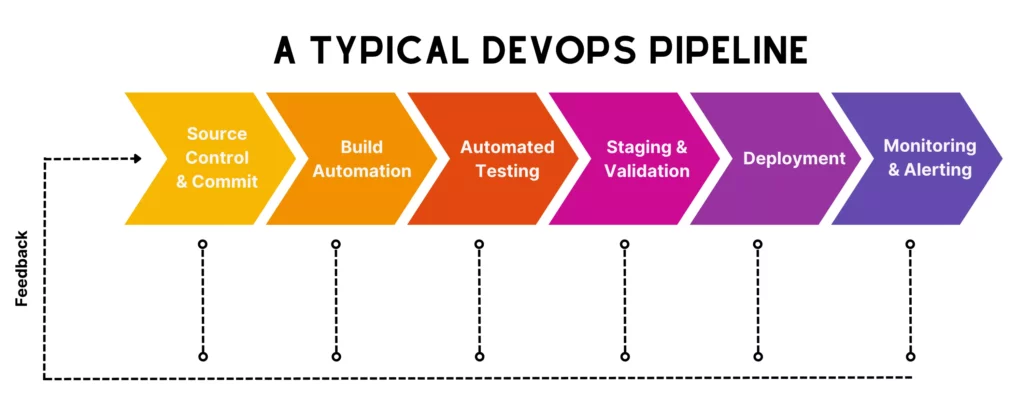
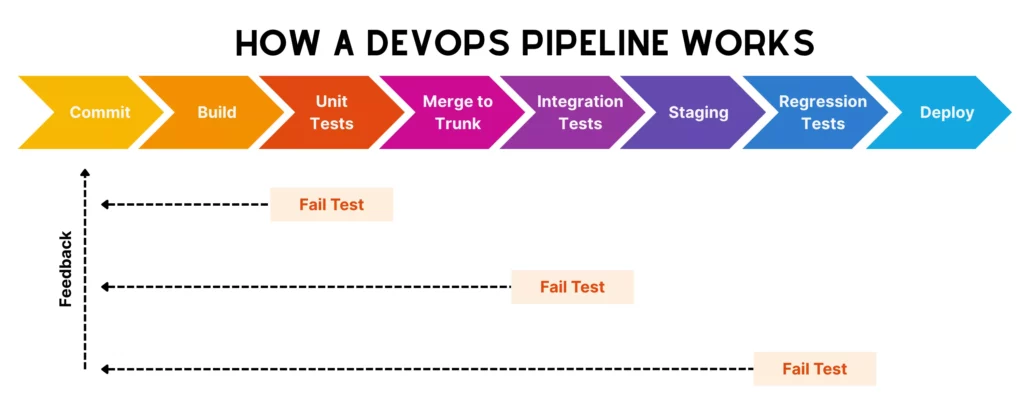
A common pipeline moves through these stages, but teams can change the order, add approvals, or run checks in parallel. Pull-request workflows may run fast checks before merge and broader checks afterward; trunk-based workflows may use short-lived branches or frequent commits to a shared branch. Neither sequence fits every system.
- Source change and trigger. A commit, pull request, tag, scheduled job, or manual release action can start work. Version control records the change and review context. For teams using Git, the Git object model and working areas explain how repository changes are represented; choose the trigger that matches the team’s review and release policy.
- Build and fast checks. The runner prepares a consistent build and can run formatting, static analysis, and focused unit tests. A failed build should block promotion when it means the release artifact is invalid; other checks may report without halting the workflow.
- Integration, quality, and security checks. Teams add API or integration tests, dependency and secret checks, and policy validation according to system risk. Decide which failures block promotion and who reviews exceptions. Place security controls where they can identify risk before the affected artifact is released.
- Package and promote an artifact. Store a versioned package or container image with enough information to identify its source and build. Where practical, promote the same artifact through environments and keep environment-specific configuration separate rather than silently rebuilding it at each stage.
- Release and deploy. A team may automatically deploy after required checks, require an approval, or schedule a release. Canary, blue-green, and feature-flag approaches can reduce exposure when they fit the architecture; the team still needs a named person or system to evaluate the rollout.
- Monitor and feed back. Watch service-level signals and user impact after deployment. If an agreed error, latency, or transaction guardrail breaches the service’s baseline, pause expansion and follow the documented incident or rollback procedure. Choose the guardrail from the system’s normal behavior and user impact rather than assuming one threshold fits every service.
A required quality gate can stop promotion and return feedback to the team. Non-blocking jobs are also useful when they provide signals that do not need to halt a release. Make the distinction explicit in pipeline configuration and documentation so developers can tell a warning from a release blocker.
DevOps Pipeline Example: An E-Commerce Change
Consider a hypothetical e-commerce team changing the rule that determines when a shopping cart qualifies for free shipping. The change affects checkout behavior, so a passing compile alone is not enough to show that the new rule works for shoppers.
- A pull request records the rule change and review. The pipeline runs unit tests for carts below, at, and above the eligibility boundary, plus an API test that checks the shipping amount returned to checkout.
- The build produces a versioned artifact. The team promotes that artifact to a test environment and verifies a purchase path without rebuilding it for each environment.
- For production, the team enables the change for a limited cohort or uses a reversible feature flag. It compares checkout errors and order-completion signals with the service’s baseline while the rollout is observed.
- If the agreed guardrail is breached, the rollout pauses. The responder disables the flag or uses the documented rollback path, then investigates before expanding exposure.
This is a hypothetical example, not a prescribed traffic percentage or checkout threshold. Select checks for the changed behavior and define recovery before release. For more context, see this guide to e-commerce infrastructure.
Core Capabilities Around the Pipeline
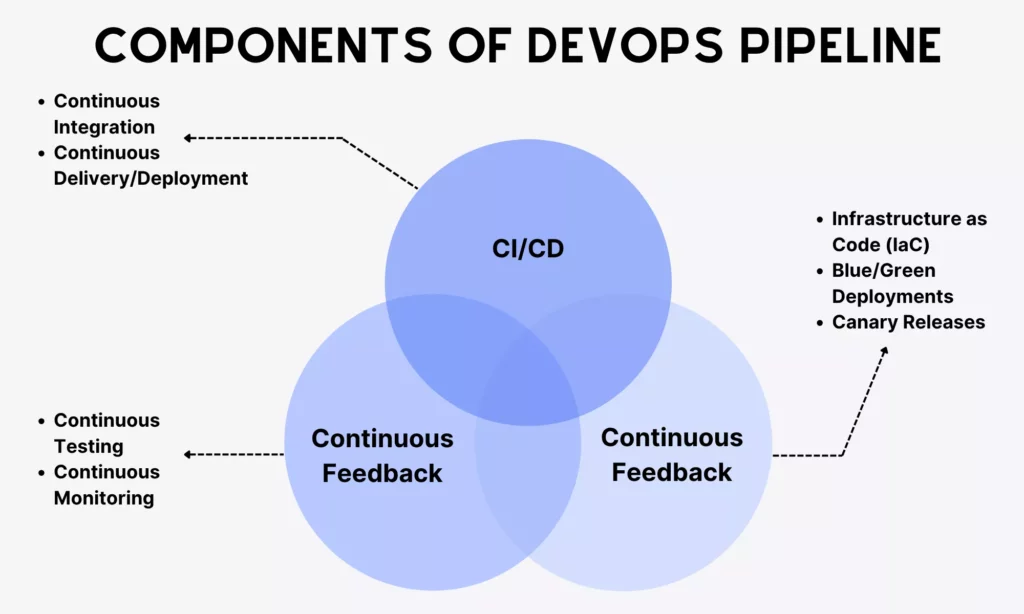
Pipeline stages describe how a change moves; supporting capabilities explain how the team keeps that route reliable over time. Three areas usually need explicit ownership: CI/CD automation, production feedback, and security across the software supply chain.
Continuous Integration, Delivery, and Deployment
Continuous integration means developers integrate changes frequently and use automated checks to find integration problems. Continuous delivery aims to keep a release deployable, while continuous deployment automatically releases qualifying changes to production. Teams can use CI and continuous delivery without adopting automatic production deployment; approvals may remain appropriate for specific systems or changes.
Feedback and Operations
Monitoring connects a release to what users and operators experience. Useful signals can include errors, latency, resource use, and task-specific outcomes, but every alert needs an owner and response path. Some teams use “continuous operations” to describe practices that support frequent releases, such as monitoring, incident response, scaling, and infrastructure management; the term is not used consistently, so define its scope when applying it.
Security and Artifact Evidence
Security checks should match the system’s exposure and release risk. A pipeline may check for exposed secrets and vulnerable dependencies, validate an artifact, restrict deployment permissions, or record where an artifact came from. NIST’s SP 800-204D guidance covers ways to integrate software-supply-chain security into DevSecOps CI/CD pipelines. Use it to inform the control design, then assign owners and decide which findings block promotion under the team’s risk policy.
A scan without an owner or remediation path adds noise rather than control. Define how the team triages findings, documents exceptions, and revisits accepted risk. Some findings should block release; others may need a tracked fix and review date. Make the decision visible in pipeline policy.
Xem thêm:
- Cloud Application Development: Architecture, Process, And Cost
- What Is DevSecOps? How Security Fits Into Every Release
- DevOps Tools: Best Tools For Every Stage Of The DevOps Lifecycle
How to Build a DevOps Pipeline
Build a first pipeline around one service and one delivery goal, then add steps only when they address a named delay, failure mode, or policy requirement. This keeps the first version small enough to operate and gives the team a baseline for deciding what to improve next.
- Select the service and goal. Identify the application, its users, and the delivery problem to address. Record a baseline for the relevant delivery and service signals, and name the person or team that will review the pipeline.
- Map the current path. Trace a change from repository to production. Mark manual handoffs, duplicated work, permissions, environment differences, and points where the team receives feedback too late.
- Choose a trigger and ownership rules. Decide which repository events start checks, how code review works, who can approve production promotion, and which credentials each job needs. Keep deployment permissions narrower than general build permissions where the platform allows it.
- Add a small set of fast checks. Start with the checks that catch common, high-impact mistakes early. Record which are blocking, what an exception requires, and who maintains each test. Add slower integration or end-to-end checks at a point where their results can still change a release decision.
- Make the artifact traceable. Produce a versioned build and store it in a controlled registry or repository. Keep configuration and secrets out of the artifact, and define how the same build is promoted through test, staging, and production.
- Set release and recovery rules. Choose direct deployment, approval, or a gradual rollout based on impact and reversibility. Specify the health signals that pause expansion, who can stop it, and whether the recovery action is a rollback, feature disablement, or fix-forward.
- Run a release, review, and adjust. Follow the change through the full route, check whether failures and production signals reach the right owner, and compare results with the baseline. Improve the biggest observed bottleneck before adding another stage or tool.
Assign maintenance for automation and infrastructure to a named person or team. The work may sit with a DevOps engineer, platform group, or service team; it should not be assumed to belong to one job title in every organization.
Measure Pipeline Outcomes with DORA Metrics
Measure both delivery throughput and instability so that faster releases are not mistaken for better outcomes on their own. DORA’s current model defines five software delivery performance metrics; use them over time for one application or service and interpret them in context.
| Metric | What it describes | How to use it |
|---|---|---|
| Change lead time | Time from a change being committed to version control until it is deployed to production. | Find where work waits between review, validation, and release. |
| Deployment frequency | How often the service deploys changes over a period. | Understand release cadence alongside service stability and user impact. |
| Failed deployment recovery time | Time to recover when a deployment fails and requires immediate intervention. | Review detection, decision, and recovery steps rather than only rollback speed. |
| Change fail rate | Share of deployments that require immediate intervention after deployment. | Look for release conditions or validation gaps associated with failures. |
| Deployment rework rate | Share of deployments that are unplanned and occur because of a production incident. | Understand how much delivery capacity is redirected to incident-related work. |
Start by validating how the service records deployments and incidents, then establish a baseline and review trends on a consistent cadence. DORA cautions that these measures are most useful in the context of a specific application or service; do not turn one number into a universal target or use it to rank unlike teams. See DORA’s software delivery performance metrics for the current definitions.
Design Decisions Before Choosing Tools
The pipeline should reflect the service’s architecture and the team’s ability to maintain it. Choosing tools first can lock a team into steps that do not address its release risks or fit the way the application is built.
Match the Workflow to the Architecture
A monolith may use one build and deployment path, while a system of independently released services may need separate workflows and ownership boundaries. Ask which components can be validated or deployed independently, how shared changes are tested, and whether a pipeline failure should affect one service or several.
Decide How Artifacts Move Between Environments
Building once and promoting the same artifact reduces differences between what was tested and what is released, provided the package is portable and configuration is kept separate. Rebuilding for each environment can be necessary in some systems, but then the team should verify that the resulting artifact is equivalent and traceable. Document where artifacts are stored, who can promote them, and what evidence accompanies a release.
Balance Controls with Team Capacity
More stages and vendors create maintenance work. Consider who updates the pipeline, reviews security alerts, owns deployment permissions, and responds when a job fails. Teams without dedicated operations capacity may need to simplify the workflow or get external support; compare managed-service responsibilities before deciding which work to retain internally.
Approvals should follow risk, not habit. A reversible low-impact change may need automated checks and monitoring, while a high-impact or difficult-to-reverse change may warrant a human review or a staged rollout. Keep the reason for each gate visible so teams can revisit it when the service or its risk profile changes.
Xem thêm:
- What Is MLOps? Understanding MLOps Lifecycle and How It Works
- Agile Methodology Testing: Lifecycle, Quadrants & Team Practices
- DevOps Managed Services: What They Include & How To Choose A Provider

How to Choose DevOps Pipeline Tools
Choose tools by the job they perform and how they fit the existing stack, permissions, and maintenance capacity. A tool name is not a design decision: define what each layer needs, then check integration, access control, operating burden, and how clearly failures are reported.
| Layer | Examples | Selection question |
|---|---|---|
| Source control and review | Git, GitHub, GitLab, Bitbucket | Does it support the team’s review rules, access model, and workflow integrations? |
| CI/CD orchestration | Jenkins, GitLab CI/CD, GitHub Actions, Bitbucket Pipelines | Can runners reach required dependencies and environments without granting unnecessary permissions? |
| Testing | JUnit and TestNG for unit tests; Selenium and Cypress for browser tests; Postman and REST Assured for API tests | Does the coverage match the application’s risk and provide feedback at the right point? |
| Security checks | Aikido Security, Checkmarx, Snyk | Can the team tune findings, assign ownership, and connect severity to a release policy? |
| Packaging, deployment, and infrastructure | Docker for containers; Kubernetes for orchestration; Helm for Kubernetes packaging; Ansible for configuration automation; Terraform for infrastructure as code | Which layer does each tool own, and who maintains its configuration and credentials? |
| Monitoring and alerting | Prometheus, Grafana, Elastic Stack, Datadog, New Relic | Can responders connect logs, metrics, traces, and alerts to a deployment and its owner? |
These examples serve different jobs and are not interchangeable. Prefer a smaller integrated toolchain when it covers the required workflow, and add a separate tool only when it closes a specific gap. Keep pipeline configuration reviewable alongside application code where possible, and periodically remove steps or integrations that no longer have an owner or decision purpose.
Conclusion
A useful DevOps pipeline gives a change a repeatable route from source control to production feedback, with checks and release decisions that fit the service’s risk. Start with one workflow, make artifact movement and ownership clear, then use delivery and stability signals to decide what to improve. If your team needs help scoping a software delivery workflow, Designveloper’s software development services can discuss the constraints and delivery needs; use the contact page to start that conversation.
Also published on

Share post on










Related Articles



What Is An Agile Framework? Definition, Types And Examples
What Is An Agile Framework? Definition, Types And Examples Published November 26, 2026
Best Open Source Vector Database: 10 Options Compared In 2026
Best Open Source Vector Database: 10 Options Compared In 2026 Published November 25, 2026
What Is a CI/CD Pipeline? Stages, Gates, and Examples
What Is a CI/CD Pipeline? Stages, Gates, and Examples Published November 25, 2026