













What Is DevOps? How It Works, Core Practices, and Benefits

A team can merge good code and still deliver it late if testing, approvals, configuration, or production support become a separate queue. DevOps addresses that gap by connecting the people and work involved from planning through production learning. The useful question is not which tool counts as a “DevOps tool,” but how a team makes each change testable, releasable, observable, and recoverable. This overview explains what DevOps means, how its workflow differs from a pipeline, where Agile fits, which tools solve which jobs, and how to start with practical safeguards.
What Is DevOps?
DevOps is an approach to software delivery that brings development and IT operations together through a shared culture, clear ownership, repeatable practices, automation, and supporting tools. The goal is to move useful changes from planning to production with fast feedback and a reliable recovery path. DevOps is not one product, a single pipeline, or a required organization chart.
The name combines development and operations. In practice, the approach often includes quality engineering and security as well: developers, operators, testers, and security specialists share information and make delivery decisions earlier instead of passing work between isolated groups. Microsoft Learn’s DevOps overview describes this as coordination across people, processes, and technology through the application lifecycle.
Tools support that way of working, but installing a CI service or hiring one “DevOps person” does not create it by itself. A team still needs to decide who owns a service in production, what checks must pass before release, how incidents are handled, and how customer or operational feedback changes the next piece of work.
For example, a pull request can trigger automated checks, but the people who build the change still need a clear path to review test failures, understand a production alert, and help restore service. DevOps improves that path; it does not remove the need for sound engineering judgment or operational responsibility.
Related reading:
- What Is A DevOps Engineer? Skills And How To Become One
- Software Development Life Cycle (SDLC): Guide for Business
- What Is Software Development and the Software Development Process?
Why DevOps Matters
DevOps matters when the route from a code change to a dependable customer outcome is slow, risky, or hard to understand. Shared planning, automated checks, and production feedback can reduce avoidable handoffs and help teams learn from a release while the details are still clear.
Those benefits depend on the quality of the workflow. Automation can repeat a useful check quickly, but it can also repeat a bad configuration or deploy an untested change faster. Teams need meaningful tests, visible ownership, and a recovery plan alongside release speed.
- Shorter feedback loops: Developers can see build and test results soon after a change, rather than waiting until a large release is assembled.
- More repeatable delivery: Versioned pipeline and infrastructure definitions reduce dependence on undocumented manual steps.
- Earlier operational learning: Monitoring and user feedback show whether a change behaves as expected after release.
- Clearer shared ownership: Product, development, operations, quality, and security can resolve risks together instead of discovering them at a late handoff.
A 2026 survey commissioned by Harness asked 700 engineering practitioners and their managers at large enterprises in the United States, United Kingdom, France, Germany, and India about delivery work. Seven in ten respondents said slow or unreliable CI/CD pipelines wasted time and contributed to developer burnout in their organization to some or a large extent. This is a self-reported perception from that sample, not proof that pipeline quality causes individual burnout or that the result applies to every team.
DevOps Culture: Shared Ownership In Practice
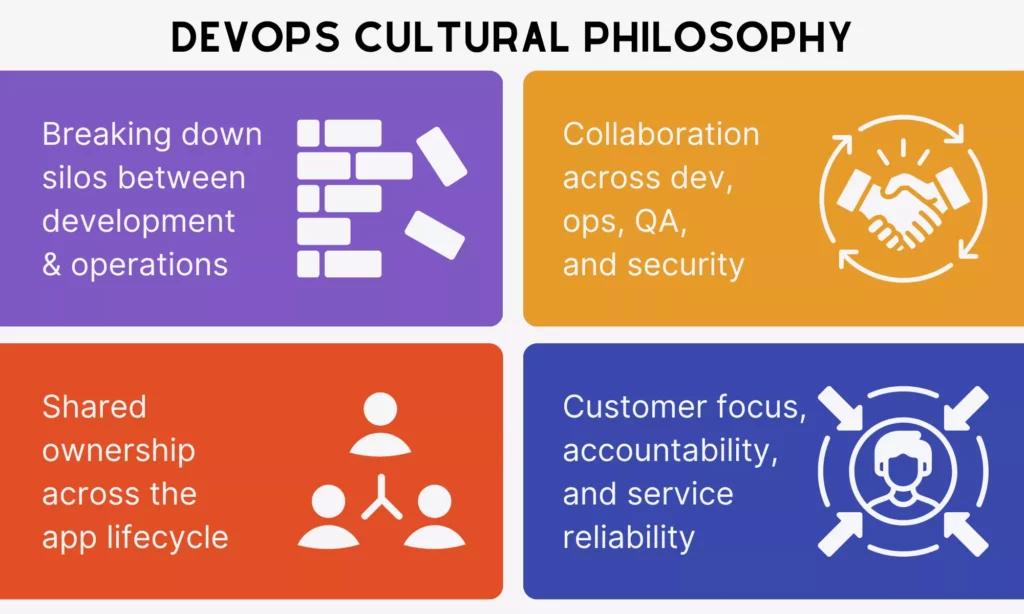
DevOps culture changes how teams coordinate work and respond to production information. It does not require every company to merge all departments into one team; it requires the people involved in delivery to share goals, context, and responsibility for the service.
The practices below make that principle visible in day-to-day work.
Reduce Handoffs Without Losing Role Clarity
Separate development and operations queues can hide risk until a change is nearly ready to ship. A cross-functional review of a feature, for example, can surface an environment dependency or an operational concern while the design is still easy to change.
Shared work does not mean every person owns every task. Product defines the user problem, developers implement and test changes, and operations specialists contribute deployment and service knowledge. Clear decision rights prevent collaboration from turning into an approval maze.
Share Service Ownership And Incident Learning
Teams should agree who maintains a service, who receives alerts, and who can stop or reverse a risky release. That agreement connects development decisions to production consequences without making one role responsible for every failure.
After an incident, a blameless review focuses on the conditions that allowed the failure, the signals that were missed, and the changes that can reduce recurrence. Useful follow-up actions have an owner and a review point; “be more careful” is not a control.
Bring Quality, Security, And Feedback Into The Work
Quality and security checks are more effective when teams plan them alongside the feature instead of treating them as a final gate. Developers and operators can agree on test data, access boundaries, alert thresholds, and rollback options before a change reaches production.
Short collaboration practices such as pair programming can also help two engineers review a risky change as it is built. The useful outcome is shared understanding, not simply adding another meeting or tool.
DevOps And Agile Solve Different Problems
Agile and DevOps complement each other, but they are not interchangeable. Agile helps teams plan and build in small increments around customer feedback; DevOps extends shared responsibility into delivery, operation, and production learning.
| Question | Agile | DevOps |
|---|---|---|
| Main focus | How a team plans, builds, and adapts product work | How a team delivers, runs, and learns from software |
| Typical feedback | User and stakeholder feedback on increments | Build, test, deployment, monitoring, and incident signals |
| Relationship | Can guide how the team organizes product delivery | Connects product delivery to production operation and recovery |
A team can use Scrum or Kanban to organize work and DevOps practices to automate and observe its release path. The right mix depends on the product, service risk, and team structure, not on choosing one label over the other.
Related reading:
- Agile Software Development: Methodologies, Benefits, And Examples
- Agile Vs Scrum: What’s the Difference and When to Use Each?
- Agile vs Waterfall vs Scrum vs Kanban: How to Choose a Method
How DevOps Works: Lifecycle, Pipeline, And Feedback
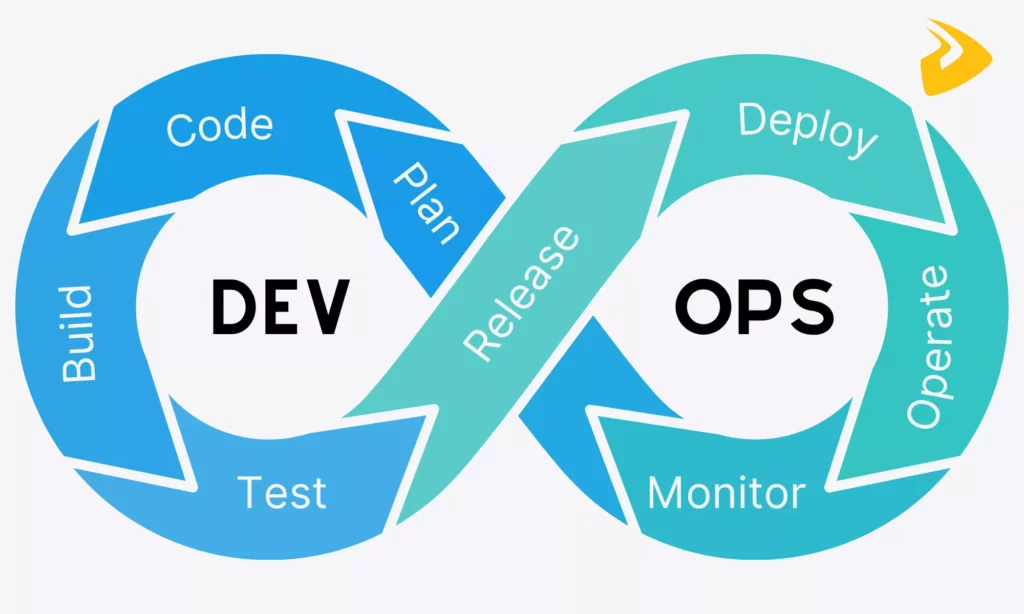
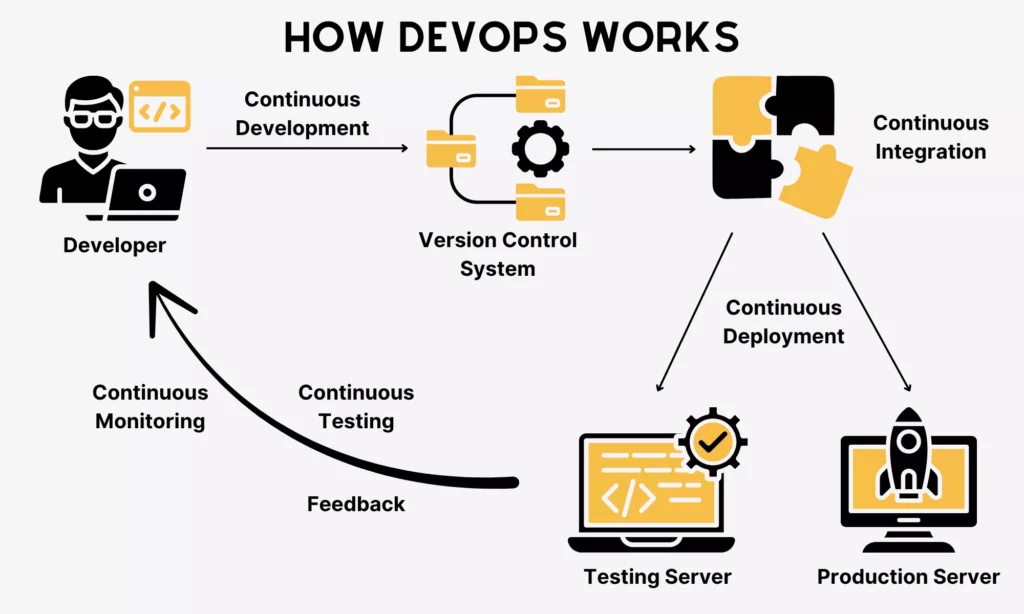
DevOps works as a repeating loop: teams plan a change, build and test it, release it through controlled steps, observe it in production, and use the results to shape the next change. The lifecycle describes the whole operating model; CI/CD automates selected integration, build, test, and delivery or deployment tasks within it. DevOps also includes shared ownership, operational feedback, and recovery after release.
Git version control gives the team a traceable record of code and configuration changes. A pipeline can then respond to a commit or pull request with checks, while people review whether the change is safe and useful to release.
- Plan: define a user or operational need, acceptance conditions, and the service that will change.
- Build: make a small, reviewable change and store code and relevant configuration in version control.
- Test: run automated checks and add human review where context or risk requires it.
- Release and deploy: package the tested version and move it through staging or production using the team’s approval and rollout controls.
- Operate and monitor: watch service behavior, respond to incidents, and gather user or support feedback.
- Learn: use those signals to adjust the backlog, tests, architecture, or deployment process.
A Release Example With Guardrails
Consider a team changing how an online service exports invoices. This illustrative scenario shows how one small change can move through the loop; it is not a claim about a measured Designveloper project.
- An engineer opens a pull request for the export change. The CI workflow builds the code and runs unit tests, an integration check for file storage, and a dependency scan. A failed check stops the change from advancing and gives the author a result to investigate.
- After review and passing checks, the team deploys the same versioned artifact to a test environment. A smoke test confirms that an authorized user can request and retrieve an invoice; operations checks that required permissions and secrets are available.
- The team enables the change for a limited user group using a feature flag or staged rollout. Before release, it agrees which signals matter, such as export errors, request latency, storage failures, and support reports.
- If a pre-agreed service guardrail is breached, the team pauses rollout or disables the feature, then investigates logs and traces. If the change remains healthy through the chosen observation period, the team expands access and feeds production learning into the next planning cycle.
The guardrail is important: passing a build is not proof that a production change is safe. The rollout decision combines automated test results, service signals, and a recovery path that the team has actually rehearsed.
Core DevOps Practices
DevOps practices make delivery more repeatable and help teams learn from changes in production. They work as a connected system: small changes are easier to test, automation shortens feedback, infrastructure definitions reduce drift, and monitoring shows whether the result is healthy.
Small Changes And Continuous Integration
Small changes are easier to review and diagnose than a large batch that combines unrelated work. Continuous integration (CI) supports this approach by integrating changes into a shared codebase regularly and running automated build and test checks.
CI does not guarantee a safe release. Teams still need tests that cover important behavior, code review appropriate to the risk, and a way to identify which change caused a failure.
Continuous Delivery Is Not Continuous Deployment
Continuous delivery keeps a validated version ready to release, while allowing a person or business process to approve when it reaches production. Continuous deployment goes further: each change that passes the required automated checks is released to production without a separate manual release decision.
Both approaches use automation, but they are not synonyms. A team with regulatory, customer, or operational approval requirements may choose continuous delivery and retain a controlled release decision. The choice should reflect the service’s risk and safeguards, not a goal to automate every step.
Infrastructure As Code And Configuration Management
Infrastructure as Code (IaC) stores infrastructure definitions in version-controlled files so teams can review, repeat, and change environments through a traceable process. Configuration management helps keep system settings aligned with the intended state and reduces configuration drift between development, test, and production.
These practices make changes easier to inspect, but they also need access controls, review, and safe handling of secrets. A mistaken infrastructure change can affect many services, so teams should test and roll out high-impact changes carefully.
Monitoring, Logging, And Observability
Monitoring tracks known conditions such as error rates or resource use. Logs record events, while traces help follow a request across services. Observability uses these signals together to help a team investigate behavior it did not anticipate.
Alerts should point to an action or owner. Too many low-value alerts train people to ignore them; too few can hide a customer-impacting problem. Teams can improve the signal by connecting an alert to a service objective, an incident procedure, or a clear escalation path.
DevSecOps And Security Checks
DevSecOps integrates security work into the delivery lifecycle instead of leaving it to a final review. Depending on the system, checks may include dependency and secret scanning, infrastructure policy checks, access review, and security testing.
Automation can catch known issues early, but it does not replace threat modeling, incident response, or human review of sensitive changes. The security team and service owners should define which findings block a release and how exceptions are recorded.

DevOps Tools: Choose By Job, Not Popularity
A DevOps toolchain supports work across source control, testing, infrastructure, deployment, and service operation. No single product is “DevOps,” and tools in adjacent categories do not always replace one another. Use the table to identify the job first, then compare products that can do that job in your environment.
| Need | Tool layer and examples | Selection check |
|---|---|---|
| Review and track changes | Git with a repository platform such as GitHub, GitLab, or Bitbucket | Access control, review workflow, audit history, and integration with existing work |
| Build and test changes | CI services such as GitHub Actions, GitLab CI/CD, Jenkins, or Azure Pipelines | Runner needs, secrets handling, test feedback, maintenance effort, and deployment controls |
| Provision or configure infrastructure | IaC tools such as Terraform or CloudFormation; configuration tools such as Ansible, Chef, or Puppet | Provider fit, state management, review process, drift detection, and team skills |
| Package and run applications | Docker packages containers; Kubernetes, Docker Swarm, and OpenShift orchestrate workloads | Do you need container packaging, orchestration, or both? Consider operating complexity. |
| Understand production behavior | Prometheus and Grafana, Elastic Stack, Datadog, or New Relic | Signal coverage, alert quality, retention, access, and total operating cost |
Start with the smallest toolset that closes a real gap in the current workflow. Check whether it fits the team’s deployment model, identity and security controls, existing systems, support capacity, and budget. Avoid adopting an orchestrator or a large monitoring suite just because other teams use it; the extra operating burden may outweigh the value for a small service.
Explore more:
- DevOps Tools: Best Tools For Every Stage Of The DevOps Lifecycle
- DevOps Pipeline: How It Works, Stages, Tools, And Best Practices
- DevOps Best Practices: 10 Ways To Improve Speed And Reliability

How To Adopt DevOps And Measure Progress
Adopt DevOps by improving one service or delivery bottleneck at a time. A bounded pilot lets a team learn how its code, infrastructure, approvals, and production support interact before it standardizes a process across unrelated products.
- Map the current path: follow one change from request to production and record where it waits, fails, or requires repeated manual work.
- Agree on ownership: name the people responsible for code review, release decisions, production signals, and recovery. Include security and quality needs in the definition of done.
- Set a baseline: choose a single application or service and a consistent observation window. Record delivery and service-health signals before changing the workflow.
- Improve one constraint: add or repair a test, automate a repeatable task, reduce a risky handoff, or make rollback easier. Keep the change small enough to evaluate.
- Review and adjust: compare the new signals with the baseline, discuss side effects with the team, and keep, change, or reverse the intervention. Document the working path before expanding it.
Use Delivery Metrics With Service Guardrails
DORA’s software delivery performance metrics help teams assess how a service delivers changes. The table below defines the five measures before a team interprets its results.
| Metric | Meaning |
|---|---|
| Change lead time | Time from when a change is committed to version control until it is deployed to production. |
| Deployment frequency | Number of production deployments in a consistent period, or the interval between deployments. |
| Failed deployment recovery time | Time to recover after a failed deployment that requires immediate intervention. |
| Change fail rate | Share of deployments that cause a production issue requiring immediate intervention. |
| Deployment rework rate | Share of unplanned deployments created to address a production incident. |
DORA groups change lead time, deployment frequency, and failed deployment recovery time as throughput measures. Change fail rate and deployment rework rate describe instability. Define what counts as a deployment and an incident for the service before comparing results.
Use the measures together and apply them to one service at a time. DORA cautions teams against turning a metric into a universal target or comparing services with very different contexts. A rise in deployment frequency is not automatically an improvement if change failures, recovery burden, or customer-facing service health also worsen.
For a practical review, keep the data source and time window consistent, identify one bottleneck, assign an owner, and decide when the team will look at the result again. Pair delivery measures with service signals that matter to users, such as availability, latency, or task completion. The baseline and review cadence should reflect the service’s normal release pattern; DORA’s metrics are a learning aid, not a score to optimize in isolation.
Teams can use a shared board or delivery tool to make work and blockers visible. If the team already uses Jira, the guide to Jira and Agile workflows explains one way to organize that work without confusing project tracking with the DevOps operating model.

FAQs About DevOps
The definition leaves a few practical questions: which environments can use DevOps, how team size changes adoption, and where a beginner can start.
Does DevOps Require A Public Cloud?
No. Teams can use DevOps practices with on-premises infrastructure, a public cloud, or a hybrid setup. The environment changes which tools and controls are useful, but shared ownership, versioned changes, automated checks, and production feedback apply across those models.
Can A Small Team Adopt DevOps?
Yes. A small team can begin with one service, a version-controlled change process, automated tests for important behavior, and an agreed way to monitor and recover. It does not need a large platform team or a full enterprise toolchain before it can improve its delivery loop.
What Should A Beginner Learn First About DevOps?
Start with command-line and networking basics, Git, automated testing, and how an application is deployed and monitored. Then build one small project with a pipeline and a documented recovery step. A DevOps job title is not required to practice these skills.
Conclusion
DevOps is a shared way to build, deliver, operate, and improve software. Its tools matter, but the lasting value comes from clear ownership, reliable feedback, safe changes, and teams that learn from production rather than treating release as the end of the work.
For organizations that also need product engineering support, Designveloper’s software development services can be a next step to discuss scope and delivery constraints. Contact the team to talk through a project; the right implementation still depends on the product, systems, and operating model.
Also published on

Share post on










Related Articles



What Is A MVP Examples? What Founders Can Learn From 10 Cases?
What Is A MVP Examples? What Founders Can Learn From 10 Cases? Published November 09, 2026
What Is a Vector Database? How It Works, Use Cases & Limits
What Is a Vector Database? How It Works, Use Cases & Limits Published October 28, 2026
How AI Affects Software Development: Tasks, Tools, And Risks In 2026
How AI Affects Software Development: Tasks, Tools, And Risks In 2026 Published October 21, 2026