
















Vibe Coding Workflow: From Product Requirements To Tested Code

KEY TAKEWAYS:
- A vibe coding workflow turns AI-assisted development into a controlled process: start with a short PRD, add project rules, ask for a plan, build one vertical slice, test, refactor, and deploy only after checks pass.
- Context quality matters more than prompt volume; codebase rules, acceptance criteria, file boundaries, security constraints, and rollback expectations help AI produce changes teams can review.
- AI coding is strongest when paired with tests, browser checks, code review, documentation, and deployment gates rather than used as a shortcut around engineering discipline.
- Vibe coding breaks down on vague scope and risky production work, especially when teams skip architecture decisions, security checks, data handling rules, or human ownership.
- For teams building real products, the practical goal is AI-assisted delivery with human accountability, not autonomous code generation without verification.
A practical vibe coding workflow turns product requirements into planned, tested, reviewable code by forcing every AI-assisted coding session through seven gates: a short PRD, project rules, implementation planning, one vertical slice, tests and browser checks, refactoring with documentation, and deployment readiness. AI coding tools can accelerate scaffolding and routine implementation, but the workflow matters because the team still owns requirements, architecture, security, code review, and release quality.
Teams are adopting AI-assisted coding quickly. The 2025 Stack Overflow Developer Survey reported that 84% of respondents were using or planning to use AI tools in development, while the 2025 DORA Report announcement described a study of nearly 5,000 technology professionals on AI-assisted software delivery. The useful lesson is simple: AI speed creates value only when teams keep a disciplined path from requirement to verification.
Quick decision guide: use vibe coding for prototypes, internal tools, CRUD-heavy screens, tests, documentation, and small feature slices when the scope is clear. Slow down or switch to a stricter engineering process for authentication, payments, data privacy, infrastructure, architecture rewrites, and any feature where a wrong answer can leak data, break compliance, or create expensive production recovery work.
| Workflow stage | What the team controls | What AI can safely accelerate |
|---|---|---|
| PRD | Goal, users, scope, constraints, acceptance criteria | Drafting user stories, clarifying edge cases, turning notes into testable requirements |
| Context | Tech stack, coding standards, security rules, key files | Summarizing code paths and finding likely implementation files |
| Plan | Architecture choices, slice boundaries, rollback strategy | Proposing steps, files to change, and test coverage |
| Build | Small diffs, reviewable commits, convention fit | Scaffolding UI, API handlers, tests, mocks, and documentation |
| Verify | Unit, integration, browser, accessibility, security, and CI checks | Generating test cases and explaining failures |
| Release | Human approval, monitoring, rollback, documentation | Preparing PR notes, deployment checklists, and runbooks |
Recommended for you:
- Vibe Coding Vs Traditional Coding: Where Fast AI Coding Helps And Where It Hurts
- Claude Vs ChatGPT Vs Gemini For Coding: Which AI Fits Your Workflow?
- Best AI For Python Coding: Top Picks For Every Workflow
What Is A Vibe Coding Workflow?
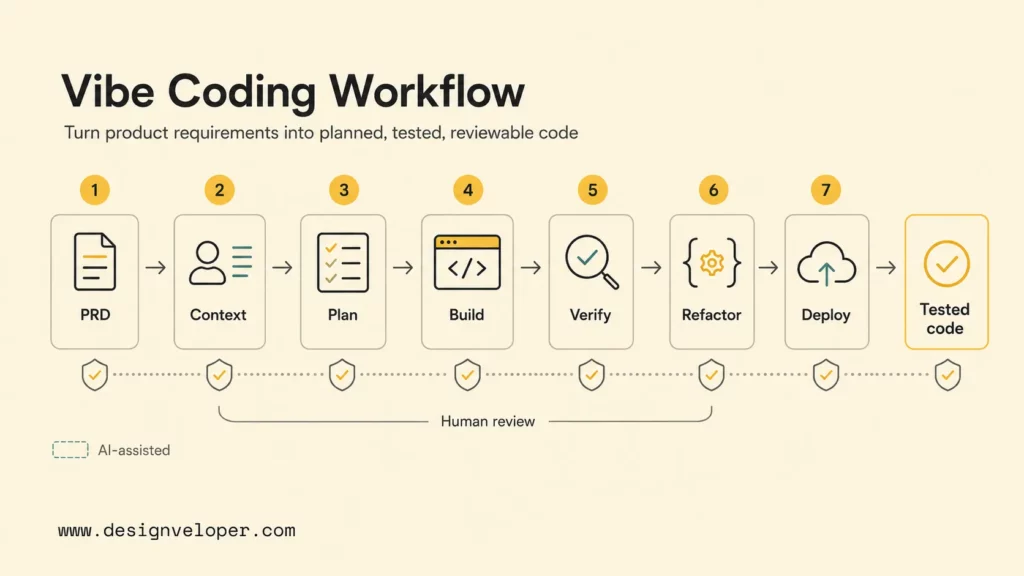
A vibe coding workflow is a repeatable process for using natural-language AI coding tools without letting the output become an unreviewed pile of generated code. The workflow starts with a short product requirement, gives the AI tool enough codebase context, asks for a plan before implementation, builds one small vertical slice, and verifies the result with tests, browser checks, and human review.
The phrase “vibe coding” is often used for a looser style of software creation where a person describes the desired behavior and lets an AI assistant generate much of the code. The practical version is not “prompt and hope.” The practical version treats AI as a fast pair programmer that can draft, explore, and revise, while the engineer keeps control over product intent, risk, correctness, and maintainability.
Modern coding assistants are built for repository-aware work. GitHub Copilot coding agent documentation says the agent can research a repository, create a plan, make changes on a branch, and let the developer review the diff. Cursor documentation documents agent mode, project rules, MCP integrations, and other ways to steer AI work inside a codebase. Claude Code describes an agentic coding tool that lives in the terminal, understands a codebase, and helps with routine tasks and git workflows.
Those capabilities make a workflow more important, not less important. A coding agent that can edit multiple files, run shell commands, and propose branches needs boundaries. A team should tell the agent what problem to solve, what files matter, what tests prove success, what security rules cannot be violated, and when to stop for human approval.
Vibe coding becomes useful engineering work when the prompt is only the start, not the definition of done.
Why Vibe Coding Needs A Workflow
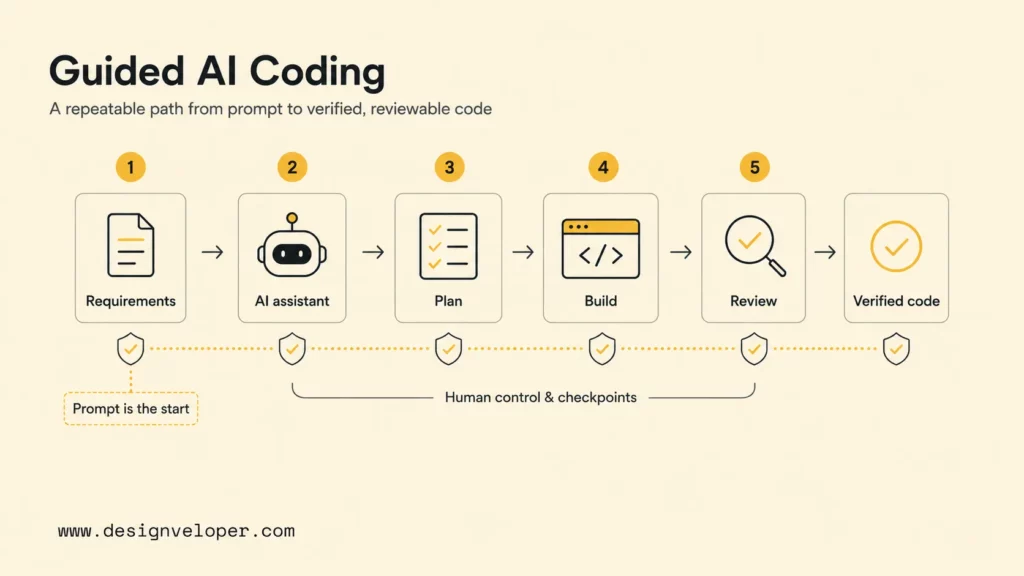
Vibe coding needs a workflow because AI-generated code can look convincing before the product problem is understood, the codebase conventions are respected, and the release risks are tested. A structured process protects the team from four common failure modes: vague requirements, large unreviewable diffs, code that ignores the existing architecture, and features that appear done before validation is complete.
- Vague requirements make AI invent details. If a prompt says “build a billing dashboard,” the assistant may invent roles, states, pricing logic, or data models that the product team never approved.
- Large diffs become hard to review. A generated change that touches routes, state, database schema, and styling at once can hide bugs that a smaller vertical slice would reveal.
- Generated code may not fit the existing codebase. AI may choose a new helper, state pattern, validation style, or package when the repository already has a standard approach.
- Code can look done before tests, UI checks, and docs are complete. A working happy path is not enough for production software, especially when authentication, permissions, payments, or private data are involved.
The risk is not that AI writes code. The risk is that teams treat generated code as if a fast draft is equivalent to a verified change. The NIST Secure Software Development Framework frames secure software around defined practices for preparing the organization, protecting software, producing well-secured software, and responding to vulnerabilities. A vibe coding workflow should borrow that mindset: define the guardrails before implementation and verify the output before release.
LLM-specific risks also matter. The OWASP Top 10 for LLM Applications lists prompt injection, insecure output handling, sensitive information disclosure, supply chain vulnerabilities, and excessive agency among major risk areas for LLM-powered systems. Those risks are relevant when AI coding tools read project files, generate dependencies, create scripts, or connect to tools that can affect a repository.
A workflow gives the team a practical answer to those risks. Requirements reduce invention. Project rules reduce convention drift. Planning reduces unreviewable changes. Small slices reduce blast radius. Tests, linters, typecheckers, browser checks, and CI reduce false confidence. Documentation and commit discipline make the work easier to audit later.
The Practical Vibe Coding Workflow
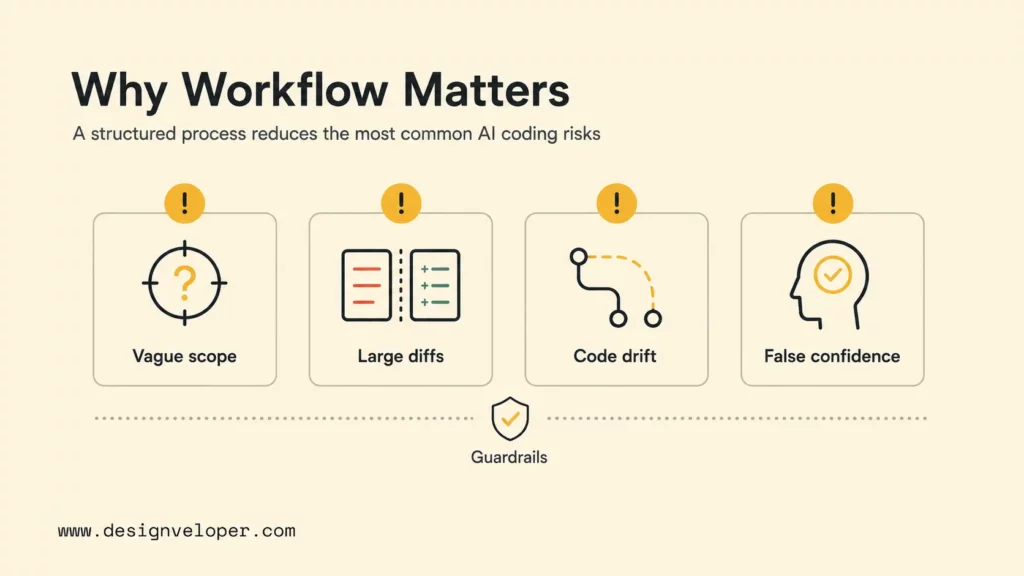
The practical vibe coding workflow moves from product clarity to tested code in seven steps. The order matters because each step gives the AI assistant a smaller, safer problem. The workflow also gives the human reviewer clear checkpoints where the team can reject, revise, or narrow the task before the assistant produces too much code.
| Step | Output | Review gate |
|---|---|---|
| 1. Short PRD | Goal, users, scope, constraints, acceptance criteria | Is the product problem testable? |
| 2. Project rules | Stack, conventions, files, commands, security boundaries | Does the AI have enough local context? |
| 3. Implementation plan | Files to inspect, change list, tests, rollback notes | Is the plan small enough to review? |
| 4. Vertical slice | One end-to-end path through UI, API, data, or state | Does one user path work before expansion? |
| 5. Verification | Unit, integration, browser, accessibility, lint, typecheck, CI | Can the team reproduce success? |
| 6. Refactor and docs | Cleaner code, comments where needed, README or runbook updates | Can another developer maintain it? |
| 7. Deploy gate | PR, deployment notes, monitoring, rollback plan | Is the release safe enough? |
The workflow diagram below shows the control points that keep AI-assisted coding useful instead of chaotic. Treat the arrows as gates: each stage should produce something reviewable before the team moves to the next stage.
The important pattern is that AI does not jump straight from prompt to deployment. Product intent, repository context, implementation planning, working code, verification, and release control each get their own checkpoint.
Step 1: Write A Short PRD Before Prompting
Start with a short PRD before opening the AI editor. A good PRD for AI-assisted coding should fit on one page and state the product goal, user type, user flow, feature scope, non-goals, acceptance criteria, data constraints, and obvious edge cases. The PRD does not need executive polish. The PRD needs enough precision to prevent the assistant from filling product gaps with guesses.
A useful prompt can paste the PRD and ask the assistant to identify missing requirements before writing code. For example: “Read this PRD and list the unclear states, security concerns, data model assumptions, and test cases. Do not edit files yet.” That instruction turns the assistant into a reviewer before it becomes an implementer.
The PRD should name the first vertical slice. For a dashboard, the first slice might be “an authenticated admin can view the last 30 days of invoices, filter by status, and open one invoice detail panel.” For an onboarding flow, the first slice might be “a new user can choose a plan, enter profile data, and see validation errors without saving to production data.” Narrow slices help the assistant work inside a defined boundary.
Step 2: Add Project Rules And Codebase Context
Add project rules and codebase context before asking for implementation. Project rules should cover the tech stack, package manager, folder conventions, naming patterns, test commands, lint commands, security constraints, design system usage, and files that should not be touched. Cursor supports persistent rules for projects and teams through Cursor Rules, while many teams use repository files such as AGENTS.md, CLAUDE.md, or CONTRIBUTING.md to give coding agents stable instructions.
Good context is specific. Instead of saying “follow the existing style,” point the assistant to the local components, API client, validation helper, auth middleware, environment variable pattern, test utilities, and deployment notes. If the repository uses Next.js, React Hook Form, Zod, Prisma, Tailwind CSS, Playwright, and GitHub Actions, the assistant should know that before it proposes a new stack.
Security context is just as important as style context. Tell the AI not to log secrets, not to invent environment variables without documentation, not to weaken authentication checks, not to bypass server-side validation, and not to add dependencies without explaining why. AI can draft code quickly, but dependency and permission decisions still belong to the engineering team.
Step 3: Ask AI For An Implementation Plan
Ask the AI assistant for an implementation plan before allowing file edits. The plan should list files to inspect, files likely to change, data model impact, test coverage, manual QA steps, and rollback considerations. A plan gives the reviewer an early chance to catch architectural drift, overbroad scope, or missing tests.
A strong implementation-plan prompt is direct: “Inspect the relevant files, then propose a minimal plan. Include risks and tests. Do not edit files until the plan is approved.” That small pause can prevent a sprawling diff. GitHub’s cloud agent model reflects a similar pattern: the agent can research a repository and create a plan before code changes, while the developer reviews the diff and iterates through a pull request.
The plan should also identify the first revert point. If the assistant must change a schema migration, API contract, or routing structure, the reviewer should know how to back out the change. Vibe coding without a rollback habit can turn a two-hour prototype into a multi-day cleanup.
Step 4: Build One Vertical Slice At A Time
Build one vertical slice at a time. A vertical slice connects enough UI, state, API, data, validation, and tests to prove one user path. The slice should be small enough for a human to review line by line. The assistant can then repeat the pattern for adjacent states after the first path passes.
Vertical slicing works better than layer-by-layer generation because it exposes integration problems earlier. A generated UI without API behavior can hide missing validation. A generated API without the real component can hide loading states and permission mistakes. A thin but complete path makes the assistant deal with the actual system, not an imagined architecture.
A useful build prompt is: “Implement only the approved first slice. Keep the diff small. Reuse existing components and helpers. Add or update tests for the acceptance criteria. Stop after the slice is complete and report changed files.” The stop condition matters. Without a stop condition, an eager assistant may keep adding polish, optional states, or unrelated cleanup.
Step 5: Verify With Tests And Browser Checks
Verify with automated tests and browser checks before expanding the feature. Unit tests can prove small functions. Integration tests can prove data and API behavior. Browser checks can prove that the user can actually complete the flow. Playwright writing-tests documentation explains that Playwright performs actions and asserts state against expectations, while auto-waiting helps avoid fragile manual waits.
The verification step should include the commands that developers already trust: package install checks, lint, typecheck, unit tests, integration tests, browser tests, and build. If the assistant changes a page, ask it to run or describe browser-level checks for the affected states. If the assistant changes a database query, require tests that cover empty, normal, and permission-denied cases.
A good AI verification prompt is: “Run the relevant checks. If a check fails, explain the root cause, make the smallest fix, and rerun only the necessary commands. Do not hide failing tests.” The instruction is plain, but it matters. Generated code can pass a screenshot-level glance while failing type safety, accessibility, or edge cases.
Step 6: Refactor, Document, And Commit
Refactor after the slice works, not before the slice is understood. Ask the assistant to remove duplication, simplify naming, align with existing helpers, and delete dead code. Refactoring should improve readability without changing behavior. The reviewer should be suspicious of broad rewrites that appear after the feature already passes tests.
Documentation should be practical and close to the code. Update README instructions, environment variables, API notes, migration instructions, test fixtures, or deployment notes when the feature changes how developers work. Documentation is especially useful when AI-assisted changes add a new tool, command, background job, schema rule, or operational assumption.
Commit discipline is the final local control. A good commit or pull request should explain the product change, the test evidence, the known limitations, and the files that deserve careful review. AI can draft the PR description, but a human should confirm that the description matches the actual diff.
Step 7: Deploy Only After The Workflow Passes
Deploy only after the workflow passes. The deployment gate should confirm that the feature meets acceptance criteria, tests pass, secrets are configured safely, database changes are reversible or well understood, monitoring is ready, and rollback steps are clear. For a small internal tool, the gate may be lightweight. For a customer-facing payment or authentication feature, the gate should be strict.
Deployment tools can support the workflow without replacing it. Vercel can host frontend and full-stack web apps, Supabase can manage PostgreSQL-backed application data, and Neon can support serverless PostgreSQL use cases. Supabase documents local development with schema migrations in its local development guide, which is the kind of version-controlled database practice teams should preserve when AI helps generate application code.
The deploy step should never be “the app loaded once.” The deploy step should be “the defined workflow passed, a reviewer approved the diff, the release path is understood, and the team knows what to watch after shipping.” AI can move a feature faster to the gate, but the gate still belongs to the team.
Further reading:
- Prompt Engineering For Developers: A Guide To Practical Patterns
- Top 10 AI Code Review Tools & Best Practices For Implementation
- 15 Best AI Coding Assistant Tools For Developers
What To Prepare Before Prompting AI
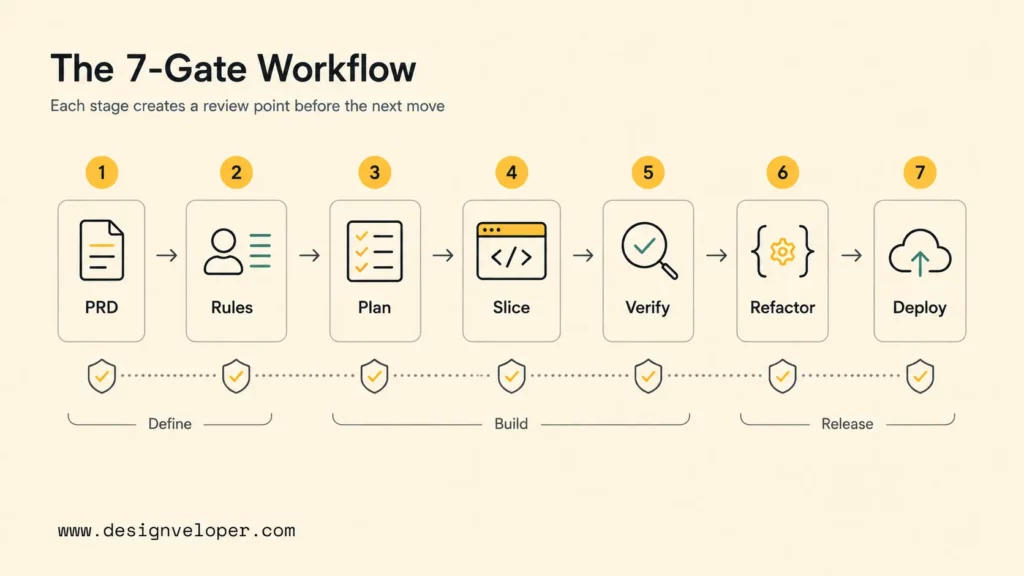
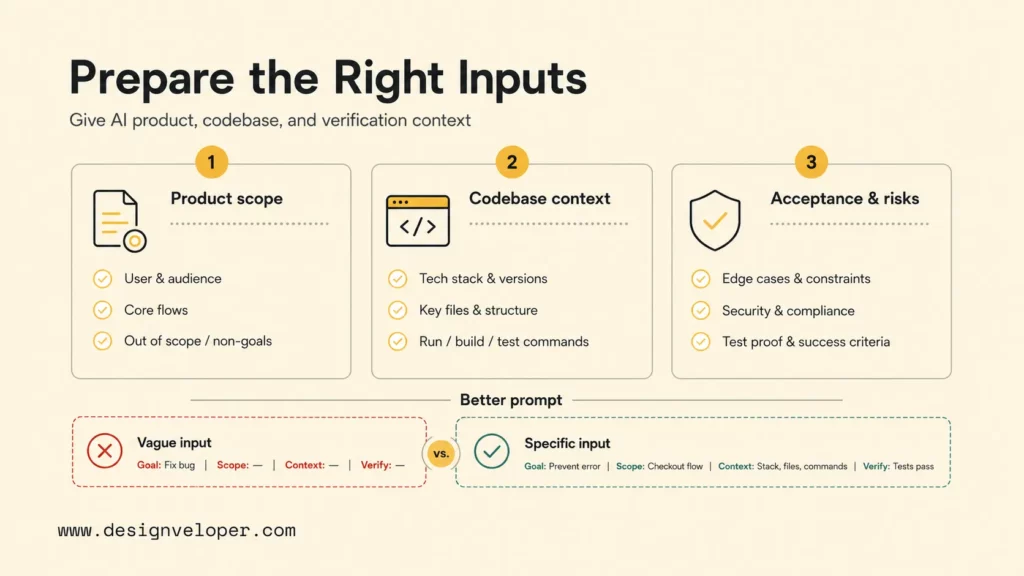
Prepare product, technical, and verification context before prompting AI. The assistant performs better when the team gives it a small problem with clear constraints. The most useful preparation fits into three groups: product goal and feature scope, codebase and stack context, and acceptance criteria with risk boundaries.
- Product goal, user flow, and feature scope. Name the user, the job to be done, the entry point, the success state, the failure states, and the non-goals. Include screenshots or wireframes when UI matters.
- Tech stack, existing codebase context, and key files. List frameworks, package manager, routes, components, services, database tables, test utilities, environment variables, and commands.
- Edge cases, coding conventions, security rules, and acceptance criteria. Define permissions, validation rules, empty states, error states, rate limits, logging boundaries, and the tests that prove the work.
A compact PRD template can keep the workflow consistent. Use fields such as “Problem,” “User,” “Primary flow,” “Out of scope,” “Data touched,” “Security constraints,” “Acceptance criteria,” “Test plan,” and “Definition of done.” When those fields are filled, the AI assistant has a product frame and the reviewer has a checklist.
| Prompt input | Bad version | Better version |
|---|---|---|
| Goal | Make checkout better | Reduce failed checkout attempts by adding inline card validation and clearer payment error messages |
| Scope | Build settings | Add profile photo upload only; do not change password, billing, or notification settings |
| Context | Use our app style | Reuse ProfileForm, AvatarUploader, apiClient, Zod validation, and existing toast patterns |
| Acceptance | It should work | User can upload PNG/JPG under 2 MB, sees preview, receives validation errors, and cannot save without permission |
| Verification | Test it | Run unit tests for validation, Playwright test for upload happy path, lint, typecheck, and production build |
This preparation does not slow down vibe coding. It removes the avoidable loops where an assistant builds the wrong feature quickly, then spends several turns correcting requirements that should have been explicit from the start.
You might also like:
- Software Development Life Cycle (SDLC): Guide for Business
- What Is Software Architecture? Benefits, Characteristics and Examples
- 10 Best Practices For Prompt Engineering With Any AI Model
Tools That Support The Workflow
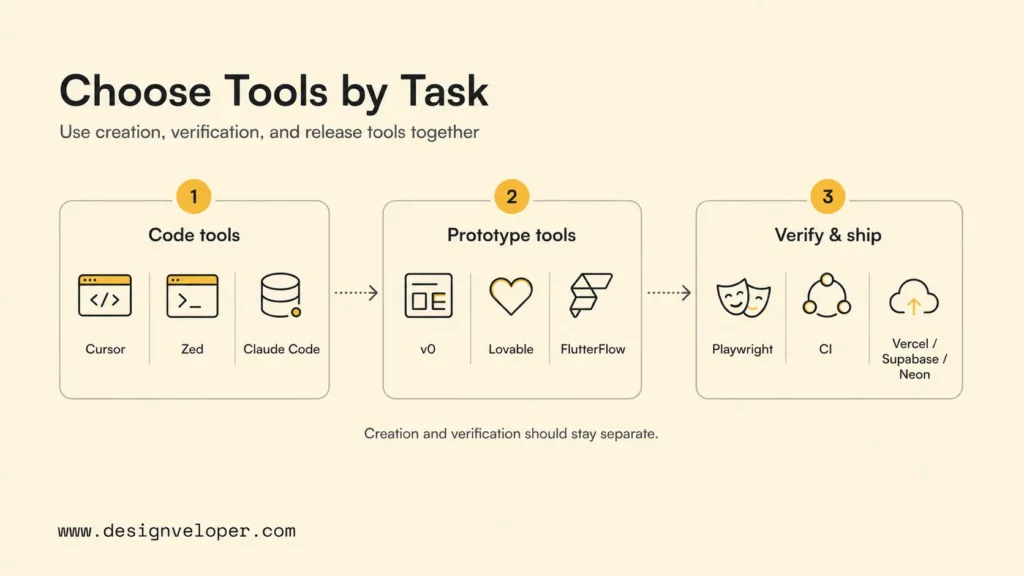
The best vibe coding tools support a controlled workflow from idea to code to verification. Tool choice should follow the task. Use repository-aware coding tools for existing codebases, visual app builders for early UI exploration, and testing or deployment tools for confidence before release.
- Cursor, Zed, or Claude Code for AI-assisted coding. Cursor provides repository-aware agent workflows and rules; Claude Code brings agentic coding into the terminal; Zed offers a fast collaborative editor experience with AI features for code work.
- v0, Lovable, or FlutterFlow for fast UI and app prototypes. Vercel v0 can generate working applications and sync code to a repository; Lovable Supabase documentation describes a chat-based path for UI and backend database setup; FlutterFlow AI focuses on generating and updating app components and pages.
- Playwright, linters, typecheckers, CI, Vercel, Supabase, or Neon for verification and deployment. Playwright verifies browser behavior, linters and typecheckers catch code issues, CI makes checks repeatable, and deployment platforms move reviewed work into test or production environments.
A healthy tool chain separates creation from verification. A visual app builder can explore layout quickly, but a production team still needs code review, source control, database migration discipline, secrets management, and deployment checks. A repository-aware coding agent can change real files, but the team still needs tests and PR review. A browser test can prove a user path, but the team still needs human judgment around product fit and risk.
Tool rules are also part of the workflow. Store durable instructions where the tool can read them, such as project rules, agent instructions, coding guidelines, and test commands. Keep secrets outside prompts and generated files. Use branch-based work so AI changes are reviewable before merge. Ask the assistant to explain dependency additions, schema migrations, and permission changes before they become part of the codebase.
Related reading:
- What Is DevOps? The DevOps Lifecycle And How It Works
- How to Improve Developer Productivity for Long Term?
- What Pair Programming Means In The Age Of AI Pair Programmers
Where Vibe Coding Works And Where It Breaks
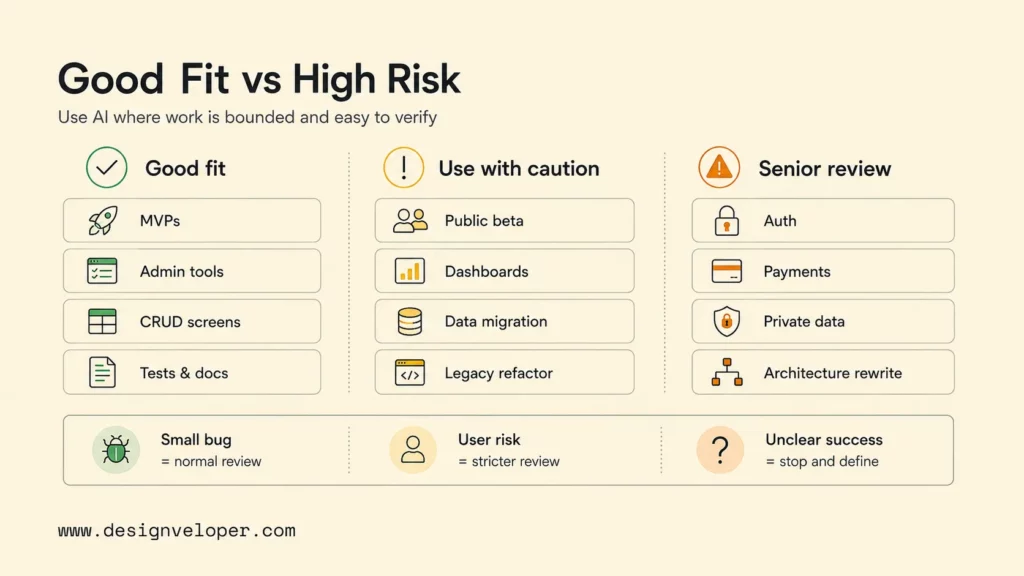
Vibe coding works best when the work is bounded, reviewable, and easy to verify. Vibe coding breaks when the team asks AI to replace product clarity, architecture judgment, security review, or production ownership. The line is not about whether AI is allowed. The line is whether the team can validate the generated result.
| Good fit | Use with caution | Poor fit without senior review |
|---|---|---|
| MVPs with clear non-goals | Public beta features | Authentication architecture |
| Internal admin tools | Customer-facing dashboards | Payment flows |
| CRUD-heavy screens | Data migrations | Privacy-sensitive workflows |
| UI scaffolding | Role-based permissions | Large architecture rewrites |
| Tests and documentation | Legacy refactors | Security-sensitive infrastructure |
| Small feature work in a familiar codebase | Performance-sensitive services | Regulated or compliance-heavy systems |
MVPs, internal tools, CRUD-heavy apps, UI scaffolding, tests, docs, and feature work in a familiar codebase are strong candidates because acceptance criteria are usually concrete. A reviewer can inspect the diff, run the app, and verify behavior without needing to redesign the system.
Security-sensitive workflows, large architecture changes, weakly tested codebases, and teams expecting AI to replace engineering judgment need stricter controls. The assistant may produce plausible code, but plausible code is not the same as secure code. The OWASP prompt injection guidance is a useful reminder that LLM behavior can be manipulated by inputs, so teams should avoid granting broad tool access or production authority without checks.
The safer question is not whether AI can generate the code, but whether the team can prove the generated code behaves correctly.
A simple decision rule helps. If a wrong implementation would create only a small UI bug, use AI aggressively with normal review. If a wrong implementation could leak data, break payments, weaken permissions, or corrupt records, require senior review, threat modeling, stronger tests, and staged rollout. And if the team cannot define success, do not ask AI to implement the feature yet.
For practical examples, check out:
- From AI MVP To Product: Why Great Demos Are Not Enough
- Custom Software Development: How It Can Drive Your Business Growth
- What Is Software Development Outsourcing?
How Designveloper Supports AI-Assisted Development Workflows
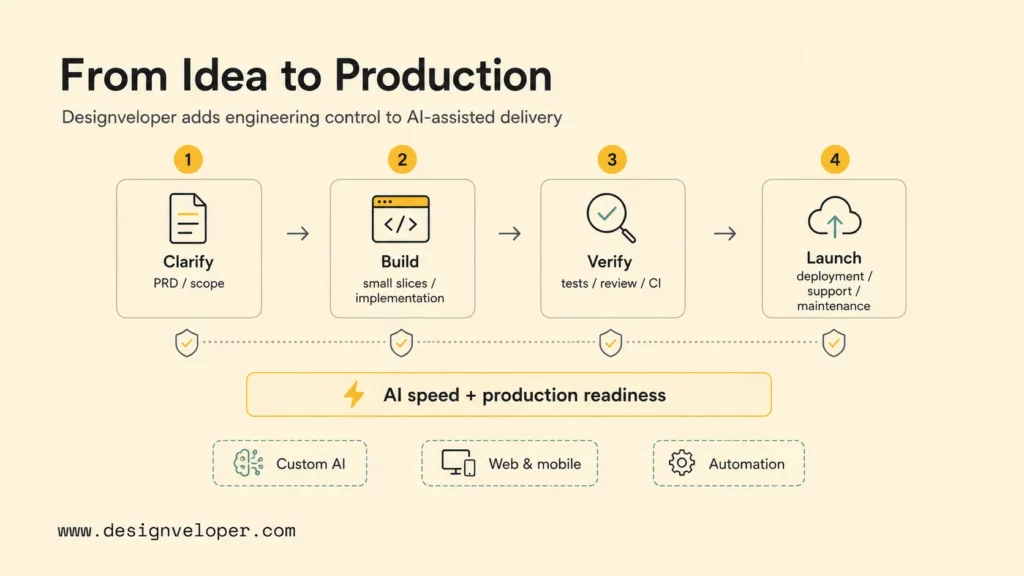
Designveloper supports AI-assisted development workflows by turning product requirements into technical plans, small implementation slices, tested releases, and maintainable software. AI can help teams move faster, but production software still needs architecture decisions, code review, security checks, documentation, deployment discipline, and post-launch support.
As an AI-first software and automation partner, Designveloper works across custom AI systems, workflow automation, web applications, mobile applications, and product engineering. Our AI development services cover practical AI integration, while our broader software development services support the delivery work around product discovery, implementation, testing, deployment, and maintenance.
For AI-assisted coding, the useful partnership is not “let AI build everything.” The useful partnership is controlled speed. Designveloper can help define a PRD, map the first vertical slice, select the right tooling, prepare repository instructions, add tests, review generated code, and move a prototype toward production readiness. That work is especially important when a proof of concept touches real users, private data, third-party APIs, or operational workflows.
Designveloper’s public project portfolio shows the delivery foundation behind that approach. Projects such as Lumin and HRM involve product workflows where document handling, collaboration, employee operations, permissions, and maintainable application behavior matter. Those patterns are directly relevant to teams that want AI speed without giving up engineering control.
The CTA angle is straightforward: use AI speed with engineering control and production readiness. A team can start with a vibe coding workflow for a contained feature, then bring Designveloper in when the work needs product clarification, architecture review, custom AI integration, CI/CD, testing strategy, security review, deployment support, or maintainable long-term development.
FAQs About Vibe Coding Workflow
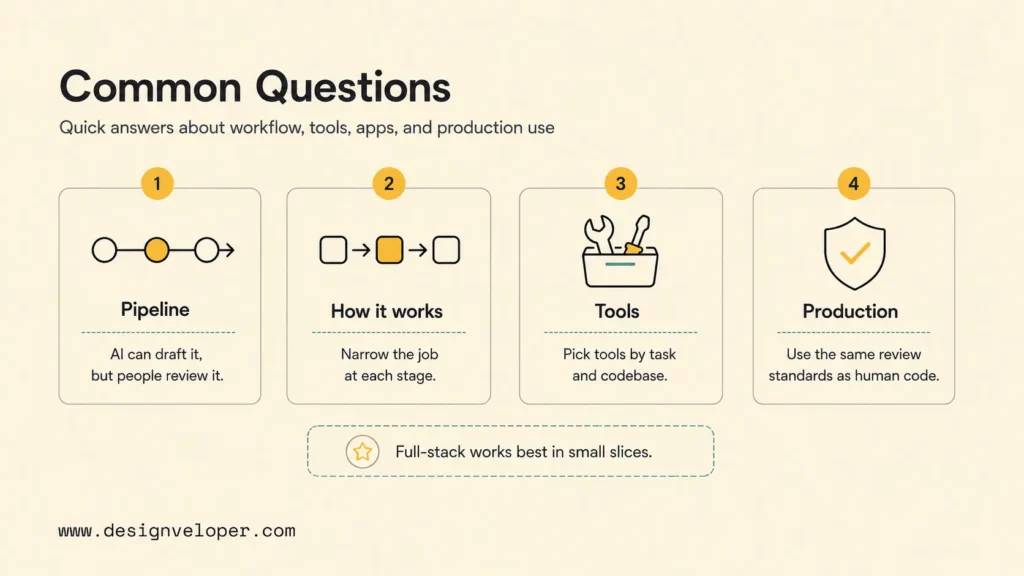
Can Vibe Coding Build Your Development Pipeline?
Vibe coding can help draft parts of a development pipeline, but it should not own the pipeline without review. An AI assistant can generate GitHub Actions files, test commands, Playwright setup, Docker configuration, or deployment scripts. A human should still review secrets handling, permissions, caching, deployment targets, rollback behavior, and environment-specific settings.
A safe pattern is to ask AI for a pipeline proposal first. The proposal should list commands, triggers, required secrets, protected branches, and failure behavior. After approval, the assistant can implement one pipeline change at a time and run a test branch before the workflow affects production releases.
How Does A Vibe Coding Workflow Work?
A vibe coding workflow works by narrowing the AI assistant’s job at each stage. The human gives a short PRD, adds project rules and repository context, asks for a plan, approves a small vertical slice, verifies the output with tests and browser checks, refactors and documents the change, and deploys only after the workflow passes.
The workflow succeeds because it changes the assistant’s role from uncontrolled generator to guided collaborator. The assistant can draft faster than a human in many routine tasks, but the workflow keeps product judgment, architecture judgment, and release approval with the team.
What Tools Are Used For Vibe Coding?
Common vibe coding tools include Cursor, Claude Code, GitHub Copilot, v0, Lovable, FlutterFlow, Replit, Zed, Playwright, Vercel, Supabase, Neon, linters, typecheckers, and CI systems. The right tool depends on whether the team is editing an existing codebase, exploring a UI prototype, generating tests, or preparing a release.
Repository-aware tools are better for production code because they can inspect existing files and work inside version control. Visual app builders are useful for quick exploration, demos, and early product alignment. Testing and deployment tools are mandatory once the team wants confidence beyond a working preview.
Can Vibe Coding Build Full-Stack Apps?
Vibe coding can help build full-stack apps when the team defines the product scope, data model, authentication rules, API behavior, UI states, tests, and deployment path. AI tools can scaffold screens, generate API handlers, propose schema changes, write tests, and explain errors. The team still needs to review architecture, security, performance, data migrations, and maintainability.
Full-stack vibe coding is safest when the app is split into small vertical slices. Build authentication separately from billing. Build one dashboard path before all filters. And build one API mutation before a batch workflow. Each slice should have acceptance criteria and tests before the assistant expands the feature.
Is Vibe Coding Safe For Production Software?
Vibe coding can support production software when the generated work passes the same standards as human-written code. Production readiness requires clear requirements, code review, automated tests, browser checks, security review, dependency review, documentation, observability, and rollback planning. AI-generated code should not get a weaker review path because it was faster to create.
Teams should be stricter when AI touches authentication, payments, authorization, personal data, infrastructure, or compliance-sensitive workflows. For those areas, use the vibe coding workflow as an assistant-driven drafting process, not as autonomous production authority. The final release decision should stay with accountable engineers and product owners.
Also published on

Share post on










Related Articles


Top Agentic AI Companies: 18 Vendors By Product Layer And Fit
Top Agentic AI Companies: 18 Vendors By Product Layer And Fit Published October 07, 2026
Agentic AI Architecture: Components, Patterns, And Workflows
Agentic AI Architecture: Components, Patterns, And Workflows Published October 07, 2026
AI Advantages and Disadvantages for Businesses: 5 of Each Explained
AI Advantages and Disadvantages for Businesses: 5 of Each Explained Published October 05, 2026



















