














What Is a CI/CD Pipeline? Stages, Gates, and Examples

KEY TAKEAWAYS:
- Continuous integration validates small code changes frequently. Continuous delivery keeps a version ready for release; continuous deployment promotes eligible changes automatically.
- A pipeline should preserve the same tested artifact across environments, with explicit gates and traceable results.
- Production health checks and recovery belong in the design. A code rollback does not automatically reverse database changes or external side effects.
- Place the pipeline within the software development lifecycle and assign owners for failed runs, approvals, and incidents.
A code change can be ready while the release remains blocked by manual steps, inconsistent environments, or an unclear approval. A CI/CD pipeline makes that route visible and repeatable. For a team evaluating delivery practices, the useful questions are what starts the workflow, what stops a bad change, and who responds when a release fails. This guide explains the terms, the stages and their outputs, the tool categories, and an illustrative web-app release with failure paths. It also separates release readiness from automatic production deployment, so teams can choose controls that fit their business rather than treat maximum automation as the only destination.
What Is a CI/CD Pipeline?
A CI/CD pipeline is an automated workflow that moves a software change through build, test, release, deployment, and feedback steps. CI means continuous integration. CD can mean continuous delivery or continuous deployment, depending on how the production release decision is handled.
A pipeline combines events, jobs, runners, artifacts, environments, and rules. A job is a defined piece of work, a runner executes it, and an artifact is the versioned package produced for testing or deployment. The pipeline is the connected release path, not a single product.
The aim is repeatable validation and promotion with useful feedback. Passing checks means the change met those checks; it does not prove that every defect has been found. The chosen tests, operating controls, and production monitoring determine what the team can reasonably trust.
CI, Continuous Delivery, and Continuous Deployment
The practices address different points in the release path. Continuous integration is the practice of merging small changes into a shared branch frequently and validating them with automated builds and tests. It depends on integration habits as well as a configured server.
| Practice | Result | Production Decision |
|---|---|---|
| Continuous integration | Frequently integrated changes with build and test feedback | Does not by itself define a production release |
| Continuous delivery | A validated version remains ready to release | Usually a human decision before production |
| Continuous deployment | Eligible passing changes are promoted automatically | No routine manual production approval; failed automated checks stop promotion |
Continuous delivery can automate deployment mechanics while keeping the release decision with a person. Continuous deployment removes that routine manual decision for eligible changes. Teams may retain approval for business timing, customer coordination, regulation, or risk; it is a valid operating choice.
A failed automated test is a gate, not a human approval. IBM’s CI/CD overview describes how the choice between delivery and deployment depends on business needs. Do not describe automatic production release as mandatory maturity.
How CI/CD Fits Within DevOps
DevOps is a broader way for development, operations, security, and other stakeholders to share delivery and service responsibility. CI/CD is a concrete workflow that supports those practices. A pipeline alone does not create good collaboration or assign incident ownership.
The team agrees how changes are reviewed, which tests matter, who approves a release, and who responds afterward. Pipeline results make parts of that agreement visible. Infrastructure definitions, environment management, and observability support the path but also need their own owners.
For a service with a separate operations team, an agreed release record can include the artifact version, configuration change, rollout plan, health checks, and recovery decision. That handoff provides context when a problem occurs instead of leaving operations to infer what changed.
Xem thêm:
- What Is DevOps? How It Works, Core Practices, and Benefits
- What Is A DevOps Pipeline? A Complete Guide To Building One
- DevOps Best Practices: 10 Ways To Improve Speed And Reliability
How a CI/CD Pipeline Works: Triggers and Gates
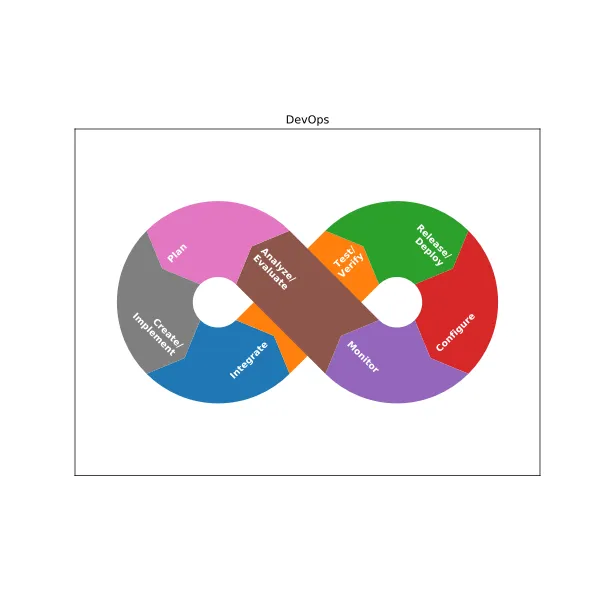
A code event triggers automated jobs. If a required job fails, promotion stops and the owner receives the result. A passing version is stored as an artifact, checked in the next environment, and released through the configured manual or automatic gate. Production signals then show whether the running version behaves as expected.
- Trigger: a pull request, merge, tag, schedule, or approved manual event starts the relevant workflow.
- Validate: build and test jobs check the change; required failures stop advancement.
- Store: keep an immutable, identifiable artifact with its commit and test results.
- Stage: deploy that artifact to a representative environment and check integrations and configuration.
- Promote: validate the approval or automated release conditions before production.
- Observe: evaluate health and user-facing signals, then continue, hold, recover, or investigate.
Separate pull-request validation from privileged production jobs. A proposed change may need fast tests without access to production credentials. Review pipeline configuration changes as code because those changes can alter the release path itself.
Build once and promote the same artifact where practical. Rebuilding separately for production can introduce different dependencies or content from what staging tested. Environment-specific settings should be controlled separately from the immutable application package.
Pipeline Stages: Inputs, Outputs, and Owners
The stage map below assigns responsibility rather than repeating the trigger sequence. A small team may combine roles, but each acceptance decision still needs an owner.
| Stage | Input | Output / Acceptance | Typical Owner |
|---|---|---|---|
| Source | Reviewed change and pipeline definition | Known commit, review, and permitted trigger | Developer / reviewer |
| Build | Versioned source and dependencies | Identifiable package or container image | Development / platform team |
| Test | Change or artifact and test data | Required results, failures, and diagnostics | Developers / QA |
| Release | Passing candidate and change record | Version, integrity evidence, and required approval | Release owner |
| Deploy | Approved artifact and environment configuration | Running version with smoke-check results | Platform / service team |
| Monitor | Running version and baseline signals | Health decision, incident, or improvement work | Service owner / on-call |
Test scope should match risk. Unit tests check local logic, integration tests check boundaries, and end-to-end tests exercise critical journeys. Security checks cover a separate set of concerns. Expensive suites may run at later gates, but their position must still prevent an unacceptable release.
Track feedback time by job and stage. A lightweight formatting workflow and a full integration environment have different costs and purposes. Compare similar pipelines rather than using one vendor median as a universal speed target.
Benefits and Common Failure Modes
CI/CD can reduce waiting and fragile manual handoffs when the release path is reliable. Smaller changes and repeatable checks also help teams identify which change introduced a problem. Those benefits depend on test quality, clear ownership, and maintainable configuration.
- Faster feedback: short, relevant checks help developers respond while the change is still familiar.
- Repeatable release work: a versioned workflow reduces dependence on undocumented local commands.
- Traceability: a running artifact can be linked to its source, review, checks, and release decision.
- Controlled exposure: staging and gradual rollout can limit the initial effect of a problem.
Common failures include flaky tests, shared runners with excessive access, hidden manual changes, mutable artifact tags, and alerts without an owner. More automation can amplify those defects. Fix the unstable step rather than repeatedly bypassing the gate to keep releases moving.
Security Controls Along the Release Path
Treat the pipeline as production infrastructure because it can change the software users receive. Limit repository, runner, artifact-store, and deployment permissions to the jobs and people that require them.
| Boundary | Control | Owner’s Check |
|---|---|---|
| Source and configuration | Protected changes and review of pipeline rules | Who can change release behavior? |
| Build and test | Isolated runners, dependency checks, and secret scanning | Can untrusted jobs reach credentials or shared state? |
| Artifact storage | Immutable identifiers and integrity verification | Is this the exact approved package? |
| Production promotion | Scoped credentials and required approval conditions | Which job may deploy to which environment? |
| Operations | Auditable results, credential lifecycle, and incident response | Can the team trace and stop a problematic release? |
Do not expose production secrets to untrusted pull-request jobs. Prefer short-lived, scoped credentials where supported, restrict logging, and avoid embedding secrets in source or artifacts. A scan helps find certain issues; it is not evidence that the entire application is secure.
The OWASP CI/CD Security Cheat Sheet covers pipeline protection as a system concern. Assign exceptions an owner, a reason, and an expiry rather than leave a permanently bypassed gate.
CI/CD Tools and Configuration Choices
Choose tools around the existing repository, hosting model, required approvals, runner control, and staff skills. Buying an automation platform does not supply a test strategy or recovery plan.
| Category | Examples | Selection Question |
|---|---|---|
| Version control | GitHub, GitLab, Bitbucket, Azure Repos | Can review, permissions, and triggers support the workflow? |
| Workflow automation | GitHub Actions, GitLab CI/CD, Jenkins, CircleCI, Azure Pipelines | How are runners, secrets, approvals, and reusable jobs governed? |
| Testing | pytest, JUnit, Jest, Playwright, Cypress | Which risks and critical journeys do the checks cover? |
| Packaging and deployment | Container registries, cloud deployment tools, Helm, Argo CD | Can the tested version be promoted and traced consistently? |
| Observability | Logs, metrics, tracing, and alerting systems | Which signals decide whether to continue or investigate? |
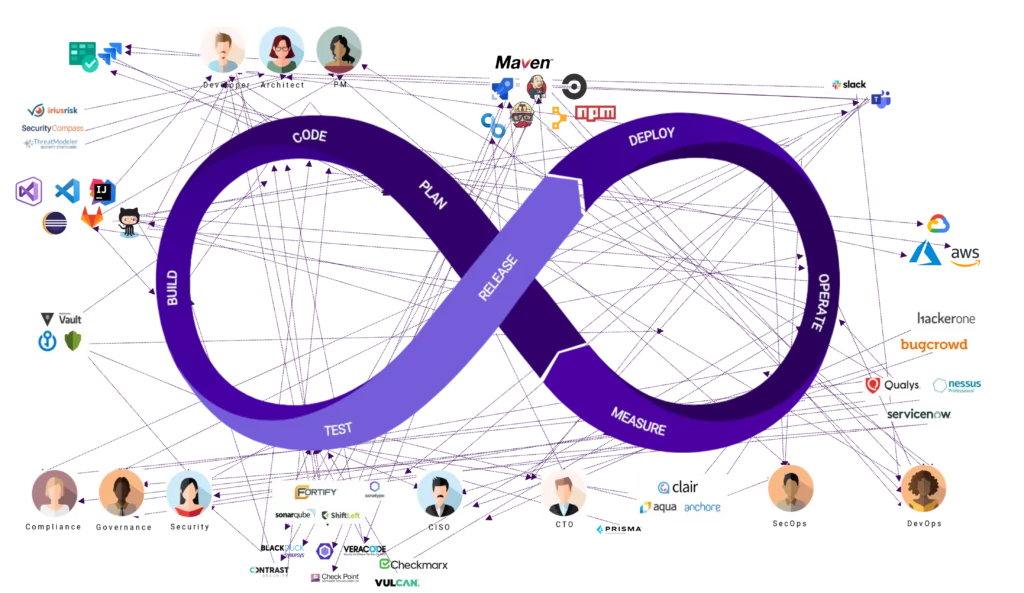
Keep pipeline definitions under version control, make steps small enough to diagnose, and publish readable failure information. Check each platform’s current hosting, billing, and plan limits before selection. DevOps tool categories are useful for assembling a stack without assuming that every project needs Kubernetes or the same deployment service.
The source image below maps a broad tool ecosystem. It is not a sequence of required products or a configuration that can be run unchanged. Select a smaller set that supports the release and support responsibilities of the application.
Illustrative Web-App Release: Success and Failure Paths
Suppose a team changes a web-app API and its browser interface. A pull request runs linting, unit tests, and integration checks. After review and merge, a release job creates an immutable application image and records its commit and test results. This is an example design, not a tested deployment configuration.
The staging job deploys that image with controlled settings and runs a critical user journey against a test account. If checks pass, the release owner approves production under continuous delivery. A continuous-deployment policy could promote it automatically if all configured conditions pass.
- Failed test: hold promotion, preserve diagnostics, and return the change to its owner. Do not publish a failing artifact as approved.
- Missing approval: leave the candidate waiting; a timeout or absent reviewer does not imply consent.
- Unhealthy production release: stop further exposure, notify the service owner, and investigate. Where compatible, redeploy the previous known-good artifact or disable the affected feature.
- Database or side effects: use a separate recovery plan. Reverting code does not undo a destructive schema change, a payment, or a message already sent.
Plan schema compatibility before release, for example by separating additive changes from later removal. Test backups and recovery where relevant, and record which old application versions remain compatible with the current data. Rollback is a decision with prerequisites, not a universal undo button.
Xem thêm:
- What Is Git and How Does Git Track Our Project Files?
- What Is Software Development and the Software Development Process?
- 10 Agile Development Best Practices & Templates
Measure the Pipeline Before Expanding It
Start with the current release path and identify the largest observable delay or failure. Assign owners for failed runs and production signals. Improve the bottleneck with a limited change rather than replace the entire delivery stack at once.
Track time from change to feedback, time waiting at gates, deployment frequency, failed-release rate, and recovery time with consistent definitions. Separate slow validation from avoidable queueing. Also inspect flaky-test retries and manual interventions, which can hide an unreliable process.
For a proposed first rollout, the team could require that every production artifact traces to passing required checks and a valid release decision. Test failed checks, missing approval, and recovery in a non-production environment before wider use. These are acceptance criteria to verify, not measured results.
Frequently Asked Questions
Can a Small Team Use CI/CD?
Yes. Begin with version control, a repeatable build, relevant automated tests, and a controlled release path. Keep the workflow proportional to the application and the team’s ability to maintain it.
Does CI/CD Require Containers?
No. A pipeline can produce binaries, packages, archives, or container images. Choose packaging that fits the runtime and preserves a traceable tested version.
Is a Passing Pipeline Enough to Release?
It is evidence that the configured checks passed. Release readiness also depends on the scope of those checks, approvals, compatibility, operational preparation, and the ability to detect and respond to problems.
Start with one visible release path, preserve the tested artifact across environments, and review failed runs and production feedback with the team. For application delivery and integration needs, Designveloper’s software development team can discuss a scope that includes release and maintenance responsibilities.
Also published on

Share post on










Related Articles



What Is An Agile Framework? Definition, Types And Examples
What Is An Agile Framework? Definition, Types And Examples Published November 26, 2026
Best Open Source Vector Database: 10 Options Compared In 2026
Best Open Source Vector Database: 10 Options Compared In 2026 Published November 25, 2026
What Is a CI/CD Pipeline? Stages, Gates, and Examples
What Is a CI/CD Pipeline? Stages, Gates, and Examples Published November 25, 2026