
















App Development Timeline: How Long Does It Take to Build an App in 2026?

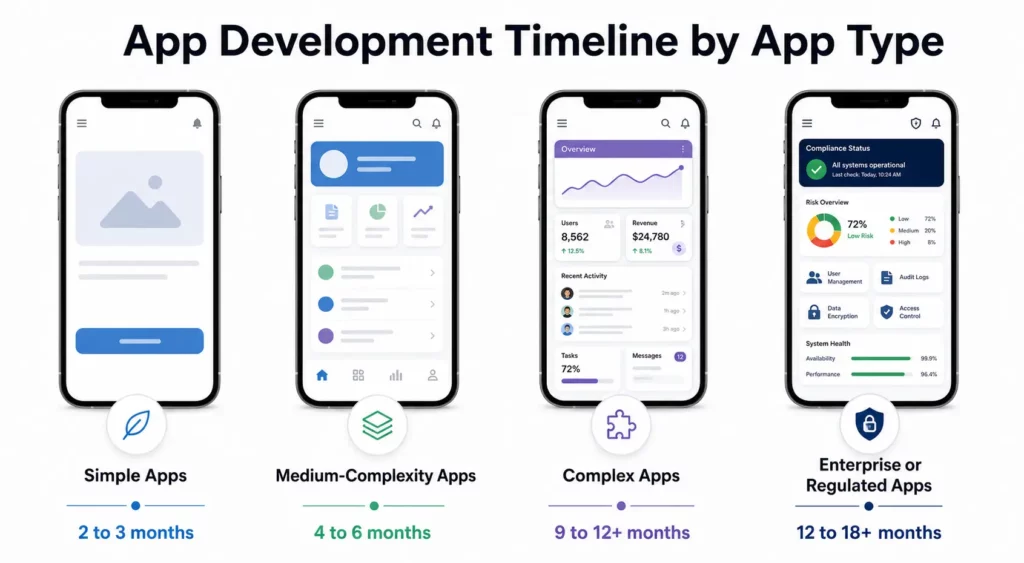
Most app development projects take 3 to 9 months from discovery to launch. A simple app may be ready in 2 to 3 months, a medium-complexity app usually takes 4 to 6 months, and a complex or compliance-heavy product can take 9 to 12+ months.
That range gets wider when you factor in platform choice, custom integrations, design complexity, testing depth, and approval cycles. It also changes depending on what you count as “done.” Some teams mean a launch-ready MVP. Others mean a fully scaled product with post-launch stabilization included.
This guide breaks down the full app development timeline by complexity, project phase, and platform. It also covers the hidden delays teams often miss, plus practical ways to shorten the schedule without cutting quality.
KEY TAKEWAYS:
- Most app development projects take 3 to 9 months, with longer timelines for complex workflows, custom integrations, and compliance-heavy requirements.
- Platform choice strongly affects delivery time, with cross-platform apps often launching faster than separate native iOS and Android builds.
- Hidden delays usually come from scope, approvals, QA, and dependencies rather than coding effort alone.
- More accurate estimates come from breaking work into milestones and delivery chunks instead of relying on one broad number.
- AI can speed up prototyping, scaffolding, testing, and documentation, but it does not replace architecture review, human validation, or release governance.
To understand the fundamentals, start with:
- What Is Mobile App Development (Full Guide)
- Advantages and Disadvantages of Mobile Apps
- Trends Shaping the Future of Mobile App Development
Quick Answer: Average App Development Timeline
Use the table below as a realistic app development timeline benchmark:
| App Type | Typical Development Timeline | Example |
|---|---|---|
| Simple apps | 2 to 3 months | Calculator, habit tracker, basic appointment booking app |
| Medium-complexity apps | 4 to 6 months | E-commerce app, fitness app, service marketplace MVP |
| Complex apps | 9 to 12+ months | Social networking app, fintech app, multi-vendor marketplace |
| Enterprise or regulated apps | 12 to 18+ months in some cases | Healthcare platform, ERP-connected internal app, insurance operations app |
These estimates assume one product team, a defined scope, and no major resets during development. If the product needs multi-role workflows, advanced security, legacy integrations, or strict compliance, the timeline usually grows fast.
One useful way to think about this is to separate the core build timeline from the full delivery timeline. Many current industry guides, including Clutch’s mobile app development timeline overview, place the core build in roughly 20 to 40 weeks, while broader delivery timelines can stretch longer when teams include procurement, architecture approvals, post-launch optimization, and support planning.
Discover more here:
Why Is an App Development Timeline Necessary?
An app development timeline is necessary because it turns a vague product idea into a plan the team can actually execute. Without a timeline, it is hard to define scope, assign responsibilities, sequence dependencies, estimate budget, or decide what belongs in the first release.
A realistic timeline also helps teams:
- align stakeholders on priorities
- set milestone-based delivery goals
- catch scope creep earlier
- plan design, development, QA, and launch in the right order
- reserve buffer time for approvals, revisions, and post-launch fixes
In practice, the timeline is not just a scheduling tool. It is also a risk-control tool. Teams use it to identify what could delay the release, where decisions are still unclear, and which parts of the app need tighter coordination before development starts.
Here’s a useful resource:
App Development Timeline by Project Phase
Most app projects move through the same broad phases, but the time spent in each phase changes based on scope, team maturity, and technical risk.
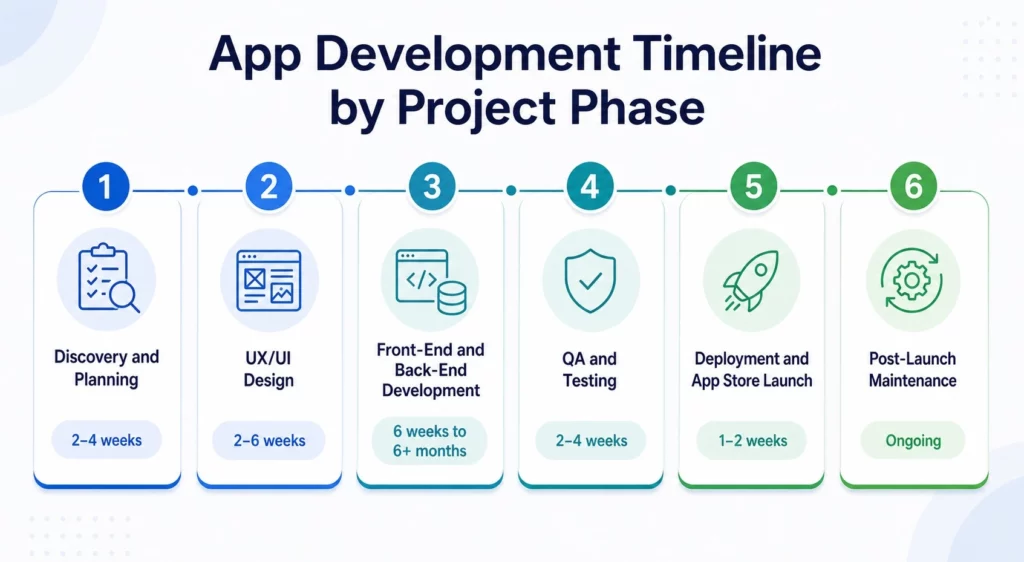
Discovery and Planning (2-4 Weeks)
This phase defines what the app needs to do, who it serves, and what version should be built first. The team gathers requirements, clarifies business goals, identifies the target users, and prioritizes the first release. In standard software development lifecycle (SDLC) models, this is where scope and delivery assumptions are set before deeper design and engineering work begins.
Typical outputs include:
- product goals
- user flows
- initial feature list
- scope boundaries
- technical assumptions
- delivery roadmap
This is also where teams make some of the most important timeline decisions. If requirements stay vague here, the project usually pays for it later in redesigns, backend changes, or missed release dates.
For more details, see: How to Conduct Mobile App Market Research for Successful Strategies
UX and UI Design (2-6 Weeks)
In the design phase, wireframes become user flows, visual mockups, and clickable prototypes. Designers define how the app should look, how users move through it, and where the product needs revision before engineering starts.
This phase often takes longer than founders expect because design is not just about screens. It also includes:
- navigation logic
- accessibility considerations
- component behavior
- design system choices
- feedback and revision rounds
Apps with multiple user roles, custom animations, or strong brand requirements usually spend more time here.
Front-End and Back-End Development (6 Weeks to 6+ Months)
This is usually the longest phase in the app development process timeline. Engineers build the user-facing interface, backend services, APIs, authentication flows, databases, admin logic, analytics hooks, and third-party integrations.
Development time depends heavily on:
- feature scope
- backend complexity
- number of integrations
- platform choice
- performance requirements
- security requirements
Simple apps can move quickly. A regulated fintech, healthcare, or enterprise app usually cannot. The more custom logic a product needs, the less useful generic timeline promises become.
Read more in: Best Programming Languages for App Development
QA and Testing (2-4 Weeks)
Testing should not be treated as a final box to check. Strong teams run QA in parallel with development, then intensify testing before release.
This phase usually covers:
- functional testing
- usability testing
- performance testing
- regression testing
- security validation
- cross-device compatibility checks
Testing often takes longer when teams support many devices, many user roles, or large numbers of edge cases.
Deployment and App Store Launch (1-2 Weeks)
Launch is not just uploading a build. Teams still need to finalize release settings, store listings, privacy disclosures, permissions, and monitoring tools.
This phase often includes:
- release build preparation
- production environment setup
- app store assets
- privacy policy and compliance checks
- store submission and review cycles
- early launch monitoring
The timeline here can stretch if the app triggers store review questions, privacy issues, or last-minute bug fixes. Google notes in its Play Console publishing guidance that reviews can take a few hours, up to seven days, or longer in exceptional cases. Apple also reviews app submissions, updates, and related assets under its App Review process and App Review Guidelines.
Post-Launch Maintenance (Ongoing)
App development does not end at launch. The first few weeks after release often reveal bugs, performance issues, user feedback, and analytics gaps that were not obvious in staging.
Post-launch work usually includes:
- hotfixes
- performance monitoring
- crash analysis
- user feedback review
- iteration planning
- minor feature updates
This matters because many teams underestimate how much stabilization work is needed after version 1.0 goes live.
Here’s a helpful guide:
- Best Practices for Successful Mobile App Development
- App Development Project Management Methodologies
App Development Timeline by Platform
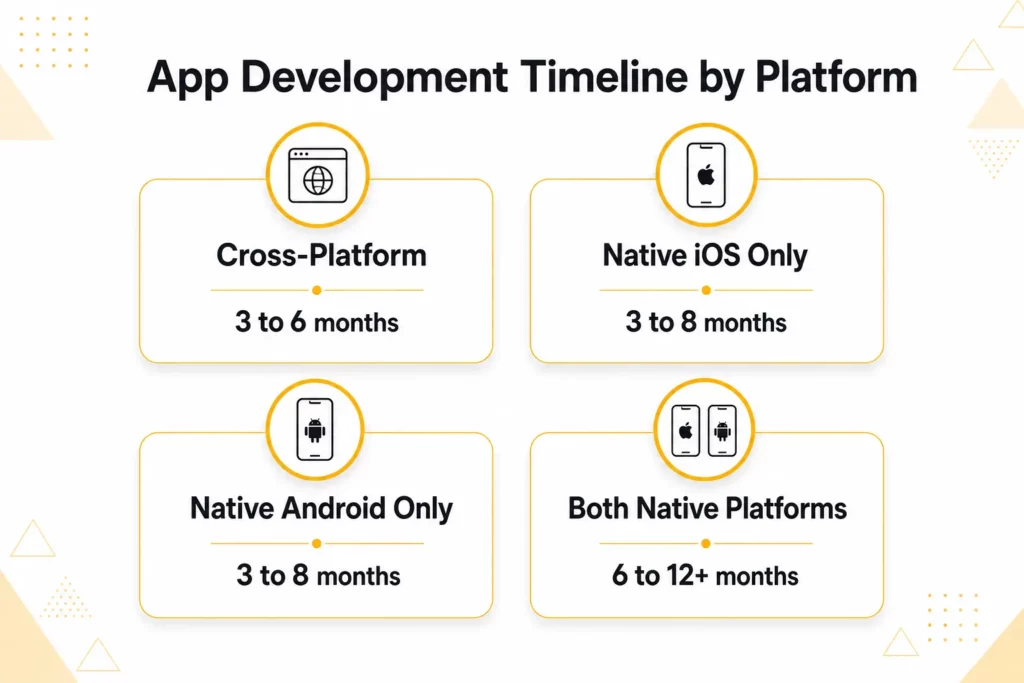
Platform choice has a direct impact on development timeline, testing scope, release planning, and long-term maintenance. In most cases, the right approach depends on how much platform-specific functionality, performance optimization, and product complexity your app requires.
| Platform Strategy | Estimated Timeline | Description |
|---|---|---|
| Cross-Platform | 3 to 6 months | Building with frameworks like Flutter or React Native allows teams to ship one shared codebase across iOS and Android. This is usually the fastest route for MVPs, business apps, and products with mostly similar workflows across platforms. |
| Native iOS Only | 3 to 8 months | Building exclusively for Apple devices using Swift is a strong fit for products that require high performance, polished iOS-specific UX, or deeper integration with Apple’s ecosystem and device capabilities. |
| Native Android Only | 3 to 8 months | Building exclusively for Android using Kotlin works well for products that depend on Android-specific integrations, broader device reach, or market strategies centered on Android-first audiences. |
| Both Native Platforms | 6 to 12+ months | Building separate dedicated apps for both iOS and Android gives the most platform control, but it also increases engineering, QA, release coordination, and long-term maintenance workload. |
These timeline differences matter because platform decisions affect more than coding speed alone. A shared cross-platform architecture can reduce duplicate implementation work, but native development often adds more platform-specific testing, interface adjustments, and release preparation.
The gap becomes even more visible when a product must support both iOS and Android with separate native builds. In that scenario, teams usually spend more time coordinating features across platforms, maintaining consistency, and handling two parallel QA and deployment tracks.
Related guide: How to Make an Android App
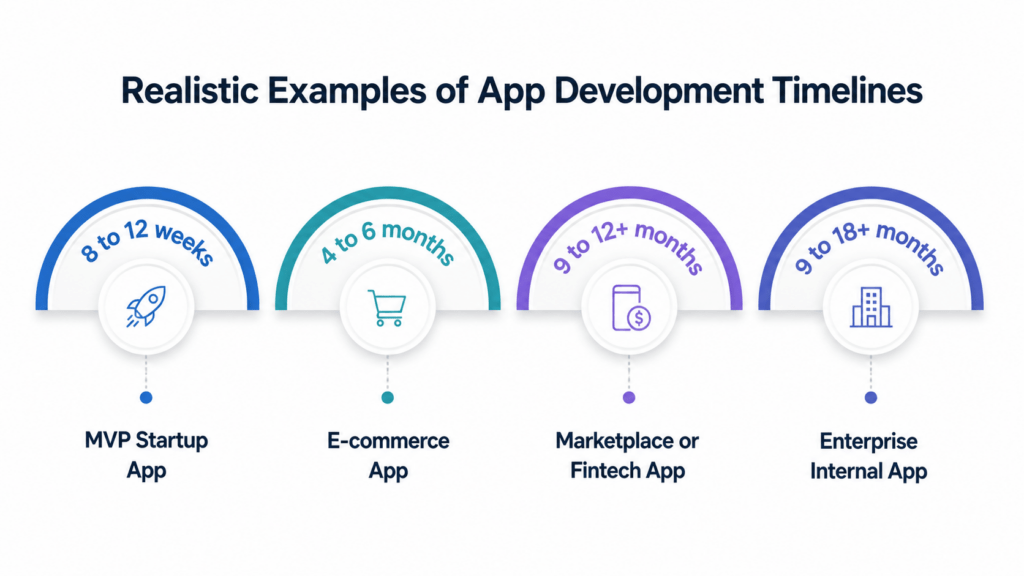
Realistic Examples of App Development Timelines
These examples show how timeline estimates change when the product moves from a simple MVP to a more operationally demanding app. They also show why broad estimates only work when the app category and scope are clearly defined.
| App Example | Typical Timeline | Why It Takes That Long |
|---|---|---|
| MVP startup app | 8 to 12 weeks | One core workflow, basic login, simple backend logic, shared cross-platform codebase |
| E-commerce app | 4 to 6 months | Catalog management, payments, user accounts, order tracking, notifications, admin workflows |
| Marketplace or fintech app | 9 to 12+ months | Role-based workflows, transaction logic, trust and safety features, reporting, stricter compliance |
| Enterprise internal app | 9 to 18+ months | Integrations, permissions, approvals, deployment constraints, stakeholder alignment |
Project teams can evaluate these examples more accurately when they break the app into clear delivery chunks such as core user flows, admin logic, integrations, and compliance requirements. This structure gives product managers, developers, and stakeholders a more realistic basis for estimating effort than treating the app as one large build.
This planning method also improves the context window for timeline decisions. Product teams can assess schedule risk through specific work layers instead of relying on a broad headline estimate, which leads to more accurate scoping, sequencing, and delivery expectations.
Recommended reading:
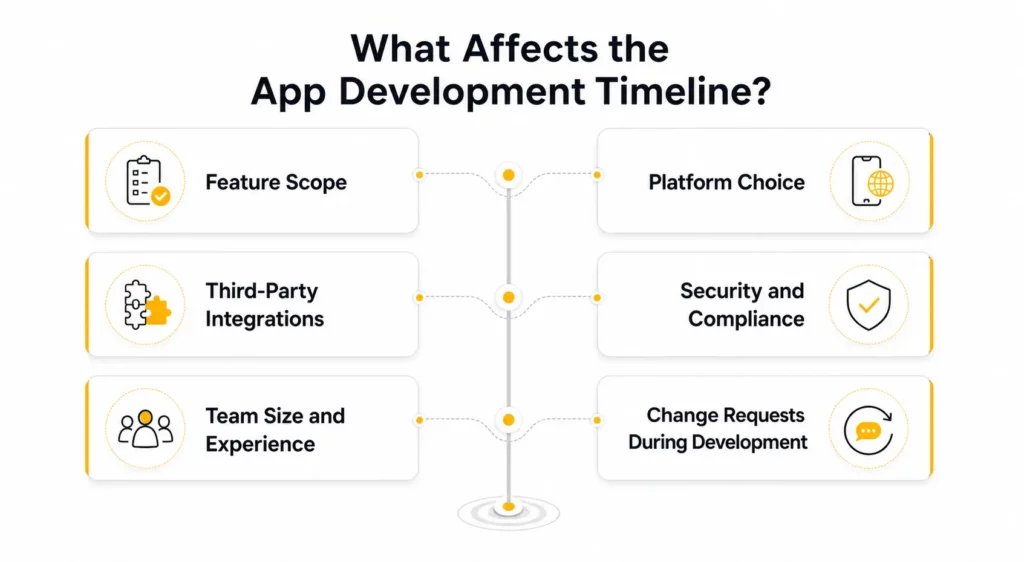
What Affects the App Development Timeline?
Even when two apps look similar from the outside, their delivery timelines can differ sharply because a few hidden factors change how much work the team actually needs to do.
Feature scope has the biggest impact on your app development timeline.
Feature scope is the biggest timeline driver. A five-screen app with simple navigation is fundamentally different from a product with multi-step onboarding, real-time updates, dashboards, messaging, role-based permissions, and offline behavior.
Each extra workflow adds design time, engineering time, and testing time. Scope also compounds. One new feature often affects analytics, settings, notifications, data storage, permissions, and QA coverage.
Platform choice changes both build speed and testing workload.
Platform strategy changes both engineering effort and testing overhead. Building separate native iOS and Android apps usually takes longer than building a shared cross-platform app.
Current competitor and research patterns consistently point to the same conclusion: for many business apps, cross-platform development can reduce delivery time by roughly 30% to 40% compared with building two separate native apps.
That does not mean cross-platform is always the right choice. If the product depends on deep device-level features, heavy graphics, or platform-specific behavior, native may still be the better decision.
Third-party integrations often add more time than teams expect.
Payment gateways, maps, chat systems, authentication providers, analytics suites, CRM connections, and internal APIs all affect the app project timeline.
Prebuilt SDKs can help. But integrations still require:
- implementation
- permissions setup
- documentation review
- fallback handling
- QA validation
Enterprise or legacy integrations often add the most unpredictability.
Security and compliance requirements can extend the timeline by months.
Healthcare, fintech, insurance, and enterprise apps typically move slower because teams need more documentation, stronger security controls, and more review cycles.
Compliance-heavy work can add months, not days. This is especially true when the app needs HIPAA-style safeguards, PCI-sensitive flows, or formal approval checkpoints from legal or IT teams. On Android, Google Play’s app review preparation requirements make it clear that privacy policies, app content declarations, sensitive permission disclosures, and reviewer access details can all affect release readiness.
Team size and experience shape how fast the team can deliver.
An experienced cross-functional team generally delivers faster than a loosely coordinated group with skill gaps. Senior teams reduce rework because they catch architectural issues earlier, define better boundaries, and avoid avoidable resets.
That said, a bigger team does not automatically mean a shorter timeline. If communication is weak, more people can create more coordination drag.
Change Requests During Development
Mid-project changes are one of the fastest ways to extend an app building timeline. Even small requests can trigger rework across design, API contracts, QA cases, analytics events, and release plans.
If the team does not use structured change control, the project can look busy while slipping further behind every sprint.
Why App Projects Get Delayed
Most delays are not caused by coding alone. They usually come from planning gaps, dependency issues, or governance problems that surface later than they should.
Common causes include:
- unclear requirements
- scope creep
- delayed stakeholder feedback
- repeated design changes
- integration issues
- underfunded QA
- app store review delays
- underestimating compliance work
The most expensive delays are often the ones product teams forget to estimate in the first place. Common examples include:
- discovery spikes to validate technical feasibility
- backend system constraints discovered too late
- compliance and policy reviews
- performance tuning near release
- launch-day monitoring and hotfix cycles
This is one of the strongest patterns across current industry benchmarks. First-pass estimates often look reasonable until the team starts dealing with real dependencies, review processes, and production behavior.
How to Speed Up App Development Without Hurting Quality
The fastest teams are not the ones that skip steps. They are the ones that reduce rework, control scope, and make decisions early.
- Start with an MVP.
An MVP-first approach helps teams launch the smallest useful version of the product before scaling it. In practice, that means focusing on one core user problem, one clear flow, and only the features required to validate demand. For full guide, read this article What is a Minimum Viable Product (MVP).
- Finalize requirements early.
Clear requirements reduce redesign, misalignment, and late-stage rework. Teams usually move faster when acceptance criteria, edge cases, integration assumptions, and compliance constraints are resolved before development is too far along.
- Reuse proven components and frameworks.
Reusable design systems, stable libraries, and mature frameworks can remove weeks of avoidable work. The same applies to common building blocks such as authentication, payments, notifications, and analytics, where proven solutions usually outperform custom rebuilds on both speed and reliability.
- Run QA in parallel.
Testing should run throughout the build, not only before release. Parallel QA helps teams catch defects earlier, which matters even more in apps with multiple user roles, payment flows, real-time features, or platform-specific behavior.
- Keep decision-making tight.
Slow approvals stretch the schedule even when engineering work is on track. Fast-moving teams usually assign clear decision ownership, set milestone checkpoints, and avoid reopening settled choices unless the product risk clearly justifies it.
Can AI Shorten App Development Timelines?
AI can shorten app development timelines, but usually by accelerating specific tasks rather than replacing the delivery process. In most teams, AI creates the biggest time savings in prototyping, code scaffolding, test generation, bug triage, documentation, and repetitive QA support.
The main constraint is that AI does not remove the need for product decisions, architecture review, security checks, or final human validation. Teams usually gain the most when they apply AI to reduce low-leverage work while keeping scope control, technical review, and release governance tightly managed.
How to Estimate Your Own App Timeline
If you are planning a build, the most practical way to estimate the timeline is to break it into milestones, not just broad phases.
Break the estimate into the following steps:
- Define the must-have features for version one.
- Group features by release priority.
- Estimate discovery, design, development, QA, and launch separately.
- Identify integration, compliance, and approval dependencies early.
- Add a 10% to 20% buffer for revisions, blockers, and unexpected technical work.
- Build regular review cycles into the plan so feedback does not pile up at the end.
- Reserve time for post-launch fixes and optimization.
One practical pattern is especially important here: teams that manage by milestones rather than vague phase labels usually estimate more accurately. A milestone such as “authentication and onboarding complete” is easier to track than a broad label like “development in progress.”
Useful guide: How Much Does It Cost to Build an App
Operational Insight: Why Some Timelines Slip Even with Good Planning
Strong schedules still fail when engineering governance is weak.
Current research and delivery benchmarks surface a few recurring patterns:
- teams start coding before freezing the first-release scope
- frontend and backend wait on each other instead of working in parallel
- CI/CD arrives too late, so build issues surface near release
- “done” is not clearly defined, so work moves forward with hidden defects
- stakeholder demos happen too late, which turns normal feedback into rework
A more reliable delivery model usually includes:
- early CI/CD setup
- parallel frontend and backend work with mocked APIs
- automated smoke testing after merges
- weekly stakeholder demos
- structured change control for any new request
Those practices do not guarantee speed, but they make the timeline far more predictable.
Performance Insight: Launching Fast Still Fails if the App Ships Slow
A release can hit its deadline and still underperform if the app launches with performance problems.
Current engineering guidance highlights several common post-launch bottlenecks:
- heavy work on the main thread
- too many concurrent background tasks
- bad thread handling
- synchronous storage I/O
- reactive chains that trigger redundant updates
That is why serious teams budget time for performance work, not just feature work.
A useful benchmark set looks like this:
- cold start under 2 seconds
- screen transitions under 300 ms
- stable 60 FPS scrolling
- network requests tuned for real mobile conditions
If these targets are ignored until the end, “fast delivery” often turns into “slow app, delayed fixes, and another release cycle.”
Why Build Your App with Designveloper
If you are planning a new app, the hardest part is rarely guessing one number. The harder part is turning business goals, feature priorities, platform choices, and delivery constraints into a schedule that is realistic enough to execute.
That is where Designveloper can help. Our team supports app strategy, UX/UI design, development, QA, and launch planning, with a practical focus on MVP scoping, delivery milestones, and risk reduction. Instead of forcing a generic estimate, we help define what should be built first, what can wait, and where the biggest timeline risks actually sit.
According to CEO of Designveloper:
“At Designveloper, we keep it simple and efficient in our app development process.
First, we listen to our clients in our initial meeting to understand their needs and discuss project requirements.
Our experienced team then provides a rough estimation (RE) covering costs, timeframes, and resources.
Once the client approves, we assemble a dedicated project team and offer a detailed estimation (DE) with specific features, costs, and a development schedule.
Our recommended tech stack includes AWS for infrastructure, React/NextJS for web development, React Native/Flutter for cross-platform mobile, NestJS for backend, and MongoDB/PostgreSQL for databases.
Our goal is to provide tailored solutions that meet project goals. By following this structured approach and using preferred tech stacks, we ensure a reliable app development timeline.”
If you want a clearer roadmap for your product, you can talk to Designveloper about scope definition, platform strategy, or a ballpark project estimate before development starts.

FAQs
These follow-up questions cover the timeline details readers usually want to clarify before planning a build.
How long does it take to build a simple app?
A simple app usually takes 2 to 3 months. That range works best for apps with limited screens, minimal backend logic, and a tightly scoped first release.
Can an app be built in 3 months?
Yes, an app can be built in 3 months if the scope is narrow and the team is focused. This is most realistic for MVPs, internal tools, or simple cross-platform products.
What stage usually takes the longest?
Development is usually the longest stage. It includes frontend work, backend work, integrations, debugging, and iterative fixes that expand as the product gets more complex.
Does cross-platform development reduce the timeline?
Often, yes. For many business apps, cross-platform development can reduce the timeline by 30% to 40% compared with building separate native iOS and Android apps.
How long does app maintenance take after launch?
Maintenance is ongoing. Most teams spend the first few weeks after launch fixing bugs, reviewing analytics, improving performance, and adjusting the roadmap based on user feedback.
Also published on

Share post on










Related Articles



How Will AI Affect Software Development? Complete Guide In 2026
How Will AI Affect Software Development? Complete Guide In 2026 Published October 21, 2026
Mobile App Development Process: Seven Stages From Idea To Launch
Mobile App Development Process: Seven Stages From Idea To Launch Published October 20, 2026
TOP 5 iOS App Development Languages: Swift, Objective-C & Cross-Platform
TOP 5 iOS App Development Languages: Swift, Objective-C & Cross-Platform Published October 16, 2026


















