
















Mobile App Development Process: Seven Stages From Idea To Launch

The mobile app development process has seven stages: validating the problem, defining MVP scope, choosing a platform, designing the UX, building, testing, and launching with ongoing maintenance. Treat these stages as a decision-led plan, not a rigid sequence. Design, development, and testing can overlap when feedback changes the requirements. If you are deciding whether you need an installed app at all, our guide to mobile app development explains app types and how they differ from mobile websites.
Mobile App Development Stages From Discovery To Post-Launch
The seven stages connect product decisions to concrete outputs. Use this table to see what must be agreed before the next major commitment of time or money.
| Stage | Key decision | Deliverable |
|---|---|---|
| 1. Validate the opportunity | Is the user problem worth solving? | Problem statement and success measures |
| 2. Define MVP scope | What must the first release do? | Prioritized backlog and acceptance criteria |
| 3. Choose development approach | Which platforms and systems fit the product? | Platform and architecture decision |
| 4. Design UX | Can users complete the core task? | Reviewed user flows and prototype |
| 5. Build in sprints | Does working software meet the agreed scope? | Testable app increments and integrated services |
| 6. Test across devices | Is the app fit for its intended users and devices? | Test evidence and release issue list |
| 7. Launch and maintain | Can the team release and support it safely? | Store submissions, rollout plan, and support ownership |
1. Validate The Problem And Product Opportunity
Start by checking whether a mobile app solves a real problem for a clearly defined group of users. A feature idea is not yet evidence of demand. Speak with potential users, observe their current workarounds, and review the other tools they use. Compare direct competitors with simpler alternatives, including websites, messaging, or existing business software.
Write a problem statement that names the user, the task, and the obstacle. Then choose a success measure tied to that task. For an illustrative appointment app, the problem might be that customers cannot find and confirm an available slot outside office hours. A useful early measure would be the share of test users who complete a booking without staff help. Downloads alone would not prove that the booking problem was solved.
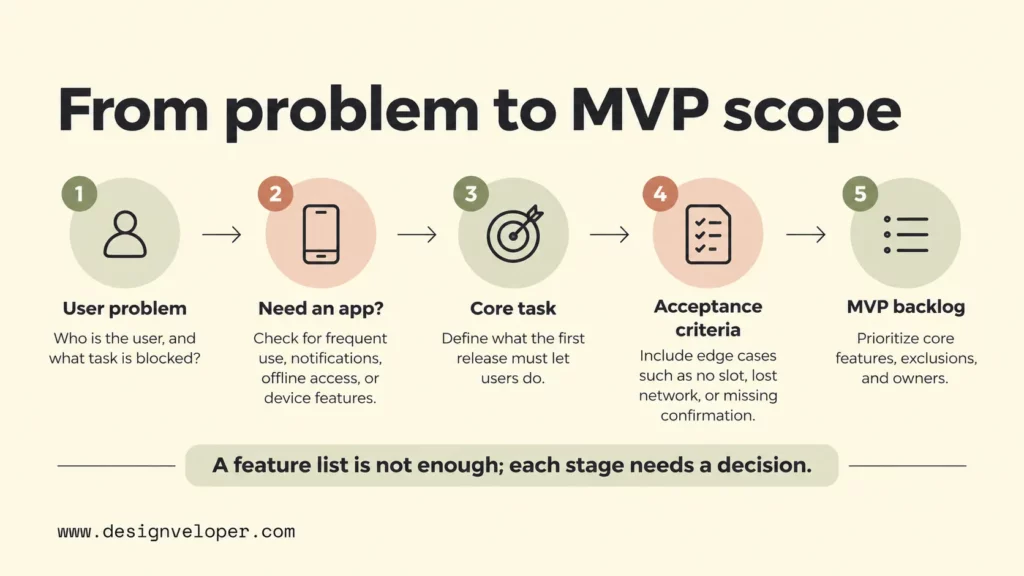
Discovery should also challenge the need for an installed app. If users only complete the task once, a mobile-friendly website may be enough. If the product depends on frequent use, offline access, notifications, or device features, an app becomes a stronger option. Record that decision before moving to the feature list.
2. Define Mobile App Requirements And MVP Scope
An MVP, or minimum viable product, is the smallest usable release that tests the product’s main value. Define its boundary through user tasks rather than a long wish list. For the appointment example, finding a slot and confirming a booking may be essential. Loyalty points and advanced reporting can wait until the core flow works.
Turn each essential task into a user story and a checkable acceptance criterion. A story might say that a customer can choose an available slot. Its acceptance criteria should also cover what happens when the slot is taken, the network fails, or confirmation does not arrive. Those conditions affect design, engineering, and testing, so they belong in the requirements before estimates are approved.
Record requirements beyond the visible screens. Identify user roles, data to be stored, privacy expectations, integrations, accessibility needs, and offline behavior where relevant. Give each requirement a priority and an owner. The result should be a first-release backlog, a list of exclusions, and enough detail for a realistic estimate. Revisit the backlog when research or technical findings change the scope.
3. Choose Native Or Cross-Platform App Development
Choose the development approach from the app’s requirements, not from a framework’s popularity. Native development builds separately for iOS or Android with platform-specific tools. Cross-platform development uses a shared codebase for more than one platform, but still needs device-specific testing and sometimes platform-specific code. Our iOS and Android development comparison explains how that choice affects behavior and long-term maintenance.
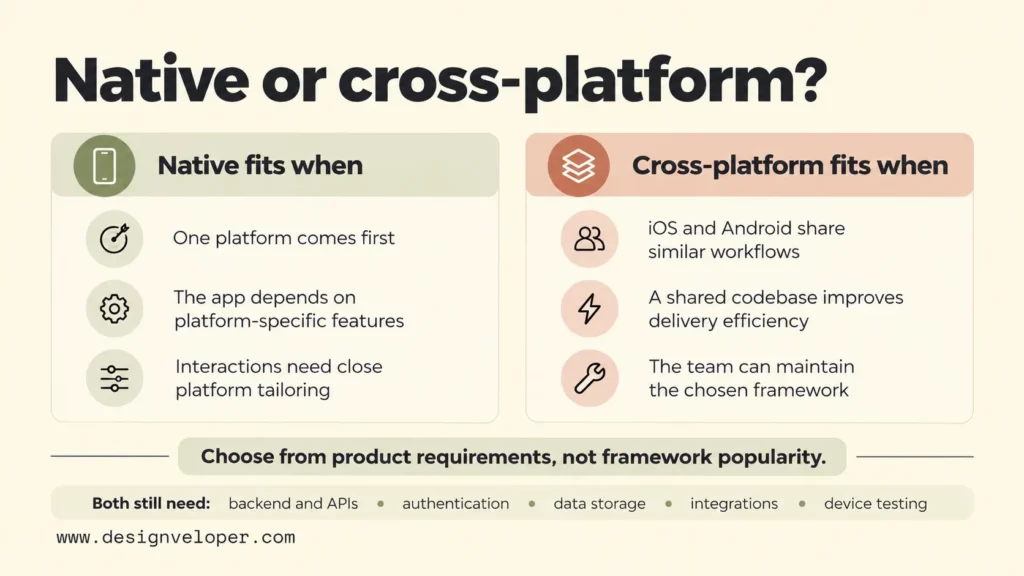
A shared approach may suit an app with similar workflows on both platforms and a team that can maintain its framework. Native development may make more sense when the product relies heavily on a particular platform’s features or needs tightly tailored interaction. Neither choice removes the need to plan the backend, application programming interfaces (APIs), authentication, data storage, and integration with existing systems.
Platform planning should also cover the wider experience. In our published HANOI ON project, we describe redesigning the user experience across a website, mobile app, and TV app for Hanoi Radio and Television. The mobile experience prioritizes touch and one-handed use, while the TV experience considers remote navigation. This is a useful example of adapting interactions to devices; the case study does not establish which mobile framework or backend architecture was used.
4. Design The Mobile App UX With Flows And Prototypes
Design should show whether users can complete the app’s main tasks before developers build polished screens. Start with user flows: the sequence of actions from opening a task to finishing it. A wireframe then shows each screen’s structure and navigation. A clickable prototype lets reviewers try a flow without requiring a finished application.
Test realistic tasks with intended users rather than asking only whether they like the interface. For the booking example, ask someone to reschedule an appointment and observe where they hesitate. Include confirmation screens and difficult states, such as an expired session or no available time slots. Our app wireframing guide explains how to separate screen structure from interactive behavior.
Approve the core flow before treating visual polish as final. That approval should cover navigation, labels, error handling, and basic accessibility. A prototype cannot prove server reliability or device performance, but it can reveal confusing decisions while changes are still relatively easy to make. Hand the agreed flows and unresolved questions to the development team together.
5. Build The App In Iterative Sprints
Build the app in small, working increments so the team can review real behavior before every feature is finished. A sprint is a short delivery cycle with a clear goal and a review of completed work. Start with an end-to-end task, such as signing in and making a booking, rather than producing many disconnected screens that cannot yet exchange data.
Mobile development usually involves both the app on the device and services behind it. Developers connect screens to APIs, implement business rules, and handle data securely. They also prepare build environments and automated checks so changes can be integrated without relying on manual setup each time. If the app must work with an existing CRM or booking service, verify that integration with realistic test data early.
End each increment with a demonstration against the agreed acceptance criteria. Record defects, feedback, and scope changes in the same backlog. A requested feature should be assessed for its effect on budget and launch readiness before entering the sprint. This keeps iterative development responsive without allowing every new idea to silently expand the MVP.
6. Test Mobile Apps Across Devices And Platforms
Test whether the app works for its intended users under realistic device and network conditions. Unit tests check small pieces of logic. Integration tests check how systems work together. End-to-end and user acceptance tests check whether someone can complete the required task. These tests answer different questions, so one successful demo cannot replace the full set.
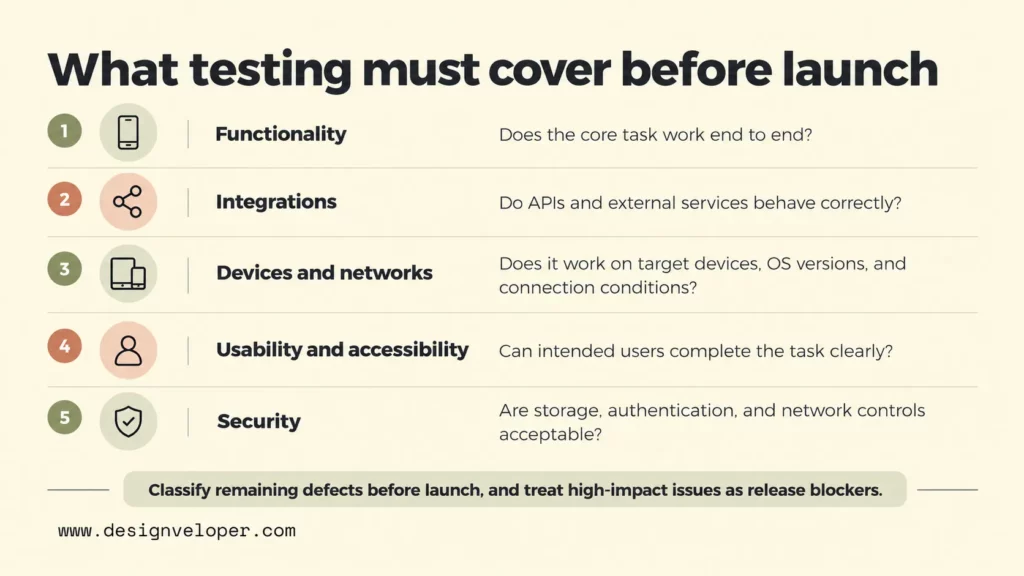
Build a device test set from the platforms, screen sizes, and operating system versions your audience uses. Include slower connections, interrupted sessions, permission denials, and accessibility checks. Android’s testing documentation explains how teams can run tests across multiple device configurations. Automated tests help with repeat checks, but hands-on testing is still useful for touch interactions and real-world usability.
Security needs its own acceptance criteria. The OWASP Mobile Application Security Verification Standard covers controls for sensitive data storage, authentication, network communication, and other mobile risks. Use the relevant controls to shape testing, not as a claim that any app is automatically secure. Before release, classify remaining defects by impact and decide which issues block launch.
7. Deploy, Launch, And Maintain The Mobile App
Launch is a controlled release, not simply the moment developers finish coding. Prepare store listings, screenshots, privacy information, access for reviewers where needed, and a tested release build. Confirm who owns the store accounts and who can approve submission. Leave time to resolve store feedback rather than treating approval as a guaranteed calendar event.
For iOS, Apple’s App Store Connect submission instructions require the appropriate build and metadata before a version is sent for review. For Android, Google’s Play Console release guide explains the testing and production tracks. Google Play’s rules for new personal developer accounts apply to personal accounts created after November 13, 2023. These accounts must complete a closed test with at least 12 testers opted in continuously for 14 days before applying for production access. Access is not automatic. Check your account’s current requirements in Play Console before setting a launch date.
After release, monitor crashes, key task completion, support requests, and store feedback. Assign an owner to urgent fixes, platform updates, and the next product backlog. Keep enough support capacity to investigate problems without abandoning planned improvements. The first public version starts a learning cycle; it does not end the mobile app development lifecycle.
Key Decision Gates Across The Mobile App Development Lifecycle
Decision gates keep the mobile app development process from advancing just because the calendar says a phase is complete. Each gate needs a named owner, evidence to review, and a clear outcome: approve, revise, or stop. A founder or product owner may approve scope, while design, engineering, and quality leads provide the evidence for their areas.
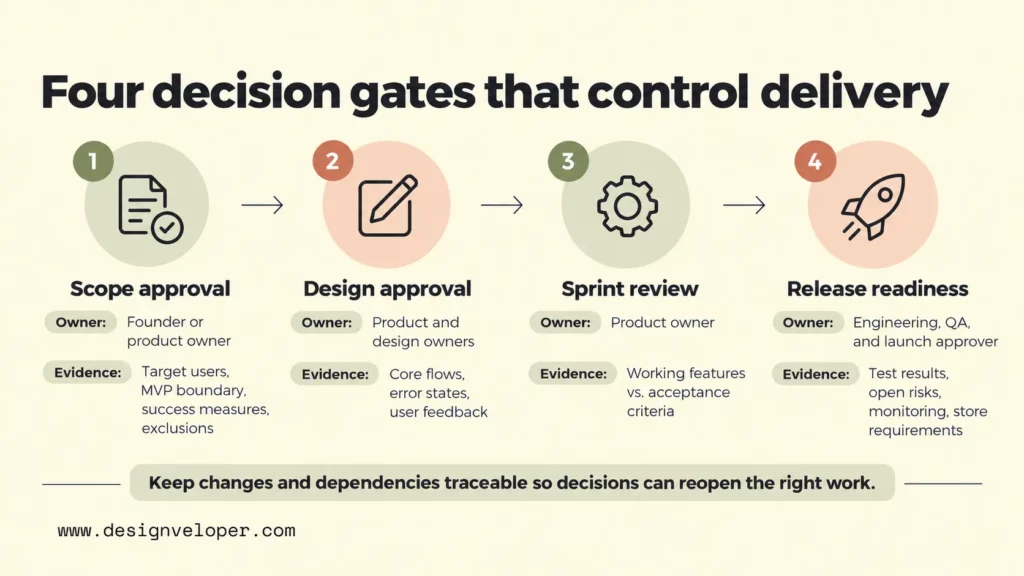
Four checkpoints cover the biggest commitments in a typical app development process:
- Scope approval: The product owner agrees on target users, the MVP boundary, success measures, and exclusions before a delivery estimate becomes a commitment.
- Design approval: The product and design owners check the main flows, error states, and user feedback before developers commit to the interface.
- Sprint review: The product owner accepts working features against stated criteria and decides whether new requests replace, delay, or expand planned work.
- Release readiness: Engineering and QA present test results, open risks, monitoring arrangements, and store requirements to the person authorized to launch.
Keep decisions traceable to the requirement they affect. A change log should show what changed, who approved it, and whether it altered the timeline or testing plan. Dependencies need the same visibility. For example, a payment feature cannot be considered ready if access to its provider’s test environment is still missing.
User feedback should be reviewed at every relevant gate, not saved for a final survey. A problem found in prototype testing might change a flow before development. A failed integration test might send a feature back to engineering. A launch-blocking accessibility defect might delay release even if the rest of the app is complete. This is why stage boundaries are decision points rather than rigid walls.
Mobile App Development Timeline: Factors That Affect Delivery
A mobile app development timeline depends on the work and approvals the product needs, so there is no reliable duration for every seven-stage project. The useful estimate is a phase-by-phase plan with assumptions, dependencies, and time reserved for testing and store review. Our app development timeline guide discusses phase estimates by project complexity; treat its ranges as planning examples rather than promises for your app.
Scope usually has the biggest effect on engineering effort. An app with a single booking flow needs less work than one with several user roles, payments, messaging, and complex reporting. Platform count also matters. One-platform delivery may reduce the initial surface to build and test, while releasing on both iOS and Android adds device checks and store work even when code is shared.
External integrations can extend the schedule even when the app’s screens look simple. Teams may need API access, test accounts, data agreements, or changes from another vendor. These tasks can block development and testing. Identify them during discovery, give them owners, and confirm access before treating the relevant feature estimate as stable.
Testing and approval time should appear in the plan as real work. Device coverage, security reviews, accessibility testing, and stakeholder feedback create tasks that cannot all happen after coding ends. Store review adds a separate dependency outside the team’s direct control. A sensible plan shows which activities can overlap and which must finish before release.
Consider two illustrative projects. A staff directory app with one platform, existing sign-in, and few integrations may move through design and testing with limited coordination. A customer app with payment processing, two platforms, and strict data controls needs more integration work and review. Assigning the same deadline to both would hide the differences that matter most.
Before requesting a fixed delivery date, ask for a scoped backlog, a platform decision, named approval owners, and a risk-based testing plan. If you need a partner to turn those inputs into an estimate, our mobile app development services cover design, engineering, testing, and ongoing support. Share the core user task and the systems your app must connect to first; those details make the initial planning discussion more useful than a feature count alone.
Also published on

Share post on










Related Articles


How Will AI Affect Software Development? Complete Guide In 2026
How Will AI Affect Software Development? Complete Guide In 2026 Published October 21, 2026
Mobile App Development Process: Seven Stages From Idea To Launch
Mobile App Development Process: Seven Stages From Idea To Launch Published October 20, 2026
TOP 5 iOS App Development Languages: Swift, Objective-C & Cross-Platform
TOP 5 iOS App Development Languages: Swift, Objective-C & Cross-Platform Published October 16, 2026


















