
















How Much Does It Cost to Build an App? 2026 Breakdown

* Disclaimer: All information is provided for reference only. Please contact each company’s sales team for detailed consultation and the most accurate pricing.
If you are wondering how much it costs to build an app in 2026, the short answer is that most projects fall somewhere between $10,000 and $400,000+. The final cost depends on the app’s complexity, the number of features, the platforms you choose, and the team you hire to build it.
A simple app with a limited feature set can cost far less than a large product with real-time features, custom integrations, advanced security, or AI functionality. The total budget also goes beyond the initial build. Design, testing, infrastructure, maintenance, and post-launch improvements all add to the real cost of app development.
This guide breaks down app development costs in a practical way. You will see typical price ranges, the factors that influence them, hidden costs to expect, and ways to control your budget without sacrificing quality.
Related Guide:
App Development Cost Breakdown
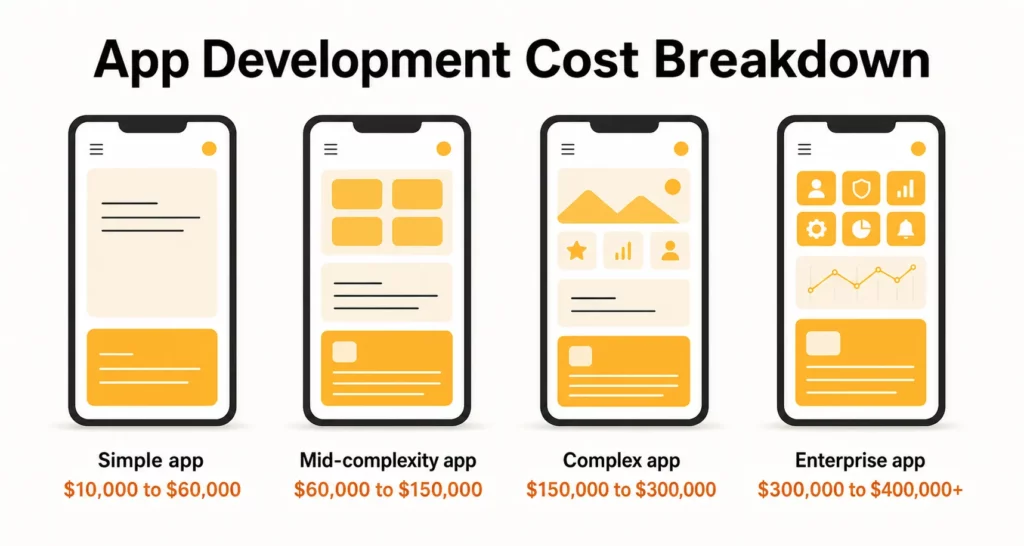
The average custom mobile app costs around $50,000 to $150,000, but the actual price can range from $10,000 for a lean Minimum Viable Product (MVP) to $400,000+ for a complex enterprise platform.
Here is a simple benchmark for initial planning:
| App Scope | Estimated Cost | Typical Timeline |
|---|---|---|
| Simple app | $10,000 to $60,000 | 2 to 4 months |
| Mid-complexity app | $60,000 to $150,000 | 4 to 7 months |
| Complex app | $150,000 to $300,000 | 7 to 12 months |
| Enterprise or highly customized app | $300,000 to $400,000+ | 12+ months |
Factors That Affect App Development Cost
The mobile app development cost is not a fixed number. The final estimate can change significantly based on the type of app you plan to build, the complexity of its features, and the development team you choose. In simple terms, it refers to the total budget required to design, build, test, and launch your mobile app.
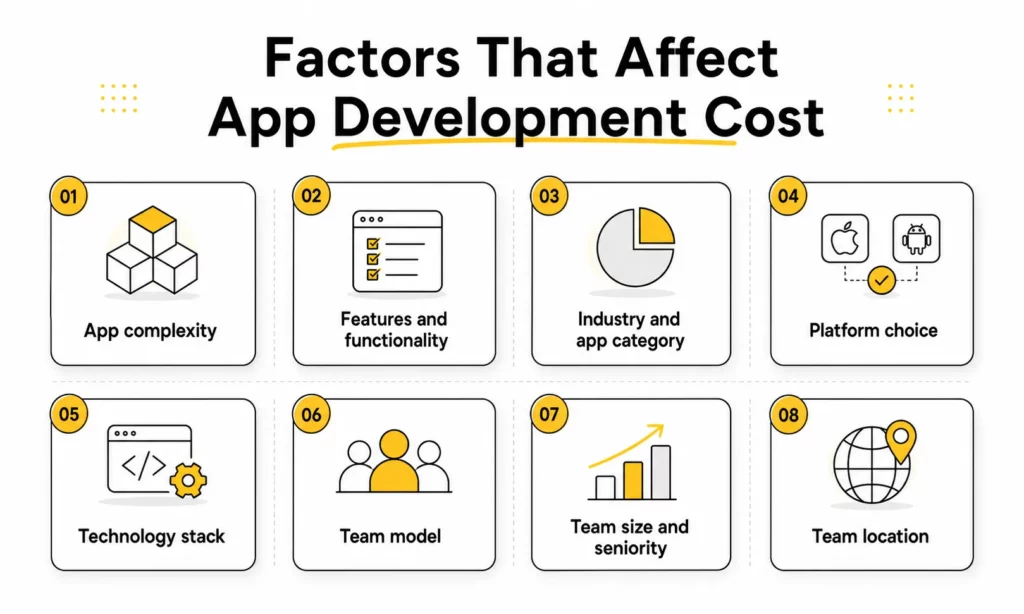
The primary factors that directly affect the cost of app development include:
- App complexity: Basic apps cost less than apps with advanced integrations, real-time features, or AI capabilities.
- Features and functionality: More complex features require additional development time and resources. Payments, chat, AI, analytics, and real-time sync usually cost much more than basic screens and forms.
- Platform choice: Building for iOS, Android, or both impacts the overall cost.
- Industry and app category: A fintech or healthcare app often costs more than a content or booking app because compliance, security, and integrations are heavier.
- Technology stack: The stack affects development speed, integration complexity, hiring difficulty, and maintenance cost.
- Team model: In-house teams, freelancers, and outsourcing partners come with very different cost structures, risks, and workflows.
- Team size and seniority: Larger or more specialized teams increase cost, but they also reduce delivery risk for complex products.
- Development team location: Hourly rates vary a lot by region, but lower rates do not always mean lower total cost if quality or communication suffers.
- Maintenance and updates: Ongoing support, bug fixes, and feature enhancements contribute to the total cost of ownership.
Cost by App Complexity
App complexity is usually the biggest cost driver because it affects nearly every part of delivery. A more complex app needs more planning, more engineering hours, more QA cycles, and often more senior specialists.
| Complexity Tier | Core Characteristics | Development Time | Cost Range |
| Simple / MVP | Basic UI, 3–5 screens, standard email/social login, simple data display (e.g., a basic utility or tracking tool). | 300 – 500 hours | $10,000 – $60,000 |
| Medium Complexity | Custom UI, API integrations, payment processing, user dashboards, database storage (e.g., basic e-commerce or booking apps). | 800 – 1,500 hours | $60,000 – $150,000 |
| Complex App | Real-time data sync, in-app chat/video, custom animations, basic AI integrations (e.g., social networks, marketplaces like Uber). | 1,500 – 3,000 hours | $150,000 – $300,000 |
| Enterprise / Advanced | Advanced AI/ML engines, IoT connectivity, high-end security, complex cloud architecture, and strict regulatory compliance (HIPAA, GDPR). | 3,000+ hours | $300,000 – $400,000+ |
Cost by App Categories and Industry Type
App category and industry type change the cost profile because different products require different workflows, integrations, and compliance levels.
Here is a rough cost guide by category:
| App Category | Estimated Cost | Why Cost Changes |
|---|---|---|
| Booking or service app | $20,000 to $80,000 | Usually needs forms, scheduling, notifications, and user accounts, so it is often cheaper than transaction-heavy products. |
| Marketplace app | $80,000 to $250,000+ | Often needs payments, reviews, messaging, search filters, and admin tools, which increases cost. |
| Logistics app | $100,000 to $300,000+ | May need real-time tracking, route logic, and operations dashboards, which raises both backend and infrastructure cost. |
| SaaS workflow app | $60,000 to $200,000+ | Often needs permissions, reporting, subscriptions, and automation, which adds business logic and QA effort. |
| Fintech app | $100,000 to $300,000+ | Usually costs more because it needs payment security, fraud prevention, KYC flows, and audit trails. |
| Healthcare app | $80,000 to $250,000+ | May require stronger data privacy, role-based access, and compliance support, which increases both build and maintenance cost. |
| Education app | $40,000 to $150,000+ | May need content delivery, progress tracking, subscriptions, and testing logic, depending on the product model. |
The industry itself does not automatically make an app expensive. The cost rises because of the workflows, data sensitivity, integrations, and regulatory demands that come with that category.
Cost by Platform (iOS vs Android vs Cross-platform)
Platform choice changes cost because it determines how many codebases the team must build, test, and maintain.
Here is a rough pricing view by platform approach:
| Platform Approach | Cost Impact | Estimated Cost | Strengths | Trade-Offs |
|---|---|---|---|---|
| iOS only | Lower than dual-platform | $20,000 to $100,000+ | Fast launch for Apple-first audiences | Smaller reach |
| Android only | Lower than dual-platform | $20,000 to $100,000+ | Good reach in many markets | More device variation to test |
| Native iOS + native Android | Highest | $40,000 to $250,000+ | Best performance and platform-specific control | Higher build and maintenance cost |
| Cross-platform | Often more budget-friendly | $25,000 to $150,000+ | Shared codebase and faster delivery | Some trade-offs in performance or deep native behavior |
Cross-platform frameworks can reduce time to market when the product needs to launch on both iOS and Android. Native development can still be the better choice when performance, deep device integration, or platform-specific UX is central to the product.
As a rule of thumb, launching on one platform first lowers the initial budget. Expanding to both iOS and Android with separate native codebases usually increases both development time and maintenance cost.
Cost by Technology Stack (Programming Languages, Frameworks)
A mature technology stack with a strong ecosystem can reduce build time and make it easier to hire developers later. A more specialized or fragmented stack can increase ramp-up time, integration complexity, and long-term maintenance overhead.
Estimated cost impact by stack choice often looks like this:
| Stack Direction | Estimated Cost |
|---|---|
| Mature web/mobile stack with standard integrations | $20,000 to $100,000+ |
| Cross-platform stack with shared codebase | $25,000 to $150,000+ |
| Custom backend-heavy architecture | $80,000 to $250,000+ |
| Specialized or high-scale architecture | $150,000 to $300,000+ |
The direct cost of a framework is not always the main issue. The larger cost question is how easy it is to hire, onboard, and retain engineers for that stack. If a technology requires rarer talent or deeper specialization, the hourly rate usually rises. If the stack slows delivery, the total project cost rises even when hourly rates look manageable.
The better question is not “Which framework is best?” It is “Which stack fits the product, the delivery timeline, and the team’s ability to maintain it?”
If you are still comparing options, it also helps to review the best language for app development and top app development frameworks before finalizing your stack.
In-House vs Freelancers vs Outsourcing
Your delivery model has a direct impact on cost, control, and speed.
| Team Model | Cost Level | Estimated Cost | Main Advantage | Main Risk |
|---|---|---|---|---|
| In-house team | Highest fixed cost | Highest total cost due to salaries, benefits, hiring, and overhead | High control and strong product context | Expensive hiring and slower team setup |
| Freelancers | Lower initial cost | Often $18 to $60+ per hour depending on role and market | Flexible for small scopes or specialist tasks | Coordination and consistency risks |
| Outsourcing agency or dedicated team | Often moderate | Often $25 to $65+ per hour depending on location and expertise | Faster team setup and broader delivery coverage | Quality depends on process and partner fit |
The right team model depends on the product stage, internal capacity, and delivery goals.
- In-house teams usually make the most sense for companies that want long-term product ownership and tighter day-to-day control.
- Freelancers are often a practical choice for smaller projects or narrowly defined tasks.
- Outsourcing is often a strong option for companies that want faster access to a complete product team without building one internally from scratch.
Cost by Development Team Size
Development team size affects cost because different app scopes need different levels of specialization and delivery coverage.
| App Scope | Common Team Shape | Cost Impact | Estimated Cost |
|---|---|---|---|
| Simple MVP | PM, designer, 1 to 2 developers, QA | Lower | $10,000 to $60,000 |
| Growth-stage product | PM, designer, frontend, backend, QA | Medium | $60,000 to $150,000 |
| Complex platform | PM, BA, designer, frontend, backend, QA, DevOps, specialists | High | $150,000 to $300,000+ |
A smaller team may look cheaper at first, but it can become more expensive if delivery slows down or quality problems create rework. The goal is not to build the biggest team. The goal is to build the smallest team that can still ship the right product with acceptable speed and quality.
Cost by Development Team Location
Team location affects hourly rates, but hourly rate alone does not define total project cost. Communication quality, overlap hours, process maturity, and technical leadership also shape the final result.
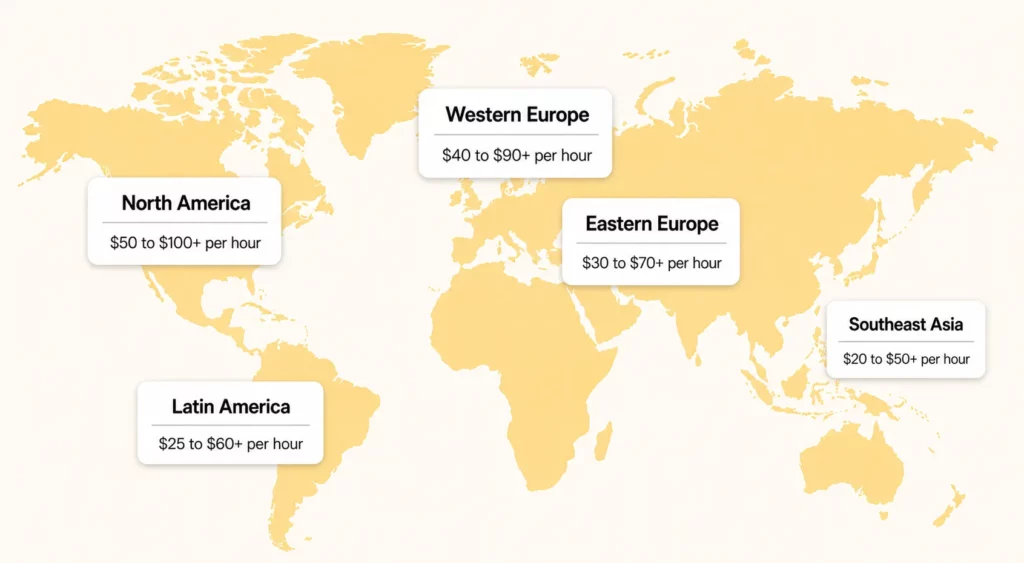
Third-party marketplace data from Upwork shows median hourly app developer rates around $18 to $39 per hour. Clutch’s directory data for app development companies points to a common $25 to $49 per hour range. In practice, rates in North America and Western Europe often trend higher, while rates in Southeast Asia, Eastern Europe, and Latin America can be more budget-friendly.
Here is a simplified regional rate view:
| Region | Estimated Cost |
|---|---|
| North America | $50 to $100+ per hour |
| Western Europe | $40 to $90+ per hour |
| Eastern Europe | $30 to $70+ per hour |
| Southeast Asia | $20 to $50+ per hour |
| Latin America | $25 to $60+ per hour |
Location differences also appear inside specific roles. For example, a mid-level JavaScript developer in the US may charge materially more than a similarly experienced developer in Vietnam or other offshore markets. Those regional differences can affect the budget significantly, but the lower-rate option only works well when delivery quality, documentation, and communication are also strong.
Lower rates can still become expensive if the project suffers from weak requirements, poor communication, or repeated rework. The best comparison is not just hourly rate. It is total cost versus delivery quality.
See also:
Cost by App Development Stage
Breaking the project into stages helps teams understand where the budget actually goes. This view is useful because many app owners only think about the total number, not how that number is distributed across planning, design, engineering, QA, and launch support.
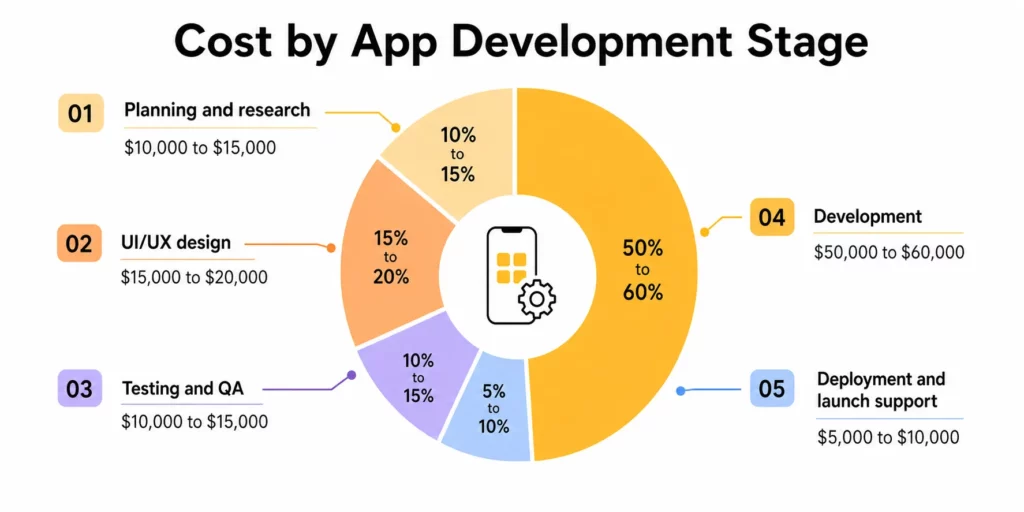
In most app projects, the pattern is fairly consistent: planning and design set the foundation, development takes the largest share of the budget, and testing plus launch support protect the quality of the release. If you also need a stage-by-stage schedule view, this guide to the app development timeline can help you connect budget with delivery phases.
| Development Stage | Typical Budget Share | Estimated Cost |
|---|---|---|
| Planning and research | 10% to 15% | $10,000 to $15,000 |
| UI/UX design | 15% to 20% | $15,000 to $20,000 |
| Development | 50% to 60% | $50,000 to $60,000 |
| Testing and QA | 10% to 15% | $10,000 to $15,000 |
| Deployment and launch support | 5% to 10% | $5,000 to $10,000 |
Planning and Research Phase (10-15% of total cost)
- product discovery
- user flows
- technical planning
- scope definition
- feature prioritization
In practice, the planning and research phase is where teams validate the app idea, define the MVP, assess competitors, map user journeys, and translate the product vision into a technical roadmap. A strong discovery phase reduces costly changes later by clarifying scope, priorities, and technical requirements before development begins.
For many business apps, this phase may take 2 to 4 weeks depending on the complexity of the requirements. Smaller projects may spend only a limited portion of the budget here, while enterprise apps may need longer planning, stakeholder workshops, and more documentation before design even starts.
UI/UX Design Phase (15-20% of total cost)
- wireframes
- user journey design
- visual design system
- interactive prototypes
- design revisions
Design costs increase when an app needs highly custom interfaces, multiple user roles, strong brand differentiation, many screens, advanced interactions, or complex dashboards. The UI/UX phase goes beyond visual styling; it covers information architecture, usability decisions, screen flows, clickable prototypes, and the design logic developers need to build the product correctly.
For lean products, design can stay relatively efficient. For products with custom UI patterns, onboarding flows, account states, and role-based journeys, design can become a major cost driver.
Development Phase (50-60% of total cost)
- frontend engineering
- backend engineering
- database and API development
- third-party integrations
- infrastructure setup
Development is usually the largest budget block because it includes the core build work: app coding, backend systems, database structure, APIs, authentication, integrations, infrastructure setup, and end-to-end product logic. The more business logic, data flow, platform coverage, or advanced integrations the product needs, the larger this phase becomes.
This is also where cost differences become most visible. A simple mobile MVP will not sit in the same range as a marketplace with payments, real-time communication, and admin tooling. In many projects, development lasts 2 to 6 months or more, depending on feature depth, team size, and platform scope.
Testing & Quality Assurance (QA) Phase (10-15% of total cost)
- test planning
- manual QA
- bug fixing
- device and browser testing
- regression testing
QA is often underestimated, especially for apps with multiple devices, user roles, workflows, or feature-heavy experiences. This phase checks whether the app performs reliably under real usage conditions through functional testing, bug reporting, regression cycles, device compatibility checks, and workflow validation.
Skipping or underfunding QA can create false savings. Teams may reduce cost before launch, but they often spend more later fixing avoidable issues, handling poor ratings, or stabilizing production problems under pressure.
Deployment and Launch Activities
- app store preparation
- release management
- production monitoring
- analytics setup
- launch support
Deployment is not always the most expensive stage, but it still needs time and coordination. Launch support is often underbudgeted when the product depends on app store reviews, analytics tools, multiple environments, or third-party services.
This stage usually includes release packaging, production configuration, app store submission, analytics setup, crash monitoring, final fixes, and early post-launch support. Some teams also include the first stabilization sprint after release, since real user behavior often reveals issues that staging did not catch.
From a budgeting perspective, it is safer to treat development cost as a sequence rather than a single line item: planning and design reduce waste, development takes the largest share, QA protects product quality, and launch support helps the app perform under real usage.
Hidden and Ongoing App Costs
The initial build budget does not cover the full cost of owning an app. Many app owners overlook post-launch costs that are easy to miss during early planning.
Common hidden and ongoing costs include:
- App store fees: Apple states that the Apple Developer Program costs $99 per membership year, while Google says the Play Console registration fee is $25 one time.
- Service fees on digital sales: Google says most eligible developers pay 15% or less in service fees under its current programs when selling digital goods or services.
- Maintenance and bug fixing: many teams budget maintenance at roughly 15% to 20% of the original build cost per year, though the real number depends on product complexity and release frequency.
- Security and compliance work: audits, renewals, security updates, and incident response can add cost over time.
- Post-launch improvements: most apps need feature refinements after real users start interacting with the product.
| Cost Item | Estimated Cost |
|---|---|
| Apple Developer Program | $99 per year |
| Google Play Console registration | $25 one time |
| Maintenance | 15% to 20% of initial build cost per year |
| Security/compliance upkeep | Varies by scope and industry |
| Post-launch improvements | Varies by roadmap and usage |
These costs do not make app development a bad investment. They simply show why the real budget should cover both the build phase and the ownership phase. The next section focuses specifically on the costs that usually show up in your monthly operating budget.
How Much Does It Cost to Build an AI App Feature?
The cost to build an AI app feature varies widely, but AI usually increases both the initial build cost and the ongoing operating cost. A lightweight AI feature such as a chatbot or content assistant is very different from a product that depends on custom data pipelines, model orchestration, evaluation, and usage-based API billing.
| AI Feature Type | Estimated Cost |
|---|---|
| Basic chatbot or content assistant | $20,000 to $50,000+ |
| AI recommendation feature | $40,000 to $100,000+ |
| Predictive analytics or custom AI workflow | $80,000 to $150,000+ |
| AI-native or custom-model feature set | $150,000 to $250,000+ |
AI cost usually rises because of:
- model or API usage fees
- data preparation
- prompt or workflow design
- testing and evaluation
- monitoring and safety controls
- specialist talent
For planning purposes, adding a basic AI feature to an existing app may increase the budget by tens of thousands of dollars, while a more advanced AI-native product or a custom model initiative can push the AI layer much higher. If AI is only one feature inside a broader product, it is often more useful to estimate the AI layer separately rather than treating the whole app as a fully AI app.
How Much Does It Cost to Run an App Per Month?
Monthly app costs can range from a few hundred dollars for a small product to tens of thousands per month for a growing or high-traffic platform. The real number depends on infrastructure, active users, third-party services, maintenance needs, and support requirements.
A typical monthly operating budget includes:
- cloud hosting and storage
- API usage
- monitoring and analytics tools
- customer support software
- maintenance retainers
- bug fixes and updates
- marketing and retention tools
The biggest difference between this section and the hidden-cost section above is frequency. These are the costs that often show up every month and scale as the app grows.
| App Size | Estimated Cost |
|---|---|
| Small app | $500 to $2,000 |
| Growing app | $2,000 to $10,000 |
| Scaled app | $10,000 or more |
These numbers vary widely, but they are useful for framing the difference between launch cost and ongoing operating cost. In practice, infrastructure, third-party APIs, and support costs tend to rise first as usage grows.
How to Calculate App Development Cost
The simplest way to estimate app development cost is to use this formula:
Total Cost = Total Development Hours x Hourly Development Rate
That formula is still useful because it keeps the conversation grounded. If a project takes 1,200 hours and the blended development rate is $40 per hour, the estimated cost is $48,000. If the same project grows to 2,500 hours because the feature set expands, the budget rises to $100,000 at the same rate.
Here is a simple example:
- Discovery and planning: 120 hours
- UX/UI design: 180 hours
- Frontend and backend development: 900 hours
- QA and deployment: 200 hours
- Total: 1,400 hours
If the blended hourly rate is $45 per hour, the rough estimate becomes $63,000.
At a smaller feature level, the logic works the same way. A standard login flow may take only a small number of hours, while a custom payment workflow, complex admin permission system, or real-time messaging feature can take many times longer. That is why early feature prioritization matters so much in cost planning.
Online app cost calculators can also help you create an early benchmark. Tools such as Estimate My App and LITSLINK’s app cost calculator usually ask a short series of questions about your feature set, target platforms, and product scope before returning a broad estimated range.
That said, these calculators are only as useful as the assumptions behind them. A scoped discovery session usually produces a more realistic budget because it forces the team to define features, workflows, technical constraints, and launch priorities in detail.
If you want a more tailored estimate for your product idea, Designveloper uses proven estimation methods shaped by more than 100 delivered projects. Our team can provide a technical consultation that breaks the scope down into design, development, and testing hours, helping you replace a wide guess with a clearer and more practical cost picture. You can also contact the Designveloper team for a scope-based consultation.
How to Reduce App Development Cost
The best way to reduce app development cost is to cut waste, not quality. Here are a few practical ways to do that:
- Build an MVP first. Start with the smallest version that proves the product idea.
- Choose cross-platform frameworks when they fit the product. Shared code can reduce build time.
- Reuse proven components and templates. Not every workflow needs to be custom from day one.
- Limit early feature scope. Focus on high-impact features and move low-priority ideas into later releases.
- Use a prioritization framework. Methods such as MoSCoW can help teams separate must-have features from later-phase ideas.
- Invest more in planning. Better discovery can reduce rework, missed requirements, and timeline expansion.
- Outsource to the right offshore team when appropriate. Cost savings only work when the partner also brings reliable process and communication.
The most expensive version of an app is often the one that tries to do too much too early.
FAQs
What factors affect app development cost the most?
The biggest cost drivers are usually app complexity, feature scope, platform choice, team model, and ongoing maintenance needs. The more custom logic, integrations, and environments the product requires, the more the budget increases.
Is cross-platform app development cheaper than native development?
In many cases, yes. Cross-platform development often lowers initial cost because one shared codebase can support both iOS and Android. Native development usually costs more but can be the better option for performance-heavy or hardware-dependent products.
How much should I budget for app maintenance each year?
Many teams plan for maintenance at around 15% to 20% of the original development cost per year. The actual number depends on product complexity, release frequency, infrastructure needs, and how quickly the app scales.
Can I build an app for under $50,000?
Yes, but usually only if the scope is limited. A lean MVP, one platform, standard design patterns, and a tightly prioritized feature set are often necessary to stay under that budget.
Conclusion
The cost to build an app depends less on the idea itself and more on the scope behind the idea. Complexity, features, platform choice, team model, and ongoing maintenance all shape the final budget.
For that reason, the smartest way to estimate app cost is not to chase a single average number. It is to define the product clearly, prioritize what matters for version one, and budget for both launch and long-term operation.
At Designveloper, app development is one of our core delivery strengths. With experience across more than 100 delivered projects, our team can support the full product lifecycle, from technical consultation and UI/UX design to frontend development, backend engineering, QA, deployment, and post-launch improvement. This helps businesses move from a broad app idea to a clearer scope, a realistic budget, and a product that is built for long-term use.
If you are planning a new app and want a more realistic estimate, talk to Designveloper. A scope-based discussion can help you translate product goals into a practical budget, timeline, and delivery plan.
Also published on

Share post on










Related Articles



Cloud Application Development: Architecture, Process, And Cost
Cloud Application Development: Architecture, Process, And Cost Published September 14, 2026
Android App Development: Stack, Process, Cost, And Best Practices
Android App Development: Stack, Process, Cost, And Best Practices Published September 09, 2026
iOS and Android App Development: A Practical Decision Guide
iOS and Android App Development: A Practical Decision Guide Published August 19, 2026



















