
















AI Chatbot Integration: How To Connect Chatbots With Business Systems

KEY TAKEWAYS:
- AI chatbot integration connects a conversational interface to real business systems such as CRM, helpdesk, ecommerce, knowledge bases, analytics, authentication, and workflow tools.
- A reliable integration needs clear use cases, trusted data, permission rules, fallback paths, monitoring, and human escalation before it should handle customer or employee workflows.
- RAG, memory, and tool calling solve different problems: retrieval grounds answers, memory preserves useful context, and integrations let the chatbot take approved actions.
- The main risks are wrong answers, data leakage, broken permissions, poor handoff, API failures, and unmanaged cost, so testing and governance must be part of delivery.
- A practical rollout starts small, measures containment and answer quality, then expands into higher-value automation only after the workflow is stable.
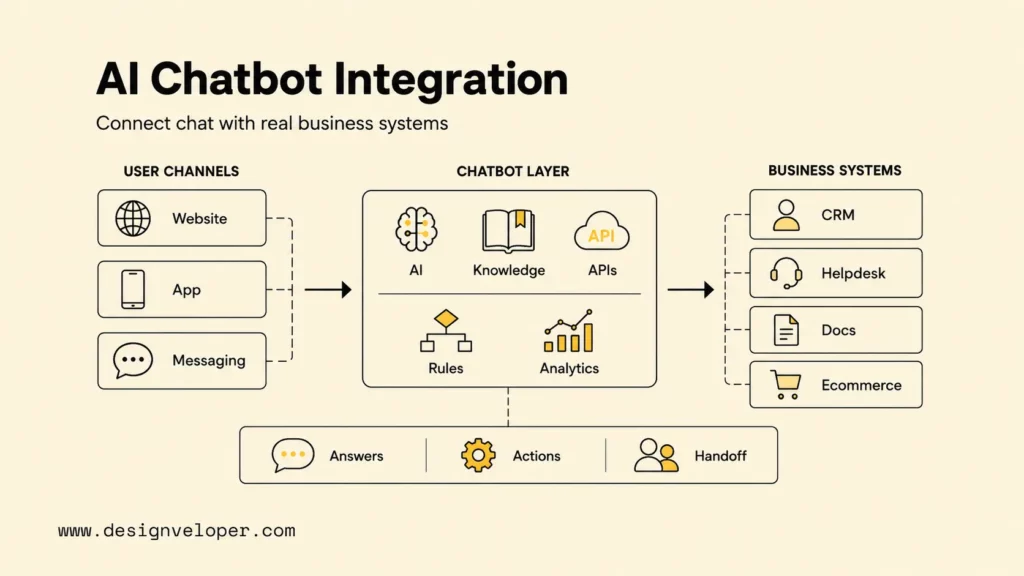
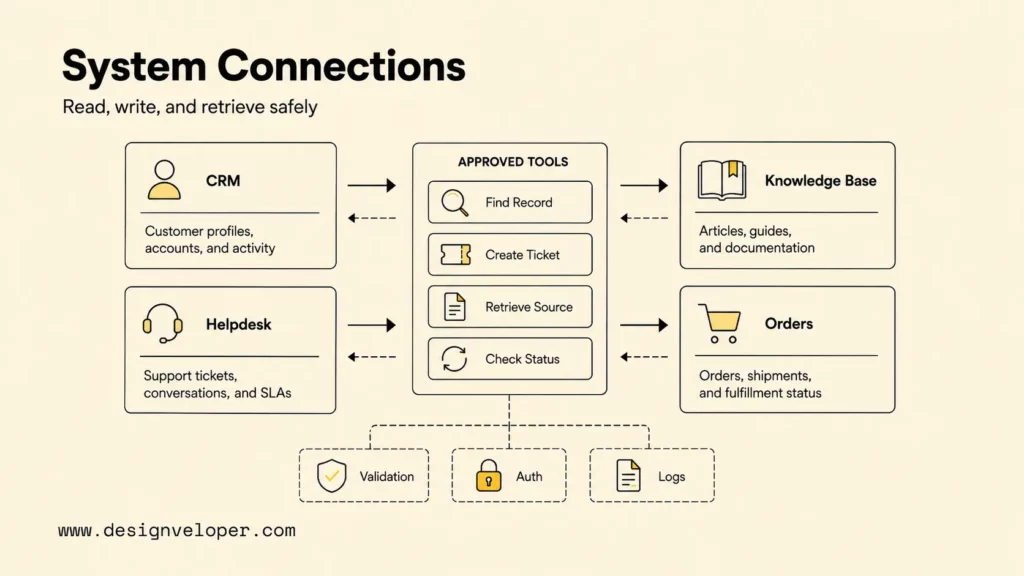
AI chatbot integration connects a conversational interface to the websites, apps, messaging channels, data sources, and business systems that people already use. A successful integration does more than place a chat window on a page: it gives the chatbot approved knowledge, controlled API access, permission rules, workflow actions, analytics, and a reliable path to human support.
Quick decision guide: Start with one frequent, measurable workflow and connect only the systems required to complete it. Use a prebuilt platform for a standard FAQ or support flow; choose a custom architecture when the chatbot must work with private data, complex permissions, several systems, or a distinctive product experience.
| Decision | Practical starting point | Production requirement |
|---|---|---|
| Where should the chatbot live? | Choose the channel where the target request already occurs. | Consistent identity, context, and handoff across channels. |
| What should it do? | Answer one approved question set or complete one bounded action. | Clear permissions, validation, and failure behavior. |
| What should it connect to? | Add the smallest useful knowledge source and system of record. | Scoped API access, monitoring, and audit logs. |
| How should success be measured? | Track completion, accuracy, escalation, latency, and user effort. | A baseline, target, review cadence, and accountable owner. |
Recommended for you:
- AI Chatbot With Memory: Architecture, Benefits, And Best Practices
- Train Chatbot With Your Own Data: A Practical Guide
- How To Build RAG: A Practical Guide For Reliable AI Retrieval
What Is AI Chatbot Integration?
AI chatbot integration is the engineering and product work required to connect a chatbot with user-facing channels and back-end systems. The integration layer carries messages between the interface and the conversational engine, retrieves trusted information, calls business APIs, preserves relevant context, enforces access rules, and records outcomes for analysis.
A standalone chatbot can answer a narrow set of questions. An integrated chatbot can check an order, create a support ticket, qualify a lead, search a document repository, book an appointment, update a CRM record, or hand a complex case to an employee with the conversation summary attached. The difference is workflow access: the integrated chatbot can safely read or change business state instead of merely generating text.
Modern conversational AI may combine intent detection, retrieval-augmented generation, large language models, deterministic rules, and tool or API calls. The right mix depends on risk. A store-hours answer can be retrieved automatically. A refund, account change, financial action, or medical request needs stronger authentication, validation, and often human approval.
Teams evaluating the underlying product patterns can first review how chatbots work in real workflows. The key design principle is consistent: conversation is the interface, while data quality, permissions, integration logic, and operational ownership determine whether the experience is dependable.
A business chatbot becomes useful when conversation leads to a trusted answer, a controlled action, or a clean human handoff.
Further reading:
- RAG Status: Meaning, Reporting Method, And Practical Use Cases
- AI Voice Agent For Customer Service: Benefits, Use Cases, And How To Build
- Conversational AI Platform: How To Choose The Right One
AI Chatbot Integration With Websites, Apps, And Messaging Channels
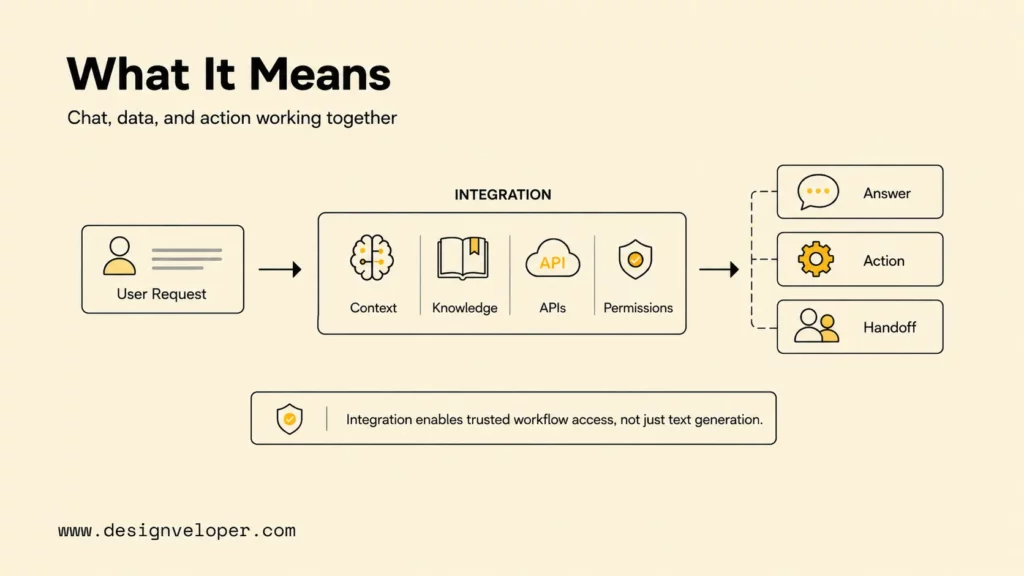
The best channel is usually the place where users already encounter the target problem. A website chatbot works well for product questions and lead capture. An in-app assistant can use authenticated product context. Messaging platforms can support ongoing service conversations, while an omnichannel design keeps identity, history, and escalation consistent when users switch channels.
| Channel | Integration use | What to prepare |
|---|---|---|
| Website chatbot | Product guidance, lead qualification, self-service support, or checkout assistance. | Widget or embedded UI, page context, consent, analytics, accessibility, and a handoff route. |
| Mobile app chatbot | Account help, onboarding, feature navigation, or authenticated tasks. | Mobile SDK or native UI, session identity, deep links, secure token exchange, and offline/error states. |
| WhatsApp, Messenger, Slack, or live chat | Customer service, notifications, employee support, and event-driven conversations. | Channel approval, webhook endpoint, message templates where required, OAuth scopes, rate limits, and identity mapping. |
| Omnichannel conversational AI | One service experience across web, mobile, messaging, and agent inboxes. | A shared conversation ID, customer profile, routing logic, channel-specific rendering, and synchronized transcripts. |
A channel adapter should normalize each platform’s message format into a common internal schema. That schema can include the conversation ID, user ID, channel, locale, timestamp, message text, attachments, and authentication state. A common schema prevents the core chatbot logic from becoming tightly coupled to every channel API.
Channel constraints still matter. Slack’s official Events API documentation explains that apps can receive subscribed events through a public HTTP endpoint or Socket Mode, and OAuth scopes determine which events the app can see. Meta’s WhatsApp Cloud API overview should be checked during planning because onboarding, webhooks, messaging rules, and platform behavior can change.
For an authenticated app, do not trust a user ID supplied in a prompt. The application should establish identity through its existing session, then issue the chatbot a short-lived token or server-side authorization context. For a public website, keep actions anonymous until the user signs in or completes a secure verification step.
Design channel-specific response rules as well. A compact messaging reply may need buttons, short choices, and a link to a secure page, while an in-app assistant can display product cards, account details, or a guided form. Attachments need type and size limits, malware scanning, and clear user feedback. Voice channels add speech recognition errors, interruptions, silence handling, and confirmation of names, dates, numbers, or financial amounts.
Omnichannel continuity should be deliberate rather than automatic. Users may welcome a shared history between a website and support inbox, but they should not discover that a private conversation has followed them into a public or shared channel. Define which context can move, ask for consent where appropriate, and show users when the conversation has changed channel or ownership.
Related reading:
- Conversational AI Vs Chatbot: Key Differences And Use Cases
- AI Business Process Automation: Benefits, Use Cases, And How To Start
- Enterprise AI Agents: Architecture, Use Cases, And Implementation Tips
AI Chatbot Integration With CRM, Helpdesk, And Knowledge Bases
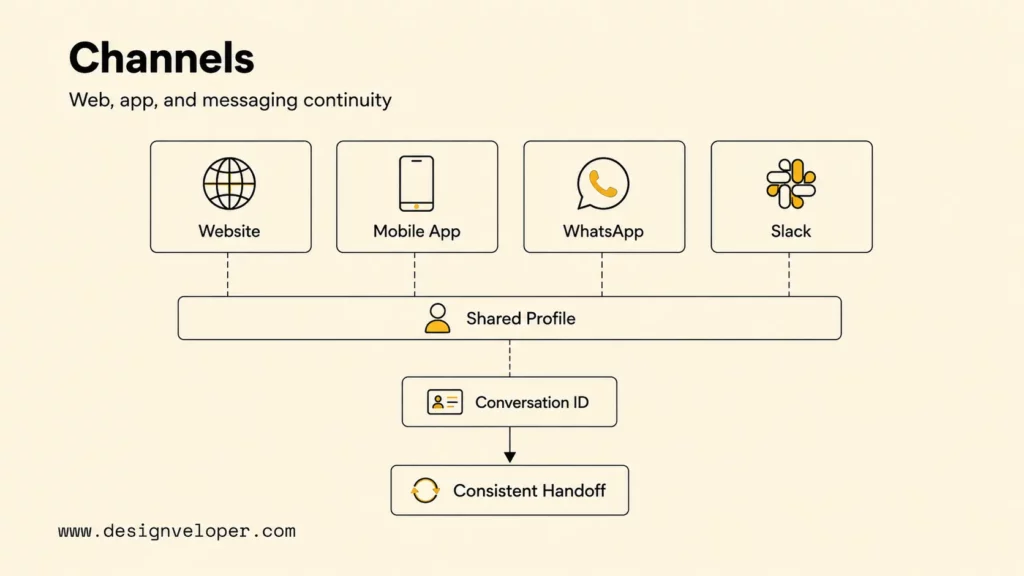
Business-system integration should separate read operations, write operations, and high-impact actions. Reading an approved help article is lower risk than updating a customer record; changing a reservation or issuing a refund requires even stronger controls. Each tool should expose a narrow function, validate its inputs, enforce authorization outside the model, and return a structured result.
| System | What the chatbot can do | Key requirement |
|---|---|---|
| CRM and sales tools | Find a contact, qualify a lead, summarize an interaction, schedule follow-up, or update an approved field. | Identity matching, field-level permissions, deduplication, consent, and a record of every change. |
| Helpdesk and ticketing systems | Search known issues, create or route tickets, attach conversation context, and show case status. | Queue mapping, priority rules, service-level expectations, and human ownership after escalation. |
| Knowledge base or document repository | Retrieve approved passages, summarize content, cite sources, and compare documents. | Content permissions, freshness controls, chunking and retrieval tests, and source links in answers. |
| ERP, booking, payment, inventory, or ecommerce systems | Check availability, prepare a transaction, reserve an item, or trigger a bounded workflow. | Server-side validation, idempotency, transaction state, explicit confirmation, and rollback or support paths. |
CRM and helpdesk integrations need a clear system of record. The chatbot can create a draft or propose a change, but the CRM, ticketing platform, or transactional database should remain authoritative. Salesforce’s official external bot integration guide, for example, treats the chatbot as an integrated participant in Service Cloud rather than a replacement for the service system.
Knowledge integration needs more than uploading documents to a vector database. Teams should define which sources are approved, who can read each source, how updates are indexed, how citations are returned, and what the chatbot says when evidence is missing. Retrieval evaluation should include ambiguous questions, conflicting documents, outdated policies, access-controlled content, and questions with no answer.
Transactional integrations should use deterministic application code around model output. If a user wants to cancel a booking, the model can identify the intent and collect the reason, but a server-side function should verify the booking owner, cancellation window, refund policy, and final confirmation before changing the record.
Define data contracts between the chatbot and every connected system. A contract records field names, accepted values, required identifiers, error codes, and version behavior. It also clarifies what the chatbot may display to the user. Data contracts make integration tests repeatable and prevent a small CRM or API change from silently producing incorrect answers or actions.
AI Chatbot Integration Process Step By Step
A reliable implementation moves from workflow definition to controlled deployment. The following six-stage path gives product, engineering, security, and operations teams visible decisions and testable outputs at every stage.
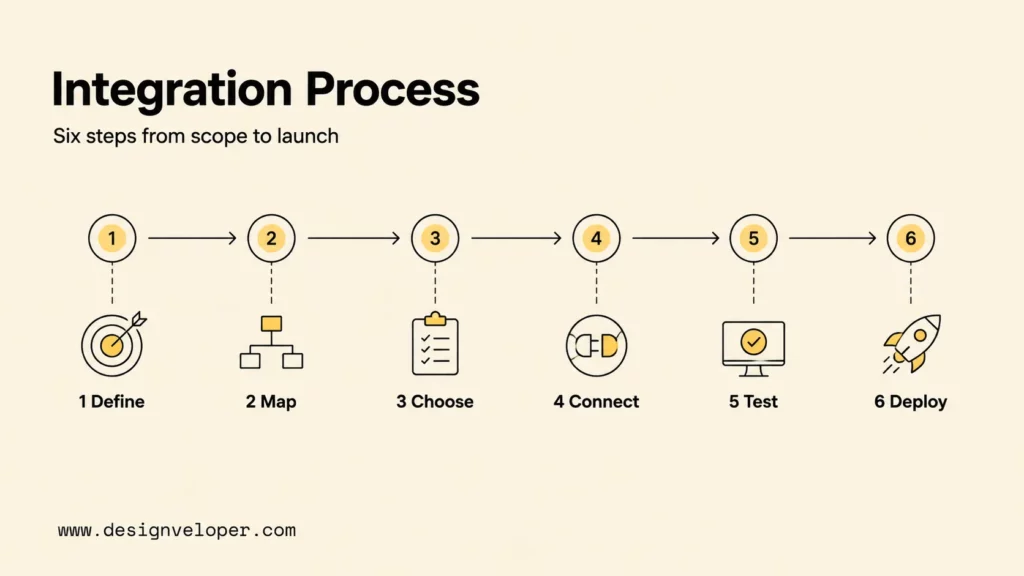
Step 1. Define The Use Case, Users, And Success Metrics
Write the first release as a job statement: “Help authenticated customers check an order and create a delivery issue ticket without repeating account details.” Identify the users, trigger, expected outcome, excluded requests, systems involved, and human owner. A narrow job statement exposes the data and permissions the chatbot genuinely needs.
Choose a baseline and target before development. Useful metrics include task completion rate, answer accuracy, containment or escalation rate, first-response time, end-to-end latency, user effort, correction rate, cost per completed conversation, and satisfaction after the interaction. A high containment rate is not automatically good if users are trapped in an unresolved conversation.
Step 2. Map Conversation Flows, Data Sources, And System Actions
Map the happy path, clarifying questions, authentication point, missing-data path, low-confidence response, API failure, policy exception, abuse case, and human escalation. For every chatbot action, specify the source of truth, allowed inputs, authorization check, expected output, timeout, retry behavior, and user-facing failure message.
Use real anonymized requests to design the flow. Support logs and search queries reveal mixed intents, unusual wording, emotional cases, and the reasons people ask for a human. The conversation design should reduce user effort without hiding important confirmations or policy limits.
Step 3. Choose The Chatbot Platform, Model, Or Custom Architecture
Select architecture after the workflow and risk boundaries are known. A rules-based bot suits predictable menus and structured intake. A managed conversational platform can accelerate common support flows. Retrieval-augmented generation helps with approved knowledge. A custom service offers more control over data, model routing, permissions, observability, and product experience.
Evaluate vendors and models with the same test set. Compare response quality, tool-calling reliability, latency, context limits, supported regions, data retention, security features, rate limits, operational controls, and total cost at expected traffic. Teams planning a bespoke product can use a detailed AI chatbot development workflow to turn these choices into build requirements.
Step 4. Connect APIs, CRM, Knowledge Base, And Human Handoff
Build integration tools as small, typed operations such as get_order_status, create_support_ticket, or search_policy. Do not expose a general database query or unrestricted HTTP client to the model. Each operation should check authorization, validate data, limit returned fields, handle retries, and log the outcome without leaking secrets.
Human handoff needs an ownership contract. Define which queue receives the case, what transcript and customer context are attached, whether the bot stops responding, and how the employee returns the conversation to automation. A handoff should preserve context while respecting data-minimization rules.
Step 5. Test Accuracy, Security, Latency, And User Experience
Test at four layers: individual tools, conversation flows, end-to-end workflows, and production-like load. The evaluation set should cover common tasks, rare but important requests, typos, multiple intents, unsupported questions, prompt injection attempts, unauthorized data requests, tool timeouts, duplicate submissions, and human escalation.
Security testing must assume that users and retrieved content can contain hostile instructions. The OWASP Top 10 for LLM Applications 2025 highlights prompt injection, sensitive information disclosure, improper output handling, excessive agency, and unbounded consumption among the risks teams should address. Authorization and transaction validation belong in application code, not only in a system prompt.
Latency testing should measure the complete user experience, including channel delivery, retrieval, model response, API calls, and rendering. Google Cloud’s Dialogflow CX fulfillment documentation illustrates one useful pattern: a partial response can acknowledge the user before a slower webhook finishes. Similar progress messages can make a multistep workflow feel responsive without pretending the action is complete.
Step 6. Deploy, Monitor, And Improve With Real Conversations
Begin with a limited audience, narrow capability set, and visible support owner. Monitor task completion, unsupported intents, retrieval quality, API errors, latency, token or model cost, escalations, user feedback, and potentially unsafe behavior. Review failed conversations regularly and convert recurring problems into new tests.
Version prompts, knowledge indexes, models, conversation flows, and tools so a regression can be traced and rolled back. Establish change approval for high-impact actions. A chatbot connected to live systems is a maintained software product, not a one-time content launch.
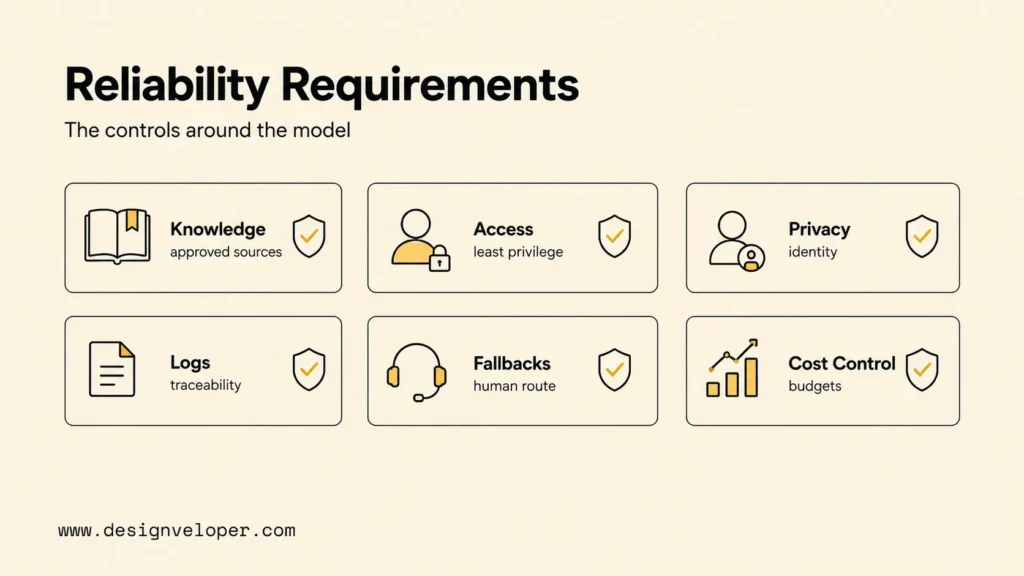
Requirements For Reliable Conversational AI Integration
Reliable conversational AI depends on controls surrounding the model. Trusted knowledge, least-privilege access, explicit identity, observable workflows, and bounded failure behavior matter more than a polished demo.
| Requirement | What to check | Why it matters |
|---|---|---|
| Approved knowledge sources | Ownership, access, version, update schedule, retrieval quality, and citation behavior. | The chatbot needs evidence for answers and a safe “I do not know” path. |
| API access and permissions | Least-privilege scopes, server-side authorization, field filtering, secret storage, and token rotation. | A user should never gain access merely by asking the model. |
| Authentication, privacy, and compliance | Identity verification, consent, retention, residency, deletion, vendor terms, and sensitive-data handling. | Conversation logs can contain personal and confidential information. |
| Conversation logs and analytics | Redaction, access control, trace IDs, outcomes, feedback, cost, latency, and retention limits. | Teams need enough evidence to investigate failures and improve quality. |
| Fallback behavior and escalation | Low confidence, missing evidence, API failure, risky intent, service hours, and human queue ownership. | A clear exit prevents confident errors and user frustration. |
| Rate limits and model cost control | Quotas, caching, context size, timeouts, retries, model routing, abuse controls, and budget alerts. | Unbounded traffic or tool loops can degrade service and increase cost. |
Use the NIST AI Risk Management Framework as a governance reference for mapping, measuring, and managing AI risk across the lifecycle. The framework does not replace product-specific controls, but it gives business, engineering, legal, and security teams a shared structure for ownership and review.
Create a release checklist for every change to a model, prompt, knowledge source, tool, or channel. The checklist should confirm evaluation results, permission review, observability, cost impact, user communication, rollback readiness, and the employee responsible for the release. High-impact tools deserve stricter approval than copy or retrieval changes.
Operational resilience also requires dependency planning. Decide what users see when the model provider, vector store, CRM, or messaging platform is unavailable. Some requests can fall back to search or a static help path; transactional requests may need to pause and create a human-owned case. A graceful failure should never tell the user an action succeeded before the system of record confirms it.
Never let fluent language bypass the controls that protect data, money, accounts, or people.
Common AI Chatbot Integration Mistakes To Avoid
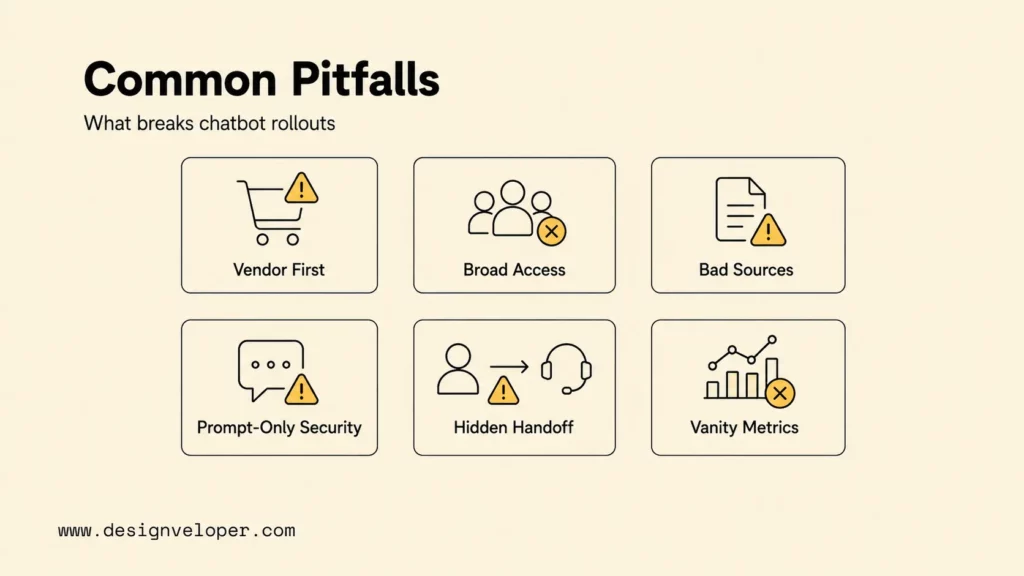
Most chatbot failures begin as product or integration mistakes rather than model mistakes. Avoid the following patterns during planning and rollout:
- Starting with a vendor instead of a workflow. The tool choice becomes easier after the team knows the user, task, systems, risk, and success measure.
- Giving the chatbot broad system access. Expose narrow operations and enforce authorization in the application layer.
- Loading every document without governance. Retrieval quality declines when sources are duplicated, outdated, contradictory, or permissioned incorrectly.
- Using one prompt as the security boundary. Prompts guide model behavior but cannot replace authentication, validation, least privilege, and transaction controls.
- Hiding the human handoff. Users need a visible route to help when the chatbot lacks evidence, encounters risk, or cannot complete an action.
- Measuring messages instead of outcomes. Conversation volume does not prove that customers completed a task or employees saved time.
- Ignoring failure and duplicate states. API retries can create duplicate tickets, orders, or reservations unless actions use idempotency and state checks.
- Launching without operational ownership. Someone must review incidents, update knowledge, approve changes, and decide when to pause or roll back a capability.
Another common mistake is automating a broken process. If teams disagree about policy, customer records are incomplete, or the handoff queue has no owner, a chatbot will reproduce that confusion faster. Fix the workflow and source data alongside the conversational layer.
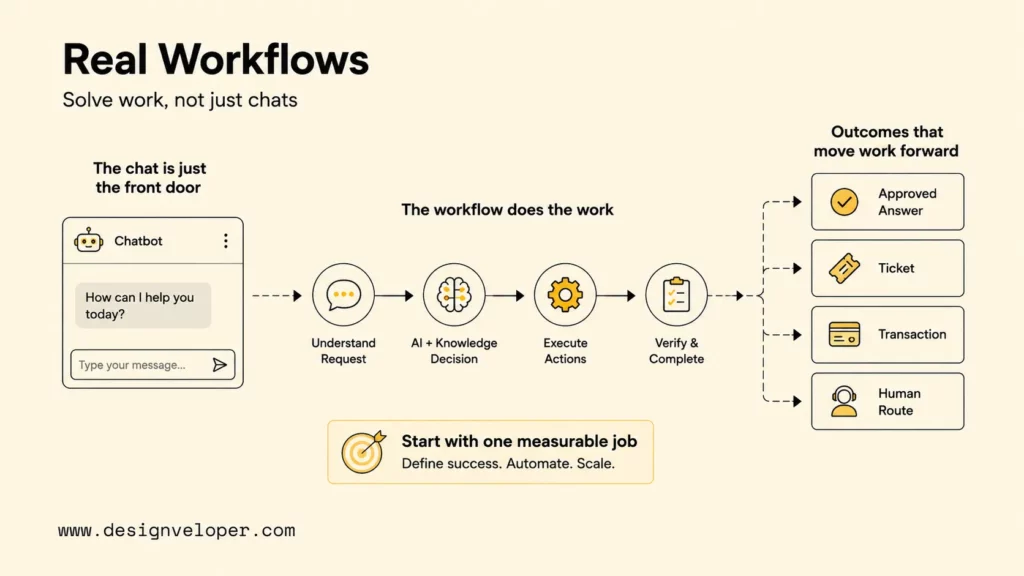
Connect AI Chatbots To Workflows, Not Just Chat Windows
The strongest AI chatbot integration begins with measurable work: resolving a known support request, finding an approved answer, preparing a transaction, or moving a case to the right person. The chat window is only the visible layer. Production value comes from the system behind it: trusted data, APIs, permission logic, workflow triggers, fallback rules, monitoring, and human review.
A practical first release can be small. Choose one high-volume request, map the current steps, connect the minimum required data, expose one or two bounded actions, and test with a representative user group. Expand only after the team can explain accuracy, completion, risk, cost, and support ownership with evidence.
A chatbot integration is ready for production only when the team can explain what data it may read, which actions it may propose or execute, and how a failed action is recovered. In our AI development work, the first deliverables are a system map, permission matrix, tool contract, handoff rule, and evaluation set built from real user requests. Those controls turn the conversation into a dependable path through CRM, helpdesk, ecommerce, document, or internal workflows instead of an isolated chat window.
FAQs About AI Chatbot Integration
How Do You Integrate An AI Chatbot Into A Website?
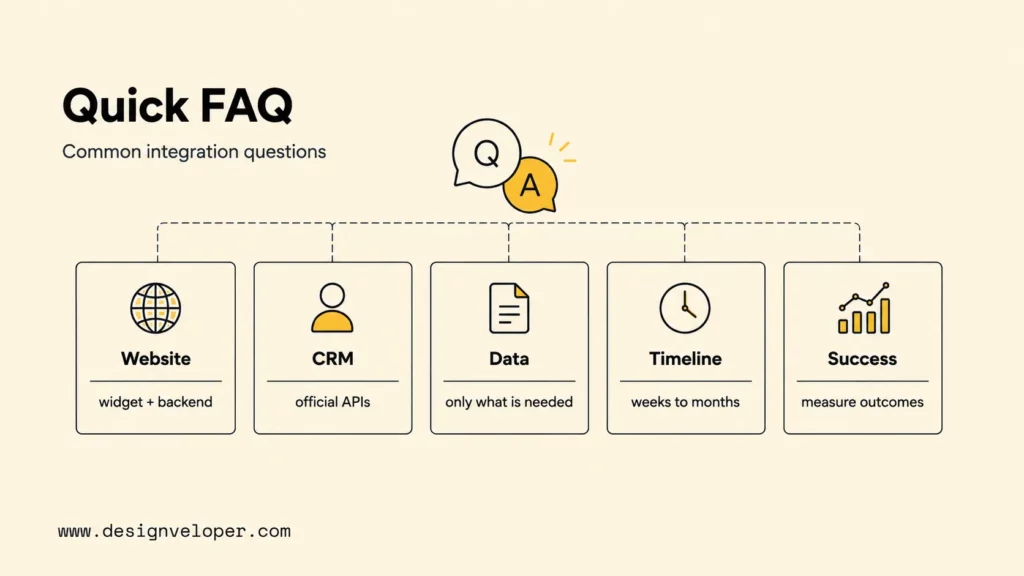
Integrate a website chatbot by adding an accessible widget or embedded interface, connecting it to a secure chatbot back end, and passing only the page or session context the workflow needs. Define consent and analytics behavior, protect authenticated actions with the site’s existing identity system, test mobile layouts, and provide an obvious human-support route.
Can An AI Chatbot Connect To A CRM Or Helpdesk?
Yes. A chatbot can use official APIs or approved middleware to read a customer profile, create or update a lead, open a ticket, add a summary, or check case status. The integration should use least-privilege scopes, server-side authorization, field validation, identity matching, audit logs, and a clear system of record.
What Data Does An AI Chatbot Need?
An AI chatbot needs only the data required for its defined task. That may include approved knowledge articles, product information, conversation context, and a limited set of authenticated customer fields. Avoid sending entire records by default. Classify sensitive data, filter fields, respect user permissions, set retention rules, and give the chatbot a safe response when required evidence is unavailable.
How Long Does AI Chatbot Integration Take?
A narrow website FAQ or lead-routing pilot can take weeks, while an enterprise integration across several systems can take months. The schedule depends on API readiness, identity and permission complexity, knowledge quality, number of channels, security review, evaluation requirements, human handoff, and production monitoring. A discovery phase should replace generic estimates with a scoped release plan.
How Do You Measure AI Chatbot Integration Success?
Measure success with task outcomes rather than message volume. Track completion rate, answer or action accuracy, appropriate escalation, time to resolution, user effort, satisfaction, latency, API failures, correction rate, cost per completed task, and security incidents. Compare results with a pre-launch baseline and review failed conversations on a fixed cadence.
Also published on

Share post on










Related Articles


10 AI Agent Use Cases And Real-World Examples By Industry
10 AI Agent Use Cases And Real-World Examples By Industry Published August 05, 2026
What Is An LLM Agent? How It Works, Architecture, And Examples
What Is An LLM Agent? How It Works, Architecture, And Examples Published August 05, 2026
AI Agent Governance: How To Manage Agents In Production
AI Agent Governance: How To Manage Agents In Production Published August 05, 2026



















