
















What Is An LLM Agent? How It Works, Architecture, And Examples

KEY TAKEAWAYS:
- An LLM agent uses a language model to manage a bounded task loop, choosing among permitted steps and checking what happened before it continues.
- The application remains responsible for execution and safety: it supplies tools, validates inputs, applies permissions, stores task state, and controls when a person must approve or take over.
- Use an agent when a workflow needs flexible decisions across multiple steps. A chatbot, one model call, or a fixed workflow is simpler when it can already do the job.
- Useful examples need a clear action boundary, such as drafting a refund for approval, returning cited research, testing code in a sandbox, or escalating uncertain document data.
An agent changes more than the model call. Product teams must decide what the system can access, which actions need approval, and how a person can correct mistakes. Those choices become harder when a task crosses several tools or depends on incomplete information. This article separates LLM agents from chatbots and fixed LLM workflows, then follows a bounded task from request to result to make the design and operating choices concrete.
What Is An LLM Agent?
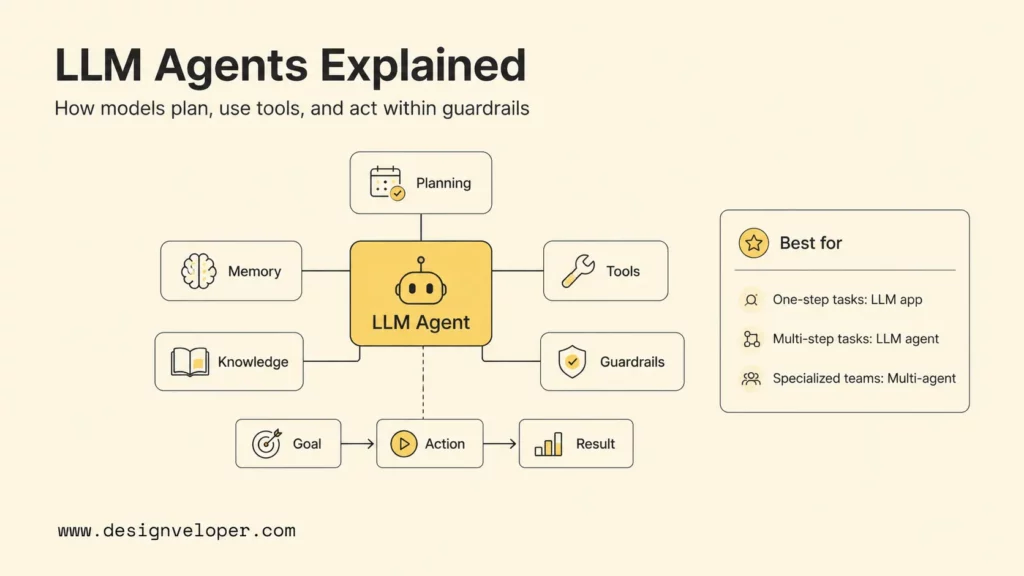
An LLM agent is a software application that uses a large language model to interpret a goal, select a permitted next step, and use tools or information when needed. It then assesses the result within a bounded workflow. The model helps with flexible language-based decisions; the surrounding application supplies execution, state, access control, validation, monitoring, and stop conditions. It is one implementation of the broader AI agent concept.
The word “agent” describes how the system participates in a task, not a promise of independent authority. An agent may look up an order and draft a refund recommendation while a support specialist approves any payment. Another may search approved documents and return citations but cannot send messages or change records. The allowed actions depend on the workflow, user identity, business policy, and possible impact of an error.
A language model by itself is not an agent. It can interpret instructions and generate text, but it does not automatically have access to a database, browser, CRM, file system, or payment service. Application code connects approved capabilities, authenticates requests, checks tool arguments, records outcomes, and handles timeouts or errors. The model may suggest what should happen next; deterministic software decides whether that action is valid and executes it.
This division is useful when a task has several steps, depends on unstructured information, or must adapt to intermediate results. A fixed function or workflow is usually a better fit when the steps are stable and fully known, especially when the cost of a wrong action is high. An LLM agent earns its added complexity only when flexible task control solves a real problem that a simpler design cannot.
OpenAI’s practical guide to building AI agents describes them as systems that can independently accomplish tasks on a user’s behalf. In a product, “independently” should still mean within explicit limits: narrow tools, least-privilege access, step and cost limits, and a clear route to pause or hand work to a person.
LLM Agent Vs Chatbot Vs AI Agent
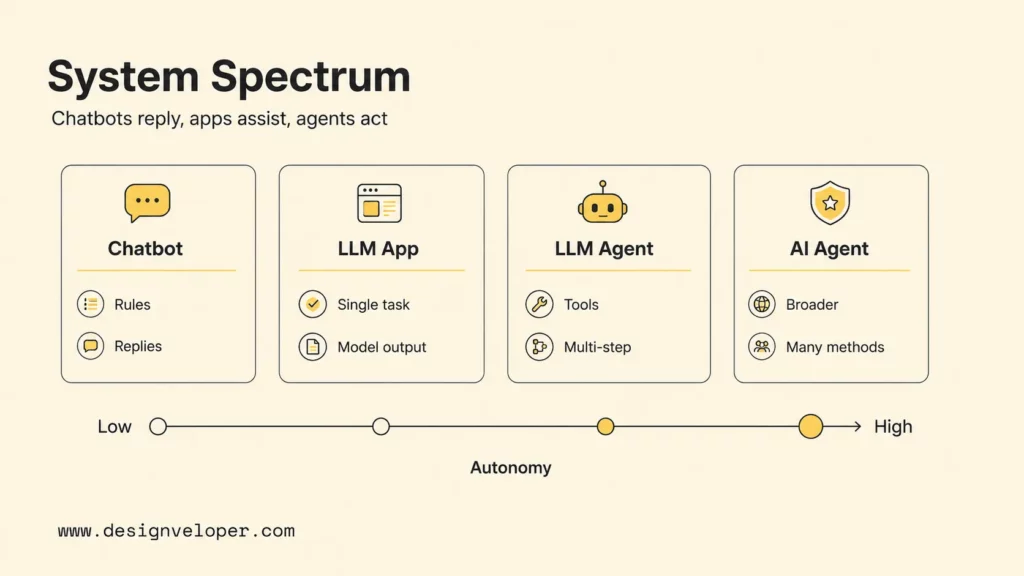
A chatbot is an interaction pattern, while an LLM application uses a model for a defined task. An LLM agent can choose among steps in a bounded task loop. “AI agent” is the broader category and can include systems that do not use language models. Compare actual capabilities rather than relying on labels, which are often used loosely.
| System | What It Does | Typical Control | Good Fit |
|---|---|---|---|
| Basic chatbot | Routes a conversation through rules, intents, menus, or prepared replies | Mostly fixed paths | FAQs, intake, and predictable routing |
| LLM application | Uses a model for a defined generation, classification, extraction, or analysis task | One call or a fixed pipeline | Drafting, summarizing, structured extraction, and search answers |
| LLM agent | Uses an LLM to select tools or actions across a multi-step task | Flexible choices inside application limits | Research, ticket handling, coding support, and document operations |
| AI agent | Perceives or receives state, makes decisions, and acts toward a goal | Varies by design; may not use an LLM | Software agents, robotics, planning, and optimization |
An LLM agent is one kind of AI agent, not a mutually exclusive peer category. A chatbot can also use an LLM, and a product can present an agent through a chat interface. The useful distinction is whether the system only responds or can choose a next step, call a capability, inspect its result, and continue or stop.
Retrieval alone does not make a system an agent. A question-answering app may retrieve relevant documents and generate one response through a fixed sequence. It becomes more agent-like when the model can decide whether to search again, ask for missing details, use another approved tool, or hand the request to a person. Even then, each option should be defined and constrained by the application.
Use the simplest pattern that meets the workflow’s needs. Start with a chatbot for predictable conversation, a single LLM call for one bounded language task, or a deterministic workflow when every transition is known. Consider an agent when the system must choose among valid actions based on changing context and the team can measure whether that flexibility improves the task.
LLM Agent Architecture: Planning, Memory, Tools, And Guardrails
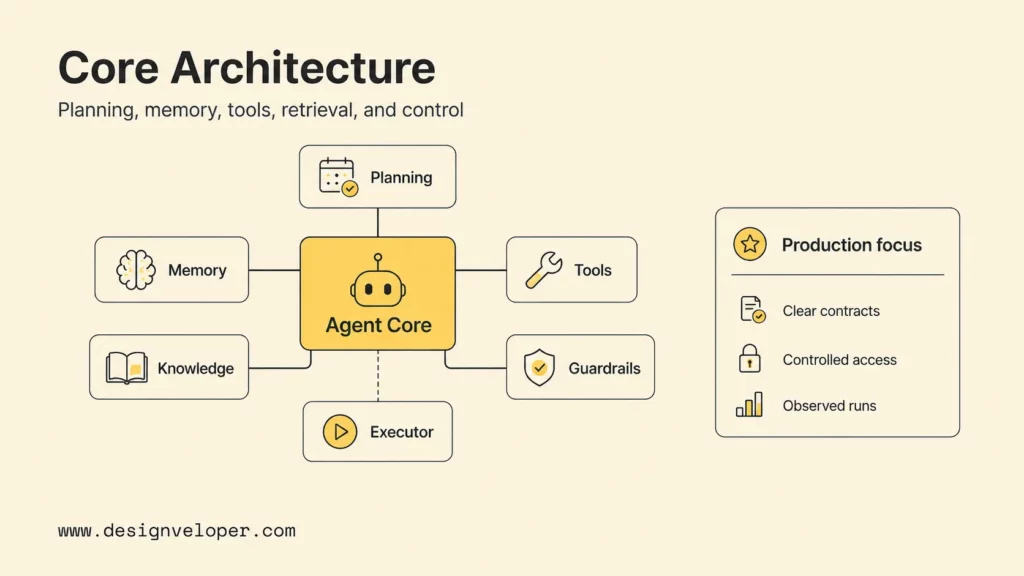
An LLM agent architecture connects a model to task state, approved capabilities, and an execution layer. The design should make each component’s responsibility visible: the model can propose a step, but application services own access checks, side effects, and the decision to continue.
| Component | Responsibility | Design Check |
|---|---|---|
| Agent instructions and model | Interpret the goal and return a response or structured action request | Are the goal, allowed actions, exclusions, and completion condition clear? |
| Planner and controller | Choose a next step, enforce limits, and manage transitions | Are maximum steps, retries, time, and spend capped? |
| Task state and memory | Carry relevant facts and tool outcomes through the current task | Is stored information authorized, current, traceable, and correctable? |
| Tools and retrieval | Expose specific reads, searches, calculations, or proposed actions | Are inputs typed, permissions narrow, and side effects explicit? |
| Executor and policy checks | Validate requests, call services, and return tool observations | Can the model bypass authentication, policy, or transaction rules? |
| Monitoring and review | Record outcomes, surface failures, and route approvals or escalations | Can an owner reconstruct a run and intervene safely? |
Planning is a proposal, not an enforcement layer. An agent can produce a short action plan, but code should check that each requested transition is allowed. Keep separate operations for reading a record, drafting a change, and applying an approved change. This makes permissions and failure handling easier to test than a broad “manage account” tool.
Memory is application-managed context. Short-term state may include the current request, verified identifiers, prior tool results, and the remaining steps. Longer-term memory may store approved preferences or past outcomes outside the model. Keep only information that the workflow needs, record where it came from, set retention and access rules, and provide a way to correct stale data.
Tools connect decisions to systems. Give each tool one clear purpose, a typed input schema, a defined authentication context, and documented errors and side effects. The executor should validate arguments and permissions before calling it, then check the returned status before the model uses that result. Use idempotency and transaction boundaries for operations that may be retried.
Retrieval supplies governed knowledge. An agent can search policies, product documents, or records through retrieval-augmented generation (RAG), but retrieved text should be treated as evidence, not as trusted instructions. Preserve source identifiers or citations so users and evaluators can inspect why the response was produced.
For example, a support agent might receive an order lookup tool, a read-only policy search, and a separate refund proposal action. The execution service checks identity and policy before each call. A human approval step then controls whether the payment service receives a refund request. This boundary keeps language-based decisions separate from authorization and financial execution.
How An LLM Agent Works Step By Step
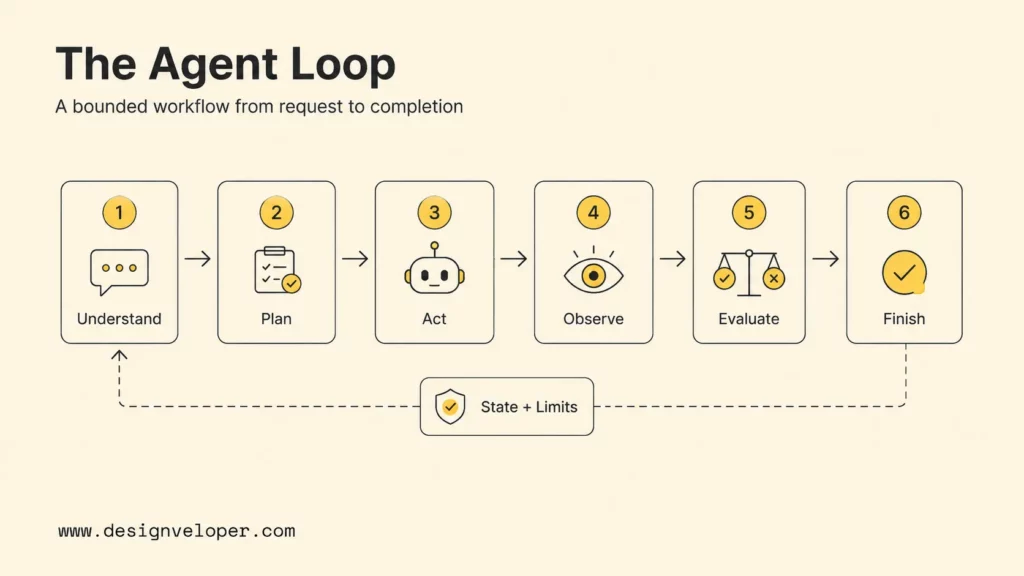
An LLM agent runs a bounded feedback loop. It interprets a request, chooses a permitted action, and receives an observation before deciding whether to continue, finish, or escalate. Consider a customer who asks for a refund on a recent order. The agent can prepare the case, but policy checks and approval control the payment action.
Step 1. Understand The Goal And Constraints
The system identifies the outcome and any missing information. For a refund, it needs an authenticated customer, the relevant order, and enough detail to distinguish a refund request from a cancellation or exchange. If the account or order is unclear, it asks a focused question instead of guessing.
Step 2. Create An Observable Plan
The agent selects a short sequence: verify the customer, retrieve the order, check policy, prepare a recommendation, and request approval when required. The product does not need to expose private model reasoning. A short action record lets the application check that the workflow follows an allowed path.
Step 3. Select An Approved Tool
The agent requests a read-only order lookup and the current refund policy. The executor checks the user’s identity, validates the requested order identifier, and confirms that both operations are allowed. If the policy source is unavailable, the system should stop or offer a safe handoff rather than inventing a rule.
Step 4. Carry Forward Relevant State
The application returns the verified order status, policy version, and prior results to the next step. It should pass only the information needed to decide what happens next. Structured state is easier to inspect and correct than a long transcript containing repeated or unrelated details.
Step 5. Check Evidence And Policy
The agent compares the order facts with the refund rules and the user’s request. The application checks the recommendation against policy, amount limits, and approval requirements. Missing evidence, conflicting records, a tool error, or a request outside policy leads to clarification or escalation, not an automatic retry without a limit.
Step 6. Complete, Pause, Or Escalate
The system can explain the finding, show the evidence, and submit a refund proposal for review. After approval, the executor can call the payment service and confirm its status. If approval is declined or the service fails, the agent reports that the task is incomplete and gives the user a clear next step.
This running example illustrates the control flow, not a guarantee that an agent is the right solution. A fixed refund workflow may be safer if eligibility rules are simple and consistent. The agent is useful only if it handles language variation or exceptions well enough to justify its additional testing and operational cost.
LLM Agent Use Cases And Examples
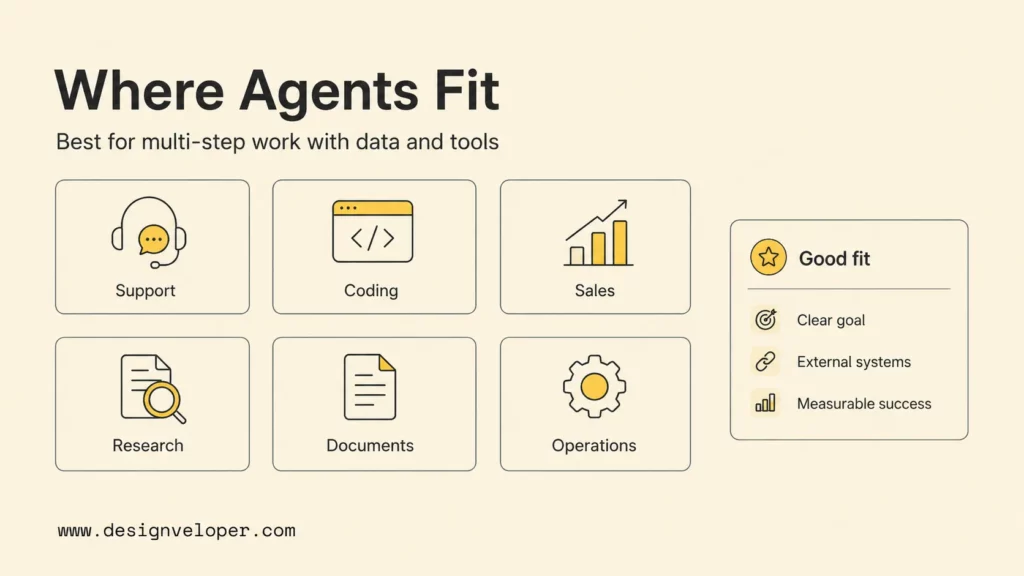
LLM agents fit workflows that combine language, changing context, multiple steps, and a result the team can check. Evaluate each use case as an operating contract: what starts the task, which systems the agent may use, what it may change, and when a person takes over.
- Customer support and refunds: Retrieve an authenticated customer’s order, search the current policy, and draft a recommendation with the facts it used. Require an employee to approve payment or any exception to policy.
- Research and knowledge work: Search a defined set of sources, compare evidence, and return a short brief with citations and unresolved disagreements. Treat retrieved pages as untrusted content, and ask a reviewer to resolve consequential conflicts.
- Software development: Inspect a code repository, propose a patch, and run approved checks inside an isolated environment. Keep code review, merging, production access, and deployment under a separate approval process.
- Document operations: Extract fields from invoices, forms, or contracts and compare them with reference records. Send low-confidence values, missing fields, and conflicting records to an operator instead of silently filling gaps.
These are candidates, not automatic reasons to build an agent. A team should first confirm that the workflow occurs often enough to matter, the needed data can be accessed safely, and an incorrect action can be detected and contained. If a rules-based process already handles the work, adding model-driven choices may create more failure modes than value.
LLM Agent Risks And Guardrails
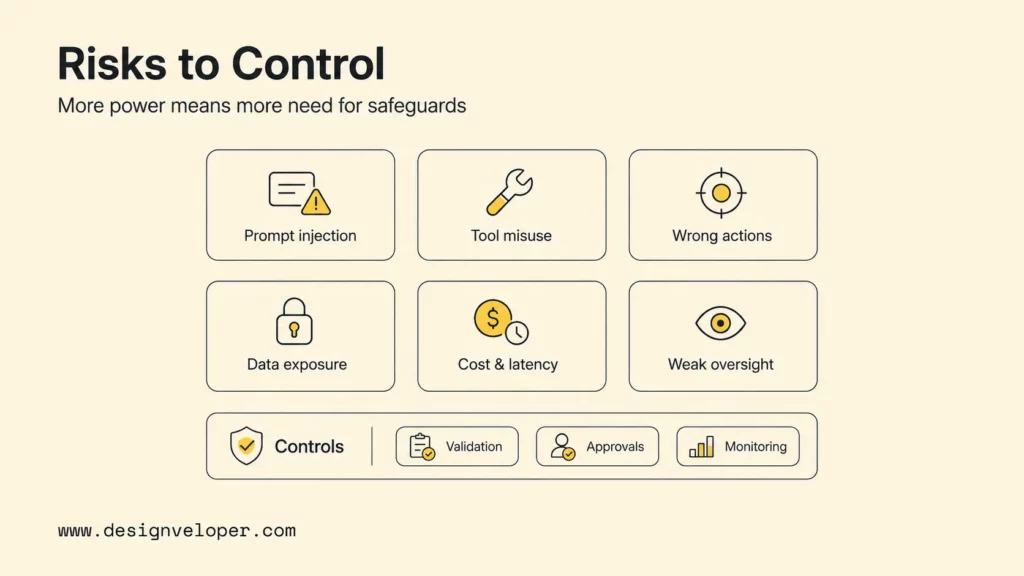
An LLM agent can turn a mistaken interpretation into a tool request, so risk spans both model output and the software that acts on it. Review untrusted prompts and documents, along with ordinary failures such as stale data, duplicate requests, unavailable services, and unclear ownership.
| Failure Or Attack | Possible Effect | Control To Test |
|---|---|---|
| Prompt injection in a document or web page | Agent follows hostile text or discloses data | Separate instructions from retrieved content; limit tools and sensitive context |
| Overbroad or confused permissions | Agent reads or changes the wrong account or record | Authenticate each action, apply least privilege, and test cross-user denial |
| Invalid or repeated tool action | Duplicate payment, message, or record change | Validate arguments, enforce idempotency, and require approval for high-impact actions |
| Stale, incomplete, or conflicting evidence | Wrong recommendation or false confidence | Preserve source and version, define freshness limits, and escalate conflicts |
| Runaway retries or weak monitoring | Higher cost, latency, or an unnoticed partial failure | Set step/time/spend limits and alert on failed outcomes, policy breaches, and unusual actions |
The OWASP Top 10 for Agentic Applications describes risks such as prompt injection and tool misuse. These risks are not solved by a stronger model alone. Keep credentials outside prompts, treat external content as data, validate model-proposed actions in code, and restrict each agent identity to the systems and operations it needs.
Risk controls should also cover people affected by an agent’s output. Identify who owns policy decisions, how users can correct or appeal an outcome, and what happens when the agent stops midway. The NIST AI Risk Management Framework resources provide a broader basis for organizing evaluation and accountability; teams still need to adapt controls to the workflow and its users.
No guardrail makes a system error-proof. Limit the effect of one model decision. Detect failures and keep enough evidence to investigate. Give a responsible person a clear way to pause or recover the task.
From LLM Agent Prototype To Reliable AI Workflow
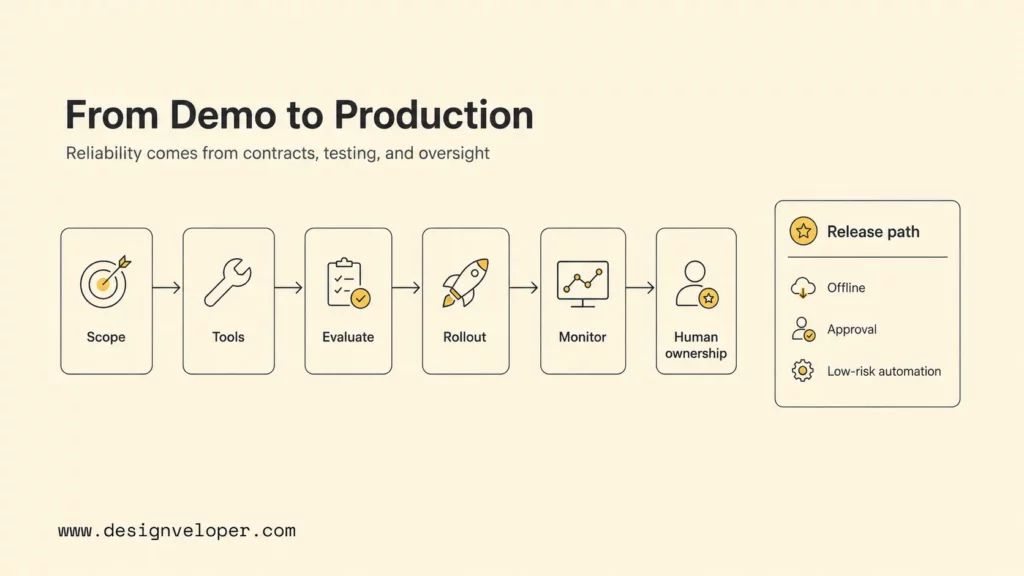
A prototype becomes a dependable workflow through a measured release, not by adding more autonomy. Teams should define the task boundary, test ordinary and failure cases, then increase permissions only when the evidence supports it.
Define The Workflow And Authority
Name the user, trigger, expected result, source systems, exclusions, and accountable owner. Define what counts as success and what the agent must do when information is missing, sources disagree, or a tool fails. Classify each action as read-only, reversible, externally visible, financial, or irreversible, then set the matching approval rule.
Connect only the required tools and use an identity with narrow permissions. Keep retrieval, proposal, approval, and execution separate when the workflow can affect people or business records. Define limits for steps, retries, time, and cost before the first production run.
Evaluate And Release In Stages
Build an evaluation set from common requests, ambiguous inputs, missing data, policy conflicts, tool outages, prompt injection, and actions that should require approval. Check the final result and the path the system took: evidence selection, tool choice, argument validity, retries, escalation, policy compliance, latency, and cost. Anthropic’s guidance on agent evaluations also distinguishes outcome checks from trajectory checks for multi-step systems.
Release first in offline tests, then shadow mode where the agent cannot change live systems. Next, have a person review every proposed action. Allow a narrow set of low-risk actions for a small group only after written quality and safety thresholds are met. Keep a rollback path and version the model, prompts, tools, policies, and retrieval data so a change can be traced.
Monitor Ownership And Recovery
Track task completion, user corrections, escalation, policy violations, tool errors, retries, latency, and operating cost. Review samples of successful runs as well as failures, because a plausible answer can hide a poor tool choice or unsupported result. Store enough structured events to investigate a run without retaining unnecessary sensitive content.
A named team should own the evaluation set, policies, tool changes, incidents, and approval thresholds. An explicit AI agent governance model makes those duties and escalation paths easier to maintain. Users need a visible way to stop a run or ask for human review. If ownership, evidence, or recovery is unclear, keep the system in a supervised mode rather than expanding its authority.
A permission matrix and a tested failure path often make a stronger starting point than a more elaborate planning loop.
FAQs About LLM Agents
Does Every LLM Agent Need Tools?
No. An agent needs tools when its task requires external information or actions beyond generating text. If it only needs to choose among steps using the current context, application-managed state may be enough. Function calling is one common way to request a structured operation, but it is not the only implementation.
Does An LLM Agent Always Need Memory?
No. A short task may need only the current request and tool results. Longer workflows or repeat interactions may benefit from stored state. Add memory only when it improves the task and the team can govern its source, access, freshness, and retention.
Is An LLM Agent Just A Chatbot With RAG?
No. RAG retrieves information to ground a model response, while an agent can decide which permitted step to take and whether to continue after observing a result. A chatbot with retrieval can remain a fixed question-answering flow; retrieval alone does not give it task control.
Can An LLM Agent Work Without Human Supervision?
Some low-risk, well-tested steps can run without approval on every action, but the system still needs a human owner, monitoring, and incident response. Require review for sensitive, high-impact, externally visible, or hard-to-reverse actions, and expand autonomy only when evaluations support it.
For teams assessing an agent-enabled product, Designveloper’s AI development services cover the application, integration, evaluation, and operating decisions that sit around the model.
Also published on

Share post on










Related Articles


AI Agents vs Agentic AI: Differences From Execution to Autonomy
AI Agents vs Agentic AI: Differences From Execution to Autonomy Published October 30, 2026
Best AI Trading Bots For Crypto & Stocks In 2026 (We Tested Them All)
Best AI Trading Bots For Crypto & Stocks In 2026 (We Tested Them All) Published October 30, 2026
Claude Vs ChatGPT Vs Gemini For Coding In 2026: Which Is Best?
Claude Vs ChatGPT Vs Gemini For Coding In 2026: Which Is Best? Published October 29, 2026


















