
















How To Build An AI Agent: A Practical Step-By-Step Guide

KEY TAKEAWAYS:
- Start with one narrow workflow so the team can test success, failure, and review paths before scaling autonomy.
- A reliable agent needs more than a model: it also needs tools, state, guardrails, evaluation, and human review.
- The best beginner path is usually use case first, framework second.
- Production readiness depends on permissions, logging, approvals, and rollout discipline, not only on model quality.
Learning how to build an ai agent starts with one grounded idea: an agent is useful only when it can complete a specific task with the right tools, context, boundaries, and review. A broad agent that can do everything is difficult to test. A narrow agent that solves one workflow can become reliable, measurable, and safe enough to improve over time.
This guide explains the practical path. It covers use-case selection, model choice, tool design, memory, orchestration, evaluation, and the production concerns that appear when an agent meets real business systems. The goal is not to make an agent sound autonomous. The goal is to make it useful and governable.
What Is An AI Agent?
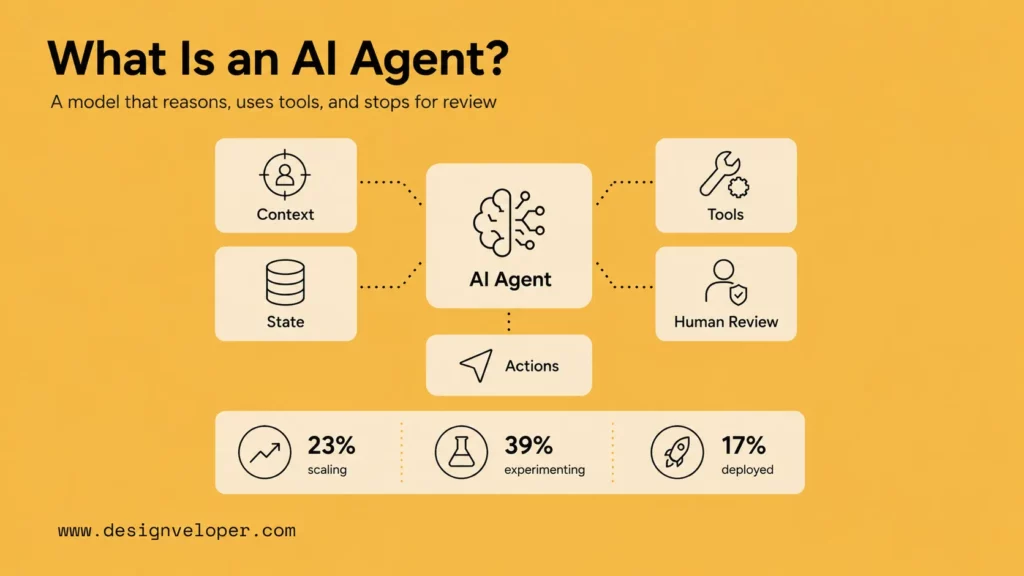
An AI agent is a software system that uses a language model to reason over a task, decide what steps to take, and use tools or data sources to move toward a goal. In practice, the difference from a simple assistant is that the agent can read context, choose a next action, use an approved tool, and stop when it reaches a defined outcome or review checkpoint.
See more:
- AI Agent vs Chatbot: Side-by-Side Comparison and Practical Use-Case Guide
- AI Agent Vs. AI Assistant: Which Is Right For Your Business?
Current AI adoption makes the topic urgent. McKinsey’s 2025 State of AI survey found that 23% of respondents said their organizations were scaling an agentic AI system in at least one business function, while another 39% had begun experimenting with AI agents. Gartner’s 2026 Hype Cycle for Agentic AI also says only 17% of organizations had deployed AI agents at the time of its CIO survey, while more than 60% expected to deploy them within two years. That gap explains why the beginner path must focus on production basics, not only demos.
This is also why the first version should stay narrow. An agent that files a draft support note is easier to test than an agent that owns the whole support workflow. The narrow version still teaches the team about tools, permissions, retrieval, logging, and review.
For beginners, the safest mental model is not a fully independent digital worker. It is a controlled workflow assistant that can reason over context, use approved tools, and stop when the next step requires human judgment. In practice, strong agent setups are usually built around context, tools, handoffs, and clear exit conditions rather than around unlimited autonomy.
The important distinction is action. A chatbot may answer a question. An agent may search documents, call an API, update a draft record, ask for approval, and summarize what happened. That action layer creates value, but it also requires permissions, validation, monitoring, and fallback behavior.
How To Start Building An AI Agent
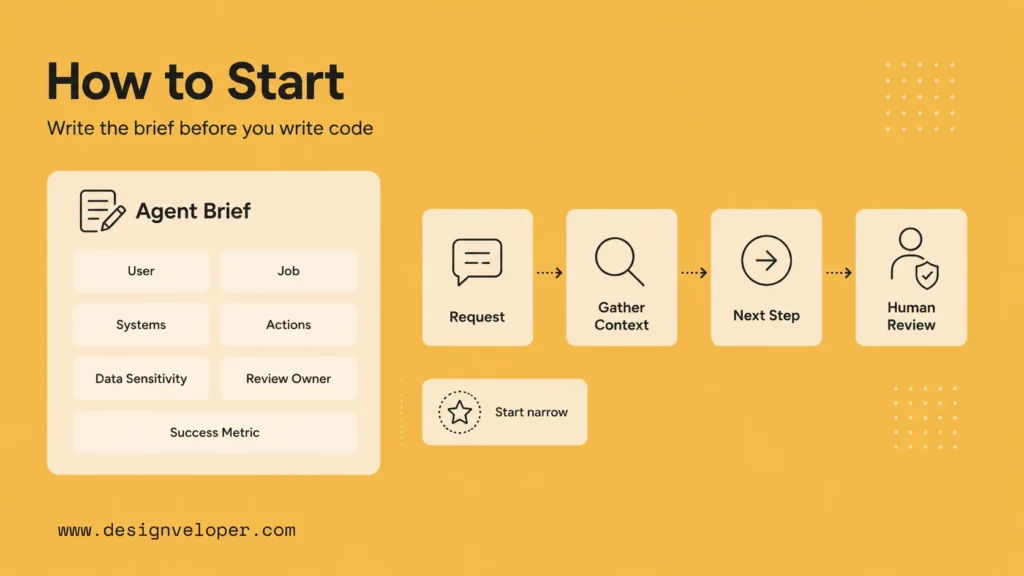
Before writing code, write a short agent brief. It should include the user, the job, the systems involved, the actions allowed, the data sensitivity, the review owner, and the success metric. This brief keeps the build grounded when the team starts comparing frameworks or adding tools.
A good first agent usually has a repeatable pattern. It reads a request, gathers context, drafts or triggers one next step, and stops. That shape is easier to evaluate than an agent that tries to plan an entire department’s work. Small scope is not a weakness; it is how agent quality becomes measurable.
Further reading:
- How to Build Agentic AI: Practical Guide with Examples
- Building AI Agents with LangChain: The Complete Guideline
- What Is Agentic AI? Benefits, Architecture And How It Works
Begin With One Narrow Use Case
Start with one workflow that has clear inputs, outputs, and success criteria. Good early examples include support triage, document Q&A, sales research, invoice extraction support, internal policy lookup, or a coding assistant for a controlled repository task.
A useful first use case has three traits. First, it happens often enough that automation matters. Second, the right answer can be checked against known data, policy, or human review. Third, the cost of a wrong action is contained. For example, “draft a refund response for human approval” is safer than “approve refunds automatically.” The first workflow still saves time because the agent collects context and prepares work; the second workflow needs stronger controls before it should run without a person.
Decide Whether You Really Need An Agent
Not every AI workflow needs an agent. A simple classifier, RAG chatbot, automation rule, or form workflow may be safer and cheaper. Use an agent when the task requires multi-step reasoning, tool selection, context gathering, or branching decisions.
This distinction matters because predictable workflows and agent-driven workflows are not the same thing. If the workflow is fixed, a deterministic chain is usually easier to test. If the workflow changes based on what the model discovers, an agent can be worth the extra complexity. Every extra degree of autonomy increases evaluation, security, and monitoring work.
Pick A Simple Tool Or Framework First
Choose a stack that matches team skill. Nontechnical teams may start with Microsoft Copilot Studio or workflow tools. Developers may use LangGraph, the OpenAI Agents SDK, Microsoft AutoGen, or Hugging Face smolagents. Keep the first version small.
The Core Building Blocks Of An AI Agent
A production agent also needs a control plane around these blocks. The control plane decides who can use the agent, which tools are available, how actions are approved, and how logs are reviewed. Without it, the model may appear capable while the organization has little visibility into what it is doing.
The agent should also have an exit condition. It may finish when a task is complete, when confidence is too low, when a required tool fails, when the user has not provided enough information, or when a human approval step is reached. Defining exits prevents endless loops and unsafe retries.
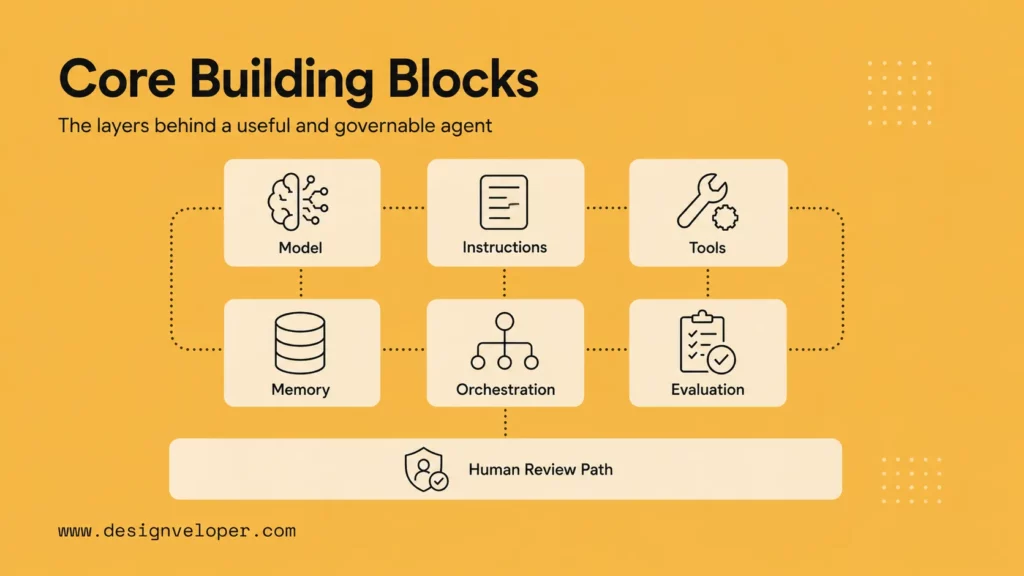
- The Brain: The LLM that handles reasoning, classification, generation, or tool choice.
- The Brain Stem: The system prompt, policies, role, constraints, and guardrails that shape behavior.
- Tools And Function Calling: APIs and integrations that let the agent read, search, write, or trigger actions.
- Memory And State: Context that helps the agent stay on task, track progress, and avoid repeating work.
A reliable agent keeps these layers explicit. The model should not have direct unlimited access to business systems. The application should expose narrow tools, validate arguments, record decisions, and require approval for sensitive actions.
Tool design deserves special attention. A vague tool such as “update customer” gives the model too much room to improvise. A safer tool uses a tight name, a typed schema, and a narrow permission boundary, such as “create_draft_refund_note” or “lookup_order_status.” Tools can give a model access to custom functions, file search, web search, or other capabilities, but the application still owns validation and execution. The model should request an action; the software should decide whether the action is allowed.
Choose Your Build Path: No-Code Vs Code
There is also a hybrid path. A team can prototype the workflow in a visual builder, learn which steps matter, then move the high-value or high-risk parts into a custom service. This is often faster than debating architecture before anyone has seen how users actually ask for help.
The decision should also consider governance. Visual builders can be excellent for operations teams, but they may create shadow systems if no one reviews permissions and change history. Code-first systems give more control, but they require engineering capacity and product discipline.
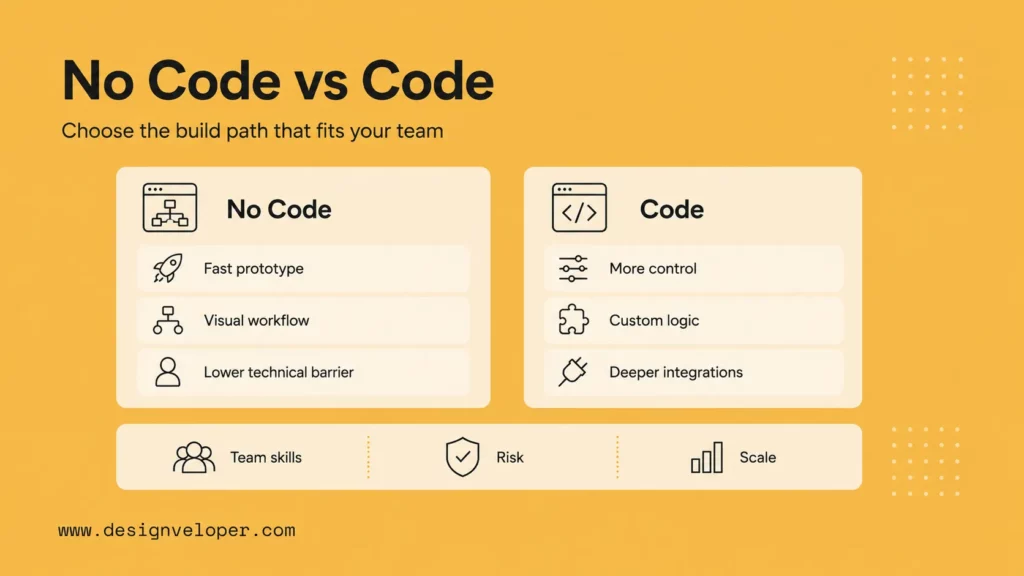
Beginners can start with no-code platforms or code-first frameworks. The right path depends on control, speed, integrations, and maintenance needs. The practical question is not which path looks more advanced. It is which path lets the team test the workflow, control access, and maintain the agent after launch.
No-Code And Visual Builders For Faster Prototyping
No-code and visual tools are useful when the goal is to test a workflow quickly. They can connect an agent to tools inside a workflow canvas and make orchestration easier for business users. These tools are helpful for operations teams that need speed, especially when the workflow depends on existing SaaS systems.
The tradeoff is governance. Visual builders make it easy to add a step, connect a credential, or publish a workflow. That speed is useful during discovery, but it can create change-control problems if no one reviews tool access, secrets, logs, and owner responsibilities. A no-code prototype should still have a written scope, an approval rule for risky actions, and a rollback plan.
Frameworks And SDKs For Custom Agent Development
Code-first frameworks give engineers more control over state, tools, branching, evaluation, and deployment. LangGraph is useful for stateful graph workflows because saved state helps workflows resume after interruptions or human review. AutoGen and smolagents support multi-agent and code-oriented patterns, while the OpenAI Agents SDK provides agents, handoffs, guardrails, and tracing for Python agent applications.
How To Pick The Right Path For Your Team
Choose no-code when the workflow is internal, low-risk, and mostly integration-driven. Choose code when the agent is product-facing, security-sensitive, performance-sensitive, or deeply tied to custom data and business logic. Many teams start no-code to learn the workflow, then rebuild the core in code once requirements stabilize.
A simple decision matrix helps: choose a visual builder for a short-lived internal pilot, a workflow tool for operations automation, an SDK for an embedded product feature, and a graph framework when the agent needs durable state, approvals, retries, or several controlled steps. If the agent will affect money, legal commitments, personal data, or customer-facing records, default to the path that gives the most observability and permission control.
How To Build An AI Agent Step By Step
| Step | Concrete output | Review question |
|---|---|---|
| Define the use case | One sentence job and one stop condition | Can a tester tell when the agent is done? |
| Map tools | Read tools, write tools, and approval rules | Can the agent change business data without approval? |
| Choose a model | Baseline model, cost range, and latency target | Does quality justify the cost? |
| Write guardrails | Source rules, refusals, and escalation paths | What happens when the agent lacks evidence? |
| Test the workflow | Task set with normal and edge cases | Did the agent choose the right tool and stop safely? |
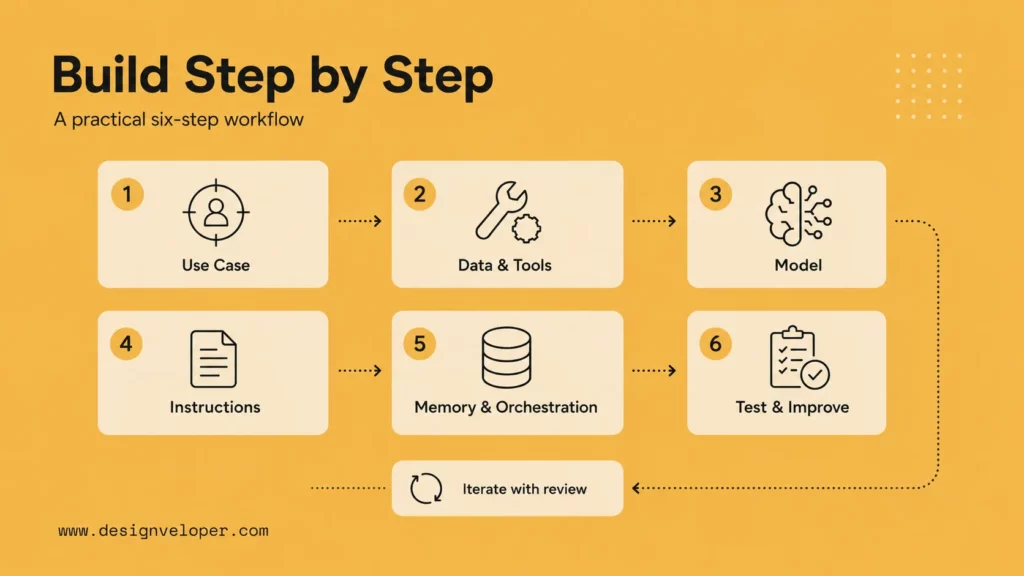
A beginner-friendly build should move from task design to tools, then testing. Keep every step concrete enough that another person can review it: what the agent receives, what it is allowed to read, what it may write, what it must ask, and when it must stop.
Continue reading:
- Agentic AI Architecture: Components, Workflow, Design Patterns
- LangGraph vs LangChain: A Detailed Comparison of Features
Step 1: Define One Narrow Use Case
Write a one-sentence job for the agent. For example: help support agents classify refund requests and draft a response from approved policy. Then define what the agent must not do, such as approving refunds without a person.
Step 2: Map The Data Sources And Tools The Agent Needs
For each tool, define the allowed action, input schema, output format, permission level, and failure behavior. A tool named run automation is too broad. A tool named create draft support note is much easier to test and govern. Narrow tools also make logs more useful because reviewers can see what the agent actually attempted.
Data mapping should include source freshness and ownership. If the agent answers from policy documents, someone must own those documents. If it checks CRM data, access rules must match the user’s role. If it writes to a system, approval and rollback should be explicit.
List every source and action. The agent may need a policy document, CRM lookup, ticket history, calendar availability, or internal search. Then decide which sources are read-only and which actions require human approval.
Step 3: Choose The Model And Set A Baseline
Pick a model based on reasoning quality, latency, cost, privacy, and provider support. Create a baseline set of test tasks before changing prompts or tools. This lets the team measure whether later changes improve the agent or only make it feel different.
The baseline should include normal tasks, edge cases, and deliberately messy examples. For a support agent, include a clear refund request, an unclear refund request, a policy conflict, a user trying to bypass rules, and an unavailable API. For a document agent, include a simple question, a question with no answer in the source, a conflicting source, and a request to expose private content. This dataset becomes the agent’s first regression suite.
Step 4: Write Clear Instructions And Guardrails
Instructions should also include examples of good and bad behavior. A few concrete examples can show the agent how to handle missing data, conflicting sources, unsupported requests, and sensitive actions. These examples are not a replacement for tests, but they make the intended behavior easier for both the model and reviewers to understand.
Instructions should define the role, goals, allowed sources, tool rules, refusal behavior, and escalation path. Guardrails can include rules-based checks, model-based checks, schema validation, and human review for sensitive operations. The important point is that guardrails act as a separate control layer, not just another paragraph in the prompt.
Step 5: Add Memory, State, And Orchestration
State tells the agent what has happened and what remains. Orchestration decides the order of steps. A graph-based design can be easier to test than a single long prompt because each node has a clear purpose and exit condition.
Memory should be scoped to the job. A support agent may need the current conversation, recent tickets, and the user’s account tier, but it may not need all historical account notes. A finance or HR agent may need stricter isolation between users, departments, or clients. State should also include what the agent has already tried, which sources it used, whether a human approved an action, and why it stopped.
Step 6: Test, Evaluate, And Improve With Human Review
Evaluation should measure the whole workflow, not only final text. Did the agent choose the right tool? Did it ask for missing information? Did it stop when the action was risky? Did it create a useful handoff summary? These questions reveal whether the agent can be trusted in context.
Human review can start with every output, then become more selective as confidence improves. Many real deployments keep human approval for high-risk actions permanently. That is not a failure of automation; it is the design that lets automation operate responsibly.
Test normal cases, edge cases, missing-data cases, adversarial prompts, and tool failures. Use human review to label bad outputs and refine prompts, tools, retrieval, or escalation. A structured risk-management lens helps teams think clearly about information integrity, data privacy, confabulation, and operational failure before the agent touches real workflows.
What Makes An AI Agent More Reliable
Reliability also needs productivity realism. METR’s early-2025 study of experienced open-source developers observed 16 developers completing 246 real tasks and found that AI tools made them 19% slower in that setting. This result does not apply to every workflow. Still, it shows why teams should measure agent outcomes instead of assuming automation always saves time.
For business agents, measure task completion, correction rate, approval time, customer impact, and human review effort. A workflow only improves if the agent reduces total effort after review, not just if it creates output quickly.
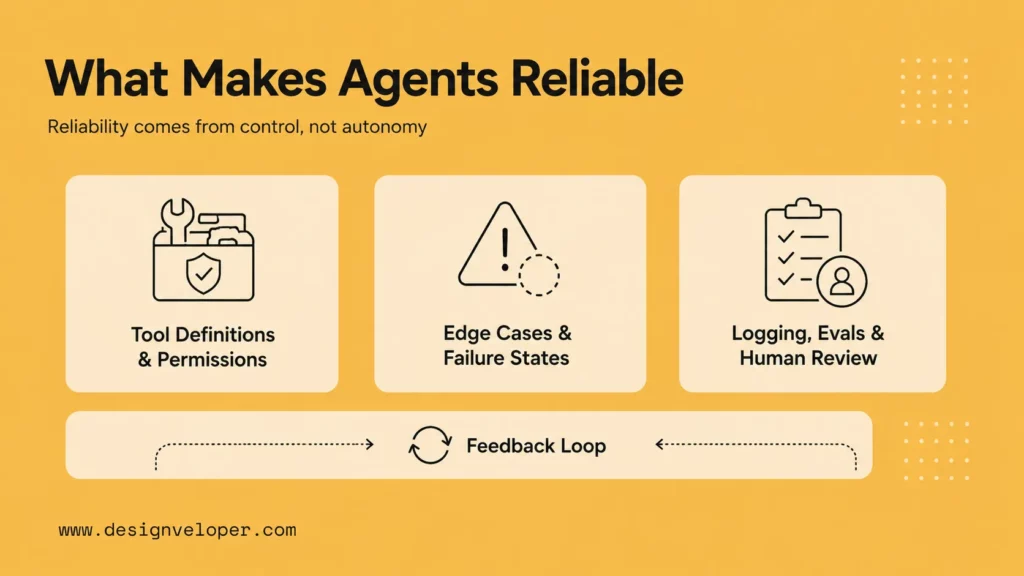
Agents need stronger controls when they can call tools or change business data. The safeguards are familiar software controls applied to a new interface: least-privilege permissions, typed inputs, test coverage, logging, rate limits, approvals, and incident response. The model may be probabilistic, but the operating environment around it should be deliberate.
Explore more:
- Best AI Agent Frameworks: Robust Platforms for Rapid Development
- Types of AI Agents: Key Categories and When to Use Each
Better Tool Definitions And Permissions
Tools should be narrow and named by business action: search policy, create draft ticket note, get order status, or request approval. Avoid broad tools that let the agent do too much. Separate read tools from write tools and log every call.
Permissions should follow the same principle. The agent should not inherit admin access because a developer used an admin API key during a demo. Give it a service account, limit available endpoints, and require a human confirmation for sensitive writes. If the tool modifies customer data, the log should show who triggered the agent, what arguments the model requested, what validation happened, and what the downstream system returned.
Clear Handling For Edge Cases And Failure States
Agents need behavior for missing documents, unavailable APIs, conflicting sources, low confidence, unsupported requests, and repeated failures. A reliable agent should ask a clarifying question, escalate, or stop instead of inventing a path.
Logging, Evals, And Human Review Loops
Review loops should have an owner and a cadence. During early deployment, teams may inspect samples every day. Later, they may review failures weekly and run regression tests before each release. The point is to make quality management routine rather than heroic.
Observability is part of the product. Track inputs, retrieved context, tool calls, output, latency, cost, errors, handoffs, and human corrections. Regression tests are especially important after changing models, prompts, tools, or source data.
Teams can formalize test structures for model behavior with an eval workflow, but the discipline matters more than the tool. Create a test set, define expected behavior, record failures, and rerun the set after every meaningful change. For agents, the expected behavior should include tool choice and stopping behavior, not only final text.
Common Mistakes When Building AI Agents
Teams also underestimate product UX. Users need to know what the agent can do, when it is acting, what data it used, and whether an action already happened or is waiting for approval. A clear interface reduces confusion and prevents people from treating the agent as either magic or unreliable.
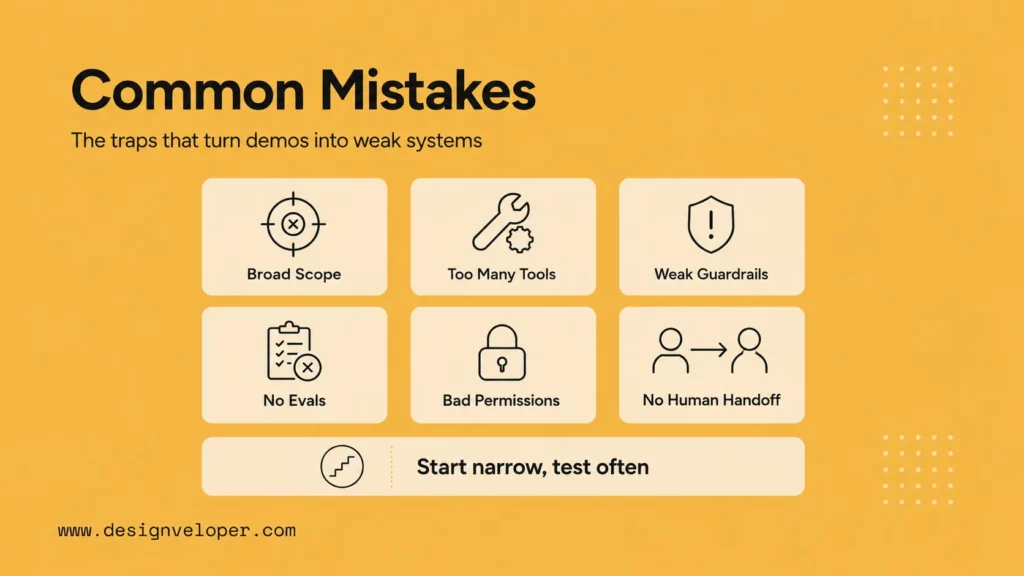
- Starting Too Broad: A general assistant is harder to evaluate than a narrow workflow agent.
- Giving The Agent Too Many Tools Too Early: More tools increase confusion and risk unless each tool has clear rules.
- Skipping Guardrails, Evals, And Escalation Paths: Agent quality must be measured before the system touches real users or business records.
Security should be designed early. Common risks include prompt injection, sensitive information disclosure, and excessive agency. Agents that retrieve web pages, documents, or customer messages need protection against instructions hidden in external content.
A common mistake is treating “agent” as a goal. It is better to treat the agent as one component in a workflow. The actual goal may be faster support triage, fewer manual document searches, better CRM follow-up, or lower back-office rework. If the agent does not improve that workflow after review and correction, the build should be simplified or redirected.
Where AI Agents Create The Most Value
Agents create value when they reduce handoffs. A user should not need to search a wiki, open a CRM, copy a customer ID, check a policy, and then write a message manually if the agent can gather that context and prepare the next action. The human still decides when the action is sensitive, but the boring coordination work gets smaller.
They also create value when work is repetitive but not perfectly rule-based. Traditional automation works well for fixed steps. Agents are better when the system needs to interpret messy language, choose from several tools, and adapt to the context while staying inside defined boundaries.
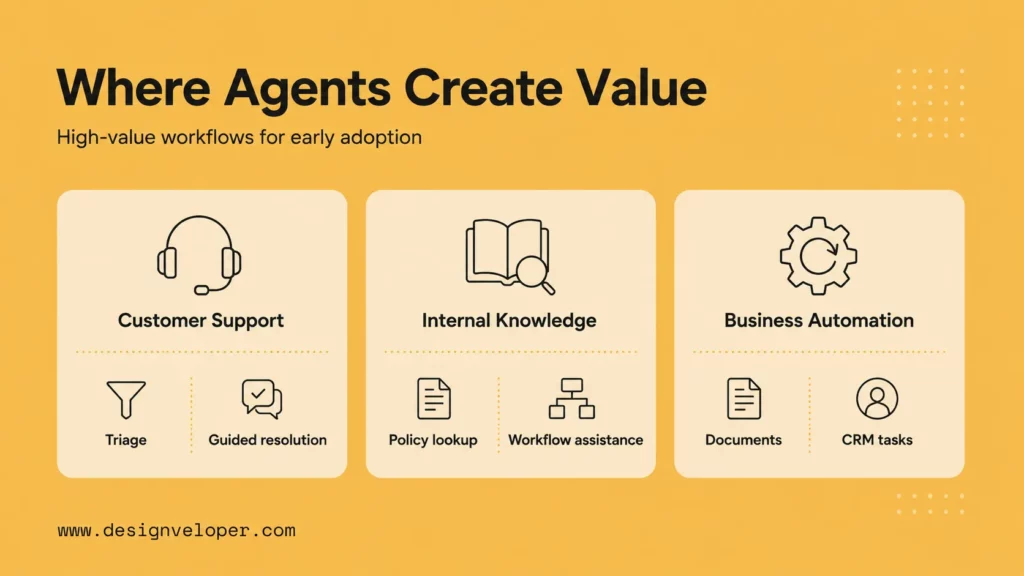
Customer Support And Guided Resolution
Support agents can classify requests, retrieve approved answers, draft responses, summarize conversation history, and route cases. Full autonomy should be limited to low-risk actions until quality is proven.
This is also one of the most active business areas for agentic AI. Gartner reported in February 2026 that 91% of customer service leaders felt pressure to implement AI in 2026. The takeaway is not to automate every customer interaction. It is to start where a guided agent can reduce repeated manual lookup while keeping escalation paths clear.
Internal Knowledge And Workflow Assistance
Internal agents can help employees find policies, summarize documents, prepare reports, and start routine workflows. They are valuable when knowledge is spread across tools and employees need a single guided interface.
Zapier’s 2026 agentic AI adoption survey found enterprise leaders using agents for document analysis and summarization, customer support triage, and report generation. These are good early categories because they combine language understanding with a clear human review surface. The agent prepares the work; the employee checks the result before it affects the business.
Document, CRM, And Multi-Step Business Automation
Agents are especially useful when documents, customer records, and workflow tools must work together. For example, an agent might extract a request from a document, check CRM context, draft a task, and ask a human to approve the next action.
These workflows need integration discipline. A document agent should cite source passages, a CRM agent should respect field permissions, and a multi-step automation agent should store each tool call and approval. The more systems the agent touches, the more important it becomes to separate read actions, draft actions, approved writes, and automated writes.
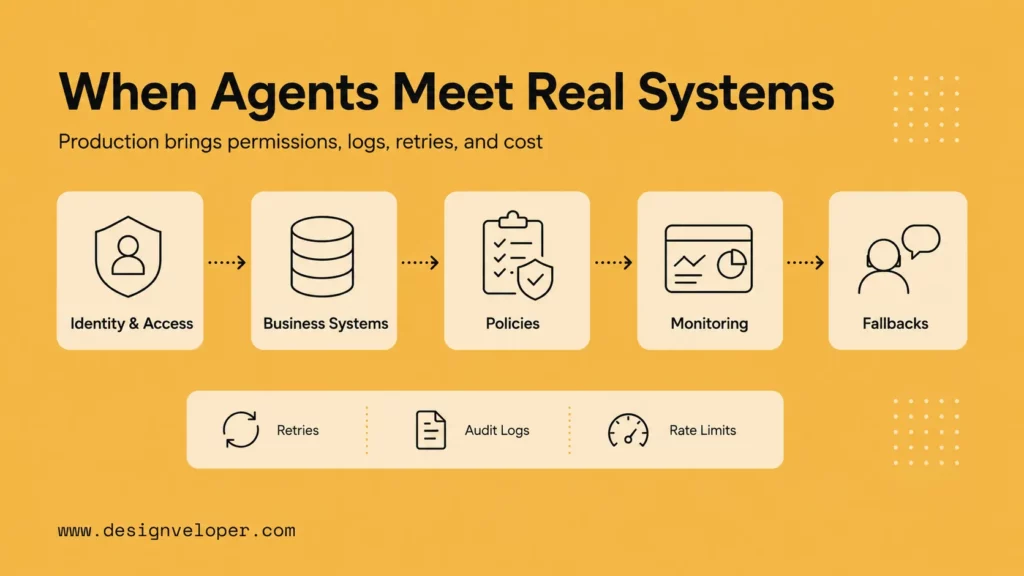
What Changes When An AI Agent Meets Real Systems
Before an agent touches live systems, the team needs a final readiness check. This checklist focuses on safety, ownership, and operations.
| Readiness area | What to verify before launch |
|---|---|
| Scope | The agent has one primary job, a stop condition, and a named workflow owner. |
| Data | Every source has an owner, freshness rule, access policy, and fallback path. |
| Tools | Tool schemas are narrow, validated, logged, and separated by read, draft, and write permissions. |
| Review | High-risk actions require human approval, and reviewers can see context and tool history. |
| Operations | There are dashboards or logs for cost, latency, failure rate, handoff rate, and user feedback. |
| Release | Prompts, models, retrieval settings, and tests are versioned so changes can be compared or rolled back. |
Release management becomes important as soon as an agent affects real users. Treat prompts, tool schemas, retrieval settings, and evaluation sets as versioned assets. When a model provider changes behavior or a business policy changes, the team should be able to test, compare, and roll back rather than editing production behavior blindly.
The agent also needs a feedback loop. Users should be able to mark unhelpful answers, agents should expose unresolved cases, and owners should review patterns weekly during early rollout. The best improvements often come from ordinary user friction, not from abstract benchmark scores.
Real systems introduce users, permissions, messy data, downtime, audits, and business consequences. The agent must be designed for these realities. It should not assume every API succeeds, every document is current, or every user is allowed to trigger every action.
Discover more here:
- Comparison of AutoGen vs LangChain: Which Is Better?
- Top Agentic AI Tools You Should Know
- What Is LangGraph? Key Concepts, Use Cases, And How To Get Started
A useful production checklist includes authentication, role-based access, input validation, source citations, tool-call logs, cost monitoring, latency monitoring, prompt and model versioning, and a human escalation path. These controls turn an agent from a clever script into a software product.
Building the agent is only part of the work. The harder challenge is shaping permissions, integrations, workflows, and reliability controls so the agent can operate safely inside a real product or business process.
Designveloper helps teams turn agent ideas into production-ready AI systems by connecting model behavior to workflow design, software architecture, and operational guardrails. Our AI development services cover custom AI assistants, workflow automation, LLM integration, and business software that needs real implementation discipline. For document-connected automation, workflow-aware assistants, and tool-driven business actions, the agent must fit the product experience and the process behind it.
That means the implementation should answer practical questions: who can use the agent, what data can it see, which tools can it call, what requires approval, how errors are logged, and how quality improves after launch. Those answers make the difference between an exciting demo and a dependable system.
FAQs About Building AI Agents
Can ChatGPT Build An AI Agent?
ChatGPT can help design, prototype, and write code for an AI agent, but the finished agent still needs tools, data access, deployment, testing, and security controls outside the chat interface.
Are AI Agents Difficult To Build?
A simple prototype can be easy. A reliable production agent is harder because it must handle permissions, tools, evaluation, monitoring, failure states, and human review.
How To Build An AI Agent For Free?
You can prototype with open-source frameworks, free tiers, or local tools, but real deployments still have costs for models, hosting, storage, monitoring, security, and maintenance.
Do You Need A Framework To Build An AI Agent?
No. A small agent can be built directly with model APIs and custom code. Frameworks become useful when the workflow needs state, tool orchestration, tracing, handoffs, or reusable patterns.
How Can I Make My Own AI Agent?
Define one use case, choose a model, expose narrow tools, write instructions, add state, test with realistic tasks, add guardrails, and deploy behind an interface with monitoring and human review.
Also published on

Share post on










Related Articles


Generative AI Applications: 20 Practical Use Cases Across Industries
Generative AI Applications: 20 Practical Use Cases Across Industries Published September 18, 2026
Machine Learning Vs AI: What’s The Difference?
Machine Learning Vs AI: What’s The Difference? Published September 16, 2026
Enterprise AI Agents: Use Cases, Tools, And Implementation
Enterprise AI Agents: Use Cases, Tools, And Implementation Published September 14, 2026



















