
















What Is A Vector Database? A Practical Guide For AI Search And RAG

KEY TAKEWAYS:
- A vector database stores embeddings and retrieves data by semantic similarity, not only by exact keyword or structured-field matching.
- Embeddings, metadata, indexing, filtering, and evaluation all affect retrieval quality in AI search and RAG systems.
- Traditional databases still matter as systems of record, while vector databases usually act as the semantic retrieval layer.
- Production RAG needs governance across permissions, source freshness, chunking strategy, hybrid retrieval, monitoring, and human evaluation.
- The best vector database choice depends on scale, latency, filtering needs, cloud preference, and governance.
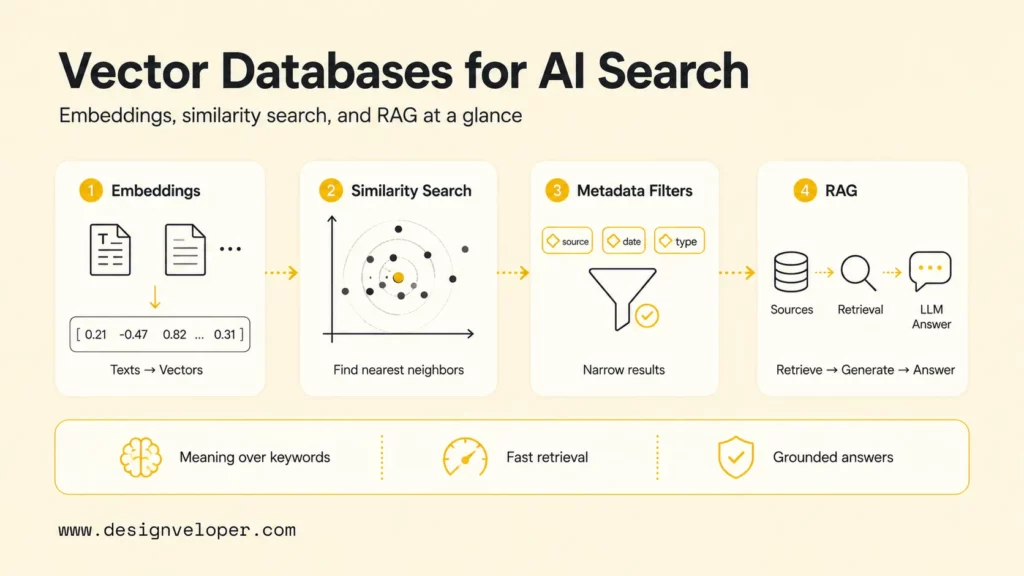
What is vector database? A vector database is a data system built to store, index, and search vector embeddings, which are numerical representations of text, images, audio, video, or other data. Vector databases matter for AI search and retrieval-augmented generation (RAG) because they can find items by meaning and similarity, not only by exact keywords or structured fields.
Traditional search asks, “Which record matches this exact value or keyword?” Vector search asks, “Which records are closest in meaning to this query?” That difference is why vector databases appear in modern artificial intelligence products, semantic search engines, recommendation systems, image retrieval, and RAG pipelines. IBM frames vector databases around high-dimensional vector data, indexing, and similarity search, while Pinecone explains how vectors, metadata, and indexes work together for AI applications.
This guide explains what a vector database is, how vector databases differ from traditional databases, how embeddings and similarity search work, common vector database use cases, a practical vector database tutorial path, popular options, and the production choices teams need to make when building AI search and RAG systems.
What Is A Vector Database?
A vector database is a database designed for high-dimensional vectors. A vector is a list of numbers that captures features of an object. In AI systems, an embedding model turns source data into a vector so that semantically similar items land near each other in vector space.
For example, a support article about password resets and a user question about “I cannot get back into my account” may use different words, but their embeddings can be close because the meaning is similar. A vector database stores those embeddings and makes it possible to retrieve the closest records quickly.
A vector database usually stores more than the vector itself. Production systems often store an ID, metadata, source text, document location, tenant ID, timestamp, access-control fields, and sometimes sparse or lexical signals. Pinecone Docs describes records that can combine vectors, text, and metadata, which is the pattern most teams need for useful retrieval.
The database part matters because a serious AI product needs more than a nearest-neighbor algorithm. Teams need inserts, updates, deletes, filtering, monitoring, scaling, backup, permissions, and predictable latency. A vector index can help find neighbors, but a vector database wraps retrieval in operational features a production application needs.
See more:
- What Is Generative AI? Definition, How It Works, and Examples
- Document Intelligence: What It Solves in Real Product Workflows
Traditional Databases Vs Vector Databases
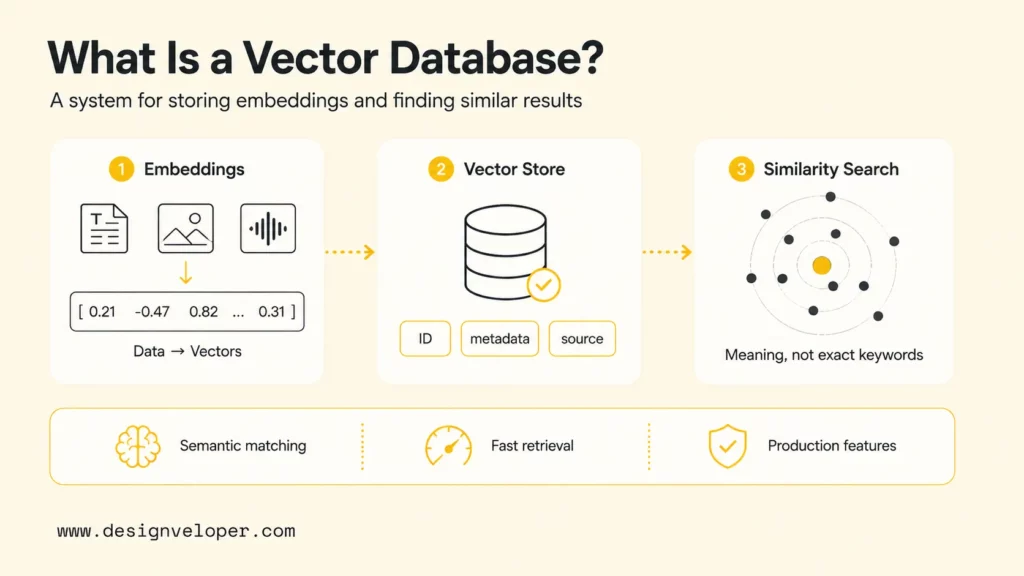
Traditional databases and vector databases solve different search problems. Relational databases such as PostgreSQL and MySQL are excellent for structured data, joins, transactions, and exact-value queries. Document databases and search engines are strong for JSON documents, keyword search, filters, and text ranking. Vector databases are optimized for high-dimensional embeddings and similarity search.
The difference matters for AI search and RAG workflows because user intent is often semantic rather than exact. A user may ask, “How do I cancel my trial?” while the knowledge base says “subscription termination policy.” Keyword search can miss that relationship unless synonyms are tuned manually. Vector search can retrieve related content because the embedding model captures meaning.
Traditional databases still belong in AI systems. A RAG product may keep customer records in PostgreSQL, documents in object storage, permissions in an identity system, and embeddings in a vector database. The production design question is not “vector database or traditional database?” The better question is which data access pattern belongs in which layer.
| Capability | Traditional Database | Vector Database |
|---|---|---|
| Primary search style | Exact match, joins, filters, keyword search depending on system | Similarity search over embeddings |
| Best data shape | Structured rows, documents, transactions, logs, business records | High-dimensional vectors linked to text, media, metadata, or entities |
| Common AI role | Source of truth, permissions, structured facts, application state | Retrieval layer for semantic search, recommendations, multimodal search, and RAG |
| Main risk | Weak semantic recall when words differ from user intent | Weak precision if embeddings, chunking, filtering, or evaluation are poorly designed |
Related reading:
- AI Agent vs Chatbot: Product Tradeoffs and Use Cases
- RAG vs Fine-tuning: Which Is Better for Improving AI Models?
How Do Vector Databases Work?
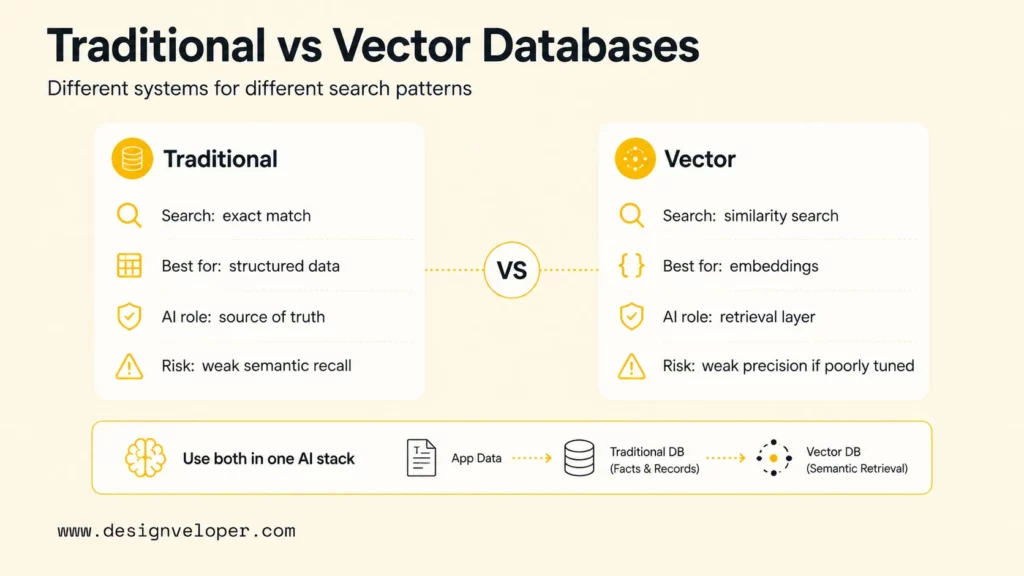
Vector databases work by turning source data into embeddings, storing those embeddings with useful metadata, building an index for efficient nearest-neighbor search, and returning records that are most similar to a query vector. The workflow sounds simple, but retrieval quality depends on many small design choices.
Turning Raw Data Into Embeddings
The workflow starts with raw data such as documents, product descriptions, code snippets, tickets, images, audio transcripts, or support articles. An embedding model converts each item, or each chunk of an item, into a vector. The model determines what “similar” means, so model choice is a retrieval decision, not only an infrastructure decision.
Text systems often split long documents into chunks before embedding. Chunking strategy matters because an overly large chunk may mix unrelated topics, while an overly small chunk may lose context. A practical starting point is to chunk by meaningful sections, store source references, and test whether retrieved chunks answer real user questions.
Storing And Indexing Vectors
After embeddings are generated, the vector database stores vectors and supporting fields. Supporting fields usually include document ID, source URL, tenant, language, timestamp, category, access-control metadata, and the original text or pointer to the original text.
Indexing makes search fast. Many vector systems use approximate nearest-neighbor methods rather than scanning every vector one by one. Elasticsearch documents dense vector fields for k-nearest neighbor search, which is one common way vector search appears inside a broader search platform.
Running Similarity Search
A query also becomes a vector. If a user asks, “Which policy explains refund exceptions?” the application embeds that query, sends the vector to the database, and asks for the nearest matches. The vector database compares the query vector with stored vectors using a similarity metric such as cosine similarity, dot product, or Euclidean distance.
The result is usually a ranked list of records. A RAG system may send the top chunks to an LLM as context. A product search system may show similar products. A recommendation system may use the nearest items as candidates before another ranking model applies business rules.
Refining Results With Metadata
Metadata filtering makes vector search practical. A healthcare assistant may need only documents from a specific department. A SaaS support assistant may need only articles for the user’s product plan. An enterprise RAG system may need tenant, role, region, language, and document-status filters before returning context.
Filtering is also technically challenging. Pinecone shows why pre-filtering, post-filtering, and single-stage filtering involve tradeoffs between speed and relevance. Teams should test filtered retrieval with real queries because a filter can improve precision while accidentally hiding relevant content.
Explore more:
- LangChain RAG: How to Build a RAG Agent With LangChain
- A Practical Guide To AI Agent Architecture With Diagrams
Why Are Vector Databases Important?
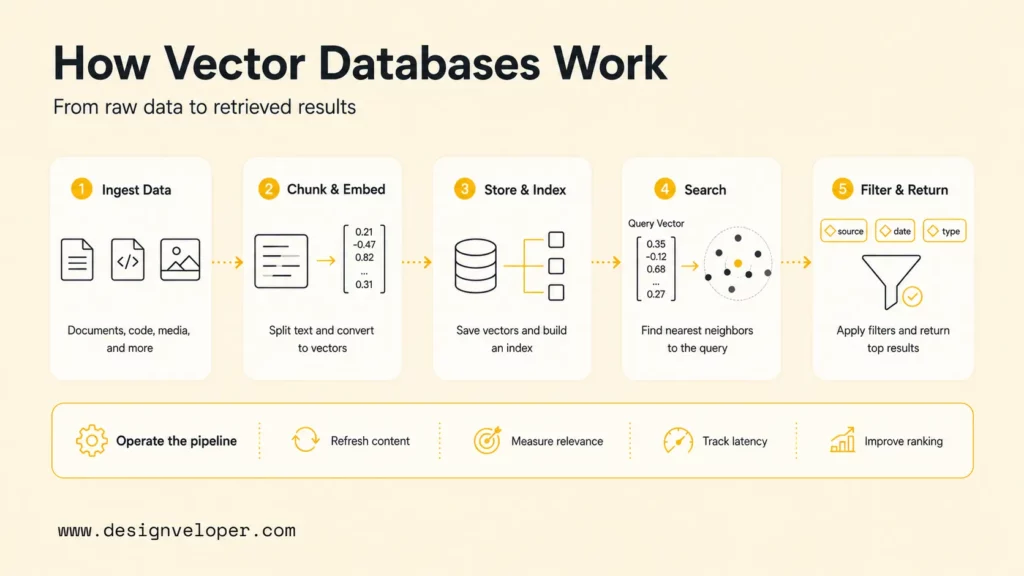
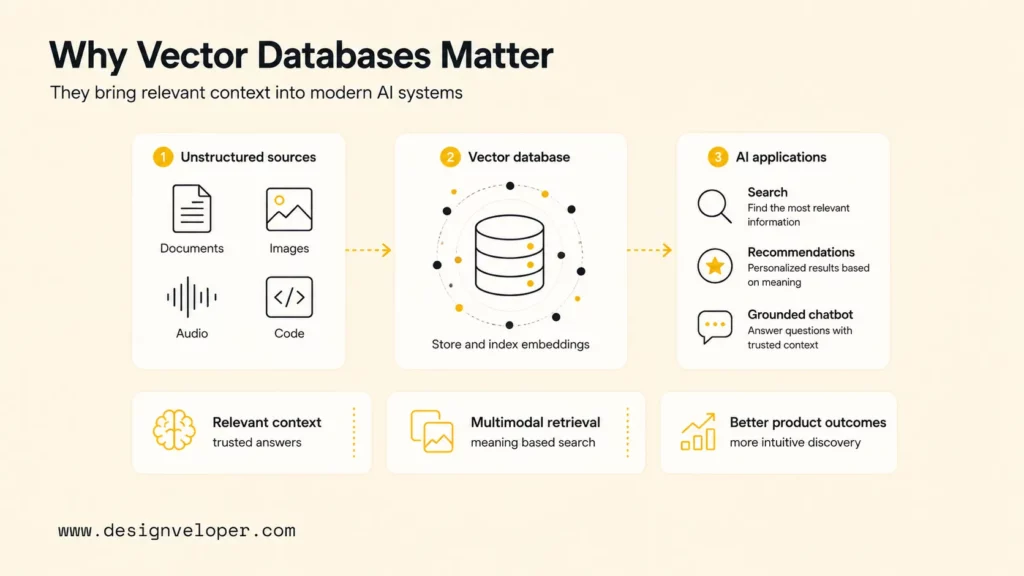
Vector databases are important because modern AI applications need a way to retrieve relevant context from unstructured data. LLMs can generate fluent answers, but they need current, trusted, permission-aware information when a product must answer about company policies, customer records, product documentation, or domain knowledge.
Vector databases are one common retrieval layer for that context. In a RAG system, the vector database helps find the documents most likely to answer the user’s question. The LLM then uses those retrieved documents to generate an answer. Better retrieval often produces better answers because the model sees more relevant evidence.
Vector databases also help teams work with data types that do not fit exact-match search. Images, videos, audio, code, natural-language questions, and product descriptions can all become embeddings. Chroma describes retrieval across text, images, metadata filters, dense vectors, and sparse vectors, which reflects the broader direction of AI retrieval systems.
The business value is practical. A better retrieval layer can reduce irrelevant chatbot answers, improve internal knowledge search, make product discovery more intuitive, and support recommendation features that respond to meaning rather than exact tags. For teams turning search into real automation, AI business process automation is often the next connected layer.
Recommended for you:
- Best AI Chatbot Options to Consider by Business Need
- Automating Workflows Without Losing the Human Touch
Benefits Of Vector Databases
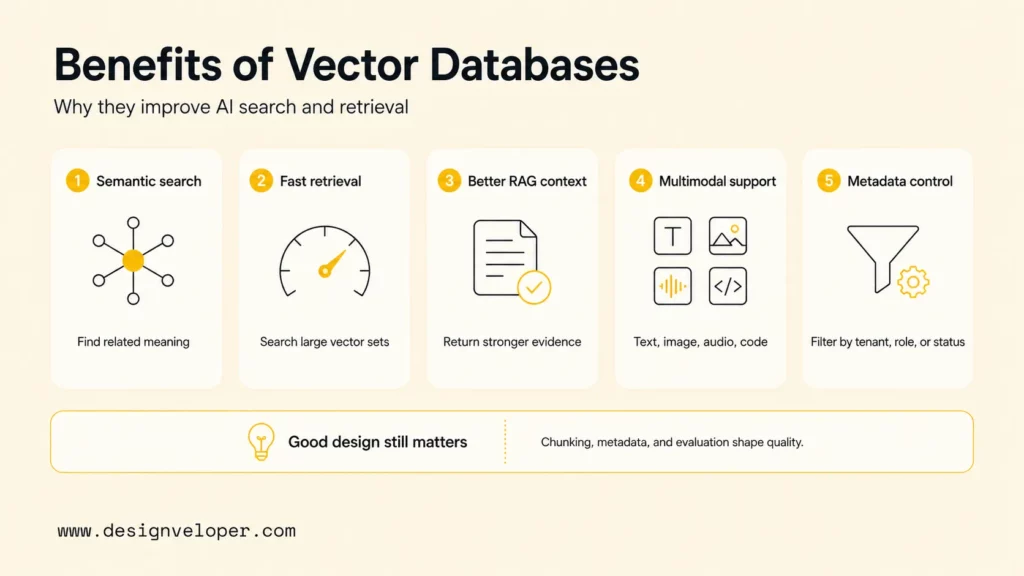
Vector databases help AI teams retrieve relevant information from large embedding datasets quickly and flexibly. The benefits are strongest when the application depends on meaning, similarity, recommendations, or multimodal content.
- Better semantic search accuracy: Vector search can find meaning-related content even when user wording differs from stored content.
- Faster retrieval over large embedding datasets: Indexing lets teams search many vectors with lower latency than brute-force scanning.
- More relevant context for RAG pipelines: Better candidate retrieval gives LLMs stronger grounding material for generated answers.
- Stronger support for multimodal use cases: Images, videos, audio, code, and text can be represented as vectors and searched by similarity.
- Useful metadata controls: Filters can constrain results by tenant, role, product, region, language, status, or source type.
Those benefits depend on good design. A vector database can return close vectors, but “close” is not always the same as “useful.” Teams should evaluate retrieved results against real product tasks, then adjust chunking, metadata, embedding model, reranking, and prompts.
Additional resources:
- Business Process Automation Tools for Modern Operations
- AI Pair Programming: What Changes for Modern Dev Teams
Also published on

Share post on










Related Articles


13 Best Vibe Coding Tools for Building Apps and Editing Codebases
13 Best Vibe Coding Tools for Building Apps and Editing Codebases Published September 30, 2026
Can ChatGPT Create an App? What It Can Build and What to Check
Can ChatGPT Create an App? What It Can Build and What to Check Published September 30, 2026
Is LangChain Bad? Developer Complaints, Pros, And When To Use It
Is LangChain Bad? Developer Complaints, Pros, And When To Use It Published September 30, 2026



















