
















Claude Vs ChatGPT Vs Gemini For Coding In 2026: Which Is Best?

Claude vs ChatGPT vs Gemini for coding is not a single-winner question in 2026. Claude is often the strongest choice for complex reasoning, debugging, and review-heavy work. ChatGPT, especially through OpenAI Codex, is strong for fast iteration, explanation, repo edits, and agentic development workflows. Gemini is useful when the work connects to Google Cloud, Android, Firebase, Workspace, research, or very large context windows.
Quick decision guide: use Claude when correctness, architecture, refactoring, and careful review matter most; use ChatGPT/Codex when you want fast prototyping, clear explanations, and an assistant that can read, edit, and run code; use Gemini when your workflow depends on Google developer tools, cloud context, Android, Firebase, or large files. For serious software, use any AI assistant as a coding partner inside tests, reviews, CI/CD, and security checks, not as an unchecked replacement for engineering judgment.
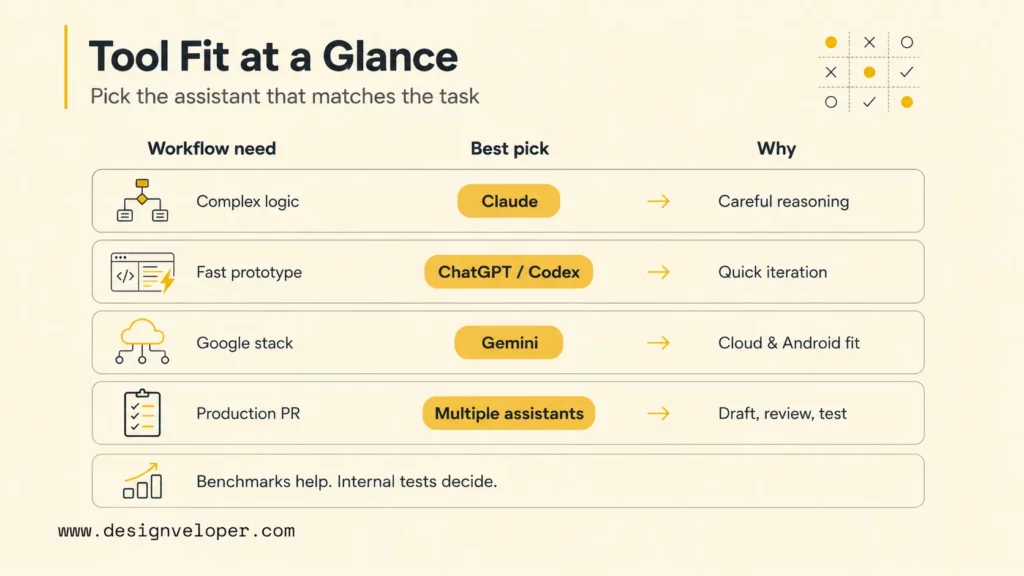
| Workflow need | Best first choice | Why | Human check required |
|---|---|---|---|
| Complex logic or architecture | Claude | Strong at careful reasoning, long-form explanations, and reviewing tradeoffs. | Validate edge cases, constraints, and architectural assumptions. |
| Fast prototype or learning task | ChatGPT / Codex | Good for iterative prompts, explaining framework patterns, and editing code in a repo. | Run the app, inspect generated files, and test unhappy paths. |
| Google Cloud, Android, Firebase, or Workspace coding | Gemini | Gemini Code Assist is built around Google developer and cloud workflows. | Confirm generated code against current Google docs and your project setup. |
| Large repo or long context review | Claude or Gemini | Both can be useful for broad context, depending on tool access and codebase shape. | Ask for scoped analysis and require file-level evidence. |
| Production pull request | Multiple assistants plus human review | One tool can draft, another can review, and CI can verify behavior. | Do not merge without tests, security review, and owner approval. |
Recommended for you:
- Best AI For Python Coding: Top Picks For Every Workflow
- AI Programming Language For AI Development And Where They Fit Best
- Developer Experience: The Vital Role of Prioritization in IT Teams
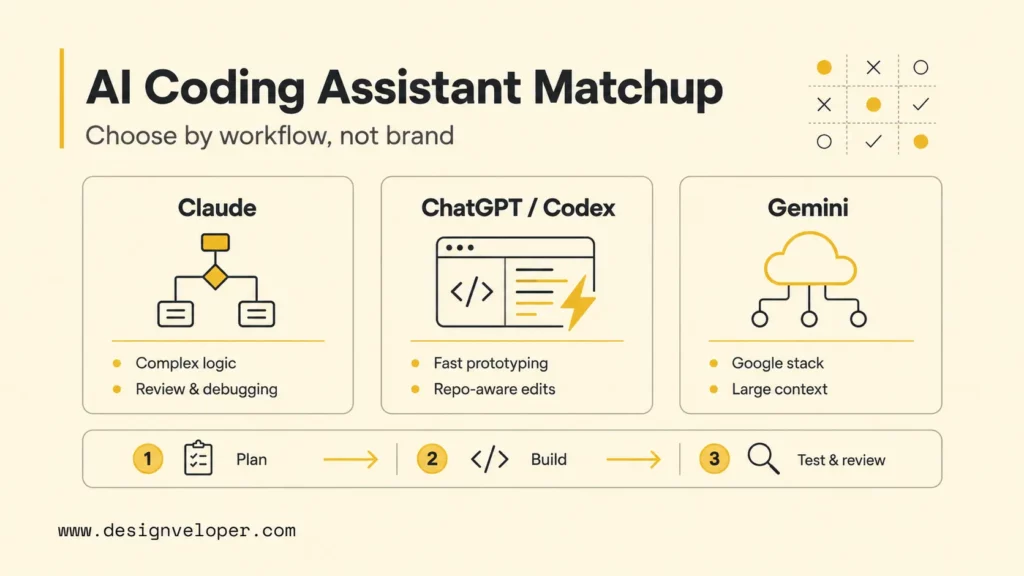
Claude Vs ChatGPT Vs Gemini For Coding Comparison
Claude, ChatGPT, and Gemini all help developers write code, explain errors, refactor files, generate tests, and understand unfamiliar systems. The difference is workflow fit. Anthropic describes Claude as strong for reasoning, analysis, and coding in the Claude platform documentation. OpenAI positions Codex web and Codex CLI as coding agents that can read, edit, and run code. Google positions Gemini Code Assist as AI support for building, deploying, and operating applications across the software lifecycle.
Benchmarks help, but they should not be treated as product advice by themselves. The SWE-bench leaderboard tracks how models and agents resolve real GitHub issues, and its top rankings shift as new models and scaffolds appear. Teams should use benchmark direction as one signal, then run small internal evaluations on their own stack, code quality expectations, test suites, and deployment process.
| AI assistant | Best coding use case | Key strength | Main limitation | Ecosystem fit |
|---|---|---|---|---|
| Claude | Complex logic, debugging, refactoring, code review, architectural tradeoffs. | Careful reasoning, strong explanations, and good review-style answers. | May be slower or less tool-integrated depending on interface and plan. | Claude Code, Anthropic API, terminal and IDE-oriented workflows. |
| ChatGPT / Codex | Fast prototypes, explanations, repo edits, tests, unfamiliar codebase exploration. | Broad framework knowledge, conversational iteration, and agentic code-editing tools. | Generated changes still need tests and review; usage limits can matter for heavy agent work. | ChatGPT, Codex web, Codex CLI, IDE extensions, OpenAI API. |
| Gemini | Google Cloud, Firebase, Android, Workspace, research-heavy and large-context development. | Google ecosystem fit, cloud integration, and large-context options in Code Assist tiers. | Tool availability has changed quickly, so teams must check current product status and edition. | Gemini Code Assist, Google Cloud, Android, Firebase, Workspace, Antigravity migration paths. |
- Speed and responsiveness: ChatGPT is often the easiest for quick loops and short explanations. Claude can be worth the extra thinking time for difficult logic. Gemini is valuable when the task needs broad Google ecosystem context.
- Accuracy in complex coding tasks: no assistant is consistently correct without tests. Claude and high-end OpenAI models often feel strong on reasoning-heavy code, while Gemini can shine when Google-specific APIs or cloud docs matter.
- Debugging and error explanation: Claude is strong at tracing logic and explaining why a fix works. ChatGPT is strong at step-by-step debugging and fast alternative fixes. Gemini helps when logs involve Google Cloud, Firebase, Android, or related tooling.
- Code review and refactoring quality: Claude is often useful for careful review. Codex is useful when review needs repo-aware changes. Gemini is useful when cloud or Android integration context is central.
- Large codebase and context handling: Claude and Gemini can both be useful for long context, but the best result usually comes from scoped prompts, repo maps, and file-specific evidence rather than dumping a whole project at once.
- Testing and documentation support: all three can write tests and docs, but developers should ask for edge cases, failure modes, and assertions that match the project, not generic happy-path tests.
- Tool and IDE ecosystem: Codex and Claude Code are strong agentic coding surfaces; Gemini Code Assist is strongest when Google developer tools are part of the stack.
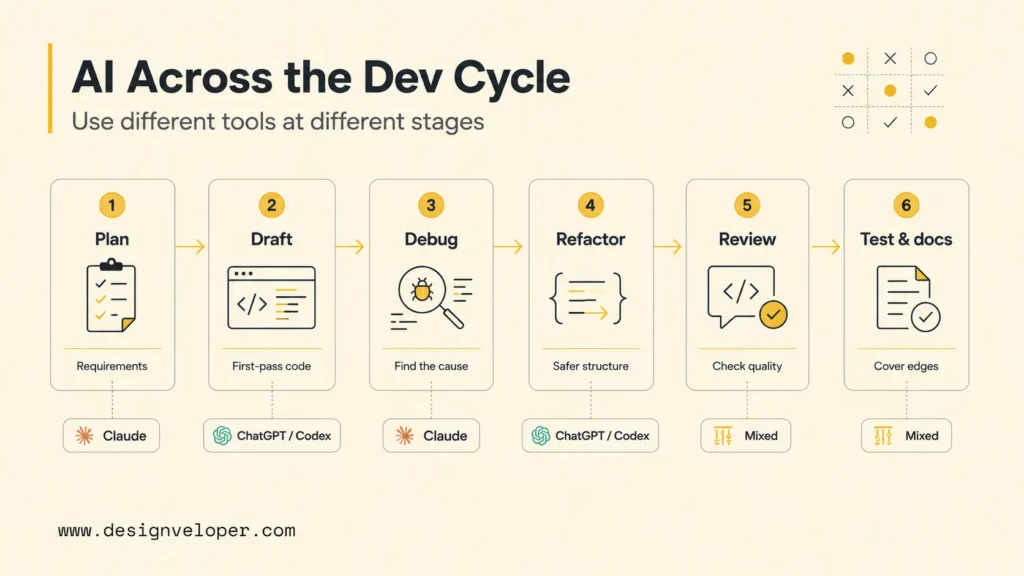
How Developers Use AI Coding Assistants Across The Development Cycle
AI coding assistants are most useful when developers give them a clear role at each stage. The same assistant should not be asked to vaguely “build everything.” Strong teams use AI to clarify requirements, draft implementation options, generate first-pass code, debug errors, refactor safely, review pull requests, and expand tests. Each stage needs different prompts and different checks.
Turning Requirements Into Implementation Plans
AI is useful before code exists. A developer can paste a ticket, product requirement, or bug report and ask for assumptions, affected modules, implementation steps, test cases, migration risks, and questions for the product owner. Claude is strong for reasoning through tradeoffs. ChatGPT is strong for turning requirements into step-by-step plans. Gemini is useful when requirements depend on Google Cloud, Android, Firebase, or Workspace APIs.
The best planning prompt asks for files to inspect, data contracts, edge cases, rollout risk, and a test plan. A weak prompt asks the assistant to “build this feature” with no constraints. Planning output should become a human-readable checklist before implementation starts.
Writing Boilerplate Or First-Draft Code
AI can write first-draft code quickly: API routes, React components, validation schemas, tests, database migrations, utility functions, and documentation. ChatGPT and Codex are especially useful here because OpenAI’s developer docs describe Codex as able to read, change, and run code locally or in the cloud. Claude and Gemini can also draft strong code, especially when given examples from the target codebase.
First-draft code should be treated as a draft, not as finished work. Developers should check naming, style, imports, typing, security, error handling, dependency choices, and whether the code matches existing project patterns. AI often writes plausible code that compiles only after small edits, and sometimes misses business rules that were never stated.
Debugging Errors And Explaining Fixes
Debugging is one of the best AI coding use cases. A developer can provide the error message, stack trace, relevant files, reproduction steps, expected behavior, and recent changes. Claude can be strong at tracing cause and effect. ChatGPT can propose quick diagnostic steps and likely fixes. Gemini can help with Google-specific SDKs, Android tooling, Firebase rules, and cloud logs.
A good debugging workflow asks the assistant to separate symptoms from causes. The assistant should propose the smallest verification step before changing code. If the model suggests a fix without explaining why it addresses the stack trace, ask for the chain of reasoning in practical terms and verify with a test or reproduction command.
Refactoring Existing Code
Refactoring with AI is useful but risky. AI can simplify functions, split modules, improve types, remove duplication, and modernize old patterns. It can also break subtle behavior if it does not understand hidden coupling. Claude is often good for reviewing design and suggesting safer refactor sequences. Codex is useful when the refactor involves real file edits and test runs. Gemini is helpful when refactoring around Google Cloud or Android dependencies.
Safe refactoring prompts should include constraints: preserve public API, avoid behavior changes, keep tests passing, make small commits, and explain any risky assumptions. For large refactors, ask AI to produce an incremental plan before changing files. A refactor that cannot be tested should be treated as high risk.
Reviewing Pull Requests And Code Quality
AI can act as a second reviewer before a human review. It can find missing null checks, inconsistent naming, weak tests, insecure patterns, unhandled errors, performance risks, and confusing abstractions. Claude is especially useful for review-style critique. ChatGPT and Codex are useful for proposing patches. Gemini can add value when PRs touch Google ecosystem services.
AI review should not replace code owners. It should produce a checklist and specific file-line comments that humans can accept or reject. Ask the assistant to prioritize defects, regressions, and missing tests instead of style preferences. That keeps the review useful rather than noisy.
Writing Tests, Docs, And Edge Cases
AI is excellent at expanding test coverage when developers provide the function, current tests, business rules, and known edge cases. It can generate unit tests, integration test outlines, fixtures, mocks, API examples, and README updates. ChatGPT is often fast for test scaffolds. Claude is good at edge-case reasoning. Gemini can help when examples should match Google Cloud, Firebase, or Android documentation.
The test prompt should ask for meaningful assertions, not only coverage. Good AI-generated tests check failure modes, permissions, invalid inputs, concurrency assumptions, time zones, empty states, and rollback behavior. Developers should run every generated test and delete shallow tests that only mirror implementation details.
Further reading:
- 10 Best Practices For Prompt Engineering With Any AI Model
- AI In Software Development: Changing How Software Gets Built
- Prompt Engineering For Developers: A Guide To Practical Patterns
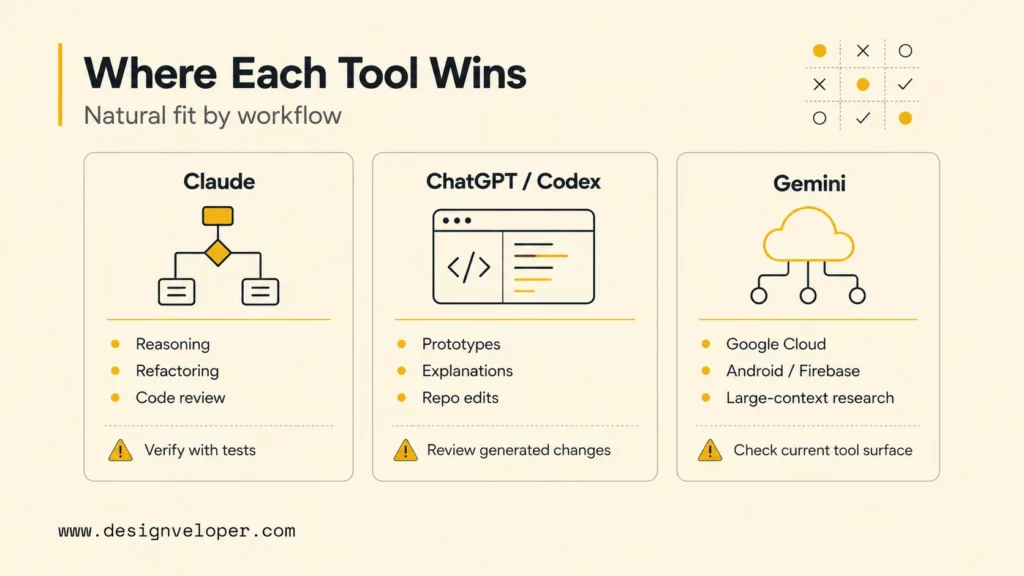
Where Each AI Coding Assistant Works Best
The practical choice depends on task shape. Claude, ChatGPT, and Gemini overlap, but each one has a natural home. Teams often get the best result by using more than one assistant: one for planning, one for implementation, and one for review.
Claude For Complex Logic, Debugging, And Code Review
Claude is a strong choice when the coding task needs careful reasoning. It is useful for explaining difficult bugs, comparing architectures, refactoring a dense module, reviewing pull requests, and reasoning through edge cases. Anthropic’s Claude Code repository describes Claude Code as an agentic coding tool that lives in the terminal, understands a codebase, and helps with routine tasks, explanations, and git workflows.
Claude works best when the developer provides strong context: expected behavior, constraints, examples, relevant files, and what not to change. For large work, create a plan first and ask Claude to identify risky assumptions. Claude is less useful when the developer expects instant code without giving project patterns or verification commands.
ChatGPT For Fast Prototypes, Explanations, And Iterative Coding
ChatGPT is often the most flexible day-to-day coding assistant. It explains errors, drafts snippets, compares frameworks, writes tests, and helps developers learn unfamiliar APIs. Codex expands that workflow into real code editing. OpenAI’s Codex CLI features describe an interactive terminal UI that can read a repository, make edits, and run commands while the developer reviews actions in real time.
ChatGPT is especially strong when speed matters: prototype a page, sketch an API route, explain a framework error, generate test cases, or compare two implementation paths. The main risk is accepting plausible answers too quickly. Use it for momentum, then let tests, code review, and runtime behavior decide correctness.
Gemini For Large Context, Google Tools, And Research-Heavy Development
Gemini is a strong option when coding work connects to Google developer products. Google says Gemini Code Assist Standard and Enterprise offers coding assistance and agents across the software development lifecycle, with Google Cloud integration and large context in business editions. Gemini is also useful for Android, Firebase, BigQuery, Cloud Run, and Workspace-adjacent development research.
The important caveat is product movement. Google’s Gemini Code Assist release notes show that some individual-tier tooling changed in June 2026, with migration guidance toward Antigravity and Antigravity CLI. Teams should check current availability before standardizing a workflow. Gemini can be excellent, but only when the specific edition and tool surface match the team.
Example Performance Test: Same Coding Task, Different Outputs
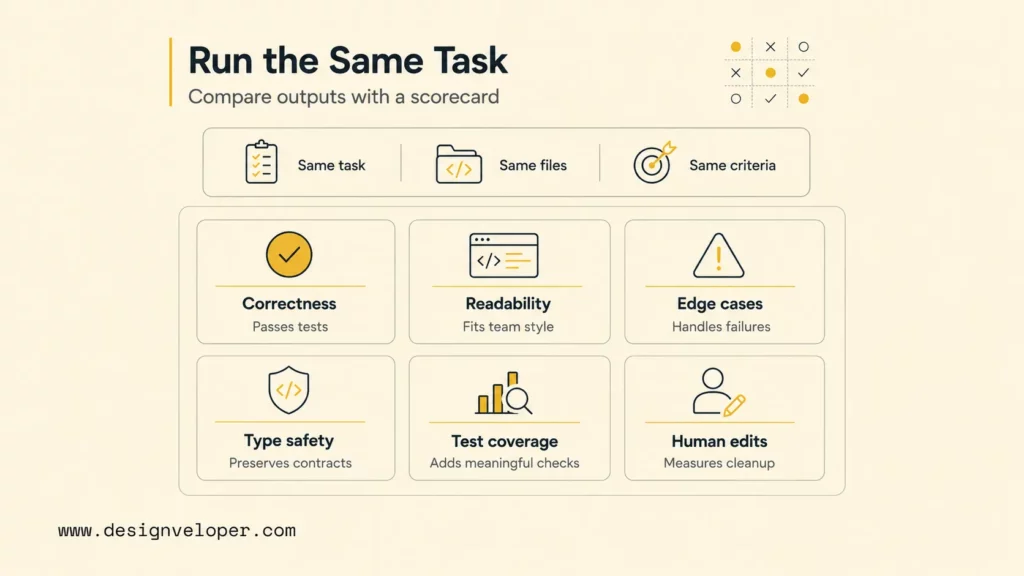
A useful internal test is better than a generic online ranking. Give Claude, ChatGPT, and Gemini the same coding task, the same files, and the same acceptance criteria. Then compare output by correctness, readability, edge cases, type safety, test coverage, and required human edits.
| Evaluation dimension | What to inspect | Why it matters |
|---|---|---|
| Correctness | Does the code pass existing tests and solve the stated behavior? | A confident explanation means little if the patch fails. |
| Readability | Can another developer understand and maintain the change? | AI code should fit the team’s style, not just compile. |
| Edge cases | Does the answer handle empty inputs, invalid states, permissions, retries, and errors? | Most AI demos pass happy paths. Production systems fail at edges. |
| Type safety | Are types, schemas, and contracts preserved? | Typed codebases should become safer after AI changes, not looser. |
| Test coverage | Does the assistant add meaningful tests and fixtures? | Tests reveal whether the assistant understood behavior. |
| Human edits required | How much cleanup, review, and rework was needed? | The best assistant reduces total engineering effort, not just typing time. |
For example, ask each assistant to add a rate-limited password reset endpoint to an existing Node.js API. Claude may produce a careful threat model and review-oriented implementation notes. ChatGPT/Codex may create the route, tests, and migration quickly inside the repository. Gemini may perform well when the stack includes Firebase Auth, Google Cloud Logging, or Cloud Run. The winner depends on how much code passed tests, how clear the security decisions were, and how little rework the developer needed.
AI coding evaluation scorecard
Existing and generated tests pass without hidden manual fixes.
Code follows local patterns, naming, modules, and dependency rules.
Handles invalid input, failures, permissions, and rollback paths.
Changes are small enough for a human owner to inspect.
No secret leakage, overbroad access, unsafe eval, or auth bypass.
Use the scorecard to compare generated code on the checks that matter after the demo: passing tests, project fit, edge-case coverage, review effort, and security. This keeps the decision tied to engineering quality rather than output speed alone.
Other AI Coding Tools Developers Should Know
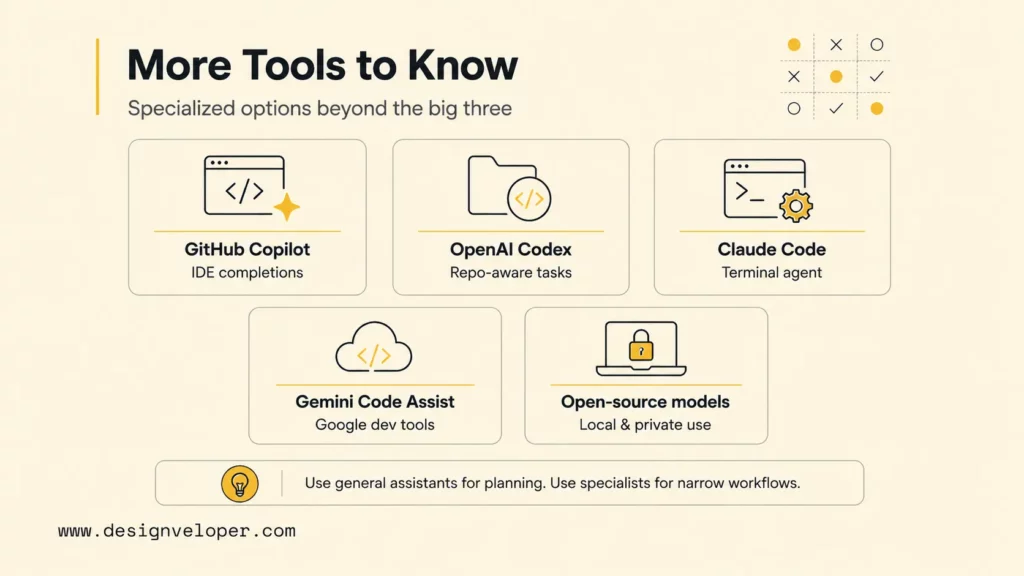
Claude, ChatGPT, and Gemini are versatile assistants, but developers should also know specialized AI coding tools. GitHub Copilot is deeply embedded in IDE workflows and pull requests. OpenAI Codex focuses on agentic coding through web, CLI, IDE, and API surfaces. Claude Code focuses on terminal-based agentic development with Claude. Gemini Code Assist focuses on Google developer and cloud workflows.
Open-source and specialized coding models also matter. Meta’s Code Llama helped popularize open coding models, and current open-source models can be attractive for local, private, or cost-sensitive tasks. Specialized tools may outperform general chatbots in narrow workflows such as code search, security scanning, dependency updates, or CI-generated fixes. General assistants remain more versatile for planning, explaining, and cross-domain reasoning.
- GitHub Copilot: strong for inline IDE completions, code suggestions, and developer flow inside GitHub-centered teams.
- OpenAI Codex: strong for repo-aware work, task delegation, CLI sessions, cloud tasks, and code review or debugging workflows.
- Claude Code: strong for terminal-based reasoning, refactoring, debugging, and structured agentic development with Claude.
- Gemini Code Assist: strong for Google Cloud, Android, Firebase, and enterprise Google development workflows.
- Open-source coding models: useful for local experimentation, privacy-sensitive workflows, and custom developer tooling when a team can operate the models safely.
Related reading:
- Vibe Coding Vs Traditional Coding: Where Fast AI Coding Helps And Where It Hurts
- Vibe Coding Workflow: From Product Requirements To Tested Code
- What Is Vibe Coding? Origin, Examples and How to Use
How To Choose The Right AI For Your Coding Workflow
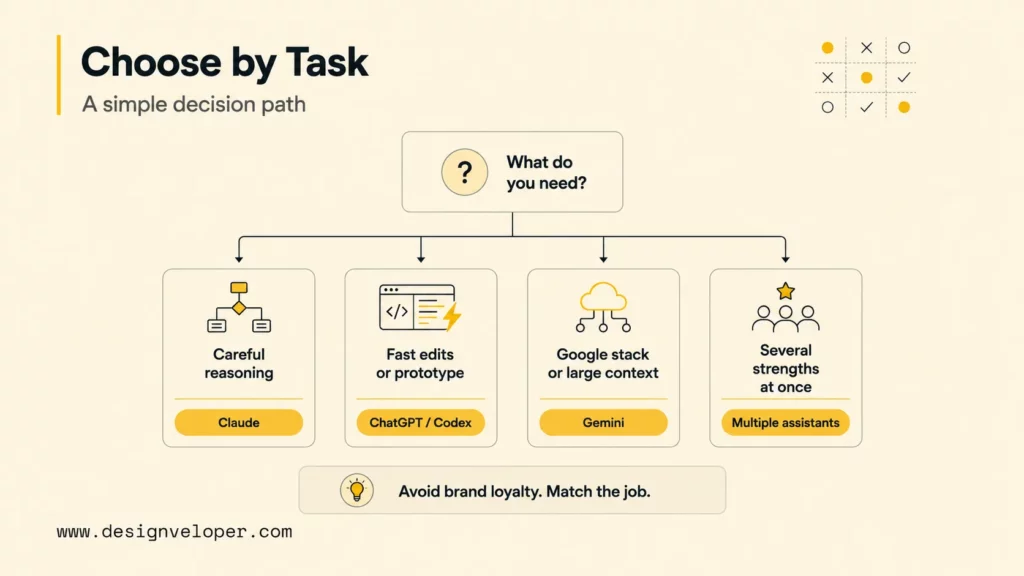
Choose the AI assistant by task, not by brand loyalty. A developer should ask what kind of help is needed: explanation, first draft, repo edit, code review, long-context analysis, Google Cloud integration, test generation, or production debugging. The assistant should match that job.
| Choose | When it fits best | Avoid relying on it alone when |
|---|---|---|
| Claude | The task needs careful reasoning, complex logic, refactoring, debugging, code review, or architecture tradeoffs. | The work requires fast multi-file edits and command execution but the chosen Claude interface cannot operate in the repo. |
| ChatGPT / Codex | The task needs fast iteration, explanations, prototypes, test drafts, real repo edits, or agentic code changes. | The patch affects security, payments, auth, data migration, or production infrastructure without human review. |
| Gemini | The task depends on Google Cloud, Firebase, Android, Workspace, research-heavy context, or large file analysis. | The team has not confirmed current Gemini Code Assist edition, migration status, or tool availability. |
| Multiple assistants | Planning, implementation, review, and testing need different strengths. | The team has no process for resolving conflicting suggestions. |
A good workflow is to let one assistant draft a plan, another inspect risks, and CI prove behavior. For example, Claude can review the architecture, Codex can implement the scoped change, and Gemini can verify Google Cloud-specific configuration. The developer remains accountable for deciding which suggestions survive.
AI Coding Works Best Inside A Real Engineering Process
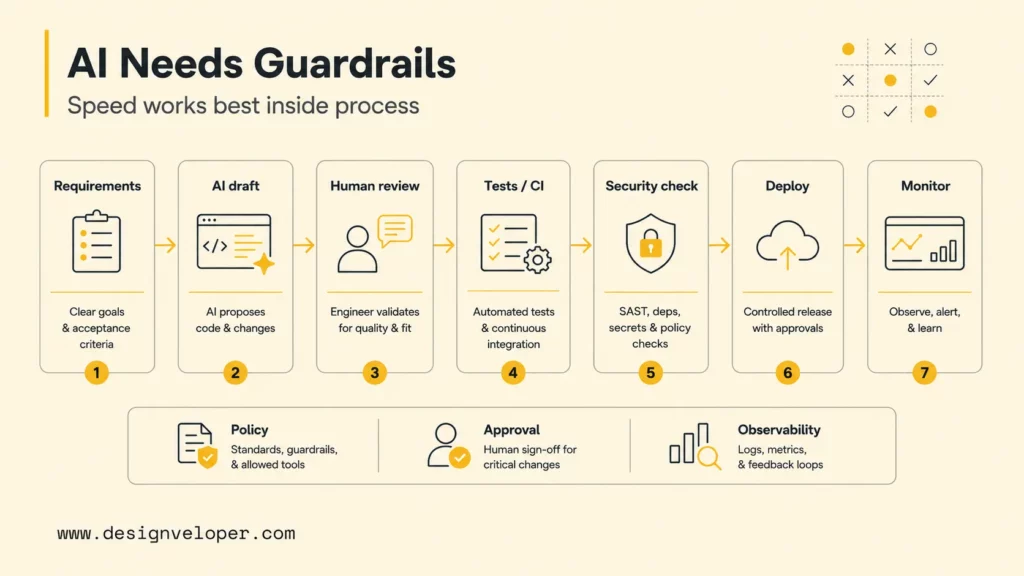
AI coding works best when it sits inside a real engineering process. Assistants can accelerate planning, coding, debugging, documentation, and testing. Reliable software still needs architecture decisions, human code review, security checks, CI/CD, test coverage, observability, and production monitoring. Without those controls, AI can generate code faster than teams can understand the risk.
Designveloper can help make it all easier. We use AI-assisted development as a speed layer, not as a replacement for engineering discipline. Our software development services cover discovery, architecture, implementation, testing, deployment, and support. Meanwhile, our AI development services help teams integrate LLMs, AI agents, RAG, automation, and production workflows into real products. The practical value is faster delivery with review discipline intact.
For teams adopting Claude, ChatGPT, or Gemini, the best starting move is to define an AI coding policy. Decide which tasks assistants can perform, which data they can access, which commands they can run, and which changes need human approval. Then add project-level instructions, tests, linting, security scanning, and review gates. AI coding becomes much safer when the workflow is explicit.
AI can accelerate the path from idea to pull request. Engineering quality still comes from constraints, tests, review, and ownership.
For a deeper dive, read:
- 20 Software Project Management Methodologies for Software Development
- Custom Software Development: How It Can Drive Your Business Growth
- How Will AI Affect Software Development? Complete Guide
After comparing the assistants across coding workflows, use the FAQ section to resolve the practical questions that often affect the final tool choice.
FAQs About Claude Vs ChatGPT Vs Gemini For Coding
Is Gemini Advanced Better Than ChatGPT For Coding?
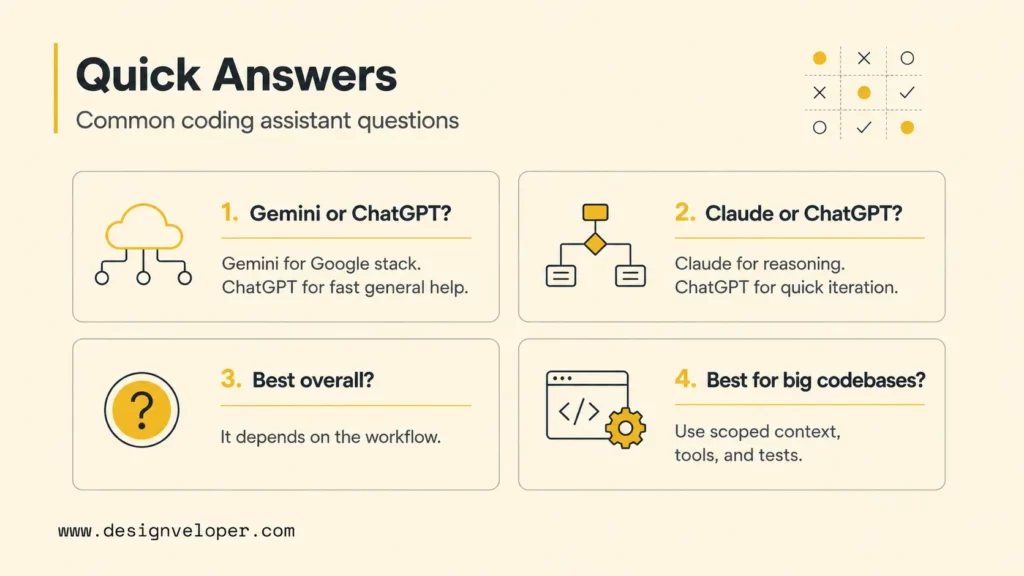
Gemini can be better than ChatGPT for coding when the work depends on Google Cloud, Firebase, Android, Workspace, or large Google ecosystem context. ChatGPT is often better for fast general coding help, explanations, prototypes, and Codex-based repo workflows. The right answer depends on the stack and tool surface, not only the model name.
Does Claude Write Better Code Than ChatGPT?
Claude can write better code than ChatGPT for some complex reasoning, refactoring, debugging, and review-heavy tasks. ChatGPT can be better for fast iteration, framework explanations, and agentic code edits through Codex. Developers should compare both on the same task and judge by tests passed, edge cases covered, and human edits required.
Is Claude Still The Best For Coding?
Claude is still one of the strongest coding assistants for reasoning-heavy development, complex logic, and code review. It is not automatically the best for every workflow. ChatGPT/Codex may be better for repo editing and fast prototypes. Gemini may be better for Google-specific development and large-context Google tool workflows.
Which AI Coding Assistant Is Best For Large Codebases?
The best assistant for large codebases is usually the one with strong tool access, scoped context, and a workflow that can inspect files safely. Claude and Gemini can both help with long context, while Codex can work directly in repositories and run commands. For large codebases, success depends more on repo instructions, task scoping, tests, and review gates than on pasting huge files into a chat window.
Claude vs ChatGPT vs Gemini for coding should be decided by workflow fit. Claude is strong for careful reasoning and review. ChatGPT/Codex is strong for fast iteration and repo-aware development. Gemini is strong for Google-centered and large-context development. The best engineering teams use AI to move faster, then use tests, code review, security checks, and production monitoring to make sure faster also means safer.
Also published on

Share post on










Related Articles


AI Agent Case Studies: 10 Real-World Examples Across Industries
AI Agent Case Studies: 10 Real-World Examples Across Industries Published October 21, 2026
How Will AI Affect Software Development? Complete Guide In 2026
How Will AI Affect Software Development? Complete Guide In 2026 Published October 21, 2026
How To Build A RAG System: Step-By-Step (New Guide)
How To Build A RAG System: Step-By-Step (New Guide) Published October 19, 2026


















