
















What Is Pair Programming? Roles, Benefits, And AI-Assisted Development

KEY TAKEAWAYS:
- Pair when another perspective can reduce uncertainty, transfer important context, or catch a costly mistake. Routine, well-understood work may be faster solo.
- Driver and navigator are temporary responsibilities, not seniority labels. Agree on a goal and switch roles when the work changes or one person becomes passive.
- Expert-expert, expert-novice, and novice-novice describe experience mix; each pair can use different coding techniques.
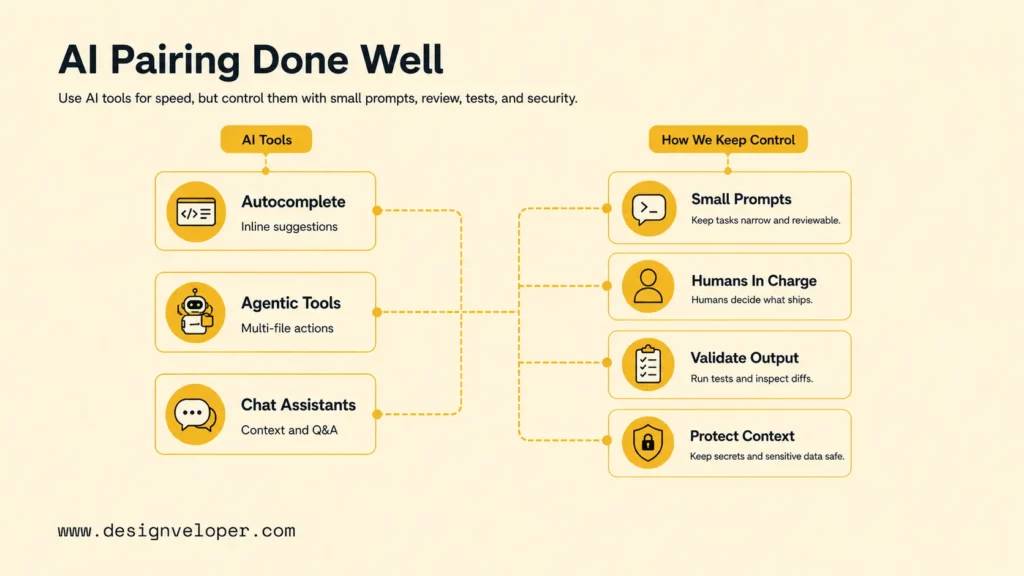
- AI can draft, explain, and suggest tests, but the developers still check behavior, permissions, security, and the final change.
A production fix can lose time in handoffs, but asking two developers to share every small task can consume focus without adding much insight. Pair programming is most useful when work is uncertain, consequential, or rich in context that another person needs to understand. AI coding assistants add another contributor: they may draft or inspect changes, but they do not share the team’s full context or own release decisions. The practical question is where shared attention earns its cost. The sections below explain the roles, task fit, session habits, and safeguards that help teams answer it.
What Is Pair Programming?
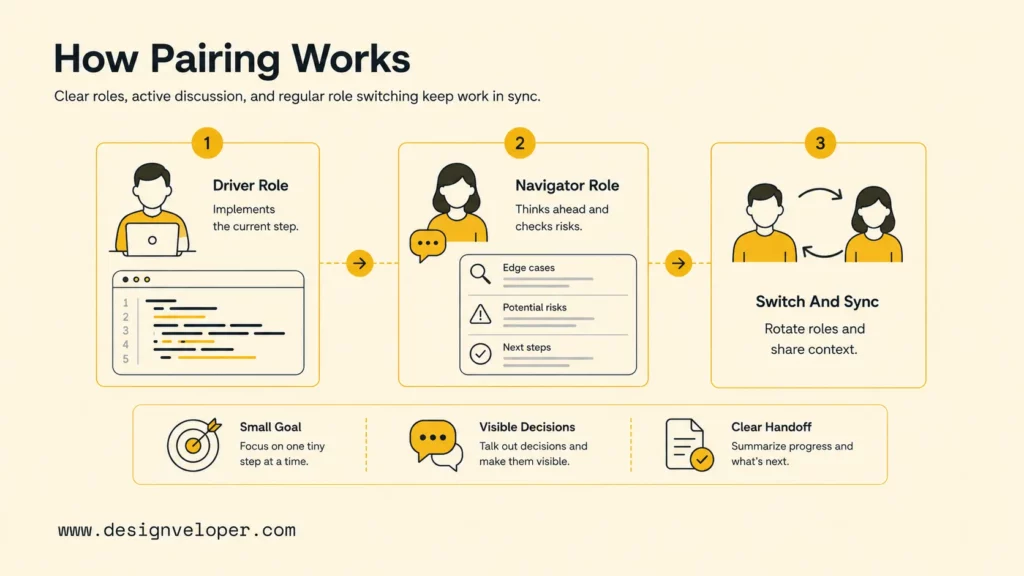
Pair programming is a software development practice in which two developers work together on one task at the same time. One person, the driver, makes the code change; the other, the navigator, reviews the direction, checks assumptions, and thinks ahead. They discuss decisions as the work develops, then exchange roles so both stay involved.
The classic arrangement uses one workstation, but the essential feature is real-time collaboration, not a shared physical keyboard. Two developers can pair remotely through a shared editor, screen, or development environment. The Agile Alliance definition of pair programming describes this two-person practice; it is related to Agile software development, but teams can use it outside a formal Agile process.
Pairing is not the same as one person coding while another watches silently. Both developers contribute judgment: one may handle the immediate edit while the other checks requirements, tests, edge cases, or the surrounding design. The goal is a shared understanding of the change, not simply more eyes on a screen.
How A Pair Programming Session Works
A useful session has a small, testable outcome, an agreed boundary, and clear participation from both developers. The exact workflow varies, but the driver and navigator roles make the collaboration easier to follow.
The Driver Turns The Current Decision Into Code
The driver controls the keyboard and implements the next agreed step. That may mean writing a failing test, changing a function, running a command, or checking the result. The driver should explain the intent behind a change so the navigator can evaluate the decision rather than guess from keystrokes.
Driving does not mean owning the code alone. If the navigator spots a simpler approach, a missing case, or a risky assumption, the pair pauses and decides together before expanding the change.
The Navigator Keeps The Wider Problem In View
The navigator checks whether the change matches the task, acceptance criteria, and nearby system behavior. They can inspect related code, trace a failure, look for a missing test, or ask what could break if an assumption is wrong. This is active work, not passive observation.
For remote work, use a shared editor or screen, keep test output visible, and say decisions aloud. Shared notes help the pair preserve context when the call ends or another developer takes over.
Switch Roles At A Meaningful Checkpoint
There is no universal timer for role changes. Switch after a test passes, when the task moves from investigation to implementation, or when one person has been driving long enough that the other is no longer contributing. Some teams use a short fixed interval as a reminder, but the purpose is balanced engagement rather than compliance with a schedule.
Before switching, summarize what changed, what remains uncertain, and what evidence will show the next step is correct. That handoff keeps the pair aligned without repeating the whole discussion.
For a deeper dive:
- What Is An Agile Team? Structure, Roles & Responsibilities
- Agile Vs Scrum: What’s the Difference and When to Use Each?
- The 12 Agile Principles And 4 Agile Values Explained For Teams
Pairing Formats Describe Experience Mix, Not Coding Technique
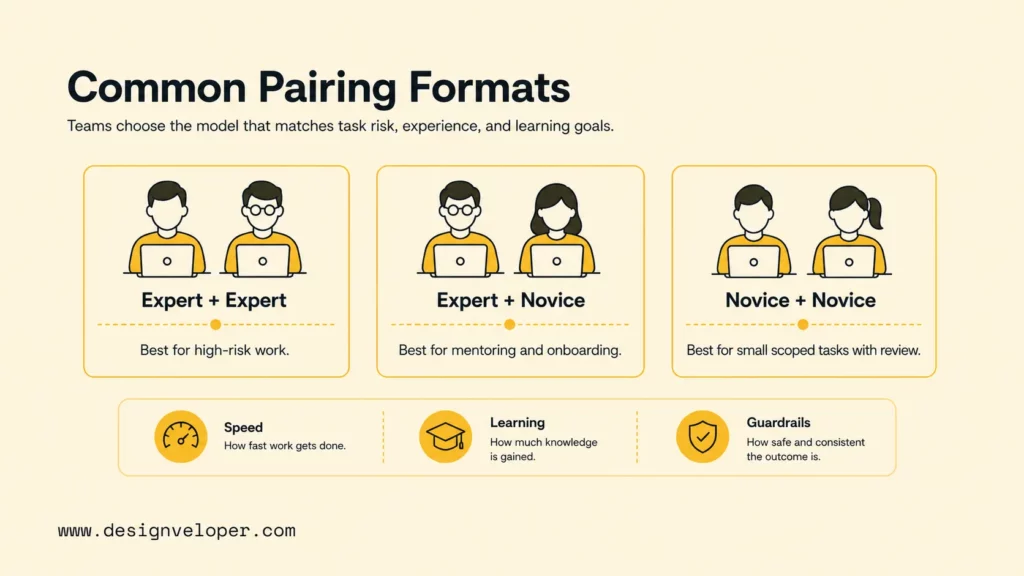
Pairing formats describe the experience level of the two developers; they are not separate coding methods. Any of these combinations can use driver-navigator roles, test-driven steps, or another agreed way of working.
Expert And Expert
Two experienced developers can challenge assumptions quickly on a difficult design, incident, migration, or security-sensitive change. This can be useful when a wrong decision would be expensive to reverse or when the knowledge should not remain with one person. The coordination cost is real, so reserve this format for work where both perspectives matter.
Expert And Novice
An experienced developer paired with a newer teammate can combine delivery with contextual learning. The novice should take an active role, such as driving a small change or explaining a test, while the expert helps navigate the codebase and calls out domain rules. If the expert does all the typing, the session may finish without transferring much skill.
Novice And Novice
Two newer developers can learn by explaining their reasoning and investigating together, especially on a well-scoped task. The main risk is that both may share the same mistaken assumption. Clear acceptance criteria, starter tests, and a planned review by an experienced developer provide useful guardrails.
When Pair Programming Is Worth The Shared Time
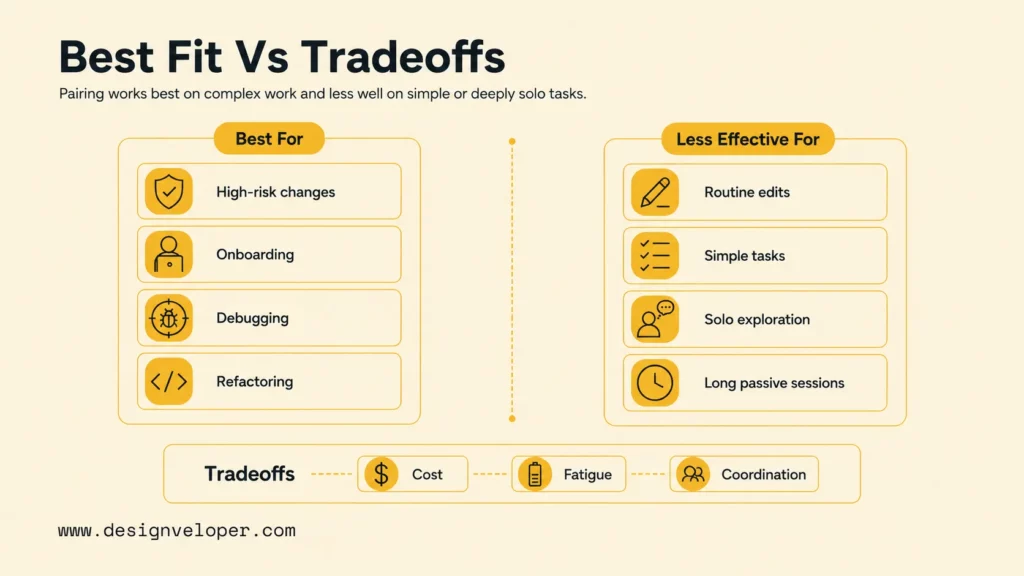
Pair programming makes sense when the cost of coordination is lower than the likely cost of a missed assumption, slow knowledge transfer, or late rework. It is a choice for a task, not a rule that every developer must follow all day.
Pair On Uncertain, Risky, Or Knowledge-Heavy Work
Two perspectives are more valuable when the task has unclear behavior, several plausible causes, or consequences that are hard to undo. Good candidates include debugging a production issue, changing a core data flow, reviewing a complex refactor, or onboarding someone into a sensitive part of the codebase.
A pair can also help when the task spans knowledge held by different teammates. One person may know the product behavior while the other knows the service boundary or test setup. Their conversation can expose a dependency that neither would see from a narrow view of the code.
Work Solo When Focus Or Exploration Matters More
Solo work may be the better choice for a routine change with known requirements, independent research, or a task that needs long uninterrupted concentration. Pairing can also be tiring when sessions run without breaks or when the participants do not have equal space to speak.
Do not treat a slower pair session as evidence that the practice failed. Compare the full task cost: discussion, implementation, review, rework, and knowledge handoff. For estimation, Story Points in Agile can help a team discuss task size, but they do not determine whether pairing is worthwhile on their own.
Make The Trade-Off Visible
Pairing uses two people’s attention at once. That cost may be reasonable when it reduces risk or prevents duplicated investigation, but it should not be hidden behind a broad claim that pairing always improves productivity. Martin Fowler’s practitioner discussion of pair programming also treats task choice and collaboration style as contextual decisions. Watch for practical signals instead: did the pair reach a testable result, did both understand the change, and did the team avoid a costly follow-up?
Run A Session With A Clear Goal And A Clean Handoff
A short working agreement prevents a pairing session from turning into an open-ended meeting. Before coding, make sure both people know the intended behavior, the evidence needed, and the boundary of the change.
- Define one outcome. State what should work when the session ends. Avoid combining unrelated cleanup with the main task.
- Agree on evidence. Choose a failing test, reproduction, acceptance criterion, or observable behavior that can confirm the fix.
- Name the first roles. Decide who drives and what the navigator will watch for, then rotate so both contribute.
- Keep the scope visible. Note unrelated defects or follow-up ideas rather than silently adding them to the change.
- Close with a handoff. Review the diff, run relevant checks, and record the result, remaining risks, and next owner.
Walkthrough: Fixing A Duplicate Checkout Retry
Illustrative scenario, not a reported project result: two developers need to fix a checkout job that retries a payment request twice. They first agree on the expected behavior and add a test that reproduces the duplicate retry. The driver writes the test; the navigator traces the retry path and checks that the scenario matches the acceptance criteria.
Once the test fails for the expected reason, the pair switches roles and makes the smallest code change that addresses the cause. An AI assistant may suggest an edge case or explain an unfamiliar function, but the developers compare each suggestion with the actual job behavior and existing code. They then run the focused test and related integration checks, inspect the diff for unrelated edits, and hand off the cause, evidence, and any remaining risk. If they cannot reproduce the problem, they stop and gather more evidence instead of accepting a plausible-looking patch.
Use AI As A Contributor, Not A Substitute For The Pair
AI coding tools can generate or explain code inside a pairing workflow, but traditional pair programming still refers to two people collaborating. The developers remain responsible for deciding what to ask, whether output fits the system, and whether the change is ready for review.
Match The AI Mode To The Work
Different assistant modes suit different tasks:
- Autocomplete can fill in a small expression or suggest a familiar pattern while the driver types. The navigator checks whether the suggestion follows local conventions.
- Chat assistance can explain unfamiliar code, outline test cases, or help compare approaches. Treat the response as a hypothesis to check against the repository and requirements.
- Coding agents can inspect or edit multiple files and may run commands, depending on their setup. Agree on the task boundary and permissions before granting that access. Review the resulting changes as a diff, not just a summary.
For example, GitHub’s documentation on Copilot describes an AI coding assistant; product features and controls can change, so teams should check the current documentation for the tool they use.
Keep The Review Boundary Clear
Before an assistant sees code or takes action, follow the organization’s policy for approved tools, data, and permissions. Do not provide secrets or sensitive code to an unapproved service. For agentic edits, limit the task, keep destructive actions behind approval, and inspect files changed, commands run, dependencies added, and tests produced.
Generated code still needs the same checks as human-written code: confirm it meets the acceptance criteria, run relevant tests, examine security and error handling, and review the full diff. A passing test is useful evidence, not proof that every behavior is safe. Keep pull-request review, static checks, and release controls where the project requires them.
FAQs About Pair Programming
Is Pair Programming Still Used By Software Teams?
Yes. Teams still use pair programming for selected work such as complex debugging, onboarding, and changes where shared context can reduce risk. It is a targeted practice, not a requirement for every task.
Does Pair Programming Require Two Developers At One Computer?
No. Two developers can pair remotely with a shared editor, screen, and communication channel. The important part is that both work on the same task in real time and contribute actively.
What Is A Pair Programming Interview?
It is an interview exercise where a candidate and interviewer solve or discuss a coding task together. A useful assessment looks at reasoning, communication, and response to feedback, not only whether the candidate reaches one exact solution.
Is AI Pair Programming The Same As Traditional Pair Programming?
No. Traditional pair programming involves two human developers sharing a task. AI pair programming adds an assistant that can generate or explain code; the human developers still provide context, review, and accountability.
Use Pairing Where Shared Context Matters Most
Pair programming is most useful when a task benefits from fast discussion, risk checks, or knowledge transfer enough to justify two people’s time. Start with one bounded task, agree on what evidence will count, and review whether both participants left with a clearer understanding of the change. Designveloper’s How We Work page describes its collaboration approach alongside Agile practices, but it does not publish a measured result for pairing. Teams planning broader product work can also review Designveloper’s software development services to understand the delivery capabilities involved.
Also published on

Share post on










Related Articles


Is Vibe Coding Legal? Ownership, Copyright, and Release Risks
Is Vibe Coding Legal? Ownership, Copyright, and Release Risks Published October 16, 2026
How to Build a Chatbot with LangChain in Python: 6 Steps
How to Build a Chatbot with LangChain in Python: 6 Steps Published October 16, 2026
Agentic AI Replacing AI: How Workflows Change and When to Switch
Agentic AI Replacing AI: How Workflows Change and When to Switch Published October 16, 2026


















