











Is Vibe Coding Legal? Ownership, Copyright, and Release Risks

KEY TAKEAWAYS:
- Vibe coding can help test an idea, but a working screen is not proof that the feature is safe to release.
- A production release needs evidence and an owner: reviewed code, risk-based tests, a deployment plan, monitoring, and a way to recover.
- Keep, refactor, or rebuild each part based on whether the team can explain, test, secure, and maintain it—not simply on whether AI wrote it.
An AI-generated feature can work on a founder’s laptop and still behave differently for a support agent, a second account, or a slow billing API. Moving vibe code to production means making deliberate decisions about data, access, failure paths, testing, ownership, and recovery—not just deploying the same demo. This guide defines the boundary between vibe coding and reviewed AI-assisted development, then gives teams a practical release path with evidence at each step. A worked example shows how to evaluate an AI-drafted admin feature, and a decision table helps determine which code to keep, refactor, or rebuild.
What Vibe Coding Means Before a Production Release
Vibe coding is a way of building with AI in which someone accepts generated code mainly because the result appears to work, without closely checking how it works. The term can be used more broadly, but for a production decision the important distinction is the review posture: can a responsible person explain the change, verify its behavior, and maintain it?
Using an AI assistant does not automatically make work vibe coding. A developer may use AI-assisted pair programming while still reading the diff, applying project standards, writing independent tests, and taking responsibility for the release. The tool can draft or explain code; it cannot accept the business risk or take ownership of the system after launch.
Where Vibe Coding Helps And Where It Stops
The fit depends on the cost of a mistake and how long the code must live, not on whether a model produced it. A small feature with synthetic data has a different release risk from a feature that changes customer records, even if both began as one prompt.
Use It for Discovery and Low-Risk Work
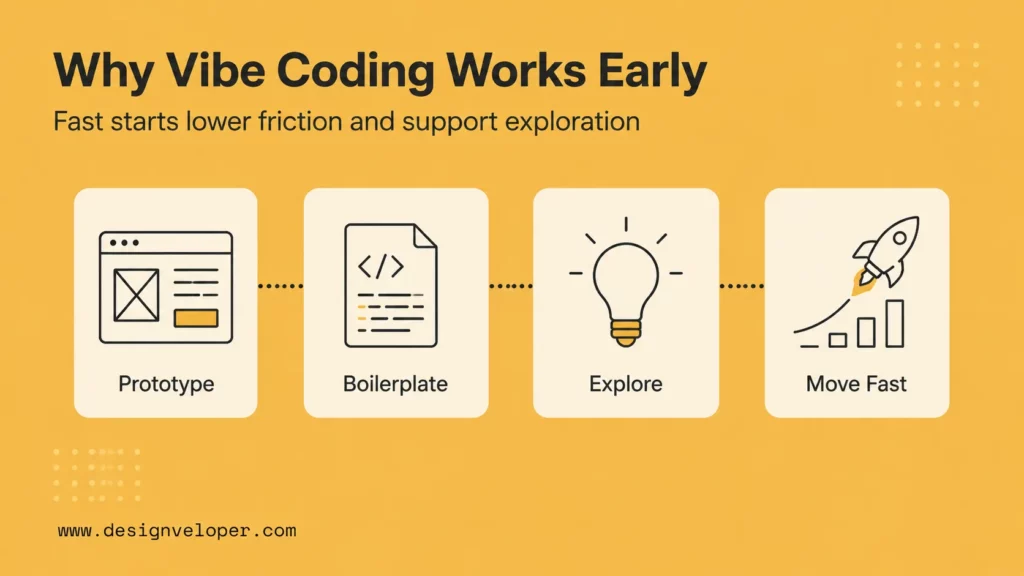
Vibe coding is useful when the team needs to explore a screen, validate a workflow, create a disposable demo, or produce a first draft of routine code. An AI coding assistant can help sketch options or scaffold a small feature, while a person checks whether the output matches the intended behavior. Keep the work isolated from production data and credentials until the team has reviewed it.
For example, a product team can use synthetic accounts to test whether a support dashboard makes the right customer details easy to find. If the screen is only a prototype, the team can replace rough code later. If it will become a maintained internal tool, the team should treat the prototype as a source of requirements and verify the real access rules before connecting it to live records. Teams exploring AI coding assistant tools should apply the same boundary regardless of the product they choose.
Switch to a Reviewed Process When Risk Rises
Use a stricter engineering process when a feature handles personal or financial data, changes account access, processes payments, affects regulated work, or becomes part of a service customers depend on. Long-lived code also needs clearer module boundaries, ownership, and tests because someone will have to change it after the original prompt is forgotten.
These conditions do not mean every AI-built prototype is unsafe or must be discarded. They mean the team should stop treating a convincing demo as release evidence. A useful risk discussion separates the value of the idea from the risks of vibe coding without close review, and assigns someone to check the parts that could harm users or interrupt the service.
Related reading:
- Vibe Coding Workflow: From Product Requirements To Tested Code
- Vibe Coding Vs Traditional Coding: Where Fast AI Coding Helps And Where It Hurts
- How to Start Vibe Coding: The Practical 7-Step Guide
Why a Working Demo Can Fail in Production
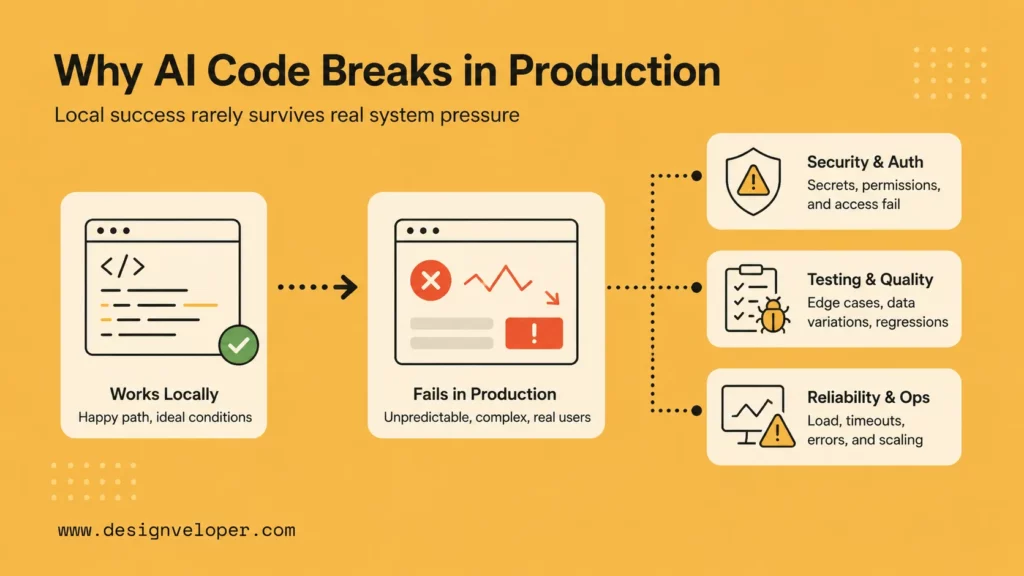
A demo usually exercises a narrow path with familiar inputs, while a live system has different users, data, integrations, and failure conditions. Production issues often come from decisions the generated code could not know: who may change a record, what happens when a service is unavailable, or who must respond when a release causes an incident.
Code Structure and Ownership
Generated code may satisfy the immediate prompt while putting business rules in the wrong layer, repeating logic, or coupling a screen directly to a database. These choices can be hard to see in a short demo, yet they make later changes riskier. A reviewer should trace a feature from its user action through the application logic to the data it reads or changes.
Ownership is just as important as structure. If no one can explain why a decision was made, identify the relevant tests, or name the person who will handle a failure, the code is not ready for an operational handoff. Keep a short change record with the intended behavior, affected modules, assumptions, reviewer, and unresolved questions.
Authorization, Data, and Dependency Risks
A successful request from an authorized user does not prove that access control is correct. Check that the server verifies the user’s role and permission for the specific record, not only that the interface hides a button. Test requests from users who should be denied, invalid or stale data, duplicate submissions, and changes that cross account or tenant boundaries.
Also review secrets, data validation, database changes, and third-party dependencies. Credentials belong in managed configuration, not in source files or prompts. Record the source and license of dependencies and any code the team adopts; when ownership or reuse is unclear, follow the organization’s policy and get the right review. The practical and legal questions around vibe coding, ownership, and safe use are separate from whether the feature passes its functional tests.
If the product itself includes an LLM, assess that component separately against the OWASP Top 10 for LLM Applications 2025. Those LLM-application risks do not automatically describe ordinary application code just because an AI tool generated it.
Failure Handling and Operations
Local success does not show what happens when an API times out, a token expires, a database write is rejected, or two people update the same record. Check error handling, retries, duplicate actions, and the way the feature behaves when a dependent service is down. A user should receive a safe, understandable result rather than a false success message or a partial update that no one can trace.
A release also needs an operational path: logs that help diagnose failures without exposing sensitive data, alerts with a named responder, and a tested way to disable or roll back the change. The exact controls depend on the service and its risk. The team should document what it will watch and who will act before the feature reaches real users.
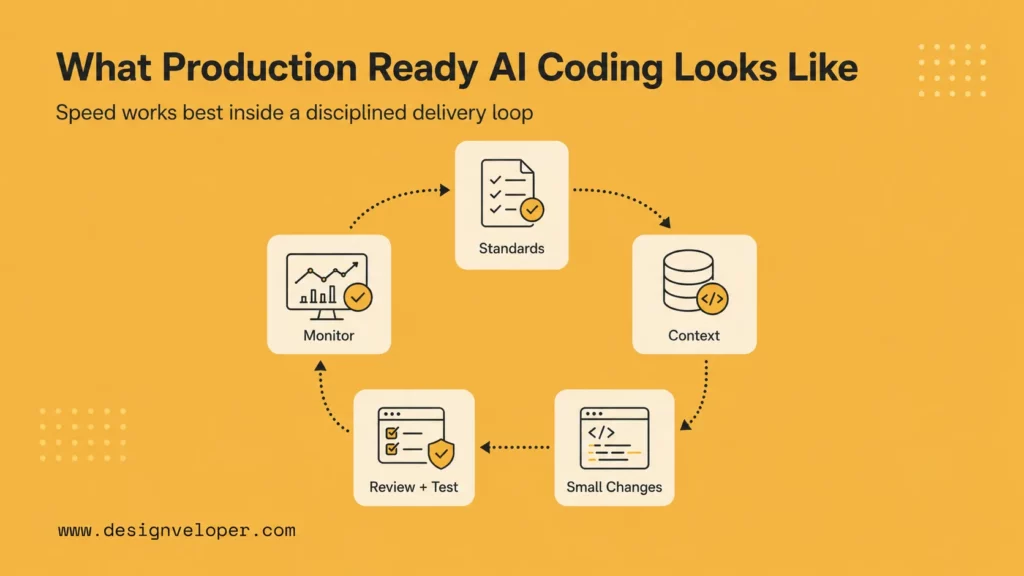
A Risk-Based Path from Prototype to Production
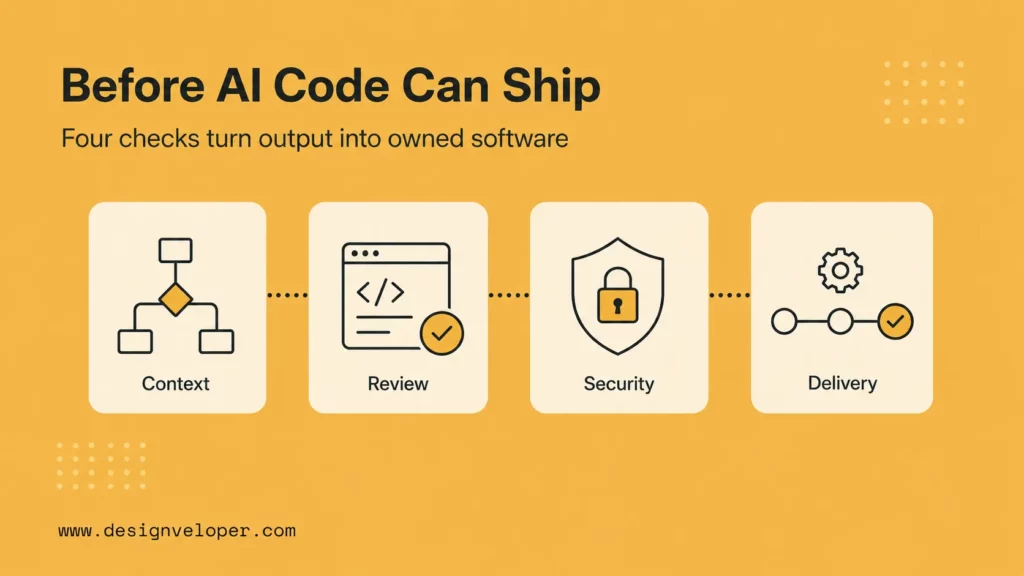
Move a feature forward in small, reviewable stages. Each stage should leave evidence that answers a practical question: what is changing, who checked it, what passed, what remains risky, and what would make the team stop?
- Define the release boundary. Write down the user problem, intended outcome, user roles, data involved, affected actions, and the most serious plausible failure. Name a technical owner and a business or product contact. For high-impact changes, define what must remain blocked until the required checks pass.
- Trace the behavior and constraints. Map the screen, API, data model, integrations, and existing tests that the feature will touch. Check the repository’s architecture and deployment rules before asking AI to change files. A short task brief with acceptance criteria, constraints, and non-goals gives reviewers a reference point; see prompt engineering for developers for ways to make coding requests more specific.
- Review the full change before polishing it. Inspect the complete diff, not only the visible screen. Confirm that each changed file belongs in the feature, the logic follows existing patterns, and dependencies are necessary. Ask a reviewer to explain the data flow and identify what would be hard to test or reverse. Record a keep, refactor, or rebuild decision for each risky slice.
- Test behavior from independent requirements. Derive tests from acceptance criteria, API contracts, security rules, and known failure cases—not only from tests generated by the same prompt as the code. Cover the expected path and important negative cases, such as a denied user, invalid input, a repeated request, and an unavailable dependency. GitHub’s responsible-use guidance for Copilot Chat says generated code should be reviewed and tested, and generated tests may not cover every scenario. NIST’s Secure Software Development Framework (SSDF) is a general secure-development framework, not a benchmark for AI-generated code.
- Prepare an isolated release candidate. Deploy to staging with synthetic or otherwise approved data. Check configuration, secrets, database migrations, logging, and integrations in an environment close enough to production to reveal deployment issues. Confirm that the team can restore data or reverse the change. A DevOps pipeline can automate repeatable build, test, and deployment checks, but a green pipeline is evidence for its configured checks—not an automatic approval.
- Set a go/no-go rule and release gradually. Name who approves the release and what evidence they need. Roll out to a limited group or behind a feature flag when the architecture allows it. Before the rollout, choose signals such as failed updates, authorization denials, error rates, task completion, and support reports. Set thresholds and a review window for the specific service; do not borrow a universal number that has not been validated for the product.
- Watch the change and close the loop. During the agreed review window, the release owner checks the signals, responds to alerts, and records whether to expand, adjust, or roll back. Afterward, add newly found cases to tests and documentation. This makes the next AI-assisted change easier to inspect and reduces the chance that the team repeats an old failure.
Example 1: An AI-drafted account-plan admin screen. A product owner asks an AI tool to add a control that lets support staff change a customer’s plan. Before release, the engineer checks that the server—not only the interface—limits the action to approved support roles, that invalid plan changes are rejected, and that the billing integration handles timeouts and repeated requests. The team uses synthetic records in staging and tests an allowed user, a denied user, and a failed billing response.
The team records the reviewer, test results, monitoring owner, and rollback method. If access or billing checks fail, the control stays unavailable; passing a visual demo is not a reason to expose it. This is a hypothetical example, not a measured project result.
Keep, Refactor, or Rebuild the Existing Code
Do not make a whole-project decision based only on the fact that AI produced some of the code. Review each feature or boundary and choose the smallest safe path that leaves the team able to understand, test, and operate it.
| Decision | Use It When | Evidence to Check | Next Action |
|---|---|---|---|
| Keep | The code fits the architecture, has a clear owner, and handles the feature’s risk. | Reviewable diff, passing acceptance and security checks, known dependencies, and a recovery plan. | Merge through the normal release gates and maintain the tests. |
| Refactor | The behavior is useful, but boundaries, duplication, tests, or error handling need work. | A stable behavior contract and a set of small changes the team can test and review. | Improve one slice at a time; keep it out of high-risk use until required checks pass. |
| Rebuild | The team cannot explain a critical path, isolate a serious risk, or test the underlying data and access rules. | Written requirements, known data flows, a safe target design, and a migration or replacement plan. | Preserve validated requirements and behavior, then rebuild only the unsafe boundary. |
A rebuild is not automatically safer: it can introduce new defects and erase useful learning. Refactoring is not automatically cheaper if no one can verify the existing behavior. If the team cannot explain who can read or change important data, the immediate decision is to hold that feature in staging while it gathers the missing evidence.
Related reading:
- 13 Best Vibe Coding Tools for Building Apps and Editing Codebases
- How Will AI Affect Software Development? Complete Guide
- AI In Product Development: From Concept To Market Faster
Assign Release Ownership Before Launch
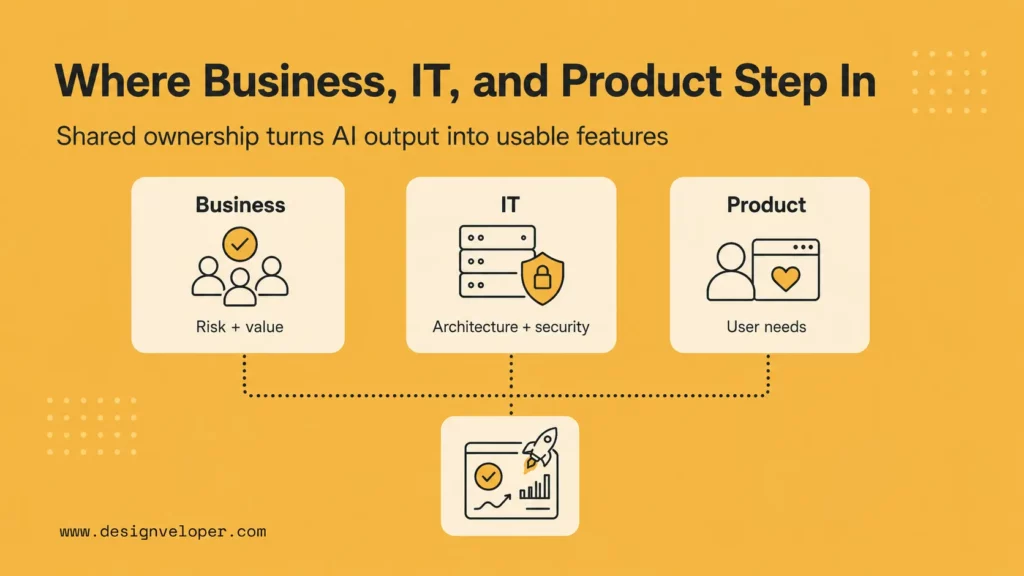
Production readiness is a shared decision, but it should not mean that responsibility is vague. The business, product, and engineering roles contribute different evidence; one named release owner coordinates the checks and knows who can stop or reverse the change.
Business Owners Define Impact and Tolerance
The business owner states why the feature matters, who is affected, and what an unacceptable failure would mean. A plan-change control, for example, may need a clear support path for incorrect updates; an internal prototype using synthetic data may need less formal release oversight. The owner also identifies the signal that shows the feature is useful, such as fewer manual steps or fewer correction requests.
Set the review window and acceptable bounds before launch with the people who will respond to problems. Do not claim a success threshold after seeing the results. If a change creates unexpected support load or an impact the business did not accept, the owner should know how to pause expansion and ask for a technical review.
Product Owners Verify the User Workflow
The product owner turns the intended outcome into observable acceptance criteria. They check that the feature handles common paths, unusual but valid cases, useful error messages, and accessibility needs. A generated interface can match the prompt and still make the real task confusing or omit an important step.
Product review should use realistic scenarios and confirm where a human must make a decision. For consequential actions, the product owner agrees with engineering on confirmation, audit history, or human approval where needed. The result is a workflow that solves the user’s problem without hiding risk behind a polished screen.
Engineering and IT Own Technical Evidence
Engineering and IT check the code, architecture, access controls, dependencies, test coverage, deployment, and recovery path. They restrict coding tools to the data and permissions required for the task, keep production credentials out of prompts and agent environments, and require human approval for sensitive or destructive actions. They also name who reviews security findings and operates the feature after release.
DORA’s 2025 State of AI-assisted Software Development report describes AI as an amplifier of an organization’s existing strengths and weaknesses. Applied here, that is a reason to improve the delivery system around the tool—not evidence that any specific AI-generated feature is safe. Teams should keep release decisions tied to their own review, test, and operating evidence.
Related reading:
- Top 10 AI Code Review Tools & Best Practices For Implementation
- AI In Software Development: Changing How Software Gets Built
- What Is DevOps? How It Works, Core Practices, and Benefits
FAQs About Moving Vibe Code to Production
These questions address decisions that remain after the team has reviewed the code and release plan.
Does Every Vibe-Coded Feature Need a Rewrite?
No. Keep code that fits the system and passes the checks its risk requires. Refactor the parts that are useful but hard to maintain. Rebuild only when a critical behavior cannot be understood, tested, or made safe through a smaller change.
Are Passing Automated Tests Enough to Ship?
No. Tests show that specific cases passed under specific conditions; they do not prove that every permission, data, deployment, or recovery risk is covered. Review the test source, add independent negative cases, inspect security-sensitive paths, and confirm monitoring and rollback before release.
What If the Original Builder or Prompts Are Unavailable?
Start from the running behavior, repository, data flows, and user requirements rather than asking a model to guess the missing history. Have an engineer map the important routes and dependencies, add tests for observed behavior, and record open assumptions. Keep risky functions out of production until a named owner can verify them.
Moving vibe code to production is a release decision, not just a deployment task: a team must be able to explain the change, verify its risks, and recover if it fails. If you need help planning an engineering review, explore Designveloper’s software development services.
Also published on

Share post on










Related Articles


Top 10 AI Code Review Tools & Best Practices
Top 10 AI Code Review Tools & Best Practices Published November 23, 2026
15 Best AI Tools for Developers: Compare Coding Workflows
15 Best AI Tools for Developers: Compare Coding Workflows Published November 23, 2026
Build A RAG Agent With LangChain: Step-By-Step Tutorial
Build A RAG Agent With LangChain: Step-By-Step Tutorial Published November 23, 2026