










How To Create A Dating App? Step-By-Step Guide In 2026

KEY TAKEAWAYS:
- Start with a dating app idea for one clearly defined audience and a relationship goal you can validate.
- A launch-ready MVP needs profiles, eligibility rules, discovery, mutual matching, messaging, report and block controls, moderation, privacy choices, and account deletion.
- Use rules to decide who is eligible before any ranking model orders profiles. AI can support matching or moderation, but it does not replace safety policy or human review.
- Budget with explicit scope, person-hours, rate assumptions, vendor costs, ongoing operations, and a phased calendar; generic quotes are not a reliable project estimate.
- For dating apps, trust and age controls are core product requirements. Apple and Google publish separate store rules that teams should check before submission.
To create a dating app, validate a focused audience, map how people move from discovery to a safe conversation, choose a build path that fits the hardest requirement, then launch a small MVP and measure whether it creates trusted connections. The first version usually needs reliable profiles, eligibility rules, discovery, mutual matching, chat, reporting, blocking, and moderation before advanced AI or video features.
This guide turns that sequence into a build plan for founders and product teams. It includes a concrete architecture example, an illustrative cost-and-timeline worksheet, launch metrics, and current Apple and Google safety requirements. The example scenarios are planning exercises, not claims about a typical market outcome.
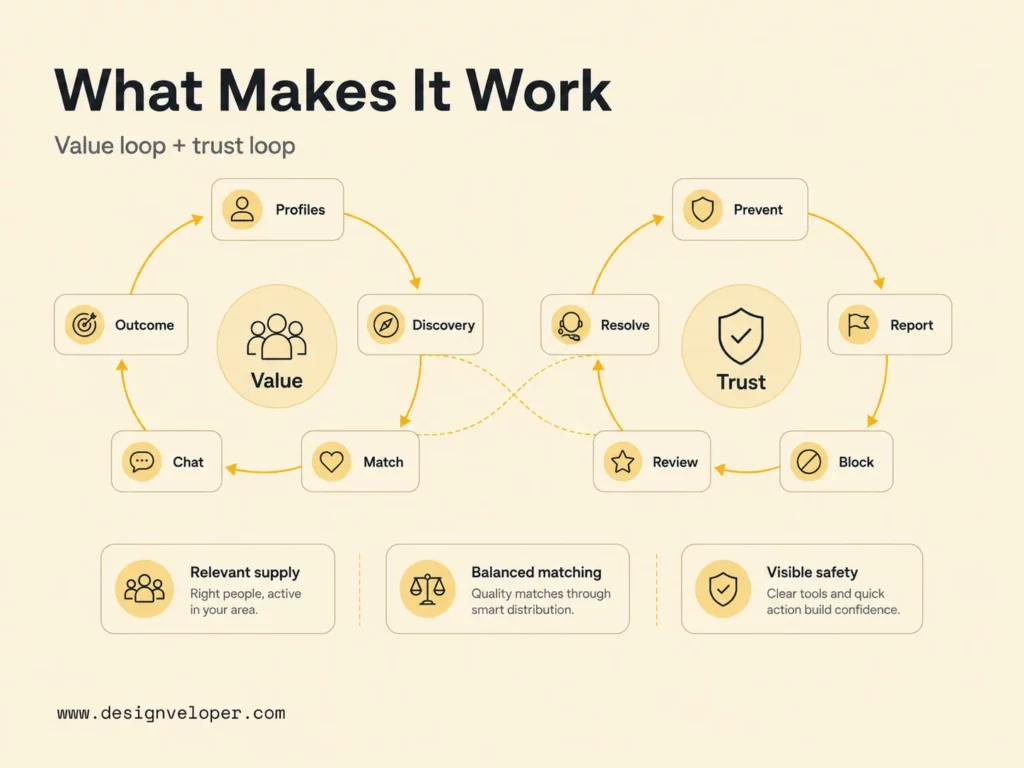
What Makes A Dating App Work?
A dating app works when people can find a relevant, eligible person and start a conversation in an environment they trust. The product therefore has two connected jobs: create enough local profile choice for a useful match and prevent the discovery or messaging experience from exposing users to avoidable harm.
The core loop is simple to describe, but each stage needs a product rule:
- Represent the person accurately: let users choose what appears in a profile and explain why each requested field is needed.
- Show eligible candidates: apply age rules, user preferences, distance limits, blocks, and account status before ranking.
- Make mutual interest clear: create a match only when the product’s consent rules are met.
- Support a safe first conversation: make report, block, unmatch, and privacy controls easy to find.
- Learn from outcomes: measure useful conversations and trust signals, not just swipes or time in the app.
Dating products also face a marketplace-density problem. A wide launch can produce many accounts but few relevant people within a user’s chosen age, intent, or distance preferences. Starting with one reachable community and one launch area makes it easier to learn whether the supply is useful before spending on broad acquisition or a complex recommendation model.
Store access is another trust requirement, but age controls and user-generated-content moderation are separate duties. Google Play applies minor-blocking tools to apps whose core function is dating or matchmaking, while incidental dating features need suitable age gating; Dating-category apps also have Child Safety Standards. Apple’s new Dating and Relationships descriptor has its own age-rating and declaration rules. The implementation and official sources appear in the store-readiness section below.
Xem thêm:
- Mobile App Development Process: Seven Stages From Idea To Launch
- MVP Examples: What Founders Can Learn From 10 Cases
Dating App Concept And Core Features
Define the audience, relationship intent, and reason to return before choosing a swipe pattern or an AI model. A niche can focus on a community, life stage, shared interest, or interaction style, but it still needs enough reachable members with compatible preferences in the first market.
Separate features needed to create a safe first connection from enhancements that can wait. This keeps the MVP useful without turning every competitor feature into a launch requirement.
| Journey stage | MVP capability | Defer until evidence supports it |
|---|---|---|
| Join and set up | Age-appropriate registration, account recovery, consent, profile fields, and clear privacy choices. | Long personality tests, broad social-network imports, and optional identity checks without a defined purpose. |
| Discover | Declared preferences, eligibility filters, approximate location, and a way to pause or hide a profile. | Live location, unlimited radius changes, and complex personalization. |
| Match and talk | Mutual-match rules, reliable messaging, notifications, unmatch, report, and block. | Video calls, livestreams, voice rooms, and message attachments. |
| Trust and support | Content rules, moderation queue, account enforcement, appeal route, and a reachable support channel. | Automated identity decisions or round-the-clock response promises the team cannot staff. |
| Pay and learn | Analytics for activation, eligible-profile coverage, conversations, safety operations, and account deletion. | Paid boosts, advanced subscription tiers, and AI optimization before the core loop is understood. |
Matching should have two stages. Eligibility removes profiles that must not be shown, such as blocked accounts, age-ineligible users, or people outside a user’s declared constraints. Ranking orders the remaining candidates using permitted preferences and observed product signals. Keeping these jobs separate makes the system easier to test, explain, and correct when a profile should never have appeared.
AI is optional at launch. It may help rank eligible profiles, suggest profile prompts, identify suspicious patterns, or prioritize content for moderator review. Start only when the team can name the input, intended benefit, failure mode, evaluation method, and appeal or human fallback. The NIST AI Risk Management Framework organizes its guidance around Govern, Map, Measure, and Manage; ongoing monitoring supports those functions rather than acting as a separate fifth function.
Do not infer sensitive traits simply because a model can. Use clear consent and purpose limits for profile and interaction data, test whether different user groups receive fair exposure, and let people correct preferences or challenge consequential actions. A more complex recommendation system is not automatically a better match experience.
How To Create A Dating App Step By Step
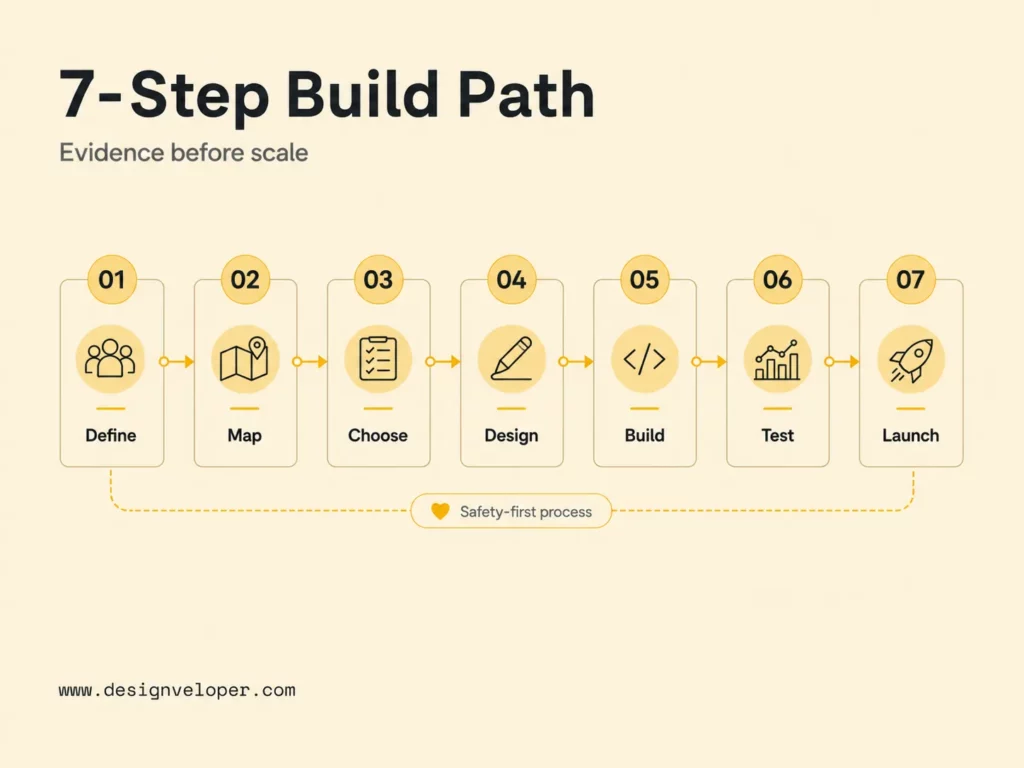
Build in a sequence that reduces product, safety, and delivery risk before expanding scope. The seven stages below move from audience validation to a measured launch; each stage should produce a decision or artifact the next team can use.
Step 1. Define The Audience, Niche, And Value Proposition
Write a one-sentence product promise that names the intended audience, relationship goal, recurring problem, and reason the product may serve that group better. “A dating app for everyone” gives the team no basis for choosing onboarding questions, acquisition channels, moderation rules, or a launch location.
Worked example: suppose a team wants to serve remote professionals seeking long-term relationships in one metro area. Before building, it interviews people currently using dating apps, people who recently stopped, and people who avoid them. The team checks whether the real problem is a lack of relevant local profiles, low-quality conversations, scheduling friction, or trust concerns; it does not assume that the group wants AI matching just because the product can add it.
Turn the interviews into a testable proposition and a reachable pilot group. Estimate how many eligible profiles the first community can supply, how users will hear about it, and what would make them return after a first session. A waitlist, moderated event, or concierge introduction test can reveal interest before the team commits to an app build; each test should explain what will be manual and how personal information will be handled.
Step 2. Map The User Journey, Matching Flow, And Data
Map every user action from invitation and registration through profile deletion. Include age and consent prompts, profile review, discovery, match creation, first message, report or block, subscription purchase and cancellation, privacy requests, account pause, and permanent deletion. For each data field, record when it is collected, why the feature needs it, who can access it, how long it is retained, and which vendors receive it.
Keep matching eligibility separate from ranking and chat authorization. A blocked pair should not reappear because a model score is high, and a conversation should not become available before the product’s mutual-match rule is satisfied. Design these constraints on the server and test attempts to bypass them through stale sessions, notifications, deep links, and blocked-account recreation.
Draw the data path for location, photos, profile answers, messages, reports, derived ranking features, and analytics. Prefer approximate location when exact coordinates are not required, remove photo metadata where possible, and make access, export, correction, and deletion flows part of the product plan rather than a future support task.
Step 3. Choose A Build Path And Technology Stack
Choose the build path by testing the hardest requirement, not by selecting the most fashionable stack. A manual or no-code pilot can validate a small community when matching and operations are simple. A custom app is more appropriate when safety controls, geospatial discovery, real-time chat, data governance, or differentiated ranking are central to the product and cannot be supported well by the platform.
For the remote-professional example, a practical spike could test one cross-platform mobile client, a managed identity service, a relational database with geospatial search, server-side eligibility and mutual-match rules, a managed or WebSocket-based chat service, a moderation console, and analytics with deletion support. That is an architecture sketch, not a vendor recommendation: the team should compare data export, regional hosting, access control, rate limits, retention, and operational support before choosing providers.
Keep matching simple in the first release. Filter ineligible profiles, rank the remaining people with transparent rules based on user-declared preferences, then review whether the results lead to useful conversations. If a no-code or AI builder cannot enforce block lists, consent, deletion, or moderator actions reliably, that limitation is a reason to change route before inviting real users.
Test authentication, photo upload, approximate-distance search, match-state transitions, notification delivery, reporting, subscription entitlements, analytics, and account deletion in a technical spike. Record what can be exported and how the team would replace each critical service; migration risk belongs in the build decision, not only in a later cost discussion.
Step 4. Design Profiles, Discovery, Chat, And Safety Flows
Design the safety path beside the happy path. Profile screens should explain verification limits rather than imply that a badge proves someone is trustworthy. Chat should keep report, block, and unmatch actions easy to reach. A report flow should let a person select a reason, add context, and get a clear next step without forcing them through a long form during a stressful interaction.
Protect location and contact details. Show a broad area or approximate distance when that is enough; prevent repeated searches from revealing a user’s exact position; do not expose phone numbers by default; and give users controls to hide, pause, or delete a profile. Decide how the app handles suspicious links, financial requests, unwanted contact, and attempts to move a conversation off-platform.
Monetization should not sell access to safety. A subscription or visibility boost must not bypass age, block, eligibility, or moderation rules. Explain price, renewal, and cancellation clearly, and check current store billing policies before submission. Google Play generally requires its billing system for paid digital features and dating subscriptions in Play-distributed apps, subject to its stated policy exceptions.
Step 5. Build The MVP Around A Simple, Auditable Architecture
A small dating MVP can use a modular backend rather than starting with many microservices. Keep identity, profile data, eligibility, discovery, mutual matches, chat, notifications, moderation, billing entitlements, and analytics as clear responsibilities, even if the first deployment runs fewer services. This makes ownership and failure handling easier to understand.
| Component | Starting design | Reason and guardrail |
|---|---|---|
| Mobile client | One cross-platform app if native-only functions are not a product requirement. | Reduce duplicate UI work; verify accessibility, notifications, permissions, and store behavior on both platforms. |
| Profiles and discovery | Server-side profile, preference, eligibility, and approximate geospatial queries. | Apply age, block, and user-declared filters before ranking; never return precise location to other users. |
| Matches and chat | Persist match state and authorize a conversation only after mutual interest. | Use idempotent message handling, clear retention, abuse controls, and a tested unmatch/block path. |
| Moderation and admin | Report queue, case history, scoped staff access, and account actions. | Record who took an action and why; allow review or appeal where appropriate. |
| Analytics and AI | Purpose-limited events first; add a versioned ranking model only after baseline data are useful and consented. | Separate raw data from derived features, define retention, measure cohort effects, and provide a rollback path. |
Mobile security is part of acceptance testing. Use the relevant controls in the OWASP Mobile Application Security Verification Standard to review storage, authentication, network traffic, privacy, and platform integration across the app and its APIs. Include administrator tools and third-party SDKs in the review because they can expose the same sensitive profile and location data as the user-facing app.
Build deletion and access controls end to end. Removing a profile should trigger the documented handling for search indexes, chat retention, analytics, backups, vendors, and derived model features. Do not promise immediate erasure from every backup unless the system can meet that promise; explain the retention behavior and make it consistent with the product’s policies.
Step 6. Test Matching Quality, Privacy, Safety, And Performance
Test whether the app produces relevant, safe interactions, not only whether a swipe creates a match. Define each metric before the pilot: eligible profiles available per active user, time to first relevant profile, mutual-match rate, conversation starts per mutual match, replies, user-reported quality, and the distribution of exposure across eligible profiles. A rise in engagement is not a win if it comes with more unwanted contact or poor matching quality.
Run abuse cases for stolen photos, duplicate accounts, harassment, scams, coercive messages, location inference, mass liking, and attempts to contact someone after a block or unmatch. Verify that reports reach the right queue, the team can restrict an account, and users receive the promised response. Track report acknowledgement, review time, enforcement consistency, appeals, repeat offenders, and the moderation backlog.
Reconcile the app’s behavior with store disclosures before launch. Apple’s App Privacy Details cover collection by the app and its third-party partners. Google Play’s Data safety form asks developers to declare collection, sharing, and protection practices, including data handled by SDKs. Update both when an SDK, feature, or data flow changes.
For the hypothetical remote-professional pilot, invite an opt-in adult cohort in one metro area for a four-week closed test. Start with eligibility filters and manually reviewed recommendations. Before invitations go out, the founder and trust lead should set a profile-supply target, a conversation target, and a maximum acknowledgement time for urgent reports based on the product promise and staffed capacity. For example, a team might require at least 60% of weekly active testers to see five eligible profiles within 24 hours, at least one in five mutual matches to start a conversation within seven days, and every urgent report to be acknowledged within the published response window. These are proposed pilot thresholds, not industry benchmarks; adjust them to the niche and moderation plan.
Step 7. Launch, Measure Retention, And Decide What To Change
Launch only to a cohort the product and moderation team can support. In the example pilot, continue to a second cohort only if profile supply and conversation starts meet the thresholds and urgent reports stay within the response promise. If the profile pool is thin, recruit in a smaller area or change acquisition; if matches do not lead to conversations, revise prompts or interaction rules. If urgent reports miss the staffed response window, pause invitations and fix the moderation workflow before expanding. If the cohort is too small to judge, hold the decision and run another defined test instead of calling the pilot a success.
Measure the path from qualified registration to profile completion, useful discovery, mutual match, first conversation, repeat value, trust, and payment. Define a “quality conversation” in a way users can answer without revealing message contents, such as a private feedback prompt about relevance and comfort. Segment results by launch cohort, stated intent, geography, device, and acquisition source; use only the data needed to improve the product.
Automate a manual step only when repeated evidence shows what should be automated and the team can evaluate mistakes. For example, a rules-based shortlist can teach the team which declared preferences matter before an ML ranking model is trained. Expand to another area only when the current cohort has enough relevant supply, the safety queue is manageable, and the next market has a credible acquisition plan.
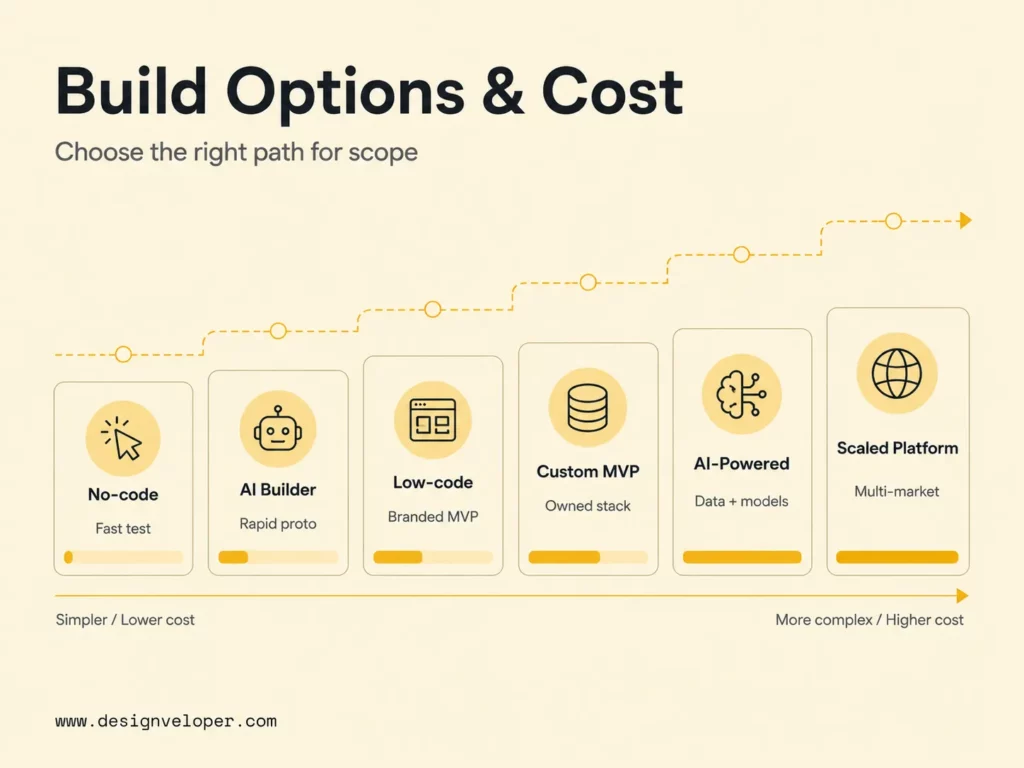
Dating App Development Options And Cost
Dating app development cost depends on platform count, custom matching, chat and media, safety operations, integrations, and the amount of work needed to validate the idea. A useful estimate names its scope and inputs; a quote that says only “dating app” is not comparable with another project’s quote.
| Route | Good fit | Cost and delivery trade-off |
|---|---|---|
| No-code prototype | Testing whether a small, invited community wants the interaction or concierge service. | Lower initial engineering effort, but data portability, safety workflows, and custom matching may be limited. |
| Low-code or AI builder | Validating branded screens and standard workflows with a small team. | Can speed scaffolding; generated code, permissions, moderation, and deletion still need technical review. |
| Custom MVP | Launching a differentiated product with server-side eligibility, reliable chat, privacy controls, and a moderation console. | More engineering and QA effort, with clearer control over data and product rules. |
| Scaled platform | Supporting multiple markets, heavy media or video, advanced ranking, and larger trust operations. | Requires sustained investment in infrastructure, compliance, support, experimentation, and moderation staffing. |
A published vendor estimate gives a concrete comparison point, not a universal price. In a guide updated October 12, 2026, RaftLabs lists a $35,000–$70,000 estimate and a 12–16 week schedule for a niche MVP with profiles, matching, messaging, and moderation. The same guide lists $3,000–$12,000 in monthly operating costs for SMS, photo scanning, hosting, and moderation. These are that vendor’s figures; the page uses dollar signs without stating the currency or service-region assumptions. Confirm currency, team location, platform count, included QA and safety work, vendor charges, and exclusions before using the range in a budget.
For a comparable quote, scope one launch market and list the required user journey: eligible registration, profiles, preference and block rules, discovery, mutual matches, chat, reporting, moderation tools, analytics, and account deletion. Then ask each team to price the same platform plan and name the people, person-hours, blended rates, release work, and assumptions behind its total.
| Budget line | What the estimate should include | Billing pattern |
|---|---|---|
| Product build | Onboarding, profiles, eligibility, discovery, matching, chat, report/block, moderation console, analytics, and deletion. | One-time delivery estimate with team and hours stated. |
| Platform and release | One cross-platform client or separate native apps, device coverage, QA, accessibility, store preparation, and release fixes. | One-time; identify what is excluded. |
| Safety and privacy | Moderation workflow, age controls, data mapping, access controls, security review, disclosures, support, and appeals. | One-time setup plus ongoing staff time. |
| Third-party services | Maps, messaging, SMS, photo moderation, identity checks, payments, notifications, and AI services. | Separate setup fees from usage-based charges. |
| Operations | Hosting, databases, media storage, support, moderation shifts, maintenance, and incident response. | Monthly low, expected, and high-activity scenarios. |
| Exclusions and contingency | Marketing, legal advice, taxes, store fees, data migration, video, extra markets, and custom model work. | List exclusions and the business-approved reserve separately. |
Use the team’s actual quote inputs: one-time build cost equals scoped labor plus setup, integration, privacy/security, QA, release, and the chosen contingency. Monthly operating cost equals infrastructure and storage plus usage-based vendors, moderation, support, and maintenance. Compare estimates only when the included journey, platform, market, currency, and safety workload match.
Separate build spending from recurring operations. Hosting, databases, photo storage, messaging, maps, identity or age checks, notifications, payment processing, AI inference, customer support, moderation shifts, security maintenance, and incident response continue after release. Ask vendors for data-export terms and usage tiers, then model low, expected, and high activity. For a broader planning method, see this software development cost guide.
A phased calendar keeps spending tied to evidence. The 16-week scenario below sits at the upper end of the cited vendor’s 12–16 week range and assumes two engineers on the core build, shared product and design support, part-time QA and safety operations, one cross-platform release, and no live video. It is a planning example, not a delivery promise. Store review and vendor approvals can vary, so leave a buffer and replace the assumptions with the selected team’s delivery plan.
| Phase | Weeks | Exit evidence |
|---|---|---|
| Discover and validate | 1–2 | Audience, launch area, safety owner, success metrics, and narrow product scope agreed. |
| Prototype and technical spikes | 3–4 | Tested onboarding, discovery, matching, chat, data deletion, vendor fit, and build estimates. |
| Build the core loop | 5–10 | Registration, profiles, eligibility, discovery, mutual match, chat, and basic admin work end to end. |
| Integrate safety and analytics | 11–12 | Report/block, moderation queue, disclosures, access controls, deletion, billing, and metric events are connected. |
| Closed beta and rehearsal | 13–14 | Users complete the flow; abuse cases, support routing, moderation load, and rollback are exercised. |
| Fix, submit, and buffer | 15–16 | Release blockers are addressed and store submissions are prepared; approval timing remains external. |
Xem thêm:
Building A Safe Dating App: Moderation, Privacy, And Store Readiness
Safety is an operating system for a dating product, not a single verification badge or launch checklist. The team needs rules users can understand, controls they can use, trained people who can act on reports, and technical evidence that critical paths work. Store policies are a floor; local privacy and child-safety obligations also depend on where the app operates.
| Control area | What the product needs | Evidence to review before launch |
|---|---|---|
| Age and store access | Enforce the appropriate age boundary and restrict access to dating functions as required by each store. | Test rejected underage and incidental-feature flows; confirm the Play Console setting and age declarations. |
| User-generated content | Terms, content rules, filtering, report and block controls, moderation, support contact, and an appeal path. | Submit test reports and prove they reach an accountable queue with a recorded resolution. |
| Location and profile privacy | Collect the minimum location and profile data needed; prevent coordinate probing and restrict staff access. | Compare app behavior and every SDK with privacy disclosures; test pause, export, and deletion. |
| Matching and AI | Apply eligibility before ranking; document model purpose, inputs, version, limits, and human fallback. | Review cohort exposure, negative feedback, harmful outputs, rollback, and correction or appeal handling. |
| Incident response | Assign owners for urgent reports, account restrictions, user communication, evidence handling, and escalation. | Run a tabletop exercise and confirm staffing can meet the response promise shown to users. |
For user-generated content, Apple’s App Review Guidelines require safeguards such as filtering objectionable material, reporting, blocking abusive users, and accessible contact information. Google Play’s UGC policy calls for clear terms, ongoing moderation, and in-app reporting and blocking controls. Design the actual moderation workflow and staff capacity before opening registration.
Google Play also requires apps in its Social and Dating categories to follow its Child Safety Standards. These standards still apply when an app is adults-only or age-gated. The policy includes published standards against child sexual abuse and exploitation, an in-app user-feedback mechanism, action to address child sexual abuse material, compliance with applicable child-safety laws, and a designated point of contact. Core dating and matchmaking apps must use Google Play’s Restrict Minor Access functionality; incidental dating features have a separate age-gating exception.
Apple’s App Store Connect announcement adds a “Dating and Relationships” descriptor starting November 16, 2026. Apps that include it receive a minimum age rating of 18+. Developers must submit the declaration when updating an app or changing its age-rating answers, and all apps must complete it by January 12, 2027. This App Store rating does not replace product age screening, moderation, or local legal review.
Maintain one data inventory that includes analytics, crash reporting, identity checks, chat, storage, and every third-party SDK. Reconcile that inventory with Apple’s App Privacy Details and Google Play’s Data safety form. Assign an owner to review changes when a new vendor or feature is introduced; deleting an account must also follow the documented rules for vendor data and derived features.
For AI features, use a documented review cycle: govern who owns the feature, map its users and harms, measure performance and unequal effects, then manage corrections, incidents, and rollback. Human moderators should handle context-heavy or high-impact cases. A model can prioritize a queue, but it should not silently make a final safety decision that the team cannot explain or appeal.
A dating app’s minimum paid features also depend on store policy. If subscriptions or digital boosts are part of the product, check Google Play’s payment requirements and applicable exceptions for the target market before designing checkout and renewal flows.
FAQs About Creating A Dating App
These answers resolve common build, budget, timeline, feature, and trust questions. The right choice still depends on the launch audience, platform rules, and the team’s ability to operate the product after release.
Can I Create A Dating App Without Coding?
Yes. A no-code tool can test a small invited community with profiles, basic discovery, introductions, and manually managed follow-up. Before using it with real users, confirm that it supports age controls, consent, reporting, blocking, data export, and account deletion. If the platform cannot meet the safety or privacy requirements, use it only for a low-risk prototype with no sensitive user data and plan a migration before opening the service broadly.
How Much Does It Cost To Create A Dating App?
There is no single dependable price for every dating app. One vendor’s published estimate is $35,000–$70,000 for a niche MVP with profiles, matching, messaging, and moderation; the source and its currency and scope limits are explained in the cost section above. Price your own agreed scope with actual team rates, then add integrations, privacy/security, store preparation, and monthly hosting, vendor usage, moderation, and support.
How Long Does It Take To Build A Dating App?
A vendor-published estimate puts a niche MVP with profiles, matching, messaging, and moderation at 12–16 weeks. The staged example in this guide uses the upper end of that range for validation, technical spikes, the core build, safety integration, beta, and submission preparation. It is not a guarantee: team availability, native platform count, integrations, moderation readiness, and store review can change the schedule.
What Features Should A Dating App MVP Include?
A dating app MVP should support age-appropriate onboarding, profiles, declared preferences, eligible discovery, mutual matching, chat, notifications, report, block, unmatch, moderation, privacy controls, basic analytics, and account deletion. Add monetization only when it is part of the hypothesis being tested. Defer video, broad AI ranking, and premium layers until the team can show that the core loop is useful and safe to operate.
How Do You Keep Users Safe In A Dating App?
Use age controls, clear conduct rules, privacy-preserving discovery, report, block and unmatch options, trained moderation, and a support path for urgent cases. Test the full flow with abuse reports, repeat accounts, location probing, and attempts to contact someone after a block. Assign an owner for response times and appeals, and review Apple, Google Play, and local rules before launch. A verification badge or automated filter does not prove that a person is safe.
Creating a dating app is a sequence of decisions about audience, trust, product scope, technology, and evidence. Start with one market and a small safe loop, use the cost and timeline model as a replaceable planning worksheet, and expand only when user value and moderation capacity support the next step.
For teams that need help connecting mobile product discovery, UX, backend, testing, privacy controls, and release planning, Designveloper’s mobile app development services can support the delivery plan.
Also published on

Share post on










Related Articles


How Much Does It Cost to Make an App? A Budget Breakdown
How Much Does It Cost to Make an App? A Budget Breakdown Published November 23, 2026
20 Best Small Business Applications In 2026
20 Best Small Business Applications In 2026 Published November 23, 2026
7 B2B Apps Compared: Categories, Costs, and Build vs. Buy
7 B2B Apps Compared: Categories, Costs, and Build vs. Buy Published November 23, 2026