
















DevOps Pipeline: A Complete Guide To Building One

KEY TAKEAWAYS:
- A DevOps pipeline is a structured workflow that moves code from commit to production through repeatable build, test, validation, deployment, and feedback steps.
- Its real value comes from automation, continuous feedback, and tighter collaboration between development and operations rather than from tooling alone.
- Effective pipelines usually rely on source control, CI/CD automation, testing, staging, deployment, monitoring, and environment strategy working together as one system.
- Teams build better pipelines when they align automation with their architecture, delivery maturity, artifact flow, and deployment risk tolerance instead of copying a generic setup.
If you have been around software development long enough, you have probably heard people talk about DevOps pipelines in the context of faster releases, fewer bugs, and smoother collaboration. That reputation is not wrong, but it also tends to oversimplify what a pipeline actually needs to do in practice.
When teams sit down to design a pipeline that truly fits their architecture, release model, and delivery maturity, the topic becomes much more practical. This guide breaks down what a DevOps pipeline is, how it works, which components matter most, and what teams should think about before building one. If you also want the broader context around the operating model behind it, this introduction to what DevOps means in practice is a useful starting point.
Related articles:
- What Is DevOps? The DevOps Lifecycle And How It Works
- DevOps Best Practices: 10 Ways To Improve Speed And Reliability
- What Is A DevOps Engineer? Skills And How To Become One
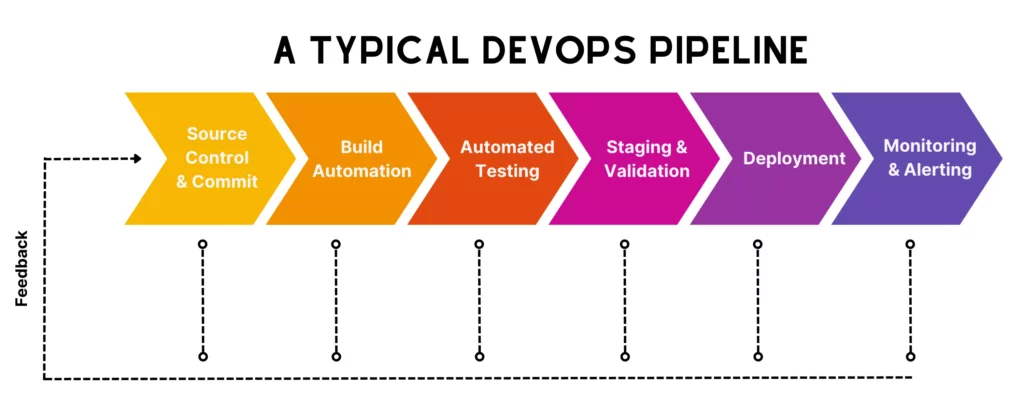
Use the definition first, then follow the pipeline from its stages to the decisions that shape implementation.
What Is A DevOps Pipeline?
A DevOps pipeline is a structured workflow that combines automated processes and tools to move code from a commit all the way to production. Instead of relying on manual handoffs that slow releases down or introduce avoidable mistakes, the pipeline connects development, testing, deployment, and feedback into one continuous flow.
In practice, a developer commit can trigger the full sequence automatically: build the application, run tests, validate quality, and deploy if everything looks healthy. That is why discussions about a DevOps pipeline often overlap with CI/CD pipelines, even though DevOps as a whole covers more than technical release automation alone.
What makes the pipeline valuable is not just speed. It is the fact that every stage also produces feedback. If a test fails or a build breaks, the process stops immediately, which helps teams fix problems while the change is still small and easy to trace.
Benefits Of A DevOps Pipeline
Organizations invest in DevOps pipelines because they want more reliable software delivery, not just more automation for its own sake. That is also reflected in broader market adoption. According to Market Growth Reports, the DevOps market has been growing at around 20.7% annually and is expected to reach roughly $17.26 billion by 2026.

The comparison becomes clearer when the broader workflow is separated from the automation layer inside it.
Those gains usually show up in several concrete ways:
- Faster delivery cycles: Automated workflows and continuous feedback reduce the time from code commit to release. Harness also reported that 35% of developers push code multiple times a day in DevOps-oriented environments.
- Improved software quality: Automated testing helps teams catch defects earlier, before they spread into later environments.
- Consistent and repeatable processes: Every build, test, and deployment follows the same defined sequence, which makes delivery more dependable.
- Better collaboration between teams: The pipeline creates a shared system that development and operations both rely on, which naturally reduces silos.
- Early and continuous feedback: Teams know quickly when a stage fails, which makes fixes easier and cheaper.
- Reduced deployment risk: Smaller, incremental changes plus automated checks make releases more stable and predictable.
DevOps Pipeline Vs CI/CD Pipeline
DevOps pipelines and CI/CD pipelines are closely related, but they are not identical. A CI/CD pipeline is one of the core technical mechanisms inside a broader DevOps setup. It focuses on automating code integration, testing, and deployment.
A DevOps pipeline goes further by wrapping that automation inside a larger delivery workflow that also includes collaboration, monitoring, operations, and feedback. In other words, the CI/CD pipeline is often the technical backbone, while the DevOps pipeline represents the larger operating system around it.
Below is a clearer comparison between the two:
| Aspect | DevOps Pipeline | CI/CD Pipeline |
| Definition | A complete workflow combining culture, collaboration, processes, tools, and practices to deliver software continuously | An automated process plus automation tools for integrating, testing, and deploying code changes |
| Goals | Improve collaboration, speed, reliability, and continuous improvement across the lifecycle | Deliver code changes quickly and safely through automation, reduce manual errors, and keep software ready for deployment |
| Scope | Broad. Covers the entire software development process, from planning and coding to deployment and monitoring. | Narrower. Focuses mainly on automatically integrating, testing, and deploying code changes. |
| How to implement | Involves cultural and organizational changes, process adjustments, and soft skills in addition to tool adoption. | Primarily tool-driven automation and building specific automated workflows. |
In a healthy setup, CI/CD gives DevOps its automated delivery muscle, while DevOps gives CI/CD the shared ownership model it needs to work consistently.
How A DevOps Pipeline Works
On paper, a DevOps pipeline looks linear, but in reality it is a feedback-driven loop. Still, the technical flow usually follows a familiar pattern from code commit through validation, staging, deployment, and monitoring.
Continue reading:
- What Is MLOps? Understanding MLOps Lifecycle and How It Works
- What Are Git Concepts and Architecture?
- What Is DevSecOps? Shift‑Left Security in Modern DevOps
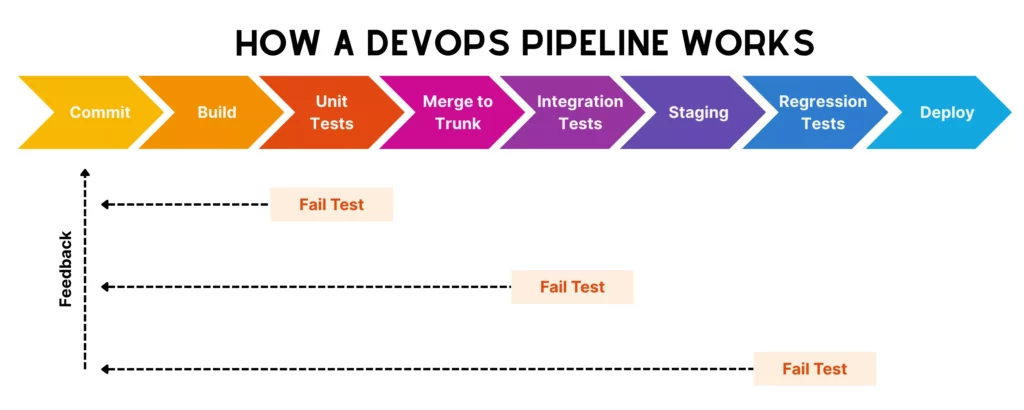
The next stages show how a code change moves through validation, release, and feedback.
Commit Starts The Workflow
A DevOps pipeline begins with a code commit. A developer pushes a feature, bug fix, or configuration change to a shared repository, and that action triggers the automated workflow without waiting for someone to start the process manually.
This is why source control discipline matters so much. Smaller, more frequent commits help the pipeline stay reliable and make failures easier to diagnose.
Build And Unit Tests Validate The Change
After the trigger, the system tries to build the updated codebase. That proves the change can actually compile and integrate with the rest of the application.
Unit tests then run immediately afterward. These fast, targeted tests validate whether individual components behave correctly. If a build or test fails here, the pipeline stops before unstable code can travel any further.
Merge To Trunk And Run Integration Tests
If the feature passes early validation, it is merged into the main branch and the pipeline moves into broader system checks. Integration tests now validate how the new change behaves with surrounding services, modules, or dependencies instead of treating it as an isolated unit.
This is also where teams that use trunk-based development usually benefit from shorter-lived branches and lower merge friction.
Staging, Regression Testing, And Deployment
Once the code passes integration tests, it moves into staging. This environment should look and behave as much like production as possible so teams can validate the release in realistic conditions.
Here, regression testing checks that the new change did not break existing behavior. Depending on the system, teams may also run acceptance checks, security validation, or manual review before allowing the deployment to proceed.
Feedback Stops The Pipeline When A Stage Fails
At any stage, if something fails, the pipeline stops and returns immediate feedback to the team. That feedback loop is one of the most important benefits of the model because it tells developers exactly where the failure happened while the context is still fresh.
Instead of letting broken code drift silently into later environments, the system forces fast learning and quick correction.
DevOps Pipeline Example
A typical pipeline becomes easier to understand through a real product scenario.

A concrete example helps connect the pipeline stages to the components teams manage in production.
Imagine a team working on an eCommerce app. A developer adds a discount code feature and pushes the change to the main repository. That commit immediately triggers the pipeline.
The pipeline builds the application, packages it into a deployable artifact such as a Docker image, and runs unit tests. If everything passes, integration checks validate that the new feature still works with related systems like payments and user accounts. The application then moves into staging, where regression, security, and final validation happen before production deployment.
After release, monitoring tools watch error rates, performance, and unusual behavior. If failed transactions spike, the team can investigate immediately or roll back with less risk.
Components Of A DevOps Pipeline
A DevOps pipeline is more than a list of stages. It depends on a few continuous capabilities that keep code moving safely and keep the delivery system responsive over time.
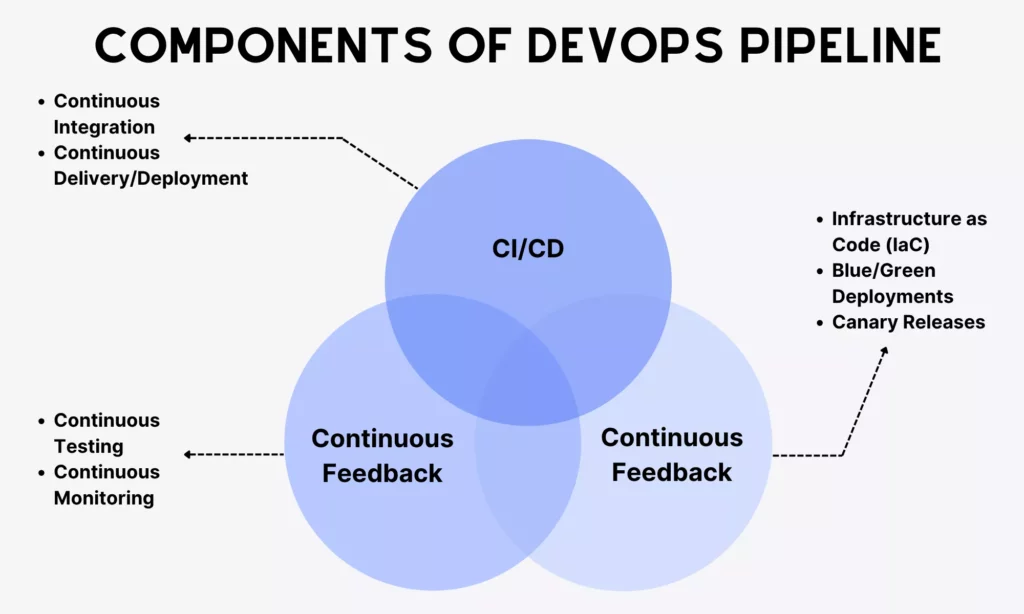
These components work together as one system, even when different tools own different responsibilities.
Continuous Integration, Delivery, And Deployment
These capabilities shape how code moves forward automatically through the pipeline.
- Continuous Integration (CI)
CI means developers merge smaller code changes into a shared repository frequently. Every commit triggers automated builds and tests so issues can surface early rather than after long integration delays.
One common strategy here is trunk-based development, where teams work directly on a single main branch or use very short-lived branches that merge back quickly. This supports fast integration and fewer merge conflicts.
- Continuous Delivery/Deployment (CD)
Continuous delivery keeps code in a deployable state at all times after it passes testing and validation. Continuous deployment goes one step further by releasing changes to production automatically when every required check succeeds.
Some teams still keep manual approvals before production, especially where risk, compliance, or stakeholder sign-off matters.
Continuous Feedback
If CI/CD is how code moves forward, continuous feedback is how the system learns and reacts. It means collecting insights during builds, tests, deployments, and live operations, then returning those signals to the team quickly enough to influence the next decision.
This idea usually appears through two practical mechanisms:
- Continuous Testing
Testing is not delayed to the end. Unit, integration, regression, and sometimes performance or security checks are embedded throughout the pipeline so problems surface sooner and cost less to fix.
- Continuous Monitoring
Once the application is live, monitoring tools track performance, errors, and user behavior. That production feedback helps teams improve both the application and the delivery workflow itself over time.
Continuous Operations
Continuous operations focuses on automating operational tasks so applications stay stable even while releases keep happening. That includes monitoring health, handling incidents, scaling resources, and managing infrastructure without constant manual intervention.
Teams often support this through techniques such as:
- Infrastructure as Code (IaC)
Infrastructure is defined and managed through code so environments stay repeatable and easier to maintain.
- Blue/Green Deployments
Teams maintain two environments and switch traffic only after the new version proves stable, which helps reduce downtime and rollback risk.
- Canary Releases
Changes roll out gradually to a smaller group first, which limits blast radius and helps teams observe real-world impact before a full release.
Key Stages Of A DevOps Pipeline
The idea of a pipeline becomes much clearer once you map its stages from source control through production monitoring.
See more:
- DevOps Tools: Best Tools For Every Stage Of The DevOps Lifecycle
- Considerations for Using DevOps Managed Services
- Agile Methodology Testing: Lifecycle, Quadrants And Best Practices
The stages below show what teams need to control from the first commit through production monitoring.
Source Control And Commit
A DevOps pipeline starts with commits to source control. Developers write and push code into systems such as Git, GitHub, GitLab, or Bitbucket, where collaboration, versioning, and code review can happen consistently.
In a healthy pipeline, commits stay small and frequent so teams can review changes, identify issues, and integrate work with lower conflict risk.
Build Automation
After the commit, the pipeline enters the build stage. Here, the system compiles code, resolves dependencies, and packages the application into a runnable artifact.
This step matters because if the application cannot be built cleanly in a consistent environment, nothing later in the pipeline can be trusted. Automated build orchestration through tools like GitHub Actions, GitLab, or Azure Pipelines keeps this process repeatable.
Automated Testing
Once the build succeeds, automated testing validates code quality. Unit tests usually run first, followed by integration checks and broader validation depending on the pipeline design.
This stage is non-negotiable because it protects the pipeline from moving faulty code deeper into staging or production. It also strengthens feedback loops, which is one of the main reasons a pipeline improves delivery confidence.
Staging And Pre-Production Validation
Once the code passes automated tests, it moves into a staging environment that should mirror production as closely as possible. This is where teams validate the release under more realistic conditions before going live.
Typical validation here includes functional and end-to-end checks, regression testing, acceptance review, performance testing, security scans, and deployment verification. Teams may also define quality gates that block promotion if key thresholds are not met.
Deployment
If staging looks healthy, the application is ready for production deployment. Depending on the operating model, this release may happen automatically or after a manual approval step.
Teams often reduce deployment risk further through strategies such as blue-green deployment or canary rollout so traffic can shift gradually or roll back cleanly if needed.
Monitoring And Alerting
Once the application is live, the pipeline enters observation mode. Monitoring and alerting tools track uptime, performance, errors, and user activity so teams can understand how the system behaves in the real world, not only in test environments.
These insights flow back into development and planning, which is what turns the pipeline from a delivery mechanism into a continuous improvement loop.
What To Consider Before Building A DevOps Pipeline
There is no one-size-fits-all pipeline. The best setup depends on your application structure, team maturity, toolchain complexity, and deployment model.

These design choices affect reliability, cost, and the effort needed to keep the pipeline healthy.
Technology Stack And Application Architecture
Your tech stack and architecture influence almost every pipeline decision. A monolithic web app and a container-heavy microservices platform will not need the same stages, timing, or deployment patterns.
That is why teams should map the real structure of the application first, including components, interactions, and deployment shape, before they design the workflow around it. Topics like web application architecture become directly relevant here.
Team Skills And Delivery Maturity
Tools alone do not make a pipeline work. The team needs enough delivery maturity to maintain the system and react well when automation fails.
If a team is still new to DevOps practices, jumping immediately into full continuous deployment may create fragile workflows. More mature teams, on the other hand, may find manual-heavy pipelines unnecessarily slow. The right automation level should match where the team actually is today.
Budget, Toolchain Complexity, And Maintenance Effort
There are many DevOps tools available for different functions. Some are specialized, while others cover several parts of the workflow at once. More tools do not automatically produce a better pipeline.
Teams need to consider cost, integration quality, and the long-term effort required to maintain the toolchain. A simpler setup that fits the real workflow is often better than an overbuilt stack that creates its own operational burden.
Artifact Management And Environment Strategy
Once the application is built, the artifact needs to move across testing, staging, and production in a controlled way. If environment handling is weak, teams can easily fall into the classic problem where a build behaves differently in one stage than another.
A good strategy usually involves clear artifact versioning, a centralized repository, and configuration separation so code and environment settings do not get tangled together.
Build-Once Versus Rebuild-Per-Stage Decisions
Teams also need to decide whether the pipeline should build once and promote the same artifact through every stage, or rebuild separately for each stage.
Build-once models usually improve consistency, because the exact same artifact moves forward each time. Rebuild-per-stage models can still make sense in some situations, especially where environment-specific dependencies are unavoidable, but they also introduce more variance and risk.
DevOps Pipeline Tools
DevOps pipelines cannot run reliably without tools. Those tools support automation, integration, testing, deployment, and visibility across the workflow.

The tool categories below map the pipeline concept to practical implementation choices.
Source Control Tools
Source control tools help teams manage code, track changes, enforce review workflows, and keep collaboration stable across the codebase.
What they typically do:
- Track code changes over time
- Support branching and merging workflows
- Enable pull requests and code reviews
- Integrate with CI/CD pipelines
Common tools include Git, GitHub, GitLab, and Bitbucket.
CI/CD Automation Tools
These tools automate the process of building, testing, and deploying code whenever changes are made. Instead of coordinating releases manually, the system executes workflow stages and jobs consistently.
What they typically do:
- Automatically build applications after commits
- Run test suites and validations
- Orchestrate multi-stage pipelines
- Deploy applications to different environments
Common tools include Jenkins, GitLab CI/CD, GitHub Actions, and Bitbucket Pipelines.
Testing Tools
Testing tools help ensure that new code does not break existing functionality or introduce security and performance issues deeper in the release flow.
What they typically do:
- Run unit, integration, and regression tests
- Automate API and UI testing
- Measure code coverage and quality
- Detect performance or security issues in some setups
Common tools include JUnit, TestNG, Selenium, Cypress, Postman, REST Assured, Aikido Security, Checkmarx, and Snyk.
Deployment And Container Tools
Once code passes validation, it needs to be packaged and released consistently. Container and deployment tools help standardize how applications are built, shipped, and run across environments.
What they typically do:
- Package applications into deployable units such as containers
- Manage container orchestration and scaling
- Automate deployments across environments
- Support rollback and release strategies
Common tools include Docker, Kubernetes, Helm, Ansible, and Terraform.
Monitoring And Alerting Tools
After deployment, teams need monitoring and alerting tools to understand application behavior in production and respond quickly when something goes wrong.
What they typically do:
- Track system metrics such as CPU, memory, and latency
- Monitor application performance and errors
- Generate alerts when thresholds are exceeded
- Provide dashboards and logs for analysis
Common tools include Prometheus, Grafana, Elastic Stack, Datadog, and New Relic.
Conclusion
This guide should give you a clearer view of what a DevOps pipeline is and how it works step by step in practice. From CI and continuous feedback to staging, deployment, monitoring, and pipeline tooling, each part contributes to a more reliable delivery system.
Of course, building a pipeline that truly fits your team still depends on your architecture, delivery maturity, and how you balance speed with stability. That is why many companies work with experienced engineering partners instead of trying to design the whole system through trial and error alone.
If your organization is at that point, Designveloper can help bridge planning, engineering, and release execution more effectively. In broader software development services work, our teams combine Agile practices with modern tools such as Git, GitHub Actions, Argo CD, Kubernetes, and Terraform to support continuous delivery across web and mobile projects.
If you are planning to build software or modernize legacy systems using DevOps, reach out to us.
Also published on

Share post on










Related Articles



Types of Agile Development Methodology: Key Approaches Compared
Types of Agile Development Methodology: Key Approaches Compared Published October 14, 2026
Agile Methodology Testing: Lifecycle, Quadrants & Team Practices
Agile Methodology Testing: Lifecycle, Quadrants & Team Practices Published October 13, 2026
What Is an Agile Team? Structure, Roles, and How to Build One
What Is an Agile Team? Structure, Roles, and How to Build One Published October 13, 2026


















