
















Best DevOps Tools by Category: Fit, Trade-Offs, and Team Needs

KEY TAKEAWAYS:
- Map a code change with a DevOps pipeline that connects its owner, checks, artifact, deployment, and recovery route.
- Before a pilot, assign an operating owner for setup, access, upgrades, and retirement.
- Keep tool jobs distinct: image builders create artifacts, orchestration systems manage workloads, and test-management products do not execute tests.
- Set a baseline for delivery and reliability before a pilot, then include maintenance effort in the decision to expand.
A team can own many DevOps tools and still lose time to broken handoffs, slow feedback, or unclear release ownership. The better starting point is to find where work gets stuck: planning, source control, build and test, deployment, operations, or security. DevOps tools support these jobs across the software lifecycle, but no single product makes a team effective on its own. This guide maps the main categories, compares their fit and trade-offs, and shows how to assemble a smaller toolchain around real team needs. Treat product examples as a shortlist, not a universal ranking; check current vendor documentation, plan limits, and operating requirements before you adopt a tool.
What Are DevOps Tools?
DevOps tools are software products that help teams plan, build, test, release, operate, monitor, and secure applications. Each tool supports one or more activities, such as tracking a change, running a test, provisioning infrastructure, or alerting an operator to a production issue.
DevOps is a way of working across development and operations; it is not a tool category or a product. A DevOps practice uses people, processes, and technology together. A DevOps toolchain is the connected set of tools that supports that work. Microsoft’s toolchain guidance also frames selection around the team’s workflow and integration needs rather than a single required stack.
For example, a code-hosting platform can connect a reviewed change to a CI job, test result, deployment record, and monitoring alert. That link between stages gives a team more context when it investigates a failed release. The tools still need clear owners, suitable permissions, and a workflow that people can follow.
Related reading:
- What Is a CI/CD Pipeline? How Modern Teams Turn Code Into Reliable Releases
- What Is DevSecOps? How Security Fits Into Every Release
- Git Concepts And Architecture: Objects, HEAD, Index & Workflow
Benefits of DevOps Tools
DevOps tools can make delivery work more repeatable when they remove a specific manual step or improve the handoff between roles. The result depends on how the team configures and adopts them; buying a tool does not guarantee faster releases, better quality, or fewer incidents.
- Earlier feedback: Automated builds and tests can show whether a change meets agreed checks before it moves to another environment.
- More traceable changes: Linking work items, code reviews, builds, and deployments helps teams see what changed and who approved it.
- Repeatable environments: Infrastructure and configuration automation can reduce manual differences between development, staging, and production.
- Faster operational feedback: Useful metrics, logs, traces, and alerts help teams investigate a problem and decide what to fix next.
These are possible workflow improvements, not guaranteed business outcomes. Teams should define a baseline and check whether the change improved the measure they care about, while also watching for added maintenance, noisy alerts, or new handoffs.
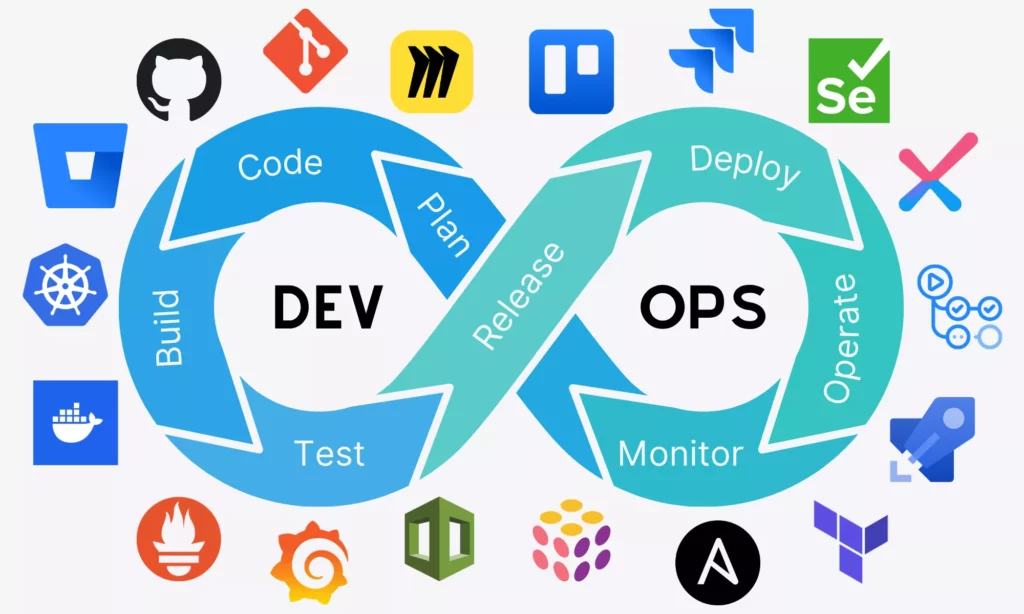
The DevOps Lifecycle and Where Tools Fit
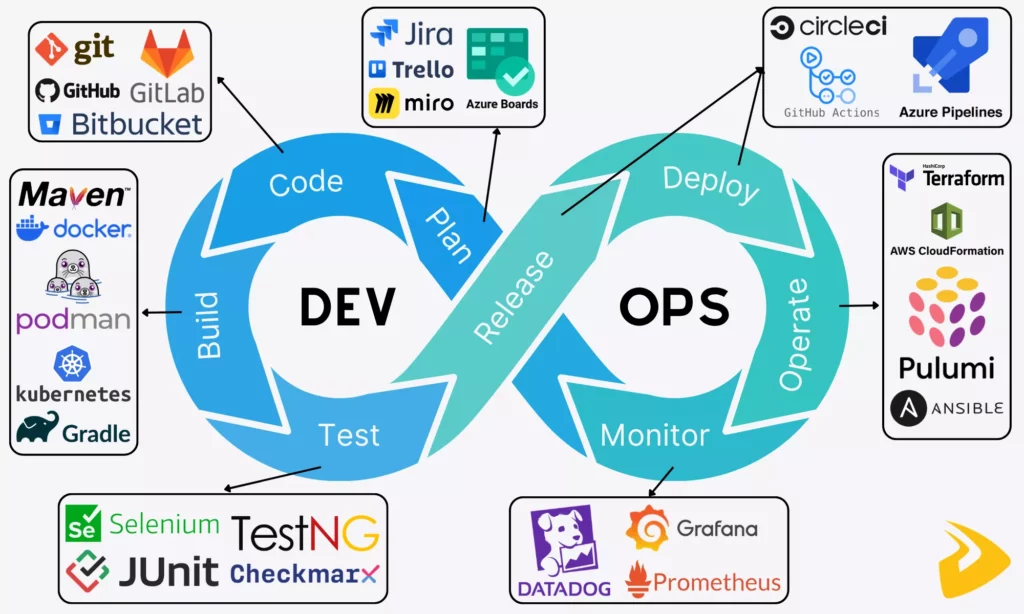
The lifecycle is a useful map for deciding what a tool should do. Teams may combine or rename stages, but work still needs to move from a request through code, verification, release, operation, and feedback.
| Stage | Tool role | Useful output |
|---|---|---|
| Plan | Backlog, priorities, requirements, and decisions | Work with an owner and a clear reason |
| Code | Version control, review, and collaboration | A reviewed, traceable change |
| Build and test | Compile, package, and verify changes | Test results and a release artifact |
| Release and deploy | Promote an approved version between environments | A controlled release with a recovery path |
| Operate and monitor | Manage infrastructure and observe production | Operational signals and feedback for the next change |
Plan: make work and ownership visible
Planning tools help a team capture requests, set priorities, assign owners, and record decisions. Jira, Azure Boards, Trello, and similar products can support different levels of workflow structure. The useful test is whether a developer or operator can find the goal, status, dependency, and decision owner without copying the same update into several systems.
Tools for project management should fit how the team handles work. A detailed sprint workflow can help a team that plans in iterations; a lighter board may be enough for a small group with frequent incoming requests. Keep documentation and chat connected to decisions, but do not treat messages as the only record of a release requirement.
Code: review changes in version control
Git records changes to source code so contributors can work in parallel, review a proposed change, and recover an earlier version when needed. Git is the version-control system; GitHub, GitLab, and Bitbucket are hosted platforms that add repository collaboration and related workflow features.
Choose a repository platform based on access controls, review rules, integrations, audit needs, and where the rest of the team already works. Keep ticket, commit, and pull-request references consistent so a later release review can trace the code change to its request.
Build: turn source code into artifacts
Build tools compile or package an application into an artifact that later stages can test and deploy. Maven and Gradle are common build tools for Java projects. Teams may use Bash, Python, or Go to connect steps, but scripts do not replace a managed, observable pipeline.
When a team also builds a container image, it should distinguish image creation from running or managing workloads. Buildah’s official tutorial describes building OCI-compliant images. Buildah creates container images; a runtime or workload platform determines how those images run.
Test: verify behavior before a release
Testing tools check different risks, so teams should choose them by test layer and application type. JUnit and TestNG support automated tests in Java projects, while Selenium and Cypress are examples used for browser-based checks. The test suite should report results back to the pipeline so a failed required check can block promotion.
Test management is a separate job from test execution. A product such as TestRail can organize test cases and results; a test runner or framework executes the automated checks. Teams should connect the two only when test plans, manual coverage, or reporting needs justify the extra system. Security scanning also has a distinct role and belongs in the cross-cutting DevSecOps controls below.
Release and deploy: promote an approved version
Continuous integration and delivery tools automate steps such as building, running checks, and promoting a version to an environment. GitHub Actions, GitLab CI/CD, Azure Pipelines, CircleCI, and Jenkins are examples, but their hosting, configuration, runner, and maintenance models differ. A team should confirm those details against current product documentation before choosing.
Continuous delivery keeps a tested change ready for release; continuous deployment also automates the production release when its required checks pass. Teams can use staged promotion, approvals, progressive rollout, or rollback controls to manage risk. The best fit depends on the release policy and the team’s ability to detect and recover from a bad change.
Operate: provision and configure infrastructure
Infrastructure as code tools define and provision infrastructure through configuration files or code. Terraform, AWS CloudFormation, and Pulumi are examples; compare the provider support, state management, language model, review workflow, and ownership that each choice requires. The Terraform introduction explains its infrastructure-as-code workflow.
Configuration-management tools such as Ansible, Chef, and Puppet address a related but different job: applying or maintaining configuration on systems. A team may use both provisioning and configuration management, but should define which system owns each setting to avoid conflicting changes or configuration drift.
Monitor and feed learning back into delivery
Monitoring and observability tools help a team understand how an application behaves after deployment. Metrics show measured values over time, logs record events, and traces help follow a request across services. Prometheus, Grafana, OpenTelemetry, and commercial observability platforms are examples, but a team should check which signals, retention, alerting, and access controls it actually needs.
A service-level indicator (SLI) is a measured signal about a service, such as request success. A service-level objective (SLO) is a target for that signal over a defined period. Useful alerts point to a user or system impact and identify who should respond; collecting more telemetry without an owner can add cost and noise without improving decisions.
DevOps Tools by Category: Fit and Trade-Offs
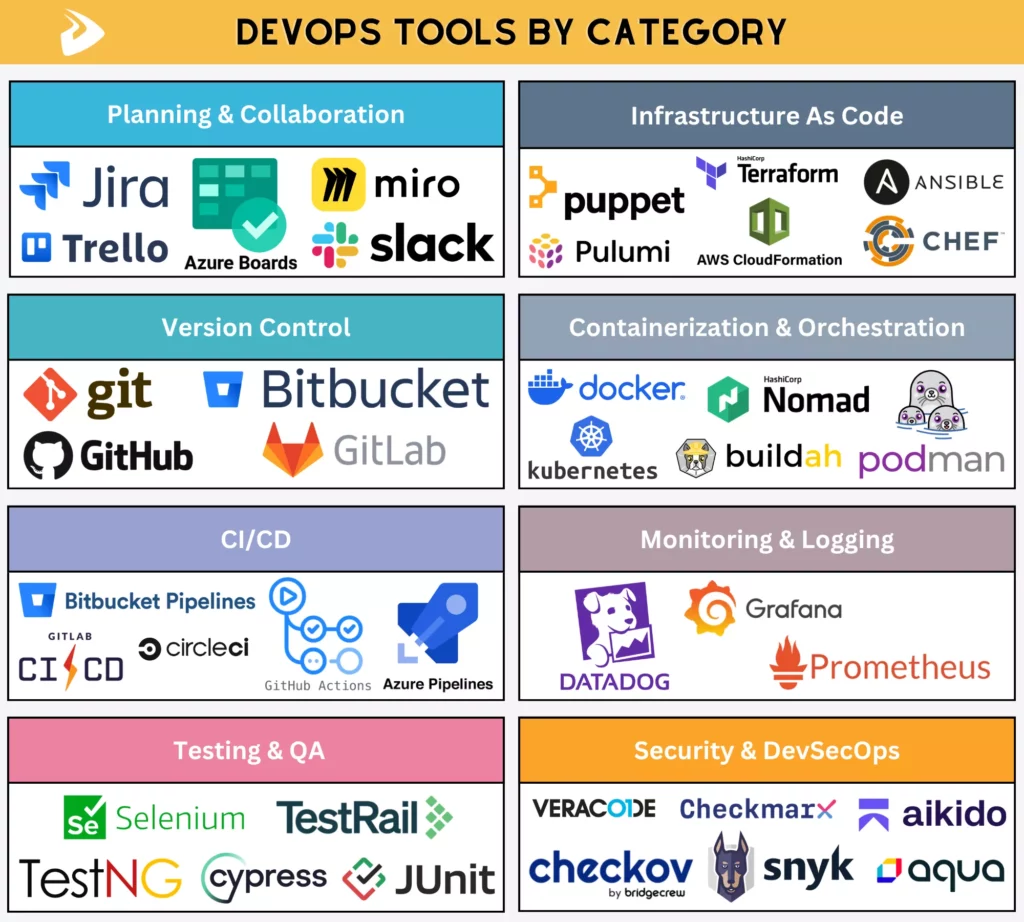
Use the categories below to find a missing capability, not as a checklist that every team must fill with a separate product. Some platforms span several jobs. The right shortlist depends on the systems already in place, the work the team needs to automate, and who will operate each tool.
| Category | Representative tools | Good fit when | Trade-off or check |
|---|---|---|---|
| Planning and collaboration | Jira, Azure Boards, Trello | The team needs visible priorities, owners, and dependencies | Avoid duplicate backlogs; check permissions, seats, and data-handling needs |
| Version control | Git with GitHub, GitLab, or Bitbucket | Changes need review, history, and a reliable link to releases | Compare access policy, integrations, audit needs, and managed versus self-managed options |
| CI/CD | GitHub Actions, GitLab CI/CD, Jenkins, Azure Pipelines | Builds and required checks should run consistently on each change | Compare runner ownership, secrets, permissions, usage limits, and maintenance; GitHub documents hosted and self-hosted runner models |
| Test execution | JUnit, TestNG, Selenium, Cypress | The team needs unit, integration, or browser checks tied to application risks | Choose by language and test layer; keep slower browser tests focused on key paths |
| Test management | TestRail and similar case-management systems | People need to organize manual coverage, test cases, or reports | A case record does not run a test; check integration and reporting needs |
| Infrastructure as code | Terraform, AWS CloudFormation, Pulumi | Infrastructure needs versioned definitions, review, and repeatable provisioning | Compare provider support, state ownership, change previews, and drift handling |
| Configuration management | Ansible, Chef, Puppet | Teams must apply or maintain settings across existing systems | Define which system owns each setting to prevent conflicting changes |
| Container image building and runtime | Docker, Podman, Buildah | The delivery path needs repeatable images or a local container runtime | Compare build and runtime features, OCI support, daemon needs, and rootless requirements |
| Container orchestration | Kubernetes and managed container platforms | Workloads need scheduling, scaling, or coordinated rollouts across services | Compare a managed runtime with the support burden of operating a cluster |
| Observability | Prometheus, Grafana, OpenTelemetry, Datadog | Signals and alerts help answer a defined reliability question | Check signal coverage, retention, export, access, alert ownership, and data volume |
| Log management | Grafana Loki, OpenSearch, Amazon CloudWatch Logs | Teams need to collect, search, retain, or analyze application and system logs | Check ingestion, retention, access controls, query cost, and links to traces |
| Security and DevSecOps | Snyk, Trivy | Security checks need to run at the stages where teams can act on findings | Verify scan scope, supported languages, permissions, false-positive handling, and plan limits |
Keep test management separate from test execution
A test framework or browser automation tool runs checks; a test-management product organizes cases, plans, and results. Teams may connect these systems when they need traceability across manual and automated coverage. They should not describe a test-management product as a functional test runner.
Separate image building from orchestration
Container image builders create package artifacts, while workload platforms manage where containers run and which state they should reach. Buildah belongs with image-building tools; Kubernetes uses declarative workload objects to manage containerized applications across a cluster, as its documentation explains. A small service may use a managed runtime instead; choose a cluster only when its scheduling or rollout features justify the operating work.
Place security checks where they can act on findings
Security scanners can check code, open-source dependencies, container images, or infrastructure-as-code, depending on the product and plan. Snyk’s documentation describes separate product scopes for these assets. Product names can overlap, so confirm supported languages, severity rules, false-positive handling, permissions, and edition limits before choosing a scanner.
Security is not a final test stage that one scanner can complete. Link the check to an owner and a response path, and decide which findings block a release. A tool that reports risks without a triage process can add noise while leaving the underlying issue unresolved.
DevOps Starter Stacks for Different Team Needs
A starter stack should cover the team’s current delivery path with the fewest systems it can operate well. The examples below are starting points, not fixed recommendations; add complexity only when a specific workflow, scale, or control requirement calls for it.
| Team context | Start with | Reason and condition to expand |
|---|---|---|
| Learning DevOps | Git repository, one CI workflow, automated tests, and a simple staging target | Follow one change from commit to test and deployment; add containers or orchestration after the basic flow is understood |
| Startup or small team | One code host, one CI/CD service, the test tools the application needs, and managed hosting where it fits | Reduce setup work, but check plan limits, access, billing triggers, backups, and a path to move data or pipelines later |
| Enterprise | Approved defaults for identity, source control, CI/CD, audit, security, and observability | Standardize shared controls; allow team-specific tools only when a documented need outweighs support and integration costs |
| Cloud-native workloads | Image build and registry, deployment automation, and a runtime that meets workload needs | Use Kubernetes when scheduling, scaling, or rollout needs justify cluster operations; add a service mesh only for a defined traffic or policy problem |
How DevOps Tools Work Together in a Toolchain
Tools work together when a change can move through the delivery path without manual copying or losing the context needed for a decision. Consider a small team that ships a web API and wants to reduce uncertainty before production deployment.
- A developer opens a reviewed change in the team’s Git platform, linked to the work item and its acceptance checks.
- The CI service runs required unit and integration tests, then creates a versioned artifact. If a required test fails, the workflow blocks staging promotion so the developer can fix or revert the change.
- The deployment workflow promotes that same version to staging, where the team checks a short smoke-test path before approval.
- After release, monitoring signals and alerts help the on-call owner decide whether the change is healthy or needs a rollback.
The team should connect the workflow to the systems it already uses and test what happens when a check fails. A managed application runtime may be enough for this service; Kubernetes is not a default requirement. If the workload later needs cluster scheduling or more advanced rollout controls, the team can pilot orchestration and account for its support burden.
This is a design example, not a claim that any one stack will improve delivery by itself. Before rollout, check that failed tests block the intended stage, deployment records identify the artifact, and an operator can find the release owner and recovery procedure. A process review can help the team find missing ownership or recovery steps around the toolchain.
Continue reading:
- What Is A DevOps Engineer? Skills And How To Become One
- DevOps Best Practices: 10 Ways To Improve Speed And Reliability
- DevOps Managed Services: What They Include & How To Choose A Provider
How to Choose the Right DevOps Tools
Choose DevOps tools by working from a delivery problem toward a tested solution. A short evaluation keeps a team from adding overlapping systems before it knows which handoff needs attention.
- Map the workflow. Trace a recent change from request to production. Record waits, manual steps, failures, duplicated records, and unclear ownership.
- Set constraints. Note the languages, repositories, cloud or hosting environment, security requirements, data-location rules, and skills the team must support.
- Check integrations and access. Confirm that the shortlist can exchange the required status and artifacts. Compare hosted and self-managed choices, identity controls, runner limits, data access, support, and exit options.
- Compare total operating effort. Include setup, administration, upgrades, training, maintenance, usage limits, and the work needed to keep integrations reliable. Verify current pricing and plan terms on vendor pages rather than relying on old comparison tables.
- Pilot with a real service. Use representative code and a non-production environment. Define the checks that must pass, who reviews the results, and how the team will roll back or remove the tool.
A useful pilot acceptance check is observable: the workflow records the change, publishes test results, blocks promotion when a required check fails, and makes the deployed version easy to identify. Set the expected result before the pilot so the team can make a clear keep, adjust, or stop decision.
Watch for tool-selection traps
Common mistakes are usually workflow or ownership problems disguised as product gaps. Keep these checks in the same evaluation instead of treating them as a separate shopping list.
- Buying before mapping the bottleneck: A new tool will not fix unclear priorities or a review queue with no owner.
- Choosing isolated “best-of-breed” products: A stronger tool in one category may create more integration work than the team can maintain.
- Adding complexity too early: Containers, Kubernetes, or a service mesh should solve a stated workload or operating need, not serve as a maturity badge.
- Ignoring retirement and ownership: Every tool needs an accountable owner, a support path, and a plan to migrate its data or workflows if it no longer fits.
Measure a pilot without overstating tool impact
Compare a pilot with a baseline and keep delivery-flow measures separate from product outcomes. A tool may make a step more visible or repeatable. Release speed and reliability can also change because of team size, architecture, review policy, or the work being delivered.
- Track a flow signal such as lead time from an approved change to deployment, or the number of deployments in a defined period.
- Track reliability with failed-change rate and time to restore service, using the same definitions before and after the pilot.
- Record manual handoffs, test failures, alert noise, and time spent maintaining the tool so an apparent speed gain does not hide new work.
- Review user or business outcomes separately when the change is intended to improve a product result; do not attribute that result to tooling alone.
The service owner and delivery team should record the baseline, choose a review window, and set a threshold for changing or ending the pilot before it starts. Keep the tool only if required checks and ownership remain reliable and added maintenance stays within the team’s agreed limit. Separate that decision from user or business outcomes.
Conclusion: Build a Toolchain Around the Work
DevOps tools are most useful when each one has a clear job, connects to the next stage, and has an owner who can maintain it. Start with the delivery path and its bottlenecks, then choose only the categories that address a real need. Test the handoffs, operating model, and recovery path before standardizing. If you need help planning or building a software product, explore Designveloper’s software development services and scope the work around your team’s requirements.
Also published on

Share post on










Related Articles


Best DevOps Tools by Category: Fit, Trade-Offs, and Team Needs
Best DevOps Tools by Category: Fit, Trade-Offs, and Team Needs Published October 14, 2026
Types of Agile Development Methodology: Key Approaches Compared
Types of Agile Development Methodology: Key Approaches Compared Published October 14, 2026
DevOps Best Practices: 10 Ways To Improve Speed And Reliability
DevOps Best Practices: 10 Ways To Improve Speed And Reliability Published October 14, 2026


















