
















DevOps Best Practices: 10 Ways To Improve Speed And Reliability

KEY TAKEAWAYS:
- DevOps works when teams share responsibility across the software lifecycle, not when they simply add more tools.
- Clear Agile and DevOps practices help teams plan small changes while tying release decisions to checks, policy, and production feedback.
- Use progressive delivery with named health signals and a recovery path that fits how reversible a change is.
- Track five current DORA metrics for one service at a time; use the trends to improve delivery, not to rank teams.
Teams rarely struggle because they have never heard of CI/CD or automated testing; they struggle when a passing pipeline still leaves ownership, security, and production recovery unclear. DevOps best practices close that gap by connecting planning, automation, and operations around one service and its users. The ten practices below help teams increase delivery speed without treating speed as the only outcome. Start with the workflow causing the most delay or customer risk, then expand only when evidence shows the change is helping.
10 DevOps Best Practices That Improve Speed and Reliability
The most useful practices form one delivery system: plan work in small increments, automate repeatable checks, protect releases with security and operational guardrails, and learn from production. Use this list as a starting point, then adapt each practice to the service, team, and risk involved.
- Plan work in small, deployable increments.
- Share ownership across development and operations.
- Automate the CI/CD pipeline.
- Manage infrastructure as code.
- Test at every stage of a release.
- Integrate security throughout delivery.
- Make production observable and actionable.
- Roll out changes gradually with recovery rules.
- Keep each change small enough to diagnose.
- Measure delivery with current DORA metrics.
Xem thêm:
- What Is DevOps? The DevOps Lifecycle And How It Works
- DevOps Pipeline: A Complete Guide To Building One
- DevOps Tools: Best Tools For Every Stage Of The DevOps Lifecycle
1. Plan Work in Small, Deployable Increments
Agile planning supports DevOps when it turns broad requests into work that a team can build, test, review, and release in manageable steps. Smaller work items make dependencies visible earlier and give teams more frequent opportunities to learn from users.
Keep the backlog focused on an outcome, define acceptance checks before implementation, and make infrastructure or pipeline work visible alongside feature work. A sprint sets a planning and review rhythm; it does not require every production release to wait until the sprint ends. A change can ship when it meets the team’s checks and release policy, whether the team plans weekly or works continuously. For a broader view of Agile software development, keep iteration cadence separate from deployment policy.
2. Share Ownership Across Development and Operations
Delivery becomes harder when developers are judged only on feature completion while operations is judged only on avoiding change. Agree on shared outcomes for one service, such as user-facing reliability, delivery flow, and time to resolve incidents. Developers, testers, security specialists, and operators can contribute different expertise without making every person responsible for every task.
Make ownership concrete: name who maintains the pipeline, who reviews production alerts, who can approve a release exception, and where responders find the runbook. Joint reviews should focus on the system and the evidence, not on assigning blame. This gives teams a path from a failed check or incident to a specific workflow improvement.
3. Automate the CI/CD Pipeline
A CI/CD pipeline should turn a reviewed change into a traceable artifact, run the checks appropriate to that change, and make the release state visible. Start with repeatable builds and fast automated tests; add security, integration, and deployment steps where they reduce a known risk. Keep the pipeline configuration under version control so teams can review changes to the delivery process itself.
Continuous delivery and continuous deployment are related but not identical. Continuous delivery keeps an approved change ready to deploy, while a team may still require a person to approve production. Continuous deployment automatically releases changes that pass the pipeline. Pick the latter only when testing, access controls, monitoring, and recovery procedures support that level of automation; GitLab documents both automatic staging with manual production promotion and automated deployment strategies in its deployment guidance.

4. Manage Infrastructure as Code
Infrastructure as Code (IaC) represents environments in versioned, reviewable files instead of relying on undocumented manual setup. A team can use those definitions to create repeatable environments, review proposed changes, and detect when the running system differs from the intended configuration.
Keep modules small enough to understand, validate a change before applying it, and restrict who can change production permissions or network boundaries. Separate secrets from ordinary configuration and make state ownership explicit. IaC does not remove the need for operational review: a syntactically valid plan can still expose data, widen access, or increase cost.
5. Test at Every Stage of a Release
Automated testing shortens the feedback loop only when the checks are relevant, repeatable, and fast enough for the stage where they run. Use focused unit checks for local logic, integration checks for component boundaries, and end-to-end checks for a small set of critical user journeys. Add performance or resilience checks when the service’s risks justify them.
Run quick checks on each proposed change and reserve slower suites for suitable pipeline stages. Track flaky tests and assign someone to fix or retire them; an unreliable gate teaches developers to ignore failures. A green test suite is evidence about the cases it covers, not a guarantee that a release cannot fail in production.

6. Integrate Security Throughout Delivery
DevSecOps moves security work into planning, coding, building, testing, release, and operations instead of leaving it as a final handoff. Automate checks for exposed secrets, vulnerable dependencies, unsafe code patterns, container images, and infrastructure configuration where those checks fit the system’s threat model. Security policies should identify which findings block a release and which need a documented exception.
Give findings an owner and a response path. A scan that produces many untriaged alerts can slow delivery without improving protection, so teams should tune checks, explain risk in actionable terms, and review exceptions over time. Teams new to the model can start with this overview of DevSecOps. NIST’s current DevSecOps practices guide maps security activities across the software lifecycle and CI/CD pipeline.
7. Make Production Observable and Actionable
Monitoring shows whether a known signal has crossed a condition; observability helps a team investigate why a system behaved that way. Combine metrics, logs, and traces where they answer different questions, and connect alerts to user impact rather than paging on every internal fluctuation. A signal is useful only when someone knows what action to take.
Page the on-call owner only when a signal reflects user impact or a defined service-level objective (SLO); keep dashboards for diagnosis and link each alert to the affected service and a maintained runbook. After a material incident, record the user impact, triggering change, recovery action, and follow-up owner. Review whether the alert fired in time and the runbook helped responders act, then tune the signal or workflow. Google’s SRE incident-management guidance describes using actionable alerts and maintained playbooks, with corrective actions fed back into team work.
When a trace crosses service boundaries, carry a request or correlation identifier through logs so responders can connect a user-visible symptom to the component that needs attention. Recheck this path after architecture changes; instrumentation that no longer reflects the live system can send responders in the wrong direction.

8. Roll Out Changes Gradually With Recovery Rules
Progressive delivery limits exposure by releasing to a small group, environment, or traffic share before expanding. A canary or blue-green strategy is useful only when the team can compare rollout health with agreed service objectives and stop promotion when those guardrails fail.
Example: A team changes a checkout flow after seeing regressions on recent releases. It first runs automated tests, then exposes the change to a limited user group and compares error and latency signals with the service’s pre-agreed objectives. If a guardrail fails, the team stops promotion. It rolls back automatically only if the application and data changes are safely reversible; if a database change cannot be undone without risk, the team holds the rollout and follows its recovery procedure instead. The example is a decision pattern, not a universal threshold.
9. Keep Each Change Small Enough to Diagnose
Small changes make review and diagnosis easier because fewer unrelated modifications move together. Keep a change narrow enough that the team can identify what it was intended to do, which checks cover it, and which part to investigate if production behavior changes. If a release fails, this limits the scope of the recovery without repeating the pipeline and rollout advice from earlier practices.
Small does not mean splitting work into arbitrary fragments. Choose a slice that delivers a coherent user or operational outcome, and avoid combining unrelated refactors with a risky release. Where a feature needs more than one step, feature flags can separate deployment from user exposure, provided the team also owns flag cleanup and access rules.

10. Measure Delivery With Current DORA Metrics
Use DORA’s five software delivery performance metrics to review both throughput and instability. They are most useful when measured for one application or service at a time and read as trends in that service’s context—not as a universal score or a way to rank individual teams.
| Dimension | Metric | What It Measures |
|---|---|---|
| Throughput | Change lead time | Time from committing a change to deploying it in production. |
| Throughput | Deployment frequency | How often the service is deployed over a defined period. |
| Throughput | Failed deployment recovery time | Time to recover when a deployment fails and needs immediate intervention. |
| Instability | Change fail rate | Share of deployments that require immediate intervention, such as a rollback or hotfix. |
| Instability | Deployment rework rate | Share of deployments that are unplanned work caused by a production incident. |
Review the measures together and compare trends within the same service and timeframe. Higher deployment frequency alone is not progress if failed deployment recovery or rework also increases. Pair DORA trends with service objectives, incident reviews, and user feedback; record a baseline and choose one workflow improvement rather than setting a universal target or ranking teams. If the collection method or service scope changes, document it so the trend remains meaningful.
What DevOps Means Beyond Its Tools
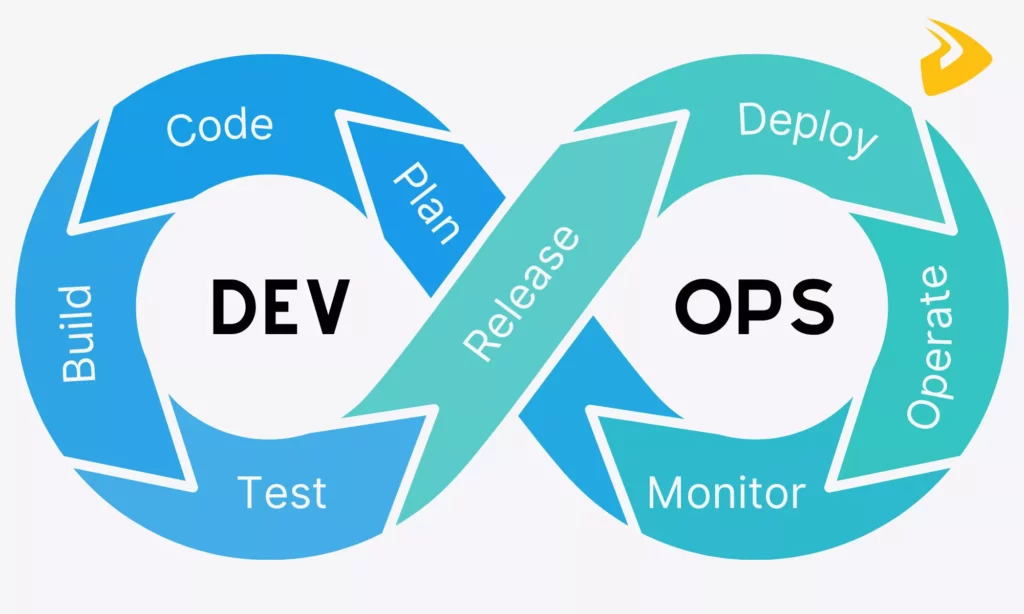
DevOps is a way of organizing software delivery so development and operations share responsibility from planning through production feedback. Its working loop includes building, testing, releasing, operating, monitoring, and improving software. CI/CD, IaC, automated testing, and observability support that loop; none of them alone makes a team DevOps-oriented.
The practical aim is to improve delivery flow without losing sight of reliability, security, and the people who use the service. Microservices are not a requirement: an architecture should change only when independent deployment or ownership needs justify the additional operational complexity. Similarly, continuous deployment is a release choice, not a prerequisite for adopting DevOps.
The right starting point depends on the constraint. If builds or tests delay feedback, improve that path first; if production changes are hard to diagnose, strengthen observability and recovery; if environments keep drifting, make configuration reviewable. A smaller organization may share operational duties across a few roles, while a larger one may have dedicated reliability or platform teams. In either case, the people allowed to release and respond should remain explicit.

How to Implement DevOps Practices Successfully
Adopt practices through one workflow before changing the whole organization. A small pilot makes it easier to see whether an intervention reduces a real bottleneck or simply automates the existing problem.
- Choose a workflow and set a baseline. Identify where work waits or failures recur. Record the service-level and delivery measures that can show whether the change helps.
- Remove a bottleneck before automating it. Map handoffs, name an owner for each step, and make development, test, and production environments consistent enough for repeatable checks.
- Add checks and a safe release path. Automate tests tied to the target failure, define promotion and stop conditions, and document who can approve an exception.
- Review, adjust, and decide whether to expand. Compare the same measures after releases and incidents. Keep or change the practice based on user impact, and scale it only when the workflow is reliable for its users.
Keep the pilot small enough to learn from, but long enough to see the workflow operate through normal releases and at least one review cycle. The team should leave with a named owner, an updated runbook or pipeline, and a clear decision to keep, adjust, or stop the change.
Before expanding the approach, ask developers and responders whether it reduced waiting or uncertainty without shifting work downstream. A release check that catches defects but creates a manual queue may need a different owner or automation step. Record the decision and the evidence behind it so another team can adapt the practice rather than copy it without context.
Xem thêm:
- 10 Agile Development Best Practices & Templates
- DevOps Managed Services: What They Include & How To Choose A Provider

Conclusion
Effective DevOps improvement is a series of measured changes to one delivery workflow: give people clear ownership, automate repeatable checks, protect releases with recovery rules, and learn from production. If your team needs help reviewing a software delivery workflow, Designveloper’s software development services can discuss the scope and constraints before any implementation plan is proposed.
Also published on

Share post on










Related Articles



Best DevOps Tools by Category: Fit, Trade-Offs, and Team Needs
Best DevOps Tools by Category: Fit, Trade-Offs, and Team Needs Published October 14, 2026
Types of Agile Development Methodology: Key Approaches Compared
Types of Agile Development Methodology: Key Approaches Compared Published October 14, 2026
DevOps Best Practices: 10 Ways To Improve Speed And Reliability
DevOps Best Practices: 10 Ways To Improve Speed And Reliability Published October 14, 2026


















