














10 Agile Development Best Practices & Templates

KEY TAKEAWAYS:
- In Agile software development, teams deliver a small useful change, learn from it, and adapt the next decision; the goal is customer outcomes.
- An ordered backlog, clear ownership, and a shared view of blockers make it easier to coordinate without turning every task into a meeting.
- Review acceptance checks early, test in small increments, and keep verified changes ready to release with appropriate safeguards.
- Start with only the fields that help your team make a decision, then remove anything nobody uses; a template should serve as a working agreement.
- Pair delivery signals with a product outcome and a quality guardrail; do not treat activity or speed as customer value.
Agile development best practices help a team deliver value in short cycles while adapting its plan to new evidence. The right template makes work, priorities, or decisions easier to see; it does not make a team Agile by itself.
This guide covers 10 practical habits, a worked checkout example, and 10 copyable template layouts. Use the selection matrix to start with the lightest structure that fits your work.
What Is Agile Software Development?
Agile software development is an iterative way to build and improve software: a team delivers a usable increment, checks what happened, and adapts its next step. Instead of treating an early plan as fixed, the team keeps priorities visible and uses feedback to make informed trade-offs.
The Agile Manifesto principles emphasize frequent delivery, close collaboration, working software, and responding to change. Agile is not one prescribed process. Scrum and Kanban, for example, offer different ways to organize and improve work; the current Kanban Guide describes Kanban as a strategy for optimizing the flow of value through a process.
A practical cycle is to choose a problem, deliver a small increment, inspect it, and adapt the backlog or workflow. Teams may use sprints or continuous flow; choose a cadence that makes feedback timely without adding ceremony.
Related reading:
- The 12 Agile Principles And 4 Agile Values Explained For Teams
- What Is An Agile Framework? Definition, Types And Examples
- Agile vs Waterfall vs Scrum vs Kanban: How to Choose a Method
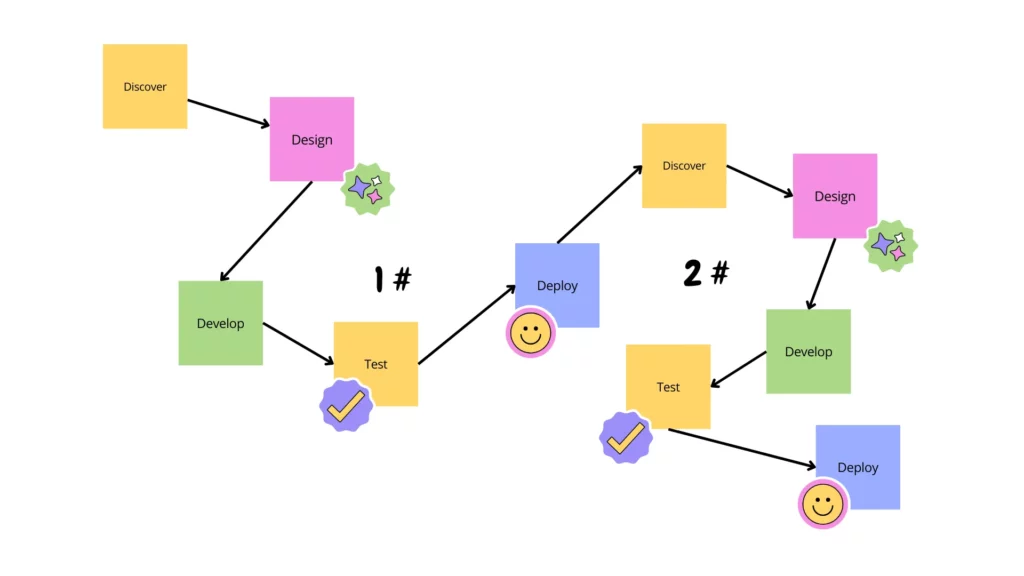
This cycle gives the practices below a shared purpose: make value visible, learn quickly, and adapt the next decision.
10 Agile Development Best Practices
These practices connect product decisions to daily delivery. Start with the bottleneck your team can observe, then add a habit that helps remove it.
1. Focus On Delivering Customer Value
Before starting an item, state whose problem it addresses and what observable change would make the work worthwhile. This keeps the team from treating output, such as completed tickets, as proof that customers benefited.
Worked example: An online shop wants to show delivery fees before payment because customers may be surprised late in checkout. The Product Owner records the current checkout-completion rate over the previous 14 days, then the team adds a shipping estimate before payment. Checks cover mobile and desktop, correct totals, and a completed payment flow. The Product Owner owns the outcome; an engineer and QA owner watch payment errors. Agree before release to pause if the error rate rises more than 0.2 percentage points above the baseline. Review completion and errors after seven days. The threshold is an example to set with the business, not an industry benchmark; no outcome is assumed.
2. Maintain An Ordered Product Backlog
A backlog is a current set of options, not a warehouse for every request. Order items by expected user or business value, risk, urgency, and dependencies. Refine the next few items enough for the team to understand the problem and decide whether the work is ready.
Add observable acceptance checks where they clarify what a user or tester should be able to verify. These Agile acceptance criteria describe outcomes without prescribing every implementation detail. Remove stale items and split work that hides several unrelated outcomes.
3. Break Work Into Small, Testable Increments
Large batches delay feedback and make it harder to isolate a problem. Slice a feature vertically so each increment gives someone a usable outcome, even if the first version is narrow. A smaller slice should still meet the team’s quality bar; it is not a reason to defer essential testing.
Short cycles make it easier to revisit scope and dependencies. Use Agile release planning to connect near-term work to a release goal, while keeping forecasts open to change when evidence or risk changes.
4. Collect Feedback Throughout Delivery
Use interviews, usability checks, support requests, analytics, or reviews to answer a specific question. A complaint can reveal friction; analytics can show where it occurs, but neither always explains why.
Record the signal, assumption, and decision. Feed learning into discovery and backlog ordering instead of collecting feedback without an owner or next step.
5. Make Work, Blockers, And Policies Visible
Show the work state, owner, blocker, and next decision in a shared place. For flow-based work, define when an item starts and finishes, and make WIP policies explicit when they help manage flow.
A board should answer a real coordination question, not reproduce every detail from every tool. Choose Agile project management tools for the team’s workflow, and keep the information that helps people act. If you use Jira, agree how issues, statuses, and decisions map to the team’s actual process; see this guide to Jira and Agile project management.
6. Build Cross-Functional Teams Around Outcomes
Give a team access to the skills needed to move an item through design, implementation, testing, and release. The goal is not for every person to do every job; it is to reduce avoidable handoffs and make ownership clear when specialist help is needed.
When employees and a vendor share delivery, define the decision owner, quality bar, access, and handoff rules early. A clear working agreement helps teams using software development outsourcing keep feedback close to the work instead of relying on end-of-phase sign-off.
7. Give Teams Autonomy Within Clear Guardrails
Leaders and product owners set the goal, constraints, and priority; the people doing the work choose how to achieve it and raise risks early. Autonomy works best when decision rights, the Definition of Done, and escalation paths are explicit.
In Scrum, the Product Owner is accountable for effective Product Backlog management, the Scrum Master for Scrum Team effectiveness, and Developers for creating a usable Increment. These accountabilities are framework-specific. See our Scrum overview and the official Scrum Guide.
8. Test Early And Often
Bring quality checks into refinement and development instead of saving all testing for the end. Review acceptance checks before implementation, automate stable repeatable tests, and use exploratory testing for behavior that scripts may miss. Add security and accessibility checks where the product’s risks call for them.
Early testing can shorten the time between a defect and useful feedback, but it does not guarantee speed or quality on its own. Match the test to the risk, keep the test suite maintainable, and use the team’s Agile testing approach to decide what belongs in each iteration.
9. Use CI And Continuous Delivery To Keep Releases Predictable
Continuous integration (CI) merges changes regularly and runs automated checks. Continuous delivery keeps each verified change ready to release, often with a manual production approval. Continuous deployment goes further by automatically releasing verified changes to production. These terms describe different release conditions, not interchangeable names for one pipeline.
Small merges, reliable checks, monitoring, and a rollback or recovery plan help teams release safely. A pipeline is not a substitute for a product decision: use it to make changes observable and reversible. For background on the broader software development life cycle, see our guide. The CI, delivery, and deployment distinction explains why a manual release gate can still fit continuous delivery.
10. Turn Retrospectives Into Small Experiments
A retrospective is useful when it changes how the team works, not just when everyone gets a chance to speak. Ask what helped, what slowed work, and what evidence supports each observation. Choose one or two changes that the team can try in the next cycle.
For every action, record an owner, a review date, and a signal that would show whether the change helped. At the next retrospective, keep, adapt, or stop the experiment. This closes the feedback loop instead of carrying an unowned action list from meeting to meeting.
Related reading:
- Agile vs DevOps: Key Differences and How They Work Together
- What is the Quality Assurance Process?
- What Is An Agile Team? Structure, Roles & Responsibilities
Review these practices against the team’s current bottleneck; the next section covers failure patterns that can undermine them.
Common Agile Mistakes And How To Avoid Them
These problems often look like a failure of the framework, but they usually come from unclear decisions or feedback that never changes the work.
1. Treating Agile As A Fixed Set Of Ceremonies
Running stand-ups and sprint reviews does not help if priorities cannot change when customer needs or delivery risks change. For each event, state the decision it supports; shorten, combine, or stop activities that do not produce information or action.
2. Letting A Tool Replace Collaboration
A board can show status, but it cannot resolve different assumptions about scope or quality. Use a tool to expose questions and decisions, then make room for the people involved to discuss trade-offs. Avoid adding fields and workflow states unless they help someone make a better next move.
3. Leaving Decision Rights Unclear
Unclear ownership creates duplicate work, slow approvals, and a backlog no one trusts. Name who orders work, who clarifies acceptance, who handles a blocker, and who decides whether a release is ready. In Scrum, use the official accountabilities; in another model, make the team’s equivalent responsibilities visible.
4. Recording Feedback Without Following Through
Teams lose trust in reviews and retrospectives when the same issues return without an owner. Limit follow-up to changes the team can test, assign each one, and check the result at a named review point. Keep unresolved ideas in a backlog instead of presenting them as completed improvements.
These mistakes often start when priorities, ownership, or follow-up stay implicit; the templates below make those decisions easier to see and revisit.
10 Agile Templates You Can Copy
Each template below starts with fields a team can paste into a document, spreadsheet, or board. Treat the fields as a starting point: keep only the ones that support a real decision, and review the format when the workflow changes.
1. Kanban Board Template
Use a Kanban board for support, maintenance, or other work that arrives continuously. Define the team’s real workflow first; a small board with explicit entry and exit rules is more useful than a long list of generic statuses.
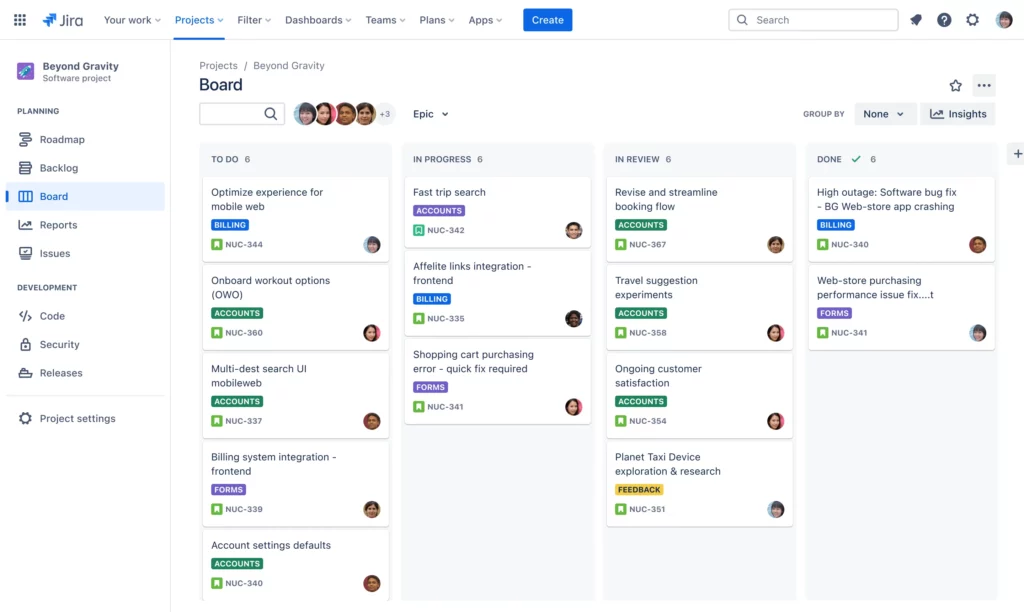
Fields: Work item · User or outcome · Owner · Status · Priority · Blocker · Started · Finished
Define start and finish policies. Add WIP controls when unfinished work needs attention, then review blocked items and flow.
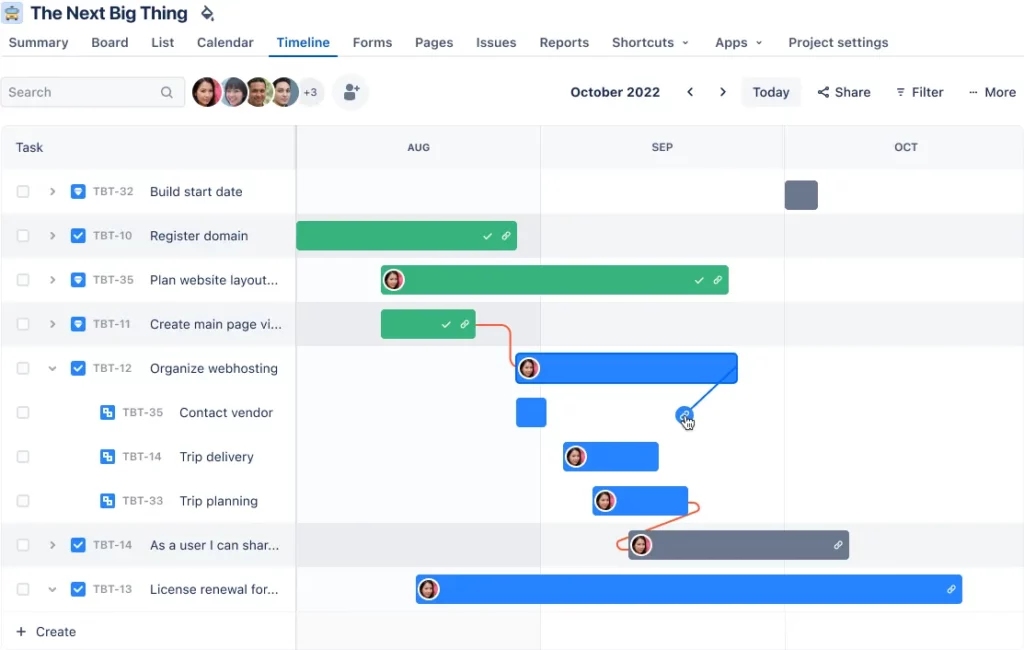
2. Gantt Milestone View
Use a Gantt view for milestones and dependencies across teams, vendors, approvals, or release windows. It complements iterative delivery; it is not a fixed promise for uncertain feature work.
Fields: Milestone · Outcome · Owner · Target window · Dependency · Confidence · Status · Next review
Show dates as ranges with confidence. Revisit the view when assumptions or dependencies change, and keep task execution in the team’s backlog.
3. Product Backlog Template
Use the product backlog to order possible work across the product. It covers candidate outcomes beyond the current sprint and helps decide what to explore or deliver next.
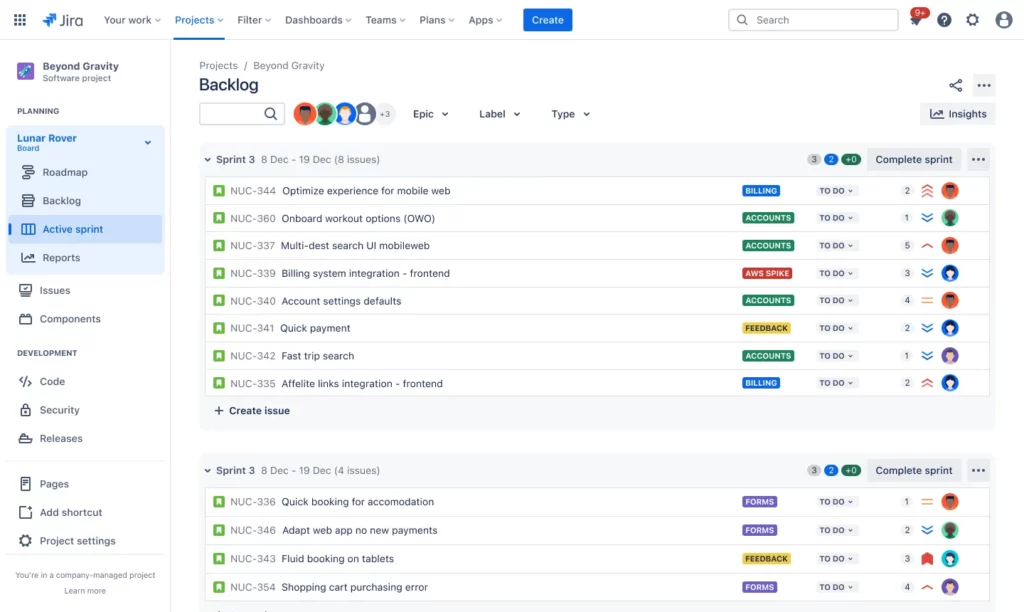
Fields: ID · User problem · Expected outcome · Priority · Acceptance checks · Size or risk · Dependency · Status
Refine only upcoming items and keep acceptance checks observable. In Scrum, the Product Owner remains accountable for effective backlog management.
4. Product Strategy Template
Use a strategy template when the team cannot explain its target user, core problem, or strategic choices.
Fields: Product vision · Target users · Core problem · Strategic outcome · Evidence · Bets · Non-goals · Review date
Separate evidence from assumptions and revisit when user needs or business constraints change. It guides direction, not task sequencing or product discovery.
5. Agile Project Plan Template
Use an Agile project plan when cross-functional work needs a shared view of scope, owners, risks, dependencies, and checkpoints. Unlike a task board, it coordinates the initiative while teams deliver in smaller pieces.
Fields: Outcome · Scope · Workstream · Owner · Milestone · Dependency · Risk · Review cadence · Decision log
Keep milestones at the outcome level and revise the plan when evidence changes.
6. Sprint Retrospective Template
Turn a sprint reflection into a follow-up experiment. Separate what the team observed from its explanation of why it happened.
Fields: Signal or observation · Likely cause · Change to try · Owner · Review date · Success signal · Result
Test one or two changes in the next sprint. At review, record whether to keep, adapt, or stop each one.
7. Sprint Backlog Template
A sprint backlog is the team’s plan for a sprint goal, not a second product backlog. Use it for timeboxed work that needs regular progress checks.
Fields: Sprint goal · Selected backlog item · Tasks · Owner · Dependency · Daily status · Definition of Done
Select work the team believes it can finish to its Definition of Done. Update the plan as the team learns; an estimate is not a reason to keep an unworkable plan.
8. Agile Roadmap Template
A roadmap communicates outcomes and sequence over a longer horizon. Use themes and confidence levels instead of treating every feature date as certain.
Fields: Theme · User outcome · Time horizon · Evidence or measure · Dependency · Confidence · Next review
Use horizons such as Now, Next, and Later. Revisit when evidence, dependencies, or priorities change.
9. Product Breakdown Structure Template
A product breakdown structure decomposes an initiative into capabilities, features, and deliverables. It can expose gaps in complex work, but it is optional and not a reason to specify every detail up front.
Fields: Product or outcome · Capability · Feature · Deliverable · Owner · Open question · Review point
Start high-level and refine only the branches the team is ready to explore. Change the structure as discovery develops.
10. Workflow Template
Use a workflow template when handoffs, states, or exceptions cause delays. Define what is ready, blocked, and finished so ownership is clear.

Fields: State · Entry rule · Exit rule · Owner · WIP policy · Blocked path · Measure to review
For example: Intake, Ready, Doing, Review, and Done. Define the owner and evidence for each transition, plus a blocked path and its resolver.
How To Choose The Right Agile Template
Choose a template based on the decision or coordination problem your team has now. Start with one view, then add structure only when a real dependency, risk, or stakeholder need makes the gap visible.
| Team situation | Starter template | Add structure when | Caution |
|---|---|---|---|
| Continuous support or incoming work | Kanban board and workflow policies | Work piles up, handoffs stall, or unfinished items keep growing | Do not add states that no one uses to make a decision |
| One team working toward a sprint goal | Product backlog and sprint backlog | A clear goal, acceptance checks, or dependencies are missing | Do not confuse the product backlog with the sprint plan |
| Uncertain product direction or stakeholder alignment | Product strategy and outcome-based roadmap | Several teams or important dependencies need a shared view | Do not turn themes into fixed promises before evidence supports them |
| Multi-team delivery with external milestones | Agile project plan with a milestone view | Approvals, vendors, releases, or shared risks affect sequencing | Use dates as forecasts and update them when assumptions change |
Related reading:
- Story Points in Agile and How to Estimate Them Effectively
- Scrum Software Development Turns Change Into Working Software
- 20 Software Project Management Methodologies for Software Development
Framework choice also matters. Scrum teams often need a product backlog, sprint backlog, and retrospective action record; flow-based teams may need a clear workflow and WIP policy. A team can borrow useful templates across frameworks, but should not combine ceremonies and fields unless they solve a real problem. If you are weighing flow-focused work, compare Agile and Lean approaches alongside your team’s actual constraints.
FAQs About Agile Development Best Practices And Templates
1. What Are The Most Effective Agile Development Best Practices?
Start with customer value, an ordered backlog, small increments, visible work, early testing, and feedback that changes the next decision. Choose habits for the team’s bottleneck, inspect whether they help, and adjust instead of copying every ceremony.
2. Which Agile Templates Should Beginners Use?
Start with a Kanban board and a product backlog so the team can see work and make priority decisions. Add a sprint backlog if you plan work in timeboxed iterations, and a retrospective template when the team needs to track one or two process experiments. Add a roadmap or project plan only when the coordination need appears.
3. How Do Agile Teams Measure Success?
Use delivery measures to understand the software delivery system, then pair them with product outcomes and a quality guardrail. DORA’s current guide names five software delivery performance metrics:
- Change lead time
- Deployment frequency
- Failed deployment recovery time
- Change fail rate
- Deployment rework rate
Apply them to one application or service and interpret them in context, as DORA’s metrics guide recommends. Add a product measure such as task completion or adoption and a guardrail such as escaped defects; delivery speed alone does not show whether the work mattered.
4. Can Agile Be Applied Outside Software Development?
Yes, when work involves uncertainty, changing priorities, and opportunities to learn through frequent feedback. Product discovery, operations improvement, and campaign work can use small batches, visible priorities, and review points. Keep the practices proportionate: use the parts that improve learning and coordination, not a full software ceremony set by default.
Conclusion
Choose a small set of Agile practices, make the work visible, and use evidence to decide what to change next. Start with the template that solves today’s coordination problem; add more only when the team can name the decision each one supports.
If your team needs help planning or building a software product, explore Designveloper’s software development services.
Also published on

Share post on










Related Articles



What Is A MVP Examples? What Founders Can Learn From 10 Cases?
What Is A MVP Examples? What Founders Can Learn From 10 Cases? Published November 09, 2026
What Is a Vector Database? How It Works, Use Cases & Limits
What Is a Vector Database? How It Works, Use Cases & Limits Published October 28, 2026
How AI Affects Software Development: Tasks, Tools, And Risks In 2026
How AI Affects Software Development: Tasks, Tools, And Risks In 2026 Published October 21, 2026