
















Hash Values (SHA-1) In Git: What You Need To Know

KEY TAKEWAYS:
- Git SHA-1 hash values identify stored objects by content, including blobs, trees, commits, and annotated tags, so a small byte-level change creates a different object ID.
- A commit hash is not just a diff because the commit object also records its tree, parent commits, author and committer metadata, timestamps, and message.
- Short hashes are convenient but full hashes are safer for automation, deployment records, incident reports, audit trails, and cross-repository communication.
- SHA-1 collision risk needs careful framing: Git has collision-detection protections and a SHA-256 transition path, but teams should still use current Git versions and verified workflows.
- Hash values support delivery traceability across debugging, code review, CI/CD, releases, rollback, artifact labels, and repository integrity checks.
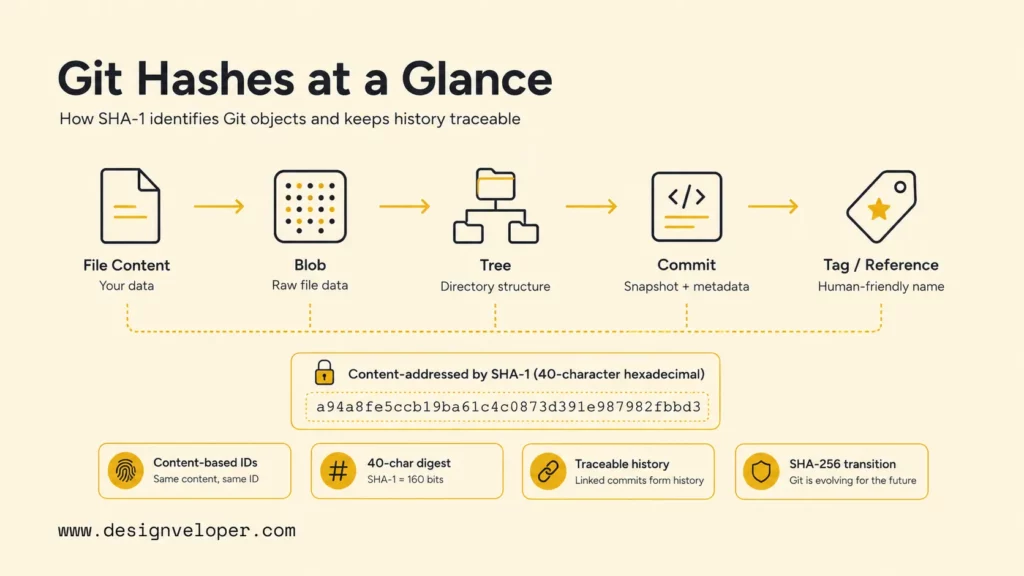
Understanding hash values SHA 1 in Git starts with one core idea: Git names stored objects from their content. A traditional Git object ID is a 40-character hexadecimal SHA-1 digest calculated from the object’s type, byte length, and content. Git uses those IDs for blobs, trees, commits, and annotated tags, so developers can address exact repository states and detect unexpected object changes.
A commit hash is therefore more than a random version number in modern software development. A commit object points to a tree, contains author and committer metadata, records its message, and normally points to one or more parent commits. Any change to that stored commit data produces a different object ID, which is why commit identity matters in AI code review, manual review, and release records. That connection makes repository history traceable, but it does not mean SHA-1 should be treated as a modern general-purpose security primitive.
Quick decision guide: Use full object IDs in automation, release records, incident reports, and cross-repository communication across DevOps pipelines. Use short hashes only for convenient human display after Git confirms the prefix is unambiguous. And, use git rev-parse, git show, and git cat-file to resolve and inspect objects. Finally, use git fsck when repository integrity is in question. Do not design new security systems around SHA-1; Git is transitioning toward SHA-256.
| Question | Practical answer | Useful command |
|---|---|---|
| What commit is checked out? | Resolve HEAD to its full object ID. | git rev-parse HEAD |
| What does an ID identify? | Ask Git for the object type. | git cat-file -t <id> |
| What is inside an object? | Pretty-print it according to its type. | git cat-file -p <id> |
| What changed in a commit? | Show its metadata and patch. | git show <id> |
| Is the object database connected and valid? | Run Git integrity checks. | git fsck |
Recommended for you:
- Software Development Life Cycle: Stages, Models, And Best Practices
- AI Tools For Developers: Best Options And How To Use Them
- Web Development Languages: Best Options For Modern Teams
What Are Hash Values?
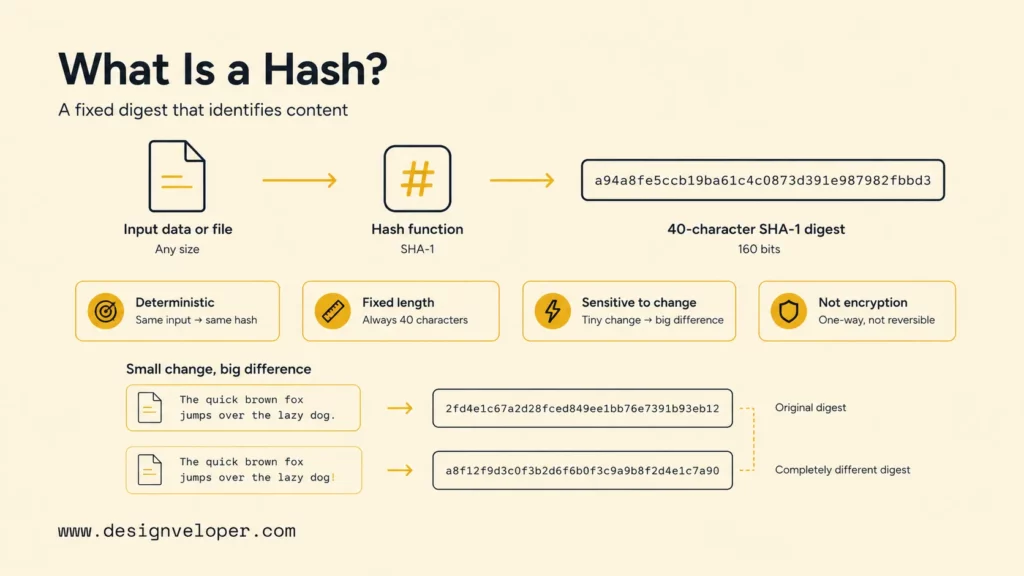
A hash value is a fixed-length result produced by a hash function from an input of any length. The function is deterministic: the same bytes produce the same digest. A tiny input change should produce a substantially different digest. Developers use hashes for content addressing, integrity checks, caching, deduplication, indexing, and comparisons where reading every byte repeatedly would be inefficient.
SHA-1 produces a 160-bit digest, conventionally displayed as 40 hexadecimal characters. Hexadecimal encodes four bits per character, so 40 characters represent 160 bits. A digest such as e69de29bb2d1d6434b8b29ae775ad8c2e48c5391 is not encrypted content and cannot be decrypted back into a file. It is an identifier computed from input bytes.
Three properties are useful to distinguish. Preimage resistance makes it difficult to recover an input that produces a chosen digest. Second-preimage resistance makes it difficult to find a different input matching one known input’s digest. Collision resistance makes it difficult to find any two different inputs with the same digest. The NIST hash-function project explains how modern hash standards support message digests and related security uses.
Collisions are mathematically unavoidable because unlimited possible inputs map into a finite digest space. The security question is whether finding one is computationally practical. In 2017, the SHAttered research demonstration produced two different PDF files with the same SHA-1 digest. Git’s transition documentation says Git 2.13.0 and later moved to a hardened SHA-1 implementation that mitigates that demonstrated attack, while still treating SHA-1 as weak and planning a move to SHA-256.
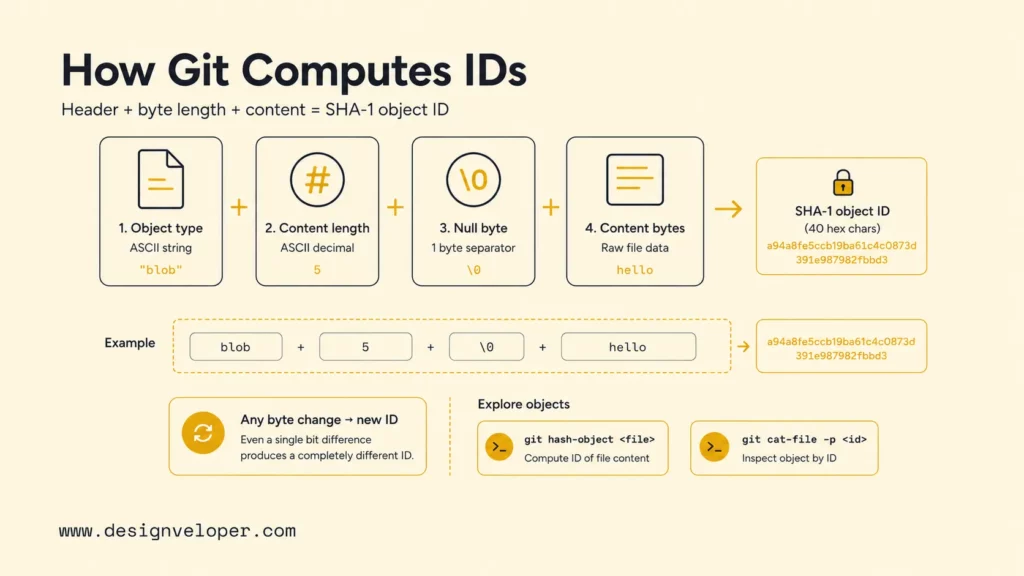
A plain file checksum and a Git object ID are not necessarily the same. Git hashes an object header plus the object’s content. For a blob containing five bytes, the conceptual input is blob 5\0 followed by those five bytes, where \0 represents a null byte. The Git user manual object-storage section documents the shared header and validation model for Git objects.
Hashing should not be confused with encryption or password storage. Encryption is reversible with the correct key. Password systems normally use salted, deliberately expensive password-hashing functions rather than fast general-purpose digests. Git needs fast, deterministic object addressing and integrity checks, so its object hash serves a different purpose. Reusing a Git SHA-1 example as a password or authentication design would apply the mechanism outside its intended context.
A Git hash identifies stored object bytes, not merely the filename a developer sees in the working tree.
Further reading:
- What Is DevOps? Definition, Benefits, And Best Practices
- Vibe Coding Vs Traditional Coding: Key Differences For Developers
- AI Programming Language: What It Means And How To Choose
How Are Hash Values Used In Git?
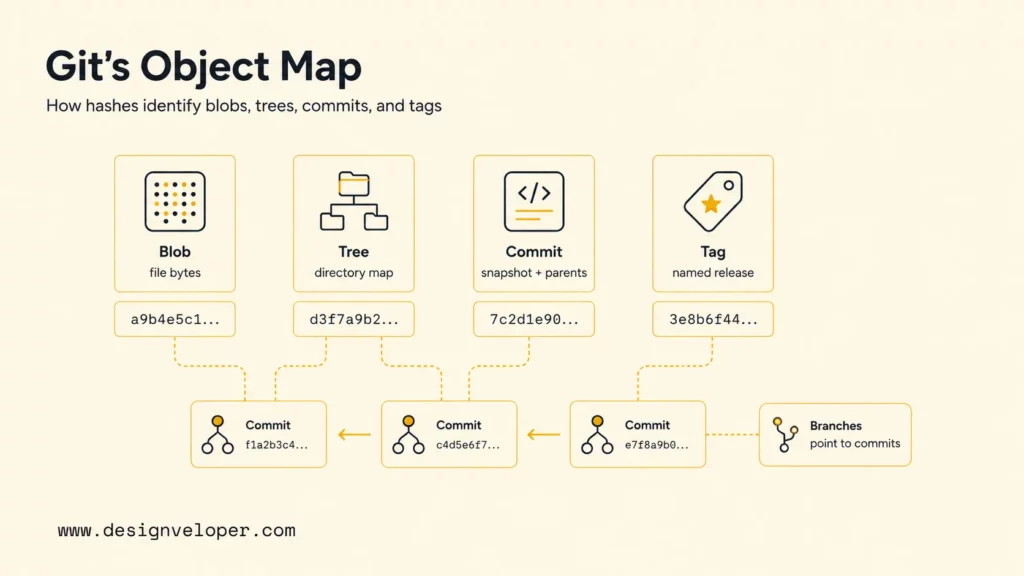
Git is a content-addressable object database. Traditional repositories use SHA-1 object IDs to identify four object types: blobs, trees, commits, and annotated tags. The Pro Git chapter on Git objects walks through how those objects are written and inspected inside .git/objects.
| Object type | What it stores | Why its hash changes |
|---|---|---|
| Blob | File content as bytes; the filename is not stored in the blob. | The stored content or filtering result changes. |
| Tree | Directory entries: names, modes, and object IDs for blobs or subtrees. | A name, mode, child object ID, or directory structure changes. |
| Commit | Tree ID, parent ID or IDs, author, committer, timestamps, and message. | The snapshot reference, parent, metadata, or message changes. |
| Annotated tag | A reference to another object plus tagger data, message, and optional signature. | The target or tag metadata changes. |
A blob’s content-derived identity enables reuse. If two paths contain identical stored bytes, Git can point both tree entries to the same blob object. Renaming a file without changing its content normally changes the containing tree because the path entry changed, but the blob ID can remain the same. Git does not need a special rename object; commands infer renames by comparing content across snapshots.
A tree turns object IDs into a directory snapshot. Each entry combines a mode, a name, and an object ID. A tree can point to blobs or other trees. Once any descendant object changes, the relevant parent tree receives a new ID. That change propagates upward until the root tree identifies the complete snapshot associated with a commit.
A commit points to the root tree and to its parent commit or parents. The first commit has no parent. A typical commit has one parent. A merge commit usually has two or more. Parent references turn otherwise independent commit objects into a directed history graph. A branch name is a movable reference to a commit; the commit object itself remains addressed by its object ID.
References provide memorable names over immutable object IDs. refs/heads/main identifies a local branch, refs/tags/v1.0.0 identifies a tag reference, and HEAD normally points symbolically to the current branch. Creating a new commit moves the branch reference to the new commit; it does not alter the earlier commit. In detached HEAD state, HEAD points directly to a commit instead of following a local branch, so developers should create or update a branch before work becomes difficult to find.
How a commit reaches repository content
main
tree + parent + metadata
names + modes + IDs
stored content
A commit’s identity covers its snapshot indirectly because the commit names the root tree, and every tree names its children.
Object IDs support ordinary Git commands. git log --oneline shows abbreviated commit IDs. git show <object> can display commits, tags, trees, and blobs, according to the current git show documentation. git rev-parse HEAD resolves a symbolic name to an object ID. Revision syntax such as HEAD^, HEAD~2, and tag^{commit} is defined in the Git revisions documentation.
Hash values also support integrity checks. Git can recompute an object’s ID from its stored representation and compare the result with the name used to address it. The git fsck manual describes checks for object validity and connectivity. Integrity verification detects corruption or broken references; it does not replace signed commits, signed tags, protected branches, access control, or trusted release provenance.
Related reading:
- Prompt Engineering For Developers: A Practical Guide
- Using AI In Software Development: Benefits, Use Cases, And Risks
- Prompt Engineering Best Practices: How To Get Better AI Results
How SHA-1 Hash Values Work In Git
Traditional Git calculates an object’s SHA-1 name from a canonical byte sequence: object type, one ASCII space, decimal content length, one null byte, and the object content. The current Git hash-function transition specification states the SHA-1 object name as the SHA-1 of the concatenated type, length, null byte, and SHA-1-form content.
For a normal file, git hash-object treats the input as a blob unless another type is supplied. The git hash-object documentation says the command computes an object ID and can optionally write the object into the database with -w. The following experiment calculates an ID without changing the repository:
printf 'hello' | git hash-object --stdinprintf 'hello!' | git hash-object --stdinThe two outputs differ because the content and byte length differ. Platform shell behavior matters: echo often appends a newline, and line-ending conversion can change bytes before content enters Git. Use printf, a known fixture file, or git hash-object --no-filters when reproducing a calculation precisely. The --path and --no-filters options control whether configured attributes and filters affect the stored blob representation.
To reproduce a blob ID outside Git, the external program must hash exactly the same byte sequence that Git hashes. It must measure content in bytes, not characters; encode the header as ASCII; insert one null byte; and append the unmodified content bytes. Text editors, Unicode encodings, byte-order marks, newline conversion, clean filters, and missing final newlines can all explain a mismatch. Running git cat-file -s <id> confirms the stored content length, while git cat-file -p <id> exposes the pretty-printed content for inspection.
A commit hash includes more than the diff. Inspect a raw commit with the following commands:
git rev-parse HEADgit cat-file -t HEADgit cat-file -p HEADgit show --pretty=raw --no-patch HEADThe output shows the tree, parent references, author, committer, timestamps, and message. Therefore, changing only the commit message changes the commit ID. Amending author or committer information changes it. Creating the same file diff on another parent changes it. Rebasing recreates commits on new parents, so rewritten commits receive new IDs even if their patches look equivalent.
This dependency propagates forward. If commit B names commit A as its parent and commit A is rewritten, the replacement for B must name the replacement A and consequently receives a new hash. That is why rebase, filter-repo operations, history cleanup, and amended commits can replace a whole chain of IDs. Remote branch coordination is required before force-pushing rewritten shared history.
Git accepts abbreviated IDs when the prefix identifies one object unambiguously. The required length depends on the repository’s object population and prefix distribution. The git rev-parse documentation provides --short for a unique shortened object name. Hard-coding seven characters is unsafe for durable automation because a prefix that is unique today can become ambiguous after more objects arrive.
git rev-parse HEADgit rev-parse --short HEADgit rev-parse --verify HEAD^{commit}The first command prints the full ID in the repository’s object format. The second asks Git for a short unique form. The third verifies that the supplied name resolves to a commit. Scripts should prefer full IDs and explicit type verification, especially for deployments, audit records, artifact labels, and API boundaries.
SHA-1 collision concerns require careful framing. The SHAttered demonstration proved a practical collision attack against SHA-1. Git added collision-detecting protection, but the Git project still selected SHA-256 as the successor. The transition design describes 40-hex SHA-1 names, 64-hex SHA-256 names, repository format extensions, and translation between compatible object names. SHA-256 repositories are not simply SHA-1 repositories with longer display strings; referenced object names inside object content also use the selected format.
When history is rewritten, Git is not renaming commits; it is creating new objects whose bytes describe a different history graph.
Explore more:
- Best AI For Python Coding: Tools, Use Cases, And How To Choose
- Java Vs Python: Key Differences, Use Cases, And How To Choose
- Most Used Programming Languages In 2026: Trends And Use Cases
Why SHA-1 Hash Values Matter For Developers
SHA-1 object IDs matter because they let developers identify an exact commit during debugging, review, release, rollback, and incident response. A branch name can move. A tag can be lightweight or, under sufficient permissions, replaced. A recorded full object ID gives a precise repository object to resolve and inspect.
During debugging, a hash connects an observed behavior to code and history. git show <commit> displays the commit and patch. git log <commit>..HEAD shows later history. git diff <old> <new> compares states. git blame links lines to commits, while git bisect narrows the first bad commit. The hash is the stable handoff between a bug report, monitoring event, deployment record, and investigation.
During review, object IDs make feedback traceable. A reviewer can state which commit was examined. If the author force-pushes a new version, the ID proves that the reviewed object changed. Hosting platforms may present branches and pull requests, but the underlying commit graph remains the precise technical record.
During releases, connect the deployed artifact to a full commit ID. A CI/CD pipeline can embed the ID in build metadata, container labels, a version endpoint, or deployment logs. Our guide to CI/CD pipelines explains how source events move through build, test, release, deployment, and monitoring. Commit identity makes that path auditable.
Hashes also help developers inspect Git itself. The git cat-file manual supports -t for type, -s for size, -e for existence, and -p for pretty-printed content. A compact investigation can use:
git rev-parse --verify <name>^{commit}git cat-file -t <id>git cat-file -s <id>git cat-file -p <id>git fsck --fullThese commands answer different questions. Resolution asks whether a name points to the expected type. Inspection shows stored content. git fsck checks connectivity and validity across the object database. Do not delete files inside .git/objects while troubleshooting. Make a backup or fresh clone, preserve evidence, and determine whether missing objects can be restored from another clone, remote, bundle, or backup.
The table below turns common hash-related symptoms into a first diagnostic action.
| Symptom | Likely explanation | First safe check |
|---|---|---|
| Short hash is ambiguous | More than one object shares the prefix. | git rev-parse --disambiguate=<prefix> or use a longer/full ID. |
| Commit ID changed after amend | Metadata, message, tree, or parent changed. | git show --pretty=raw --no-patch <old> <new> |
| Many IDs changed after rebase | Each recreated commit points to a new parent. | Compare old and new ranges with git range-diff. |
| File checksum differs from blob ID | Git hashed a blob header plus stored content; filters may apply. | git hash-object --no-filters <file> |
| Object is missing or corrupt | The object database or references may be incomplete. | git fsck --full on a preserved copy. |
Teams should also avoid using commit hashes as authorization. Knowing an object ID is not proof that a person may access or deploy it. Use protected branches, code review, signed commits or tags where appropriate, artifact signing, CI permissions, environment approvals, and auditable deployment controls. A hash identifies content; organizational trust comes from the systems and policies around it.
At Designveloper, we connect Git traceability with the wider delivery system: branch rules, review, automated testing, CI/CD, artifact versioning, deployment, and monitoring. Our DevOps pipeline guide shows why source control is one stage in an end-to-end release workflow. When teams need to improve that workflow, our software development services can support repository practices, delivery automation, testing, and maintainable product engineering.

FAQs About SHA-1 Hash Values In Git
Does Git Use SHA-1?
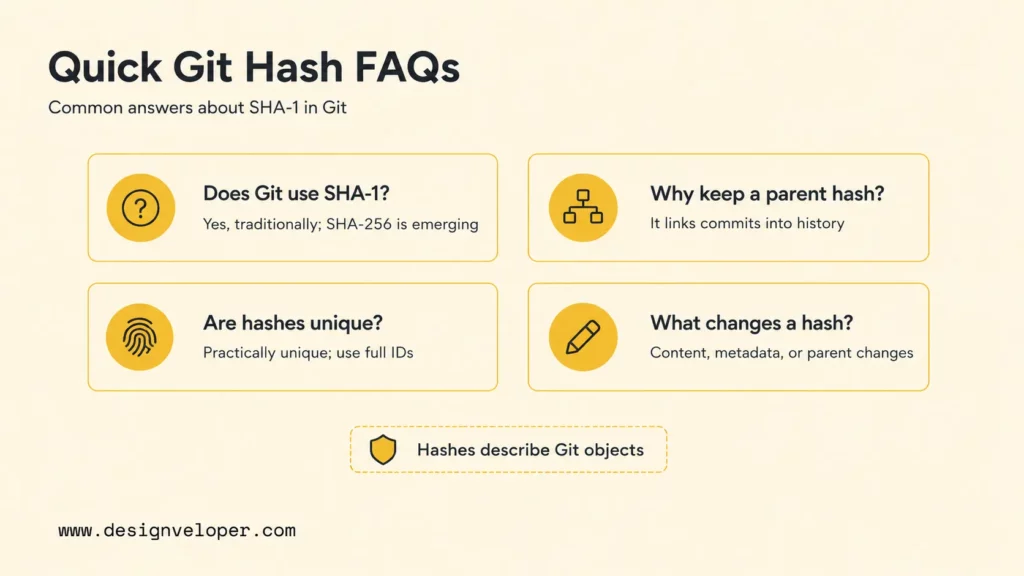
Yes, traditional Git repositories use SHA-1 object IDs, commonly shown as 40 hexadecimal characters. Modern Git also includes work toward SHA-256 repositories. The official transition design says repositories using the SHA-256 extension name objects with SHA-256 and can maintain mappings for SHA-1 compatibility. Check the current repository rather than assuming the format:
git rev-parse --show-object-format=storagegit rev-parse --show-object-format=inputOlder Git versions may not support every transition-related option or repository extension. Use the Git version approved by the team and hosting provider, and test interoperability before choosing a non-default object format for shared production work.
Why Does A Git Commit Contain The Previous Commit Hash?
A commit stores its parent object ID so Git can connect one repository state to the history that preceded it. The parent reference enables traversal, comparisons, merges, ancestry tests, logs, and history visualization. A merge commit can contain multiple parent IDs because it joins histories. The initial commit contains no parent.
Parent references also explain why history rewriting propagates. If a parent commit is replaced, every descendant that should follow the replacement must be recreated with a different parent field. New commit bytes produce new object IDs.
Is SHA-1 Better Than MD5?
SHA-1 has a larger 160-bit output than MD5’s 128-bit output, but both have known collision weaknesses and neither is suitable for designing new collision-resistant security systems. “Better” is therefore the wrong decision test. Use a currently approved hash or password-hashing scheme for the actual security requirement. Git’s object format is a specialized compatibility context, and the Git project selected SHA-256 as its successor rather than recommending SHA-1 for new applications.
Are Git Commit Hashes Unique?
Git commit hashes are designed to identify objects with an extremely low accidental-collision probability, but no finite hash function can provide mathematical uniqueness across unlimited inputs. Git also permits abbreviated prefixes only when they are unambiguous in the current repository. Use full object IDs for durable records and let Git calculate an adequate short form for display.
A deliberate collision is a separate security concern from an accidental duplicate. Git’s hardened SHA-1 implementation detects known collision techniques, and the SHA-256 transition addresses long-term trust. Signed commits and tags can authenticate provenance, but signature verification and key trust still need their own policies.
What Happens To The Hash When A Git File Changes?
Changing the stored bytes of a tracked file creates a new blob ID when Git records the change. The tree that references that blob receives a new ID. Parent trees up to the repository root also change. A new commit that points to the new root tree receives its own ID. The previous objects usually remain available while they are reachable from existing commits, tags, reflogs, or other references.
Changing only a filename can leave the blob ID unchanged while changing the tree ID, because blob objects do not store filenames. Changing a file mode can also change a tree. And changing only a commit message leaves the snapshot tree unchanged but creates a new commit object. Those distinctions make Git object IDs useful for diagnosing whether content, structure, or history metadata changed.
Hash values SHA 1 in Git are best understood as the addressing system for an object graph. Blobs identify content, trees identify directory snapshots, commits identify a snapshot plus metadata and parent history, and tags can identify named release objects. Use full IDs for durable traceability, inspect objects with Git’s plumbing commands, and follow the Git project’s SHA-256 transition instead of treating SHA-1 as a recommended choice for new security designs.
Also published on

Share post on










Related Articles



How Gitignore Works: .gitignore Rules, Patterns, And Examples
How Gitignore Works: .gitignore Rules, Patterns, And Examples Published August 05, 2026
Hash Values (SHA-1) In Git: What You Need To Know
Hash Values (SHA-1) In Git: What You Need To Know Published July 15, 2026
How To Build A RAG System: Step-By-Step (New Guide)
How To Build A RAG System: Step-By-Step (New Guide) Published June 23, 2026



















