
















How Gitignore Works: Rules, Patterns, Examples, And Debugging Tips

KEY TAKEAWAYS:
- Git’s staging index makes a path tracked as soon as it enters the index, even before its first commit.
- Use a committed
.gitignorefor shared rules,.git/info/excludefor one clone, andcore.excludesFilefor your own machine-wide clutter. - Pattern scope depends on slashes and wildcards. A negation cannot bring a file back when its parent directory is excluded.
- To stop tracking a committed file but keep its local copy, use
git rm --cached, review the staged change, and commit it.
A new .env file can stay out of a commit, while a staged copy may still appear in git status. A root-anchored .gitignore pattern can also match a build folder at the repository root but miss one nested below src/. These symptoms point to different questions about file state, rule source, and pattern scope. The examples and commands below show how to trace each cause, verify a fix, and avoid hiding files the team still needs.
What Is a .gitignore File in Git?
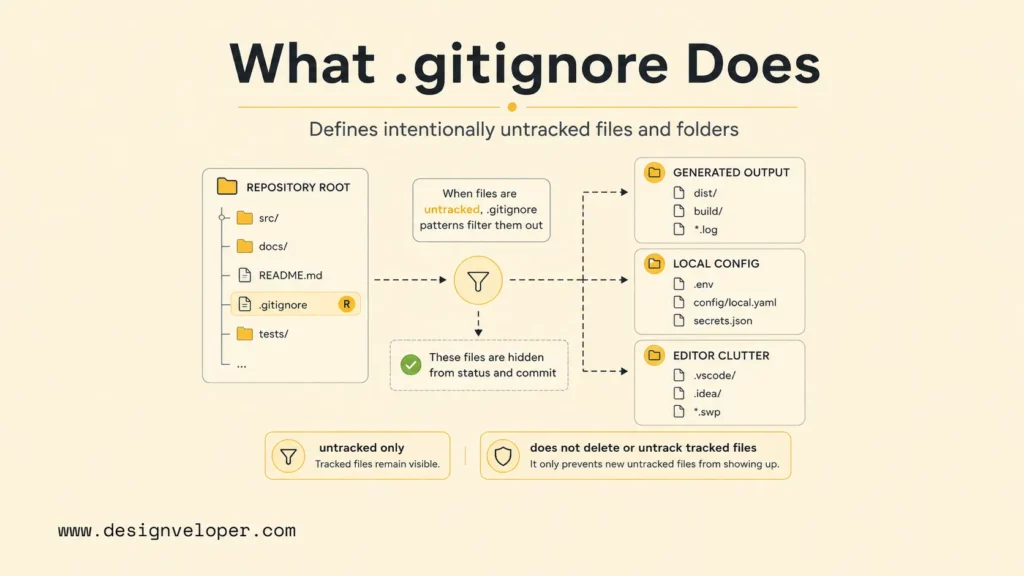
A .gitignore file is a plain-text list of patterns that tells Git to leave matching, untracked files and directories out of normal status and staging operations. It does not remove a file from disk, and it does not hide a path already in Git’s index. Git’s gitignore documentation defines the file as a way to keep intentionally untracked paths untracked.
Teams usually commit a root .gitignore so every clone receives the same rules. A nested file can add rules for its directory and descendants. Patterns in a nested file are read relative to that file, which can help when one package in a monorepo creates output that other packages do not.
Ignore rules are useful for generated files, local settings, caches, build output, and editor clutter. They are not a safe place to hide required source files or to protect a secret that was already committed. Keep the rule list narrow and explain unusual entries with comments, so another contributor can tell what a pattern excludes and why.
An ignored file stays untracked; changes to a tracked file can still appear in git status. The Git index records paths and content for a future commit, so a file can be tracked before its first commit.
For example, ignore a generated cache such as coverage/, but keep the source and dependency lockfile needed to recreate it. A good rule describes disposable or local output, not a shortcut around deciding which project files belong in version control.
How Gitignore Rules Work in a Repository
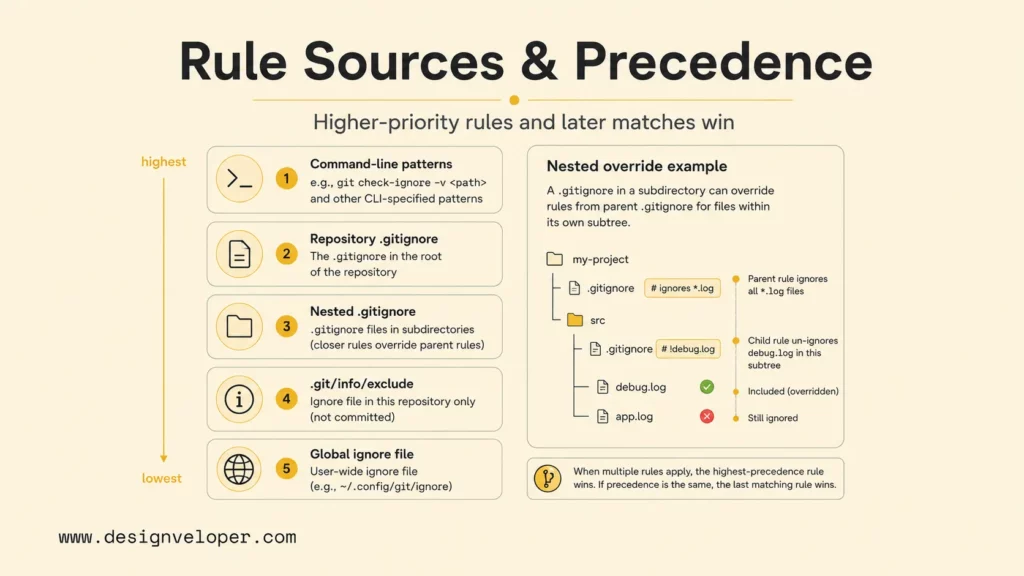
Git can read ignore patterns from several places, and the source affects which rule wins. Choose a location based on who should share the rule, then use the matching pattern’s scope to explain the result.
| Rule source | Scope and precedence | Good fit | Shared? |
|---|---|---|---|
| Command-line exclude patterns | Highest, but only for commands that accept them | A one-off command or script | No |
Per-directory .gitignore |
Applies from its directory down; a deeper file can override a parent file | Rules the project team needs | Yes, when committed |
.git/info/exclude |
Repository-local; below repository .gitignore rules |
Personal files in one clone | No |
core.excludesFile |
User-wide; lowest in this precedence order | Operating-system and editor files across repositories | No |
Within one precedence level, the last matching pattern decides whether Git ignores the path. A lower-level .gitignore can override a parent file for paths inside its directory. The .git/info/exclude file and the file set by core.excludesFile stay local, so they should not hold rules that teammates need.
Suppose a root file contains *.log and tests/.gitignore contains !fixture.log. The nested exception can make tests/fixture.log visible again because the nested file has higher precedence for that subtree. By contrast, if a parent pattern excludes tests/ itself, Git will not descend into it to find a child exception.
Put machine-wide editor noise in a configured global file, not in a project’s shared rules. GitHub’s guide to ignoring files also separates shared repository rules from local exclusions and global rules.
Common .gitignore Patterns and Syntax Examples
Each nonblank line in a .gitignore file is a pattern. A slash changes where Git looks for a match, while *, ?, and bracket ranges match characters within path components.
| Pattern | What it matches | Example use |
|---|---|---|
debug.log |
A file or directory with that name at any depth below this ignore file | One common log filename |
logs/ |
Directories named logs and their contents |
Generated logs at any depth |
/*.log |
Files ending in .log at this ignore file’s level only |
Root-level build logs |
src/cache/ |
The named directory relative to this ignore file | One package’s generated cache |
logs/**/*.log |
Log files inside logs, at its top level or deeper |
Nested service logs |
!important.log |
Re-includes a matching path excluded by an earlier pattern | Keep one fixture visible |
\#report.txt |
A literal filename that starts with # |
Escape a character that starts a comment |
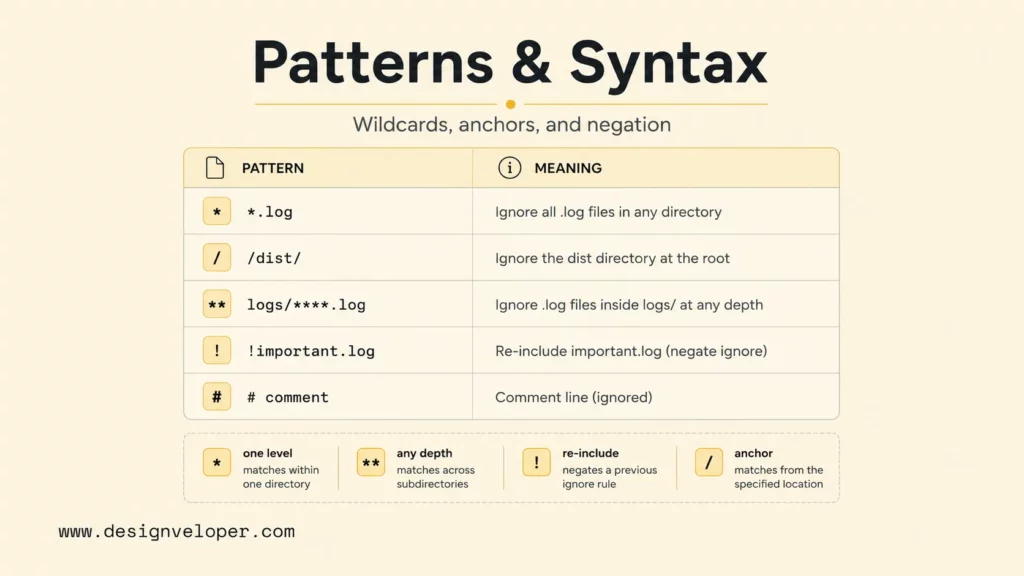
A pattern without a slash, such as *.log, can match at any level below its ignore file. A slash at the start anchors a pattern to that file’s directory. A slash in the middle also makes the pattern relative to that directory. A trailing slash limits a pattern to directories.
For example, /dist/ targets the root-level dist directory, while dist/ can match a directory named dist at any level. An asterisk does not cross a slash, so logs/*.log matches files directly in logs, not files several folders below it.
Negation has one important limit: Git cannot re-include a file when one of its parent directories is excluded. To ignore most files in a folder but keep a reviewed example, exclude the contents rather than the folder itself:
# Let Git inspect the directory
logs/*

# Keep one reviewed example
!logs/important.log
Git tracks files, not empty directories. To keep a directory in a repository, commit a placeholder file such as .gitkeep. That name is a convention, not a Git feature. For example, logs/* with !logs/.gitkeep leaves the placeholder available, but it does not make Git keep arbitrary empty subdirectories.
A leading # starts a comment; escape it with a backslash when it is part of a filename. A leading ! also needs escaping when the filename itself begins with that character. Trailing spaces are ignored unless escaped.
Why .gitignore Does Not Ignore Tracked Files
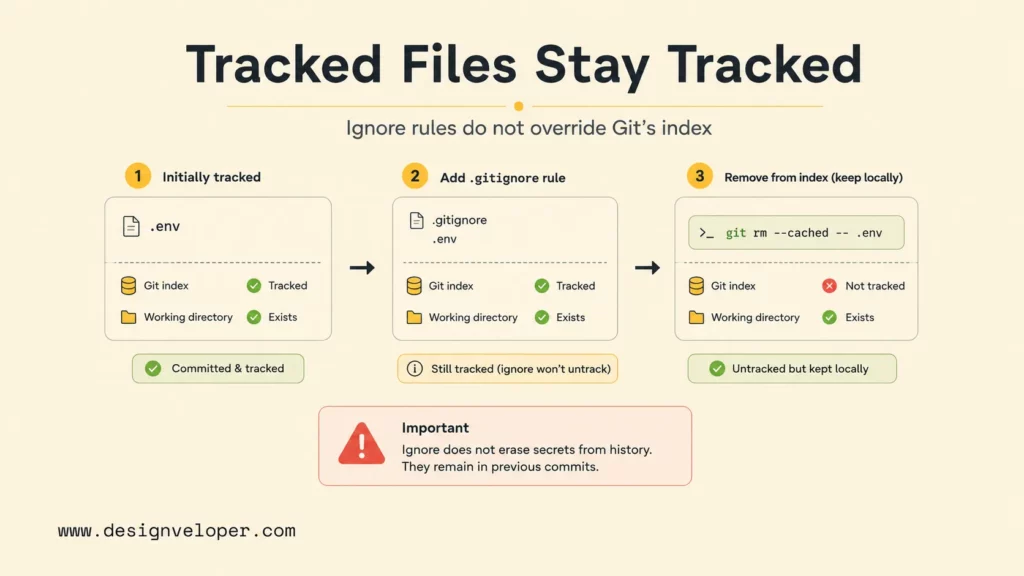
A path becomes tracked when it enters Git’s index, whether it is staged for its first commit or already committed. A .gitignore rule does not unstage that path or hide later edits. The git add documentation explains that adding a path records its content in the index.
If a committed file should remain on your computer but leave future repository snapshots, add a matching rule and remove the path from the index:
printf '\n.env\n' >> .gitignore
git rm --cached -- .env
git status --short
For a tracked directory, add -r: git rm -r --cached -- generated/. The --cached option removes the selected path from the index, not the working copy. For a committed file, the next commit records its removal from the repository while leaving the local file in place.
A staged-only new file is a small but important case. Running git rm --cached -- .env removes it from the index before its first commit. The working copy stays on disk, and the ignore rule can keep it out of later staging. In this case there is no previously committed copy to remove from history.
Review the staged result before committing. Use git diff --cached to see what the next commit would record. The git rm manual documents the difference between removing a file from the index and removing it from both the index and working tree.
A .gitignore rule is not a security boundary. It can help prevent a future accidental add, but it cannot erase a password, token, or key from earlier commits, forks, or clones. If a secret was exposed, revoke or rotate it first; history cleanup is a separate change that may require coordination. GitHub’s guidance on removing sensitive data explains the risks of rewriting shared history.
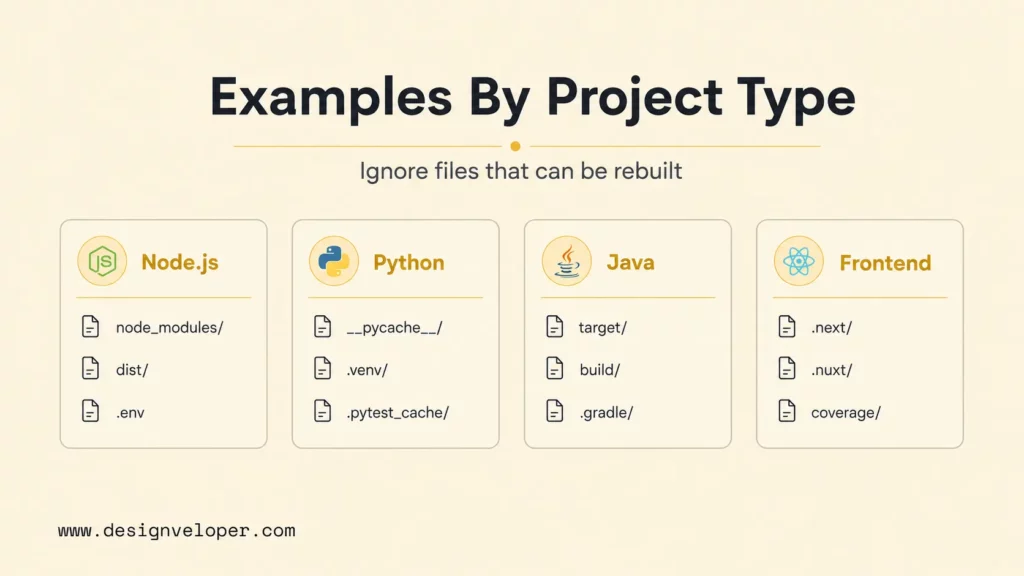
Useful .gitignore Examples by Project Type
Project templates are starting points, not automatic policies. Keep files that another developer needs to build or run the project, and ignore output that can be recreated from tracked sources. GitHub maintains an official github/gitignore template repository; review each suggested pattern before adopting it.
Node.js: Dependencies and local secrets are common ignore targets. Keep the package manifest and the lockfile so the dependency set can be restored.
node_modules/
coverage/
.env
Python: Exclude interpreter caches, bytecode, virtual environments, and test output. Track a dependency file such as pyproject.toml or requirements.txt.
__pycache__/
*.py[cod]
.venv/
.pytest_cache/
Java: Build folders and compiled classes are often reproducible. Check before excluding *.jar, because some projects intentionally keep a required binary in the repository.
target/
build/
.gradle/
*.class
Frontend frameworks: Framework output and coverage reports are usually generated, but a release process may intentionally commit built assets. Check the project’s deployment method before excluding them.
dist/
build/
.next/
.nuxt/
.vite/
coverage/
Operating systems and editors: Machine-specific files usually fit a global ignore file. Do not ignore an entire editor folder in the shared file if the team tracks settings such as recommended extensions or launch configurations.
.DS_Store
Thumbs.db
*.swp
For every template entry, ask whether the file is generated, reproducible, local, or sensitive. If it is the only copy of required source or configuration, keep it tracked. If a team intentionally publishes a generated artifact, document that release choice instead of copying a broad template without review.
How to Fix Gitignore Not Working
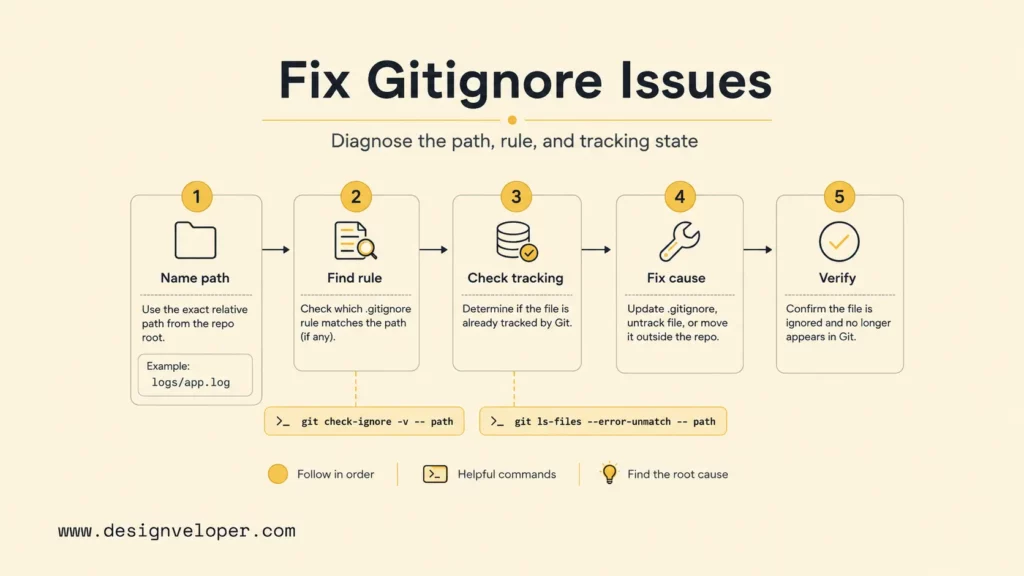
When a path still appears in git status, check its tracked state before changing patterns. Then identify the matching rule and confirm the result after one focused edit.
Use this order so each command answers one question:
- Name the path. Use its exact repository-relative path and letter case, such as
src/cache/session.log. - Check the index. Run
git ls-files --error-unmatch -- src/cache/session.log. A successful result means the path is already tracked; change the index if you want Git to stop tracking it. - Find the matching pattern. For an untracked file, run
git check-ignore -v -- src/cache/session.log. The output shows the source file, line number, pattern, and path. - Fix the cause. Change the rule’s location or scope, or use
git rm --cached -- pathwhen the tracked path should leave the index. - Check again. Re-run the relevant command and review
git statusorgit diff --cachedbefore committing.
For example, a root rule /cache/ does not match src/cache/session.log, because the leading slash anchors the match at the root. If only that source folder should be ignored, use /src/cache/. If any folder named cache should be ignored at every depth, use cache/ instead.
# Show the matching rule for an untracked path
git check-ignore -v -- src/cache/session.log

# Test ignore rules even when the path is tracked
git check-ignore --no-index -v -- src/cache/session.log
The default git check-ignore skips tracked paths because ignore rules do not apply to them. Add --no-index when you want to test whether a rule would match regardless of index state. The git check-ignore manual describes the verbose output and this option.
No output usually means no rule matched, or the path is tracked and the command did not check the index. Confirm both facts before adding a broader pattern. A broad rule can hide useful files without fixing the real cause.
Review .gitignore Rules Before Committing
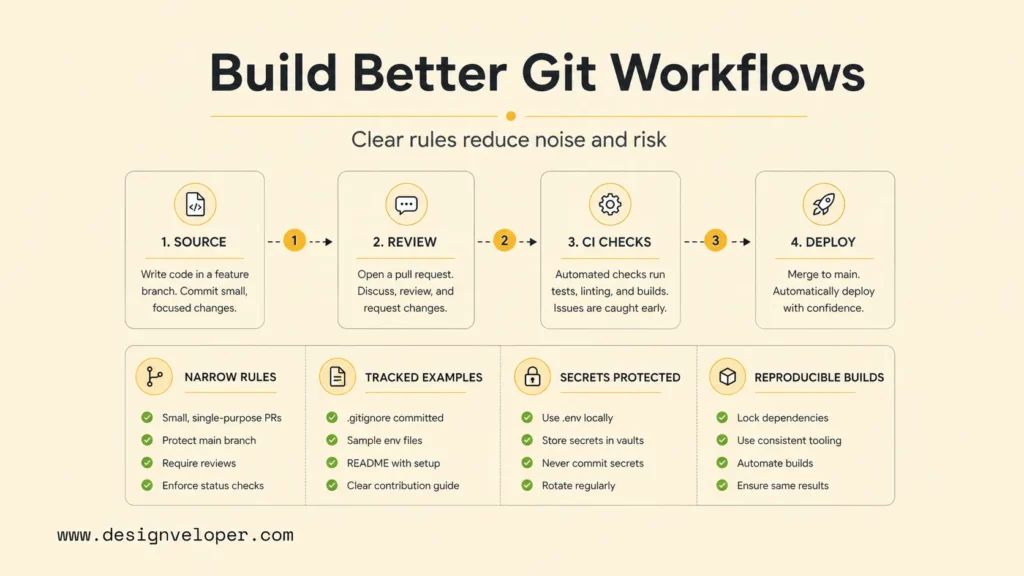
Ignore rules affect what contributors see and what Git stages by default. Keep shared patterns narrow, group them by purpose, and remove entries that no longer match the build or development setup.
A lightweight review can ask four practical questions:
- Can the excluded output be rebuilt from tracked files?
- Does this rule apply only to the intended directory and file type?
- Should the rule be shared, kept in one clone, or applied across one user’s repositories?
- Did the staged diff remove only the files the team intended to stop tracking?
When a build artifact is ignored, document the command or CI step that recreates it. Contributors should not need a machine-specific file that is absent from the repository. A clear rule and a visible staged diff make it easier to review the repository state without relying on someone else’s local exclusions.
FAQs About How Gitignore Works
Does git check-ignore Show Files Already Tracked?
Not by default. Git omits tracked paths because ignore rules do not apply to them. Use git check-ignore --no-index -v -- path to inspect the matching pattern without checking the index.
Can I Use More Than One .gitignore File?
Yes. Git reads ignore files from the path’s directory up through its parent directories. A deeper file can set rules for its subtree and override a parent file, but too many overlapping files can make a path harder to diagnose.
Does .gitignore Work With GitHub, GitLab, and Other Hosts?
Yes. Git reads ignore rules in your local working tree, so the behavior is not tied to GitHub. A committed .gitignore is shared through the repository and works with services that host Git repositories.
Does .gitignore Remove a Secret From Git History?
No. Ignore rules do not erase past commits, forks, or clones. Revoke or rotate an exposed credential first, then follow a coordinated history-cleanup process if removal is still needed.
Also published on

Share post on










Related Articles



How To Build A RAG System: Step-By-Step (New Guide)
How To Build A RAG System: Step-By-Step (New Guide) Published October 19, 2026
How Gitignore Works: Rules, Patterns, Examples, And Debugging Tips
How Gitignore Works: Rules, Patterns, Examples, And Debugging Tips Published October 16, 2026
What Is Pair Programming? Roles, Benefits, And AI-Assisted Development
What Is Pair Programming? Roles, Benefits, And AI-Assisted Development Published September 23, 2026


















