
















Web App vs Website: Similarities, Differences and Misconceptions

Try googling the keyword “web app vs website”, and you can see tons of articles jumping into breaking down the difference between a web app and website. Before you start your development project, be it a website or a web application, you had better learn about what each means. In this article, we will help you with that by defining each term and clarifying the key differences between them.
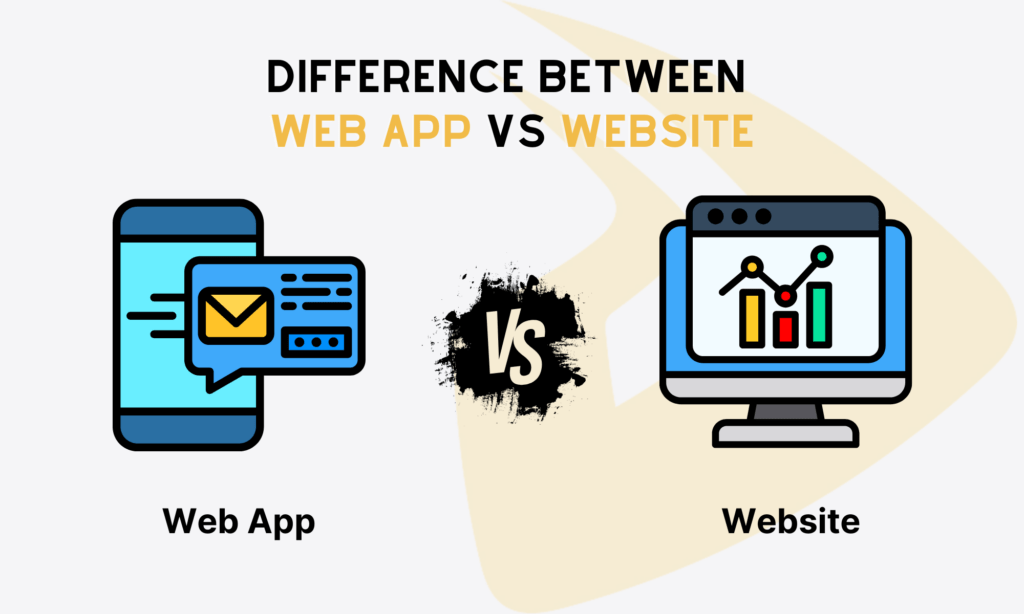
What Is a Website?
A website consists of many web pages, which are each their own digital file and are made with HTML. For others to see your website, it needs to be stored on a computer with an internet connection. This is called hosting. “Web Servers” is the name for these kinds of computers.
The website’s web pages connect to each other with hyperlinks and hypertext, and they all have the same look and user interface. The website might also have some extra files and documents, like photos, videos, or other types of digital property.
Since the Internet is used in every field, there are websites for many different causes and goals. Because of this, we can also say that a website is a digital environment that can provide information and solutions. It can help people, places, and things connect with each other to help organizations reach their goals.
News websites (like CNN or The New York Times), brochure sites, and personal or company blogs are typical examples of a website. They mainly offer static content and information for browsing.
What Is a Web Application (Web App)?
A web application is an app that can be accessed through a web browser. When viewed on a mobile device through a web browser, web apps look and work like mobile apps, but they are not the same thing.
Web applications use server-side scripts to get and store information. These scripts are written in languages like PHP and ASP. The relevant information then appears on the user interface using JavaScript and HTML5 scripts that run on the client side. This information could be given in a lot of different ways. Online shopping carts, content management systems, and online form generators are examples of common web applications.
Because web apps can be used in many different ways, people can do many different things. This means customers can use them to ask questions about products or services, make wishlists, and place orders. Apps also make it possible for employees to talk to each other, share documents, edit files, and collaborate.
Without your notice, you may access more web apps than you thought. Think of productivity websites (Canva, Google Docs), social media sites (Instagram, X), e-commerce platforms (Amazon, Ebay), streaming services websites (Netflix, Shopify), and many more. As web apps, they allow you to perform certain tasks, and more importantly, access dynamic content (which sets them apart from traditional websites).
Recommended reading: Web Application Examples and Definition for Beginners
Similarities Between Web App and Website

Many people often mix up a website and a web application due to the word “web” they both have in their names. But this highlights the first, and most visible, similarity between them: running on a web browser via a URL. Only typing their address on any browser (Chrome, Firefox, Safari, etc.), you can easily access their content.
Further, they share cross-platform functionality. This means they can be accessed on any device (smartphones, tablets, computers), operating systems (iOS, Android, macOS, or Windows), and web browsers (Chrome, Brave, Opera, etc.).
Speaking of technical stuff, websites and web applications require a common toolkit for frontend and backend development. Particularly, frontend developers use a powerful trio: HTML, CSS, and JavaScript to build an intuitive user interface with interactive elements. Meanwhile, backend developers may leverage Python, PHP, Ruby, and other essential technologies to build and manage a robust server-side.
Differences Between Web App vs Website
Most of the time, users don’t really care about which one is a website or a web application. The most important thing for users is to get results that match what they are looking for.
If you’re a developer, though, you should care. You need to know very well how they are different. So, in this section, let us talk about the five key differences between a web app and a website, including their ultimate purpose, interactivity, functionality, user login, and development resources.
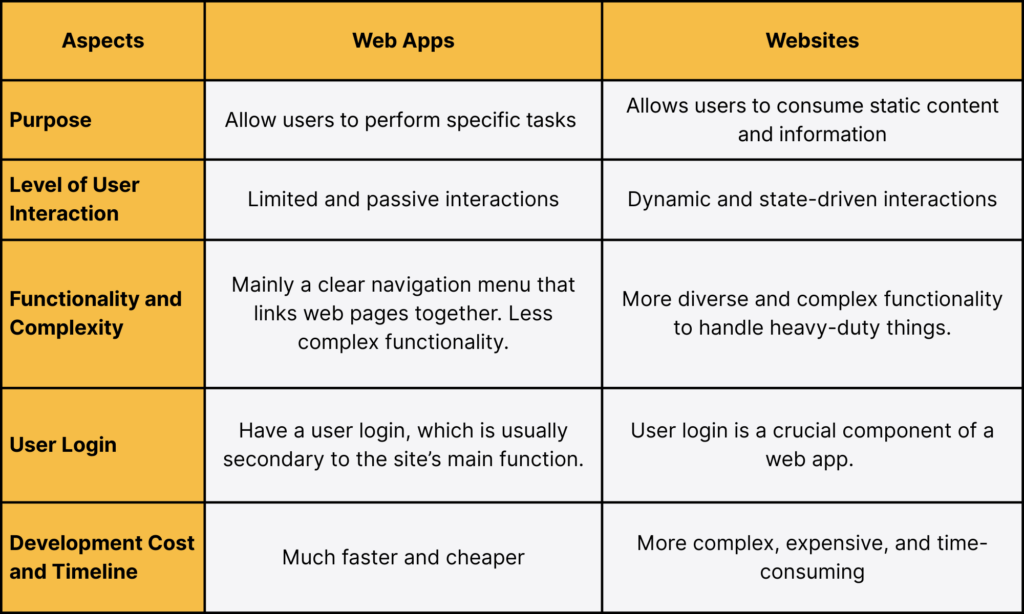
Purpose of Web App vs Website
The core difference lies in their intent. What do they ultimately aim to?
The purpose of a typical website is to allow you to consume information (which is often static). It’s primarily a medium for one-way communication, presentation, and building a brand image. On a company’s website, for example, you can scroll through, read about a company’s mission, check out its product specs, or maybe just find its address. The goal is largely unidirectional: to convey your message to target users.
Conversely, the purpose of a web application is to execute tasks. It is entirely designed to do things. It empowers a user to perform a complex action, manipulate specific data sets, manage their personal accounts, or solve a specific business problem. Think of something like Gmail (where you can send and receive emails) or Canva (which allows you to edit images).
The goal here is truly bi-directional. Accordingly, users send a request, the app processes that input, and it then delivers a unique, personalized result.
Level of User Interaction
For the person actually using the platform, this is probably the most visually obvious distinction.
Interaction is generally quite limited and fairly passive on a website. You click links, scroll through pages, maybe fill out a contact form or subscribe to a newsletter. Importantly, the content you see is largely the same content every other visitor sees, unless you’re logged into a super basic account. In other words, the pages don’t really “change” based on what you are doing, beyond maybe highlighting a link or changing the URL.
But in a web application, interaction is more dynamic and state-driven. Users are actively engaging with complex UI elements. Think of intricate interactions like zooming a map to locate a specific place (Google Maps), editing an image directly on a page (Canva), or chatting with AI chatbots (Salesforce).
Surprisingly, a web app can remember your actions and your status, or you can say, it actively maintains a “state.” Everything you see is often unique to you, from your specific data to your granted permissions. Just try closing a productivity tool like Google Docs and then opening it up again. Your content is still there, right where you left off, and unique to you.
FURTHER READING: |
1. Why Google Advocates Progressive Web Apps? |
2. 6 Best Progressive Web Apps Examples (PWAs) Over the Past Decade |
3. Progressive Web App Tutorial for Beginners |
Functionality and Complexity
With different purposes, a website and a web app offer different functionality and complexity levels.
A website mostly contains static information, so its functionality is also about a clear navigation menu that links web pages together. The complexity here mainly lies in its SEO-friendly design and content hierarchy, which is optimized to help people easily find the right information. Besides, it still comes with limited interactions, like newsletter subscription forms, “Contact Us” forms, and media players.
And a web app? The functionality here is inherently more diverse and complex to handle heavy-duty things, like intense data validation, real-time database management, or complex security protocols. The app has to handle complex business logic, process user inputs across multiple screens smoothly, and ensure data integrity.
User Login
People often think that only an app has a user login, while a website does not. But the reality proves the opposite.
A website may have a basic user login. Some built on CMS (Content Management System) like WordPress allow users to create accounts for leaving comments on a blog or accessing a small, restricted knowledge base. However, the login is usually secondary to the site’s main function (which is presenting information). That is, logging in doesn’t fundamentally or radically change the platform’s structure or core purpose.
In a web app, user authentication is absolutely crucial to the system’s entire existence. Why? Because the app needs to identify you specifically to serve up your specific, proprietary data and give you personalized permissions to function as intended. You just can’t use a banking app or a spreadsheet tool without logging in; the login is the required first step to access the primary, unique data processing features.
Development Cost and Timeline
Finally, let’s talk about potential costs and timeline to build a website and a web app.
Website development is generally much faster and cheaper. Because the scope of functionality is limited (mainly presenting content), you can often use available templates, popular CMS platforms (WordPress, for example), or simpler development stacks. You could launch a high-quality, professional corporate website in maybe a couple of weeks or months, depending on your site’s functionality and complexity.
Web app development is more complex, expensive, and time-consuming. It often requires custom business logic, a secure back-end infrastructure, thorough testing, and more. But this also means more web developers, dedicated testing cycles, and even longer time to build a web app. Especially, if you aim to develop a bespoke, unique tool that involves advanced techs (like AI integration or big data analytics), that may take longer, and the cost may skyrocket.
Website, Web App, and Progressive Web App (PWA)

So, we’ve pretty much clarified the basics. A website, in simple terms, is for reading information, while a web app is for doing something – editing images, maybe balancing a budget, transcribing audio, etc. But when you start learning deeper into this stuff, you inevitably catch another popular term: the Progressive Web App, or PWA.
A PWA is a website that acts like a native mobile app. Instead of downloading an app from the Apple or Google stores, you can access it directly via a standard URL, and then, if you like the experience, you can “install” it right onto your phone or desktop’s screen. It lives there, benefiting from those app-like features, without all the typical installation stuff. Think about things like push notifications, home screen installations, and offline access.
A PWA doesn’t require platform-specific technologies, like Swift for iOS or Kotlin for Android. PWA developers can use the same foundational web technologies we’ve always used — HTML, CSS, JavaScript — to build one instead. These apps can send timely notifications to users and even cache vast amounts of data for offline access at times. The performance boost alone is incredible.
“So, are PWAs just typical web applications that are faster?” you might ask. And the short answer is no, not quite.
They’re hybrid, kind of acting as a website (because they’re built with web techs and accessed via a URL) that incorporates the feature set of a mobile app or a heavy web app. They really exist on a spectrum.
Today, it seems like many modern websites and web apps are aggressively adopting PWA features to drive traffic, increase overall user engagement, and just deliver a better product. Forbes, The Washington Post, Trivago, Flipkart, and Lancôme are just a few examples that are choosing to go the PWA route.
Recommended reading: Fundamentals of Ecommerce Development That You Should Know
Common Misconceptions About Website and Web App
Even when websites and web apps are different in many aspects, there are myths around them:
- Websites have a similar format to web apps
Websites and web apps run directly on web browsers. This makes people think that they have the same format.
But in fact, their underlying structures are different. A website is actually a page turner. This means that a traditional website is inherently formatted around pages. When a user clicks a link, the browser sends the request to the server, and the entire page is reloaded.
But a web app? Think of it as a dynamic canvas. The format of a web application is driven by views and rapid state changes within a single, continuous session. When you perform an action in an app, it doesn’t reload the entire page but uses dynamically updated content based on your input.
- Web apps are similar to mobile apps
Not because they are called “apps,” they’re the same, honestly. Both help users perform certain tasks, but they’re developed, deployed, and accessed in different ways.
Mobile app development requires platform-specific or cross-platform languages, like Swift or Kotlin. Besides, mobile apps are downloaded from an app store and stay directly on your device’s hard drive. More importantly, they allow access to device features, like cameras or GPS.
Web apps are browser-based, so they require typical web technologies. You don’t need to download them from app stores. Also, web apps are unable to access a device’s hardware.
- All web apps must be complex
A web app isn’t necessarily complex. Its complexity level depends on its core purpose or which functional task it aims at. For example, a simple online calculator involves fewer complex features and functionality than enterprise-grade systems that require custom API integrations or GenAI capabilities.
Recommended reading: Web Application Architecture: Types, Components, and Tools to Creates
Building Websites and Web Apps with Designveloper
You have understood the key differences between a website and a web app. But if you want to step closer to your business’s success, partner with a dedicated team that is capable of turning your idea into a successful solution.
Web app development and web development are growing significantly, with an estimated $62.28 billion in 2026. This increasing demand leads to an increase in web developers. And if you’re looking for the best one in Vietnam, why don’t you consider Designveloper?
With 12 years of experience, we’ve got the right tool and expertise to build SEO-optimized websites or robust web apps aligned with your specific use case. We’ve successfully implemented hundreds of projects across segments like finance, healthcare, and education. Our solutions speak exactly to our clients’ voice, delivering the most useful functionality and handling integration hurdles.
We also receive good reviews for our technical excellence on independent platforms like Clutch and GoodFirms. Our team masters over 50 technologies, from JS frameworks (React, Vue.js, etc.) and backend languages (e.g., Python) to advanced techs (e.g., AI), to build bespoke, scalable solutions.
We are also committed to the Agile development methodology, delivering working features frequently based on your feedback and market shifts. We also promote transparent and proactive communication to ensure seamless workflows. Contact us and bring your idea to life!
FAQs About Website vs Web App
Is Facebook a Website or Web Application?
Facebook is a web application. It allows you to create an account, be it personal or business, and perform a lot of actions to share your information with others. Accordingly, you can upload a wide range of photos, send real-time messages, manage groups, run targeted advertising campaigns, and search for people or information you want. Based on every one of your actions, Facebook presents personalized, unique content on your news feed.
Is a Web App The Same As a Website?
No. They share some similarities, like running directly on web browsers via a URL and requiring web technologies (HTML, CSS, JS). But a website aims to present static content and information, while a web app primarily helps users perform tasks and enables seamless interactions. For this reason, they’re different in functionality, interaction level, and development cost and timeline.
Can a Website Become a Web App?
Yes. You can transform a website into a web app by adding task-focused functionality and making the site dynamically interactive.
For example, your company’s basic informational website might start out just showing text and images. But if you integrate an AI-powered chatbot or add a full-featured customer portal that lets users manage billing and open support tickets, your site will become a web app.
Do Web Apps Work Offline?
Web apps, by default, don’t work offline. They still require an internet connection to load data and talk to a server. However, many modern web apps integrate PWA features to benefit from its offline support. By using browser technologies like Service Workers, these web apps can cache files and data, allowing users to perform basic tasks and sync their work when a connection is restored. Google Docs is a typical example.
Also published on

Share post on










Related Articles


WebSocket Protocol Vs HTTP: Key Differences And When To Use Each
WebSocket Protocol Vs HTTP: Key Differences And When To Use Each Published August 05, 2026
The Future Of Frontend Web Development: Trends Teams Should Prepare For
The Future Of Frontend Web Development: Trends Teams Should Prepare For Published August 03, 2026
Best Frontend Frameworks For Modern Web Development In 2026
Best Frontend Frameworks For Modern Web Development In 2026 Published August 03, 2026



















