













HR Integration: How To Connect HR Systems Across Your Business

HR integration connects your human resources software with payroll, recruiting, benefits, finance, and IT systems so they can share data and trigger employee workflows. Start by choosing the processes where missing or late information causes the most harm. Then select a connection method that meets each process’s data, timing, and security needs.
You do not need to replace every HR tool to achieve this. In many cases, you can keep your existing software and connect it in stages. The goal is to make approved employee information available where it is needed without creating conflicting records or exposing sensitive data.
What Is HR Integration?
HR system integration is the process of linking applications that manage different parts of the employee lifecycle. A connection can transfer information between systems or trigger an action when an employee record changes. For instance, a confirmed hire can lead to the creation of a payroll record and a request for a company email account.
A human resources information system (HRIS) is not the same as an integration. An HRIS stores and manages core employee information, such as names, employment status, and job details. HRIS integration connects that system to other tools. Those tools may still hold their own records and perform specialized tasks.
Integration also differs from automation. Integration makes information or actions available across systems. Automation applies rules to decide what happens next. For example, connecting a leave management tool to payroll makes approved leave data available. An automated workflow can then send it at the right time. Our guide to HR workflow automation explains how to handle the approval and routing steps that surround such connections.
The main benefit is that employees and HR staff need to enter the same information less often. This can reduce duplicate records and delays. But connecting two databases does not automatically make their data accurate. Teams must agree on which record is correct before they let an update flow to another system.
Which Systems Should HR Connect?
Connect the systems that depend on shared employee information first. Payroll and IT access deserve early attention because errors can affect pay or leave former employees with active accounts. Recruiting, benefits, and finance connections address different needs. UKG’s HR integration guide also identifies pay and identity as important areas of risk.
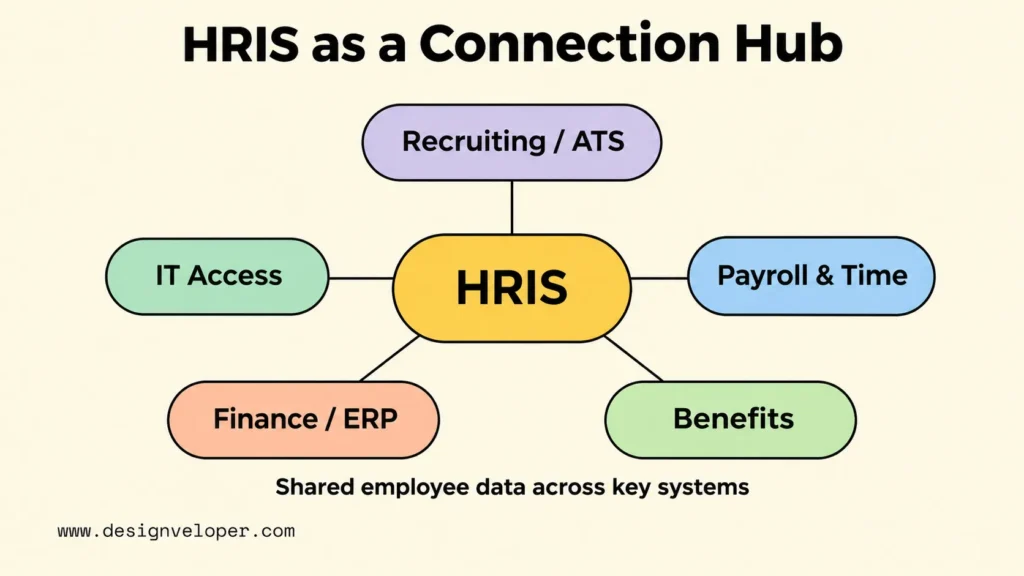
An applicant tracking system (ATS) manages job candidates. Enterprise resource planning (ERP) software supports business operations such as accounting. Both can exchange selected data with the HRIS rather than share a full copy of every employee record.
| System Connection | Example Data Or Workflow |
|---|---|
| ATS and HRIS | Candidate-to-employee handoff |
| HRIS, payroll, and timekeeping | Compensation, hours, and approved leave |
| HRIS, benefits, and payroll | Eligibility, enrollment, and deductions |
| HRIS and ERP/finance | Departments, cost centers, and headcount |
| HRIS and identity/IT | Access changes for hires, role changes, and departures |
Prioritize connections by the cost of a failed handoff, not just the amount of data involved. A daily headcount report may tolerate a short delay. A termination notice may require access removal much sooner. Microsoft describes how its HR-driven user provisioning can create, update, and disable accounts based on employment changes when properly configured.
Next, look for connections that remove work across several departments. Consider a company where recruiters email new employee details to HR, payroll, and IT. Connecting the hiring system to the HRIS removes the need to send those details separately. Teams can then use the confirmed HRIS record to start their own tasks. Our employee onboarding automation guide covers how to coordinate those tasks through the employee’s first day.
Which HR Integration Approach Fits Your Systems?
Choose the simplest approach that can handle the required workflow safely. A built-in connection may be enough for two standard cloud applications. A custom solution or integration platform makes more sense when business rules exceed the capabilities of available connectors.
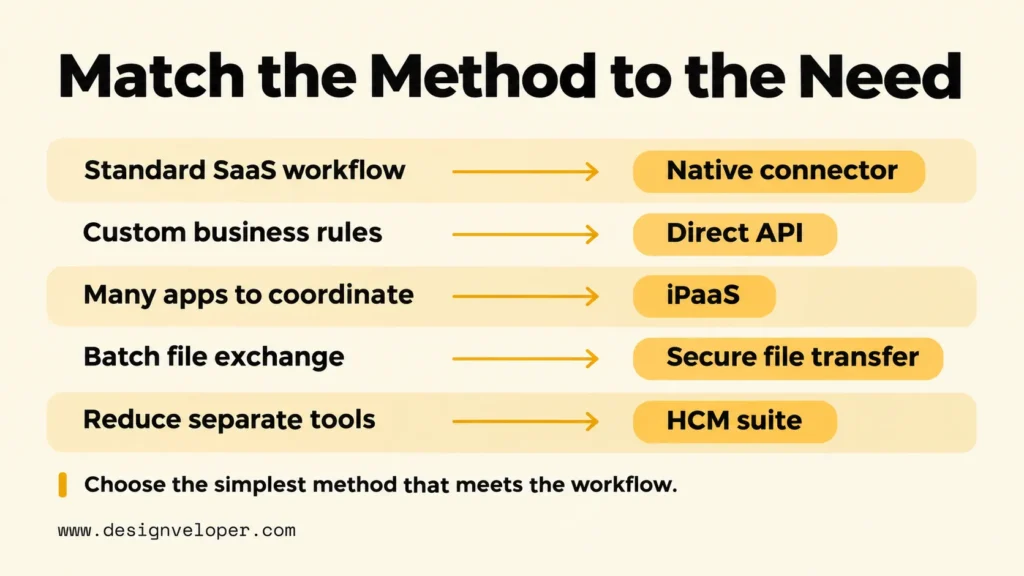
Native connectors. These are ready-made connections offered by software providers or their partners. They are a good starting point for common HR software integrations. Check whether the connector handles your actual employee types and custom fields. A connector that transfers names but cannot transfer approved overtime, for example, may not solve your payroll problem.
Direct APIs or custom connectors. An application programming interface (API) defines how one application can request data or actions from another. Developers can build a direct connection that follows your own approval rules and field mappings. This is useful for a specialized workflow, provided the systems expose the required interfaces. Your team must also maintain the connection when vendors change their APIs. Our API integration guide explains these design and maintenance choices.
Integration platform as a service (iPaaS). An iPaaS is a cloud service for building and managing connections between applications. Platforms commonly provide reusable connectors and tools to transform data, as explained in IBM’s iPaaS overview. Consider this option when several applications need coordinated updates. Check subscription fees, usage limits, and whether your team can monitor and maintain the workflows centrally.
Secure file exchange. Some systems can import or export structured files even when they lack useful APIs. A scheduled transfer through a secure protocol such as SSH File Transfer Protocol (SFTP) can work for periodic payroll imports. Workato’s SFTP documentation illustrates encrypted file transfers and automated file handling. You still need to confirm that the receiving system accepted the records. A file arriving successfully does not mean its contents were processed.
Consolidation into an HCM suite. Human capital management (HCM) suites bring several HR functions into one platform. Consolidation can reduce the number of separate applications you need to connect. It is worth evaluating when existing tools overlap and their contracts are due for renewal. ADP’s HCM integration planning guide discusses shared records and connected HR functions. Allow for data migration and training. External payroll or benefits providers may still need separate connections.
Before choosing any HR software integration method, ask the provider to demonstrate a complete workflow with representative test records. Confirm these points:
- Which standard and custom fields can the connection read or update?
- Can data travel in the required direction? How quickly do changes reach the destination?
- How does the connection protect employee data and report failed updates?
- What will the connection cost to set up and maintain? Who provides support?
How To Plan And Implement HR Integrations
Implement HRIS integrations one workflow at a time. First agree on who owns the data and how it should move. Then define security controls and test whether the entire business process works before expanding the rollout.
Define The Workflow And System Of Record
Define the outcome before deciding which data to transfer. For a payroll integration, the outcome might be to give payroll every approved pay change before the next cutoff. Name a person responsible for the workflow and specify who can approve changes.
Assign a system of record, or authoritative source, for each field. The HRIS might own employment status, while timekeeping owns approved hours. Finance might control valid cost center codes. If two systems disagree, the integration should know which value takes priority. Ownership at field level matters more than naming one application as the owner of all employee data.
Map Data, Direction, And Sync Timing
Create a field mapping that shows where each value comes from and how the receiving system expects it. Include formats, required fields, allowed values, and effective dates. Use a stable employee identifier or a verified mapping between system identifiers. Matching employees by name alone can lead to mistakes when two people share a name.
Use one-way flows when a destination only needs to receive information. Allow data to travel back when there is a clear reason. For example, an IT system could return a newly created email address to the HRIS without being allowed to change a person’s salary. This limits the risk of systems overwriting each other’s records.
Set the update frequency based on business deadlines. A webhook is a notification sent by a system when a supported event occurs. BambooHR’s event-based webhook documentation shows how an integration can receive a change notification and then retrieve data through the API. Scheduled transfers may suit less urgent tasks. For future-dated pay or role changes, distinguish when information is entered from when it takes effect.
Define how to handle missing values, duplicate events, and updates that arrive out of order. For instance, an older update should not undo a newer approved change.
Set Access And Data Controls
Give each integration only the permissions and employee data it needs. An account creation workflow may need a person’s name, start date, and department, but not bank details. Vendor permissions can affect the fields available through an integration. For instance, BambooHR’s API documentation explains that associated user permissions govern which employees and fields API requests can access.
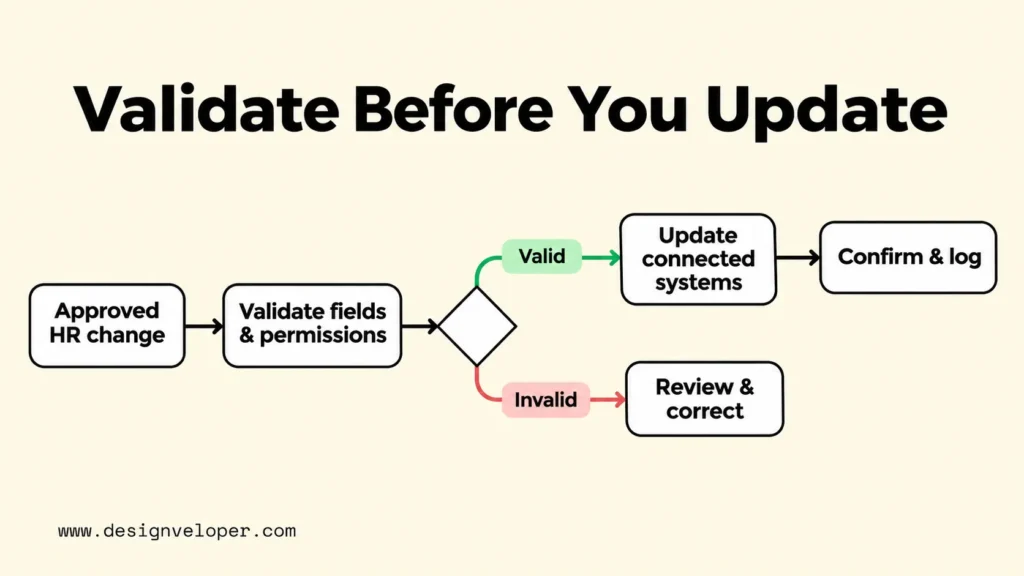
Protect credentials, encrypt data during transfer and storage, and check applicable privacy and retention requirements. Validate incoming records before writing them to the destination. Reject an unknown cost center, for example, rather than assigning a default that could send labor expenses to the wrong department.
Plan for failures before launch. Keep audit logs of record identifiers, update times, and outcomes without exposing unnecessary personal information. Send alerts to a named owner. Retry temporary connection failures safely, but send invalid records for review. Define how to correct or replay a failed update without creating a second payroll entry.
Test And Monitor End-To-End Workflows
Test the business outcome, not just whether two applications can communicate. Use a test environment with synthetic or appropriately protected records. Include both normal cases and exceptions. Our guide to agile software testing distinguishes tests of system interactions from tests of business acceptance. Both matter here.
- Hire: confirm the employee record appears once and the correct account is prepared.
- Role change: check the new department, effective date, and removal of access that is no longer needed.
- Payroll: compare approved hours and pay changes against the payroll preview.
- Benefits: verify eligibility and check that approved elections produce the correct deductions.
- Termination: confirm access is removed by the required deadline while necessary payroll records are retained.
For payroll, run a parallel comparison before relying on the new connection for live payments. Reconcile employee counts and pay totals between the approved source data and the destination. Investigate unexplained differences before signing off. After launch, monitor failed updates, delays, and missing records. A successful transfer count alone cannot reveal every missing employee.
If your existing tools lack suitable connectors, custom integration may be an option. At Designveloper, we offer custom software development services. Before commissioning a connector, we recommend identifying the unsupported workflow and checking both vendors’ interfaces. This helps determine whether a targeted connection is feasible or whether a change to the underlying system is necessary.
FAQs About HR Integration
How Long Does HR Integration Take?
The timeline depends on the number of workflows, the available connectors, and the quality of existing data. A standard connector generally needs less development than a custom integration across several systems. There is no reliable universal duration. Build your schedule around confirmed vendor access, data mapping, testing, and business sign-off. Allow time for a representative payroll cycle if payroll is in scope.
What Determines HR Integration Costs?
Costs depend on connector licenses, development effort, data cleanup, security requirements, and ongoing support. Compare the total cost over the same period, rather than only the setup fee. Ask whether the quote includes test environments, API access, and charges based on transaction volume. Also budget for updates when a vendor changes its interface or your HR policies change.
Can HR Integration Connect Legacy HR Or Payroll Systems?
Yes, if the legacy software offers a supported way to export, import, or exchange the required information. A secure file transfer or a custom adapter may be enough for a scheduled payroll workflow. Confirm the system’s capabilities with its vendor first. If no safe interface exists, keep a controlled manual handoff or consider replacing the system instead of forcing an unreliable connection.
Also published on

Share post on










Related Articles


HR Integration: How To Connect HR Systems Across Your Business
HR Integration: How To Connect HR Systems Across Your Business Published November 27, 2026
HRM Software In 2026: 9 Platforms To Compare For Different Teams
HRM Software In 2026: 9 Platforms To Compare For Different Teams Published November 27, 2026
The 5 Advantages of CRM in the Banking Sector
The 5 Advantages of CRM in the Banking Sector Published October 19, 2026