
















What Is API Integration? Architecture, Examples, And Best Practices

API integration lets separate applications exchange data and trigger actions so teams do not have to move information by hand. A reliable connection still needs decisions about permissions, data mapping, and failure handling. This article follows the request-to-response flow, compares common architecture patterns, and shows how teams can keep integrations maintainable after launch without assuming every workflow needs a separate platform.
What Is API Integration?
API integration connects two or more applications through APIs so they can share data or coordinate actions without a person moving information between them. IBM describes API integration as using APIs to connect applications, systems, and workflows for data and service exchange in its API integration overview.
The distinction between an API and an integration matters. An API defines the available endpoints, accepted requests, authentication rules, and response format. An integration decides when to call those endpoints, how to transform the result, what business rule to apply, and how to recover if something goes wrong.
For example, an online store may expose an order event after checkout. An integration can use that event to update inventory and create a fulfillment record in an ERP system. The API makes the interaction possible. The integration turns it into a repeatable business workflow.
How Does API Integration Work?
The API integration process moves through the same basic stages. A system starts a request or event, identity is checked, and data is validated or transformed. The receiving system then performs the work, and the integration records the result. The exact flow changes with the API and architecture.
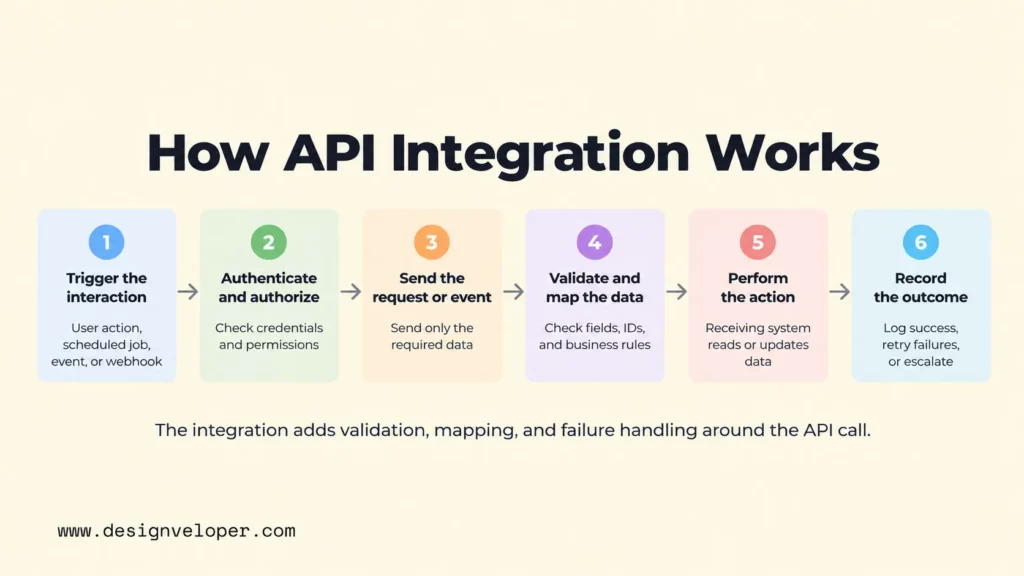
- Trigger the interaction. A user action, scheduled job, application event, or incoming webhook starts the workflow.
- Authenticate and authorize. The calling system presents a credential, token, signature, or other proof. The receiving side checks whether that identity may perform the requested action.
- Send a structured request or event. The integration sends the required fields to an API endpoint or event destination. It should send only the data needed for that operation.
- Validate and map the data. Integration logic checks required fields, formats, identifiers, and business rules. It may transform one system’s schema into the format expected by another.
- Perform the action and return a result. The receiving system reads or changes data, then returns a response or emits a later event.
- Record and handle the outcome. The integration logs success or failure, updates workflow state, and applies retry, escalation, or reconciliation rules when needed.
Microsoft’s basic enterprise integration architecture shows this separation clearly: a client authenticates, an API gateway validates and forwards requests, workflow logic orchestrates calls, and back-end systems complete the work.
Consider an illustrative order workflow. A customer completes checkout, the commerce system sends the order ID and purchased items, integration logic validates the payload, and the inventory system reserves stock. If the reservation succeeds, the ERP receives the order for fulfillment. If inventory is unavailable, the integration should return or record a controlled failure rather than silently creating inconsistent records.
API Integration Architecture: Patterns And Components
An API integration architecture defines where the connection logic lives and how systems communicate. Its core parts usually include the connected applications, API endpoints, authentication, integration or middleware logic, data mapping, error handling, and monitoring. Our web application architecture guide gives a broader view of where APIs, back-end services, security, and monitoring sit in an application.
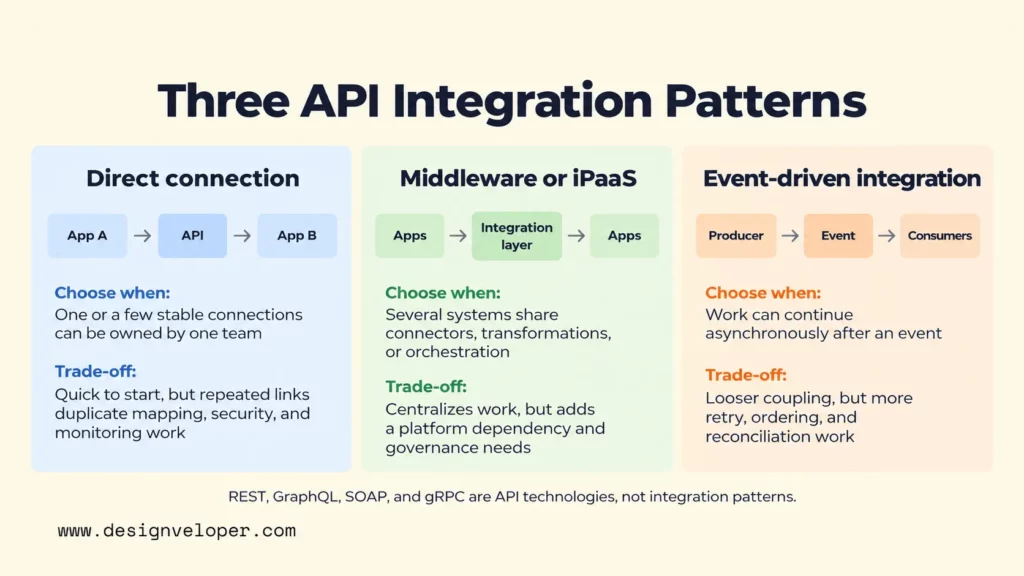
Three common connection patterns solve different problems. The best fit depends on how many systems are involved, how tightly they should depend on one another, and who will operate the integration.
| Pattern | Choose when | Main trade-off |
|---|---|---|
| Direct connection | One or a few stable connections can be owned by one team. | Quick to start, but many links repeat mapping, security, and monitoring work. |
| Middleware or iPaaS | Several systems share connectors, transformations, or orchestration. | Centralizes integration work but adds a platform dependency and governance needs. |
| Event-driven integration | Work can continue asynchronously after an event. | Loosens coupling but requires idempotency, retry or ordering handling, and reconciliation. |
Synchronous and asynchronous communication are separate design choices from those connection patterns. A synchronous call waits for an immediate response, which suits tasks such as checking account details before showing a page. An asynchronous flow lets work continue later through queues, events, or webhooks. It suits longer processing or workloads where the calling system should not wait on every downstream dependency.
REST, GraphQL, SOAP, and gRPC are not integration patterns in this sense. They describe API styles, protocols, or communication technologies. A direct, middleware-based, or event-driven architecture may use one or more of them depending on the systems involved.
API Integration Examples In Real-World Workflows
API integration examples are easiest to understand as workflows. The useful question is not only which systems connect, but what information or action crosses the boundary and why that exchange matters.
| Workflow | Systems connected | Data or action exchanged | Workflow value |
|---|---|---|---|
| E-commerce fulfillment | Online store and inventory or ERP | Order lines, stock status, fulfillment updates | Reduces manual order re-entry and keeps fulfillment state current |
| Lead follow-up | CRM and marketing platform | Lead status, consent, segments, campaign activity | Keeps outreach aligned with the current customer record |
| Customer support chatbot | Chatbot and order or support system | Order lookup, ticket creation, status updates | Lets a conversation retrieve approved data or start a controlled support action |
| Document collaboration | Document platform and cloud storage | Document access, file updates, collaboration actions | Lets users work with stored documents without separate manual transfers |
The chatbot case becomes more demanding when the bot can change business data. Our AI chatbot integration guide explains why order checks, ticket creation, and other actions need scoped API access, server-side validation, permission rules, and a human fallback.
For a public project example, our Lumin project page confirms that the document platform integrates with cloud storage and supports document collaboration. It does not identify a specific storage API, provider, authentication method, or integration architecture, so those details should not be inferred from the public case study.
API Integration And API Management Serve Different Purposes
API integration connects systems and workflows; API management governs APIs as managed assets. Integration focuses on moving data or triggering functions across systems. Management focuses on how APIs are published, secured, discovered, monitored, versioned, and controlled over their lifecycle.
That difference becomes clearer at scale. A team may build an integration that sends orders from a storefront to an ERP. API management can sit around the exposed APIs to control access, apply policies, track usage, document interfaces, and manage versions. IBM’s API management overview describes these lifecycle and governance responsibilities.
The two disciplines are complementary. Strong management makes integrations easier to discover and operate consistently. Reliable integrations also reveal which APIs need better documentation, access policies, observability, or version planning.
Benefits And Challenges Of API Integration
The main benefit of API integration is controlled automation between systems that would otherwise depend on manual handoffs or isolated data. The practical value depends on the workflow, not on the connection alone.
- Less manual transfer. Data can move between systems as part of the workflow instead of being copied by staff.
- Fresher operational data. Systems can receive updates closer to the time an event occurs, which can reduce stale records.
- Reuse of existing capabilities. A product can call a payment, messaging, mapping, identity, or internal service instead of rebuilding that function.
- Legacy connectivity. An API or integration layer can expose selected functions from older systems to newer applications without replacing the entire back end at once.
Those benefits create new dependencies. Data models may not match. Credentials can be over-permissioned. Providers may enforce rate limits, deprecate endpoints, or change versions. Network failures can leave a workflow partly complete. Monitoring must therefore answer a business question, not only a server question: did the order, customer update, or support action actually finish?
Security also belongs inside the integration design. The OWASP API Security Top 10 2023 includes broken object-level authorization, broken authentication, unrestricted resource consumption, improper inventory management, and unsafe consumption of APIs. These risks show why authentication alone is not enough. Each integration also needs authorization checks, bounded resource use, current API inventory, and validation of data received from external services.
How To Build And Maintain Reliable API Integrations
Reliable API integration is a lifecycle, not a one-time coding task. Useful API integration best practices start with ownership, clear contracts, failure testing, and ongoing monitoring. Start with the business workflow and ownership, then choose the lightest architecture that can meet its security, reliability, and maintenance needs.
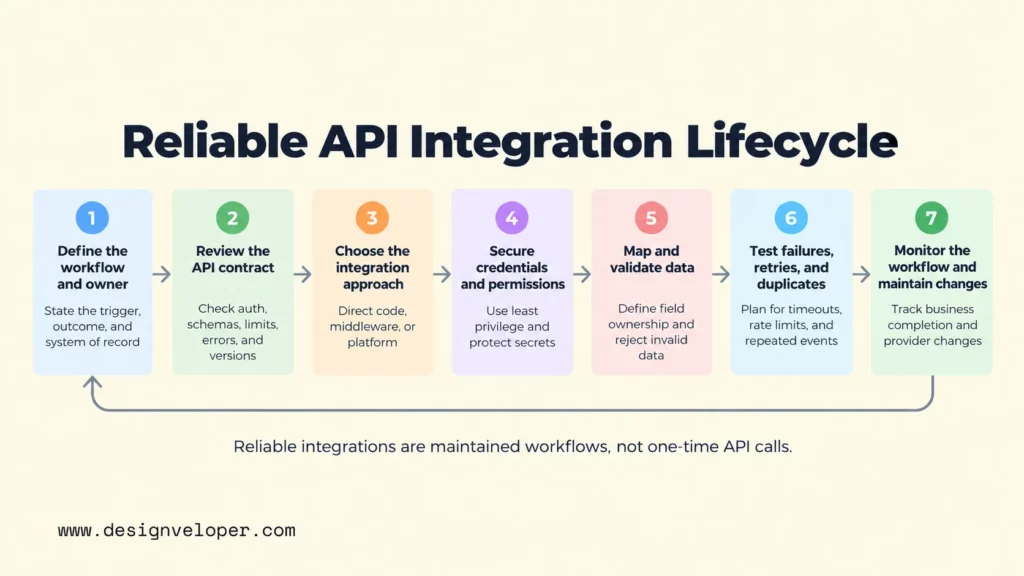
- Define the workflow and owner. State the trigger, expected outcome, systems of record, data owner, and person or team responsible when the integration fails.
- Review the API contract before designing the connection. Confirm authentication, endpoints, schemas, pagination, rate limits, version policy, error responses, webhook behavior, and environment requirements.
- Choose direct code, middleware, or a platform deliberately. A direct connector may be enough for one stable dependency. A platform can reduce repeated integration work across many systems. Custom code gives more control when the workflow has unusual rules or security boundaries.
- Secure credentials and permissions. Keep secrets out of source code, use the smallest practical scopes, rotate credentials when required, and enforce authorization in the receiving application.
- Map and validate data at the boundary. Define field ownership, required values, identifiers, time zones, units, and error behavior. Reject or quarantine invalid data instead of letting it silently corrupt the next system.
- Test failures, retries, and duplicates. Test timeouts, partial outages, malformed data, expired credentials, rate limits, duplicate events, and out-of-order delivery. Use idempotent operations or deduplication where repeating a request could create a harmful second action.
- Monitor the workflow and maintain changes. Track technical signals such as latency and errors, but also track business completion. Review provider changelogs, deprecations, credential expiry, and schema changes before they break production.
Webhook integrations show why failure design matters. Stripe’s webhook documentation says live-mode event deliveries can be retried for up to three days, event order is not guaranteed, and duplicate deliveries can occur. Stripe recommends tracking event IDs to avoid processing the same event twice. Those behaviors are provider-specific, but the design lesson is general: do not assume one delivery, one order, or one attempt.
For cloud-hosted products, reliability also depends on the surrounding system. Our cloud application development guide treats authentication, secrets, telemetry, backup, recovery, and dependency handling as cross-cutting concerns. API connections should fit those operational controls rather than becoming isolated scripts that nobody owns.
FAQs About API Integration
What Is An API With A Simple Example?
An API is a defined interface that lets one piece of software request data or functionality from another. For example, a weather application can send a city or coordinates to a weather API and receive structured forecast data. The API defines how that request and response work; an integration decides how the application uses the returned data in its own workflow.
How Much Does API Integration Cost?
There is no reliable universal price for API integration because the effort depends on the workflow and the systems involved. A small connection to a stable, well-documented API can be much simpler than an integration that spans legacy software, several data models, custom authentication, compliance controls, and high-volume event processing.
Estimate the work by separating discovery, development, testing, infrastructure or platform fees, third-party API charges, monitoring, and ongoing maintenance. The largest hidden cost is often not the first connection. It is the work needed later when permissions, schemas, provider versions, or business rules change.
How Do Teams Manage Multiple API Integrations Efficiently?
Teams manage many integrations more efficiently by standardizing what can be standardized and keeping clear ownership for what cannot. Useful controls include a shared API and integration inventory, reusable authentication and error-handling patterns, central secret management, consistent logs and trace IDs, contract tests, and alerts tied to business outcomes.
As the number of connections grows, a gateway, middleware layer, or iPaaS may reduce duplicated work. The platform choice should follow the actual need for orchestration, connectors, governance, and operations. Adding a central platform to a small set of simple integrations can create more complexity than it removes.
Plan API Integration Around The Workflow, Not The Endpoint
Start with one integration flow: record its trigger, systems of record, and the failure that needs a human response. If legacy systems or custom rules make that flow hard to scope, our software development services can help assess the implementation path.
Also published on

Share post on










Related Articles


What Is API Integration? Architecture, Examples, And Best Practices
What Is API Integration? Architecture, Examples, And Best Practices Published October 12, 2026


















