
















How AI Automates Routine Tasks: What To Automate First?

KEY TAKEWAYS:
- AI automates routine tasks best when the work is frequent, rule-guided, measurable, and reviewable. Good candidates have clear inputs, repeatable decisions, and visible outputs.
- The best automation opportunities usually sit in document processing, customer support, sales follow-up, finance operations, HR workflow automation, reporting, knowledge retrieval, and internal approvals.
- Teams should start with one painful workflow, map inputs and rules, choose the right tool or custom workflow, connect systems safely, test edge cases, and measure time saved, quality, adoption, and ROI.
- AI should not fully automate every task. Human review, security checks, escalation rules, and audit logs matter when the task affects money, compliance, customer trust, or sensitive data.
- Production automation needs ownership after launch: monitor accuracy, cost, latency, security, employee adoption, and exceptions instead of treating automation as a one-time setup.
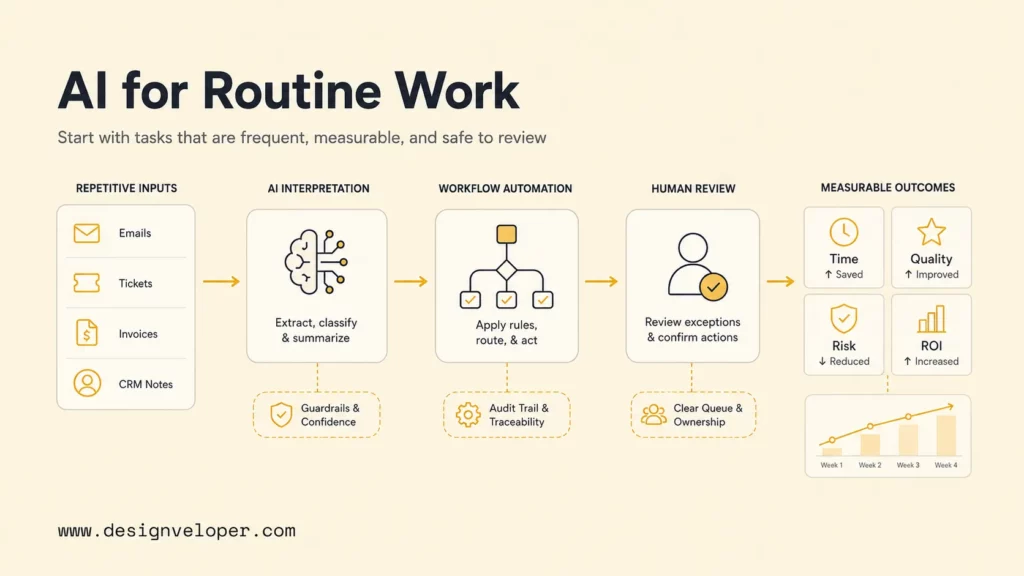
Understanding how AI automation is changing how AI is automating routine tasks starts with one practical principle: automate work that is frequent, painful, measurable, and safe to review. AI can read unstructured inputs, classify requests, extract data, draft outputs, recommend actions, and trigger workflow steps. The best first use case is not the most impressive demo. It is a narrow task with clear inputs, a known owner, repeatable success criteria, and a human fallback when the system is uncertain.
Businesses are moving from isolated AI assistants toward connected workflows. The Microsoft Work Trend Index found that 66% of surveyed AI users said AI gave them more time for high-value work. However, productivity only becomes durable when a company redesigns the task, defines quality, protects data, documents human handoffs, and measures the result after launch.
Quick decision guide: Start with one high-volume task that has stable rules and visible delays. Fully automate low-risk, reversible steps; use AI assistance for variable work that needs judgment; and keep high-impact financial, legal, employment, safety, or customer decisions human-led until evidence supports a carefully controlled workflow.
| Starting question | Good signal | Recommended action |
|---|---|---|
| Does the task happen often? | Volume and waiting time are easy to count | Estimate the monthly opportunity |
| Can success be checked? | Expected outputs and exceptions are known | Build a test set before automation |
| What happens if AI is wrong? | Errors are reversible and contained | Automate with monitoring |
| Does the task affect rights, money, or safety? | Accountable review is mandatory | Assist a human rather than approve automatically |
| Can the workflow reach trusted data? | Sources, permissions, and owners are defined | Integrate the minimum necessary access |
Further reading:
- Top 10 AI Workflow Automation Tools To Scale Smarter
- AI Agent Vs. Chatbot: Key Differences & Which One Do You Need?
- Agentic AI in Action: 7 Real Life Use Cases and Examples
What Counts As A Routine Task AI Can Automate?
A routine task is a recurring unit of work with recognizable inputs, a limited range of expected outputs, and a result that can be reviewed. The task does not need to be identical every time. AI becomes useful when the variation appears in language, images, documents, or patterns that fixed rules handle poorly. An incoming support request, invoice, resume, sales note, or bug report can vary in wording while still following a predictable business path.
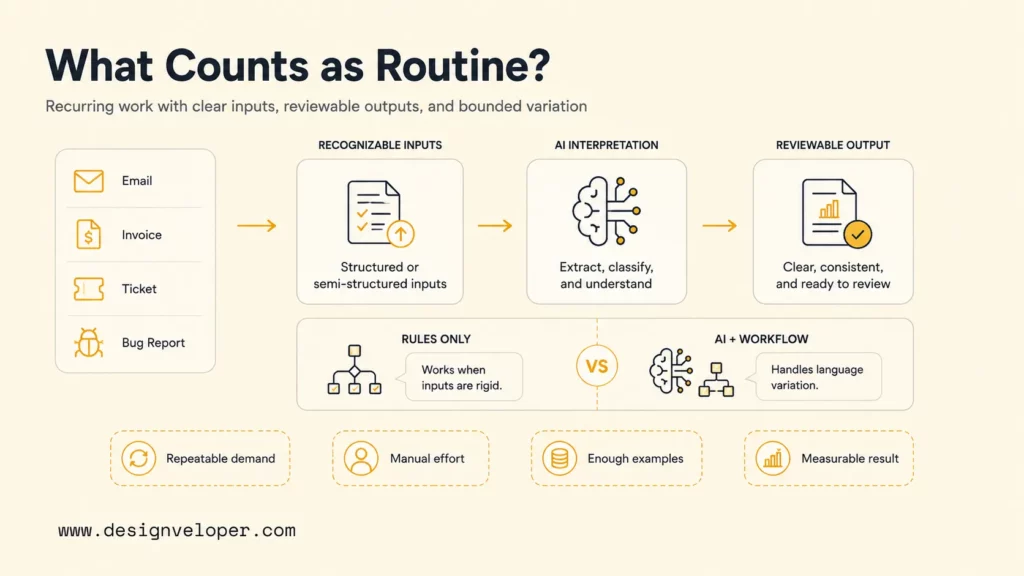
Traditional automation is strongest when each condition is explicit: if a field has one value, send the record to a specific queue. AI task automation adds interpretation. A model can summarize an email, identify intent, extract fields from a PDF, suggest a category, or draft a reply. Workflow software then applies permissions, business rules, approvals, and system updates. IBM’s current IBM defines AI workflow similarly distinguishes systems that perform, coordinate, or enhance structured activities with or without human collaboration.
Routine does not mean low value. A customer escalation, payment exception, employee request, or production alert may recur every day and still require careful treatment. The question is whether a specific step can be bounded. AI might prepare context and recommend the next action while an authorized person remains accountable for approval.
Strong candidates usually share four traits: repeatable demand, visible manual effort, sufficient examples or source data, and a measurable result. Weak candidates have ambiguous ownership, unstable policies, rare edge cases with severe consequences, or success that depends on unstated expertise. A company should fix ownership and workflow clarity before adding a model.
Automate a bounded task, not an unclear responsibility. AI should enter a workflow with an owner, a test, and an exit.
How To Choose Which Tasks To Automate With AI
Task selection should compare value, feasibility, and risk before anyone chooses a model or platform. McKinsey’s McKinsey State of AI survey found that nearly two-thirds of respondents said their organizations had not begun scaling AI across the enterprise. High-performing organizations were much more likely to redesign workflows, which suggests that tool access alone does not create operational value.
Recommended for you:
- AI Chatbot Integration: How To Connect Chatbots With Business Systems
- How To Train A Chatbot With Your Own Data For Better Business Support
- Build A RAG Chatbot From Local Prototype To Production Deployment
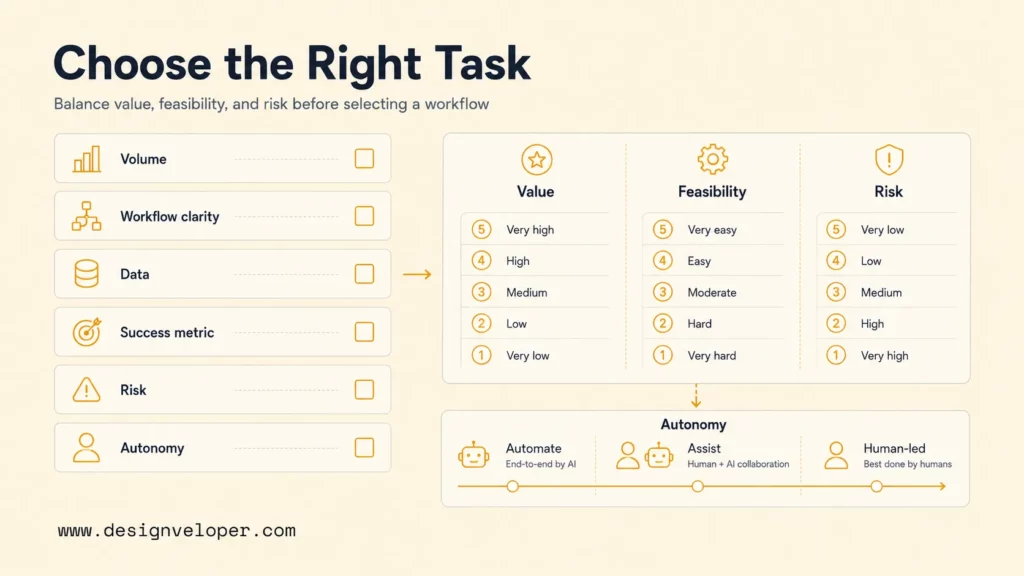
Use the following questions to compare possible first projects. Score each candidate with real data from the process owner rather than an estimated feeling that the team is “busy.”
| Question | Decision Signal |
|---|---|
| How frequently does the task occur? | Count cases per day or month and the seasonal peak. High volume allows small per-case gains to add up. |
| Is the workflow clear? | Inputs, outputs, owners, rules, queues, exceptions, and approvals can be mapped without contradictions. |
| Is suitable data available? | Trusted examples, documents, labels, or knowledge sources are accessible under defined permissions. |
| Can success be measured? | Baseline time, error rate, rework, backlog, response time, or conversion can be compared after launch. |
| What is the risk if AI is wrong? | Errors are classified by reversibility, customer impact, financial effect, security, compliance, and safety. |
| Should the task be automated, assisted, or human-led? | Autonomy matches the consequence of an error and the reliability demonstrated in tests and production. |
A useful portfolio contains more than one score. Value estimates the pain removed or outcome improved. Feasibility covers data, integration, and workflow readiness. Risk covers the cost and reversibility of failure. A high-value but high-risk workflow can still be a good assistance use case, while a modest but low-risk workflow may be the best full-automation pilot.
Low-risk, reversible work with stable rules, strong test results, and reliable monitoring.
Variable work where AI prepares, ranks, extracts, or drafts and a person decides.
Novel, sensitive, or high-impact decisions where context and accountability dominate.
Autonomy can change over time. Begin in shadow mode, where AI produces an answer without affecting the live process. Compare it with human decisions. Next, let AI assist while reviewers accept or correct outputs. Only allow automatic action for the subset that consistently meets the launch threshold, and keep exceptions routed to people.
Routine Tasks AI Can Automate By Team
AI task automation examples are easiest to evaluate when they name the task and the AI role separately. “Automate customer support” is too broad. “Classify incoming tickets, retrieve account context, draft a response, and escalate refund exceptions” is testable. The following examples show where AI can reduce preparation and routing work without removing accountable decisions.
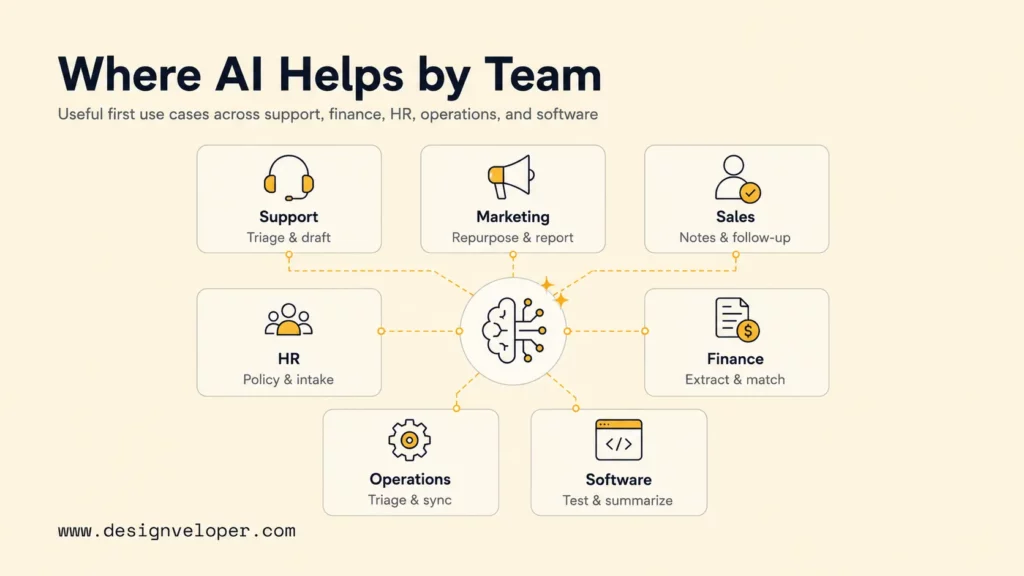
| Team | Task Example | AI Role |
|---|---|---|
| Customer support | Ticket intake, summaries, knowledge lookup, and response preparation | Detect intent and urgency, retrieve context, draft a reply, and route sensitive cases |
| Marketing and content | Brief preparation, content repurposing, campaign tagging, and reporting | Summarize research, create controlled drafts, classify assets, and explain performance changes |
| Sales and CRM | Call notes, lead research, record updates, and follow-up reminders | Extract commitments, enrich records, recommend next steps, and flag stale opportunities |
| HR and employee support | Policy questions, request intake, onboarding checklists, and scheduling | Retrieve approved policy text, collect missing information, and route requests for authorization |
| Finance and accounting | Invoice intake, expense coding, reconciliation preparation, and exception review | Extract fields, match records, suggest categories, and surface discrepancies for approval |
| Operations and admin | Inbox triage, document processing, status reporting, and cross-system updates | Classify work, summarize changes, create tasks, and synchronize approved data |
| Software development and QA | Issue reproduction, code explanation, test drafting, and release-note preparation | Organize evidence, propose changes, generate test candidates, and summarize reviewed commits |
Customer support often starts with triage because categories, response times, and escalation reasons are measurable. AI can summarize long conversations and retrieve a relevant article, but refunds, account closures, threats, vulnerable customers, and regulated topics need explicit policy gates. Monitor acceptance rate, escalation precision, first-response time, resolution time, and reopened cases rather than counting generated replies.
Document-heavy finance and operations workflows also offer clear boundaries. AI can extract vendor, amount, date, line item, and purchase-order fields, while rules compare records and humans review mismatches. The Lumin Lumin document platform illustrates the broader product complexity behind digital documents, collaboration, and signatures. Reliable automation must preserve permissions, versions, audit trails, and deliberate approval.
HR automation should support employees without making unreviewed employment decisions. A system can answer approved policy questions, prefill a request, check whether required fields are present, and notify an authorized manager. The HRM project demonstrates how leave, calendars, timesheets, resources, and employee self-service connect inside an operational product.
Software development automation works best as evidence preparation and bounded change. AI can reproduce a bug from logs, propose a unit test, explain unfamiliar code, or summarize a pull request. Reviewers still need to validate correctness, security, performance, dependencies, accessibility, and deployment behavior. Code generation should enter the same controlled CI/CD path as any other contribution.
How To Automate A Routine Task Step By Step
A safe first implementation moves from workflow evidence to controlled autonomy. Each step should produce an artifact that another person can review. That discipline prevents a promising prototype from becoming an opaque production dependency.
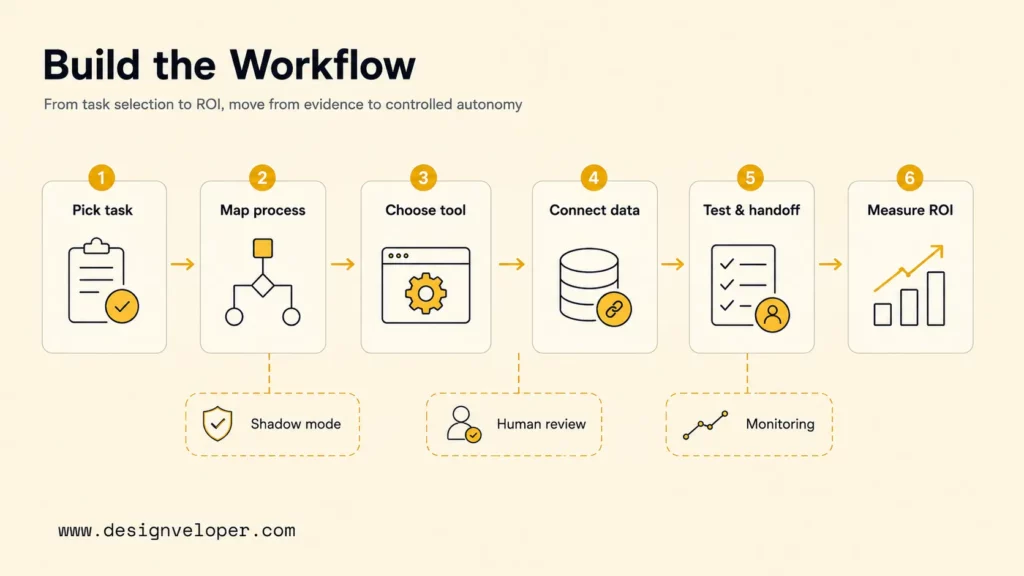
Step 1. Pick One Frequent, Painful, Measurable Task
Select one task with enough volume to learn from and enough pain to justify change. Interview the people doing the work and observe real cases. Record the monthly volume, median and peak handling time, backlog, error or rework rate, escalation rate, and business consequence of delay. Avoid a workflow chosen only because an executive saw a similar demo.
A useful pilot statement is specific: “Reduce the time required to triage standard support emails from 12 minutes to 5 minutes while keeping escalation recall above the agreed threshold.” The statement names the task, baseline, target, and quality guardrail. It also makes a failed pilot informative rather than subjective.
Step 2. Map Inputs, Outputs, Rules, And Review Points
Draw the current path from trigger to completion. Name every input, system, role, rule, queue, exception, decision, and output. Mark where work waits, where people copy data, where knowledge is retrieved, and where an error becomes costly. A broken or contradictory process should be simplified before automation.
Define the human-in-the-loop pattern explicitly. Google Cloud’s current Google Cloud agentic AI architecture and workflow design guidance describes a checkpoint where an agent pauses for a person to approve, correct, or add input. Set checkpoints before financial actions, external messages, record deletion, personnel changes, sensitive document handling, or any step the policy owner identifies as critical.
Step 3. Choose The AI Tool, Platform, Or Custom Workflow
Choose the smallest architecture that meets the requirement. A built-in assistant may be enough for summarization inside one application. A low-code automation platform can connect common systems with human approvals. A custom workflow becomes useful when the company needs proprietary logic, private data integration, specialized interfaces, strict permissions, domain evaluation, or behavior that packaged tools cannot support.
Evaluate data residency, identity, access control, audit logs, integration methods, rate limits, model choice, latency, cost, versioning, monitoring, and exit options. Do not compare products only through prompt quality. The operating environment determines whether a tool remains reliable after the pilot.
Step 4. Connect Apps, Documents, APIs, And Business Rules
Integrate only the access required for the task. A support triage workflow may need read access to a ticket and approved knowledge, permission to add an internal note, and no permission to issue a refund. A finance extractor may write a draft record but should not authorize payment. Least privilege limits the damage caused by an error or malicious input.
Separate model judgment from deterministic controls. Let AI classify text or propose fields. Use ordinary code for required fields, thresholds, identity checks, routing constraints, and irreversible actions. Store the model input, relevant source identifiers, output, rule result, reviewer action, and final outcome where privacy policy allows. This audit trail supports diagnosis and improvement.
Knowledge should have owners and freshness rules. An internal assistant cannot provide reliable policy guidance if outdated documents remain searchable. For changing private knowledge, a retrieval pipeline can ground responses in approved sources; the retrieval augmented generation explains why retrieval, source quality, access control, and no-answer behavior belong in the complete system.
Step 5. Test Accuracy, Security, Edge Cases, And Handoff
Build an evaluation set from representative cases before launch. Include easy examples, common variations, rare exceptions, poor-quality inputs, missing data, conflicting records, multiple languages, and cases that must be refused or escalated. Define expected outputs and acceptable tolerances with the process owner. OpenAI’s OpenAI evaluation guidance emphasizes that general model benchmarks cannot capture every requirement of a specific business workflow.
Security testing must cover the new action surface. The OWASP AI Agent Security Cheat Sheet highlights prompt injection, tool abuse, privilege escalation, data leakage, memory poisoning, excessive autonomy, and high-impact actions without independent validation. Test malicious documents, emails, web content, and tool outputs as untrusted input.
Run the system in shadow mode, then assistance mode, before increasing autonomy. Confirm that reviewers can understand the recommendation, correct it quickly, and reach the original source. Test timeouts, unavailable dependencies, duplicate events, partial writes, retries, and rollback. A safe failure should route work to a person with context rather than silently drop it or repeat an action.
Step 6. Measure Time Saved, Quality, Adoption, And ROI
Compare production results with the baseline from Step 1. Time saved is useful only when quality remains acceptable and the organization uses the capacity well. Track end-to-end cycle time, first-pass acceptance, correction rate, exception rate, failure rate, customer or employee outcomes, and cost per completed case. Separate model cost from integration, review, support, and maintenance cost.
Adoption reveals workflow friction. Measure active users, eligible cases processed, override reasons, abandoned suggestions, and reviewer time. Interview users when adoption falls. The model may be accurate but slow, the interface may hide its evidence, or staff may distrust an unexplained recommendation. Product changes can matter as much as model changes.
Calculate ROI with a conservative formula: verified hours saved multiplied by the loaded cost of that work, plus measurable revenue or error reduction, minus build, license, model, infrastructure, review, training, support, and governance cost. Report a range and a payback period. The McKinsey organizational AI survey found that tracking well-defined AI KPIs had the strongest relationship with reported bottom-line impact among the scaling practices it tested.
An AI workflow earns more autonomy through measured reliability; it should never receive broad permissions as a substitute for evidence.
Mistakes To Avoid When Automating Routine Tasks
The most expensive mistakes begin before model selection. Repetition is only one qualification. A broken workflow that repeats frequently will produce faster confusion after automation. Teams should remove obsolete steps, clarify ownership, and agree on the desired outcome before connecting AI.
Related reading:
- AI Agent Governance: How To Manage Agents In Production
- Agentic AI Security: Risks, Core Architecture, Solutions
- AI Agent Orchestration: How Multi-Agent Workflows Work In Practice
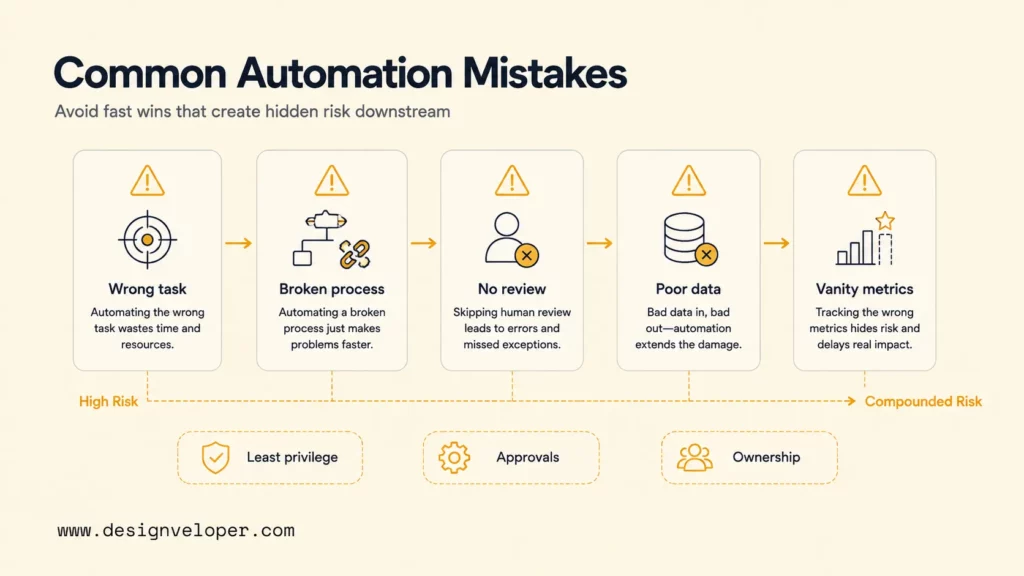
- Choosing tasks only because they are repetitive. Include business value, feasibility, and consequence of error in the selection score.
- Automating broken workflows. Fix duplicate approvals, unclear queues, missing owners, and contradictory rules first.
- Skipping human review for risky outputs. Keep accountable approval where actions affect money, rights, safety, employment, sensitive data, or external commitments.
- Using poor data or outdated knowledge. Assign source owners, permissions, refresh rules, retention limits, and a no-answer path.
- Measuring activity instead of impact. Generated drafts, tool calls, and processed tokens do not prove that cycle time, quality, or customer outcomes improved.
Another mistake is granting excessive agency. OWASP’s OWASP Excessive Agency guidance warns that broad functionality, permissions, or autonomy can allow damaging actions after hallucination, prompt injection, or compromised tool output. Limit tools by purpose, scope credentials by user and task, require confirmation for high-impact actions, and cap loops, time, and cost.
Do not measure only the automated step. A classifier may process tickets quickly while creating a larger correction queue downstream. Measure the full workflow from intake to accepted outcome, including rework and exceptions. Ask the receiving team whether the output reduces effort or merely relocates it.
Finally, avoid a launch without ownership. Name the business owner, technical owner, security reviewer, data or knowledge owner, and support path. Set a review cadence for model, prompt, workflow, permission, and source changes. The system will encounter new inputs after launch, so maintenance is part of automation design.
Start With The Right First AI Automation Workflow
The best starting point is a frequent, painful, measurable task where AI can reduce manual work without removing necessary human judgment. Good examples include support triage, invoice extraction into a draft, policy-question retrieval, meeting follow-up preparation, CRM note structuring, or software issue summarization. Each example has a bounded input, a visible output, and a reviewable result.
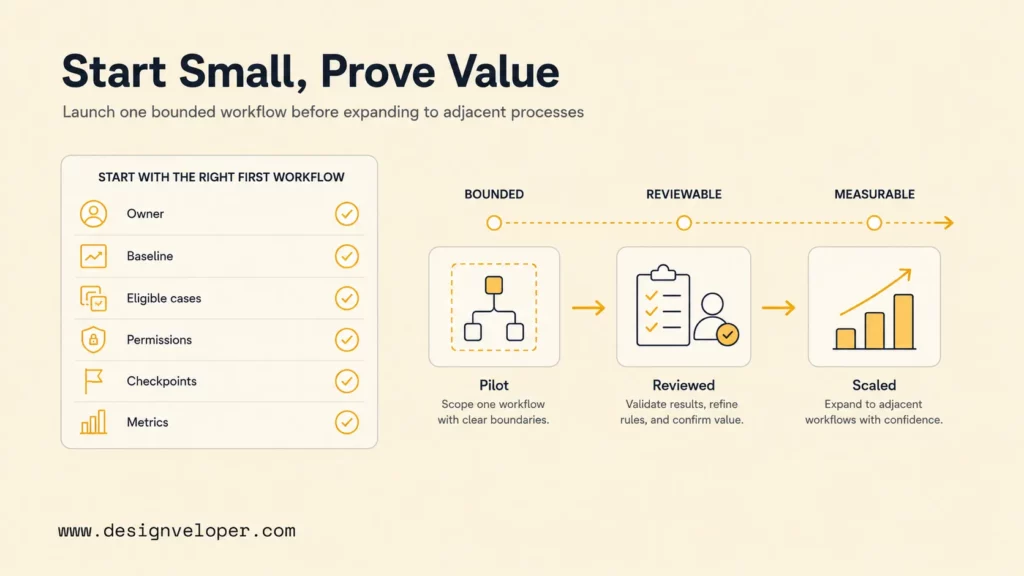
A first pilot should be small enough to ship within one operational area but complete enough to test the full path. Include identity, data access, model behavior, rules, integrations, user interface, approvals, logs, monitoring, fallback, training, and measurement. A prompt that works in a playground is not yet routine task automation and AI business process automation.
The best first AI automation target is usually a high-volume task with a clear input, observable output, and inexpensive human review. In our AI development services, we document the current steps, exception rate, approval owner, data access, and baseline handling time before choosing a model. The first release succeeds when it reduces total reviewed effort without hiding errors, not merely when the AI produces an answer quickly.
Our delivery process begins with the business bottleneck and an acceptance target. We decide what AI should interpret, what deterministic rules should control, where people must approve, and how the system proves its result. Teams can then expand from one verified task to adjacent workflows without copying hidden risk. The broader AI business process automation guide explains how orchestration, integrations, governance, and outcomes fit together at process level.
Before funding a pilot, produce a one-page automation brief: task and owner, baseline, target, eligible cases, excluded cases, data sources, permissions, human checkpoints, evaluation set, launch threshold, failure path, metrics, and review date. If the team cannot complete that brief, the next step is workflow discovery rather than software development.
FAQs About AI And Routine Task Automation
What Routine Tasks Can AI Automate Best?
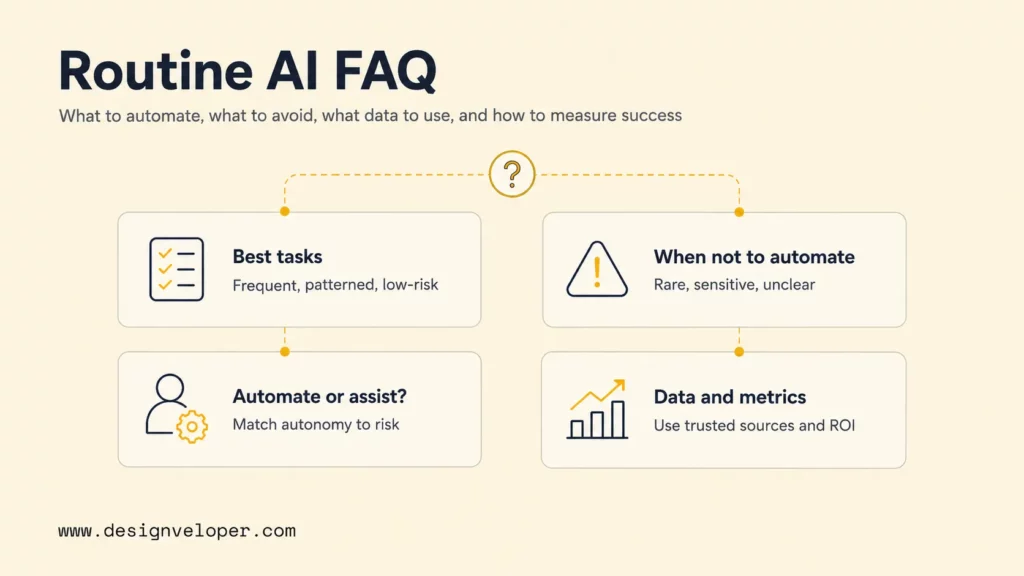
AI performs best on frequent tasks with recognizable patterns, adequate examples or source data, clear output criteria, and limited consequences when an error occurs. Strong candidates include classification, extraction, summarization, draft generation, knowledge retrieval, anomaly flagging, scheduling support, and routing. Workflow rules and people should handle permissions, approvals, and unusual cases.
The strongest candidate is often one step inside a larger process. Instead of automating invoice payment, automate field extraction and matching into a draft. Instead of automating customer resolution, prepare context and a suggested response. Bounded scope makes quality measurable and errors recoverable.
How Do I Know If A Task Should Not Be Automated?
Keep a task human-led when it is rare, novel, poorly defined, politically sensitive, or dependent on tacit context that cannot be captured reliably. Avoid full automation when errors can create severe legal, financial, employment, safety, privacy, or customer consequences and there is no effective review or rollback.
A task may become suitable later. First standardize the process, assign ownership, improve data, reduce unnecessary variation, and define success. Then test AI in shadow or assistance mode. “Not now” is a valid automation decision.
Should AI Fully Automate Or Only Assist Routine Work?
The consequence of an error should determine the starting level of autonomy. Fully automate low-risk, reversible actions that have stable rules and strong evidence. Use AI assistance when language or judgment varies. Keep final approval with an authorized person for high-impact decisions.
Move gradually from shadow mode to assistance and then selective automation. Increase autonomy only for the slice of cases that consistently meets quality, security, and operational thresholds. Continue monitoring because data, policies, integrations, and model behavior can change.
What Data Is Needed To Automate Routine Tasks With AI?
Teams need representative task examples, expected outputs, exception cases, authoritative knowledge, business rules, and outcome data. The exact mix depends on the task. Document extraction needs varied files and verified fields. Support triage needs messages, labels, escalation outcomes, and current knowledge articles. Sensitive data should be minimized and governed.
Data quality includes ownership, permission, freshness, coverage, and traceability. A large archive is not automatically useful. Select approved sources, document exclusions, separate evaluation cases from configuration examples, and confirm that the system can refuse or escalate when evidence is missing.
How Do You Measure Success After Automating A Task?
Measure end-to-end cycle time, accepted output quality, correction and exception rates, adoption, user effort, customer or employee outcomes, and total cost per completed case. Compare those metrics with a baseline and a control period where possible. Add guardrails for security incidents, policy violations, and high-impact errors.
Review both average performance and the worst important cases. A workflow can save time overall while failing a small group of sensitive requests. Segment results by input type, team, language, customer group, and risk category. Success means the complete workflow becomes faster or better without hiding new risk or rework.
How AI is automating routine tasks will keep changing as models and agent platforms improve. The durable method remains stable: choose a bounded problem, design the human and system roles, connect only necessary data and tools, test real cases, measure end-to-end impact, and expand autonomy only when evidence supports it.
Also published on

Share post on










Related Articles


Top Agentic AI Companies: 18 Vendors By Product Layer And Fit
Top Agentic AI Companies: 18 Vendors By Product Layer And Fit Published October 07, 2026
Agentic AI Architecture: Components, Patterns, And Workflows
Agentic AI Architecture: Components, Patterns, And Workflows Published October 07, 2026
AI Advantages and Disadvantages for Businesses: 5 of Each Explained
AI Advantages and Disadvantages for Businesses: 5 of Each Explained Published October 05, 2026



















