
















What Is Mobile App Development? Definition, Types, Stages

Mobile has become one of the main ways people interact with brands, services, and digital products. For businesses, that means mobile app development is no longer just a technical option. It is often a practical way to improve customer experience, support internal operations, and create products users can access quickly from anywhere.
The challenge is that building a mobile app is not simply about publishing something on the App Store or Google Play. Teams need to choose the right platform, define the right feature scope, balance speed with quality, and make sure the product fits real user behavior. According to Statcounter Global Stats, Android held about 68% of worldwide mobile operating system market share and iOS held about 31.94% in May 2026. That split alone shows why platform strategy matters from the beginning.
This guide explains how mobile app development works, why it matters, the main app types, key platforms, common architecture patterns, the development lifecycle, costs, timelines, and how to choose the right approach for your project.
What Is Mobile App Development?
Mobile app development is the process of creating software applications that run on mobile devices such as smartphones, tablets, and smart wearables. It involves designing, building, testing, and deploying applications for platforms like iOS, Android, or cross-platform frameworks that work on multiple devices.
Mobile app development is different from building a website because mobile apps often rely more heavily on device-specific capabilities. A mobile app may need offline access, camera input, local storage, biometric login, background syncing, or location services. That is why teams must think beyond visual design and address performance, security, battery usage, and operating system behavior from the start.
Why Mobile App Development Matters for Businesses
Mobile app development matters because mobile is where users spend a large share of their digital time. An app gives a business a persistent place on a user’s device, but the real value goes beyond visibility.
- Mobile apps can improve customer experience. A well-designed app makes it easier to browse products, book services, track deliveries, receive updates, or access support. When common tasks take fewer steps, user satisfaction usually improves.
- Mobile apps can support stronger retention. Push notifications, saved preferences, in-app messaging, and loyalty features make it easier for businesses to stay connected with users after the first interaction.
- Mobile apps can improve internal operations. Not every mobile app is customer-facing. Businesses also build apps for field teams, sales staff, technicians, HR workflows, inventory tracking, inspections, and approvals. In these cases, the app is not only a channel. It is an operational tool.
- Mobile apps can open new revenue opportunities. Some apps generate revenue directly through subscriptions, in-app purchases, or service bookings. Others increase revenue indirectly by shortening the path between user intent and action.
Not every business needs a mobile app immediately. The strongest cases usually appear when users need repeat interactions, fast access, personalized experiences, offline support, or device-native functionality that a website alone cannot deliver well.
Different Types of Mobile Applications
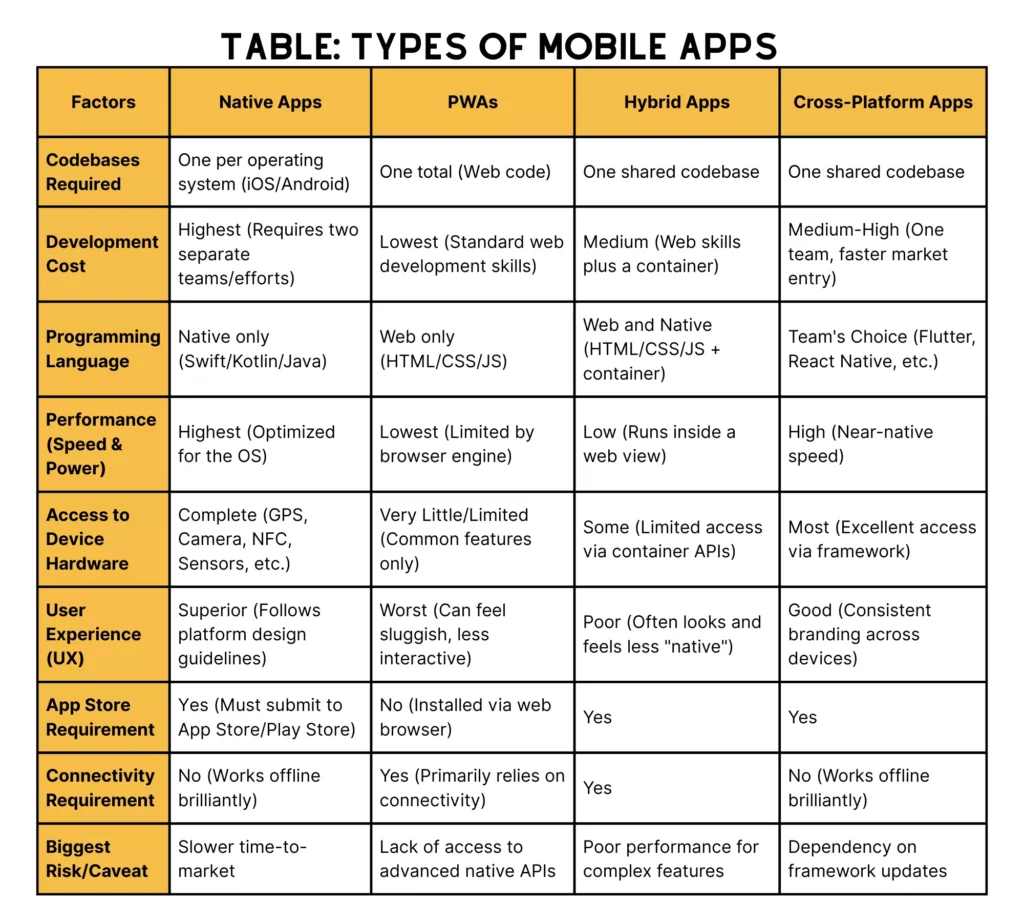
Mobile apps are commonly grouped into four main types, and each type differs in performance, development method, and practical use case.
Native Apps
Native apps are built specifically for one operating system. iOS apps are typically developed with Swift, while Android apps are commonly developed with Kotlin or Java. Because the code is written for a single platform, native apps can fully align with platform design conventions and device capabilities.
The biggest strengths of native apps are performance, responsiveness, and deep hardware integration. They are often the best choice for apps that need complex animations, advanced security handling, real-time features, high reliability, or intensive use of cameras, sensors, Bluetooth, and background processes.
Native development brings a clear tradeoff in cost and speed. If a business wants to launch on both Android and iOS using native development, it usually needs two codebases or at least two dedicated platform tracks.
Cross-Platform Apps
Cross-platform apps use one shared codebase to run on multiple platforms, most often Android and iOS. Popular choices include React Native and Flutter. If you want a deeper look at framework decisions, see these mobile app development frameworks.
Cross-platform development is often a strong option for startups, MVPs, and businesses that need to reach both major platforms without doubling development effort. It can reduce time to market and simplify ongoing maintenance.
Cross-platform development also brings tradeoffs. Some projects still require platform-specific optimization or custom native modules. In other words, cross-platform does not always mean simple. Cross-platform delivery often means shared foundations with selective native work when necessary. For example, if your team is considering a JavaScript-based stack, this overview of React Native can help frame the tradeoffs.
Hybrid Apps
Hybrid apps are built with web technologies such as HTML, CSS, and JavaScript, then wrapped inside a native shell. If you need background on this model, Designveloper also has a separate guide on hybrid apps.
A hybrid approach can work well for simple business apps, content-focused products, or internal tools where speed and budget matter more than top-tier performance. Teams with strong web development experience may also find it easier to start here.
However, hybrid apps can struggle when a product requires heavy graphics, complex offline behavior, or very polished device-native interactions.
Progressive Web Apps (PWAs)
Progressive Web Apps are web applications that behave more like mobile apps. They run in a browser but can support features such as home screen installation, offline caching, and push notifications in certain environments.
PWAs are often useful when discoverability, lightweight access, and faster deployment matter most. They can be a practical entry point for businesses that want an app-like experience without committing to full native or cross-platform development immediately.
PWAs also have clear limitations. PWAs do not always offer the same level of hardware access, performance, or app-store distribution benefits as fully installed mobile apps.
Mobile App Development Platforms
The two dominant mobile app platforms are Android and iOS. Both are mature ecosystems, but they differ in device range, development tools, review processes, and user expectations.
Android App Development
Android app development focuses on building for Google’s mobile operating system and the broader Android device ecosystem. That ecosystem includes phones, tablets, foldables, and other form factors from multiple manufacturers.
According to Android Developers, Android teams are increasingly encouraged to build adaptive experiences that work well across different device types and screen sizes. Android device diversity matters because Android is not one hardware environment. The Android ecosystem is a broad device landscape.
Android development is often a strong fit when businesses want broad global reach, especially in price-sensitive or Android-dominant markets. It also makes sense when device diversity is part of the product opportunity.
From a technical perspective, Kotlin has become one of the most important languages in the Android ecosystem. If your readers want a deeper language-level breakdown, you can point them to this article on What is Kotlin.
iOS App Development
iOS app development focuses on Apple’s mobile ecosystem, especially iPhone and, in some cases, iPad. Apple’s platform is more controlled than Android, which usually means less device fragmentation and a more consistent design environment.
According to Apple Developer, iOS development is built around Apple’s platform technologies, design systems, and app distribution standards. For businesses, that often translates into a cleaner testing surface and a strong expectation of polished UX.
Swift is now the primary language for modern iOS development, while Objective-C remains common in many legacy iOS projects. Since Objective-C was widely used before Swift, long-running apps may still contain Objective-C code that teams need to maintain, debug, or extend. For a deeper overview, read this guide on What is Objective-C.
Mobile App Architecture Overview
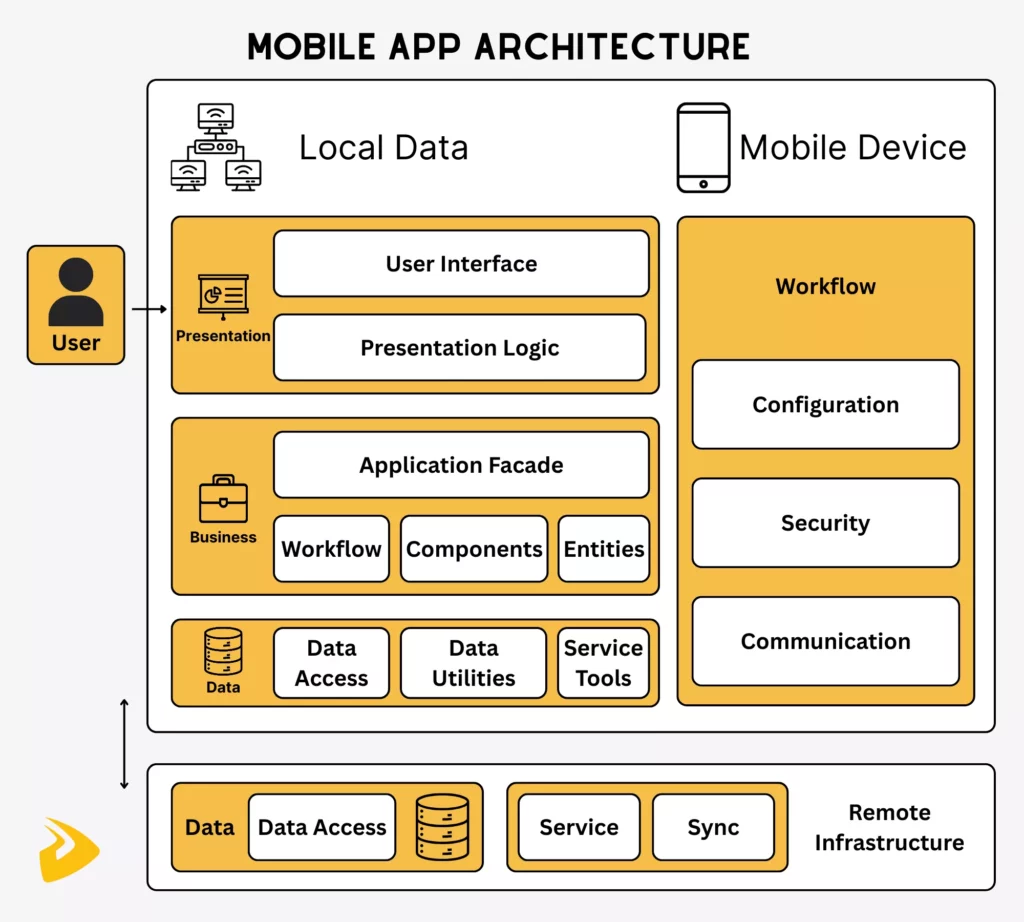
Mobile app architecture is the structural blueprint that defines how different parts of an app work together. Good architecture helps a product scale, remain maintainable, and avoid expensive rebuilds later.
While architecture can become very technical, a useful high-level model for most business readers includes three layers.
- Presentation Layer
- Business Logic Layer
- Data Layer
Presentation Layer
The presentation layer is the part users see and interact with. It includes layouts, buttons, forms, navigation, states, and visual feedback.
Its job is not only to look good. It must make tasks easy to complete, keep interactions clear, and respond well across different screen sizes and device conditions.
Business Logic Layer
The business logic layer handles the rules of the app. It decides what happens when a user signs in, submits a form, checks out, upgrades a subscription, or receives permission-based content.
The business logic layer connects user actions to product behavior. In practical terms, it is what turns a screen into a working application rather than a static interface.
Data Layer
The data layer manages how information is stored, retrieved, synchronized, and secured. It may include local storage, remote APIs, databases, cloud services, and caching strategies.
The data layer becomes especially important when an app needs offline access, real-time updates, secure transactions, or personalized content.
Mobile Application Development Lifecycle
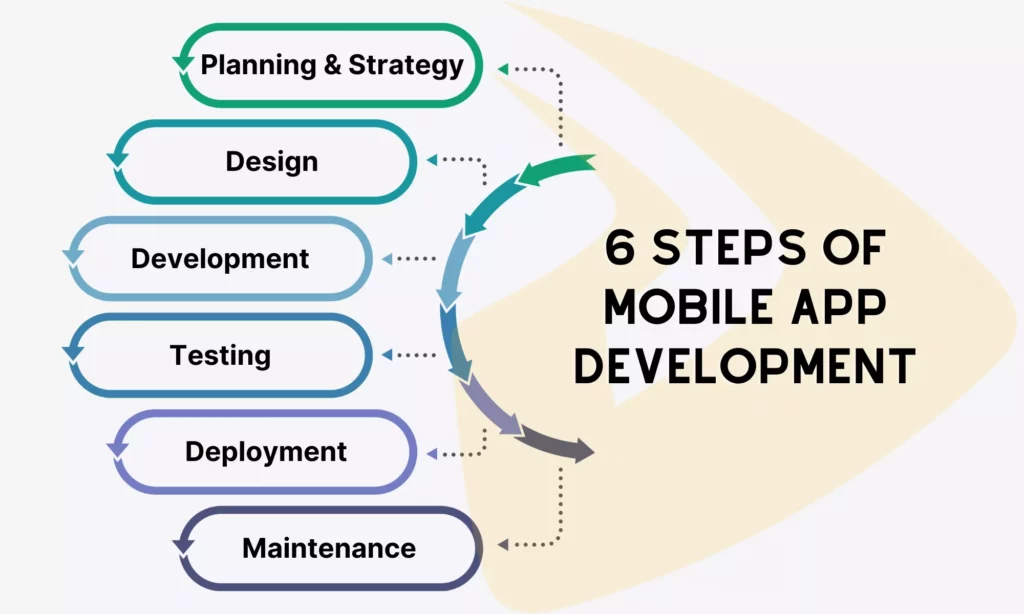
Most successful apps do not move directly from idea to code. They go through a structured lifecycle that reduces risk, improves decision-making, and keeps the project timeline more predictable. For a deeper breakdown by phase, see this guide to the app development timeline.
- Discovery and planning: Teams define the problem, user needs, business goals, success metrics, and release scope. This is also where the MVP takes shape.
- UX and UI design: Designers create user flows, wireframes, mockups, and prototypes to test whether the product is easy to use before development ramps up.
- Development: Engineers build the client-side app, back-end services, APIs, data flows, and admin or analytics support if needed.
- Testing and quality assurance: Teams validate functionality, usability, compatibility, security, and performance. This related article on the quality assurance process explains how QA fits into software delivery.
- Deployment: The app is prepared for Google Play or the App Store, reviewed for compliance, and released in a controlled way.
- Maintenance and optimization: After launch, teams monitor bugs, crash rates, engagement, retention, and user feedback, then ship improvements over time.
Common Technologies Used in Mobile App Development
Mobile app development uses different technologies depending on the platform and delivery model.
For iOS, Swift is the main modern language. For Android, Kotlin is now widely used, with Java still present in many products and legacy systems. For cross-platform development, React Native and Flutter are among the most common options. For teams comparing language choices more broadly, this guide to the best language for app development is a helpful related resource.
On the back end, mobile apps often rely on REST or GraphQL APIs, cloud databases, object storage, analytics services, authentication platforms, and notification infrastructure. Many also integrate payment gateways, maps, chat systems, CRMs, or internal business software.
Some app projects also involve web technologies directly. For example, hybrid apps and PWAs still depend on front-end fundamentals such as HTML, CSS, and JavaScript.
The right stack depends on what the product needs to do. A fintech app, an employee workflow app, a marketplace, and a healthcare scheduling product can all be called mobile apps, but their technical requirements will differ significantly.

How Much Does Mobile App Development Cost?
There is no universal cost for mobile app development because pricing depends on product scope, complexity, and delivery model. A simple utility app costs far less than a multi-role platform with payments, real-time updates, analytics, and integrations.
The biggest cost drivers usually include:
- the number and complexity of features
- whether the app targets one platform or multiple platforms
- the level of UI and UX customization
- the need for a custom back end or third-party integrations
- security, compliance, and performance requirements
- the experience and location of the development team
- the amount of post-launch support needed
In general, a lightweight MVP with focused features can be developed much faster and more affordably than a full product with advanced workflows. Businesses that want a more detailed breakdown can continue to How Much Does It Cost to Make an App.
Cost should also be viewed in relation to product risk. A more expensive architecture may be justified if it reduces future rework, supports compliance, or enables a better long-term experience.
How Long Does It Take to Build a Mobile App?
The timeline for building a mobile app depends on scope, platform strategy, design complexity, integration needs, and testing effort.
A simple MVP may take a few months. A mid-sized business app with a proper design phase, back-end services, and store-ready QA often takes longer. More complex products with custom logic, real-time features, or industry-specific compliance can take significantly more time.
Common timeline variables include:
- the number of core features
- whether the app is native, cross-platform, hybrid, or a PWA
- the amount of custom design work
- the complexity of APIs, payments, or external systems
- the number of user roles and workflows
- the range of devices and operating systems to test
Teams usually save time not by skipping steps, but by narrowing scope, validating assumptions earlier, and launching a sharper first version.
Common Challenges in Mobile App Development
Mobile app development comes with several recurring challenges.
- Platform fragmentation: Android alone spans many devices, screen sizes, and system versions. That makes testing and adaptive design more demanding.
- Performance optimization: Mobile users expect smooth interactions, short load times, and reliable behavior even on unstable networks.
- Security: Apps often handle personal data, payment flows, or sensitive business operations. Authentication, secure storage, and safe API design must be treated as product requirements, not late-stage add-ons.
- Integration complexity: Many apps depend on payment providers, CRMs, inventory systems, maps, chat tools, analytics platforms, or internal software. These dependencies can slow a project down if they are not planned early.
- Post-launch work: App store reviews, user feedback, OS updates, bug fixes, and retention improvements all continue after release.
How to Choose the Right Mobile App Development Approach
The right approach depends on what your product needs to achieve.
- Choose a native approach when performance, reliability, platform-specific UX, or deep hardware access is critical. This often applies to fintech, health, logistics, communication, or feature-rich consumer products.
- Choose a cross-platform approach when you need to launch on both Android and iOS with stronger code reuse and a faster release cycle. This is often a good fit for startups, MVPs, and digital products that need broad reach without maintaining two fully separate tracks from day one.
- Choose a hybrid approach when the app is relatively simple, content-led, or closely related to an existing web product.
- Choose a PWA when app-store presence is less important than speed, accessibility, and lightweight delivery.
The best decision usually comes from weighing six factors together: audience, business model, budget, timeline, feature complexity, and long-term maintenance. If the project starts with the wrong assumptions, teams often pay for that mistake later.
Expert Tips Before Starting a Mobile App Project
Start with a narrow problem, not a long feature list. Apps become expensive when they try to solve too many problems at once.
Validate the core use case early. Before building advanced features, make sure the product solves a real user need.
Prioritize MVP scope. A smaller first release often creates faster learning and better budget control.
Design for real usage conditions. Users may have weak connections, older devices, partial attention, or inconsistent habits.
Plan the back end early. Many mobile delays come from API, authentication, or data-model issues rather than front-end screens.
Think about QA from the beginning. If testing arrives too late, bugs become more expensive to fix.
Choose partners who can advise, not only code. Businesses often need help with tradeoffs, not just implementation. If your readers are evaluating vendors, this guide on how to choose a mobile app development company is a strong next step.
How Designveloper Builds Mobile Apps
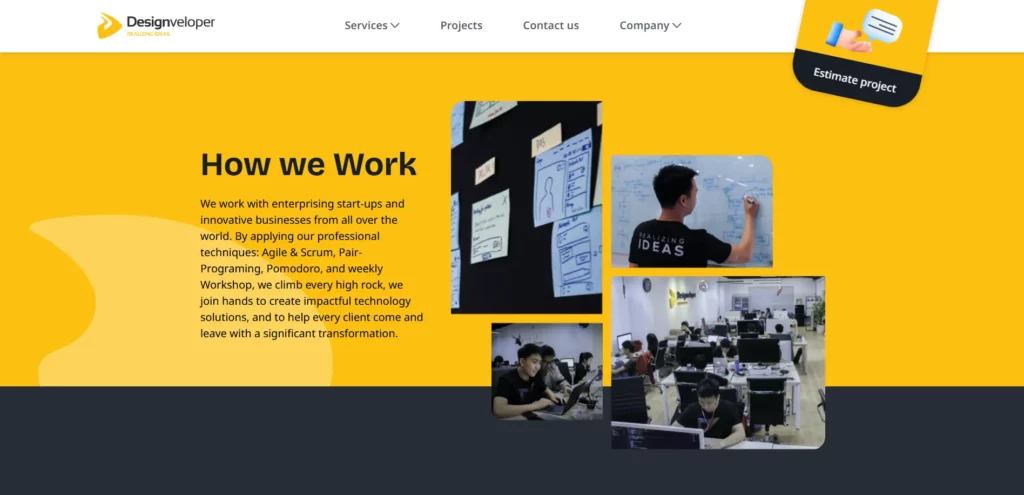
At Designveloper, we treat mobile app development as a product-building process rather than a coding task. That means starting with business goals, user journeys, and delivery constraints before deciding on the tech stack.
Our typical workflow begins with discovery. We clarify who the users are, what the core workflows look like, which features matter in the first release, and what level of complexity the product really needs.
From there, we move into UX and UI design, technical planning, development, QA, and post-launch support. Depending on the product, that may involve native development, cross-platform frameworks, custom back-end services, or integration with existing systems.
Designveloper’s approach is shaped by real project experience across different industries, including healthcare, HR, crypto-wallet, and operational workflow products. In public-facing examples shared by Designveloper, that includes products such as Lumin, Bonux, ODC, HRM, and WorkPacks. The point is not that every app should look the same. App strategy, architecture, and release scope need to match the product context.
For businesses at the planning stage, the most valuable outcome is often clarity. Early planning may mean confirming the right platform, the right MVP scope, or the right timeline before deeper development begins. If readers are still evaluating ideas, you can also direct them to related inspiration around mobile app ideas.
Conclusion
Mobile app development is a broad discipline, but the basics are straightforward. It is the process of turning a product idea into a mobile experience that users can trust, use, and return to.
The best mobile apps do more than function on a phone. They solve a clear problem, fit the right platform strategy, use an architecture that can scale, and launch with a scope the team can support.
For businesses, the right question is not only “How do we build an app?” It is “What kind of app should we build, for whom, and with which tradeoffs?” Once that is clear, the technical path becomes easier to choose.
Also published on

Share post on










Related Articles



Cloud Application Development: Architecture, Process, And Cost
Cloud Application Development: Architecture, Process, And Cost Published September 25, 2026
SaaS Application Development: Process, Cost, And Architecture
SaaS Application Development: Process, Cost, And Architecture Published September 25, 2026
10 Best Mobile App Development Tools: Choose Your Stack In 2026
10 Best Mobile App Development Tools: Choose Your Stack In 2026 Published September 23, 2026



















