
















What Is Hybrid App Development? Frameworks & Use Cases

Hybrid app development helps businesses build mobile apps for iOS and Android with one shared codebase. It is often a practical choice when a team needs faster delivery, lower development cost, and enough native functionality for real mobile workflows. This guide explains how hybrid apps work, how they compare with native, web, PWA, and cross-platform apps, and when this approach is the right fit.
Read this guide on what mobile app development is to get a foundational view.
What Is Hybrid App Development?
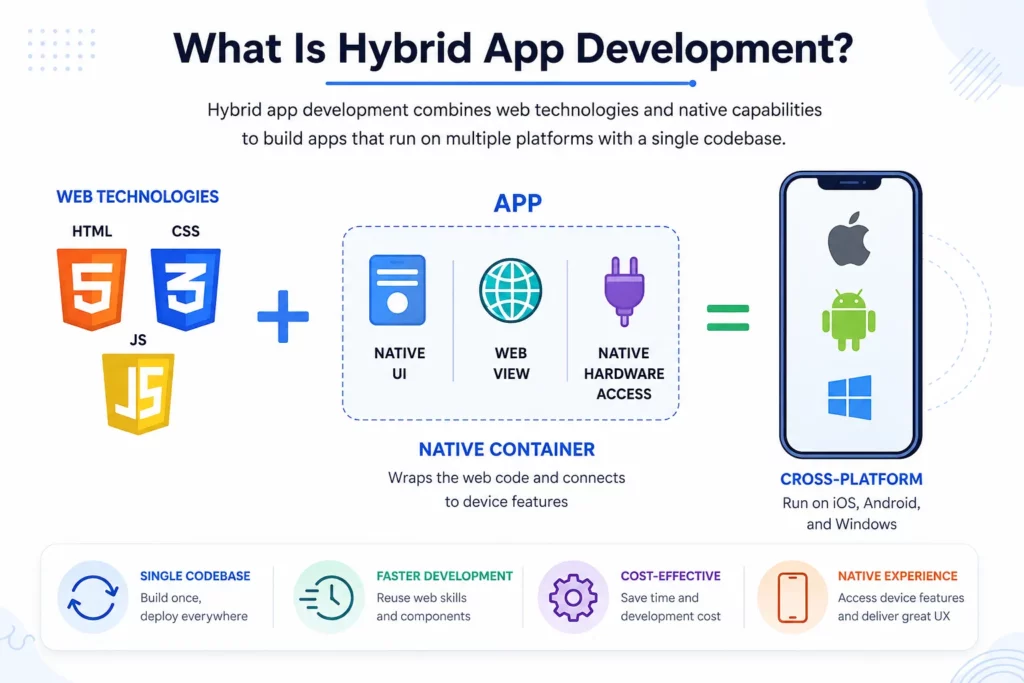
Hybrid app development combines web technologies such as HTML, CSS, and JavaScript with a native container to build mobile applications that run on iOS and Android. This model helps businesses reach users on both platforms without building two fully separate products, which can shorten release cycles, control budgets, and keep updates more consistent.
Hybrid development is not the best answer for every product. Apps with heavy animation, complex offline logic, advanced hardware access, or strict native UX requirements may need native or cross-platform development instead. But for content apps, internal business tools, ecommerce apps, booking platforms, MVPs, and many customer-facing products, hybrid app development can be a strong option.
A simple way to understand hybrid app development is this:
| Layer | What it does |
|---|---|
| Web code | Handles screens, layout, logic, and user interaction |
| Native container | Packages the app for iOS and Android |
| WebView | Displays the web-based interface inside the app |
| Plugins or bridge | Connects the web code to device features |
| Backend services | Stores data, handles accounts, APIs, payments, and business logic |
In practice, modern hybrid development is no longer only about “wrapping a website.” A production hybrid app needs mobile-first interface design, a controlled WebView environment, secure bridge communication, reliable plugin management, and real-device testing.
How Hybrid App Development Works
Hybrid app development works by placing a web-based application inside a native mobile wrapper. The user installs the app like any other mobile app, but many screens are rendered with web technology inside the app.
The app still feels like a mobile product when it is designed and optimized well. It can use navigation, gestures, camera access, push notifications, authentication, and other mobile features. The difference is that much of the interface and logic comes from shared web-based code.
Most hybrid apps rely on four technical ideas: a web layer, a native app shell, a bridge to device features, and backend services. Each part has a different role, and each part affects performance, security, and long-term maintenance.
Web layer
The web layer is the part of the hybrid app built with HTML, CSS, and JavaScript. It controls what users see and how they interact with the app, including screens, buttons, forms, product listings, dashboards, checkout flows, content pages, or internal workflow tools.
A strong web layer should not feel like a website squeezed into an app. The interface should be designed for mobile behavior from the start. Mobile-first design means clear navigation, fast loading, responsive layouts, accessible controls, and touch-friendly interactions.
Native shell or container
The native shell is the mobile wrapper around the web application. The shell allows the app to be installed on iOS and Android devices, gives the product a path into app stores, and helps the web-based experience behave like an installed mobile application instead of an ordinary browser page.
The native shell also controls app-level behavior such as splash screens, permission prompts, deep links, status bar behavior, app-store packaging, and operating-system-level configuration. Teams that are still choosing the right mobile stack can compare options in this guide to the best languages for app development.
Plugins and native bridge
Plugins and native bridges connect the web layer to device features such as the camera, GPS, local storage, push notifications, file system, biometric login, or contacts. For example, a delivery app may need GPS, a banking support app may need file upload, and an ecommerce app may need push notifications.
The native bridge is powerful, but the bridge is also where complexity appears. If an app needs deep hardware integration or very specific native behavior, hybrid development may require custom native code or may stop being the best fit. A good bridge should define which actions the web layer can request, how data is passed, how errors are returned, and which native calls are blocked.
Backend services
The backend handles the data and business logic behind the app. A hybrid app can use the same type of backend as a native or web app, including user accounts, product data, payment systems, messaging, admin dashboards, analytics, AI features, or integrations with third-party tools.
For many business apps, the backend is more important than the app type. A well-built hybrid app with a strong backend can support real customer workflows, internal operations, and scalable product features. Security also belongs in the architecture discussion, so teams should avoid loading untrusted content inside the app, restrict unnecessary WebView capabilities, validate messages passed through the bridge, and open external links in the system browser when needed.
Hybrid vs Native vs PWA vs Cross-Platform Apps
Hybrid app development is often compared with native apps, web apps, progressive web apps, and cross-platform apps. These categories overlap in casual conversation, but they are not the same. For a wider breakdown, see Designveloper’s guide to the main types of apps.
AWS explains the difference between web apps, native apps, and hybrid apps by looking at how each type is built, distributed, and used across devices. This comparison is useful because the right choice depends on performance needs, device access, budget, and reach. Source: AWS.
| Characteristics | Native app | PWA | Hybrid app | Cross-platform app |
|---|---|---|---|---|
| Codebase | Separate iOS and Android codebases | Shared web codebase | Shared web-based codebase | Shared codebase with platform-specific builds |
| Runtime or rendering model | Runs directly on native platform APIs and UI components | Runs through the browser with service workers and web APIs | Runs inside a native container, often through a WebView and plugins | Uses native UI mapping or compiled rendering depending on the framework |
| Distribution | Apple App Store and Google Play | Browser, install prompt, or home-screen shortcut | Apple App Store and Google Play | Apple App Store and Google Play |
| Best for | High-performance apps, advanced UX, heavy hardware use | Browser-first products that need installability or offline support | Faster multi-platform delivery with app-store distribution | Apps that need shared logic with stronger native-like UX |
| Main limitation | Higher cost and longer development time | Limited app-store behavior and uneven native feature access | Can have performance and UX limits if poorly built | Still needs platform-specific testing and optimization |
The key difference is how each app type renders the interface and connects to device features. A hybrid app usually displays web technologies inside a native container, while a native app is built for one platform at a time and a PWA runs through the browser. A cross-platform app, such as one built with React Native or Flutter, may share code across platforms but is not always a WebView-based hybrid app, so calling every shared-codebase app “hybrid” can lead to the wrong technical decision.
Popular Hybrid App Development Frameworks
The best framework choice depends on the product’s interface, performance target, plugin needs, and the team’s existing skills. A business app with forms and dashboards does not need the same architecture as a consumer app with complex animation, real-time media, or deep hardware behavior.
For this article, “hybrid app development” mainly refers to WebView-based hybrid apps such as Ionic and Capacitor. React Native, Flutter, Kotlin Multiplatform, and .NET MAUI are also worth mentioning because teams often compare them during the same architecture decision. For a broader list, see this guide to mobile app development frameworks.
Ionic and Capacitor
Ionic with Capacitor is usually the strongest option for teams that want a modern WebView-based hybrid stack. Ionic provides mobile-ready UI patterns, while Capacitor gives the app a native runtime and plugin access for iOS, Android, and the web.
Ionic and Capacitor fit products where speed, maintainability, and web-team productivity matter more than advanced graphics performance. Enterprise dashboards, customer portals, ecommerce interfaces, booking flows, and internal workflow apps are common examples because these products rely on forms, content, authentication, notifications, and integrations.
Apache Cordova
Apache Cordova is the legacy foundation of many early hybrid applications. Cordova wraps web applications in a native container and uses plugins to connect the web layer with device features.
Cordova can still appear in older products, but new projects should evaluate it carefully. Teams should check plugin maintenance, iOS and Android compatibility, security updates, and migration paths before choosing Cordova over newer tooling such as Capacitor.
Framework7
Framework7 is useful when the product needs a web-based interface with mobile-style components. The framework provides ready-made UI patterns that can help teams build screens that feel closer to mobile app interfaces.
Framework7 works best when the interface layer needs to move quickly and the app does not require deep native complexity. Teams may consider it for prototypes, internal tools, or lightweight hybrid apps where UI speed is more important than a large native-plugin ecosystem.
Onsen UI
Onsen UI is another option for teams that want prebuilt mobile UI components in a web-based app. The framework supports mobile-style layouts and can work with different JavaScript frameworks.
Onsen UI is most useful when the team wants consistent interface patterns without designing every mobile component from scratch. The framework is less about deep native capability and more about helping web teams create app-like screens faster.
Note: React Native and Flutter are cross-platform frameworks, not traditional WebView-based hybrid frameworks. Teams should compare them with hybrid tools when they need shared code plus stronger native-like UI or performance, but they should not treat every shared-codebase app as a hybrid app.
Hybrid App Development Process
The hybrid app development process should follow the same product discipline as any serious mobile project. A strong process keeps the shared-code advantage without ignoring mobile UX, native features, testing, or long-term maintenance.
- Define product goals and platform scope: The team should first define what the app must do and which platforms it must support. Important questions include target platforms, required device features, offline needs, user roles, backend integrations, and expected scale.
- Plan a mobile-first user experience: The design should be built for mobile behavior from the start. A strong UX plan should include simple navigation, clear touch targets, fast forms, visible feedback, and platform-aware behavior.
- Choose the framework and architecture: The team should choose the hybrid framework based on long-term maintainability. Key criteria include plugin ecosystem, documentation, compatibility with the team’s frontend stack, native API access, testing workflow, build process, and future feature support.
- Audit native feature requirements: The team should review device features before development starts. Camera access, push notifications, GPS, file storage, biometric login, Bluetooth, NFC, and background execution can each affect architecture and plugin choices.
- Build the frontend and backend: The frontend team builds the app screens and logic, while the backend team builds APIs, databases, authentication, admin workflows, integrations, and business rules. A hybrid app still needs a strong backend to support reliable customer and business workflows.
- Connect native features: The team connects native device features through plugins or custom native code. Native feature work may include camera access, location, push notifications, file upload, biometric login, storage, or payment integrations.
- Review security before launch: Security review should happen before release, not after. The team should check how the WebView loads content, how the bridge accepts messages, how external links open, how authentication tokens are stored, and whether sensitive workflows need stronger safeguards.
- Test across platforms and devices: Hybrid apps need serious cross-platform testing. The same shared code can behave differently across iOS versions, Android devices, browsers, screen sizes, WebView behavior, permissions, and plugin combinations.
- Check performance under real conditions: Performance testing should include startup speed, screen transitions, long lists, media loading, offline behavior, and low-network conditions. Many hybrid apps fail not because the framework is weak, but because the app loads too much JavaScript, sends too many API requests, or treats mobile users like desktop users.
- Plan release and maintenance: After testing, the app can be submitted to app stores. The release plan should define which updates can be shipped through the web layer, which updates require a new app-store submission, and how the team will handle operating system updates, plugin updates, security patches, analytics, and user feedback.
Hybrid App Development Cost and Timeline Factors
Hybrid app development often reduces cost compared with building two separate native apps, but the final budget depends on scope.
The main cost drivers are:
| Factor | Why it affects cost |
|---|---|
| Feature complexity | More screens, workflows, and roles require more design and engineering |
| Native integrations | Camera, GPS, payments, push notifications, and biometric login add testing and setup work |
| Backend complexity | APIs, databases, admin panels, AI features, and third-party systems increase scope |
| Design quality | Custom UI, animations, and UX research add effort |
| Offline support | Sync logic and local storage can make the app more complex |
| Security needs | Authentication, permission control, encryption, and compliance require extra work |
| Testing scope | More devices and platforms mean more QA time |
| Maintenance plan | Plugin updates, OS changes, and feature releases need ongoing budget |
A simple hybrid MVP may take a few months. A more complex business app with backend systems, integrations, roles, analytics, and native features can take longer. For a fuller planning view, compare this with Designveloper’s guide to the typical app development timeline.
The safest way to estimate a hybrid app is to define the first release clearly. Businesses should separate must-have features from later improvements. This keeps the first version realistic and prevents the shared-code advantage from being lost to scope creep.
The table below shows how scope usually changes the delivery plan:
| Scope tier | Typical features | Timeline pressure |
|---|---|---|
| Simple MVP | Login, basic profile, content screens, simple forms, one or two integrations | Fastest path if design and backend are simple |
| Mid-level business app | User roles, dashboards, notifications, payment or booking flow, admin panel, analytics | Needs stronger QA and backend planning |
| Complex enterprise app | Offline sync, multiple systems, strict security, custom native modules, complex permissions | Requires deeper architecture, testing, and maintenance planning |
Hybrid development can reduce duplicated mobile work, but it does not remove product complexity. If the backend, data model, integrations, or approval workflows are complex, the project still needs proper discovery and phased delivery.
Benefits of Hybrid App Development
Hybrid app development has several advantages for businesses that need to launch and maintain apps across platforms.
- Code reuse across platforms: A shared codebase can reduce duplicate work across iOS and Android. This can make development faster and maintenance simpler, especially for products with similar behavior across platforms.
- Faster time to market: Hybrid development can help teams launch an MVP or first product version faster. This matters when the business needs to validate demand, test a workflow, or release a product before investing in a larger native build.
- Lower development cost: A hybrid app can cost less than building two separate native apps. The savings usually come from shared code, fewer duplicated features, and a smaller team structure. The final cost still depends on design quality, backend complexity, integrations, app-store requirements, and maintenance needs. For budget planning, read this breakdown of how much it costs to make an app.
- Simpler maintenance: Hybrid apps can be easier to maintain when the iOS and Android versions share most of the same logic. Bug fixes, UI updates, and feature improvements can often be made once and then tested across platforms.
- Better fit for web-skilled teams: Hybrid development works well for teams that already know HTML, CSS, JavaScript, and modern frontend frameworks. Instead of hiring separate iOS and Android specialists at the beginning, a team can use existing web skills to build a mobile product.
- Better feature parity: A shared product layer can reduce the risk that the iOS and Android versions drift apart. This is useful for businesses that need both platforms to receive the same features, fixes, and policy updates at the same time.
- Useful path for legacy systems: Hybrid apps can help companies mobile-enable existing web portals, intranets, ecommerce systems, or internal tools without rebuilding every workflow from scratch. This is often valuable in enterprise environments where backend systems are already stable but the user experience needs a mobile layer.
Limitations of Hybrid App Development
Hybrid app development also has trade-offs. These trade-offs should be understood before a business chooses the approach.
- Possible performance limits: Hybrid apps may not match native apps for performance-heavy use cases. Apps with complex animations, real-time graphics, advanced gestures, AR, games, or heavy background processing often need native or cross-platform native development.
- More complex native feature access: Plugins solve many native access needs, but not all. If an app depends on advanced Bluetooth behavior, custom camera processing, background services, biometric flows, or platform-specific APIs, hybrid development may require custom native code.
- Higher UX design risk: A hybrid app can feel smooth and polished, but only if the team designs for mobile from the start. A common mistake is to reuse a desktop web interface and place it inside a mobile app.
- Plugin dependency risk: Hybrid apps often depend on plugins for native features. If a plugin is outdated, poorly maintained, or incompatible with a new iOS or Android version, the app can face stability issues.
- More testing than teams expect: Shared code does not remove the need for platform testing. A hybrid app still needs QA across iOS, Android, screen sizes, OS versions, WebView behavior, permissions, and plugin combinations.
- Possible app-store review issues: A hybrid app must still provide a real mobile experience. If the app feels like a low-value website wrapper, lacks useful native behavior, or handles external navigation poorly, it may create user experience and review risks.
When Should You Choose Hybrid App Development?
Hybrid app development is a strong option when the product needs broad reach, controlled cost, and reasonable mobile functionality.
Choose hybrid development when the app has these conditions:
- The product needs to launch on both iOS and Android.
- The first version must be delivered quickly.
- The app does not require heavy graphics or advanced hardware integration.
- The interface is mostly forms, content, dashboards, listings, booking flows, or account features.
- The team already has strong web development skills.
- The business wants to validate an MVP before investing in a larger native build.
- Maintenance speed matters more than platform-specific perfection.
Hybrid development is especially useful for business apps, internal tools, ecommerce apps, event apps, education platforms, content platforms, and early-stage customer apps.
For example, a company that needs a mobile ordering app, a field-service reporting tool, or an employee workflow app may not need two fully native codebases. A well-built hybrid app can cover the core workflow and reduce the cost of reaching users on both platforms.
Hybrid development is also useful when the mobile app extends an existing web product. For example, a company may already have a customer portal, ecommerce site, employee intranet, or reporting dashboard. A hybrid architecture can reuse part of that product logic while adding mobile features such as push notifications, biometric login, offline caching, or camera upload.
A practical rule is to choose hybrid when the app is workflow-heavy rather than graphics-heavy. If users mainly read content, submit forms, manage orders, view records, upload files, receive alerts, or complete approvals, hybrid development can deliver strong business value.
When Should You Avoid Hybrid App Development?
Hybrid app development is not ideal for every project.
Avoid or reconsider hybrid development when the app depends on:
- High-performance graphics or gaming behavior.
- Advanced AR, VR, or real-time visual processing.
- Heavy offline-first architecture.
- Complex background services.
- Deep platform-specific UX patterns.
- Strict hardware access.
- Very large-scale consumer performance requirements.
- Security-sensitive flows that need deeper native control.
Hybrid limitations do not mean hybrid apps are insecure or low quality. The development model should match the product’s risk profile.
If performance, device integration, or native UX is central to the product value, native development or a cross-platform native framework may be a better long-term choice.
Teams should also avoid hybrid development when the product roadmap will soon require many custom native modules. If the app starts as a simple wrapper but quickly needs deep native behavior, the project can become harder to maintain than a native or cross-platform native build.
FAQs
Is hybrid app development the same as cross-platform development?
Hybrid app development is related to cross-platform development, but the two terms are not identical.
Hybrid apps usually use web technologies inside a native container. Cross-platform apps use a shared codebase, but the rendering model may be different. React Native and Flutter are often called cross-platform frameworks rather than traditional hybrid WebView frameworks.
Are hybrid apps slower than native apps?
Hybrid apps can be slower than native apps in performance-heavy use cases, but many business apps do not need maximum native performance.
A well-built hybrid app can perform well for forms, content, ecommerce, dashboards, booking flows, and internal tools. Performance problems usually appear when the app has heavy graphics, poor frontend optimization, complex animations, or inefficient backend calls.
Can hybrid apps access the camera and GPS?
Yes. Hybrid apps can access device features such as the camera, GPS, storage, and push notifications through plugins or native bridges.
The exact level of support depends on the framework, plugin quality, device platform, and operating system version. Teams should test these features on real devices before launch.
Can hybrid apps be published on app stores?
Yes. Hybrid apps can be packaged and submitted to the Apple App Store and Google Play.
They still need to follow app-store guidelines. The app should provide real mobile value, not simply wrap a low-quality website without a proper mobile experience.
Are hybrid apps secure?
Hybrid apps can be secure when they are designed and tested properly. Security depends on how the app handles authentication, local storage, API calls, WebView permissions, plugin access, and communication between the web layer and native layer. Teams should validate bridge messages, avoid loading untrusted content, protect tokens, and review plugin dependencies before launch.
Is a hybrid app better than a PWA?
A hybrid app is better than a PWA when the business needs app-store distribution, stronger access to device features, push-notification behavior, or a more installed-app experience.
A PWA can be better when the product is browser-first, SEO visibility matters more than app-store presence, and the app does not need deep native capabilities. The right choice depends on distribution, feature access, and user behavior.
Conclusion
Hybrid app development is a practical way to build mobile apps for iOS and Android using web technologies inside a native container. It works best when a business needs faster delivery, shared code, app-store distribution, and enough access to native device features for everyday workflows.
The approach is not a shortcut around product quality. A hybrid app still needs strong UX, clean architecture, real-device testing, secure backend systems, and ongoing maintenance. When those parts are handled well, hybrid development can help businesses launch useful mobile products without the cost and complexity of two separate native codebases.
For companies planning an MVP, internal tool, ecommerce app, booking platform, or mobile workflow system, hybrid development may be the right starting point. For products with advanced hardware needs or strict native performance requirements, a native or cross-platform native approach may be safer.
Designveloper helps businesses choose the right mobile architecture, build production-ready apps, and connect mobile products with the workflows, data, and systems behind them. If your team is deciding between hybrid, native, web, or cross-platform development, contact Designveloper to review the best path for your product.
Also published on

Share post on










Related Articles



How To Create A Free App And Make Money: 8 Monetization Models
How To Create A Free App And Make Money: 8 Monetization Models Published July 30, 2026
Healthcare App Development: Building Secure Apps For Better Care
Healthcare App Development: Building Secure Apps For Better Care Published July 29, 2026
SaaS Application Development: Process, Architecture, And Cost Guide
SaaS Application Development: Process, Architecture, And Cost Guide Published July 28, 2026



















