
















Types of Apps: Native, Hybrid, Cross-Platform and PWAs

The main types of apps by technology are native apps, cross-platform apps, hybrid apps, and progressive web apps. Apps can also be classified by function, such as ecommerce, finance, education, healthcare, productivity, or entertainment.
This classification matters because each app type affects performance, cost, user experience, maintenance, and long-term scalability. According to DataReportal’s Digital 2026 Mid-Year Global Update, there were 5.83 billion unique mobile users worldwide in April 2026, equal to 70.4% of the global population.
This guide explains what each app type means, where it fits best, its pros and cons, real examples, and how to choose the right option for your product.
What Is an App?
An app, short for application, is a software program designed to help users perform specific tasks on a device. Apps can run on smartphones, tablets, desktops, browsers, smart TVs, wearables, and other connected devices.
In everyday language, the word “app” often refers to a mobile application installed on a smartphone. In software development, an app can also refer to a web app, desktop app, enterprise app, or progressive web app.
An app usually has a clear purpose. A banking app helps users manage money. A fitness app helps users track health goals. A booking app helps users reserve a service. A business workflow app helps teams complete internal tasks faster.
This article focuses mainly on mobile and web-based apps because these are the app types most businesses compare when planning a digital product.
May you are interested in: What is super app
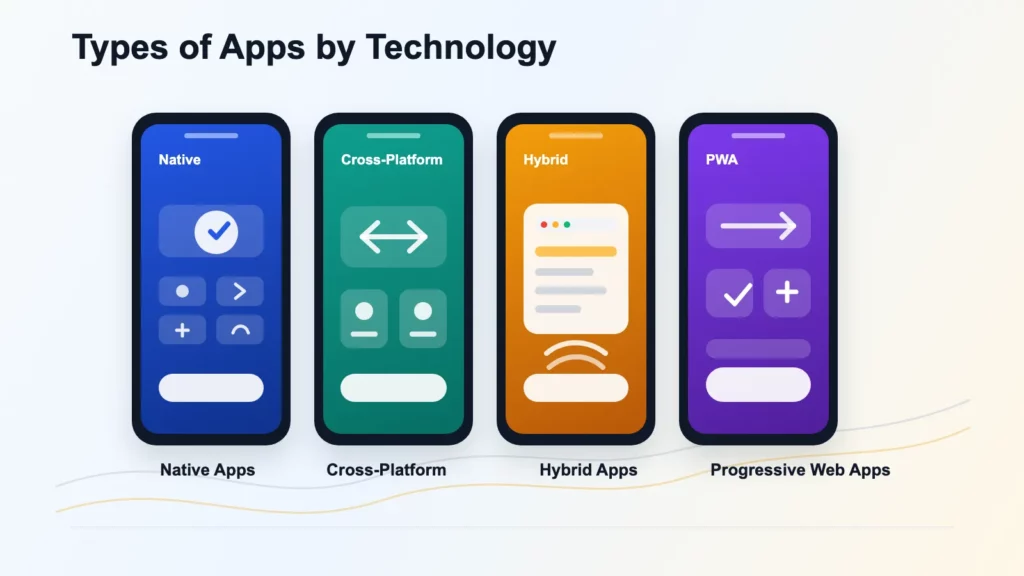
Types of Apps by Technology
Apps can be classified by technology, also called development approach. This classification helps teams choose the right architecture, programming stack, budget, release process, and maintenance model.
The four common technology-based app types are native apps, cross-platform apps, hybrid apps, and progressive web apps.
Native Apps
Native apps are built specifically for one operating system. iOS native apps are commonly developed with Swift. Android native apps are commonly developed with Kotlin or Java.
Native apps run directly on the device and follow the design patterns of the platform. They are usually the strongest choice when performance, security, offline workflows, or deep device integration matter. In technical terms, native apps are compiled for a target operating system and work closely with platform SDKs.
Key features:
- Built for a specific platform, such as iOS or Android.
- Uses platform-native languages and tools.
- Runs directly on the user’s device.
- Follows platform-specific interface and interaction patterns.
- Can access device features such as camera, GPS, microphone, biometrics, Bluetooth, NFC, accelerometer, push notifications, local storage, and background processes.
- Can support advanced workloads such as AR features, media editing, high-frequency location tracking, and real-time graphics.
Pros:
- Offers the strongest performance and responsiveness.
- Provides deep access to device hardware and operating system features.
- Supports polished, platform-specific user experiences.
- Works well for advanced offline workflows and security-sensitive products.
- Can handle complex animations, real-time features, and high reliability requirements.
Cons:
- Usually costs more to build than other app types.
- Often requires separate development tracks for iOS and Android.
- Needs platform-specific testing, release management, and maintenance.
- Can take longer to launch on multiple platforms.
- Requires updates when operating systems or device standards change.
Best-fit intent and use cases:
- Choose native apps when the app must be fast, secure, reliable, and deeply integrated with the device.
- Best for fintech apps, healthcare apps, navigation apps, video apps, gaming apps, fitness apps, messaging apps, and real-time mobile products.
- Best when the app depends on biometric login, background tracking, camera workflows, Bluetooth, NFC, sensors, or complex offline behavior.
Real examples: WhatsApp, Spotify, Google Maps, Snapchat, Mobile banking apps,…
Cross-Platform Apps
Cross-platform apps use one shared codebase to run on multiple platforms, most often iOS and Android. Popular mobile app development frameworks include React Native and Flutter. Some teams also consider Kotlin Multiplatform when they want to share business logic while keeping native user interfaces.
Cross-platform apps are different from traditional hybrid apps. A cross-platform app often renders native-like interface components and can use native modules when needed. A hybrid app usually relies more heavily on web technologies inside a native container. This difference affects performance, UI consistency, hiring, testing, and long-term maintenance.
Key features:
- Uses one shared codebase for multiple platforms.
- Commonly built with frameworks such as React Native or Flutter.
- Can deliver a native-like mobile experience.
- Allows selective native modules for platform-specific features.
- Reduces duplicated development work across iOS and Android.
- Can use different rendering models, such as native components in React Native or a custom rendering engine in Flutter.
Pros:
- Reduces time to market compared with building two separate native apps.
- Lowers development and maintenance effort.
- Offers a strong balance between performance, cost, and speed.
- Helps teams launch on both iOS and Android faster.
- Works well for products that need consistent features across platforms.
Cons:
- Does not remove all platform-specific work.
- Some features may still require native modules or custom platform code.
- Complex animations, advanced device access, or unusual platform behavior can increase development effort.
- Performance depends on the chosen framework and implementation quality.
- Debugging can be harder when issues appear only on one platform.
- Framework choice can affect app size, startup behavior, animation performance, and the availability of experienced developers.
Best-fit intent and use cases:
- Choose cross-platform apps when you need a strong mobile presence on both iOS and Android but want to control cost and timeline.
- Best for startups, MVPs, marketplaces, ecommerce apps, booking apps, social apps, customer portals, and SaaS mobile companion apps.
- Best when the product needs a mobile-first experience but does not require fully separate native builds.
Real examples: Uber, Discord, eBay Motors, BMW app, Shopify mobile apps,…
Hybrid Apps
Hybrid apps are built with web technologies such as HTML, CSS, and JavaScript, then wrapped inside a native shell. This native shell allows the app to be installed on a device and distributed through app stores.
Hybrid apps often use frameworks or tools such as Ionic, Cordova, or Capacitor. These tools allow web-based code to run inside a mobile app container and access selected device features through plugins. The embedded web experience usually communicates with native device APIs through a bridge layer.
Key features:
- Built with web technologies such as HTML, CSS, and JavaScript.
- Runs inside a native container or shell.
- Can be distributed through app stores.
- Can access selected device features through plugins.
- Often reuses web-based logic across platforms.
- Uses a WebView or similar embedded browser context to render much of the interface.
Pros:
- Usually faster to develop than fully native apps.
- Can reduce development cost for simple products.
- Allows teams with web development skills to build mobile apps.
- Uses one main codebase for multiple platforms.
- Works well for content-focused products and internal tools.
Cons:
- May perform worse than native or cross-platform apps in complex use cases.
- Can struggle with heavy graphics, advanced animations, and complex offline behavior.
- Plugin dependency can create maintenance risks.
- May feel less polished than native apps.
- Not ideal for products that require deep device-native interactions.
- Bridge communication can create latency when the app requires frequent UI updates, heavy data parsing, or complex animations.
Best-fit intent and use cases:
- Choose hybrid apps when the product scope is simple, the timeline is tight, and the app does not need advanced performance.
- Best for internal business apps, employee tools, event apps, simple customer portals, content apps, surveys, directories, and MVPs with limited technical complexity.
- Best when speed and budget matter more than top-tier mobile experience.
Real examples: Instagram, Gmail, Evernote, Amazon Shopping,…
Progressive Web Apps (PWAs)
Progressive Web Apps are web applications that provide an app-like experience. They run through a browser but can support features such as home screen installation, offline caching, responsive layouts, and push notifications in supported environments.
Progressive Web Apps are built with web platform technologies and provide a user experience similar to a platform-specific app. A PWA can run across platforms from a single codebase, and it may be installable, offline-capable, and integrated with device features depending on browser and operating system support. Most PWAs depend on a web app manifest, service workers, and HTTPS.
Key features:
- Runs through a web browser.
- Uses web platform technologies.
- Can be installable in supported environments.
- Can support offline caching and background synchronization through service workers.
- Can support responsive layouts and push notifications where available.
- Does not require app-store installation for basic access.
- Uses a web app manifest to define app icons, display mode, theme colors, and launch behavior.
Pros:
- Reduces installation friction because users can access the app through a URL.
- Can be easier to deploy and maintain than native apps.
- Supports faster updates through the web.
- Works across mobile and desktop browsers.
- Can improve repeat visits when caching and installation are implemented well.
Cons:
- Has more limited hardware access than native apps.
- Browser and operating system support can vary.
- Usually has less app-store visibility.
- May not match native performance for advanced mobile experiences.
- Some users may not understand how to install a PWA.
- Some advanced APIs, such as Bluetooth, NFC, or long-running background execution, can be restricted in browser-based environments.
Best-fit intent and use cases:
- Choose PWAs when broad access, fast deployment, low installation friction, and web discoverability matter more than full native functionality.
- Best for ecommerce platforms, media sites, booking platforms, education products, community platforms, lightweight productivity tools, and customer portals.
- Best when the product should work across mobile and desktop browsers from one web-based codebase.
Real examples: Starbucks, Pinterest, X Lite, Forbes, Trivago,…
Comparison Table
| Criteria | Native apps | Cross-platform apps | Hybrid apps | Progressive web apps |
|---|---|---|---|---|
| Definition | Built for one operating system | Shared codebase for iOS and Android | Web technologies inside a native shell | Web app with app-like features |
| Common technologies | Swift, Kotlin, Java | React Native, Flutter, Kotlin Multiplatform | Ionic, Cordova, Capacitor, HTML, CSS, JavaScript | HTML, CSS, JavaScript, service workers, web app manifest |
| Performance | Very high | High | Medium | Medium to high |
| Development cost | High | Medium | Low to medium | Low to medium |
| Time to market | Slower for multi-platform launch | Faster than separate native builds | Fast for simple products | Fastest for web-first products |
| Device access | Strongest | Strong, with native modules when needed | Moderate, through plugins | Limited to moderate, depending on browser support |
| Offline support | Strong | Strong when planned well | Moderate | Strong for cached flows when configured well |
| Distribution | App Store and Google Play | App Store and Google Play | App Store and Google Play | Browser, direct URL, installable in supported environments |
| Best for | Fintech, healthcare, navigation, gaming, media-heavy apps | Startups, marketplaces, ecommerce, booking apps, SaaS companion apps | Internal tools, content apps, simple MVPs, customer portals | Ecommerce, media, booking, education, communities, lightweight tools |
| Main tradeoff | Higher cost and platform-specific maintenance | Some platform-specific work still remains | WebView and plugin limits can affect performance | Limited hardware access and weaker app-store visibility |
Types of Apps by Function
Apps can also be grouped by function. This view focuses on what the app helps users do, not how the app is built.
- Social media and communication apps: Platforms for connecting, messaging, and sharing content (e.g., Facebook, Instagram, WhatsApp, Telegram).
- Entertainment and streaming apps: Apps for watching videos, listening to music, reading content, or following creators (e.g., Netflix, Spotify, YouTube, Kindle).
- Productivity and business apps: Tools that help users work, collaborate, manage tasks, or run business workflows (e.g., Notion, Microsoft Teams, Slack, Trello).
- Finance and banking apps: Apps for managing money, budgets, payments, transfers, investments, or banking services (e.g., PayPal, Revolut, local bank apps).
- Ecommerce apps: Platforms for online shopping, product discovery, payments, and order tracking (e.g., Amazon, Shopee, eBay, Shopify stores).
- Health and fitness apps: Apps for tracking workouts, diet, sleep, mindfulness, medication, or health goals (e.g., Strava, Fitbit, Calm, MyFitnessPal).
- Education and e-learning apps: Apps that support lessons, courses, quizzes, language learning, or skill development (e.g., Duolingo, Coursera, Khan Academy, Udemy).
- Travel, booking, and on-demand apps: Apps for booking trips, rides, food delivery, hotels, services, or appointments (e.g., Uber, Grab, Airbnb, Booking.com).
- Gaming apps: Apps built for interactive play, competition, and entertainment (e.g., Roblox, Candy Crush Saga, PUBG Mobile, Clash of Clans).
- Utility and lifestyle apps: Simple tools for everyday needs, planning, habits, weather, notes, recipes, or smart home control (e.g., Google Keep, Weather, Todoist, Google Home).
Common Mistakes When Comparing App Types
Choosing an app type is easier when the team avoids a few common assumptions. These mistakes can increase cost, slow delivery, or create technical limits later in the product lifecycle.
- Confusing cross-platform apps with hybrid apps: Cross-platform apps often use frameworks such as React Native or Flutter to create native-like experiences. Hybrid apps rely more heavily on web technologies inside a native shell.
- Choosing native development too early: Native development can be powerful, but it may add cost and complexity when a simpler web-first product or cross-platform app would be enough.
- Using hybrid development for complex mobile products: Hybrid apps can work well for simple use cases, but they are not the best fit for products that need heavy graphics, advanced offline workflows, or deep device integration.
- Ignoring long-term maintenance: App-store releases, operating system updates, security patches, analytics, third-party SDKs, and device testing can all affect the total cost of ownership.
- Deciding based only on launch speed: A fast launch is valuable, but the app also needs to support future features, user growth, product stability, and release operations.
- Following trends instead of requirements: The best app type is not the trendiest option. The best app type is the one that fits the product’s real requirements.
Expert Recommendation from Designveloper
Designveloper’s practical recommendation is to choose the app type based on product risk, not only app development cost.
For an MVP, cross-platform development or a PWA is often a strong starting point. These options help businesses test the market faster while keeping the product flexible.
For fintech, healthcare, logistics, and other workflow-heavy products, native or cross-platform development is usually safer. These products often need stronger performance, security, offline behavior, and device integration.
For internal tools, content apps, and simple customer portals, hybrid apps or PWAs may be enough. These products usually need speed, usability, and cost control more than advanced mobile performance.
For ecommerce and customer engagement products, the choice depends on user behavior. A PWA can reduce access friction. A cross-platform or native app can support stronger retention if users return often.
The most reliable approach is to define the product requirements first. A team should clarify user journeys, must-have features, offline needs, security requirements, integrations, release frequency, and expected growth before choosing the technology.
Contact Designveloper for a detailed consultation on the right app type for your product. Our experienced software development team will review your goals, technical requirements, budget, and roadmap, then recommend the most suitable approach for your app. Explore Designveloper projects to see how Designveloper turns product requirements into production-ready software.
FAQs About Types of Apps
What are the main types of apps?
The main types of apps by technology are native apps, cross-platform apps, hybrid apps, and progressive web apps. Apps can also be grouped by function, such as ecommerce apps, finance apps, education apps, healthcare apps, gaming apps, productivity apps, AI-enabled apps, and super apps.
What is the difference between native and cross-platform apps?
Native apps are built for one operating system, such as iOS or Android. Cross-platform apps use one shared codebase to run on multiple platforms. Native apps usually offer the strongest platform-specific performance, while cross-platform apps can reduce development time and cost.
Are cross-platform apps the same as hybrid apps?
Cross-platform apps and hybrid apps are not the same. Cross-platform apps often use frameworks such as React Native or Flutter to create native-like apps from a shared codebase. Hybrid apps usually use web technologies inside a native shell.
Which type of app has the best performance?
Native apps usually have the best performance because they are built specifically for one operating system. Cross-platform apps can also perform well when the framework and architecture match the product requirements.
Which type of app is cheapest to build?
PWAs and hybrid apps are often cheaper to build than native apps. Cross-platform apps usually sit in the middle because they share code across platforms while still offering a stronger mobile experience than many traditional hybrid apps.
Which type of app is best for startups?
Startups often choose cross-platform apps or PWAs because these options can reduce time to market. A startup should choose native development when the product depends on advanced performance, security, or device integration.
Do PWAs replace mobile apps?
PWAs can replace mobile apps in some use cases, especially ecommerce, content, booking, and lightweight productivity products. PWAs are not a full replacement for native apps when a product needs deep hardware access, app-store visibility, or advanced mobile performance.
What type of app should a business build first?
A business should build the simplest app type that can deliver the required user experience. If a responsive web app or PWA can meet user needs, that may be the best first step. If the product needs strong mobile performance, native or cross-platform development may be better.
Conclusion
Apps can be classified by technology and by function. Technology explains how the app is built. Function explains what the app helps users do.
The main types of apps by technology are native apps, cross-platform apps, hybrid apps, and progressive web apps. Native apps offer the strongest performance and device integration. Cross-platform apps balance mobile experience with shared development. Hybrid apps help teams build simple apps faster with web technologies. Progressive web apps provide app-like experiences through the browser.
Apps can also be classified by function, such as ecommerce apps, finance apps, healthcare apps, education apps, productivity apps, travel apps, entertainment apps, gaming apps, AI-enabled apps, super apps, and utility apps.
The right choice depends on your users, product goals, budget, timeline, technical requirements, and long-term roadmap. A strong app strategy starts with the experience users need, then selects the technology that can deliver that experience reliably.
Also published on

Share post on










Related Articles



How To Create A Free App And Make Money: 8 Monetization Models
How To Create A Free App And Make Money: 8 Monetization Models Published July 30, 2026
Healthcare App Development: Building Secure Apps For Better Care
Healthcare App Development: Building Secure Apps For Better Care Published July 29, 2026
SaaS Application Development: Process, Architecture, And Cost Guide
SaaS Application Development: Process, Architecture, And Cost Guide Published July 28, 2026



















