
















Top 10 Best AI Chatbots We’ve Tried And Tested In 2026

KEY TAKEAWAYS:
- The best AI chatbot depends on the workflow, not on launch buzz or brand familiarity alone.
- Claude and ChatGPT remain strong for broad knowledge work, while Gemini, Perplexity, Copilot, and others become more useful when they match a specific ecosystem or use case.
- Research, coding, workplace productivity, and companion-style conversation are different chatbot jobs, so one tool rarely leads in every category.
- For business or sensitive work, users should test real tasks, verify sources, and factor in privacy, integration, and governance before choosing a chatbot.
The best AI chatbot is the one that fits the task, the data, and the risk level. A writer may need careful reasoning. A developer may need coding help. A researcher may need citations. A business user may need a chatbot that works inside Google Workspace, Microsoft 365, or an internal product workflow.
This guide compares the best AI chatbot options we would test first in 2026: Claude, ChatGPT, Gemini, Perplexity, Grok, Microsoft Copilot, DeepSeek, Meta AI, Kindroid, and Nomi.
If you are comparing broader product patterns rather than just consumer apps, it also helps to understand the difference between conversational AI and chatbot systems, because some tools are built for writing and search while others are built for automation, integration, or companionship.
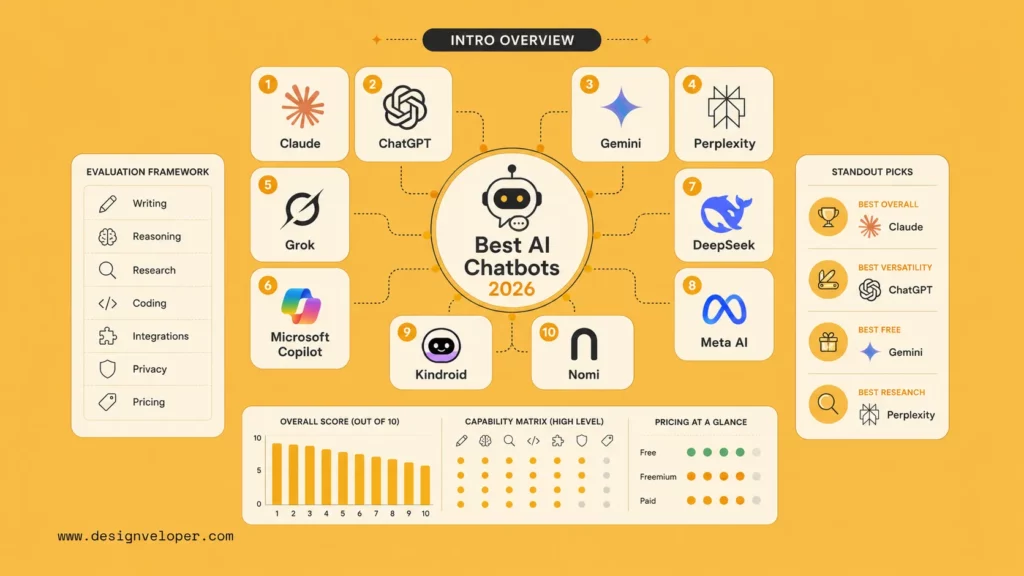
See more:
- Best Chatbot Platforms for Teams That Need More Than a Website Widget
- AI Chatbots for Businesses: Top Picks by Use Case
- AI Agent vs Chatbot: Product Tradeoffs and Use Cases
The Best AI Chatbots At A Glance
Demand is growing because people now use AI across writing, research, support, coding, and everyday productivity. Recent data helps frame that shift. McKinsey’s 2025 State of AI survey found that 88% of respondents use AI in at least one business function, while Microsoft’s AI Diffusion Report estimates that roughly one in six people worldwide now use generative AI tools. The better question is no longer whether people use chatbots. It is which chatbot fits the work.
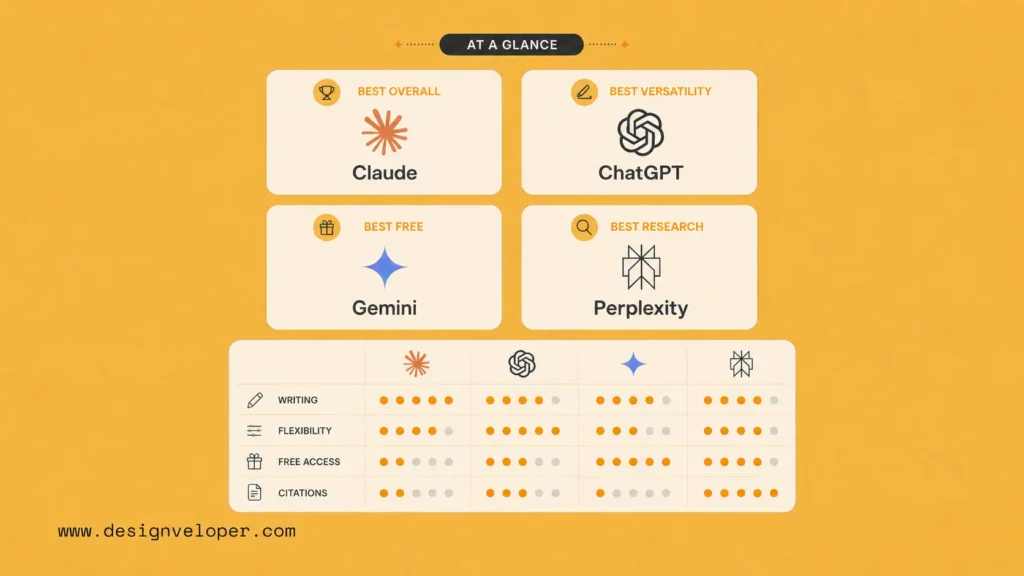
| Need | Best pick | Why it stands out |
|---|---|---|
| Best Overall | Claude | Strong writing, reasoning, and stable long-form work. |
| Best For Versatility | ChatGPT | Broad ecosystem, files, voice, images, data analysis, and custom workflows. |
| Best Free Option | Gemini | Useful free access and strong Google ecosystem fit. |
| Best For Research And Real-Time Information | Perplexity | Source-backed answers and web-first research habits. |
Explore more:
- What Is Agentic AI? Benefits, Architecture And How It Works
- Best Agentic AI Tools for Practical Workflow Automation
- Enterprise AI Agents: What Matters Before Scaling
Best Overall
Claude is the strongest overall choice for many knowledge workers because it handles writing, synthesis, reasoning, and document-heavy work with a calm style. It is not always the fastest tool for every task. Yet it often gives consistent drafts that need less cleanup.
Best For Versatility
ChatGPT remains the most versatile choice. It fits brainstorming, writing, coding support, image work, data analysis, voice use, and everyday productivity. It also has a large ecosystem around custom GPTs, workspace tools, and developer APIs.
Best Free Option
Gemini is the best free option for many Google users. It works well when the workflow touches Gmail, Docs, Sheets, Drive, Search, and Android. Google plan details change often, so users should still re-check the current official subscriptions page before choosing a paid tier.
Best For Research And Real-Time Information
Perplexity is the strongest pick when the answer needs sources. It is useful for market scans, product research, competitor checks, and fast reading across the web. Users still need to open sources and verify key claims.
How We Tested These AI Chatbots?
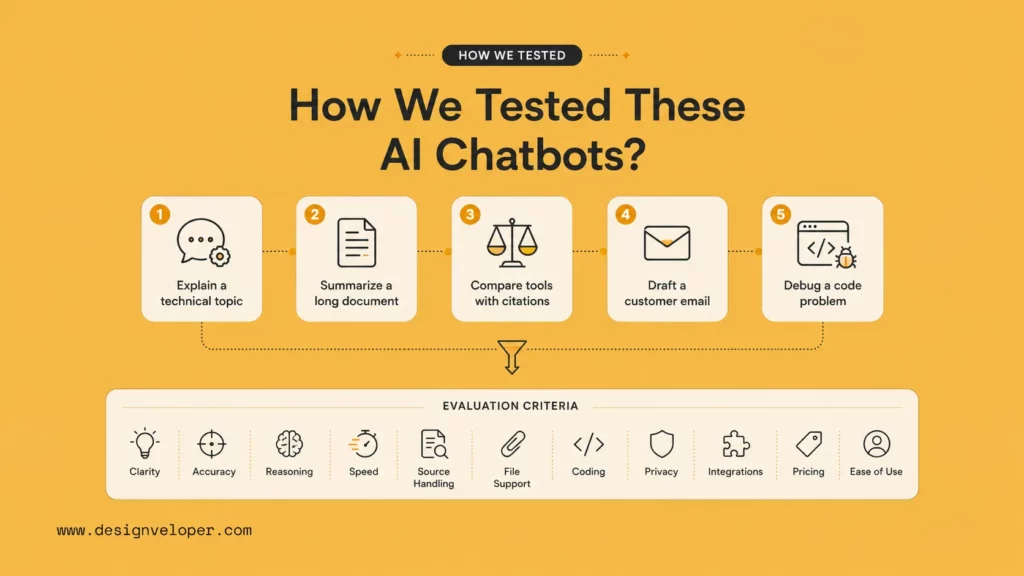
We used practical tasks instead of abstract scores. A chatbot that wins a benchmark may still fail a real workflow. Therefore, we judged each tool on clarity, accuracy, reasoning, speed, source handling, file support, coding usefulness, privacy signals, integrations, pricing clarity, and ease of use.
The test set included five common tasks. First, we asked each chatbot to explain a technical topic for a non-technical reader. Second, we asked it to summarize a long document and list uncertainties. Third, we asked it to compare tools with citations. Fourth, we asked it to draft a customer email with a specific tone. Finally, we asked it to debug a small code problem and explain the fix.
This method favors tools that behave well in everyday work. It also reveals hidden weaknesses. Some chatbots sound confident but miss sources. Some handle web search well but write flat copy. Others answer quickly but lose context. And others produce friendly replies but struggle with structured analysis.
Pricing also mattered, but only as a decision factor, not as a permanent fact table. The safest habit is to test the free tier first, then upgrade only when a paid limit blocks real work. That mindset is also useful when comparing broader AI agent pricing or evaluating what a team actually needs from production AI tooling.
Further reading:
- What AI Integration Means in Real Business Systems
- AI Chatbot Integration: What Successful Rollouts Usually Need
- AI Business Process Automation: What It Really Changes
Best AI Chatbots In 2026: Which One Is Right For You?
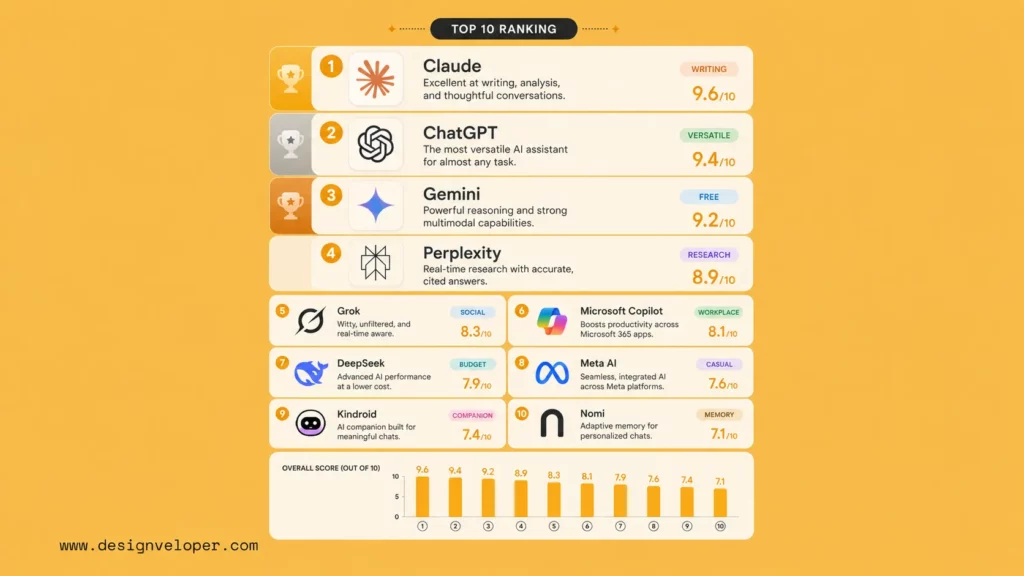
The ranking below is practical, not absolute. It favors usefulness for work, writing, research, coding, and daily productivity. It also considers whether a chatbot can fit into a business workflow without creating unnecessary privacy or review risks.
Continue reading:
1. Claude – Best Overall For Writing, Reasoning, And Consistency
Why We Picked It
Claude is our top overall pick because it produces thoughtful, readable, and structured responses. It works especially well for long-form writing, strategy notes, document review, and careful reasoning.
Key Strengths
- Strong writing quality.
- Good long-context behavior.
- Clear explanations.
- Useful for planning, editing, and document synthesis.
Pros & Cons
Claude’s main benefit is consistency. It often gives a polished answer on the first try. The drawback is that it may feel less tool-rich than ChatGPT for users who want broad multimodal features and a large add-on ecosystem.
Who It’s For
Choose Claude if you write reports, analyze documents, plan projects, review strategy, or need a calm reasoning partner.
Pricing
Claude has free and paid options. Check Anthropic’s official plan page before buying because usage limits and tier names can change.
2. ChatGPT – Best For Versatility And Ecosystem Features
Why We Picked It
ChatGPT is the best all-around ecosystem choice. It can help with writing, coding, images, files, voice, data analysis, and custom assistants. That range makes it one of the easiest tools to test when a team wants one assistant for many workflows.
Key Strengths
- Broad feature set.
- Strong coding and data workflows.
- Useful mobile and desktop experience.
- Large ecosystem for custom GPTs and integrations.
Pros & Cons
ChatGPT’s strength is range. Its weakness is that users must choose settings and models carefully for sensitive or high-stakes work.
Who It’s For
Choose ChatGPT if you want one chatbot for many tasks. It is useful for teams that move between writing, code, files, spreadsheets, images, and brainstorming.
Pricing
OpenAI lists free and paid ChatGPT plans, but plan limits and model access change often, so users should verify the latest official plan page before purchase.
3. Gemini – Best Free Option For Google-Centric Workflows
Why We Picked It
Gemini is a strong option for users who live in Google’s ecosystem. It pairs well with Search, Android, Gmail, Docs, Sheets, and Drive workflows.
Key Strengths
- Good free access.
- Strong Google product fit.
- Useful for everyday questions and productivity.
- Natural choice for users already paying for Google AI plans.
Pros & Cons
Gemini works best when the task connects to Google services. It may not always produce the most polished long-form writing compared with Claude or ChatGPT.
Who It’s For
Choose Gemini if you use Google tools daily and want a free AI chatbot app that fits that environment.
Pricing
Google lists current AI Pro and Ultra details on its official subscriptions page. Always confirm current country availability and limits before rollout.
4. Perplexity – Best For Research And Source-Backed Answers
Why We Picked It
Perplexity is built around search and citations. It is useful when you need fast context, source links, and a readable research summary.
Key Strengths
- Source-first answers.
- Good for market research.
- Helpful for fact-checking starting points.
- Strong for comparison and discovery tasks.
Pros & Cons
Perplexity helps users find sources quickly. However, it should not replace source review. Open the cited reports before using numbers in business content.
Who It’s For
Choose Perplexity if you research trends, competitors, tools, academic topics, or current news.
Pricing
Perplexity has free and paid plans. Confirm current limits on the official pricing page before subscribing.
5. Grok – Best For Real-Time X Data And Social Context
Why We Picked It
Grok is useful when the task needs social context from X. It can help users follow online discussion, creator reactions, and fast-moving cultural topics.
Key Strengths
- Strong connection to X context.
- Useful for social trend scanning.
- Informal tone.
- Good fit for creators and marketers who track public conversation.
Pros & Cons
Grok can feel timely and entertaining. The risk is that social context can be noisy. Users should verify claims with primary sources before acting.
Who It’s For
Choose Grok if your work depends on X trends, social commentary, or quick cultural context.
Pricing
Grok access and limits can depend on xAI and X plans, so users should verify official subscription details before buying.
6. Microsoft Copilot – Best For Microsoft Productivity Work
Why We Picked It
Microsoft Copilot is the practical choice for teams that already work inside Microsoft 365. It is less about casual chat and more about productivity in Word, Excel, PowerPoint, Outlook, Teams, and enterprise workflows.
Key Strengths
- Microsoft 365 fit.
- Useful for document and meeting workflows.
- Enterprise identity and admin controls.
- Good choice for organizations already using Microsoft tools.
Pros & Cons
Copilot works best when the organization has clean Microsoft data and strong permission hygiene. It may feel less flexible than a general chatbot for creative exploration.
Who It’s For
Choose Copilot if your daily work happens in Microsoft 365 and your company wants enterprise controls.
Pricing
Plan details vary by consumer, business, and education use, so check official Microsoft pricing before rollout.
7. DeepSeek – Best Budget-Friendly Alternative
Why We Picked It
DeepSeek is useful for users who want a budget-friendly chatbot for coding, reasoning, and general experimentation. It also matters in the open-model conversation because many teams compare proprietary and open-weight options.
Key Strengths
- Budget-friendly access.
- Useful coding support.
- Strong interest from developers.
- Good for experimentation.
Pros & Cons
DeepSeek can deliver strong value. Users should still review privacy, hosting, and data handling before using it for sensitive work.
Who It’s For
Choose DeepSeek if cost matters and the tasks are low-risk or developer-oriented.
Pricing
DeepSeek’s chat product and API are separate, so users should confirm the official pricing and product page before relying on it for regular work.
8. Meta AI – Best For Casual Everyday Use
Why We Picked It
Meta AI is convenient because it appears inside familiar social apps. It can answer everyday questions, generate ideas, and help with casual creative tasks.
Key Strengths
- Easy access through Meta apps.
- Good for casual use.
- Useful image and idea generation.
- Low learning curve.
Pros & Cons
Meta AI is easy to try. It is not the first choice for confidential business analysis or deeply sourced research.
Who It’s For
Choose Meta AI if you want a casual assistant inside apps you already use.
Pricing
Access is usually tied to Meta products and region availability, so review the latest official app information before depending on it.
9. Kindroid – Best For Personalized AI Companion Experiences
Why We Picked It
Kindroid focuses on personalized AI companion experiences. It is different from work-first tools because memory, character, and interaction style matter more than enterprise productivity.
Key Strengths
- Personalized conversation.
- Companion-style memory.
- Custom character experiences.
- Good for users who want emotional continuity.
Pros & Cons
Kindroid can create a more personal experience. It is not a replacement for professional advice, therapy, legal support, or business-critical analysis.
Who It’s For
Choose Kindroid if the goal is a personalized companion-style chatbot, not a workplace assistant.
Pricing
Check Kindroid’s official subscriptions page before subscribing because limits and features may change.
10. Nomi – Best For Memory-Driven AI Conversations
Why We Picked It
Nomi is another companion-style option. It focuses on memory-driven conversations and relationship continuity. That makes it useful for users who value personal tone and long-running context.
Key Strengths
- Memory-centered interactions.
- Personalized tone.
- Companion-style use cases.
- Good for casual long-running chats.
Pros & Cons
Nomi can feel personal. Users should still set boundaries and avoid using it as a substitute for regulated professional support.
Who It’s For
Choose Nomi if you want a memory-heavy AI chatbot app for personal conversation.
Pricing
Review the official Nomi site before subscribing because companion-app access, free use, and paid limits can change.
Which AI Chatbot Fits Different Needs Best?
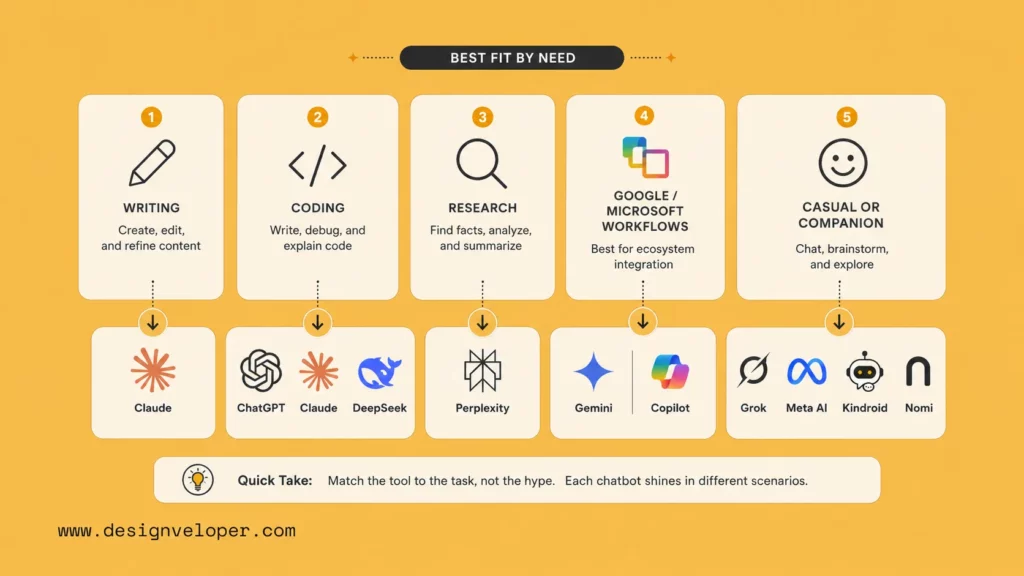
The best chatbot depends on the kind of work you are doing. Matching the tool to the workflow usually matters more than finding a universal winner.
Related articles:
- What Is Python Programming? A Simple Guide for Practical Automation
- How To Build Agentic AI Around Real Workflow Logic
- What Is TypeScript? A Practical Guide for Product Teams
For Writing And Long-Form Thinking
Choose Claude first. It gives structured drafts, careful rewrites, and useful reasoning. ChatGPT is a close second because it can combine writing with files, images, data, and custom workflows.
For Coding And Technical Work
Use ChatGPT, Claude, or DeepSeek depending on the codebase and budget. For serious work, never paste secrets into a chatbot. Use a tool with clear data controls, code review, tests, and repository permissions.
For Research And Fact-Finding
Use Perplexity when source links matter. Then open the sources and verify. ChatGPT, Gemini, and Claude can also research, but Perplexity’s core experience keeps citations near the answer.
For Google Or Microsoft Workflows
Choose Gemini for Google-heavy work and Copilot for Microsoft-heavy work. Integration matters because a chatbot becomes more useful when it can operate near the documents, emails, calendars, and data that shape daily work.
For Casual, Social, Or Companion-Style Use
Choose Grok for social context, Meta AI for casual everyday use, and Kindroid or Nomi for companion-style conversations. These tools solve a different need than enterprise assistants.
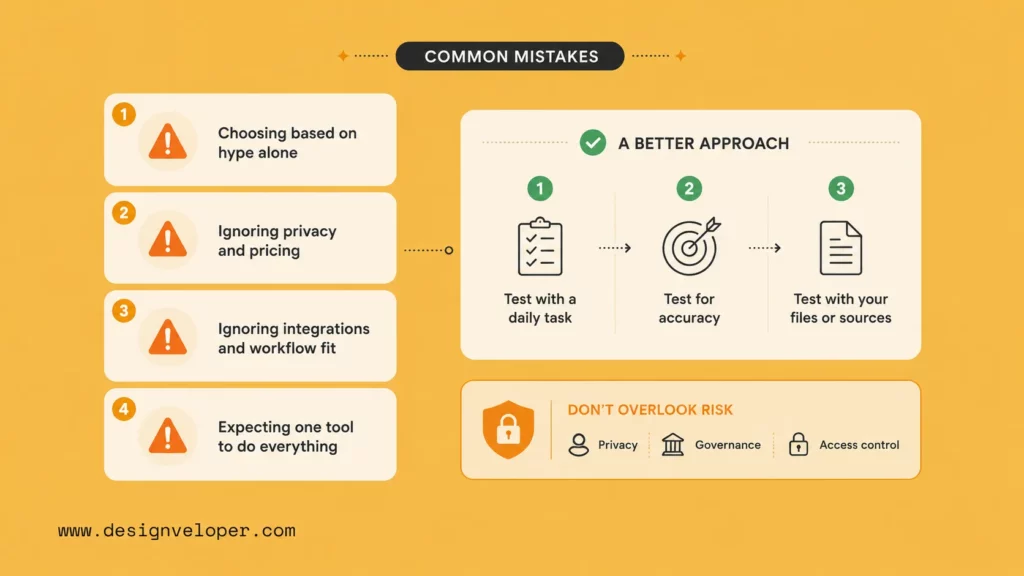
What Most People Get Wrong When Choosing An AI Chatbot
- Choosing Based On Hype Alone: A famous model may not fit your workflow.
- Ignoring Pricing, Privacy, And Integration Limits: A cheap plan can become expensive if users need higher limits, team controls, or secure data handling.
- Expecting One Tool To Do Everything Well: A research chatbot, coding assistant, workplace copilot, and companion app optimize for different goals.
Chatbot choice is not only about model quality. IBM’s 2025 breach report announcement found that 13% of organizations reported breaches involving AI models or applications, with most of those organizations lacking proper AI access controls. That is why privacy, data handling, and governance belong in chatbot selection criteria.
The better approach is to test three real tasks. Use one task you do daily, one task that requires accuracy, and one task that needs a file or external source. Then judge the output quality, speed, source handling, and privacy fit.
See more:
- AI Agent Orchestration: Coordinating Systems Safely
- Automating Workflows Without Losing the Human Touch
When Off-The-Shelf AI Chatbots Are Not Enough
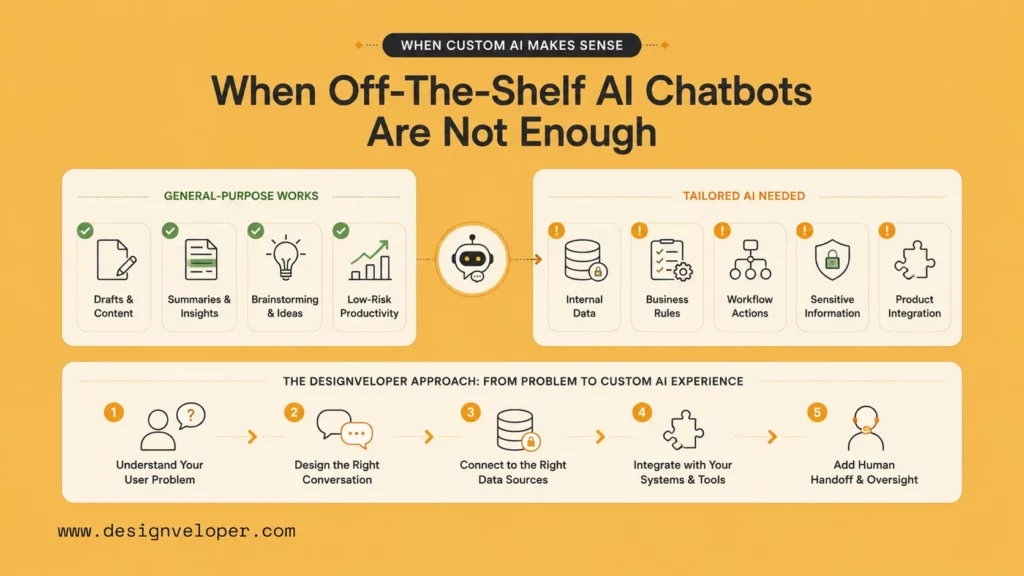
When A General-Purpose Tool Works Fine
A general-purpose chatbot works fine for drafts, summaries, brainstorming, learning, and low-risk personal productivity. It also works well when users can review the result before sharing it.
When Teams Need More Tailored AI Experiences
Teams need custom chatbot experiences when the bot must connect to internal data, follow business rules, trigger actions, protect sensitive information, and fit a product interface. A public chatbot cannot safely replace a designed workflow in those cases.
How Designveloper Approaches AI Chatbot Product Experiences
At Designveloper, we treat AI chatbot development as product and workflow design. We define the user problem first. Then we design the conversation, data access, integrations, human handoff, analytics, and support process.
That approach fits companies that need AI assistants, document chatbots, workflow automation, customer support automation, or embedded AI features inside SaaS products. We focus on practical outcomes: less manual work, clearer user flows, safer data handling, and software that teams can maintain after launch. When a team needs more than an off-the-shelf assistant, custom AI development services often become the more stable path.
Explore more:
- AI Chatbot Development: When a Custom Build Makes More Sense
- Document Intelligence: What It Solves in Real Product Workflows
FAQs About AI Chatbots
What Is The Most Intelligent AI Chatbot?
There is no single permanent answer. Claude, ChatGPT, Gemini, and Perplexity all perform well in different tasks. The smartest choice depends on whether you need writing, coding, research, integration, or personal conversation.
Which AI Chatbot Is Best For Research?
Perplexity is the best starting point for research because it centers the answer around sources. Still, users should open the sources and check dates, context, and original claims.
Which Free AI Chatbot Is Best?
Gemini is a strong free option for Google users. ChatGPT, Claude, Perplexity, Meta AI, and DeepSeek also have useful free access. The best free AI chatbot depends on limits, region, and the task.
For business use, free plans are best for evaluation. Paid or enterprise plans become important when teams need higher limits, stronger privacy terms, admin controls, shared workspaces, and reliable support.
In short, the best AI chatbot is not the one with the loudest launch. It is the tool that helps you finish real work with accuracy, control, and less friction. Start with the task, test the output, check the sources, and choose the chatbot that fits your workflow.
Also published on

Share post on










Related Articles


AI Chatbot Development: A Step-By-Step Guide
AI Chatbot Development: A Step-By-Step Guide Published July 15, 2026
Claude Vs ChatGPT Vs Gemini For Coding: Which AI Fits Your Workflow?
Claude Vs ChatGPT Vs Gemini For Coding: Which AI Fits Your Workflow? Published July 06, 2026
12 vLLM Alternatives for Efficient and Scalable LLM Inference
12 vLLM Alternatives for Efficient and Scalable LLM Inference Published July 06, 2026



















