
















10 Best AI Chatbot Of 2026: We’ve Tried & Tested By Use Case

KEY TAKEAWAYS:
- The best AI chatbot depends on the task, the quality of the context it can use, the available tools, the output quality, and the human review the workflow requires.
- ChatGPT and Gemini are versatile starting points; Claude is a strong fit for writing and long-form work, Perplexity for web research, and NotebookLM for questions grounded in your own documents.
- Microsoft Copilot fits Microsoft 365 workflows, while DeepSeek, Meta AI, Grok, and Poe serve more specific needs such as low-cost experiments, casual use, social context, or model comparison.
- Free AI chatbots have real limits. Message caps, model access, file uploads, browsing, regional availability, and other features can vary by plan.
- Choose by workflow and data boundary, not brand name. A free plan is useful for testing a chatbot, but it is not automatically a suitable data policy for confidential work.
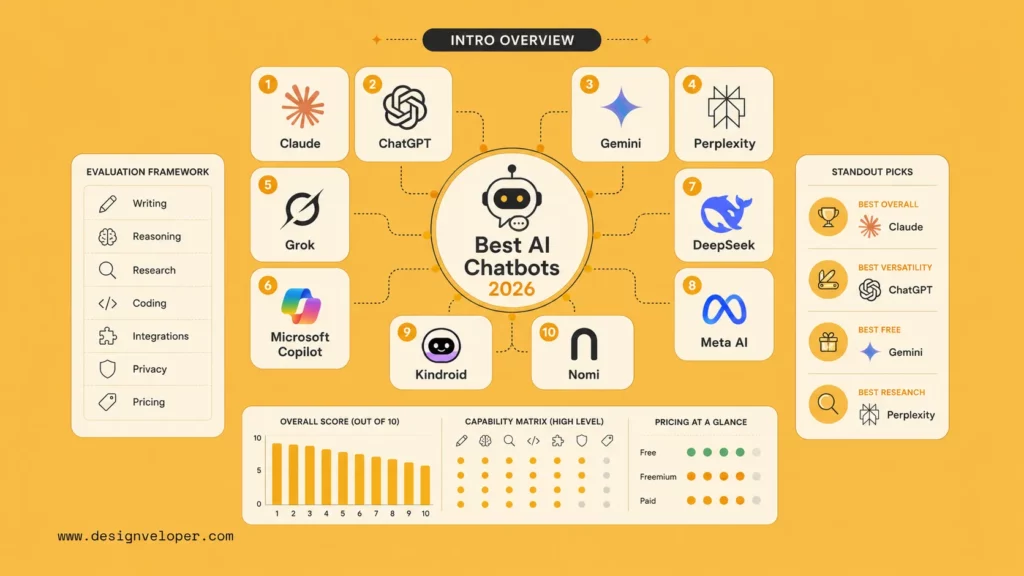
Finding the best AI chatbot is less about choosing the most famous name and more about matching a tool to the work you need to finish. This comparison covers 10 options for writing, research, coding, document questions, workplace productivity, social context, and model comparison, including free AI chatbot plans and free starting tiers. Each entry explains the practical fit, a realistic project to try, the limits that can change the experience, and when another tool is the better choice. For the basic concept first, see What Is A Chatbot? Product access changes often, so confirm the current offer before relying on a feature or uploading sensitive data.
Best AI Chatbots At A Glance
The best AI chatbot depends on the job you need to finish. For one broad starting point, ChatGPT is the most flexible option in this list; Gemini is a better fit when your work already lives in Google, Claude when long-form editing matters, Perplexity for web discovery, and NotebookLM for a defined set of documents. Use the table as a shortlist, then read the individual review before choosing a default tool or a free plan to test.
| AI chatbot | Best for | Why consider it | What to check |
|---|---|---|---|
| ChatGPT | Best overall starting point | Broad writing, coding, file, image, and voice workflows | Message and tool limits |
| Gemini | Google workflows | Useful when work already lives in Google products | Region, account, and plan access |
| Claude | Writing and reasoning | Clear work over long supplied context | Usage caps and feature availability |
| Perplexity | Web research | Search-led answers with visible sources | Citation quality and advanced-search limits |
| Microsoft Copilot | Microsoft work | Natural fit for Microsoft users | License and Microsoft 365 permissions |
| DeepSeek | Low-cost experiments | Another option for coding and reasoning pilots | Data handling and service terms |
| NotebookLM | Your own documents | Keeps questions tied to a defined source set | Source completeness and upload rules |
| Meta AI | Casual everyday use | Easy access in familiar Meta products | Availability and privacy settings |
| Grok | Public social context | Useful for exploring fast-moving public discussion | Noisy or incomplete social signals |
| Poe | Model comparison | Several model experiences in one app | Points, provider terms, and limits |
“Free” is not one fixed product category. A plan can be free to start but restrict the number of messages, the strongest model, file uploads, image creation, browsing, or access during busy periods. Those limits are part of the product experience, so this article treats them as selection criteria rather than footnotes.
What Does “Free AI Chatbot” Mean?
Before comparing tools, identify which kind of free access you actually need. A free account may be enough for learning or low-risk drafting, while a no-sign-up tool may be better for a one-off public question. An open model can offer more control, but the interface, hosting, moderation, and operating cost may still belong to someone else.
- Free tier: You create an account and receive a limited allowance of messages, models, files, browsing, or other features. This is the most common meaning of “free AI chatbot.”
- No-card access: The service lets you start without payment details, but it can still require an account and can change or restrict its allowance.
- No-sign-up chatbot: You can ask a question without creating a persistent account. This is convenient for low-risk, one-off tasks, but it may provide less history, personalization, support, or control over submitted data.
- Open model: The model weights or usage method may be available to a wider community, but running it reliably still requires an interface, hosting, hardware, updates, safety controls, and sometimes paid infrastructure.
For work involving customer records, source code, health information, contracts, or internal strategy, “free” should never be the only selection rule. Check the account type, data-use terms, retention settings, access controls, and review path before sharing anything confidential.
Open models and local chatbot tools are a separate decision. They may reduce dependence on a hosted service, but the user or team still has to provide hardware, model updates, security controls, an interface, and support. This list prioritizes accessible hosted chatbots because that is the quickest path for most readers who want to compare and use a tool now.
Related reading:
- What Is Artificial Intelligence? Definition, Types, and How It Work
- AI Agent Vs AI Assistant: Differences, Use Cases, And Choice
- AI Agent Orchestration: Patterns, Frameworks, And Best Practices
How We Compare The Best AI Chatbots
A chatbot comparison can become misleading when it treats a polished answer as proof of quality. This article uses an editorial, use-case-based comparison. It separates public product information from controlled hands-on testing and does not claim that one model wins every prompt.
Here, “best” means the strongest fit for a defined workflow after considering five factors: output quality for the task, context and tool access, free-plan continuity, privacy and permissions, and the effort required to verify or correct the result. A chatbot that sounds impressive but creates extra review work is not the best choice for a repeatable process.
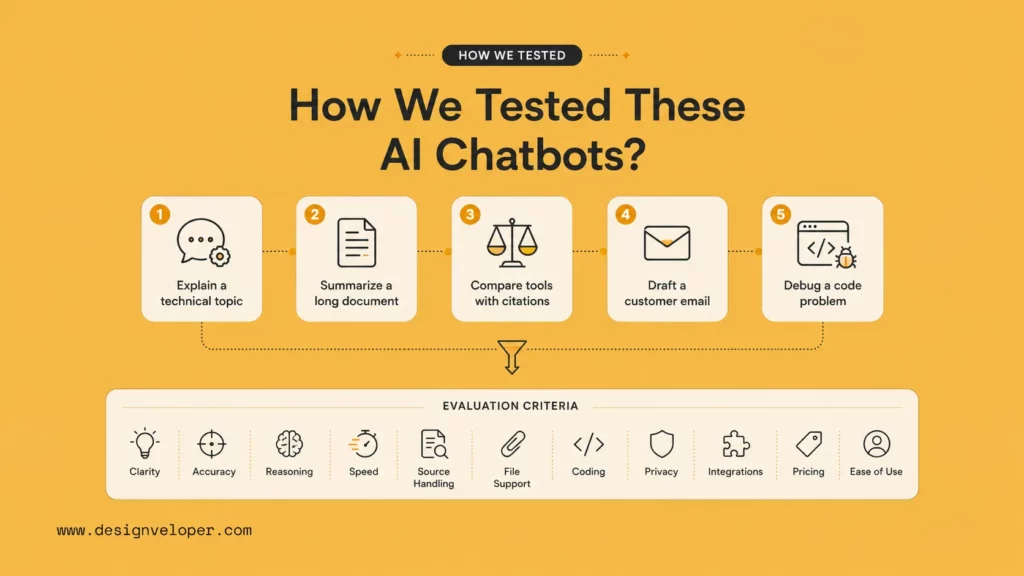
For a fair pilot, run the same small task through each shortlisted chatbot. Record the account type, model or mode, date, prompt, output, corrections, and limits. A repeatable test should include:
- Writing: Ask for a short draft, then request a revision for a defined audience and tone.
- Reasoning: Give the chatbot incomplete information and check whether it states assumptions or guesses.
- Research: Ask for current claims and inspect whether the cited sources support each sentence.
- Coding: Provide a small bug with safe sample data and request a test plan before a patch.
- Files: Upload a representative document and ask for a summary, missing information, and source-grounded questions.
- Free access: Note message caps, file limits, model switching, feature locks, and what happens after the free allowance ends.
The evidence standard matters as much as the task. Vendor documentation is appropriate for plan names, advertised features, integrations, and pricing. A personal test can support an observation about a specific prompt and account at a specific time. Neither type of evidence proves that a chatbot is universally the most intelligent or safest option. For the difference between chatbot interfaces and broader systems, see Conversational AI Vs. Chatbot.
Practical AI Chatbot Workflows To Try
The quickest way to choose a free AI chatbot is to test a small project that resembles your own work. The workflow should have a clear input, a useful output, and a review rule. Avoid testing only entertaining prompts because they do not reveal whether the tool fits a repeatable task.
- Content brief: Provide a keyword, audience, source notes, and a tone. Ask for an outline, missing questions, and unsupported claims. An editor approves the brief before drafting.
- Research memo: Ask for a short comparison with one source and publication date per claim. Open the original pages and reject sources that do not support the exact wording.
- Document Q&A: Supply a policy, project brief, and meeting notes. Ask for a summary, contradictions, and unanswered questions. The document owner confirms that the source set is complete.
- Bug triage: Use an anonymized error log and reproduction steps. Ask for likely causes and a test plan, then let a developer review and run the tests.
- Support draft: Provide an approved FAQ and escalation rules. Ask for a reply draft and escalation category. A support agent approves every customer-facing answer.
A useful starter prompt is: Use only the supplied material. Return the answer, the evidence used, the missing information, and one reason a human should review it. That instruction makes the review task visible, but it does not remove hallucinations. When the workflow must connect a chatbot to business systems, read about AI Chatbot Integration before assuming a consumer plan can support the same use case.
For a deeper dive:
- Chatbot Vs ChatGPT: Differences, Features, And Which Is Better
- AI Chatbot Development: Types, Process, Costs
- What Is AI Integration? How to integrate AI successfully?
10 Best AI Chatbots: Free Options For Every Task
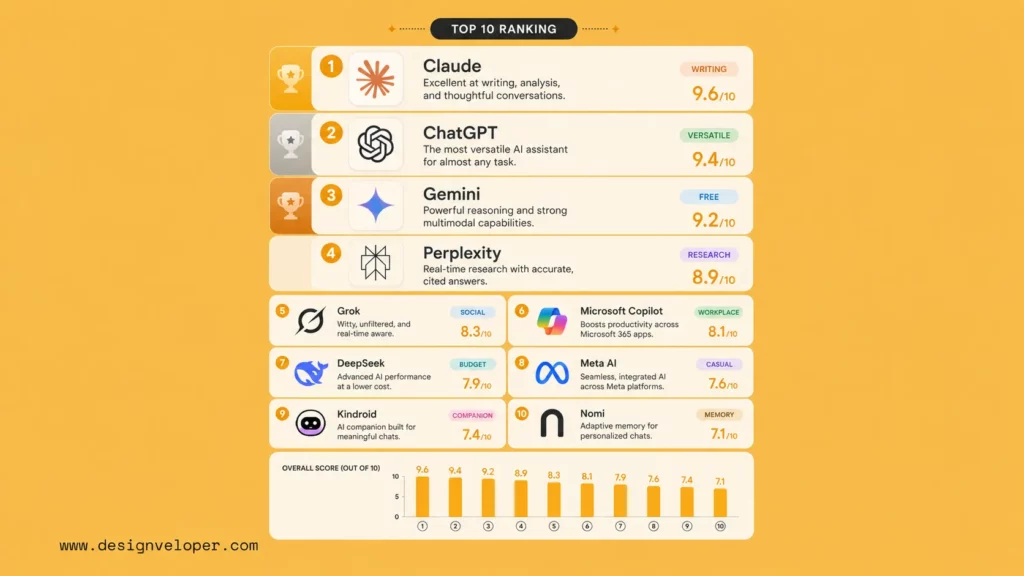
The list below focuses on the best AI chatbot fit for a specific job, with free access or a free starting tier where available. Each review answers four practical questions: what the chatbot is good at, what small project you can test, what the free plan may limit, and when another option is a better fit. “Best” describes the use case each tool fits most clearly, not a universal benchmark result. Plan names, model access, quotas, and regional availability can change.
1. ChatGPT: Best AI Chatbot For General Use
ChatGPT is the most useful first stop when one free chatbot must cover several kinds of work. Its value is breadth rather than one narrow specialty. A user can move from drafting and explanation to coding help, file analysis, image tasks, voice, or structured data work without learning a different interface for every job.
That breadth also makes ChatGPT a good tool for discovering what an AI workflow should look like. A team can start with a manual prompt, learn which inputs are missing, and decide whether the task needs retrieval, an integration, or only a better template. The free account is therefore useful for workflow discovery, even when it is not the final business deployment.
Practical project: Give ChatGPT a product brief, three anonymized interview notes, and delivery constraints. Ask it for:
- A requirements summary
- Unanswered questions
- Acceptance criteria
- Potential contradictions
- Claims that need human confirmation
A product manager can then turn the reviewed output into tickets instead of copying an unchecked answer into the backlog.
What the free tier changes: Free access does not guarantee unlimited messages or access to every model and tool. Limits can affect long sessions, file operations, image features, voice, and model selection. Confirm the current offer on the ChatGPT pricing page, and treat the free consumer plan as a trial environment rather than a business data-control solution.
Choose it when: You need a flexible general assistant and can manage changing limits with human review. Choose Claude when careful long-form work matters more than a broad tool surface, or Gemini when the source material already lives in Google products.
2. Gemini: Best AI Chatbot For Google Workflows
Gemini is strongest when Google already holds the context for the task. Search, Gmail, Docs, Drive, Sheets, Android, and Workspace can make the assistant more useful because the user spends less time moving text between products. That ecosystem fit is the reason to choose Gemini, not a claim that it produces the best answer for every prompt.
Gemini can also be a practical free entry point for people who need everyday explanations, outlines, summaries, or light data interpretation. The important boundary is whether the task uses public information or private Workspace material. A consumer chat experience and an organization-managed Workspace workflow may have different permissions, retention rules, and administrator controls.
Practical project: Start with a spreadsheet of customer questions. Ask Gemini to:
- Group similar questions
- Identify missing topics
- Suggest an FAQ structure
- Flag questions that need human clarification
A support owner should verify the categories and wording before publication. If the same flow later needs to run inside a product, review the Gemini API documentation instead of assuming that a consumer chat session is an integration.
What the free tier changes: Access can vary by country, age, account, Workspace setting, product surface, and subscription. A feature shown in a Google demonstration may not be available on the free account or in the same product. Check the current plan, file, model, and regional rules before designing a workflow around them.
Choose it when: Your documents and daily work already live in Google products. Choose ChatGPT or Claude when you need a more platform-neutral workspace, or NotebookLM when every answer must stay tied to a defined source set.
3. Claude: Best AI Chatbot For Writing And Reasoning
Claude is a good fit when the work begins with a large body of text and ends with a careful explanation, rewrite, or decision memo. The useful distinction is not that Claude never makes mistakes. It is that the workflow rewards sustained context, clear structure, and several focused revision passes.
Claude is especially useful for editing where the writer needs to preserve meaning while changing audience, tone, or organization. It can help surface contradictions and missing assumptions, but it should not become the final approver of a policy, contract, technical decision, or customer-facing claim.
Practical project: Supply a policy draft, an approved earlier version, and reviewer comments. Ask for a change log, conflicting rules, unanswered questions, and a rewrite of only the affected sections. The writer then checks facts, tone, and omissions. The Anthropic prompt engineering guidance can help make repeated requests more consistent.
What the free tier changes: Free usage can depend on demand, plan, model, and task type. A long document workflow may reach its allowance sooner than short questions, so test the number of revisions your real task needs. Check Claude pricing and the applicable privacy terms before using the free account for confidential material.
Choose it when: Writing quality, nuance, and supplied context are the main decision factors. Choose ChatGPT when the same assistant must handle a wider mix of media and tools, or Perplexity when source discovery is the central job.
4. Perplexity: Best AI Chatbot For Web Research
Perplexity is less like a blank chat box and more like a search-led research workspace. It is useful when the reader needs to discover sources, compare current information, identify follow-up questions, or see links close to the generated answer. The product’s main advantage is source visibility, not automatic fact-checking.
The free experience works best for research discovery rather than final publication. A researcher can use it to build a shortlist of vendors, standards, studies, or product changes, then move the accepted claims into a source log. This is faster than starting every search from a blank page, but the original pages still determine whether a claim is reliable.
Practical project: Ask Perplexity to compare three vendors and provide:
- One primary source for each important claim
- One independent source where available
- Publication dates
- A short explanation of the evidence
Open every cited page, record the exact evidence, and reject links that only loosely relate to the generated sentence. A citation is a path to evidence, not evidence by itself.
What the free tier changes: Basic access can differ from paid access in advanced searches, file tasks, model choices, and usage caps. A research workflow that looks free may become slower when a team needs many repeated searches or deeper source analysis. Review the current Perplexity plans before promising a research process to a team.
Choose it when: Web discovery and source collection are part of the job. Choose NotebookLM when answers must stay within a known document collection, or ChatGPT when the task is mainly drafting and transformation.
5. Microsoft Copilot: Best AI Chatbot For Microsoft Users
Microsoft Copilot is most relevant when the user’s work already happens in Microsoft products. The free consumer experience can support general questions and drafting, but Microsoft 365 versions add a different permission, licensing, and application context. Those are separate buying and governance decisions.
The free chatbot can still help a small team prototype useful work habits. It can draft a meeting follow-up, reorganize notes, explain a spreadsheet formula, or turn a rough outline into a first presentation structure. The value becomes larger inside Microsoft 365 only when permissions, file organization, identity, and administrator controls are ready.
Practical project: Give Copilot a meeting transcript and ask it to separate:
- Decisions made
- Owners and deadlines
- Unresolved questions
- Items that need follow-up
The meeting owner should verify names and dates before turning the result into tasks or a client update. Review Microsoft’s Microsoft 365 Copilot documentation for the product boundary.
What the free tier changes: Do not assume that a free consumer account can read private company files or provide the same controls as a licensed Microsoft 365 deployment. Check the intended license, data boundary, permissions, retention, and admin settings before using private work content.
Choose it when: Microsoft tools and identity are already central to the workflow. Choose a general chatbot when the work spans several unrelated systems or when the team cannot maintain clean permissions.
Explore more:
- How To Build An AI Chatbot With Memory: A Step-By-Step Guide
- Train Chatbot With Your Own Data: Methods, Tools, And Best Practices
- Customer Service Chatbots: 10 Best Platforms And Use Cases
6. DeepSeek: Best AI Chatbot For Low-Cost Coding Experiments
DeepSeek belongs on a free-chatbot shortlist when cost and coding support matter more than a large consumer ecosystem. It gives developers another model to compare for explanations, small refactors, test ideas, and reasoning tasks. The budget angle should be evaluated with data handling and review effort, not with a headline price alone.
It is a better fit for controlled experiments than for an unreviewed production assistant. The team should know which code and logs can be shared, keep credentials out of the prompt, and treat generated patches as suggestions. A cheaper answer that takes longer to verify may not reduce the total cost of the workflow.
Practical project: Provide a small, non-sensitive function and ask for:
- Likely edge cases
- A test table
- A proposed patch
- Dependencies or assumptions that need checking
Compare the output with another model, run the tests locally, inspect dependencies, and record how much correction the generated code needs. Keep production credentials and private repository data outside the experiment.
What the free tier changes: Chat access and API access are different products with different terms, pricing, privacy rules, and operational responsibilities. Review the current DeepSeek API pricing documentation and data-handling terms before sending company data. API use also requires your own monitoring, rate limits, and support.
Choose it when: You need a low-cost, low-risk coding pilot and the team owns testing. Choose a business plan from another provider when enterprise controls, contractual terms, or private repository access are the deciding requirements.
7. NotebookLM: Best AI Chatbot For Your Own Documents
NotebookLM is useful when the question is “What do these documents say, and where do they disagree?” rather than “What does the open web say?” Its source boundary makes it a strong free option for study notes, project briefs, policies, meeting packs, and early requirements analysis. That distinction matters when a general web answer would introduce information outside the team’s approved material.
The tool changes the research workflow by making the source set part of the task. That helps a team see whether an answer comes from a supplied document or from a general model assumption. It does not guarantee accuracy: a missing policy, old requirements file, or biased source set can still produce a confident but incomplete conclusion.
Practical project: Add a project brief, meeting notes, and the latest requirements document. Ask for:
- A one-page summary
- Conflicting requirements
- Source-backed answers
- Questions the team must resolve before development
The project owner should check that the important files are present and current. Use the NotebookLM help documentation to confirm current source and feature limits.
What the free tier changes: Free access can impose source, usage, or feature limits. More importantly, uploaded material may have privacy, copyright, retention, or internal-sharing restrictions. The team should define what can enter a notebook and who can review the generated summary before using it in a decision.
Choose it when: The answer must stay close to a known document collection. Choose Perplexity when the task is to discover current information across the wider web, or ChatGPT when the work is mainly transformation and drafting.
8. Meta AI: Best AI Chatbot For Casual Everyday Use
Meta AI is designed for low-friction use inside familiar Meta products when the feature is available in the user’s country and account. That makes it useful for quick questions, short messages, casual brainstorming, and simple creative prompts. The advantage is convenience, not a controlled research or enterprise workflow.
Meta AI can be a good fit when the user wants help without opening a separate workbench. It is less suitable when the task needs a durable source trail, long document review, role-based access, or a clear separation between personal and company data. The context in a social product can also encourage users to share more information than the task requires.
Practical project: Turn a rough event announcement into three short variations for different audiences. Before publishing, verify:
- Dates and factual claims
- Tone and audience fit
- Brand rules and calls to action
Keep customer records, confidential planning documents, private strategy, and sensitive personal information out of this casual workflow unless the applicable privacy and data controls have been verified.
What the free tier changes: Feature access can vary by country, product, account, and rollout. Review Meta AI and the privacy settings for the specific product before using it for anything sensitive. Do not infer business-grade retention or access controls from easy consumer availability.
Choose it when: You want a quick assistant for low-risk everyday tasks. Choose ChatGPT, Claude, or Gemini when the task needs sustained context, files, research, or a more deliberate workspace.
9. Grok: Best AI Chatbot For Public Social Context
Grok is relevant when public conversation on X is part of the question. Creators, marketers, journalists, and trend analysts can use it to explore language, reactions, and recurring questions around a fast-moving topic. That makes it a social-context tool, not a replacement for primary research.
The key risk is representativeness. Public posts can be duplicated, sarcastic, incomplete, coordinated, or dominated by a vocal minority. A chatbot may summarize the visible conversation well while still giving a poor picture of customers, voters, users, or the wider market. The output needs a clear boundary: signals for further investigation, not proof.
Practical project: Use Grok to identify recurring questions and phrases around a public topic. Turn those signals into a research brief, then compare them with:
- Primary sources
- Customer interviews
- Search data
- A broader sample of users or posts
Treat social discussion as a signal for further research rather than proof of a market-wide trend. Keep health, legal, financial, security, and business-critical claims out of a social-only verification process.
What the free tier changes: Access can depend on country, account type, subscription, and current xAI product rules. Review the latest X Premium information and relevant terms before adopting it for a repeatable workflow. Also check whether the free access provides the live context your task assumes.
Choose it when: Public social context is a real input and a person will verify the result. Choose Perplexity when source collection matters more than social reaction, or Gemini and ChatGPT when the task does not need social context.
10. Poe: Best AI Chat App For Comparing Models
Poe is useful when the immediate question is not “Which chatbot should we adopt?” but “How differently do several models handle the same task?” It brings multiple model experiences and task-specific bots into one app. That can shorten early comparison work for a writer, product team, or developer.
The comparison is not perfectly neutral. Providers can expose different context limits, system instructions, tools, speeds, safety settings, and versions through a third-party interface. A response that looks better in Poe may not behave the same way in the provider’s own product or API. Use Poe to narrow the shortlist, then validate the finalist where the real workflow will run.
Practical project: Send the same customer-support prompt, policy excerpt, and style rules to three models. Score:
- Factual accuracy
- Missing steps
- Tone and policy compliance
- Citation behavior
- Correction effort
If one model appears stronger, repeat the experiment with another example before making a product decision. The Poe creator documentation is useful when the experiment grows into a task-specific bot.
What the free tier changes: Points, limits, provider terms, context, speed, tools, and data handling can differ by model. A multi-model app can also make repeated experiments consume points faster than expected. Review the current Poe subscription information and the relevant model terms before using it for confidential work.
Choose it when: You are comparing model behavior or teaching a team why task fit matters. Choose a direct vendor product when the team has selected a model and now needs stable governance, integrations, support, or contractual controls.
How To Choose The Best AI Chatbot
Start with the task, then apply the free-plan and data checks. A chatbot that produces a good first answer but requires too many corrections may be a poor fit for a repeated workflow.
Best AI Chatbot For Writing And Long-Form Work
Choose Claude when the work depends on structure, editing, nuance, and a large body of supplied context. Choose ChatGPT when writing is one part of a wider workflow that also needs files, images, data tools, or custom assistants. If you want to compare model families before choosing, see ChatGPT Models and Best Claude Model. Compare the quality of the second revision and the correction effort, not only the first draft.
Best AI Chatbot For Coding And Technical Tasks
Start with ChatGPT or Claude for broad coding help, then consider DeepSeek for low-risk experiments where cost is a major constraint. Use an anonymized bug report and request a test plan before a patch. Compare:
- Repository context and tool access
- Diagnosis and debugging quality
- Test coverage and dependency risk
- Privacy controls and developer review time
Keep secrets out of every public chat, run generated code locally, and make sure a developer can test and roll back the result.
Best AI Chatbot For Research And Fact-Checking
Choose Perplexity for web discovery and source links. Choose NotebookLM when the question must stay within reports, notes, or policies that you provide. In both cases, open the original source and check:
- Publication date
- Source authority
- Exact evidence
- Whether the source supports the generated claim
Do not treat a citation or a source-grounded answer as proof without checking the underlying material.
Best AI Chatbot For Google Or Microsoft Workflows
Choose Gemini when Google products hold the relevant documents and Copilot when Microsoft 365 is the main work environment. A free consumer account and a governed company deployment are not interchangeable. Review identity, permissions, retention, and admin controls before putting private company data into the workflow. For a direct product comparison, see Gemini Vs ChatGPT.
Best AI Chatbot For Everyday Use
ChatGPT, Gemini, Claude, Meta AI, Perplexity, and DeepSeek can all be useful free starting points, but their limits differ. Compare:
- Follow-up message limits
- Model, file, image, voice, and web access
- Regional availability and account requirements
- Privacy settings and correction effort
For a quick decision, choose the tool that reduces total workflow time for your recurring task, not simply the one that produces the most impressive first answer.
Free AI Chatbot Limits, Privacy, And Hidden Costs
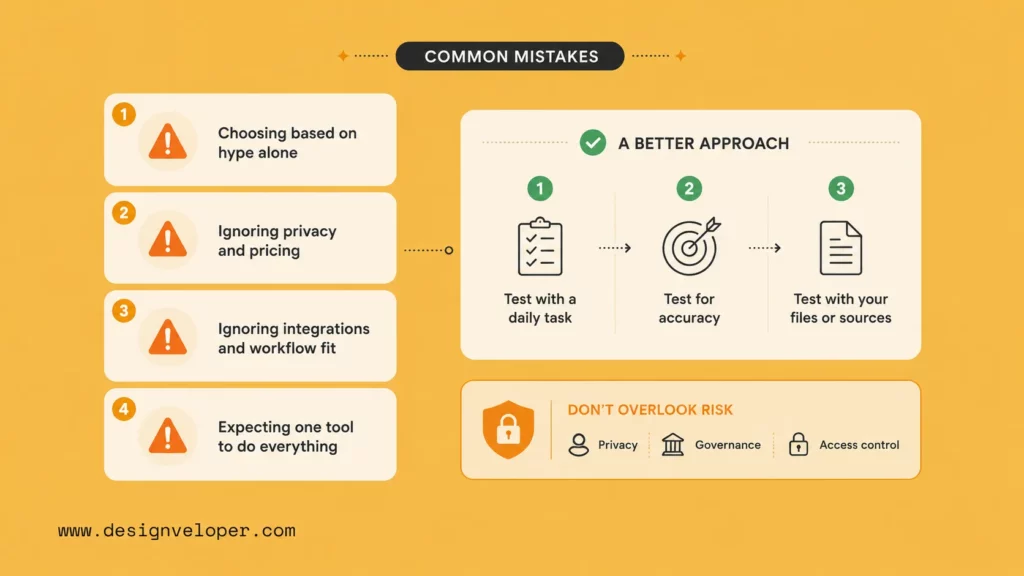
A free plan can be enough for learning and low-risk experiments. It is not automatically enough for a team, a regulated workflow, or a product that must support private data. Check the surrounding operating conditions before you treat a free chatbot as a long-term solution.
- Message and model limits: Check which models are available, how limits are counted, whether limits change during busy periods, and what happens after the allowance is used.
- Files and documents: A free plan may limit file size, file count, document types, extraction quality, or the number of file tasks.
- Browsing and citations: Search-led answers, deep-research modes, citations, and source collections may be restricted to certain plans or credits.
- Images and voice: Image generation, image analysis, voice mode, screen sharing, or other media features can have separate caps.
- Data use and training: Do not assume that paid access gives the same data policy as a business workspace. Read the terms for the exact account type and confirm the relevant settings.
- Business controls: Teams may need single sign-on, role-based access, retention controls, audit records, workspace separation, and a deletion process.
- API versus chatbot cost: A chatbot subscription pays for a user-facing product. API usage usually requires your own application, security, monitoring, rate limits, logging, and support.
- Correction and switching cost: Count the time spent checking answers, rewriting prompts, moving files, waiting for limits to reset, and retraining users when the product changes. A free tool can be expensive in staff time if the workflow depends on repeated manual repair.
- Human review: For legal, financial, security, HR, healthcare, or customer-impacting work, assign a reviewer and define when the system must stop rather than guess.
A free AI chatbot is a low-cost way to test a workflow, not a shortcut around privacy, verification, or operating controls.
A simple buying test is to run three real tasks through the free plan. Record turns, file operations, corrections, source checks, and minutes saved. Then compare the result with a paid plan, another chatbot, or a small custom workflow. That evidence is more useful than comparing monthly prices alone.
Further reading:
- 11 Best AI Chatbot Platforms to Use
- Best AI Chatbots For Businesses: Compare Tools By Use Case
- 15 Best AI Tools For Developers: Coding, Review, And More
When A Free AI Chatbot Is Not Enough
A free chatbot is usually enough for drafting, summarizing, learning, brainstorming, and other low-risk tasks that a person can check. A tailored AI product becomes more useful when the assistant must work inside a business process rather than sit beside it.
Private Company Knowledge And Access Controls
Teams may need an assistant to answer from private policies, product documentation, customer records, contracts, or internal research. That requires more than uploading a file once. The system needs an approved knowledge source, authentication, permission-aware retrieval, update ownership, and a way to show which source informed the answer.
Custom Workflows And System Integrations
If the assistant must create a ticket, update a CRM, check an order, send a notification, or start an approval flow, it becomes part of an application. The design must cover APIs, validation, retries, rate limits, user permissions, error handling, and human handoff. A consumer subscription does not remove those engineering responsibilities. See Enterprise AI Agents for the wider implementation context.
Branded Experiences And Domain-Specific Evaluation
A product team may need a branded interface, a defined conversation flow, role-based access, audit controls, analytics, and monitoring against domain-specific tasks. A general chatbot can still be part of the solution, but the product needs its own evaluation set and operating rules. Measure whether the assistant completes the intended workflow, not only whether its replies sound fluent.
Practical AI Chatbot Project Examples
Public project examples make the build-versus-buy decision easier because they show the workflow around the chatbot, not just the chat window. These references illustrate capability and process; they do not prove that a general free chatbot provides the same product features.
- Personal finance: A domain-specific assistant can turn uploaded financial documents and natural-language requests into structured records and reports, with user review before an action is accepted. See the public AI-oriented personal-finance assistant project overview.
- HR self-service: An internal assistant can connect policy questions and defined employee requests to an existing HR workflow instead of answering from an uncontrolled public chat. See the public HR self-service platform project overview.
- Document collaboration: A document product may combine PDF work, signatures, document search, and AI-assisted tasks in one controlled environment. See the public document collaboration platform project overview.
Each example points to the same lesson: a useful AI chatbot product needs a defined data boundary, permitted actions, a review path, and an owner for ongoing evaluation. The public pages do not prove model choice, accuracy, or business results unless those details are explicitly documented.
Designveloper works on AI products and workflow integrations that can include conversation design, private knowledge access, authentication, system connections, human review, analytics, and post-launch support. Teams exploring this path can review AI development services after defining the use case, data boundary, and success criteria.
See also:
- What Is Agentic AI? Benefits, Architecture and How It Works
- AI Agent Vs Chatbot: Key Differences, Use Cases, And Best Fit
- AI Agent for Customer Service: Best Use Cases and Examples
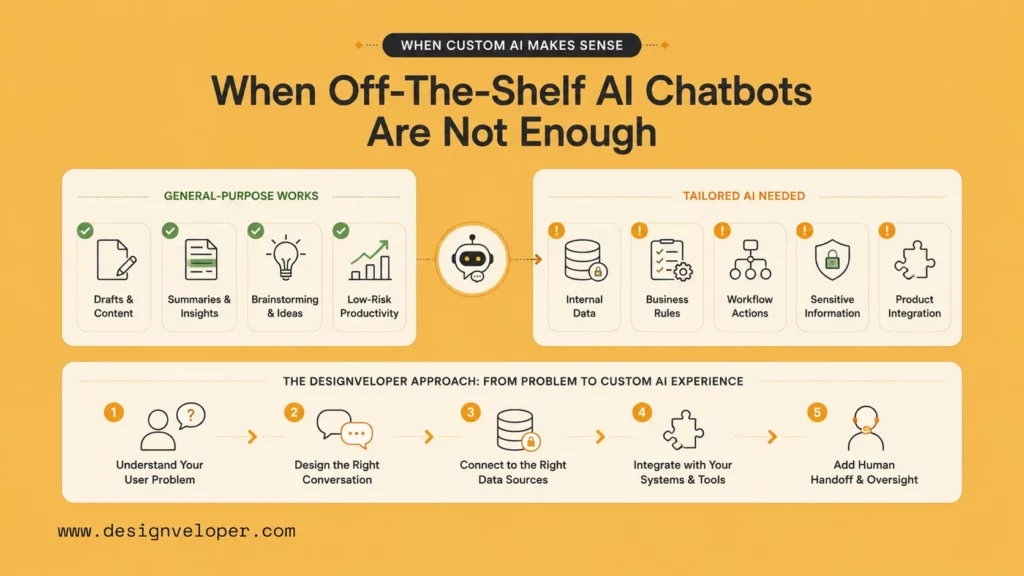
If your team needs to turn a chatbot idea into a secure product workflow, contact Designveloper with the use case, data sources, integrations, and review rules you already have.
FAQs About The Best AI Chatbots
What Is The Best AI Chatbot Overall?
For most people who need one general assistant, ChatGPT is the best starting point because it covers a broad mix of writing, explanations, coding, files, and other workflows in one interface. Gemini may be the better choice for Google-centered work, Claude for long-form editing, Perplexity for web research, and NotebookLM for questions grounded in your own documents. Treat this as a starting recommendation, then validate the tool with the task, data, and review rules that matter to you.
Which Free AI Chatbot Is Best?
ChatGPT and Gemini are practical general starting points, Claude is a strong writing option, and Perplexity is useful for web research. The best choice depends on the task, access limits, privacy terms, and how much correction the output needs.
Which Free AI Chatbot Is Best For Writing?
Claude is a strong choice for long-form writing and editing when its free access meets your usage needs. ChatGPT is a better fit when writing is part of a wider workflow that also needs files, images, data tools, or other modes.
Which Free AI Chatbot Is Best For Research?
Perplexity is useful for web discovery because it places sources near the answer. NotebookLM is better when the research must stay within a defined document set. Read the original source before relying on an important claim.
Are Free AI Chatbots Safe For Private Data?
Do not assume that a free consumer plan is suitable for private company or sensitive personal data. Review the provider’s data use, retention, training controls, region, account settings, permissions, and deletion process before uploading anything confidential.
Conclusion: Choosing The Best AI Chatbot
For most general tasks, ChatGPT is the best AI chatbot to start with because it offers the broadest fit across writing, explanations, coding, files, and everyday work. Choose Gemini when Google products hold the relevant context, Claude for writing and reasoning, Perplexity for web research, NotebookLM for your own documents, and Copilot for Microsoft workflows. DeepSeek, Meta AI, Grok, and Poe are useful when cost, casual access, public social context, or model comparison is the deciding need.
Before making a chatbot your default, run the same real tasks across two or three options. Compare output quality, correction time, source transparency, file and message limits, privacy terms, and the human review required. The best free AI chatbot is the one that fits the work without hiding the cost or risk of using it.
Last reviewed: September 2026. Recheck vendor pricing, plan names, model availability, privacy terms, usage limits, and regional access before publication.
Also published on

Share post on










Related Articles


13 Best Vibe Coding Tools for Building Apps and Editing Codebases
13 Best Vibe Coding Tools for Building Apps and Editing Codebases Published September 30, 2026
Can ChatGPT Create an App? What It Can Build and What to Check
Can ChatGPT Create an App? What It Can Build and What to Check Published September 30, 2026
Is LangChain Bad? Developer Complaints, Pros, And When To Use It
Is LangChain Bad? Developer Complaints, Pros, And When To Use It Published September 30, 2026



















