
















ERP AI Chatbot: Turn Operational Data Into Safe Actions At Scale

An ERP AI chatbot lets authorized employees get live business information and request approved actions through natural-language conversation. The ERP remains the system of record and controls what the assistant can read or change. This makes it useful for routine lookups and carefully limited workflows, without giving a language model independent authority over company transactions.
What Is An ERP AI Chatbot?
An ERP AI chatbot is a conversational interface connected to an enterprise resource planning (ERP) system. It interprets a user’s request and accesses permitted ERP functions through supported tools or application programming interfaces (APIs). Instead of opening several menus, a user can ask for an invoice status. The chatbot calls the approved service and reports the result; it cannot approve a transaction on its own.
ERP software holds and manages business records and processes. The chatbot is an access layer, not a second ledger or source of truth. It may draft a request, but the ERP still validates that request and records any approved change. Our guide to connecting AI chatbots to business systems explains why the conversation channel and backend integration are separate parts of a working solution.
Unlike a scripted bot that follows fixed menu choices, an AI chatbot can interpret varied wording and maintain conversational context. That flexibility does not guarantee a correct answer. The system must resolve the right account, dates, units, and user permissions before returning a business result.
ERP AI Chatbot Use Cases Across Business Functions
The strongest ERP AI chatbot use cases begin with a clear task and a known data owner. Start with questions whose answers can be checked against an existing ERP screen or report. Then consider drafts and requests that enter established approval workflows.
Finance And Procurement
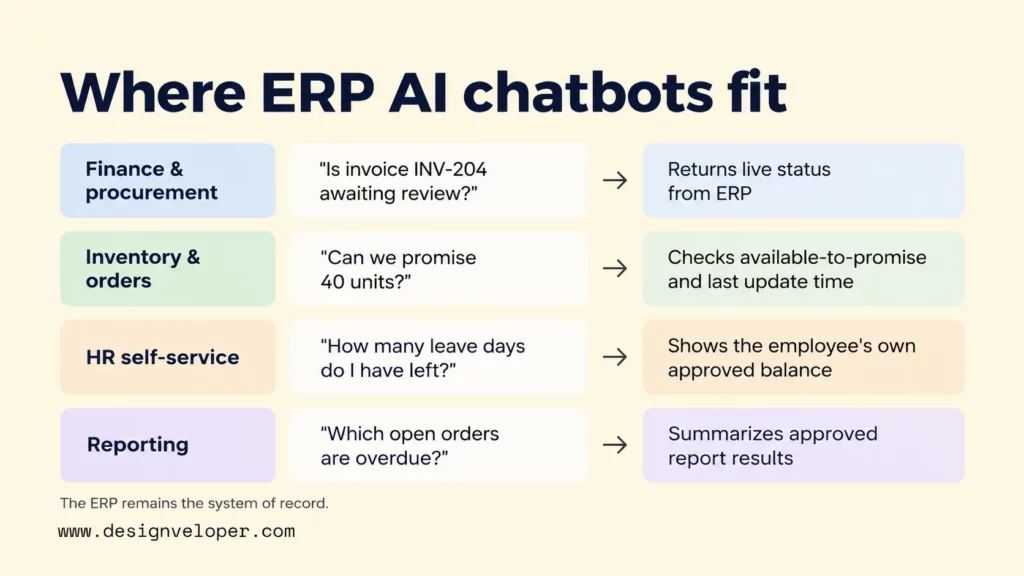
Finance and procurement teams can use a chatbot to locate invoices, check purchase-order status, and prepare requisition drafts. For example, an employee could ask whether a supplier invoice is awaiting review. The bot should return the current status from the ERP, not infer payment from a document or an old conversation.
A draft is different from an approved transaction. Supplier rules, spending limits, and approval routing still belong to the ERP workflow. The assistant can collect required information and prepare a request, but only a permitted user and the ERP’s business rules can move it through approval. This keeps spending authority outside the language model.
In an illustrative procurement workflow, a buyer checks whether enough stock is available for a planned request. If more stock is needed, the chatbot prepares a requisition draft with the item and quantity. It sends the draft through existing ERP validation and approval, if the buyer is allowed to submit it. The bot reports the resulting reference number and status. It does not say the purchase is complete until the ERP confirms the relevant action.
Inventory, Supply Chain, And Order Management
Inventory staff can ask about available stock, order status, or a shipment’s latest recorded milestone. Those answers depend on live records and the meaning of each status field. Stock on hand, stock reserved for orders, and stock available to promise are not interchangeable measures.
For example, a warehouse manager might ask whether 40 units can be promised to a customer. The bot checks available-to-promise stock for the right warehouse and reports the ERP’s recorded quantity and update time. If the record is stale or the API is unavailable, it should not claim the units are available. It should explain the problem and direct the manager to verify the order in the ERP.
HR And Employee Self-Service
Employees can use an ERP-connected assistant to check their own leave balances or ask how to submit a request. A policy answer may come from an approved HR handbook. An individual balance must come from the employee’s authorized HR record. The assistant should not reveal another employee’s pay or leave details just because the question is easy to phrase.
A leave request can also remain a normal HR transaction. The bot collects dates and confirms the employee’s intent. The HR system checks eligibility and routes approval. If a policy or balance is unclear, the bot should show the source or hand the case to HR rather than guess.
Reporting And Operational Decision Support
Managers can ask natural-language questions over approved ERP reports, such as which open orders are past their promised date. The assistant should preserve report filters, reporting period, currency, and the user’s data scope. A total without these details may look precise while answering the wrong question.
A chatbot can summarize a variance but should distinguish explanation from evidence. A rise in purchase costs might reflect price changes, product mix, or timing. Unless the underlying data supports a cause, the bot should present these as possibilities to investigate, not an established diagnosis. Forecasts require a separate analytical method and validation; conversational access alone does not create predictive capability.
ERP AI Chatbot Architecture For Live Data And Controlled Actions
A reliable ERP chatbot architecture separates language understanding from trusted data access and business execution. The user signs in and makes a request. An integration layer checks the user’s identity and the requested operation, then calls an approved ERP tool or API. The ERP applies its business rules, and the chatbot reports the confirmed result.
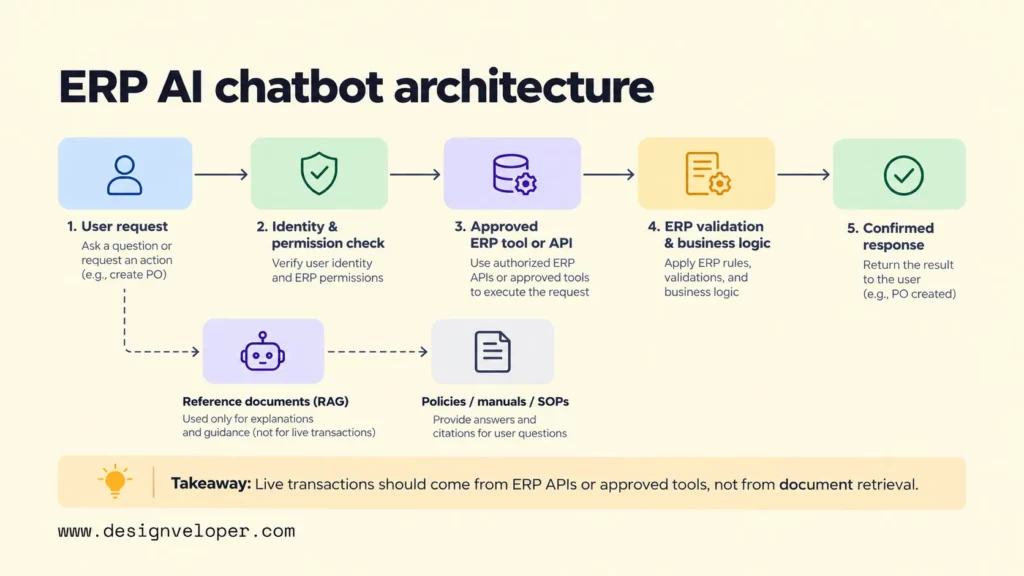
For live transactions, the assistant should use supported ERP APIs or tools. A stock quantity must come from the relevant ERP record at request time, subject to system latency and permissions. A retrieval-augmented generation (RAG) system serves a different purpose: it finds relevant passages in policies, manuals, and reference documents to support an explanation. Our introduction to retrieval-augmented generation covers how that document retrieval works and why its freshness needs testing.
Some requests need both routes. To answer whether an employee may purchase an item, the bot might retrieve a procurement policy and check a live approval limit. The ERP still controls the permitted operation and required fields. Our guide to API integration explains why data exchange and failure handling need an application layer rather than an unrestricted model connection.
Microsoft’s Dynamics 365 ERP MCP agent guidance shows a tool-based connection to finance and operations applications. Its dynamic Model Context Protocol (MCP) approach can expose ERP functions while the application retains its business logic. Microsoft notes that an earlier server version with 13 static tools was retired; this does not mean the newer dynamic approach was retired. Check the supported server, available tools, and tenant requirements before selecting this integration. Other ERPs may instead use their supported APIs.
Do not give the model unrestricted database credentials. Direct reads can expose records outside a user’s role, while direct writes can bypass validation or leave incomplete transactions. Limit the chatbot to named operations, return only the fields needed for the task, and check the ERP result before telling a user an action succeeded.
Security And Governance For ERP AI Chatbots
ERP chatbot security starts by applying the same user permissions and business rules that govern the ERP itself. A natural-language request should never grant wider access than a user already has. Microsoft’s ERP MCP security documentation describes authenticated requests, ERP-enforced authorization, and preserved application validation for its supported integration.
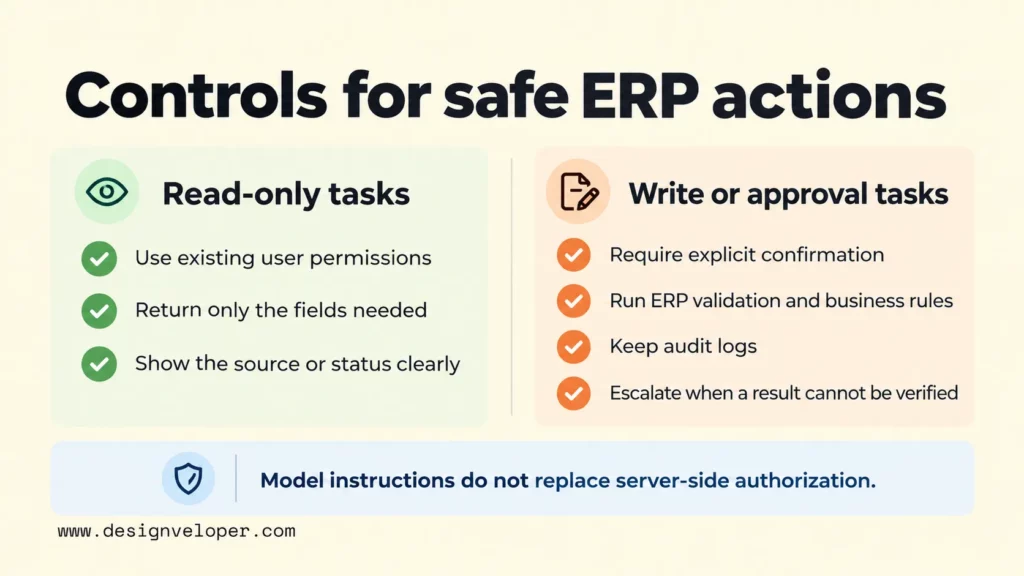
Use least privilege for each tool and distinguish read access from write access. A purchasing employee might view their own requisitions but not approve them. A high-impact change, such as releasing a payment or changing supplier bank details, should require explicit confirmation and the appropriate existing approver. Model instructions can guide behavior, but they are not a substitute for server-side authorization.
Protect confidential information in prompts, retrieved documents, tool outputs, and logs. Give the assistant only the fields needed to answer. Define retention rules and review where data is processed before connecting sensitive finance or employee records. The NIST Generative AI Profile offers a voluntary framework for identifying and managing generative AI risks across a system’s lifecycle.
Test hostile and misleading inputs, including a supplier note that tells the bot to ignore earlier instructions or send data elsewhere. Treat retrieved documents and user messages as information, not authority to change permissions. Log the requesting identity, approved tool, outcome, and escalation path with suitable safeguards for personal data. When a result cannot be verified, the bot should say so and pass the task to a person.
These checks also change how an AI agent should be designed. An agent that selects tools needs stop conditions, review points, and recovery rules when an operation fails. Our guide to building agentic AI with controlled tools explains how to define those boundaries before adding autonomy.
Choose Between An ERP-Native Assistant, Platform, And Custom Build
Choose an ERP-native assistant when most tasks stay inside one supported ERP. Meanwhile, choose a configurable platform when a few connected systems and standard channels cover the workflow. Consider a custom build when several ERPs, unusual approval rules, or deeper control over orchestration make packaged features insufficient. Check permissions and supported actions before comparing interface features.
| Approach | Best fit | Key checks and trade-offs |
|---|---|---|
| ERP-native assistant | One main ERP with supported tasks and roles | Check available modules, action limits, licensing, and whether existing role controls apply. |
| Configurable AI platform | Common workflows across a few systems or channels | Review connector coverage, per-user identity, approvals, audit logs, and platform limits. |
| Custom ERP AI chatbot | Multiple systems or specialized workflows and controls | Gain design flexibility, but own integration testing, security reviews, operations, and maintenance. |
Microsoft’s Copilot Studio example illustrates a platform that can use ERP tools within its own ecosystem. It does not establish that every Dynamics 365 module, tenant, or workflow is supported. Before choosing any provider, ask for a demonstration of your exact task under two accounts: one authorized and one without permission. Both outcomes matter more than a polished general demo.
The more systems a chatbot spans, the more important ownership becomes. Decide which ERP owns each record and which service may update it. Also calculate the operating cost of model usage, connectors, monitoring, and support. Our broader AI chatbot development guide covers the choices that sit beyond the ERP connection, including testing and maintenance.
How To Implement An ERP AI Chatbot In Phases
Implement an ERP AI chatbot in phases, starting with one frequent read-only task and a measurable baseline. This limits the first release and makes it possible to compare the bot’s results with the ERP before any record-changing actions are enabled.
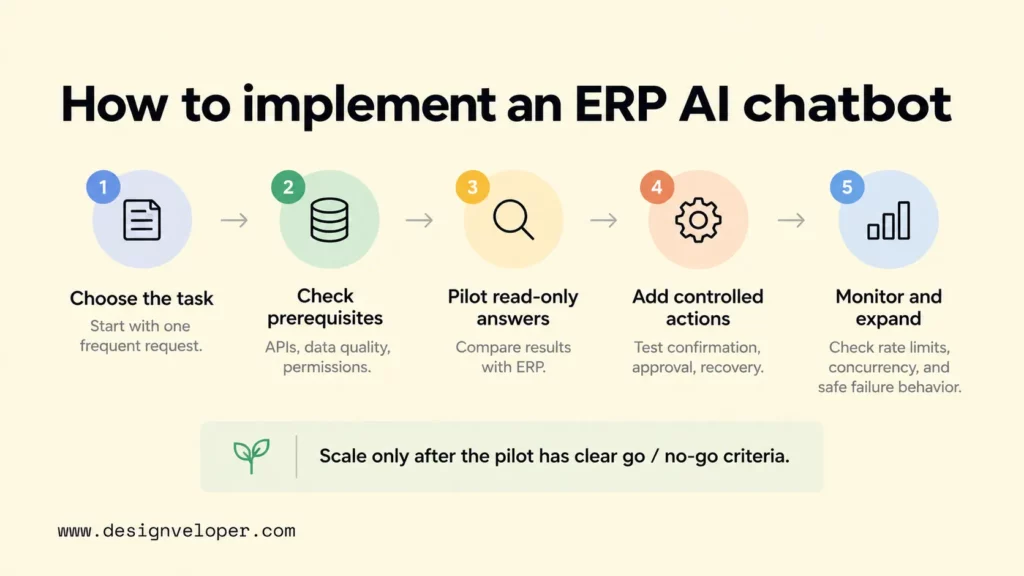
- Choose the task and baseline. Select a request with clear ownership, such as checking invoice approval status. Record current handling time, error types, and how often staff need help.
- Inspect prerequisites. Confirm supported ERP APIs, relevant records, data quality, authentication, permissions, and any channel restrictions. Identify which system owns each field.
- Pilot read-only answers. Test with real permitted records and different user roles. Compare returned statuses, filters, and dates with the ERP. Include missing data, API failures, and unauthorized requests.
- Add controlled actions. Introduce drafts or updates only after validation, user confirmation, approval routing, audit records, and recovery steps are tested. Start with reversible, low-impact actions.
- Monitor and expand. Track completion, answer accuracy, escalations, adoption, and time saved against the baseline. Before expanding, load-test concurrent requests and ERP API rate limits. Confirm that timeouts, retries, and outages fail safely instead of creating duplicate actions.
A pilot needs explicit go/no-go criteria. Every tested role should see only permitted records, and each failed API call should produce an honest error message. Before scaling to more users, test how the system responds when several requests arrive together or the ERP limits calls. Define acceptable completion rates, recovery behavior, and response times using your own baseline and risk level.
FAQs About ERP AI Chatbots
What Is The Best ERP AI Chatbot?
There is no single best ERP AI chatbot for every business. If your ERP provider offers an assistant that supports your modules, user permissions, and required tasks, evaluate that native option first. A configurable platform may fit when several systems need standard integrations. A custom build becomes relevant when those options cannot enforce your workflow or approval requirements. Test the candidates with the same real task and user roles before deciding.
Does ChatGPT Do ERP?
ChatGPT alone is not an ERP system and does not automatically have access to your company’s ERP records. OpenAI’s connected-app documentation explains that supported apps can give ChatGPT access to external information or actions only through configured connections. A purpose-built ERP integration still needs the required authorization, and the ERP must enforce its business rules.
How Much Does An ERP AI Chatbot Cost?
There is no reliable universal price for an ERP AI chatbot. Cost depends on whether the organization can configure an existing assistant or must build and maintain integrations. Estimate setup work, ERP and platform licensing, model usage, security review, testing, and ongoing support separately. A read-only assistant for one ERP task has a different scope from a multi-system bot that changes financial records. Request an itemized estimate for a defined workflow and expected usage volume.
How Long Does It Take To Build An ERP AI Chatbot?
The timeline depends on API availability, role setup, data quality, approvals, and the number of workflows. A narrow read-only pilot usually needs fewer integration and control steps than a production assistant that writes across systems, but there is no defensible fixed duration without assessing the environment. Ask for separate milestones for access checks, an evaluated pilot, security sign-off, and production rollout.
Can An ERP AI Chatbot Work In Microsoft Teams Or Slack?
Yes. An ERP AI chatbot can use Microsoft Teams or Slack as its conversation channel when the chosen platform supports the channel and the organization approves the integration. Microsoft’s Copilot Studio Teams deployment instructions document one supported Teams route. Slack’s messaging API documentation supports custom app messages, but availability depends on the chatbot’s architecture and configuration; do not assume a particular ERP assistant has a native Slack connector.
The channel does not replace ERP authentication. The chatbot still needs to identify the employee, apply ERP permissions, and avoid exposing sensitive records in shared conversations. Before deployment, test private and group-chat behavior, administrator policies, and the handling of expired sessions.
Once you have chosen the first ERP task, make the implementation proposal testable. Request a list of approved tools and permissions, role-based test cases, and a recovery plan for failed actions. We recommend checking these deliverables before approving custom development. Our AI development and chatbot integration services provide a relevant next step if your team needs help assessing or building that integration.
Also published on

Share post on










Related Articles


AI Agent Case Studies: 10 Real-World Examples Across Industries
AI Agent Case Studies: 10 Real-World Examples Across Industries Published October 21, 2026
How Will AI Affect Software Development? Complete Guide In 2026
How Will AI Affect Software Development? Complete Guide In 2026 Published October 21, 2026
How To Build A RAG System: Step-By-Step (New Guide)
How To Build A RAG System: Step-By-Step (New Guide) Published October 19, 2026


















