
















DevOps Managed Services: What They Include & How To Choose A Provider

DevOps managed services provide ongoing external support for software delivery and operations, including CI/CD, infrastructure as code, cloud infrastructure, monitoring, security, incident response, and continuous improvement. The provider operates an agreed technical scope over time, while the client should retain product ownership, risk acceptance, and control of its core accounts, repositories, and business decisions.
This model fits teams that need recurring DevOps capability without building every specialty in-house. It is not the same as a one-time cloud migration, a consulting engagement, staff augmentation, or a collection of DevOps tools. The value comes from assigning clear operational responsibility, measuring the service, and keeping enough internal control to make architecture and product decisions safely.
What Are DevOps Managed Services?
Managed DevOps services provide continuous external operation of an agreed part of the DevOps lifecycle. The scope can include strategy, delivery automation, infrastructure, security, monitoring, incident response, and platform improvement. If you need the underlying operating model first, our guide to what DevOps means in practice explains how development and operations share responsibility across the software lifecycle.
The boundary matters because several different purchases are often described as a “DevOps service.” Consulting usually diagnoses a problem and recommends or implements a defined change. Staff augmentation adds engineers who work under the client’s day-to-day direction. DevOps tools provide technical capabilities. Managed services are different because the provider accepts continuing responsibility for an agreed delivery or platform function.
| Model | What You Buy | Who Directs Daily Work | Typical Use |
|---|---|---|---|
| Managed DevOps services | Ongoing operation of an agreed DevOps scope | Provider within agreed governance | Running and improving pipelines, cloud operations, monitoring, and support |
| DevOps consulting | Assessment, architecture, roadmap, or specialist implementation | Usually the client after the defined engagement ends | Solving a specific design, migration, or transformation problem |
| Staff augmentation | Individual engineering capacity | Client | Filling a skills or capacity gap inside an existing team |
| DevOps tools | Software capability | Client or its provider | Automating builds, deployments, infrastructure, security, or observability |
Tools alone do not create operational ownership. A CI/CD platform can run a deployment, for example, but it does not own the operating result. Someone still has to maintain the workflow, respond when it fails, control production access, and improve the process as the application changes. Our guide to DevOps tools across the lifecycle is useful when you need to compare the technology layer separately from the managed-service model.
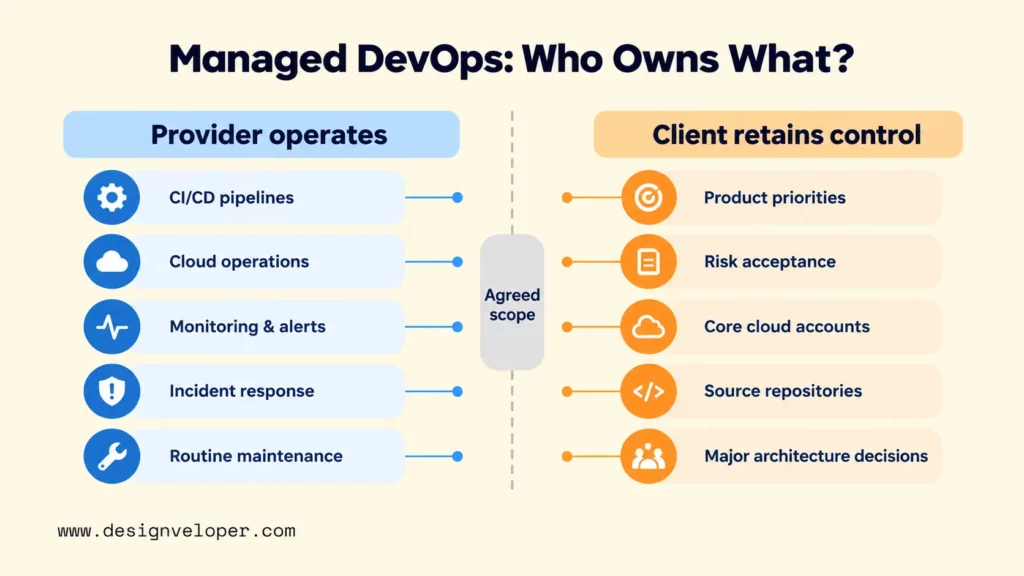
A managed contract should therefore define responsibilities, not just technologies. The provider can operate the agreed function, but the client should know which decisions remain internal and which assets stay under client control. A practical responsibility split can look like this:
| Area | Provider Responsibility | Client Responsibility |
|---|---|---|
| Delivery and operations | Operate agreed pipelines, environments, monitoring, incident routines, and maintenance tasks | Set product priorities, approve material risk, and define business-critical requirements |
| Accounts and repositories | Use approved access and maintain the agreed configuration | Retain ownership of core cloud accounts, source repositories, and access policy |
| Security and compliance | Run agreed controls, collect evidence, and escalate exceptions | Define applicable obligations, risk acceptance, and final exception authority |
| Knowledge and exit | Maintain runbooks, infrastructure code, dashboards, access records, and handover material | Review handover quality and keep enough knowledge to change providers or insource the work |
AWS uses a shared responsibility model. Customer responsibilities vary by the services selected and can include application software, data, identity, and configuration. That cloud boundary is separate from the managed-provider contract, so both layers should be documented. See the AWS Shared Responsibility Model.
What Do DevOps Managed Services Include?
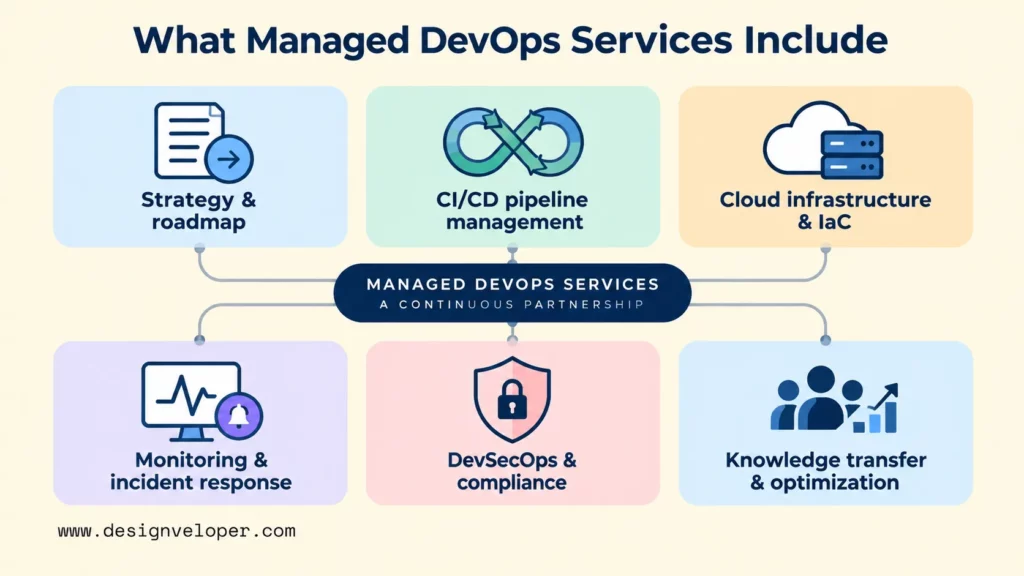
A mature managed DevOps scope usually connects planning, delivery automation, infrastructure, reliability, security, and knowledge transfer. The exact mix should follow the application and operating risks. A provider that only installs tools is offering a narrower service than an engagement that includes ongoing ownership, support, and improvement work.
DevOps Strategy And Roadmap
The first job is to decide what should change and in what order. A provider should assess the current delivery flow, architecture, cloud setup, toolchain, security constraints, incident history, and team responsibilities. The roadmap should then connect technical work to engineering and business goals, such as reducing manual release steps or improving recovery from failed deployments.
This step prevents a common mistake: replacing one toolchain with another before identifying the real bottleneck. The roadmap should separate quick operational fixes from deeper architecture work and make dependencies explicit. It should also state what will not be changed yet, so the engagement does not turn into an open-ended platform rebuild.
CI/CD Pipeline Management
CI/CD managed services operate the automated path from code change to tested, releasable software. The scope can include triggers, builds, automated tests, artifact handling, deployment steps, approvals, rollback logic, credentials, and release monitoring. Our guide to CI/CD pipelines explains the underlying delivery mechanism in more detail.
The provider may work with GitHub Actions, GitLab CI/CD, Jenkins, Azure DevOps, or another system that fits the existing stack. GitHub describes Actions as a CI/CD platform that can automate build, test, and deployment workflows. The managed-service question is not which brand appears in the diagram. It is who maintains the workflow, investigates failures, controls deployment permissions, and improves it as the application changes. See the GitHub Actions quickstart.
Cloud Infrastructure And Infrastructure As Code
Managed DevOps providers can operate cloud environments, provisioning, network and runtime configuration, containers, and infrastructure changes. Infrastructure as Code (IaC) moves those changes into versioned configuration so teams can review and reproduce environments instead of relying on undocumented console work. HashiCorp describes Terraform as an IaC tool for building, changing, and versioning cloud and on-premises resources through reusable configuration. See HashiCorp’s Terraform overview.
The scope may also include Docker and Kubernetes when the application actually needs container orchestration. Kubernetes manages containerized workloads through declarative configuration and automation, but it also creates an operational layer that someone must maintain. See the Kubernetes platform overview. A provider should be able to justify that complexity rather than treating Kubernetes as a default requirement.
Monitoring, Observability, And Incident Response
Operational support should define what the provider watches and what happens when a signal becomes an incident. The scope should name key application and infrastructure signals, severity levels, support hours, escalation routes, and who can make emergency changes. It should also define when an incident needs a post-incident review and who owns the resulting actions.
Alerts should map to useful action instead of generating noise. Google’s Site Reliability Engineering guidance separates urgent pages from work that can wait and stresses that human alerts should be actionable. In practice, the provider and client should agree which conditions page an on-call engineer, which create a ticket, and which are reviewed during normal optimization work. See Google’s monitoring guidance for distributed systems.
Observability should cover logs, metrics, traces, deployment events, and critical user-flow signals, not only infrastructure utilization. CPU and memory charts can help, but a release team may also need error rates, request latency, failed jobs, queue health, and the success of critical user flows. These signals make it easier to connect a technical problem to user impact and to verify whether a fix restored the service.
DevSecOps And Compliance
Managed DevSecOps work integrates security into the delivery process instead of leaving it for a final review. The service may cover secrets management, identity and access control, vulnerability scanning, infrastructure checks, security testing, and audit evidence. Release gates should reflect the organization’s actual risk and compliance needs.
The provider and client should also agree on access authority, exception handling, evidence ownership, and compliance responsibilities. NIST’s Secure Software Development Framework recommends integrating secure development practices into the software lifecycle and provides a common vocabulary for producers and acquirers. A provider can operate agreed controls, but the client should still decide which obligations apply and who can accept an exception. See NIST SP 800-218.
Knowledge Transfer And Ongoing Optimization
A managed service should reduce operational fragility, not create dependence on undocumented provider knowledge. Useful handover artifacts include readable runbooks, current infrastructure code, pipeline documentation, dashboards, access records, architecture decisions, and training material. Those artifacts make provider changes or future insourcing safer.
Optimization then becomes a recurring activity. The provider can review recurring incidents, slow pipeline stages, noisy alerts, cloud waste, manual approvals, and security findings, then propose changes with a measurable reason. Our DevOps pipeline guide shows why delivery automation works best as a feedback loop rather than a one-time build.
When Does DevOps As A Service Make Sense?
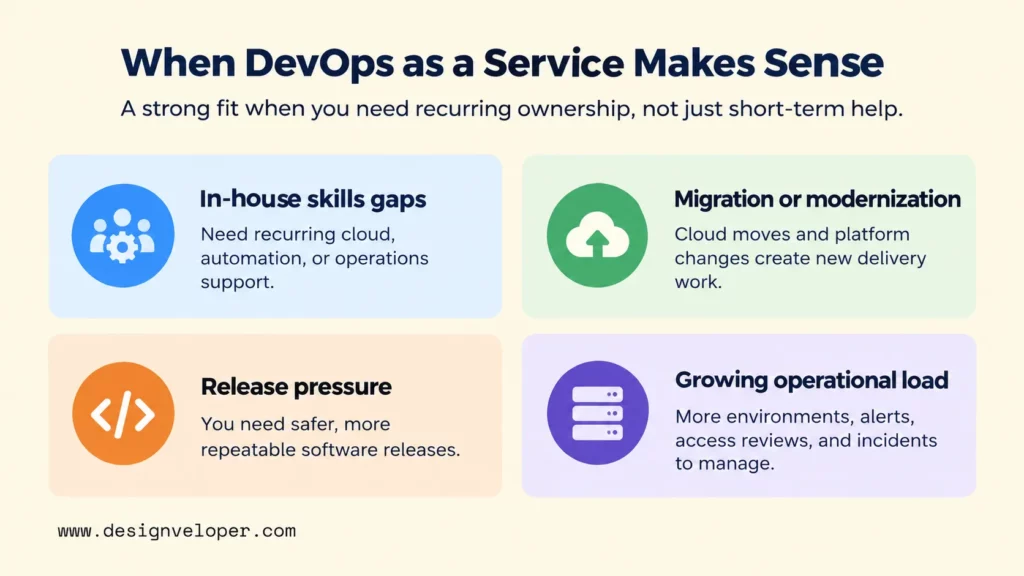
DevOps as a service makes sense when the team has a recurring delivery or operations problem that needs specialist ownership, not simply a temporary shortage of hands. The strongest cases usually involve skill gaps, modernization, release pressure, or operational complexity that the current team cannot absorb without pulling attention away from product work.
Filling In-House DevOps Skills Gaps
A managed service can fill recurring gaps in cloud engineering, automation, security, observability, or operations when hiring each specialty is impractical. If the company only needs one expert for a short migration or audit, consulting or staff augmentation may be a cleaner fit. In that case, operational accountability does not need to transfer for the long term.
The client still needs an internal owner who can set priorities and evaluate trade-offs. Outsourcing execution without retaining architectural context can make future decisions slower because the provider becomes the only party that understands why the platform works the way it does.
Migrating Or Modernizing Applications
Migration and modernization often create DevOps work at the same time as application work. Moving a legacy system to cloud infrastructure can require new deployment automation, environment definitions, secrets handling, monitoring, backup, and recovery processes. Refactoring a high-change component may also require a different release strategy.
For that reason, the provider should connect operations decisions to the application architecture instead of treating them as separate tracks. Our guide to cloud application development explains how architecture, CI/CD, monitoring, security, backup, and cost control affect one another in cloud delivery.
Supporting More Frequent Software Releases
A team that wants to release more often may need help making the release path repeatable. Managed DevOps support can automate builds, tests, deployments, environment promotion, health checks, and rollback steps so a release depends less on manual coordination.
More releases are only useful when they remain safe and observable. The goal should therefore be a delivery system that supports smaller changes, fast feedback, and recovery when something fails. A provider should not optimize deployment count while failed changes, incident volume, or user impact gets worse.
Managing Growing Cloud And Operational Workloads
Managed DevOps services can also fit when environments, applications, or support demands have outgrown the internal team. Growth may add more accounts, clusters, deployment targets, alerts, access reviews, backups, cost questions, and incidents. At that point, the problem is not one missing tool. It is the operating load created by the whole system.
Before outsourcing that load, separate repetitive operations from decisions that should stay close to product and architecture owners. Routine provisioning, monitoring, patch coordination, and incident triage may be delegated. Product priorities, risk acceptance, data rules, and major architecture decisions usually need direct client ownership.
How To Choose A Managed DevOps Services Provider
Choose a managed DevOps services provider by testing whether it can own the required operating scope without taking away the visibility and control your team still needs. Start with responsibilities and evidence, then compare tools and commercial terms.
- Check full-lifecycle technical coverage. The provider should have relevant capability across development workflows, cloud infrastructure, security, QA, monitoring, and operations when your scope crosses those areas. A narrow specialist can still be right when the engagement is deliberately narrow.
- Match experience to your real stack. Ask for relevant experience with your cloud platform, deployment model, repositories, runtime, data services, and compliance constraints. Tool logos are less useful than a clear explanation of how the team would operate your environment.
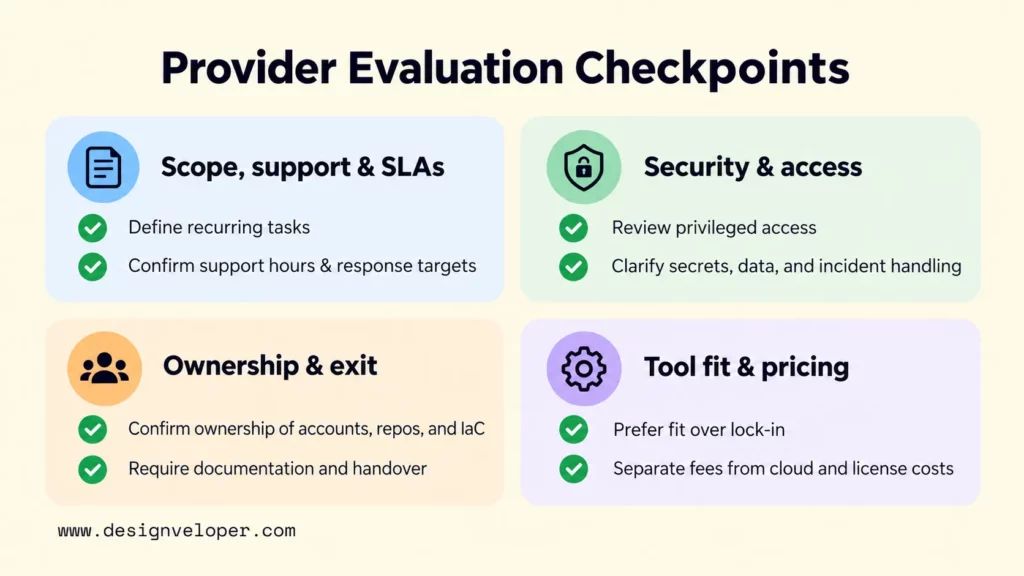
- Define service scope, support hours, and SLAs. Document environments, recurring tasks, on-call coverage, response targets, maintenance windows, escalation paths, exclusions, and dependencies on the client team. An SLA is only useful when both sides agree what event starts the clock and what resolution means.
- Review security and data handling. Verify how privileged access is granted, reviewed, logged, and removed. Clarify secrets management, subcontractor access, data location, incident notification, evidence ownership, and the responsibilities tied to your compliance obligations.
- Clarify asset ownership before signing. The client should know who owns cloud accounts, repositories, IaC code and state, pipeline definitions, monitoring configuration, documentation, and credentials. Exit terms should make those assets usable after the engagement ends.
- Test knowledge transfer and exit planning. Ask what runbooks, dashboards, access records, and architecture notes are maintained. Also ask how the internal team is trained and what handover looks like. A provider that cannot describe a clean exit is creating avoidable lock-in.
- Prefer tool fitness over vendor lock-in. A provider should be able to work with multiple tools when the architecture requires it and explain when standardization is worth the migration cost. Replacing a functional stack should need a technical or operational reason, not just a provider preference.
- Compare pricing against the operating scope. Separate provider fees from cloud spend, tooling licenses, on-call coverage, compliance work, one-time migration or setup, and the internal staff who still own decisions. Also check whether recurring optimization time is included or billed separately.
During evaluation, ask each provider to walk through one likely incident and one likely change request. The exercise exposes responsibility gaps quickly. You should be able to see who detects the issue, who communicates with stakeholders, who can change production, what evidence is recorded, and when the client must approve a decision.
How To Start A Managed DevOps Engagement
Start with a bounded assessment and one measurable workflow, then expand only after ownership, automation, and reporting work in practice. This reduces the risk of outsourcing a poorly understood operating model and gives both teams a shared baseline for improvement.
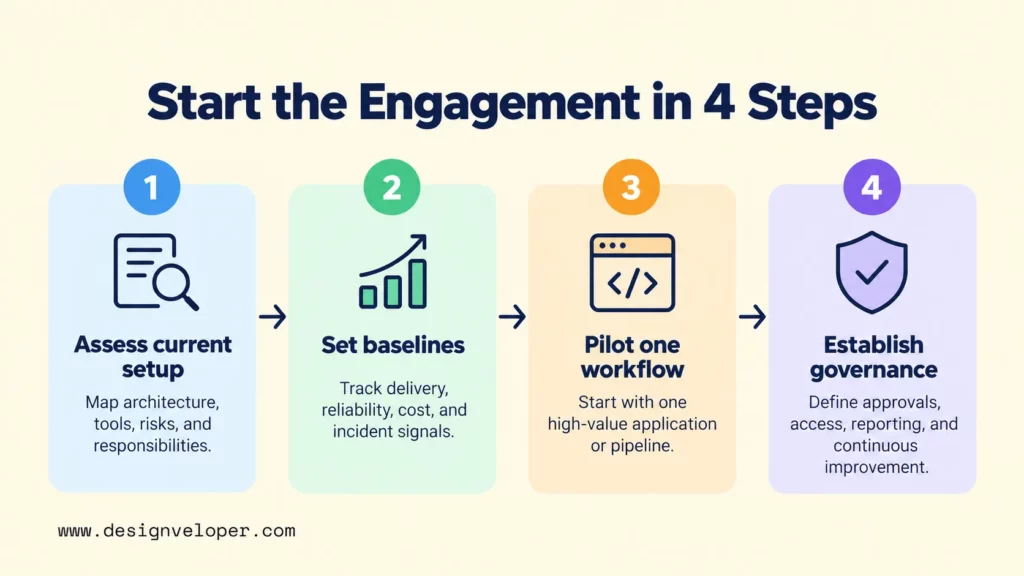
Assess The Current Delivery And Operations Setup
Map the current architecture, deployment flow, infrastructure, tools, known risks, support model, and team responsibilities. Record manual steps and recurring failure points. Also identify which environments and systems are business-critical, because they may need stronger access controls, recovery plans, or support coverage than lower-risk workloads.
The assessment should end with explicit boundaries. List what the provider will manage, what remains internal, and where decisions are shared. This responsibility map is more useful than a generic “end-to-end DevOps” promise because it can be tested during incidents and change reviews.
Set Baselines And Success Metrics
Measure delivery and reliability signals that match the problem you are trying to solve. Four useful starting signals are deployment frequency, change lead time, change fail rate, and failed deployment recovery time. DORA’s current software delivery model also tracks deployment rework rate, so teams can add it when it helps explain unplanned deployment work. See DORA’s software delivery performance metrics. Alongside those delivery metrics, measure availability, cloud cost, incident volume, and support response time when they match the engagement.
Use these metrics as improvement signals, not automatic SLA targets or isolated goals. Higher deployment frequency can coexist with poor reliability, and lower recovery time can hide repeated avoidable failures. Review a small set together so the provider is rewarded for improving the delivery system rather than gaming one number.
Start With One High-Value Workflow
Pilot one application, environment, or pipeline where improvement matters and the result can be observed. A useful pilot has a clear before-state, an owner, a limited set of dependencies, and a rollback plan. It is large enough to expose real operational problems but small enough to avoid moving the whole organization at once.
For example, a cloud application pilot could automate one service’s build and deployment, define its infrastructure with code, add production monitoring, and document release approvals. If a release fails, the same pilot should test alerting, escalation, incident feedback, and the handover material needed by the internal team. That sequence shows whether CI/CD, IaC, monitoring, governance, and knowledge transfer work together before the scope expands. Our DevOps best practices guide explains the gradual adoption logic behind this approach.
Establish Governance And Continuous Improvement
Before expanding the service, define ownership, access, documentation, reporting, review cycles, and handover expectations. Decide who can approve production changes, how emergency access works, how incidents are reviewed, and how service changes are proposed. These rules keep the provider fast enough to operate while preserving client oversight.
Continuous improvement should then follow evidence from incidents, delivery data, security findings, and team feedback. Review recurring problems, decide which changes are worth making, assign owners, and verify whether the change actually improved the baseline. This is where managed operations become more valuable than simple ticket handling.
FAQs About DevOps Managed Services
What Is The Difference Between Managed DevOps Services And DevOps Consulting?
Managed DevOps services are ongoing operations for an agreed scope, while DevOps consulting is usually focused on assessment, architecture, strategy, or a defined transformation problem. Consulting can lead into a managed service, but buyers should confirm when responsibility shifts from advising to operating.
What Tools Are Commonly Used In Managed DevOps Services?
Common tool categories include source control, CI/CD, Infrastructure as Code, container platforms, monitoring, logging, security scanning, and cloud services. Examples include GitHub Actions, GitLab CI/CD, Jenkins, Terraform, Docker, Kubernetes, Prometheus, Grafana, and services from AWS, Azure, or Google Cloud. The right stack depends on the application, team skills, compliance needs, and existing environment.
How Much Do Managed DevOps Services Cost?
There is no reliable universal price for managed DevOps services. Separate the provider fee from cloud spend, tooling licenses, on-call coverage, compliance work, one-time migration or setup, and the internal staff who still own business and architecture decisions. Then ask what recurring optimization time is included. Two proposals with similar monthly fees can cover very different operating scopes.
Can Managed DevOps Services Support A Multi-Cloud Environment?
Yes, managed DevOps services can support multi-cloud environments when the provider has relevant expertise and the operating model accounts for each platform’s identity, networking, observability, and security differences. Shared Infrastructure as Code workflows can reduce some variation. Multi-cloud still adds governance and operational complexity, so it should solve a real business or resilience need rather than exist by default.
How Can A Company Keep Control When Outsourcing DevOps?
Keep control by retaining ownership of cloud accounts, repositories, infrastructure code and state, access policies, business data, documentation, and major architecture decisions. Use least-privilege access, named approval rights, auditable changes, service reporting, current runbooks, and a tested handover process. The provider should operate within those controls rather than become the only party able to understand or change the platform.
If you are planning a cloud modernization effort that also needs clearer delivery and operational ownership, our software development services can support the application-engineering work around that transition. We recommend starting with an assessment that defines application boundaries, release responsibilities, and handover artifacts before expanding the operating scope.
Also published on

Share post on










Related Articles


DevOps Managed Services: What They Include & How To Choose A Provider
DevOps Managed Services: What They Include & How To Choose A Provider Published September 21, 2026
How AI Automates Routine Tasks: What To Automate First?
How AI Automates Routine Tasks: What To Automate First? Published August 05, 2026
AI Resume Screening: How It Works, Benefits, Risks, And Tools
AI Resume Screening: How It Works, Benefits, Risks, And Tools Published May 15, 2026



















