

What Is Mobile App Development? (Definition, Stages, Types)

Mobile apps are becoming increasingly popular. This promotes demands for effective mobile app development to build high-quality, tailored solutions for different businesses. So, what is mobile app development, exactly? This article will help you figure out its importance, different types, and detailed stages.
What Is Mobile App Development?
Mobile app development is the process of creating software applications that run on mobile devices such as smartphones, tablets, and smart wearables. It involves designing, building, testing, and deploying applications for platforms like iOS, Android, or cross-platform frameworks that work on multiple devices.
So, why should your business actually spend time, effort, and capital on dedicated app development? There are some main reasons behind:
- Personal Billboard
Unlike a website, which users have to actively go and seek out, an app icon is a constant, subtle brand presence. It’s like having a tiny, perfect billboard nestled right among their most-used tools (mobile devices, we mean). Therefore, developing an effective mobile app means you successfully digitize your business and increase your brand’s online presence to a wider audience.
- UX Factor
No matter what app you build, one of its key purposes is to increase the user experience (UX). Users here can be your internal employees, long-term clients, and customers.
A well-built app gives you total control over their experiences, by automating repetitive tasks to make your staff more productive, engaging clients in bulk discount programs, making purchases smoother for shoppers, etc. Without dedicated app development, you hardly improve UX, build trust, and achieve your app’s ultimate goal.
Different Types of Mobile Applications
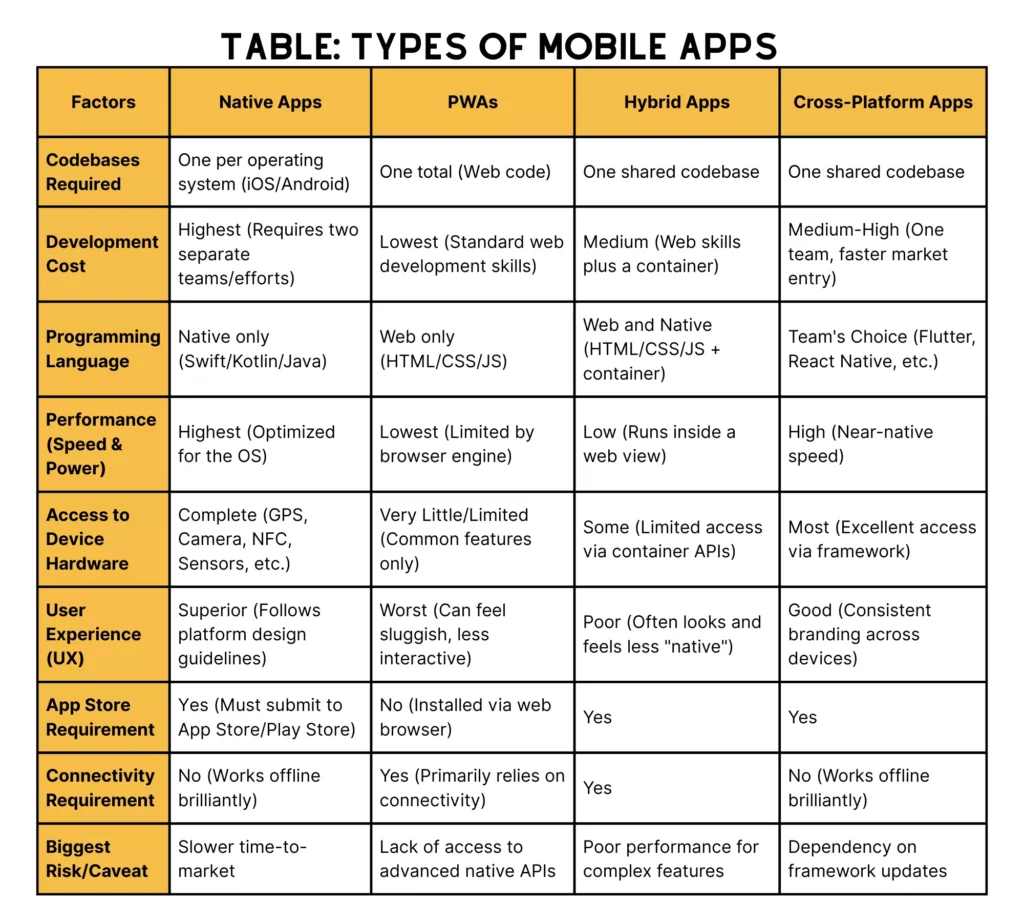
Mobile apps are now divided into four different types. Each comes with its own performance characteristics, development methods, and use cases. Let’s find them out!
Native Apps
Native apps are basically created for a specific mobile operating system, for instance, iOS or Android.
Developers use each platform’s favored programming languages and software development kits (SDKs) to write native apps. Particularly, Android apps require Java or Kotlin for development, while Swift or Objective-C is common for iOS.
These apps are downloaded from Apple’s App Store or Google Play Store and installed from their source directly onto a mobile device.
| Pros | Cons |
| – Native apps have superior performance and responsiveness. They can operate smoothly even for graphics-intensive applications. – They can access all the device’s hardware features (like camera, GPS, accelerometer, or contacts), hence delivering a rich and seamless experience to the user. This makes native apps popular for cases requiring real-time data processing, like navigation apps (Google Maps). – Native apps are designed to follow the design guidelines of their underlying platform. This guarantees a user-friendly design and consistent experiences for users. | – More expensive to develop because of the need for individual codebases for both Android and iOS (more time and resources). – Take longer to develop, as developers have to customize the app for every OS. This, hence, delays entry into the market. |
Progressive Web Apps (PWAs)
Progressive Web Apps (PWAs)
A Progressive Web App (PWA) is a website that integrates modern features to function like a native app. They are developed with standard web technologies (HTML, CSS, JavaScript) while providing native-like capabilities, such as working offline and delivering push notifications. One plus of PWAs is that they can be installed directly to a user’s home screen without needing an App Store download.
| Pros | Cons |
| – PWAs enable instant accessibility, which means you don’t need to download them from any app store. Just visit a URL and start using the PWA. – PWAs use one codebase (web code), so you can significantly lower costs associated to development and maintenance. It’s cheaper than developing separate native iOS and Android apps. – PWAs are designed to be incredibly fast, even on weak networks, which naturally leads to better user retention. Plus, as they offer regular web content, they are searchable by Google and other search engines. This is a big perk for SEO. | – PWAs still have restrictions on access to hardware features. They support common features like geolocation, camera, and push notifications. But they can’t access advanced ones, like the device’s light sensor, advanced file storage, or NFC functionality. – PWAs might be less energy-efficient than a highly optimized native app. As they work inside the browser engine, they can consume more battery during heavy usage. |
Hybrid Apps
A hybrid app is a mixture of native and web apps built upon web technologies to run on top of special containers (e.g., Apache Cordova or React Native) to appear as a native app for mobile devices. This method of development supports cross-platform development so that developers can write a single codebase that works with multiple operating systems.
| Pros | Cons |
| – Hybrid apps can run on both Android and iOS platforms with minor adjustments. This shortens development time and reduces cost. For this reason, hybrid apps are especially beneficial for businesses that are trying to reach a wide audience without having to duplicate efforts. – Hybrid apps use web content and the latest web technologies to update features easily without the app store’s approval. – Hybrid apps can access some device features via APIs provided by the native container for device access. Some features include a camera and geolocation. | – Perform more slowly than native apps, especially for graphics-intensive cases or those requiring extensive device integration. – In certain cases, there is restricted access to some native features that affect user experience when doing complex functionalities. |
Cross-Platform Native Mobile Apps
A cross-platform native mobile app (sometimes just called “Cross-Platform”) is built using a single language and framework (like Flutter, React Native, or Xamarin). It’s compiled to run as true native code on multiple operating systems, chiefly iOS and Android.
This method stems from the “write once, run everywhere” idea. It makes performance really close to truly native apps without the high cost of duplicating the entire codebase and hiring two separate teams. It’s a compelling, practical choice for most businesses.
| Pros | Cons |
| – Unlike older hybrid solutions, cross-platform apps use advanced frameworks (like Flutter or React Native) to achieve near-native performance. – You only need one team to write the codebase once. So, this allows you to add new features or fix bugs across platforms at the same time, significantly reducing time-to-market and maintenance effort. – Sharing the exact same code for the UI (User Interface) and business logic, you can keep brand experience consistent across devices. | – Your entire app relies on third-party frameworks (e.g., Flutter, React Native). When Apple or Google updates its OS, you have to wait for the framework team to update its platform. This is a potential bottleneck, and unfortunately, it can leave you exposed. – The resulting compiled app file might potentially be a little bit larger than a perfectly optimized pure native app because the final package has to include the framework’s necessary runtime environment. |
Mobile Platforms and Operating Systems
You’ve learned what mobile app development means and its different development methods. So, you may feel curious about the two largest mobile operating systems now in the market: Android and iOS. We can’t really talk about mobile app development without discussing the duopoly. Now, let’s find out what they are:
Android
Google is the main developer of Android. As the world’s most popular mobile operating system (72.55%), Android allows anyone to modify its source code. This leads to a huge, sprawling ecosystem of device manufacturers – let’s say Samsung, Xiaomi, etc.
Do you aim to reach the maximum number of users globally, especially in emerging markets where mobile devices are often cheaper, like China? If so, Android is an ideal choice.
This mobile platform mainly requires Kotlin and Java for native app development. Java is mostly for legacy code, while Kotlin is more modern and cleaner.
However, be careful with the fragmentation problem in Android app development. Many different companies manufacture Android phones, with a variety of screen sizes and hardware specs. So, if your app targets Android users, it must work perfectly across different Android versions and devices. This requires developers to take significant time on quality assurance and compatibility testing, making Android app development a kind of headache at times.
iOS
iOS is the operating system that powers Apple’s iPhones and iPads. It’s not open-source like Android. Conversely, it’s completely closed and highly curated. This means Apple completely controls the hardware and software, and therefore, the whole user experience.
iOS has a smaller user base than Android, but it targets higher-income users who are willing to spend money on apps and in-app purchases. As Apple keeps the hardware in check and releases OS updates effectively, developers don’t need to cope with the fragmentation challenge. Therefore, testing becomes simpler and quicker.
Swift is the main modern programming language for native iOS development. This language features its speed and safety. Further, Apple’s App Store offers strict guidelines and a notoriously thorough review process. So, if you want to release your app on the App Store, you have to follow Apple’s rules.
Common Mobile App Development Technologies

Mobile app development basically requires a wide range of technologies, depending on your app type and project requirements. However, there are some common techs – including programming languages, frameworks, and libraries – you should consider as follows:
- For iOS:
Swift is the main language for native iOS development. It’s highly renowned for its safety, performance, and modern syntax.
Further, you need SwiftUI as a modern framework for developing user interfaces using Swift that accepts a declarative way to create adaptable layouts. These applications are designed to make optimal use of the space available by following the iOS frameworks to make sure that iOS apps are visually appealing and user-friendly.
- For Android:
Kotlin is safer and less error-prone than Java. It’s interoperable with Java, has null safety, and other modern features. So, it’s preferred for Android app development.
Besides, Google provides the Android SDK as the official software development kit for building Android apps. This toolkit comprises different tools, libraries, and APIs for various functionalities.
Jetpack is a set of libraries and tools that help developers build high-quality Android apps. Accordingly, it provides components for, for example, lifecycle management, navigation, etc., and therefore helps developers in faster delivery of apps with optimal performance.
- For Hybrid Apps:
React Native from Facebook lets developers develop native-like iOS and Android apps with JavaScript and React, used by Airbnb and Dropbox.
If built for mobile, Flutter is a UI toolkit that lets you and your designer build beautiful, natively compiled applications for iOS and Android from a single codebase using Google’s Dart programming language, and is used by Google, Alibaba, among others. These frameworks help in cross-platform development that eases costs and time to market.
We also have JavaScript, the top favorite tech choice of developers all the time (66%). JavaScript is used for hybrid and cross-platform apps. It enables you to work on the development across iOS and Android platforms using frameworks like React Native or Angular. By allowing developers to write a single codebase for different platforms, JavaScript helps you reach a broader audience efficiently.
Mobile App Architecture Overview
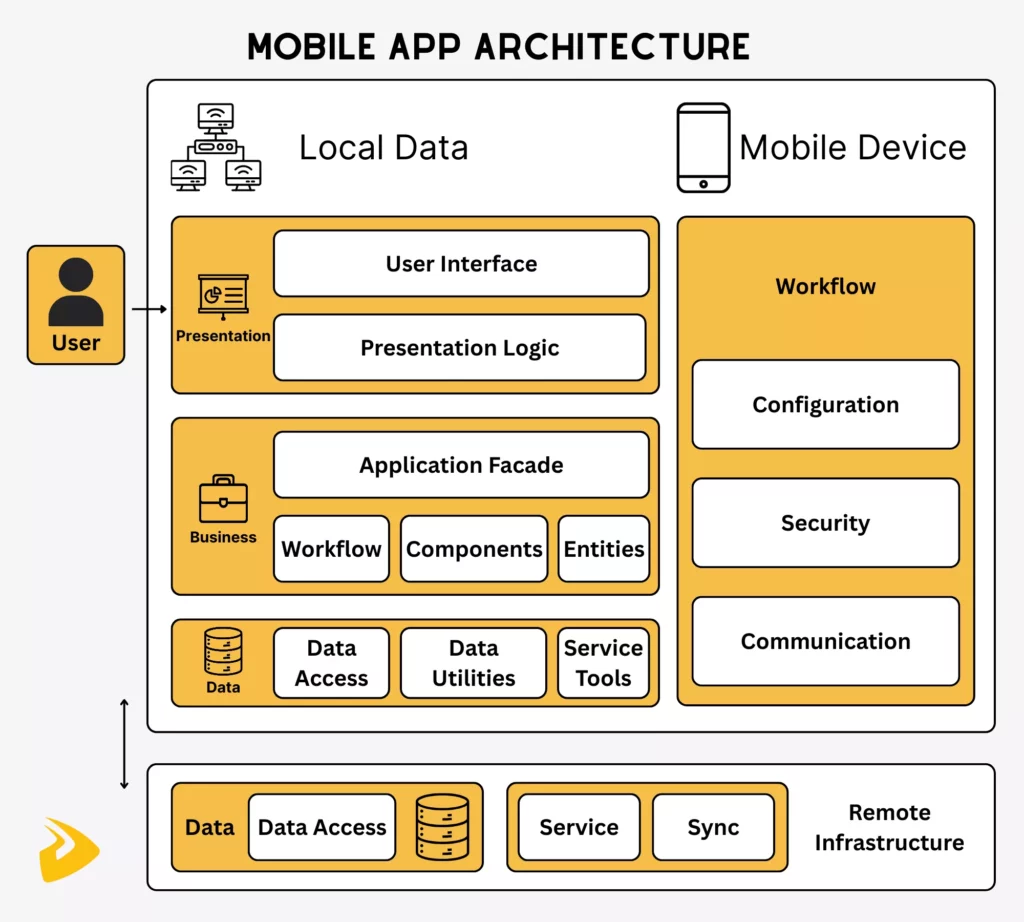
When you see a really slick app doing its thing on your phone, have you ever actually stopped and genuinely wondered how it works? To really answer those kinds of questions, we’ve got to dig deep into the mobile app architecture. It’s fundamentally built on three smart, interconnected layers as follows:
Presentation Layer
The Presentation Layer is the app’s face. It includes the entire user interface (UI) and all those visual, interactive elements that combine to form the user experience (UX). This is where you see the app’s content, and where you interact with the app to actually perform certain actions.
Its single job is to gracefully show information to users and then to accept their inputs. Whether that input is text, or a voice command, or a little finger tap, or a photo upload—it doesn’t actually care. It’s the front person, the one keeping everything looking neat, and, honestly, taking all the initial requests.
Business Logic Layer
Now, the Business Logic Layer? This is the central nervous system, or maybe it’s better to think of it as the app’s real decision-maker. It enforces all the actual rules and does the heavy-duty thinking and calculations. It’s responsible for all important, back-end functions, like deciding on how to process and securely store data.
Imagine a user writes his email address in a form and then clicks the “Subscribe” button (this action happened in the Presentation Layer). After recognizing the input and the command, the Business Logic Layer immediately takes over. It checks whether the email is valid, tells the Data Layer to save the information (if the email’s correct), and finally governs the Presentation Layer to flash a polite message like “Thanks for your subscription” onto the user’s screen.
Data Layer
The Data Layer is, well, the basement. This is the often-unseen part of the system where you validate, securely store, access, and protect all the essential, irreplaceable information.
When the Business Logic Layer requires a piece of data (say, a user’s entire purchase history from five years ago), it sends a simple, concise request to this Data Layer. The Data Layer, in turn, takes all the necessary actions to fulfill that request. It might extract the history from a remote database or just pull it from the device’s local storage.
Front-End vs. Back-End in Mobile App Development
Before we dive headfirst into the actual coding and development of your shiny new mobile app, there’s this absolutely fundamental distinction we have to clear up. They are Front-End and Back-End Development.
- Front-End
The front-end, sometimes called the client-side, is what users see. It is the user interface (UI), the entire visual and interactive experience a person has while they’re actually using your app.
A front-end developer’s job is to turn sleek, static UI/UX designs turn them into something interactive and alive. They often work with programming languages like Swift (for iOS), Kotlin (for Android), or React Native and JavaScript for cross-platform stuff, to make a responsive experience.
- Back-End
The back-end is the server-side of the entire operation. Users never actually see it. And it’s where all the heavy lifting, the security, and the serious, complex calculations happen.
Think of it like this: when you hit a button like “Log In” on the front-end, that front-end is just sending your username and password through an invisible tunnel. That tunnel is called an API call. The back-end sits on a remote server – maybe run by AWS, Google Cloud, or Azure – and has the immediate job of verifying that login against a massive database of users. It’s what makes the entire app work.
Developers here are using different tools entirely, like programming languages such as Python, Java, or Node.js. They also work with complex databases like MySQL or MongoDB to save and organize all your user profiles, their purchase histories, the content they’ve created, and basically every data.
Further, they write code (complex business rules) to tell what the front-end should do next and create custom APIs to ensure smooth data exchanges. They also deal with protecting sensitive information, from passwords to payment details.
Mobile Application Development Lifecycle
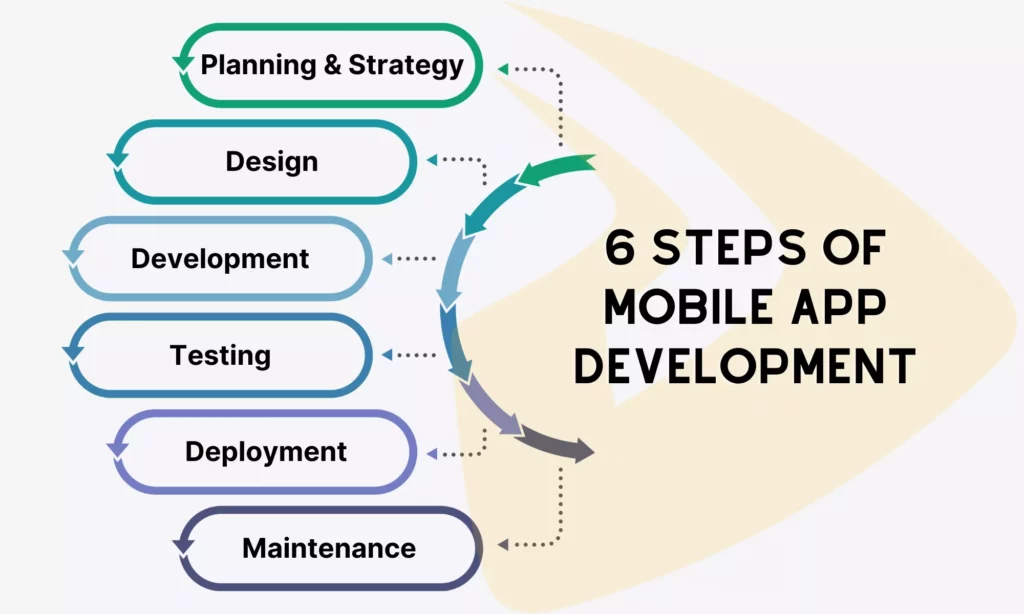
The process of mobile app development is a structured journey with six key stages. Each stage is interlinked and plays a crucial role in the successful delivery of a high-quality app:
Planning and Strategy
Before your app is conceptually designed, we absolutely need to know: What problem are we trying to solve, and for whom are we solving it? I mean, who is truly the direct user of your app? If you don’t make this clear in this first stage, you’ll set yourself up for failure later.
The planning stage is about asking a ton of questions and doing detailed research. It usually kicks off with a robust market analysis to see what your competitors are doing, but, better yet, what they are not doing. Where’s that frustrating gap in the market? That’s what we want to find. We need to clearly define the app’s core goals and its target audience.
Crucially, this is also when we identify functional requirements. What exactly should the app do on day one, or what features are absolutely non-negotiable for the Minimum Viable Product (MVP)? What you found in this phase acts as the anchor, helping designers and coders to have the same clear, singular vision.
Design
This work concerns the design stage, which concentrates on user interface (UI) and user experience (UX). This would be creating wireframes, mockups, and prototypes to visualize the app layout and the functionality.
The aim of all this is that the app is intuitive enough, aesthetically pleasing, and matches what the user would anticipate. Accessibility considerations, such as screen readers for visually impaired users, are also addressed in this stage.
Development (frontend + backend)
In this phase, all that detailed planning and the artistic design work actually get translated into a tangible, working application. This time, your development team will take care of developing both the front-end and back-end:
For the front-end, developers focus entirely on the client-side, using programming languages, like Swift (iOS), Kotlin (Android), or React Native (cross-platform). Their job is to literally bring the UI/UX designs to life, building all those screens, making the buttons clickable, and reducing load times to optimize the app’s performance for the best user experience.
For the back-end, the team is deep in the heavy-duty business logic and dealing with the database connections. They often utilize robust, versatile techs like Python, Node.js, or maybe even Java for enterprise-level applications.
Critically, they’re the ones setting up the APIs to let the app actually talk to the remote server and fetch data reliably. They also handle all the necessary integrations with third-party services, like payment gateways, big cloud storage solutions, or perhaps an external analytics platform to track user behavior.
Depending on your app’s actual requirements, the team can involve specialists to handle advanced features – let’s say real-time video or complicated AI algorithms.
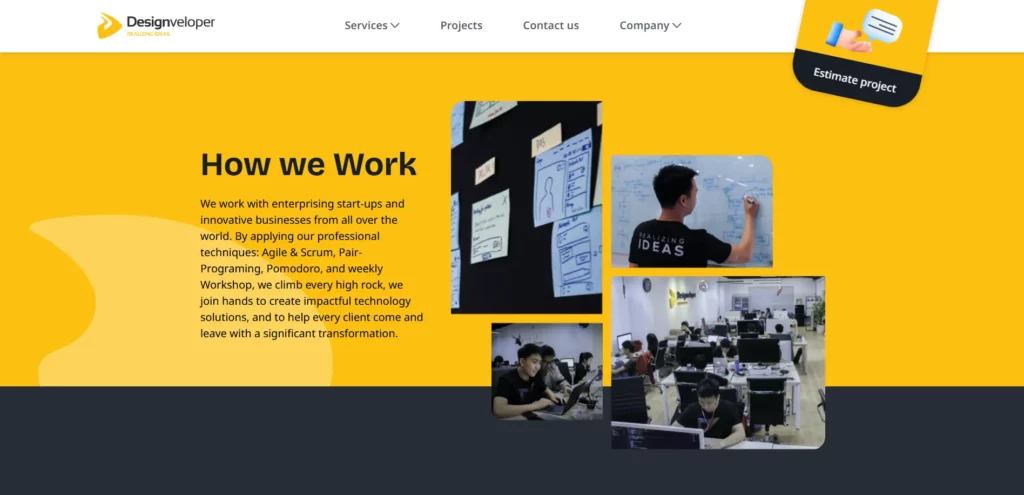
Many companies, like Designveloper, often follow some best practices (like modular code, version control, and continuous integration) to keep the code quality and make collaboration easier. We also adopt Agile development principles – pair programming, behavior-driven development (BDD), and test-driven development (TDD) – to help us flexibly adjust to changing requirements and to deliver value incrementally.
Testing
This stage involves identifying and fixing bugs, checking functionalities, and verifying the app against the requirements specified.
This requires a rigorous set of tests, unit testing for an individual component, integration testing for an interaction between the components, and user acceptance testing, to make sure that an app meets user needs. Testing also includes checking performance, security, and compatibility across various devices and operating system versions.
Our QA team tries to look out for any performance issues, security vulnerabilities, or user experience gaps so that the app is in its top performance. As another important step, this rigorous testing process is crucial in order to maintain high user satisfaction and user retention rates.
Deployment
Once the app is working fine on all testing phases, then it is ready to be deployed. This consists of asking the app stores (e. g. Apple App Store or Google Play Store) to review and approve the app. Later, after approval, the app is available to the public, and users can download and install it.
Maintenance and Optimization
Once deployed, you need to schedule regular maintenance to address problems that crop up and to implement updates and new features.
Why? It’s because your app may become outdated, insecure, and incompatible with new technologies and device capabilities if it doesn’t have regular updates. By monitoring user feedback, app performance, and market trends, developers can make feasible improvements.
Mobile App Development Services Cost Factors

When it comes to mobile app development, costs are one of the biggest concerns. Generally, building a simple app can cost at least $40,000, while a highly complex one requires up to $120,000. These figures aren’t fixed, as the total expense is under the impact of various factors:
- The complexity of features partially contributes to the cost of mobile app development. Building a simple app with a catalogue and a contact form requires far less effort and resources than developing a real-time streaming platform with custom AI integration.
- Native or cross-platform choice is another determinant. Building and maintaining for both separate systems is more expensive, as it requires you to hire separate professionals and put double effort.
- UI/UX requirements affect the cost a lot. A standard, templated look is definitely cheaper than a highly custom design with 3D animations.
- Integrations with bespoke infrastructure add development time and cost than connecting to common third-party services, like PayPal.
- The location and expertise of the team impact the total expense as well. If developers come from high-cost-of-living areas (like New York or London), the hourly rate may be higher than those from developing countries (e.g., Vietnam or India).
- Other factors, such as post-launch marketing, licensing fees, and app store fees, may add to your spending.
So, before jumping into the project and writing any code line, you should first calculate the possible budget, including hidden or unexpected costs.
Challenges in Mobile App Development

You don’t just need to have a clear goal, follow a well-structured process, and have the best development team to make mobile app development successful. But it requires you to identify and handle common challenges to avoid unexpected losses.
- Security
People are using mobile apps from checking their bank balance to managing super-sensitive health records. But the stakes of data leakage are high if you don’t secure data properly.
To address this problem, design your app with security in mind instead, adopt security best practices (like encryption or multi-factor authentication), and make regular audits.
- Interoperability
One visible challenge in mobile app development is that the app lacks the ability to communicate well with other systems and services. This is a big disadvantage if your app relies on other external systems (e.g., CRM or accounting software) to get data for certain tasks.
So, use standard APIs or protocols to facilitate connections between your app and other systems. Further, you should test the integrations to fix issues promptly before app launch.
- Regulatory Compliance
In some highly regulated industries (e.g., healthcare or finance), collecting, storing, and using data improperly can lead to financial losses and legal penalties.
Therefore, you need to work closely with legal experts and developers who have a deep understanding of industry standards (GDPR, HIPAA, etc.) to build a compliant app. Further, regularly auditing and updating your app to maintain compliance with evolving company policies and compliance regulations.
- Scalability
You’re not building an app for today, but for the future. If the app can’t handle a growing user base, it’ll lose lots of users who feel pissed off due to lag. That’s why you should develop your app with scalability in mind by using the right architecture and infrastructure, like microservices and load balancing.
FAQs About Mobile Application Development
How Long Does It Take To Develop a Mobile Application?
The answer to this question is usually: it depends. A super simple app (without a complex back-end or any payment integration, for example) might potentially take as little as three to five months from initial strategy sign-off to deployment.
But if you want to build something complex with a bespoke back-end, real-time data feeds, or AI integration, you may expect the time to fall around six to nine months. But in reality, it may take longer if you encounter unexpected events, like changing user demands.
What Is The Average Cost of Developing an App?
It’s quite hard to give an average cost of developing a mobile app, because the total cost depends on different factors, like feature complexity, team expertise, and platform choices.
But generally, a Minimum Viable Product (MVP), which comes with limited scope and simple requirements, can cost around $40,000 to $80,000. Meanwhile, a more complex application charges higher at at least $120,000 due to its tailored UI/UX design, robust back-end infrastructure, and complex third-party integrations.
What is The Difference Between Native and Cross-Platform App Development?
The key difference between native and cross-platform app development lies in which operating systems they target.
Native development refers to building two separate apps for iOS and Android platforms. Accordingly, iOS developers mainly use Swift to create mobile apps for Apple devices (and maybe Objective-C for older systems). Meanwhile, Android developers use Kotlin and Java to build apps for different types of Android phones.
Native apps have excellent performance and smooth integrations with hardware features (like the camera or GPS). But they’re more expensive to build and maintain.
And cross-platform development? It refers to using technologies like Flutter or React Native to write a single codebase that can run across different devices. This makes development and later maintenance faster and cheaper. But you may sacrifice a bit of performance on cross-platform apps.
Conclusion
So, there you have it. We’ve taken a pretty deep dive into what mobile app development actually is and the six detailed stages of creating an app, from planning to maintenance.
Building a mobile app is never an easy journey. If you want to find someone reliable and professional to go with you on this path, Designveloper is here to help.
With 12 years of experience since our founding in 2013 and a team of over 100 professionals, Designveloper has established itself as a leader in the mobile app development industry in Vietnam.
We take pride in our portfolio, which includes Bonux (a crypto wallet app with UI/UX as the centre focus), ODC (a healthcare platform aimed at patient management), HRM (an HR process digitization tool), and WorkPacks (a construction management tool), ultimately showing that we are versatile across the sectors.
Our team consists of experienced mobile developers, designers, and QA engineers, all working collaboratively to bring your app idea to life. We work on a cross-functional team that understands the other side’s pain and is transparent, so that every single project receives a variety of perspectives and skill sets.
With a concentration on advanced techs (like AI) and expertise in app development technologies, such as React Native, Flutter, etc., we can build apps that ensure your target users are getting the best experiences possible.
Contact us now and receive a tech consultation to bring your idea to life!
Also published on

Share post on