
















Which Programming Language Is Best for App Development?

Choosing the best programming language for app development affects speed, performance, scalability, and long-term maintenance. In 2026, the strongest default options are Swift for iOS, Kotlin for Android, Dart for Flutter apps, and JavaScript or TypeScript for React Native apps. The right choice still depends on your target platforms, budget, performance needs, and time to market.
This guide explores the best programming languages for app development, comparing their strengths, limitations, and ideal use cases to help you choose the right technology stack for your next project.
See also: web app languages and web development languages for browser-based alternatives.
Which Programming Language Is Best for App Development?
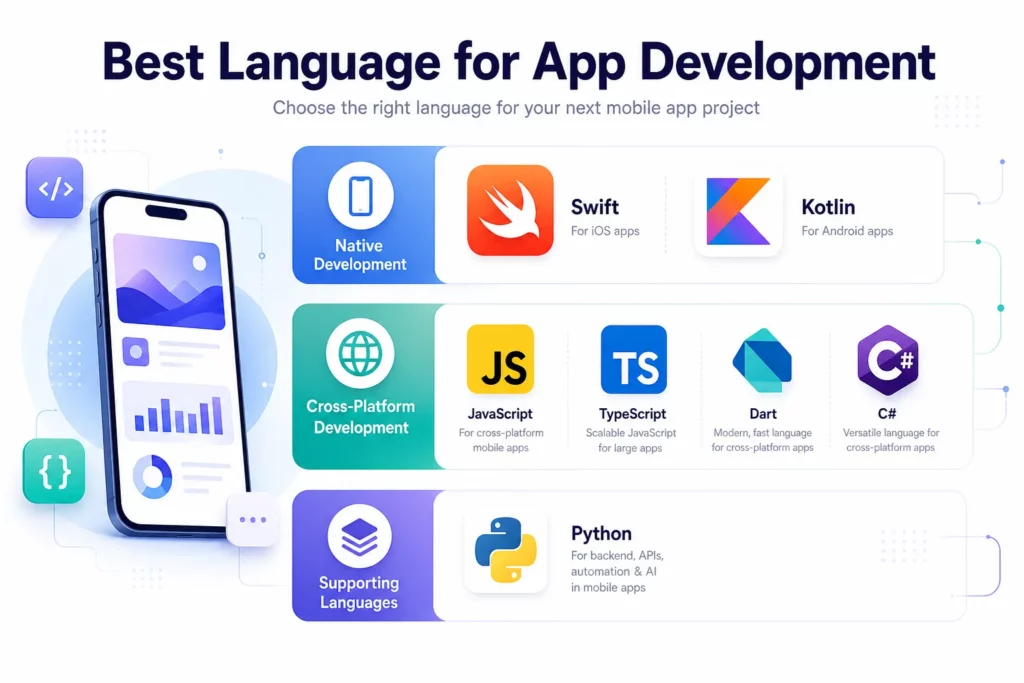
The right app programming language depends on the type of product you plan to build. No single language leads in every scenario, because each platform has its own technical strengths, tooling, and performance demands.
- iOS apps: Swift remains Apple’s recommended modern language for building native experiences across its ecosystem.
- Android apps: Kotlin is Google’s preferred language for modern Android development.
- Cross-platform apps: Dart with the Flutter framework, or JavaScript/TypeScript with the React Native framework.
The final decision depends on the target platform, the app development scope, the user experience requirements, and the engineering resources available to the team.
See also: best programming language for beginners for teams that want a broader baseline before narrowing the shortlist.
Best App Programming Languages Based on the Type of App
A clear comparison of app development languages starts with the type of mobile app a team plans to build. Most projects fall into three main paths: native app development, cross-platform app development, and hybrid app development. The sections below focus on the most relevant languages for native and cross-platform mobile app development.
Native mobile app development languages
Native app development is still the best fit when performance, platform-specific design, and deep device integration matter most. It is also the clearest choice for apps that depend heavily on camera pipelines, advanced offline behavior, hardware access, or platform-specific interaction patterns.
Swift for iOS apps
Swift is the strongest option for teams building apps specifically for iPhone, iPad, Apple Watch, Apple TV, or other Apple-platform experiences. Apple positions Swift as its modern language for all Apple platforms, which makes it the safest default for new iOS work (Apple Swift).
Swift works best for products that want a polished Apple-first experience and need close alignment with Apple APIs, interaction patterns, and device features. Swift is especially strong for subscription apps, health products, media apps, and other consumer experiences where interface quality and platform-native behavior matter.
Pros:
- Excellent performance on Apple devices
- Direct access to new Apple APIs and platform capabilities
- Strong tooling through Xcode and the Apple ecosystem
- Clean fit for teams building a premium iOS-native experience
Cons:
- Apple-only scope for the main app layer
- Separate Android delivery still requires another stack
- iOS hiring can be more specialized than cross-platform hiring
Objective-C still matters in older codebases, but it is usually a maintenance or migration concern rather than the best default for a new iOS app. Teams that want a deeper platform-specific comparison can review these iOS app development languages alongside this guide.
Kotlin for Android apps
Kotlin is the best default language for modern Android app development. Google has taken a Kotlin-first approach for Android, and the Android team says Kotlin is used by more than 60% of professional Android developers (Android Developers).
Kotlin is the right fit for Android-first products, enterprise Android tools, utility apps, and any mobile product that depends heavily on Android services, hardware features, or long-term native support. Kotlin gives Android teams a modern language without forcing them to abandon the broader Java-based ecosystem that still exists in many production apps.
Pros:
- Modern syntax and better developer ergonomics than Java
- Strong support in Android Studio and Jetpack libraries
- Good compatibility with existing Java-based Android ecosystems
- Reliable long-term choice for Android product teams
Cons:
- Android-first scope unless paired with a broader multiplatform strategy
- Separate iOS delivery still requires another stack
- Not always the fastest route for one-team MVP delivery across both platforms
Java still matters for legacy Android apps and older libraries. For new Android builds, Kotlin is usually the stronger default. If the decision is mainly about the Android ecosystem, this guide to Android app development languages can help narrow the tradeoffs further.
Cross-platform mobile app development languages
Cross-platform app development is usually the right choice when a team wants one codebase, faster delivery, and lower initial build cost across iOS and Android. It is especially useful for startups, lean product teams, and companies that need to prove demand before funding two separate native tracks. If the team is evaluating tooling as much as language choice, it also helps to compare the leading mobile app development frameworks.
Dart for Flutter apps
Dart is the language behind Flutter. Flutter’s official documentation describes it as a way to build and deploy multi-platform applications from a single codebase, which is one reason it remains attractive for fast product delivery.
Dart makes the most sense when a team chooses Flutter as the cross-platform framework and wants to ship one product across iOS and Android without maintaining two separate native codebases. Dart is especially useful for startups, marketplace apps, booking apps, and branded consumer products that need fast UI iteration and strong visual consistency.
Pros:
- One codebase for multiple platforms
- Fast UI iteration and smooth developer workflow
- Strong interface consistency across devices
- Good fit for teams optimizing for speed to market
Cons:
- The app can feel less platform-specific if the UX is not adapted carefully
- Some advanced platform integrations still require native knowledge
- Teams become more dependent on the Flutter ecosystem
See also: Flutter vs Dart for a clearer breakdown of how the language and framework relate.
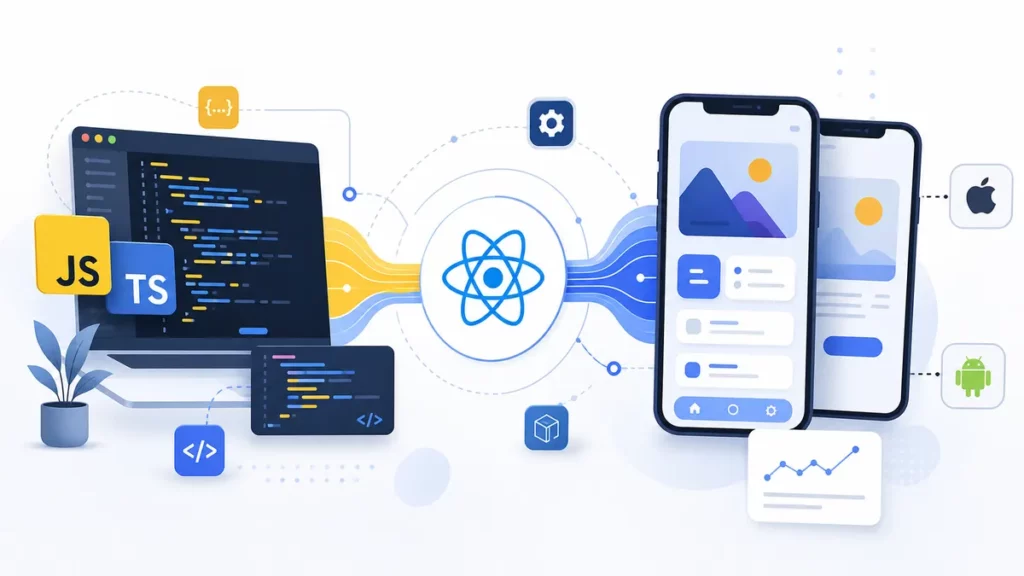
JavaScript for React Native apps
React Native remains a strong contender for companies that already work in React on the web. JavaScript still makes sense in that ecosystem, especially when a company wants to move quickly with an existing web skill set and does not need stricter typing from day one. For full guide, read this article Best Javascript Tutorial for Beginners.
JavaScript works well for early-stage React Native apps, quick MVPs, and teams that already have front-end developers who know React well. JavaScript lowers the barrier to mobile entry for web-heavy companies, which can make it attractive when release speed matters more than strict code structure.
Pros:
- Familiar ecosystem for React teams
- Faster staffing for companies with JavaScript talent
- Strong community and mature tooling
- Good path for web-to-mobile product expansion
Cons:
- Large codebases can become harder to maintain without stronger typing
- Complex native integrations can still require platform specialists
- Dependency churn can create maintenance overhead
TypeScript for React Native apps
TypeScript is usually the better long-term choice for React Native teams that expect the app to grow. The official React Native documentation notes that new projects target TypeScript by default, even though JavaScript is still supported. TypeScript helps teams catch data structure and interface mismatches earlier, making a larger mobile codebase easier to maintain over time.
TypeScript fits React Native teams that are building for scale, adding multiple integrations, or expecting several developers to work in the same codebase over time. TypeScript is often the better default for SaaS companion apps, long-term cross-platform products, and mobile apps with shared business logic across many screens and services.
Pros:
- Better maintainability for growing codebases
- Stronger code safety across components and APIs
- Easier scaling for larger teams
- Better fit for structured mobile product development
Cons:
- Slightly more setup and discipline than plain JavaScript
- Teams new to typed development may need adjustment time
- Some early prototyping teams may prefer the lighter feel of JavaScript
See also: the difference between TypeScript and JavaScript if a team is deciding how strict the React Native codebase should be from the start.
C# for .NET MAUI apps
C# with .NET MAUI is a practical option for organizations that already work deeply in Microsoft technologies. Microsoft positions .NET MAUI as a way to build native mobile and desktop apps from a shared codebase, which makes it relevant for some enterprise environments (Microsoft Learn).
C# with .NET MAUI is most useful for Microsoft-centric organizations, internal business apps, and enterprise mobile projects that already depend on .NET systems. The stack is less about winning a consumer app race and more about reducing friction inside an established Microsoft environment.
Pros:
- Strong alignment with existing .NET talent
- Useful for internal enterprise application ecosystems
- Shared engineering language across backend and app layers
Cons:
- Smaller mobile ecosystem than Flutter or React Native
- Less common as a default choice for consumer mobile products
- Not usually the first recommendation for startups
Supporting and specialist languages for mobile app ecosystems
Some languages matter around mobile delivery without being the main choice for building the mobile UI. These languages are still valuable, but they should be framed correctly so the article stays aligned with user intent.
Python for AI-heavy backends and prototypes
Python is highly valuable for backend APIs, data workflows, and AI features connected to a mobile app. That matters even more now that many products add recommendation, summarization, search, or automation features. Stack Overflow’s 2025 Developer Survey also highlighted Python’s continued growth and its role across AI, data science, and backend work.
Python is a strong fit for AI-enabled app backends, internal automation, rapid prototypes, and data-heavy business logic. Python should usually sit behind the mobile app rather than inside the mobile UI layer, which is why the language belongs in a supporting role for this topic.
Pros:
- Excellent ecosystem for AI, machine learning, and automation
- Fast iteration for backend workflows and prototypes
- Strong fit for data-heavy app features
Cons:
- Not usually the right first choice for the mobile front end
- Mobile UI support is limited compared with native or cross-platform stacks
- Performance-sensitive workloads may need another language in some cases

Rust for performance-critical modules
Rust is not a mainstream mobile UI language, but it has a real role in some advanced mobile architectures. It makes sense for security-sensitive logic, low-level libraries, or performance-critical modules that need memory safety and speed.
Rust is a specialist choice for cryptography-heavy functions, high-performance processing, low-level shared modules, and infrastructure components behind a mobile product. For most product teams, Rust is a supporting language rather than the primary language used to build the app interface.
Pros:
- Strong memory safety and performance
- Good fit for security-sensitive or low-level modules
- Useful for advanced engineering cases where reliability matters
Cons:
- Not a mainstream choice for mobile UI development
- Higher complexity than most product teams need
- Steeper learning curve than more common app languages
See also: Rust vs Python if the team is comparing performance-focused engineering priorities against AI and backend productivity.
How to Choose the Right App Development Language
Choosing the right language is not only a technical decision. It is also a product, hiring, and maintenance decision, so teams should weigh the factors below before they commit to a stack.
- Choose your app approach first: native, cross-platform, or PWA
Many teams make a better decision when they choose the app approach before the language. Native apps fit high-performance or platform-specific experiences. Cross-platform apps fit teams that need speed and shared code. PWAs can work for lightweight web-led experiences, but they are not the default answer for a full mobile product.
- Start with your target platform
An iOS-first app and an Android-first app often need different priorities. A team targeting Apple users may value Swift and native polish. A team targeting Android devices in operations or fintech may prefer Kotlin. A team shipping to both stores at once may get more value from Flutter or React Native.
- Balance performance against speed to market
Native stacks usually win on full platform control. Cross-platform stacks usually win on launch speed and engineering efficiency. The right answer depends on whether the product is competing on technical depth, release speed, or both.
- Check hiring and ecosystem maturity
The best language on paper can still be the wrong choice if it is hard for the team to hire, maintain, or scale. React Native often wins here for web-heavy organizations. Kotlin and Swift win when native quality matters. Flutter wins when a team wants focused cross-platform delivery.
- Consider legacy interoperability
Some companies are not choosing from a blank slate. They already have Java on Android, Objective-C on iOS, or .NET on the backend. In those cases, the best next move may be an extension strategy, not a full rewrite.
- Plan for AI, backend, and long-term maintenance
Modern apps are not only UI projects. They often include backend workflows, admin tools, recommendation systems, search, analytics, and automation. A strong decision considers the mobile layer and the supporting architecture together.
- Factor in update complexity and long-term cost
One shared codebase can reduce early cost, but it also creates framework-level dependencies. Two native codebases increase staffing and maintenance effort, but they can reduce abstraction friction in complex products. Teams should evaluate both delivery cost and future operating cost.
Which Languages Should Most Teams Avoid for Mobile UI?
Teams should be careful not to confuse useful backend languages with strong mobile UI choices.
PHP and Ruby are not common first-line options for mobile front ends. They can still support web platforms or backend systems, but they do not lead modern mobile app delivery. Python has stronger relevance than PHP or Ruby because of AI and backend workflows, but it still does not belong on the shortlist for most mobile UI decisions.
This distinction matters because users searching for the best language for app development usually want to know what to build the app itself with, not what to run behind it.
Emerging Trends That Affect App Language Choice
Two trends are shaping stack decisions more than most others in 2026.
The first trend is AI integration. More mobile products now include AI-assisted search, recommendations, summarization, workflow automation, or support features. In most cases, that does not change the mobile language itself. It changes the backend and product architecture around the app.
The second trend is pressure to ship on multiple platforms earlier. That pressure keeps cross-platform tools attractive. At the same time, native development still matters for apps that rely on advanced performance, nuanced UX, or hardware-heavy use cases.
In short, AI increases the importance of backend architecture. Cross-platform increases the appeal of shared delivery. Neither trend eliminates the need for strong platform decisions.
FAQs
What is the best language for app development overall?
The best language for app development overall depends on the type of app. Swift is best for iOS, Kotlin is best for Android, Dart is a strong choice for Flutter apps, and JavaScript or TypeScript is a strong choice for React Native apps.
Is Kotlin better than Java for Android apps?
For most new Android projects, yes. Kotlin is the stronger default because it aligns with modern Android tooling and gives developers a more productive language experience. Java still matters in older Android codebases.
Can Python be used for app development?
Yes, but mostly around the app rather than as the mobile UI layer. Python is a strong choice for app backends, AI systems, automation, and data-heavy workflows connected to a mobile product.
Build the Right App Stack with Designveloper
After the shortlist is clear, the real challenge is turning that shortlist into a delivery plan that fits the product and the team. Architecture, staffing, and roadmap decisions matter more than language popularity alone at that stage.
Choosing an app development language is ultimately a product decision. The selected stack affects release speed, hiring flexibility, maintenance cost, and how easily the app can scale as the roadmap grows.
Designveloper helps companies move from language selection to product delivery with the right mobile architecture, engineering strategy, and execution plan. The team supports native iOS and Android development, cross-platform app development, backend engineering, UI/UX design, API integration, QA, and long-term product maintenance.
Designveloper also helps businesses connect mobile apps with admin dashboards, internal systems, and AI-powered workflows, so the final product works as part of a larger business ecosystem rather than as a standalone app.
If your team is planning a new mobile product, the better next step is not asking which language is most popular. The smarter question is which stack can support your users, your launch timeline, and your long-term product growth.
Also published on

Share post on










Related Articles



vLLM Tutorial: A Step-By-Step Guide To Deploying And Serving LLMs
vLLM Tutorial: A Step-By-Step Guide To Deploying And Serving LLMs Published June 29, 2026
Rust vs. C++ Performance: Can Rust Actually Be Faster In Practice?
Rust vs. C++ Performance: Can Rust Actually Be Faster In Practice? Published June 23, 2026
AI Programming Language For AI Development And Where They Fit Best
AI Programming Language For AI Development And Where They Fit Best Published June 17, 2026



















