
















What Is a Web Application? Types, Examples & How It Works

KEY TAKEAWAYS:
- Before choosing a product label or architecture, list what users need to create, find, change, or share.
- Keep product purpose separate from the delivery pattern; a portal can use a single-page interface and add progressive web app features.
- Websites and web apps can overlap. Compare the main user task, not only whether users sign in.
- Check browser and device support, offline tasks, permissions, and integrations before choosing a delivery approach.
- Compare the full lifecycle, including build, hosting, security, and support, with a scoped web app development cost estimate.
A small team may launch a public site and later hear an unplanned request: users want to sign in, save a task, and resume it on another device. That shift changes the product brief. The team must map screens to data, permissions, browser support, and network behavior—not only page design. For anyone evaluating a web application, the useful question is which user tasks need application logic and which still fit ordinary pages. The sections below explain that boundary, show the basic request flow, and connect product needs to delivery choices.
What Is A Web Application?
A web application is software people use through a web browser to complete tasks. It accepts input, applies rules, and returns a result, such as a saved document, an order status, or an updated account record. Many web applications connect the browser interface to server-side logic and stored data, but the exact setup depends on the product.
For example, a customer opens an invoice portal, selects an invoice, and requests a copy. The browser sends that request to the application. The server checks the account’s access, finds the matching record, and returns the result. The user is working with information, not only reading a page.
A web application can sit inside a larger website. A company site may have public service pages and a separate client portal. The public pages help visitors learn; the portal lets clients review files, update details, or complete another task. Those parts can share a domain while doing different jobs.
The word “application” describes the software’s task-oriented behavior, not a required technology stack. A browser interface may use HTML, CSS, and JavaScript, while server and data choices vary. Teams comparing technical options can review React as one example of a front-end library, then assess the wider stack against the product’s needs.
- Web Application Development Tutorial: The Ultimate Guide for Beginners
- What Is Web Application Security? OWASP 10 Web App Vulnerabilities
- 20 Web App Ideas: Health, FinTech, AI, E-commerce
How Does A Web Application Work?
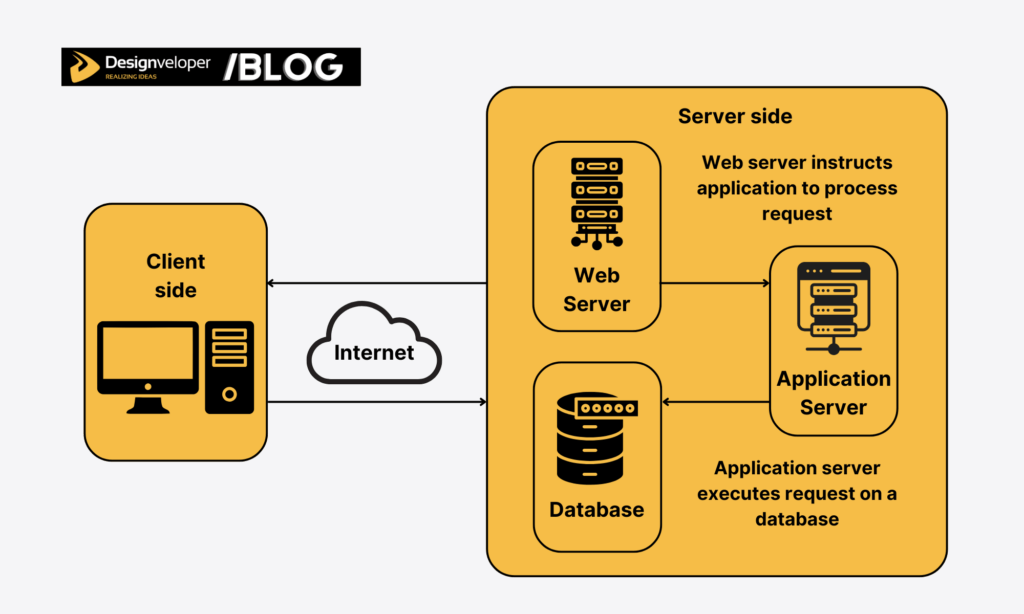
A web application usually turns a browser action into a request, processes it, and sends a response back. The browser, application logic, and data storage often take part, though a small app may not need every part.
A common design uses a client-side interface for browser interactions and server-side logic for tasks such as checking access or saving data. The exact split depends on what the product needs to do; AWS’s overview of web applications explains this client-and-server model.
- The browser displays the interface. A user opens a page, selects an item, or submits a form. The browser packages the action as a request and sends it over the network. MDN’s overview of browsing the web explains the browser’s role in retrieving and displaying web content.
- The application checks the request. Server-side code applies business rules and checks whether the user can perform the action. It may also call another service, such as a payment provider or a search API.
- Data is read or changed when needed. A database can store accounts, documents, or orders. Some pages do not need personal records or a database, so storage is a design choice rather than a defining requirement.
- The browser shows a result. The application returns a page, a message, or updated data. If the request fails, the interface should explain what happened and what the user can do next.
Consider the invoice request again. The application should check the user’s account before showing the file. If the file is missing, it should return a clear message instead of a blank screen. If the action changes a record, the system should confirm whether the change was saved.
This flow is a useful starting model, not a rule that every web application has one server and one database. A product can use managed services, APIs, or browser-side storage for some tasks. Architecture should follow its data, security, and availability needs. For a more detailed map, see web application architecture.
Web Application Types Describe Different Choices
“Type” can mean the user problem a product solves or the way its pages and features are delivered. These categories can overlap, so avoid treating them as one list of mutually exclusive products.
Types By The User Task
Task-based labels tell readers what the product helps them do. Common examples include:
- Ecommerce applications: help customers search products, manage a cart, and place or track orders.
- Customer or employee portals: give a defined group access to records and actions, such as submitting a request or checking an account.
- Content management systems: let a team create, review, and publish pages without editing each page by hand.
- Dashboards and internal tools: help staff review shared information, update work, or move a process forward.
- Communication and collaboration products: support messages, documents, comments, or shared tasks.
These labels describe product purpose. A dashboard can be internal or customer-facing, and an ecommerce product may include a customer portal for orders and returns.
Types By Architecture And Delivery
Architecture labels describe how the interface loads and changes. A single-page application (SPA) can update parts of a page without loading a new document for every action. A multi-page application (MPA) can request a new page as the user moves through the product. Neither pattern decides whether the product is ecommerce, a portal, or a dashboard.
A progressive web app (PWA) adds capabilities such as an installable experience or selected offline behavior when browsers and devices support them. A PWA may also be an ecommerce app or a portal. “Static” and “dynamic” describe how content is produced or updated, while animation describes a user-interface effect. They are not extra task-based product types.
When teams discuss languages or frameworks, they are describing implementation choices rather than a new kind of web application. A short list of web app languages can help narrow options, but the choice should also reflect team skills, integrations, and support plans.
Web Application Examples In Everyday Workflows
Examples are easiest to understand when they show the user’s task and what the system does with the input. The same product can also combine public pages with logged-in workflows.
Communication And Collaboration
Webmail lets a user write, send, sort, and search messages. A shared document tool lets people edit content and review comments. A project board lets teammates move work between stages and see changes made by others.
These examples qualify as web applications because people can change or manage information through the interface. The useful lesson is not that every interactive button makes a whole site an app; it is that users rely on software behavior to complete a task. See more web application examples if you want to compare products by the work they support.
Commerce And Service Portals
An online store combines browsing with transactions. A shopper filters products, adds an item, enters delivery details, and checks the order. The site may include public product pages, while checkout and account history use more app-like workflows.
A booking portal follows a similar pattern. A visitor searches available times, selects an option, and receives a confirmation. If staff need to update schedules or resolve a booking conflict, the application must show current availability and prevent invalid changes. The exact controls depend on the business rules.
Documents And Shared Work
Document products make the task boundary clear. A person may open a file, edit it, share it with a colleague, and complete a signature step. Each action needs a clear status so users know whether the document changed or the next person received it.
Designveloper’s public project page for Lumin describes a document product with PDF tools, sharing, collaboration, and digital-signature workflows. It is a useful example of user tasks grouped around a document. The public page does not establish how file processing works, whether files stay on-device, or what privacy or cost outcomes the product achieves.

Web Application Vs Website: A Difference In Primary Job
A website and a web application are not always separate products. A website can include booking, account, payment, or document features. The distinction is more useful when it describes the main job a visitor comes to do.
| Question | Information-Led Website | Task-Led Web Application |
|---|---|---|
| Main visitor job | Read about a company, service, product, or topic | Create, retrieve, update, or share information |
| Common actions | Browse pages, follow links, or send a simple enquiry | Manage an account, submit a workflow, edit a record, or complete a transaction |
| Data and rules | May publish shared content or include interactive features | Often applies task-specific rules and may store user or business data |
| How the terms overlap | Can be part of a larger web product | Can live inside a website under the same domain |
Login is not a reliable dividing line. Some websites use accounts, and some web applications allow basic tasks without sign-in. Likewise, technical complexity can vary on either side. A public site with search and forms may have substantial application logic.
For a smaller site that mainly explains services, clear information architecture and web design may matter more than custom account workflows. For a client portal, the product brief should define which records clients can view and what changes they can submit. Teams weighing both formats can read web app vs website for a focused comparison.
Web App Vs Mobile App: Match The Product To Device Needs
A web app runs through a supported browser. A native mobile app is installed for a mobile operating system and can use platform features subject to permissions and store rules. A PWA remains a web application but may offer an installable interface or selected device and offline features.
- Use a browser-first approach when people need to access shared tasks from supported devices and a browser workflow meets their needs.
- Evaluate a native app when core tasks depend on operating-system features, background work, or offline behavior that the web experience cannot reliably provide.
- Evaluate a PWA when installability or limited offline access could help, then test the exact browsers, devices, and permissions that users rely on.
No option works on every device in the same way. Browser APIs and installation behavior vary, and connectivity still affects many tasks. A team should test the target devices and failure states rather than promise access from “anywhere.” For interface planning, follow responsive web design principles alongside functional testing.
Benefits And Trade-Offs Of Web Applications
A web application can reduce friction when users need a shared workflow, but the benefits depend on the product and its operating conditions.
Where A Web Application Can Help
- One browser-based entry point: users can open the product through supported browsers instead of finding a separate installer first.
- Shared updates: teams can release changes centrally, though users may still face browser compatibility or rollout issues.
- Connected workflows: an app can join a user task with an existing API or business system when access rules and data ownership are clear.
- Cross-device continuity: users may return to shared information on another supported device when the product stores and syncs that information.
What Teams Still Need To Manage
- Network failures: pages that rely on server data may not work as expected when a connection drops. Offline support must be designed and tested.
- Browser differences: screen size, browser versions, permissions, and APIs can affect how a feature behaves.
- Security and access: accounts, sensitive data, and business actions need appropriate authentication, authorization, validation, and monitoring. OWASP’s Application Security Verification Standard provides a framework teams can use to plan and check security requirements.
- Ongoing ownership: releases, backups, support, data retention, and third-party services need named owners.
Web delivery does not guarantee lower costs or faster performance. Total cost depends on workflows, integrations, data controls, testing, hosting, and long-term support. A fair estimate should compare the same scope across options. A web application can be the lower-maintenance fit for one product and a poor fit for another.

When Should You Build A Web Application?
Choose a web application when users need a repeatable task that works with changing or shared information. Do not start with “we need an app.” Start with the action a user must complete and the records or decisions that action depends on.
A Shared Inventory Workflow
Consider a distributor whose warehouse team records incoming stock. Staff open a purchase order, enter or scan received quantities, and flag mismatches for review. The application applies the team’s rules and updates shared inventory only after an authorized person confirms the change. A public website can explain the service, but it cannot manage this private, changing workflow by itself.
A browser-based application may fit when staff use supported devices and complete the task online. If warehouse connectivity is unreliable, or staff need camera access, background tasks, or queued updates, test those needs on target devices before choosing a PWA or native app. The team should decide who can approve a mismatch and how failed or duplicate updates are handled.
Questions To Answer Before Scoping
- What task does the user need to complete, and how often?
- Which users may read or change each type of data?
- What happens when a request fails, data conflicts, or the network drops?
- Which devices, browsers, third-party services, and accessibility needs must be supported?
- Who will own security updates, support, backups, and ongoing operating costs?
Use the answers to compare a content-led website, a web application, a PWA, and a native app. Keep the first release focused on one complete user task, then measure completion, failure points, support needs, and maintenance effort before expanding it.
- 10 Real Progressive Web Apps (PWAs) Examples And Key Lessons
- How Long Does It Take To Build A Web App?
- Guide about Web Application Development for Beginners

FAQs About Web Applications
Do Web Applications Need A Database?
No. A database is useful when an application must save or retrieve structured information, such as accounts or orders. A browser-based tool that does not keep user data may not need one.
Can A Web Application Work Offline?
Some can, if the product is built to cache needed resources or hold selected changes until a connection returns. Offline behavior depends on the browser, device, and task. Teams must also plan what happens if data changes elsewhere before a queued update syncs. MDN explains how progressive web apps can add app-like capabilities while remaining web experiences.
Do Users Have To Install A Web Application?
Usually not; many web applications open from a link in a browser. Some PWAs can be installed on supported devices, but availability and features vary by browser and operating system.
When a product needs more than public pages, the next step is to scope the user tasks, data rules, device support, and failure paths before choosing a stack. Teams planning a custom portal or workflow can explore web application development support from Designveloper, with the project scope defined around those requirements.
Also published on

Share post on










Related Articles


What Is a Web Application? Types, Examples & How It Works
What Is a Web Application? Types, Examples & How It Works Published October 12, 2026
10 Real Progressive Web Apps (PWAs) Examples And Key Lessons
10 Real Progressive Web Apps (PWAs) Examples And Key Lessons Published September 25, 2026
How Long Does It Take To Build A Web App? Timeline And AI Impact
How Long Does It Take To Build A Web App? Timeline And AI Impact Published June 30, 2026


















