
















iOS & Android App Development Is More Than Building The Same App Twice

The core challenge in ios and android app development is not producing two matching apps. Teams can share product goals, service logic, data rules, and some implementation. They still need platform-specific choices for navigation, device behavior, testing, privacy, release, and maintenance.
This guide explains what can stay common and what should adapt across iOS and Android. It also shows when native or cross-platform development fits better, how to scope the build, and what teams must own after launch. For a broader foundation, see our guide to mobile app development.
iOS And Android App Development In Practice
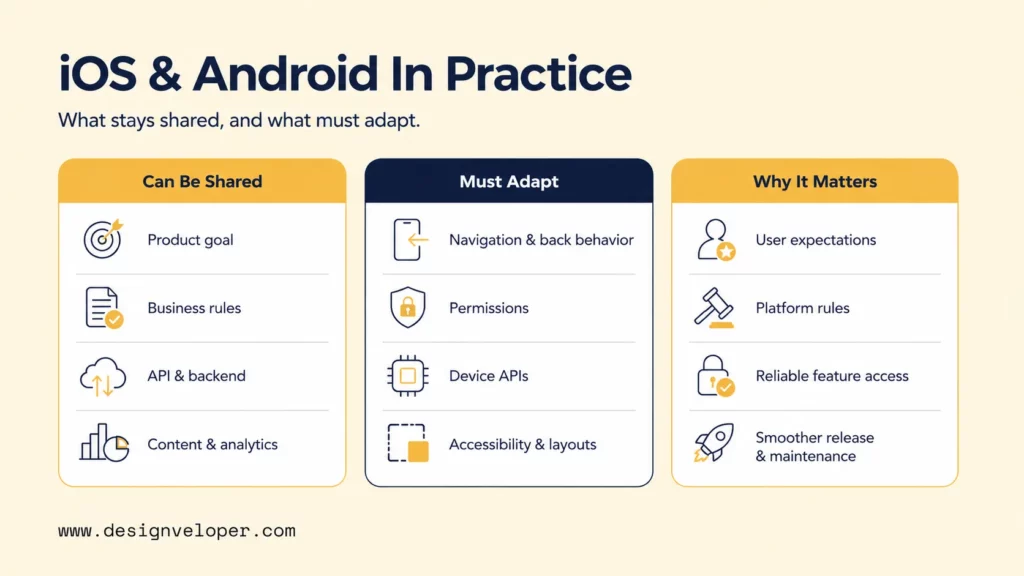
A mobile product usually has a shared product layer and a platform delivery layer. The useful planning question is not simply whether the team needs one codebase or two. It is which decisions should remain consistent and which decisions depend on the operating system.
The shared layer can cover product rules, API contracts, validation, content structure, analytics events, and support policies. The delivery layer covers how those rules appear and behave on each platform. Navigation, permissions, device APIs, accessibility behavior, signing, and store submission can all require different handling.
The table below separates the parts a team can usually standardize from the parts that deserve platform-specific design or engineering.
| Can Be Shared | Must Be Adapted | Why It Matters |
|---|---|---|
| Product goal and core user outcome | Navigation and back behavior | Users rely on familiar platform patterns to move through the app safely. |
| Business rules and validation logic | Permissions and system prompts | Permission models, timing, and wording differ by platform and OS version. |
| API contracts and backend services | Device APIs and native SDKs | Camera, location, payments, health data, and background work may need native handling. |
| Content hierarchy and analytics plan | Accessibility behavior and device layouts | Screen readers, text scaling, system controls, and window sizes behave differently. |
| Release goals and support policy | Signing, store metadata, review, and rollout | Apple and Google use different submission workflows and policy checks. |
The split also explains why cross-platform work still includes native tasks. In Android and iOS app development, shared code can reduce duplication, but the app still runs inside two operating systems. A team must test those environments and maintain the platform edges that connect shared code to native behavior.
Share the product logic where it stays true. Adapt the delivery where the platform changes the user’s experience.
Set Mobile Product Priorities Before Choosing A Platform Or Framework
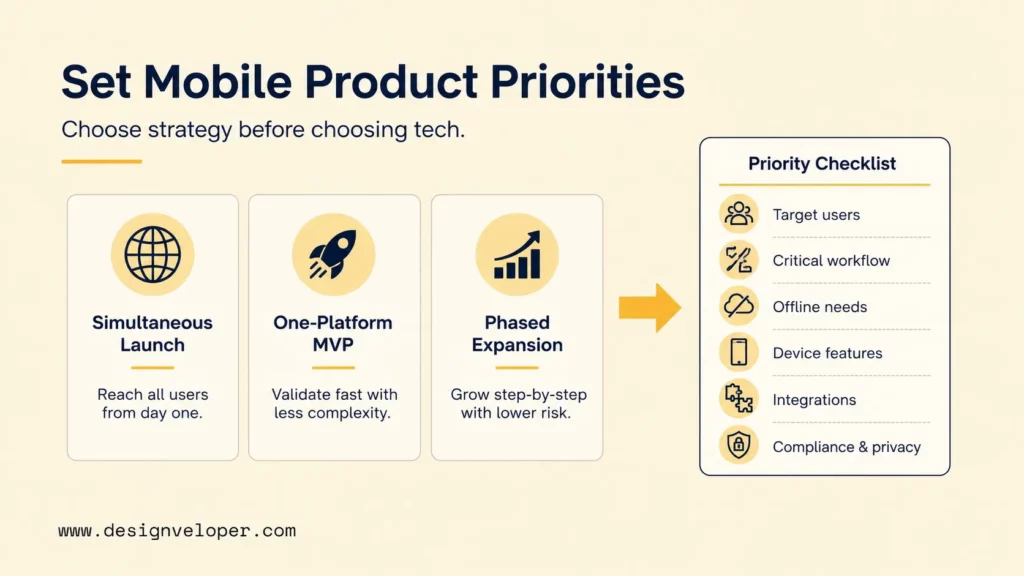
Choose the launch strategy before choosing the framework. An iOS vs Android development decision should start with target users and the first complete workflow. A simultaneous launch, one-platform MVP, and phased expansion create different staffing, testing, and release needs.
A simultaneous launch fits products that need both platforms on day one, such as a service tied to a coordinated market release. It gives broad reach but creates more parallel QA and release work. A one-platform MVP is more useful when one audience clearly dominates and the team needs fast learning.
Phased expansion sits between those options. The team launches where the strongest demand exists, validates the critical workflow, and then expands with evidence from real use. That can lower early complexity without treating the second platform as an afterthought.
Use this decision path to choose the launch model before debating frameworks.
Choose a simultaneous launch and budget for parallel QA, store work, and support.
Start with a one-platform MVP and validate the complete workflow there.
Use phased expansion and carry validated rules into the second platform.
Before locking that choice, check six constraints: target users, critical workflow, offline needs, device features, integrations, and compliance. Offline use changes storage, conflict handling, and recovery states. Device features may push work toward native APIs even when most of the product is shared.
Integrations deserve the same early review. Authentication, payments, maps, enterprise APIs, and vendor SDKs can shape architecture before UI work starts. Privacy and legal teams should join early when the app handles sensitive or regulated data.
A short product-prioritization checklist helps keep the decision concrete:
- Identify the users who must be served in the first release.
- Define the smallest complete user outcome, not the smallest screen set.
- List offline states, device capabilities, and background behavior that the workflow needs.
- Confirm which external systems and SDKs the app must connect to.
- Confirm privacy, security, legal, and support requirements before architecture is fixed.
Once those constraints are visible, framework discussions become much easier. The team can compare tools against an actual product problem instead of choosing by popularity.
Native And Cross-Platform Mobile Development Solve Different Product Problems
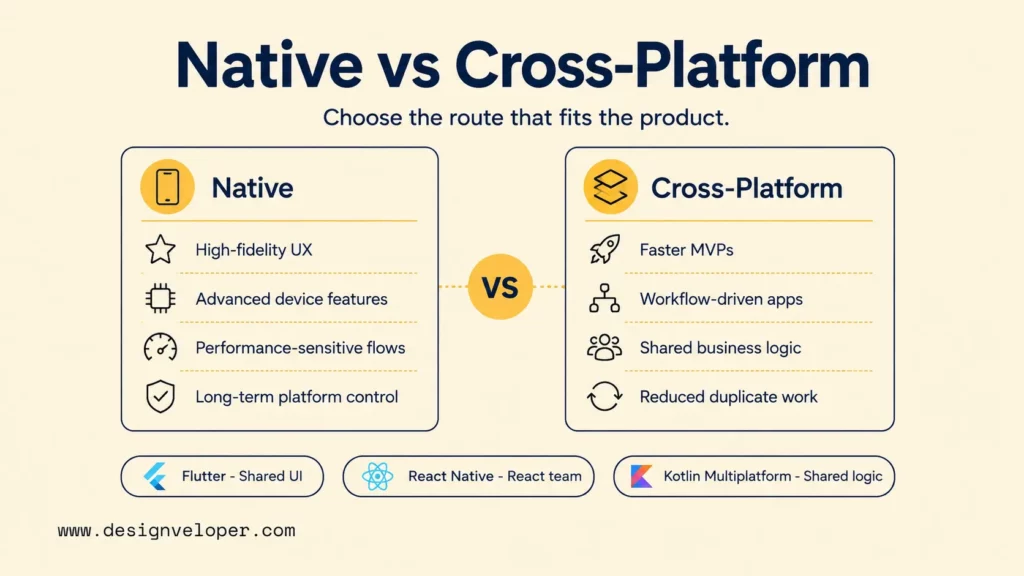
Native and cross-platform development solve different delivery problems. Native development keeps the team close to platform APIs and platform behavior. Cross-platform development can reduce duplicated work when important logic or interface code can be shared.
Native Mobile App Development For Platform-Specific Depth
Native mobile app development fits products that need deep platform behavior, high-fidelity UX, or performance-sensitive interactions. It also suits teams that expect the iOS and Android implementations to diverge as the product grows.
Direct access to platform frameworks can simplify work that depends on complex device features. The same is true when the team needs precise control over background tasks, platform accessibility APIs, system UI, or hardware-specific behavior. The trade-off is more platform-specific engineering and more duplicated work where both apps implement the same business rules.
Consider a field-service app that depends on camera capture, location, background uploads, and reliable recovery after a connection drops. Native development may make those platform interactions easier to isolate and test. It also gives each mobile team clearer control when device behavior is part of the product itself.
Cross-Platform Mobile Development For Shared Product Logic
Cross-platform mobile development fits workflow-driven products, MVPs, and apps with substantial shared business logic. The main advantage is selective reuse. The team can share code while keeping native escape routes for platform-specific APIs.
An internal operations app is a useful example. If most screens are forms, dashboards, approvals, and shared account logic, a cross-platform route can reduce duplicate implementation. Native modules may still handle notifications, device SDKs, or operating-system behavior that cannot be standardized safely.
The decision table below compares three common options. For a broader tool overview, see our guide to mobile app development frameworks.
| Framework | Team Skill | UI Needs | Native Modules | Code Sharing | Integration Complexity | Maintenance Ownership |
|---|---|---|---|---|---|---|
| Flutter | Dart skills or willingness to adopt Dart | Strong fit when one shared UI system is a priority | Plugins and platform-specific code are available | Can share substantial UI and business logic | Rises when unsupported SDKs or custom native APIs become central | Best when one team owns shared code and native edges |
| React Native | React plus JavaScript or TypeScript | Shared React UI with platform branches where needed | Native modules and components are available | Can share features while isolating platform-specific files | Rises with custom SDKs, native views, or platform-specific workflows | Needs clear ownership across JavaScript and native modules |
| Kotlin Multiplatform | Kotlin plus native mobile skills | Can keep native UI or share UI with Compose Multiplatform | Native platform code remains available | Can share selected business logic or broader modules | Depends on how shared modules cross iOS and Android boundaries | Works best with named owners for shared modules and platform apps |
Framework choice should follow the product constraints above. Flutter supports platform-specific code when a shared implementation needs native features. React Native also supports platform-specific files and native modules. Kotlin Multiplatform lets teams choose how much code to share rather than forcing one UI model.
Cross-platform development does not remove device testing, native integrations, or store-specific release work. It reduces selected duplication. The team still owns two platform environments and should budget for that reality.
Framework choice should follow product constraints, not tool popularity.
Design A Consistent Mobile Product Without Copying The Same Interface
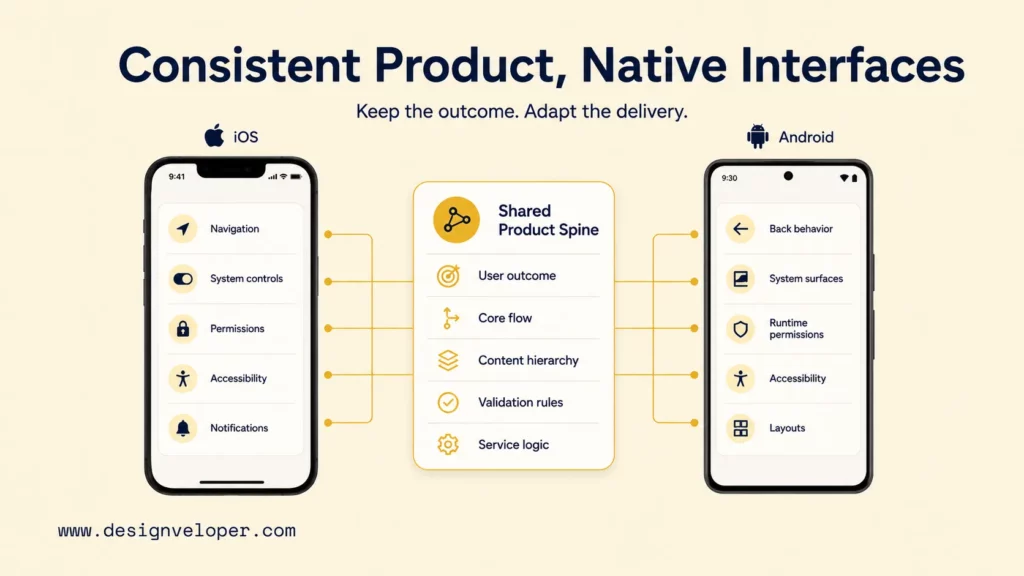
Consistency should protect the user’s outcome, not force pixel-identical screens. Keep the core flow, content hierarchy, validation rules, and service behavior aligned. Then adapt the controls and navigation that users expect from each platform.
Apple’s Human Interface Guidelines explain the design conventions used across Apple platforms. Android Developers’ navigation principles define a separate baseline for consistent Android navigation. Those differences are product behavior, not decoration.
The model below separates the product spine from the platform delivery layer.
Permissions show why this distinction matters. Ask for access when the user can understand the benefit, and design a useful state after denial. The product intent can stay consistent even when the system prompt and permission sequence differ.
Accessibility needs the same approach. A shared design system can define readable type, clear labels, logical focus, and sufficient touch targets. Each platform still needs real testing with its own assistive technologies and system settings. Our mobile app development best practices cover accessibility as part of production quality rather than a final polish step.
Scope The Mobile App Build Around Team, Time, And Budget
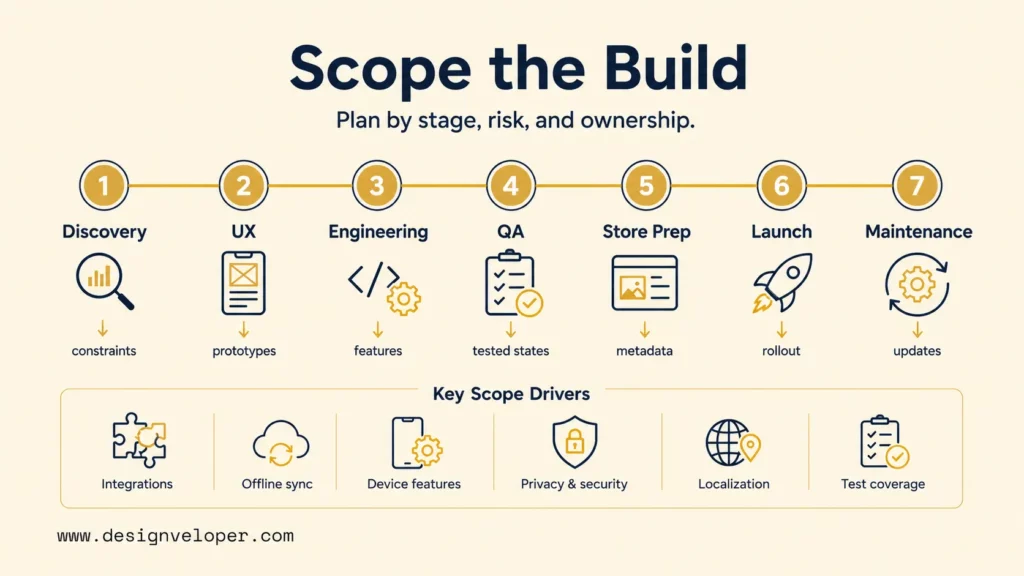
Scope the build by delivery stage and risk, not by screen count alone. A small interface can hide difficult integrations, offline rules, privacy work, or device behavior. Those factors often affect the estimate more than the number of visible screens.
The stage table below makes ownership visible before estimates harden. It also shows where timing can slip even when the feature list stays stable. Our detailed mobile app development process explains these stages in more depth.
| Stage | Primary Output | Major Cost Driver | Timing Risk | Owner |
|---|---|---|---|---|
| Discovery | Prioritized outcome, constraints, and release plan | Unknown workflows or technical dependencies | Late stakeholder decisions | Product lead with technical lead |
| UX | Flows, states, prototypes, and platform behavior | Complex workflows and accessibility needs | Unresolved edge cases | Product designer with product lead |
| Engineering | Working mobile features and backend connections | Native modules, APIs, offline sync, and data rules | Third-party or backend dependency changes | Mobile and backend leads |
| QA | Verified behavior across supported devices and states | Device matrix, regression depth, and test automation | Late defects or weak test environments | QA lead with engineering |
| Store preparation | Signed builds, metadata, privacy details, and review access | Policy, privacy, assets, and account setup | Missing declarations or credentials | Release owner with legal or privacy support |
| Launch | Controlled production release | Rollout, monitoring, support, and rollback readiness | Production-only failures | Release owner with product and support |
| Maintenance | Patches, OS compatibility, and planned improvements | Release cadence, support load, and platform changes | Unowned technical debt | Named product and engineering owners |
Integrations expand scope because the app depends on systems it does not control. Offline sync adds conflict rules, retry logic, and recovery states. Localization adds content and layout work, while privacy requirements can add consent flows and data-handling reviews.
Test coverage also affects both time and budget. Supporting more device sizes, OS versions, languages, and interrupted network states increases the number of meaningful paths. The team should define that support matrix before the final estimate.
An MVP should be the smallest complete user outcome, not the fewest screens. A checkout MVP still needs validation, failure handling, confirmation, and enough monitoring to show whether the transaction worked. Removing screens does not help if the remaining flow cannot finish safely.
Test, Protect, And Release For App Store And Google Play Readiness
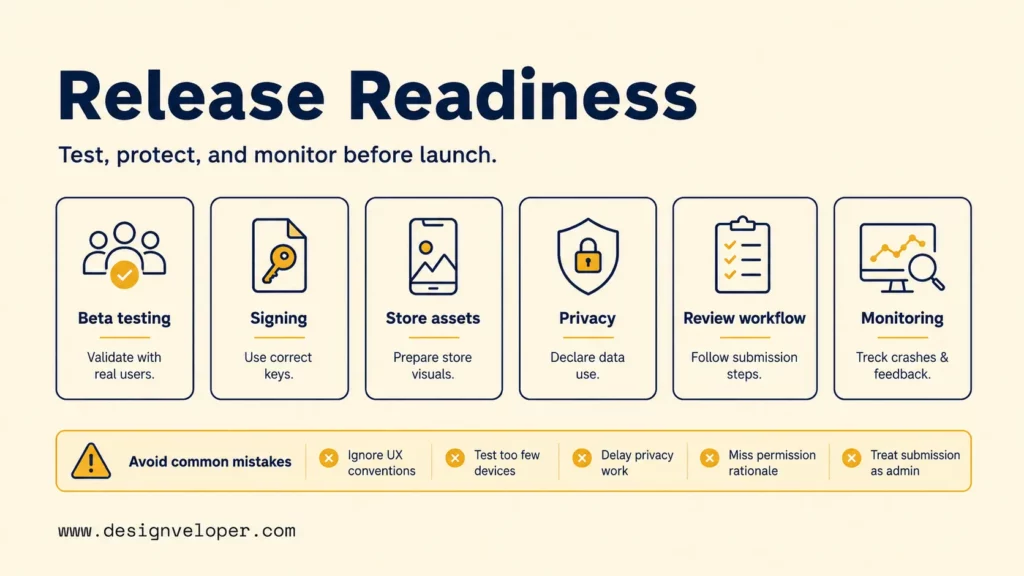
Release readiness starts before store submission. Test the app across supported devices, operating systems, network states, accessibility settings, and recoverable failures. Then verify security, analytics, privacy declarations, signing, review access, and rollback steps.
Security depth should match the product risk. Teams handling sensitive data can use the OWASP Mobile Application Security Verification Standard as a structured reference for mobile security controls and testing. A final penetration test should not replace secure design and routine verification during development.
The readiness matrix below turns store work into six evidence checks. A release owner should be able to show each item before production rollout.
Evidence: production-like builds used by real testers on supported devices.
Evidence: keys, certificates, access roles, and recovery owners are documented.
Evidence: names, descriptions, screenshots, support links, and review notes match the build.
Evidence: declared data practices match the app and included third-party SDKs.
Evidence: reviewer access, demo accounts, restricted flows, and response ownership are ready.
Evidence: crash alerts, analytics checks, support routing, and rollback or hotfix steps are active.
Store requirements are part of engineering because they can block release. Apple’s App Store submission guidance requires accurate privacy information, including relevant third-party practices. Google Play’s Data safety requirements also require developers to describe how their apps collect and handle user data.
Common release mistakes include:
- Ignoring platform UX conventions.
- Testing too few devices or OS versions.
- Leaving privacy declarations until the end.
- Missing permission rationale and useful degraded states.
- Treating store submission as administrative work.
A build can pass automated tests and still fail for a real user. Device behavior, accessibility, review access, and production monitoring belong beside functional QA because each one can determine whether a release is usable and supportable.
Plan Mobile App Ownership Beyond The First Release
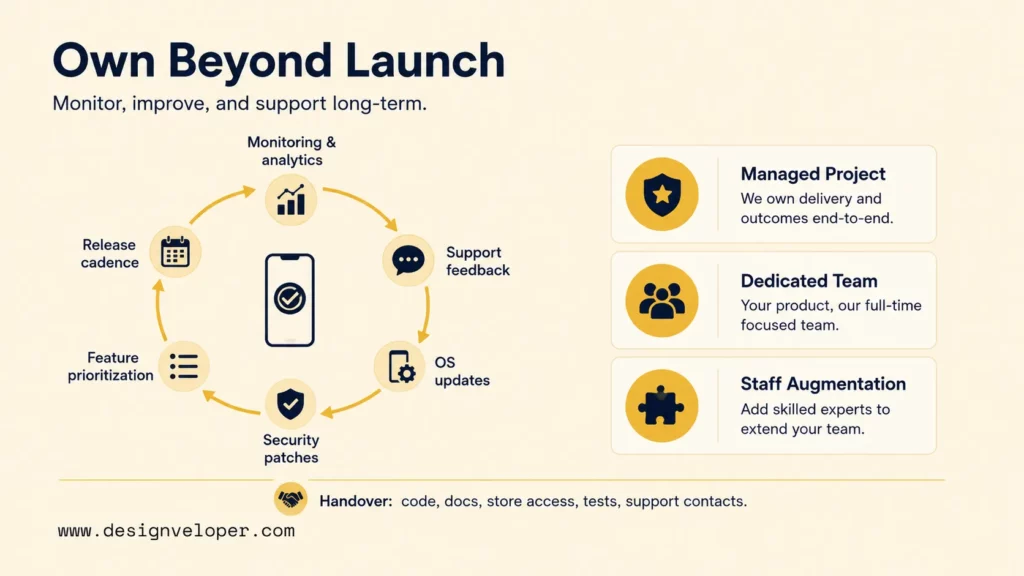
Plan ownership before launch because mobile platforms keep changing after the first release. A live app needs monitoring, support feedback, OS compatibility work, security patches, feature decisions, and a repeatable release cadence.
Assign owners for crash monitoring, analytics validation, store access, signing assets, privacy declarations, and support escalation. Also decide who approves a production release and who responds when an integration fails. Those responsibilities should survive staff changes.
The delivery model should match the ownership gap:
- Managed project: useful when one team must be accountable for a defined release or roadmap. Confirm what happens after acceptance and what maintenance is excluded.
- Dedicated team: useful when the product needs continuous delivery and stable product knowledge. Confirm who sets priorities, who approves releases, and how team changes are handled.
- Staff augmentation: useful when an internal team already owns architecture and product decisions but needs more capacity or specialist skills. Confirm who reviews work and owns cross-platform consistency.
The choice should follow the missing responsibility, not just the number of engineers. A strong internal product team may only need extra mobile specialists. A team without release governance may need a partner that owns QA coordination, store preparation, and post-launch response.
When your team needs one plan for mobile UX, backend connections, release governance, and long-term support, our mobile app development services can cover those checkpoints together. We recommend naming owners for release approval, signing access, incident response, and maintenance before implementation starts.
FAQs About iOS And Android App Development
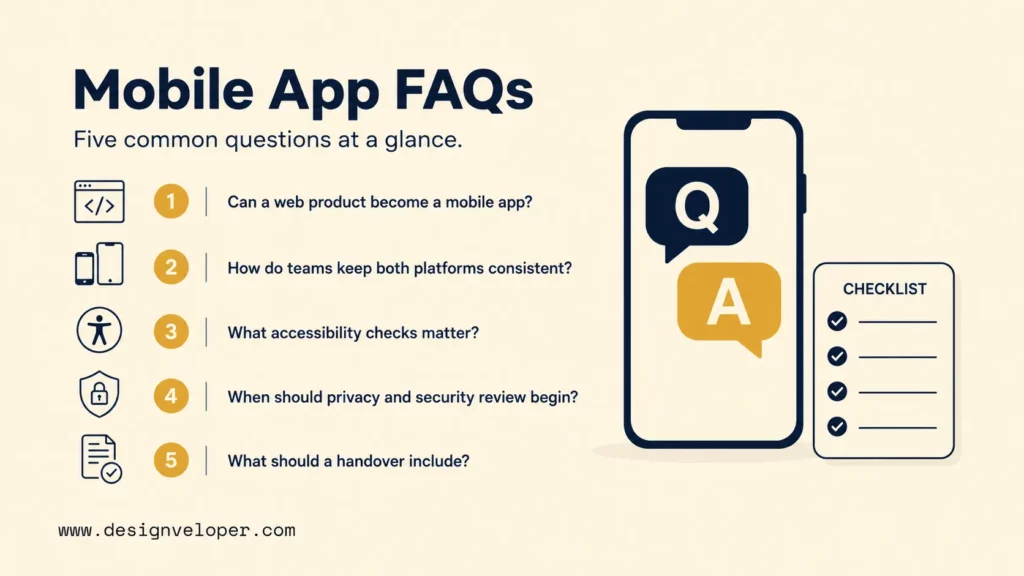
Can An Existing Web Product Become A Mobile App Without Rebuilding Everything?
Yes. An existing web product can often reuse backend services, APIs, account rules, content, and business logic. The mobile team still needs to decide which workflows should become mobile-native and which browser assumptions no longer apply.
Start by mapping the web product’s API contracts and the critical mobile outcome. Then identify large-screen flows, file handling, authentication, offline needs, notifications, and device access that need redesign. Reuse the stable service layer where possible instead of rebuilding it only because the interface is changing.
How Do Teams Keep iOS And Android Experiences Consistent Without Making Them Identical?
Keep the same user outcome, core flow, content hierarchy, validation rules, and service logic. Adapt navigation, back behavior, permissions, system controls, notifications, accessibility behavior, and layouts to each platform.
A shared design system should define intent, reusable tokens, and product states. It should not force one platform’s controls onto the other. During QA, compare whether users can complete the same task with similar clarity and confidence rather than checking for pixel equality.
What Accessibility Checks Should Mobile Teams Complete Before Release?
Teams should test screen readers, text scaling, labels, focus order, contrast, touch targets, motion, and alternative input paths where relevant. The main user journeys should also be tested with real accessibility settings enabled.
Automated checks can catch some defects, but they cannot prove that a workflow is understandable. The release criterion should be whether users can complete important tasks with assistive technologies, not whether a scanner reports zero issues.
How Early Should Privacy, Legal, And Security Teams Review A Mobile App?
Bring them in before data flows and architecture become expensive to change. Early review matters when the app collects sensitive data, uses third-party SDKs, requests powerful permissions, or serves regulated users.
At minimum, map what data enters the app, where it goes, why it is needed, who can access it, and how long it remains. Then align consent, permissions, logging, retention, store disclosures, and security testing with that map. Revisit the review when a new SDK or feature changes data handling.
What Should A Mobile App Handover Include?
A handover should include the codebase, build instructions, environment setup, store access, signing ownership, deployment steps, architecture notes, test coverage, known issues, and support contacts. It should also explain how the team monitors production and patches or rolls back a faulty release.
For ongoing ios and android app development, the receiving team also needs the decision history behind platform differences. Record which variations are intentional, which native modules need special care, and which privacy or store tasks recur with every release. A useful handover lets a new owner ship safely without reconstructing the project from memory.
Also published on

Share post on










Related Articles


iOS & Android App Development Is More Than Building The Same App Twice
iOS & Android App Development Is More Than Building The Same App Twice Published August 19, 2026
How To Make An Android App People Will Actually Use
How To Make An Android App People Will Actually Use Published August 19, 2026
Financial App Development: Features, Security, And Cost
Financial App Development: Features, Security, And Cost Published August 13, 2026



















