
















eCommerce Infrastructure: Definition, Components, Challenges

Modern eCommerce doesn’t run on pretty storefronts alone. There’s an invisible system underneath doing the heavy lifting. And this system is more complex than you thought, with a pile of layers to ensure your eCommerce platform will work effectively even during peak traffic. This article looks at that system, or called the eCommerce infrastructure, which keeps an eCommerce website online, fast, and stable.
Here, we’ll focus on three core aspects to provide you with the basics of that system, from its definition and key components to potential challenges of building and maintaining one. Now, first, let’s answer the common question: What is eCommerce infrastructure?
What is eCommerce Infrastructure?
eCommerce infrastructure, at its core, is the digital backbone of an online store. It includes the servers, hosting environments, databases, APIs, payment systems, security layers, cloud services, and all those behind-the-scenes tools. Its goal is to make your online store function, stay secure, and even handle increasing volumes without collapsing.
With this capability, the eCommerce infrastructure handles things like:
- How fast your site loads
- Whether checkout works smoothly or freezes at the worst possible moment
- How secure customer data actually is
- How well your store scales during traffic spikes
- How systems talk to each other without losing data
Now, some people define eCommerce infrastructure narrowly – in a technical scope, we mean. But others go wide and include logistics software, CRM tools, analytics platforms, and even customer support systems into this infrastructure.
And honestly, both views kind of make sense. It’s because modern eCommerce isn’t a single platform, but more like a web of connected services.
FURTHER READING: |
1. 10 Best eCommerce Website Design Services for Success |
2. What is B2B Ecommerce? All You Need to Know about B2B Ecommerce |
Core Components of eCommerce Infrastructure
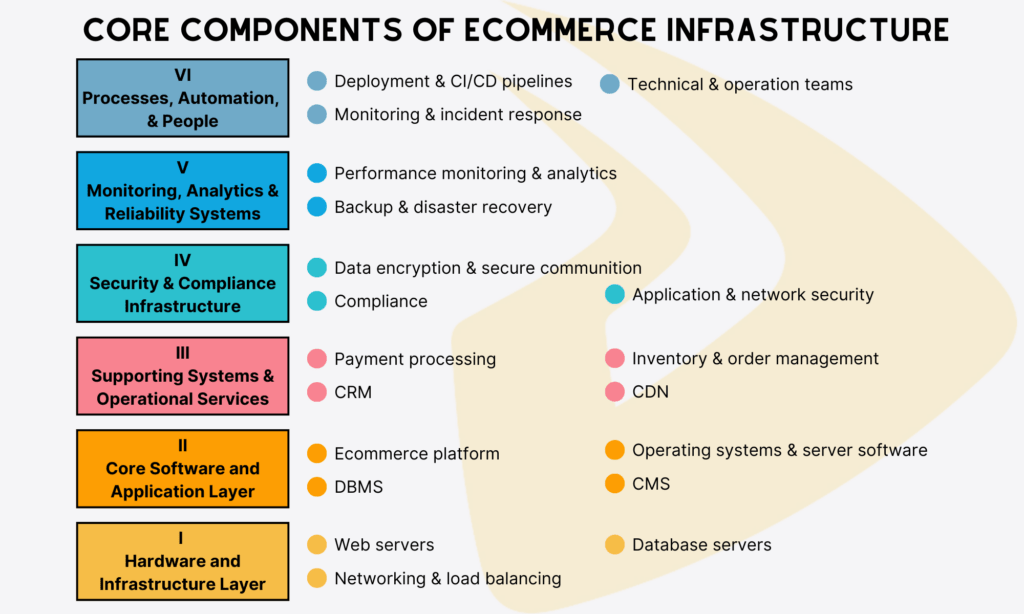
You’ve understood what eCommerce infrastructure is. Now, you may wonder which components make up one. To answer this question, let’s discover the five core fundamental layers as follows:
Hardware and Infrastructure Layer
The hardware and infrastructure layer lies at the base of the eCommerce infrastructure. Here, the entire eCommerce can run on physical servers (data centers) or virtual machines (cloud environments).
In this layer, you can see servers, storage systems, and networking resources. They work together to process incoming requests, store essential data, and move information between different parts of the platform.
Web Servers
When you type a URL or click a product link, the request reaches a web server first. The server receives the request and sends back the right response. That response can be a product page, an image file, or the checkout screen.
In practice, web servers are rarely deployed as single machines. Most eCommerce platforms run them in clusters to spread out traffic during busy periods like flash sales or holiday promotions. If one server slows down or fails to work, another can come in.
These days, web servers often run as cloud-based instances instead of physical hardware to handle tasks like request routing, caching, and basic traffic management. Your eCommerce platform can use web server tools such as Nginx or Apache. The software choice matters, but how it’s configured often matters more.
Database Servers
Web servers deal with what users see. But database servers take care of what your business depends on – let’s say product information, user accounts, order histories, and payment records. These systems are under constant load; they read and write data in real time.
Inventory tracking is a simple example. When the final item is sold, that update needs to happen immediately. If it doesn’t, your business may confront overselling.
Your eCommerce platform may use database servers like MySQL or PostgreSQL, along with NoSQL options such as MongoDB. Each type serves a different purpose. Some are optimized for fast transactions, while others are designed to handle large data sets efficiently. But many eCommerce platforms use more than one database system because no single solution fits every workload.
Networking and Load Balancing
Networking and load balancing tie everything together. Without them, even well-provisioned servers can struggle.
Particularly, networking controls how data moves between users, internal systems, and external services. Some common tools include routers, switches, firewalls, and cloud-based networking tools. Performance and security both depend on how well this layer is designed.
Load balancers lie in front of application servers and make real-time decisions about where requests should go. They distribute traffic across multiple machines, hence reducing pressure on any single server.
Core Software and Application Layer

If you consider the Hardware and Infrastructure Layer as the body, then this layer acts as the brain. Either way, it’s where logic lives and decisions happen.
This layer often tells the Hardware and Infrastructure Layer what to do, when to do it, and how to respond when something wrong happens. From monitoring storefront behavior to processing data, it covers them all.
Think what happens if there’s no Software and Application Layer. Servers still stay there but do nothing much.
Diving deeper, you’ll see this layer includes the following pieces:
eCommerce Platform
The eCommerce platform defines how your online store works. All daily operations – let’s say product catalogs, shopping carts, checkout flows, order management, promotions, customer accounts – run through here.
Today, you can use Shopify, Magento, WooCommerce, or custom-built solutions as an eCommerce platform. Regardless of your choice, these platforms all act as a central hub. They pull data from databases, send requests to payment gateways, talk to shipping services, and provide the right content to your users.
Operating Systems and Server Software
Operating systems and server software are important, as they manage system resources like memory, CPU, and storage, and make sure different programs don’t step on each other’s toes.
Most eCommerce systems now run on Linux. They use server software such as Nginx, Apache, or application servers like Tomcat to take care of request routing, process management, security permissions, etc.
When configured well, this layer stays invisible. But issues appear if you misconfigure it, like slow response times, random crashes, or unexplained downtime.
Database Management Systems (DBMS)
The Database Management System (DBMS) is responsible for organizing and grabbing everything – product specs, user logins, payments, and more. Whether the data is neatly structured or semi-structured, the DBMS handles the heavy lifting.
Some big DBMS names include MySQL, PostgreSQL, Oracle, and NoSQL tools. These systems are basically built to process requests from the application layer and return results fast, even during traffic surges. They also keep relationships between data points consistent and enforce business logic.
Content Management System (CMS)
CMS is where non-technical people (e.g., marketers or sales executives) often spend on. Here, you can post, edit, and manage content displayed on the user interface without touching the behind-the-scenes code.
In some setups, the CMS is tightly integrated with the eCommerce platform. In others, it’s a separate, headless system that feeds content to multiple frontends. Either approach can work. What matters is flexibility and control.
Supporting Systems and Operational Services

This layer directly supports the operation and growth of your eCommerce website. It includes:
Payment Processing Infrastructure
Payment processing matters a lot in eCommerce. If it isn’t smooth, customers hesitate.
So, the payment processing infrastructure is very important for your eCommerce website. It connects payment gateways, banks, fraud detection tools, compliance systems, and other tools. They control how money moves from a customer’s wallet into your eCommerce platform.
This infrastructure must also follow security standards such as PCI DSS. This ensures secure payments across regions, currencies, and payment methods.
Inventory and Order Management Systems
These systems keep track of what’s actually in stock, what’s been reserved, what’s already sold, and what’s somewhere between the warehouse and the customer. Here, counts update in real time and data syncs across locations.
When everything works, customers see accurate stock levels and delivery dates that make sense. But if it doesn’t, your business may encounter problems, like overselling or shipping delays.
Order management tools also handle returns, cancellations, and partial shipments. They have to work seamlessly with the storefront, internal warehouses, and third-party logistics providers to avoid even a small mismatch between systems that can grow into an expensive issue.
Customer Relationship Management (CRM)
In eCommerce, managing customer relationships effectively is a must. And you need CRM systems to help you with that.
These systems store customer profiles, purchase history, preferences, support interactions, and all data related to your customers that may be scattered across sources. Their goal is to give your teams context.
Who is this customer? What have they bought before? What do they like or dislike about your offerings? CRM systems help you answer these questions to personalize emails, tailor offers, and resolve issues faster.
Content Delivery Network (CDN)
A Content Delivery Network distributes static assets – like images, scripts, stylesheets – across servers located closer to users. Instead of loading everything from one central server, content is delivered from the nearest location.
The result? Faster load times, less strain on origin servers, and better performance during traffic spikes.
CDNs also add a layer of security. They can absorb traffic surges, block malicious requests, and reduce exposure to attacks. In a way, they act like a buffer zone between users and core infrastructure.
Security and Compliance Infrastructure

Security and compliance infrastructure exists to protect data, transactions, and trust – three things eCommerce can’t survive without, even if everything else looks fine on the surface.
At a basic level, this layer keeps bad actors out and sensitive information safe. But it does more than that. It sets rules and enforces boundaries. It also makes sure an eCommerce system behaves responsibly, legally, and predictably.
So, what does this layer have? Let’s find out:
Data Encryption and Secure Communication
In eCommerce systems, encryption keeps sensitive data from being exposed. Customer details, payment information, login credentials — all of it is transformed into data that can’t be read without the proper keys. Even if someone gains access, the information itself remains unusable.
Encryption doesn’t stop once data is stored. Information kept in databases, backups, or cloud storage is usually encrypted as well, reducing the impact if systems are compromised. Protocols such as HTTPS and TLS support this by securing communication across the infrastructure, not just at a single point.
Application and Network Security Tools
Security rarely depends on a single tool. Instead, it depends on various tools. Firewalls, intrusion detection systems, web application firewalls (WAFs), anti-malware tools, access controls, or anything you can name.
Application security tools focus on protecting the software layer. They help block common threats such as SQL injection or cross-site scripting before those attacks reach sensitive systems.
Network security tools work at a broader level. They monitor traffic, filter requests, and shut down suspicious behavior early. Some react instantly. But others look back through logs to spot patterns that weren’t obvious at first.
Compliance and Regulatory Requirements
For eCommerce businesses, compliance isn’t optional. Laws and standards like GDPR, PCI DSS, and local regulations shape how customer data is handled throughout its entire lifecycle.
When a site fails to meet these requirements, your business will face fines, legal issues, and even reputational damage. That’s why you should treat compliance as a starting point rather than a box to check later.
In practice, this means building compliance into the infrastructure itself. Access controls, logging systems, and consent management tools become part of daily operations, not add-ons. When these pieces are integrated early, staying compliant is less about constant firefighting and more about maintaining normal, traceable workflows.
Monitoring, Analytics, and Reliability Systems

In an eCommerce infrastructure, monitoring and analytics are essential to early warn your team about unusual behavior and possible failures of your site. With these systems, you can understand how well the eCommerce website is working. More importantly, it gives you a chance to react and scale the site if possible.
Performance Monitoring and Analytics
These tools see how your eCommerce website behaves in real-world conditions. They measure how your site truly performs by looking at different metrics like page load times, server response rates, or error frequencies.
Besides, these tools analyze raw data to spot patterns and trends. For example, if checkout slows down every Friday afternoon, analytics might reveal a traffic surge tied to promotions or maybe a database bottleneck that only appears during traffic surges.
Backup and Disaster Recovery Systems
Backup and disaster recovery systems are designed to protect data and restore operations after failures.
Backups mean regularly copying data and storing it in secure, separate locations. Meanwhile, disaster recovery sees how quickly your services come back online.
Your business can rely on simple backups and manual recovery. Or you can invest in automated failover systems that switch traffic to standby environments almost instantly. Regardless of your choice, consider having a plan and testing it. If your recovery plan looks good on paper but fails in practice, it’s a red flag.
Processes, Automation, and People

The final component of eCommerce infrastructure involves processes, automation, and people. The overall infrastructure is only effective if your business has the right people and processes.
Deployment and CI/CD Pipelines
Your eCommerce website needs regular updates to fix bugs, improve features, and even scale services. CI/CD pipelines facilitate your site’s deployment and updates.
CI, or continuous integration, focuses on merging code changes frequently and testing them early. CD – or continuous delivery – takes it further by automatically pushing approved changes live. Together, they automate how code moves from development to production.
Monitoring and Incident Response Processes
Tools can tell you what broke. But processes decide what happens next. Adopting monitoring and incident response processes, your team can discover issues, escalate them to the right person, and fix them effectively.
Good processes are clear with prompt alerts and well-defined roles.
Some teams argue this is unnecessary for smaller operations. And maybe, at first, it is. But as traffic grows and systems become more complex, a clear incident response process matters to avoid chaos.
Technical and Operations Teams
Finally, there are the people behind the systems. They include developers, DevOps and SRE (Site Reliability Engineering) specialists, security specialists, customer support agents, and more. Both technical and operations teams work together to design systems, maintain them, respond to issues, and improve things over time.
What matters most is collaboration. When teams understand how the system works end to end, decisions improve and problems get resolved faster.
Challenges in eCommerce Infrastructure and Solutions
The previous section gave you a clearer picture of how a typical eCommerce infrastructure might look. Although we can’t deny its big potential, it still comes with some challenges:
- Scalability
Most eCommerce platforms work perfectly, until a flash sale or holiday rush. When request volumes and traffic soar, the infrastructure can’t stretch fast enough to meet those demands. The result? Your site’s pages slow down, payments fail, and more.
- Performance issues
Performance issues can appear for any reason. From heavy product images to one more API call than necessary, they all make your site perform poorly and even crash. This hurts conversions and user experiences.
- Security risks
eCommerce platforms are targets of various bad actors. Why? Because they contain a large amount of customer data, payment info, login credentials, and other valuable information. Without the best security measures, monitoring tools, and regular updates, new vulnerabilities may appear constantly and make your eCommerce site an easy target.
- Integration complexity
Modern eCommerce stacks are crowded with payment gateways, inventory systems, CRM tools, analytics tools, and more. Each solves a specific problem, but this causes a visible problem: integration with too many tools. If they don’t work seamlessly with each other, data gets out of sync, payments may get stuck, and other problems happen.
How to Choose the Right eCommerce Infrastructure

Choosing the right eCommerce infrastructure isn’t easy, and the wrong one can lead to technical debts and expensive rebuilds. Below are some tips to help you choose one:
- Start with your business goal, not the tech
Many teams may jump directly into choosing between AWS vs. Azure, or monolith vs. microservices. But it’s a big mistake.
Remember that your infrastructure choice should align with your business goals first, not tech stacks. Because a small niche store with steady traffic doesn’t need the same infrastructure as a fast-scaling marketplace preparing for global sales.
So, answer these important questions: “What are you selling?”, “How fast do you expect to grow?”, “Are traffic spikes predictable, or totally chaotic?” and more. They help you identify what the infrastructure is truly for.
- Think about scalability, but don’t obsess over it
Scalability matters. But it doesn’t need to be perfect from day one.
What matters more is scalability paths. Can you add resources without rewriting everything? Do databases likely scale without downtime? Can components be replaced gradually?
A system that scales step by step is often better than one designed for hypothetical future traffic that may never come.
- Security and compliance should be built-in
Your team should choose eCommerce infrastructure with security in mind, as it often deals with sensitive data and works under strict data protection regulations.
When evaluating infrastructure, ask: What security features are native to the platform? How are updates and patches handled? Does it support compliance requirements you may face later?
The answers help you identify whether the infrastructure meets your security requirements.
- Look beyond the monthly bill
Initial costs are easy to compare. But long-term costs are not.
Infrastructure expenses grow due to extra environments, monitoring, and more. So, estimate the total cost of ownership, not just hosting fees.
Conclusion
An eCommerce infrastructure plays a crucial role for any eCommerce business. It covers the five key components, including:
- The hardware and infrastructure layer
- The core software and application layer
- Supporting systems and operational services
- Security and compliance infrastructure
- Monitoring, analytics, and reliability systems
- Processes, automation, and people
Any of these components contributes to the success of the whole eCommerce website.
Do you struggle with eCommerce website development and need expert consultations? Designveloper, a leading web and software development company in Vietnam, is here to help.

We offer full-cycle development services to build a custom website or platform for your eCommerce business. Our solution integrates seamlessly with different systems, like payment gateways, CRM systems, inventory management tools, and more.
We also adopt modern technologies to modernize your legacy eCommerce infrastructure, integrate AI chatbots, and advance security measures. Our successful eCommerce projects prove our top-notch capability and services. Typically, we upgraded Aha.is, a local eCommerce website, to improve its speed, cost, and content management.
Wanna discuss your idea with us? Contact us and receive free consultations!
FAQs About eCommerce Infrastructure
How Does Infrastructure Affect eCommerce Performance?
It impacts almost every aspect of an eCommerce website. A good infrastructure ensures that pages load fast, checkout works smoothly, and your site still behaves stably when traffic suddenly increases. Conversely, a poorly-designed infrastructure often has improper load balancing, caching, and backend coordination. This makes pages lag and reduces the user experience.
Is Cloud Infrastructure Necessary for eCommerce?
Not always necessary, but very helpful. Cloud infrastructure allows you to flexibly scale resources depending on traffic without high costs. It also supports faster deployment and global reach.
How Much Does eCommerce Infrastructure Cost?
It’s hard to give an exact number for this question. Why? Because costs depend on scale, traffic, architecture, and how much you manage yourself. A small store might spend a modest monthly fee on hosting and basic services. But a large platform? You have to consider servers, databases, monitoring tools, security layers, and support systems that can add up the total cost.
What often surprises many teams is the indirect cost for maintenance time, incident response, etc. So, when it comes to the eCommerce infrastructure cost, you should think in terms of the total cost of building a website rather than a single number.
Also published on

Share post on










Related Articles



What Is B2B Ecommerce? Types, Models, Platform Features, Examples
What Is B2B Ecommerce? Types, Models, Platform Features, Examples Published August 05, 2026
Cloud Ecommerce Solutions: How To Choose The Right Platform
Cloud Ecommerce Solutions: How To Choose The Right Platform Published July 15, 2026
Ecommerce Business: How To Start, Grow, And Use Technology
Ecommerce Business: How To Start, Grow, And Use Technology Published June 30, 2026



















