
















LangChain Vs MCP: What’s The Difference And When To Use Each?

KEY TAKEWAYS:
- LangChain and MCP solve different AI architecture layers. LangChain helps teams orchestrate LLM workflows and agents, while MCP standardizes how AI clients access tools, data, prompts, and external systems.
- They are often complementary, not interchangeable. Use LangChain or LangGraph for workflow control, MCP for reusable integration boundaries, and both when a production agent needs orchestration plus governed tool access.
- Production choices should start from the missing layer. If the team lacks stateful logic, focus on orchestration; if the team lacks reusable connectors, focus on MCP servers.
- Security and maintainability still need product engineering. Neither framework nor protocol replaces authentication, permissions, evaluation, logging, user approval, and clear ownership.
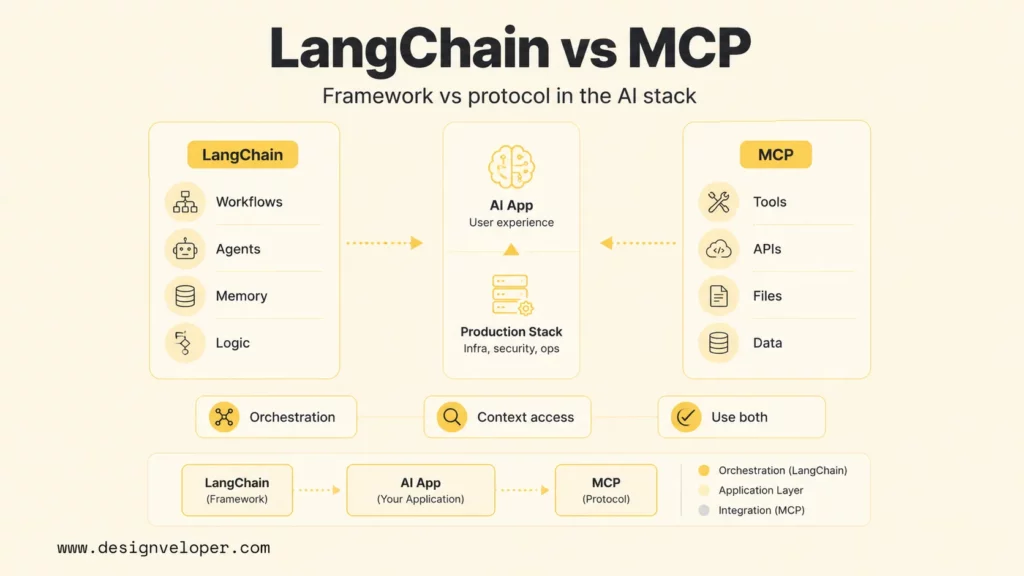
Langchain vs MCP is best understood as a comparison between an AI application framework and an AI integration protocol. LangChain helps developers build LLM workflows, agents, prompts, memory, model calls, and application logic. MCP, or Model Context Protocol, standardizes how AI clients connect to tools, APIs, files, databases, prompts, and other external context.
The practical answer is simple: use LangChain or LangGraph when the product needs orchestration. Use MCP when the product needs reusable, standardized access to external systems. Use both when an AI application needs a controllable agent workflow and a cleaner way to expose tools or data sources across models and clients.
This comparison explains the difference by layer, use case, architecture, security boundary, and production workflow. The goal is not to crown one winner. The goal is to help teams decide which missing piece their AI stack actually needs.
Xem thêm:
- What Is Agentic AI? Benefits, Architecture And How It Works
- AI Agent vs AI Assistant: Which Is the Better Fit?
- AI Agent vs Chatbot: Product Tradeoffs and Use Cases
LangChain Vs MCP: The Core Difference
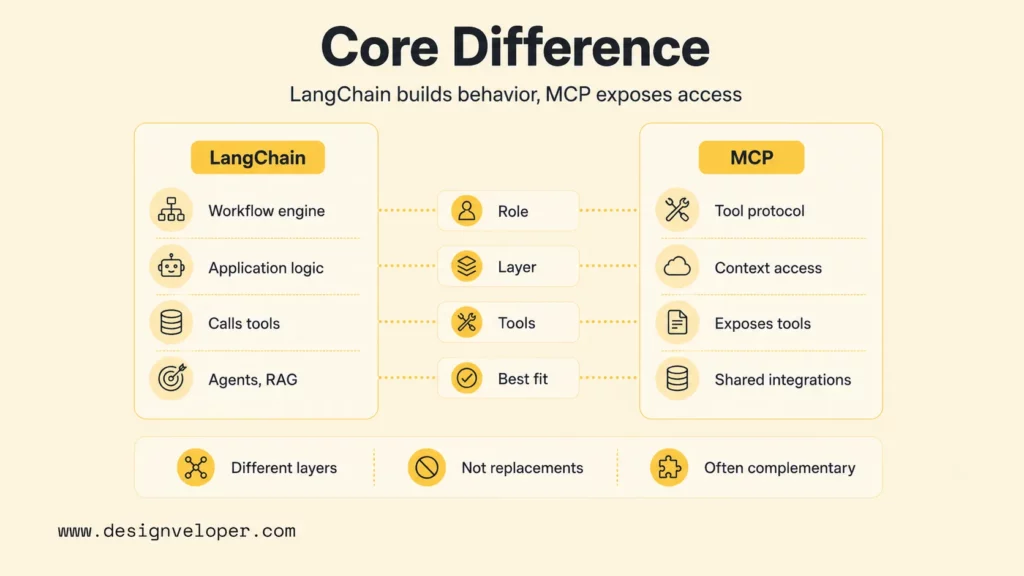
LangChain and MCP operate at different layers of an AI system. While LangChain is mainly an application development framework for building LLM-powered behavior, MCP is mainly a protocol for connecting AI applications to external tools and context through a common interface.
The LangChain overview documentation frames LangChain around agents, models, messages, tools, memory, streaming, structured output, and middleware. The Model Context Protocol introduction describes MCP as an open-source standard for connecting AI applications to external systems such as local files, databases, tools, and workflows.
| Comparison point | LangChain | MCP |
|---|---|---|
| What it is | An open-source framework and ecosystem for building LLM applications, agents, and workflows. | An open protocol for exposing tools, resources, prompts, and context to AI clients. |
| Primary role | Orchestrates model calls, prompts, tools, memory, chains, and agent behavior. | Standardizes how AI clients discover and call external capabilities. |
| Abstraction level | Application logic and workflow orchestration. | Integration and context access layer. |
| How it handles tools | Defines and invokes tools inside an application or agent workflow. | Lets servers expose tools with schemas that compatible clients can discover and call. |
| Portability | Most portable inside the LangChain and LangGraph ecosystem. | Designed for reuse across different MCP-compatible clients and models. |
| Best fit | Multi-step reasoning, RAG workflows, agents, stateful logic, and product-specific AI flows. | Shared integrations, enterprise tool access, data connectors, permission boundaries, and cross-client reuse. |
The core distinction matters because teams often compare LangChain and MCP as if both answer the same architecture question. LangChain answers, “How should the AI workflow run?†MCP answers, “How should the AI workflow access external capabilities?†This distinction becomes especially important when teams move from a simple assistant to enterprise AI agents with governance, permissions, and operational review.
They Solve Different Layers Of The AI Stack
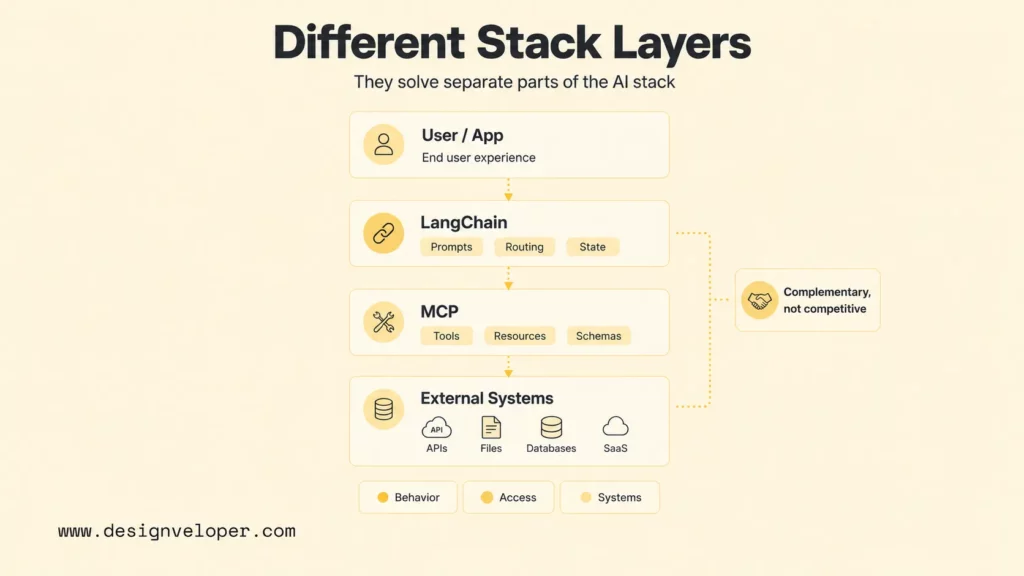
LangChain and MCP solve different layers of the AI stack, so they are often complementary rather than competitive. A production agent may need a workflow engine, an evaluation process, a tool registry, security controls, user approval steps, and observability. LangChain and MCP each cover only part of that broader stack. For the coordination layer around agents, AI agent orchestration is the closer comparison point than a single protocol or library.
LangChain As The Orchestration Layer
LangChain fits the orchestration layer because it helps developers define how an LLM application behaves over time. A LangChain application can route requests, call a model, retrieve documents, invoke tools, parse structured output, maintain short-term memory, stream events, and apply middleware.
Orchestration becomes important when an AI feature is more than a single prompt. A support assistant may classify a request, retrieve account context, ask a model to draft a response, call a refund-policy tool, require human approval, and then write a ticket note. That sequence needs state, control flow, tool definitions, and error handling. The same rollout concerns appear in AI chatbot integration, where a useful assistant must connect cleanly with real business systems.
LangChain can be fast for prototyping because the framework provides ready patterns for models, messages, tools, structured outputs, and agents. The tradeoff is that teams still need to design business logic carefully. A framework can wire pieces together, but the product team must decide which actions are allowed, what context is relevant, how failures are handled, and how the result is evaluated.
MCP As The Tool And Context Access Layer
MCP fits the tool and context access layer because it defines a standard way for servers to expose capabilities. The MCP tools specification describes how servers expose tools with names, descriptions, input schemas, optional output schemas, and tool results. MCP clients can list tools, call tools, and handle structured or unstructured results.
MCP is useful when a team does not want every AI application to build custom connectors for the same systems. A company might expose Jira, GitHub, Google Drive, Salesforce, internal databases, vector search, design files, or finance workflows through MCP servers. Compatible AI clients can then discover and call those capabilities through a shared protocol. Anthropic’s MCP announcement framed this need around connecting AI assistants to the systems where data already lives.
The protocol boundary also helps teams separate concerns. The MCP server can own authentication, schema validation, rate limiting, logging, and access controls. The AI application can focus on reasoning, routing, and user experience.
Why They Are Not Direct Replacements
LangChain is not a direct replacement for MCP because LangChain does not define a universal protocol for external systems. LangChain can call tools, but those tools usually live inside the application’s framework-specific code unless the team deliberately exposes them through a standard interface.
MCP is not a direct replacement for LangChain because MCP does not decide the whole agent workflow. MCP can expose a tool such as search_customer_records or a resource such as customer://1234/profile. MCP does not automatically define when the agent should call the tool, how to combine tool results, how to manage state, or how to evaluate the answer.
A useful analogy is an operating system app and a device port. LangChain is closer to the app logic that decides what happens next. MCP is closer to a standard port that gives the app a predictable way to access external capabilities.
Xem thêm:
- How To Build Agentic AI Around Real Workflow Logic
- Agentic AI Architecture and Workflow Patterns
- Conversational AI Vs Chatbot
Where LangChain Fits Best
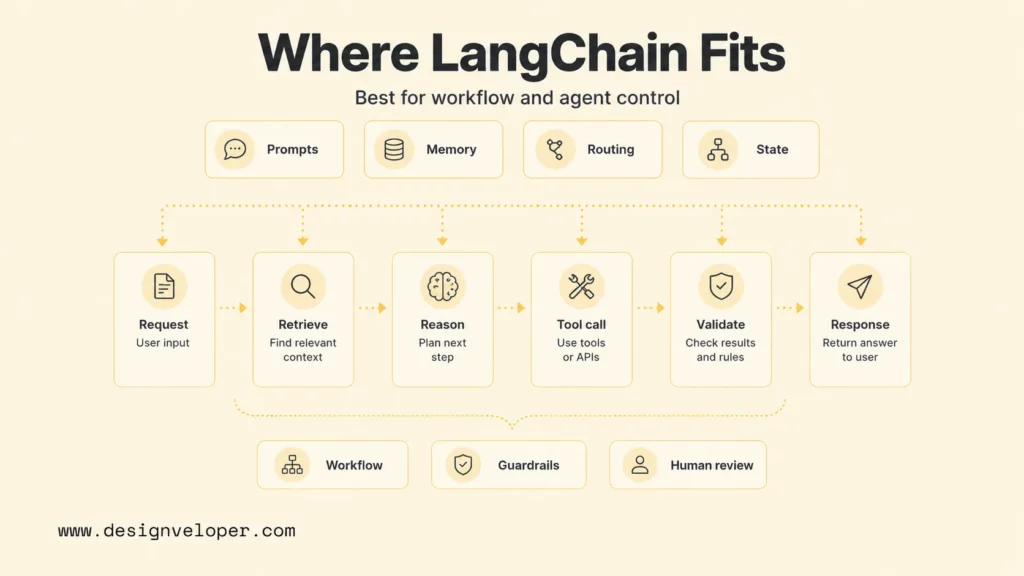
LangChain fits best when a team needs to build the behavior of an AI application. It is strongest when the team is asking about workflow, agent logic, prompt management, memory, evaluation, and the application-specific path from user request to final answer.
Building Multi-Step LLM Workflows And Agents
LangChain is useful for multi-step LLM workflows and agents because it provides abstractions for models, tools, messages, structured output, streaming, and middleware. A developer can define a model call, attach tools, validate outputs, stream intermediate events, and build a repeatable process around an LLM.
Multi-step workflows need more than tool access. They need decisions. The application may need to decide whether to retrieve documents, ask a clarifying question, call a payment API, call a database, trigger a human review, or stop. LangChain is the layer where that product-specific logic usually lives.
A practical LangChain workflow might look like this:
- Receive a user request in a web application.
- Classify the request as support, sales, compliance, or engineering.
- Retrieve relevant documents from a vector database.
- Call a tool only if the model needs live account data.
- Generate a structured answer with citations and confidence metadata.
- Route high-risk actions to a human reviewer before execution.
That orchestration pattern is more than a protocol problem. The team needs application rules, guardrails, retries, observability, and test cases.
Managing Prompts, Memory, And Stateful Logic
LangChain is also useful when prompts, memory, and stateful logic need to be managed consistently. An AI assistant may need short-term conversation state, structured system prompts, user preferences, retrieved documents, previous tool outputs, and safe fallback behavior. When retrieved files and documents become central to the workflow, document intelligence patterns can help teams think beyond memory and into source quality, extraction, and workflow fit.
Stateful logic is where many prototypes break. A simple demo may work with one prompt and one tool call. A production assistant may need to remember what it asked, avoid repeating a tool call, retry safely after a timeout, and explain what action it wants to take before acting.
LangChain gives teams a place to compose these behaviors. It can coordinate prompt templates, model selection, tool definitions, middleware, structured outputs, and memory-related components. Teams still need to keep memory scoped, auditable, and privacy-aware because more context is not always safer or more useful.
Using LangGraph For More Structured Agent Control
LangGraph is important when the agent needs a clearer state machine. The LangChain reference documentation describes LangGraph as a way to control custom agents with low-level orchestration, memory, and human-in-the-loop support. That makes LangGraph useful when simple agent loops are too opaque.
Graph-based control helps teams model nodes, transitions, retries, review states, and stop conditions. For example, a customer-support workflow may have nodes for intent detection, account lookup, policy retrieval, draft answer generation, risk scoring, human approval, and CRM update. Each node can be tested and monitored separately.
LangGraph does not remove the need for integration standards. It gives teams more control over the agent brain. MCP can still be the way that the graph accesses approved tools and context.
Where MCP Fits Best
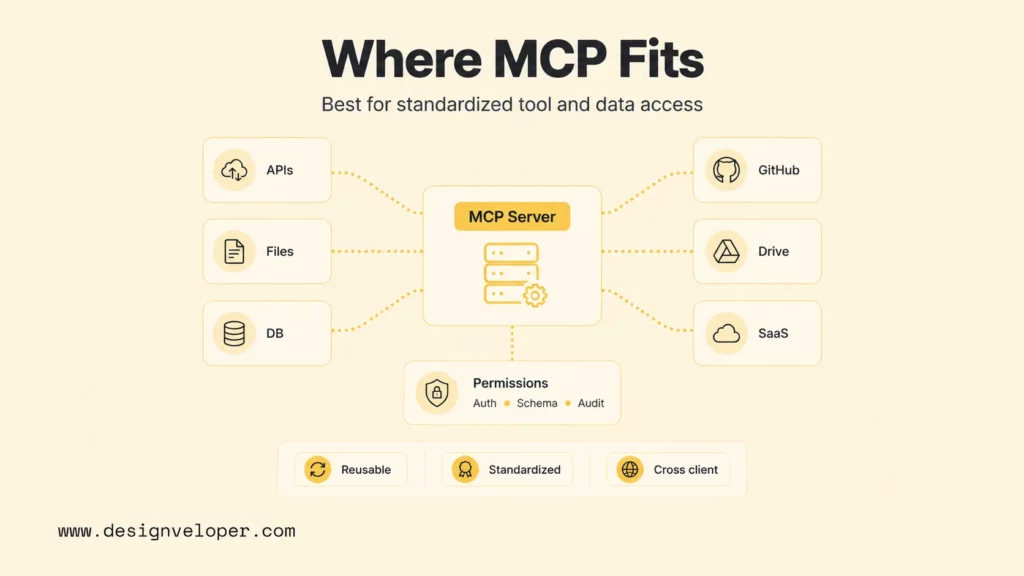
MCP fits best when the main problem is not agent logic but access to external systems. MCP is especially useful when a company wants tool and data integrations to be reusable across multiple AI clients, teams, or model providers.
Standardizing Access To Tools, APIs, And Data Sources
MCP standardizes how tools, APIs, and data sources are exposed. Instead of hard-coding one connector for each AI application, a team can build an MCP server that exposes approved operations with schemas and descriptions. Compatible clients can then discover and call those operations.
That standardization is valuable for enterprise systems. A company may have many AI use cases that need the same capabilities: search documents, read CRM records, create support tickets, query inventory, fetch invoices, or trigger workflow approvals. MCP turns those capabilities into shared infrastructure rather than duplicated app code.
The MCP specification also pushes teams to describe tool input and output clearly. A tool with a JSON input schema is easier to validate, test, document, and monitor than a loose function call hidden inside an agent prompt.
Reusing Integrations Across Models And Clients
MCP is designed for reuse across models and clients. The Model Context Protocol introduction notes broad ecosystem support across AI assistants, development tools, and other clients. That matters because AI teams increasingly use more than one model, more than one interface, and more than one application surface.
Without a protocol layer, every new client can create another integration backlog. A team may wire a GitHub integration for an internal assistant, then repeat similar work for a coding tool, then repeat it again for a support workflow. MCP can reduce that duplication by making the integration available through a standard server interface.
Reuse does not mean every client should access every tool. MCP servers still need authentication, authorization, tenant boundaries, audit logs, and safe defaults. The value comes from standardizing the connector shape while keeping permissions explicit.
Creating Cleaner Security And Permission Boundaries
MCP can create cleaner security and permission boundaries because tool access moves into a server layer with explicit schemas and controls. The MCP tools specification says servers must validate tool inputs, implement access controls, rate limit tool invocations, and sanitize tool outputs. It also says clients should show tool inputs, ask for confirmation on sensitive operations, validate tool results, implement timeouts, and log tool usage for audit purposes.
Those details matter in production. An AI assistant that can read files, write tickets, query databases, or call payment APIs creates real operational risk. MCP gives teams a place to enforce tool-level controls, but the surrounding application still needs user approval flows, policy checks, and monitoring.
MCP should not be treated as automatic security. A poorly designed MCP server can expose dangerous tools. A safe implementation starts with least privilege, scoped credentials, explicit user consent, environment separation, and regular review of tool schemas and logs.
How LangChain And MCP Work Together
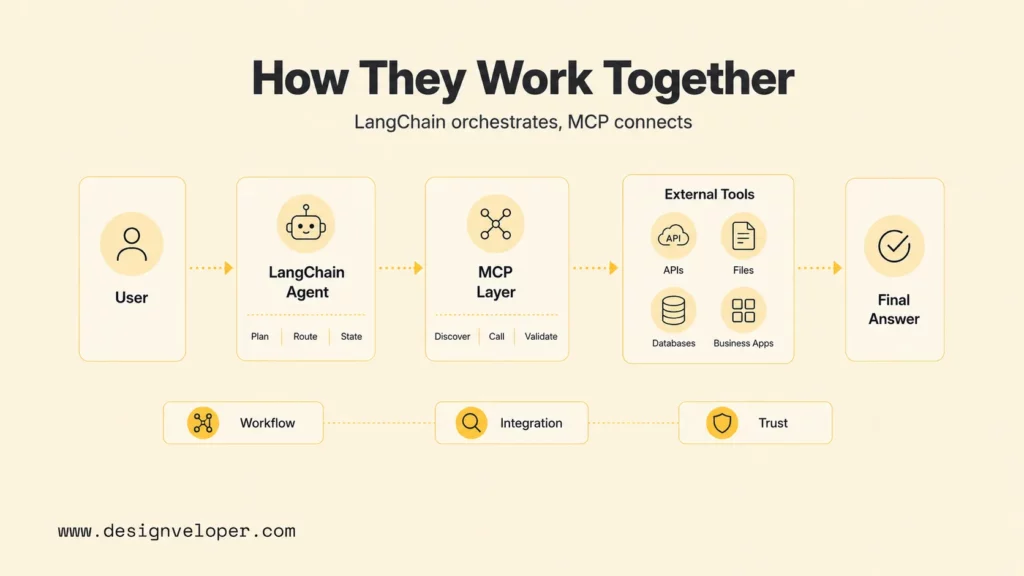
LangChain and MCP can work together cleanly because each component can own a different part of the architecture. LangChain or LangGraph can act as the application brain. MCP can expose tools and context through a standard interface. The result is an AI system with both orchestration and reusable connectivity.
The LangChain MCP documentation explains that LangChain agents can use tools defined on MCP servers through the langchain-mcp-adapters library. The LangChain MCP adapters repository provides the adapter package that helps connect MCP servers to LangChain workflows.
A practical architecture might look like this:
| Layer | Responsibility | Example |
|---|---|---|
| Product UI | Captures user intent and displays tool-call confirmations. | Support dashboard, coding assistant, internal operations portal. |
| LangChain or LangGraph | Controls the workflow, state, model calls, routing, and final response. | Decides whether to retrieve policy docs, call CRM, or ask for approval. |
| MCP client/adapters | Connects the workflow to MCP servers. | Loads approved MCP tools for account lookup and ticket creation. |
| MCP servers | Expose external systems through schemas and permission-aware tools. | GitHub, Jira, database, Notion, Google Drive, internal APIs. |
| Enterprise systems | Hold the actual records and execute the underlying operations. | CRM records, source code, documents, invoices, tickets. |
This pattern helps teams avoid one-off tool integrations. The agent workflow remains in LangChain or LangGraph, while tool infrastructure becomes reusable through MCP. If another AI client needs the same approved tools later, the team can reuse the MCP server instead of rebuilding the connector.
Teams should still test the full path. A LangChain agent may call an MCP tool correctly in development, but production behavior depends on authentication, network timeouts, schema changes, rate limits, model tool-selection behavior, and user approval flows.
When To Choose LangChain, MCP, Or Both
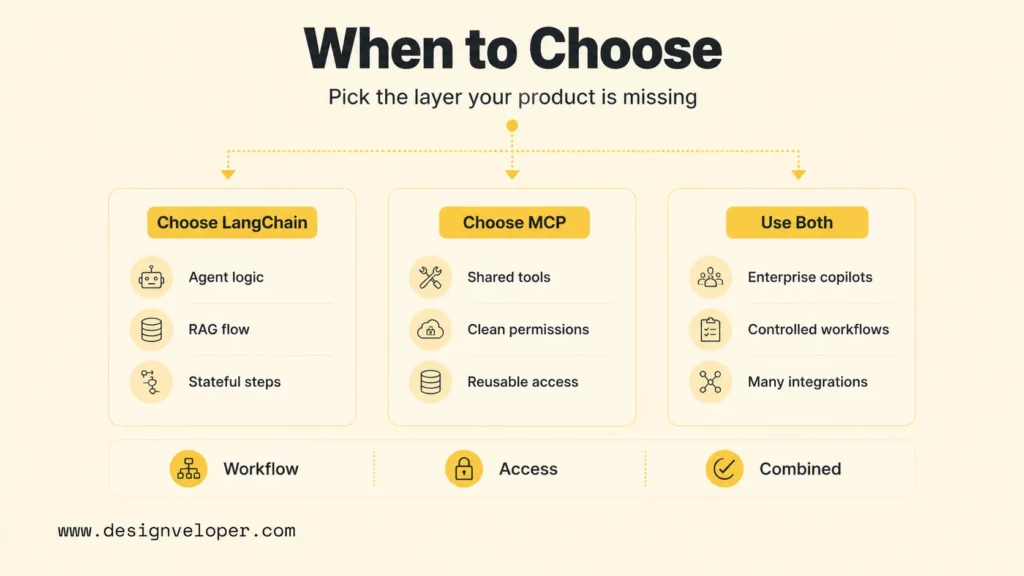
Choose LangChain, MCP, or both based on the missing layer in the AI system. A team that lacks workflow control should focus on LangChain or LangGraph. Meanwhile, a team that lacks reusable tool access should focus on MCP. And a team building a production agent often needs both.
Choose LangChain If You Need Workflow And Agent Control
Choose LangChain when the main task is building the AI application’s behavior. LangChain is the better starting point when the team needs prompt orchestration, model routing, tool-use decisions, RAG flow, structured outputs, memory, streaming, evaluation hooks, or application-specific agent logic.
Common signals include:
- The team is still designing how the AI assistant should reason through a task.
- The product needs a repeatable sequence of model calls, retrieval, tool calls, and validation.
- The team needs stateful behavior or human-in-the-loop workflow steps.
- The main integrations are simple enough to define inside the application at first.
LangChain is also a good fit for rapid prototyping. A team can prove the workflow, learn user behavior, and identify which integrations deserve a stronger MCP server boundary later.
Choose MCP If You Need Standardized Tool Access
Choose MCP when the main task is giving AI clients safe, reusable access to tools and data. MCP is the better starting point when a company has many systems to expose, many AI clients to support, or a need for cleaner boundaries around authentication, schemas, permissions, and audit logging.
Common signals include:
- Multiple AI products need the same integration with tools such as GitHub, Jira, Slack, Notion, Google Drive, or internal databases.
- The team wants a standard server interface instead of framework-specific tool wrappers.
- Security reviewers need clearer control over which tools are exposed and how they are called.
- The integration layer should survive changes in model provider or agent framework.
MCP is especially useful for platform teams. A platform team can expose approved internal capabilities once, then let product teams consume those capabilities from different AI applications.
Use Both If You Need Orchestration And Reusable Integrations
Use both LangChain and MCP when a production AI system needs a controlled agent workflow and a reusable integration layer. This combination is common for enterprise assistants, developer tools, support copilots, document automation, and operations agents. Teams planning a custom build can compare these tradeoffs with broader AI chatbot development decisions around UX, data access, tool permissions, and rollout quality.
A strong combined setup has clear ownership:
- LangChain or LangGraph owns the workflow: model calls, state, routing, memory, tool-use decisions, and final answer behavior.
- MCP owns the connector interface: tool discovery, schemas, server-side validation, resource access, and integration-level permissions.
- The product owns trust: user confirmations, audit trails, policy rules, sensitive-action approval, and error recovery.
The combination should not become architecture theater. If the product has one simple tool and one simple prompt, an MCP server may be unnecessary. If the product has several tools but no complex agent behavior, MCP may matter more than LangChain. Architecture should follow the product’s real complexity.
What This Means For Production AI Systems
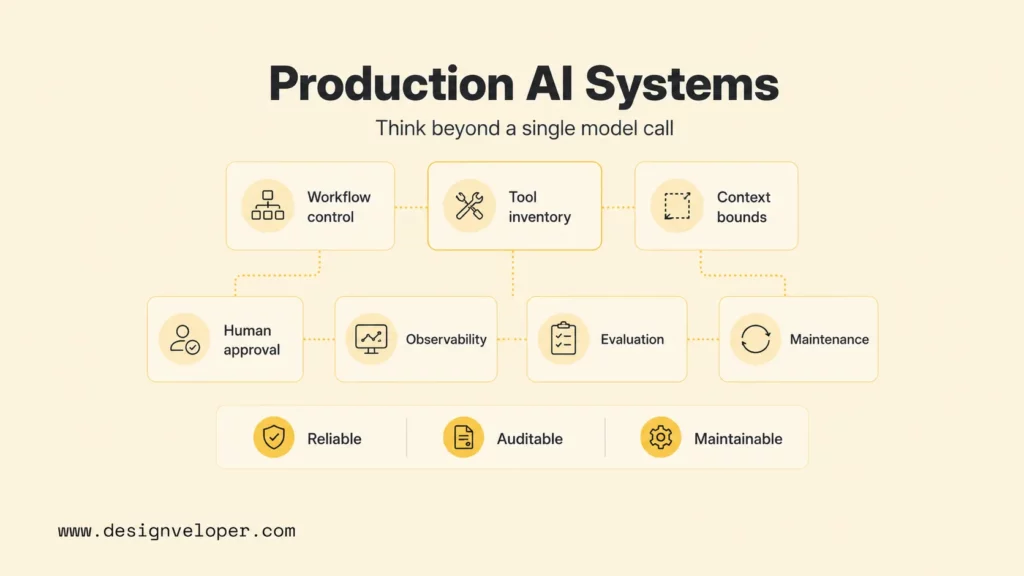
The production decision is not whether LangChain or MCP is better in isolation. The production decision is which layer your AI stack is missing. Teams usually need to solve both orchestration and external connectivity, and LangChain and MCP address those problems from different directions.
A production AI system needs more than a model call. It needs context selection, tool permissions, prompt management, state handling, evaluation, logging, security review, fallback behavior, deployment, and maintenance. LangChain can help orchestrate the behavior. MCP can help standardize access to external systems. Neither one removes the need for product engineering discipline.
Use this production checklist before committing to an architecture:
- Workflow control: Can the team explain every step the agent can take, including retries and stop conditions?
- Tool inventory: Are all tools named, documented, permissioned, tested, and scoped to real user needs?
- Context boundaries: Does the agent receive only the data needed for the task?
- Human approval: Do risky operations require confirmation before execution?
- Observability: Are prompts, tool calls, outputs, errors, and latency visible in logs or traces?
- Evaluation: Does the team have regression tests for tool-use behavior and final answers?
- Maintenance: Is there a clear owner for LangChain workflows, MCP servers, credentials, and schema changes?
At Designveloper, we treat these choices as part of production AI engineering, not as isolated library decisions. We help teams map workflows, design agent architecture, integrate LLMs with tools and data, create human approval paths, and prepare AI features for monitoring and maintenance. Our AI development services and web application development services connect model behavior with real product operations, security expectations, and post-launch support.
The safest rule is to choose the smallest architecture that solves the real problem. Start with LangChain when workflow control is missing. Start with MCP when standardized access is missing. Combine LangChain and MCP when the product needs both a reliable agent brain and a reusable tool layer. For teams still early in the decision, chatbot platforms can also be a practical baseline before committing to a custom orchestration stack.
FAQs About LangChain Vs MCP
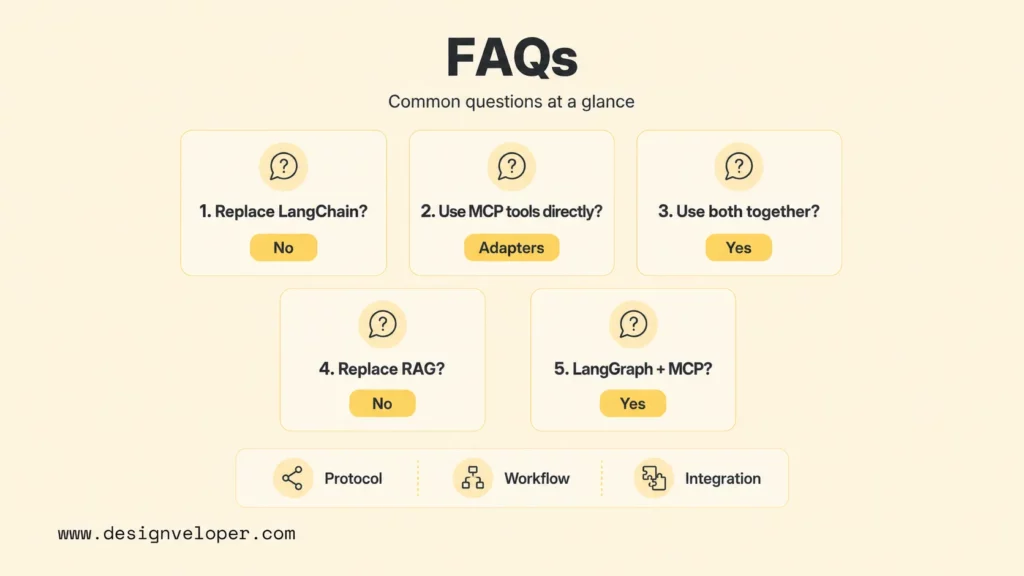
Is MCP A Replacement For LangChain?
MCP is not a replacement for LangChain. MCP standardizes how AI clients access tools, resources, prompts, and external context. LangChain helps developers build LLM workflows, agents, prompts, memory, and application logic. MCP can complement LangChain by supplying reusable tools to a LangChain agent.
Can LangChain Use MCP Tools Directly?
LangChain can use MCP tools through adapter libraries. LangChain’s MCP documentation describes langchain-mcp-adapters, which lets LangChain agents use tools exposed by one or more MCP servers. Teams still need to configure servers, authentication, schemas, and tool permissions correctly.
Can I Use MCP And LangChain Together?
You can use MCP and LangChain together. A common pattern is to use LangChain or LangGraph for the agent workflow and use MCP servers to expose external tools such as databases, APIs, document systems, coding tools, or business applications. This keeps orchestration and integration responsibilities separate.
Is MCP A Replacement For RAG?
MCP is not a replacement for RAG. Retrieval-augmented generation is a pattern for finding relevant knowledge and adding it to a model prompt. MCP can expose resources or tools that support retrieval, but the RAG workflow still needs retrieval logic, ranking, grounding, prompt design, citation handling, and evaluation.
What Is The Difference Between MCP And LangChain Agent Protocol?
MCP focuses on standardizing tool and context access between AI clients and external systems. LangChain agent-related abstractions focus on building and controlling the behavior of agents inside the LangChain and LangGraph ecosystem. MCP is a protocol boundary; LangChain agent abstractions are application orchestration tools.
Does LangGraph Have MCP?
LangGraph can work with MCP through the LangChain ecosystem and MCP adapters. LangGraph can control the agent workflow, while MCP servers expose tools and context that the workflow can call. The important design decision is to keep graph state, tool permissions, and error handling explicit.
Also published on

Share post on










Related Articles


Is Vibe Coding Legal? Ownership, Copyright, and Release Risks
Is Vibe Coding Legal? Ownership, Copyright, and Release Risks Published October 16, 2026
How to Build a Chatbot with LangChain in Python: 6 Steps
How to Build a Chatbot with LangChain in Python: 6 Steps Published October 16, 2026
Agentic AI Replacing AI: How Workflows Change and When to Switch
Agentic AI Replacing AI: How Workflows Change and When to Switch Published October 16, 2026


















