
















9 Best ChromaDB Alternatives for RAG and Vector Search In 2026

Teams usually look for ChromaDB alternatives when a local retrieval prototype must support more users, stricter data boundaries, a different search pattern, or a production operating model. A new database is not always the answer: Chroma Cloud now offers managed deployment and hybrid search, so first identify whether the gap is the Chroma engine, its deployment, or the wider RAG system. This comparison reviews nine alternatives by workload, explains their deployment and cost models, and gives you a repeatable way to test a candidate before moving live traffic.
When Should You Consider A ChromaDB Alternative?
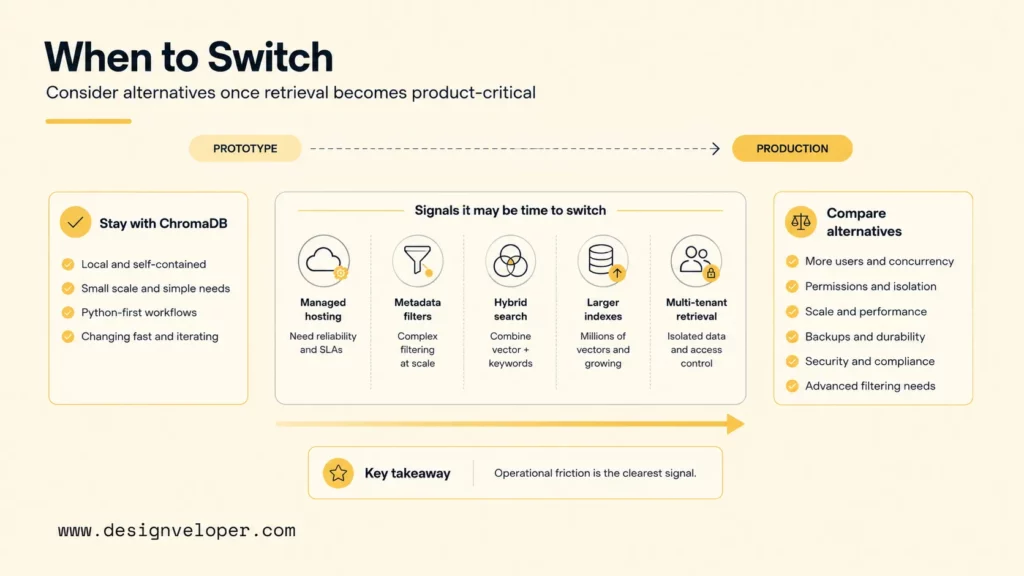
Consider a ChromaDB alternative when the retrieval layer no longer fits the product’s requirements or the team cannot operate it safely. A higher vector count alone is not enough reason to migrate. Check whether the current system meets your needs for access rules, query behavior, data freshness, backups, recovery, latency, and ownership before changing databases.
Switching becomes more reasonable when one or more of these gaps affect users or make the system costly to maintain:
- Data boundaries: The application needs tenant-aware or role-aware retrieval, and the current metadata and filter design is difficult to test or maintain. The application must still enforce authorization; a vector database does not grant permission just because a record has a tenant field.
- Search behavior: Users need exact keyword matches alongside semantic similarity, more control over ranking, or filters that match the product’s query patterns.
- Operations: The team needs a supported backup, recovery, scaling, or monitoring model that it cannot provide with its current deployment.
- Stack fit: Vector search creates avoidable synchronization work because the application’s source data already lives in PostgreSQL, Redis, or another system.
- Measured workload: Representative tests show that the existing setup misses a required latency, freshness, reliability, or cost limit after reasonable tuning.
Before switching only to reduce database operations or add hybrid search, check whether Chroma Cloud meets the workload. Its current documentation describes a managed deployment and a Search API for hybrid search. Confirm the required region, feature availability, data governance, retention, access controls, and total cost for your account. A managed service may solve a hosting gap without changing the database; a different engine may still be necessary when the data model, retrieval behavior, portability, or infrastructure control is the real constraint.
For example, a support assistant that serves several customer accounts may need an auditable way to exclude another tenant’s documents from every query. First test whether the existing schema and application authorization can enforce that boundary. If the team also needs a different filter model or operating setup, compare alternatives against those specific requirements instead of treating “production” as a product feature.
Recommended reading:
- What Is RAG in AI? How Retrieval-Augmented Generation Works
- How To Build A RAG Chatbot: Steps, Code & Best Practices
- How To Train A Chatbot With Your Own Data For Better Business Support
9 Best ChromaDB Alternatives By Use Case
The best ChromaDB alternative depends on where the index runs, how queries are filtered and ranked, and who owns production operations. The table is a shortlist, not a universal ranking: Pinecone and Qdrant offer managed paths, Weaviate emphasizes hybrid retrieval, and pgvector or Redis may fit an existing data stack. FAISS is a library rather than a database service, so it solves a different job.
| Alternative | Best fit | Main trade-off |
|---|---|---|
| Pinecone | Managed vector search for production apps | Vendor-managed model and usage-based costs |
| Qdrant | Filtered, metadata-heavy retrieval | Self-hosting still requires security and operations work |
| Weaviate | Hybrid keyword and vector search | More schema and ranking choices to manage |
| Milvus | Teams planning distributed, open-source deployments | Greater infrastructure and maintenance effort |
| pgvector | Applications already built around PostgreSQL | Vector workload shares the primary database’s resources |
| Redis | Low-latency retrieval in an existing Redis stack | Memory, index, persistence, and license choices need review |
| LanceDB | Embedded and multimodal data workflows | Deployment and concurrency fit depend on the chosen mode |
| Deep Lake / Deeplake | Multimodal AI data and dataset workflows | Check current product, API, and service terms carefully |
| FAISS | In-process similarity search and custom indexing | It does not provide a full database service |
Use each profile to decide whether a product deserves a place in a short list. Then test the candidates with the same corpus, query set, access rules, and operating assumptions. The differences below are about fit and trade-offs, not claims that one system is faster or more accurate for every workload.
Pinecone For Managed Production Search
Pinecone is a candidate when a team wants a managed vector service and does not want to operate its own database cluster. Its hosted indexes and namespaces can fit a SaaS support assistant that stores help-center content for several customer accounts. Keep tenant IDs and document status in the retrieval design, but have the application authenticate the user and apply an allowed tenant filter before sending a query.
Test Pinecone with real questions, metadata filters, expected source documents, and a revoked or outdated document. Compare retrieved evidence and final answer quality, then measure latency and projected usage under the team’s expected traffic. The trade-off is a managed, vendor-specific operating model: confirm regions, feature limits, data controls, support terms, and the cost of reads, writes, storage, and related services before committing.
Qdrant For Metadata-Heavy RAG
Qdrant suits retrieval systems that rely on structured metadata filters as well as vector similarity. Its payload filtering model is useful for a private knowledge assistant that must narrow results by matter, document status, or permitted group. The application should derive those filters from verified user permissions; a filter field is not an authorization system by itself.
For a legal knowledge assistant, test questions against approved and draft documents, multiple user roles, and a document that has been deleted or access-revoked. Check that restricted material never reaches the prompt, not only that the database returns plausible matches. Qdrant can be self-managed or cloud-hosted. Self-management offers more infrastructure control but leaves backups, network security, monitoring, and upgrades with the team.
Weaviate For Hybrid Search
Weaviate is worth testing when users combine natural-language requests with exact terms such as product codes, invoice numbers, or policy names. Its hybrid search combines keyword and vector retrieval, which can help a product catalog or support portal handle both kinds of clue in one query. For example, test “refund rules for invoice INV-2048” against the exact identifier and the meaning of the surrounding policy text.
Hybrid search still needs tuning. The team must decide how lexical and semantic scores contribute, confirm the right fields are indexed, and check whether the final ranked documents improve the answer. Weaviate provides both self-managed and hosted deployment paths, but a richer schema and ranking configuration can increase the work needed to operate and debug the system.
Milvus For Distributed Open-Source Deployments
Milvus is a candidate for teams that want an open-source vector database and are prepared to manage a distributed deployment. The project is available under Apache 2.0, and its official project guide describes the system and its deployment options. Zilliz Cloud provides a managed path for teams that want Milvus-related search without operating the full deployment themselves.
A media-search platform, for example, may need to index embeddings alongside a large collection of image or video metadata. Before choosing Milvus, test ingestion, index configuration, query latency, backup and restore, monitoring, and version upgrades with the team’s own infrastructure. Distributed capability is useful only when the workload needs it and the team can own the operational model; a small assistant may be simpler to run elsewhere.
pgvector For PostgreSQL Teams
pgvector adds vector similarity search to PostgreSQL, making it a practical option when application records, permissions, and embeddings already live in that database. A SaaS product can keep document IDs and account data close to the vectors and use SQL joins to assemble the retrieval context. The extension supports exact and approximate nearest-neighbor search, but teams still need to choose and tune indexes for their workload.
PostgreSQL roles, row-level security policies, and application checks—not pgvector alone—must enforce data access. Test filtered queries, updates, index maintenance, query plans, and database load while the usual application workload is running. pgvector can reduce the need for a separate service, but a dedicated vector database may fit better if vector retrieval begins to compete with core transactions or needs a different operating model.
Redis For Existing Low-Latency Data Stacks
Redis can be a sensible choice when the product already uses Redis and wants vector or hybrid retrieval near its cache, session, or real-time data workflows. Its vector search features support vector queries and metadata filters. A shopping assistant might use Redis to retrieve product candidates while the application checks current stock and user eligibility in the authoritative catalog.
Do not assume that a fast cache is automatically a low-cost vector store. Compare memory use, index size, persistence and recovery needs, update patterns, and the effect on existing Redis workloads. Redis Search terms also vary by version and license option; review the current Redis Search documentation and the terms for the exact edition you plan to deploy.
LanceDB For Embedded And Multimodal Workflows
LanceDB is a library-first alternative to evaluate when a team wants embedded retrieval or works with multimodal datasets. The LanceDB documentation describes its database APIs and deployment approaches; its open-source project uses Apache 2.0. A data-science team could use it to search text and image embeddings in a workflow that already works with local files or object storage.
Check whether the chosen deployment mode supports the application’s concurrent reads and writes, update frequency, recovery requirements, SDK, and data portability needs. An embedded developer experience can reduce setup for a single process, but it does not answer how several services share an index or how production incidents are handled. Compare those requirements with the managed service’s current terms before treating local-to-cloud as a seamless migration.
Deep Lake And Deeplake For Multimodal AI Data
Deep Lake is relevant when a workflow stores and searches more than text chunks, such as images, audio, video, or other AI dataset content. The product and naming have evolved: the current Deeplake documentation describes an AI database, while earlier Deep Lake integrations may use a different Python API or managed-database path. Verify which product, version, and deployment the application would use before comparing it with a Chroma collection.
For a document assistant that also searches diagrams or recorded training, test ingestion and retrieval for each media type, metadata filters, export options, and the path from the existing vector-store integration. The open-source Deep Lake repository is Apache 2.0, but hosted-product terms and pricing are separate questions. Do not estimate service cost from the library license; confirm current plans and compatibility with the vendor.
FAISS For In-Process Similarity Search
FAISS is a library for similarity search and clustering, not a hosted vector database. Its official repository describes CPU and GPU index options and uses the MIT license. FAISS can fit offline retrieval, research experiments, or an application that needs direct control over how an index is built and queried.
A batch recommendation job could load a local index, retrieve nearby items, and write results to a separate application store. The team would still need to design persistence, metadata filtering, updates, a shared API, concurrency, backups, and access control. Choose FAISS when that flexibility is valuable and the application can own the missing database functions; do not treat it as a drop-in service replacement.
For another view of the vector-search category, compare this shortlist with the best open-source vector database options and note which candidates are full services, PostgreSQL extensions, or application libraries.
How To Choose The Right ChromaDB Alternative
Choose a ChromaDB alternative by eliminating options that fail a mandatory requirement, then comparing the remaining tools against one workload. The deployment and billing models below are more useful than a single “free” or “paid” label: managed plans charge for service usage, while self-hosted tools shift more work and infrastructure cost to the team.
Pricing pages, product terms, and deployment options were checked on October 19, 2026. The table summarizes billing models, not quoted prices. Recheck regions, included limits, license terms, and service eligibility before purchase.
| Option | Deployment And License | Cost Model To Check | Operating Work |
|---|---|---|---|
| Pinecone | Managed service; vendor terms | Plan and usage charges | Less database infrastructure to run; monitor usage, regions, limits, and vendor dependency |
| Qdrant | Apache 2.0 engine; self-managed or cloud | Cloud cluster resources or self-hosted infrastructure | Self-hosting requires security, backups, monitoring, scaling, and upgrades |
| Weaviate | BSD 3-Clause database; self-managed or cloud | Cloud storage, compute, and plan | Self-hosted operations plus schema, indexing, and ranking decisions |
| Milvus | Apache 2.0 project; self-managed or Zilliz Cloud | Managed Zilliz Cloud plan or infrastructure and engineering | Distributed deployment may require database, storage, and platform expertise |
| pgvector | PostgreSQL-licensed extension; runs inside PostgreSQL | Primary database hosting, compute, storage, and support; no separate vector-service price | Share capacity with application queries; manage SQL plans, indexes, and database recovery |
| Redis | Self-managed or cloud; Search terms depend on version and license option | Redis Cloud plan or infrastructure and memory | Review index memory, persistence, updates, and the exact license/edition |
| LanceDB | Apache 2.0 open-source project; embedded, self-managed, or hosted options | Ask about hosted terms; self-managed cost depends on infrastructure | Work depends on deployment mode, sharing, concurrency, and recovery design |
| Deep Lake / Deeplake | Apache 2.0 open-source library; hosted product has separate terms | No product-specific public price sheet verified for this comparison; confirm current terms with the vendor | Confirm product/API compatibility, media processing, and hosted-service responsibilities |
| FAISS | MIT-licensed library; runs within your application | No database-service bill; budget for compute, storage, persistence, and engineering | Your team builds the service, update, access, monitoring, and recovery layers |
For PostgreSQL, “no separate vector-service price” does not mean zero cost: larger indexes can change the capacity and maintenance needs of the primary database. Likewise, a self-hosted license does not include engineering time, cloud storage, monitoring, backup, or recovery. For a closer look at the architectural distinction, see vector databases vs. traditional databases.
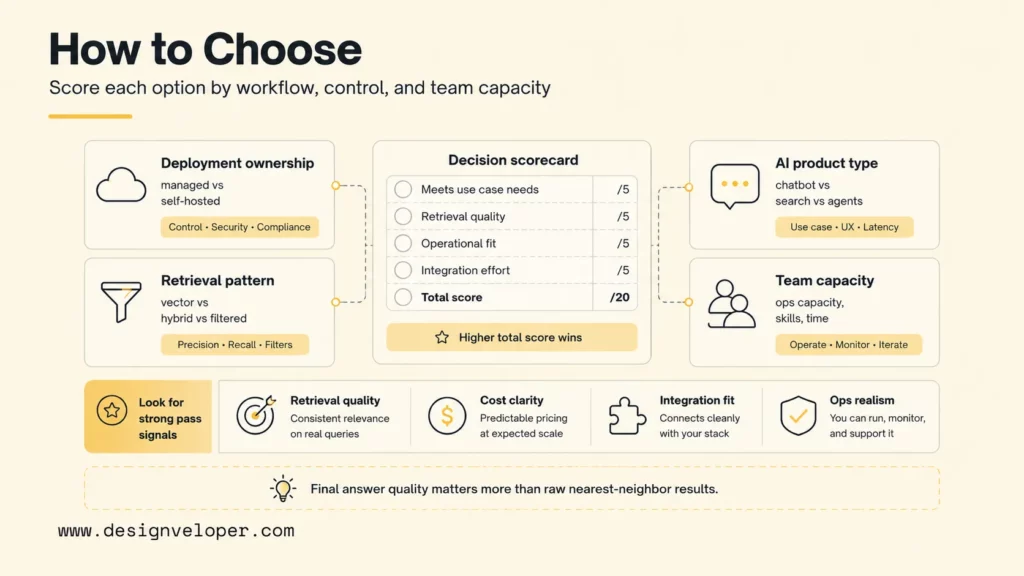
Use the same 1–5 rubric for each candidate. The score is a comparison aid, not a universal pass threshold:
- 1 — Fails: It misses a requirement or cannot complete a representative test.
- 2 — Major workaround: It can work only with substantial custom code, operational burden, or an unresolved trade-off.
- 3 — Baseline met: It meets the need, but with a material limitation the team has accepted.
- 4 — Good fit: It meets the requirement with manageable implementation and operating effort.
- 5 — Validated: It meets the requirement in tests using representative data, permissions, and expected traffic.
| Score Area | What To Test | Acceptance Evidence |
|---|---|---|
| Retrieval quality | Top-k documents, filtered results, hybrid queries, citations, and final answers | Representative questions return the expected sources and acceptable answers |
| Data boundaries | Tenant filters, user roles, revocation, deletion, retention, and audit needs | Unauthorized documents never enter the prompt or response |
| Operations | Backups, restore, monitoring, scaling, upgrades, incident response, and ownership | A named team can operate and recover the selected deployment |
| Integration fit | SDKs, SQL or data formats, application permissions, observability, and CI/CD | The required workflow works without fragile glue code |
| Total cost | Service use, infrastructure, storage, egress, model calls, migration, and staff time | Projected cost stays within a budget the team has approved |
Set hard gates before adding scores. A candidate that fails a required security, authorization, data-residency, deletion, or availability condition is a no-go even if its average is high. Among candidates that pass every gate, compare the five score areas using the same evidence. Prefer the option that meets the requirements with the least total cost and operational risk; if candidates are close, favor the one that fits the current stack with fewer new moving parts and a tested rollback. Do not average away a failed requirement.
Example 1: A B2B SaaS team already stores customer records and access policies in PostgreSQL. It compares pgvector with a managed vector service using the same help articles and user questions. The team checks that a user cannot retrieve another account’s document, records query latency and database load during normal application traffic, and estimates host cost plus service fees. If PostgreSQL passes the agreed access and load gates, it avoids adding another system; if it fails, the managed candidate remains in the migration test. The result is a workload-specific decision, not a general ranking.
Use the decision graphic as a reminder to score the actual application rather than the product names.
How To Migrate From ChromaDB Without Losing Retrieval Quality
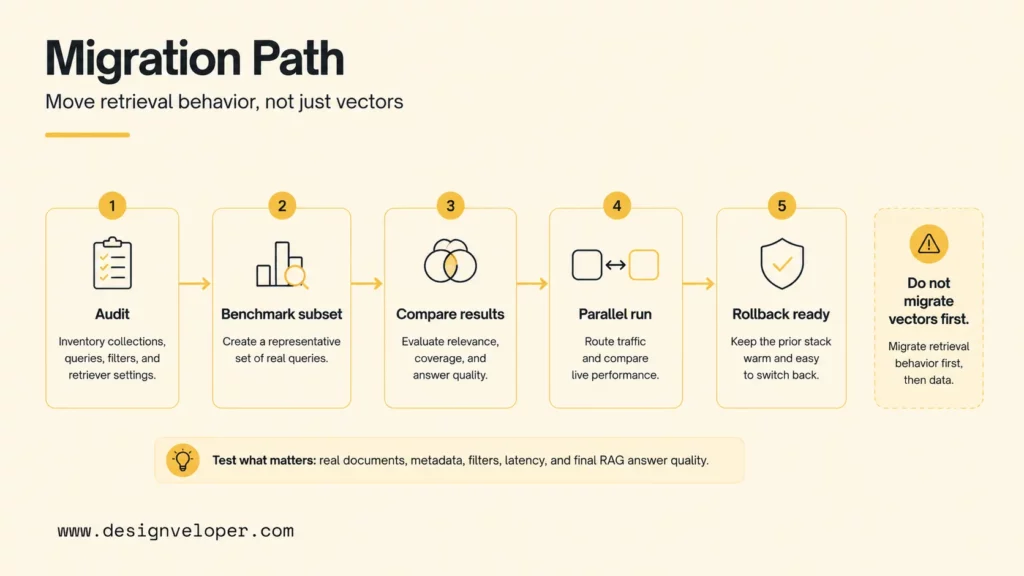
A safe ChromaDB migration moves the retrieval behavior, not only the stored vectors. Before selecting an export or connector, inventory the collections, document IDs, metadata, embedding model and dimensions, distance metric, chunking rules, filters, update process, and deletion behavior. This inventory gives the team a baseline for deciding whether to reuse embeddings or rebuild them.
Run a staged test rather than moving the full corpus in one step:
- Map the current path. Record where source documents come from, how they are split, when embeddings are refreshed, which filters run, and how the application checks access. Include downstream prompt, citation, and human-review steps.
- Build a representative test set. Include common questions, rare terms, recent and stale content, ambiguous requests, restricted documents, deleted records, and past retrieval failures. Keep the expected source IDs and access rules with each case.
- Load a sample into the candidate. Verify vector dimensions, distance settings, IDs, metadata types, filter logic, and update/delete behavior. Re-embed only when the model, dimensions, chunking, or migration plan requires it.
- Compare retrieval and answers. Run the same queries through ChromaDB and the candidate. Review retrieved source IDs, ranking, citations, final answer quality, latency, ingestion time, and failure behavior. A different ranking is not automatically better.
- Shadow real traffic. If the test set passes, send a copy of production queries to the candidate without using its results for users. Log query IDs, retrieved IDs, filter outcomes, latency, errors, and answer-quality review while respecting privacy and retention rules.
- Cut over gradually and keep rollback ready. Route a limited workflow first, watch the agreed guardrails, and retain a tested way to return traffic to ChromaDB. Define how data changes made during the trial will be reconciled before the cutover.
Set the measurement plan before the trial. Choose an owner, a representative query set, a review window, and pass/fail limits for retrieval quality, access violations, latency, freshness, and cost. For example, the security owner can review every restricted-document case while the application team tracks latency and failures against its existing service target. Use the team’s actual thresholds; there is no single benchmark result that makes a database migration safe for every product.
Keep the migration reversible until the candidate passes the same checks as the current system. A written rollback plan should name who changes routing, how the latest writes are recovered, which alerts trigger a rollback, and how users are handled if retrieval is temporarily unavailable. This is especially important when the new database changes the metadata schema or the application’s query code.
For deeper reading:
- Advanced RAG Techniques For Production-Grade AI Search
- RAG Pipeline Diagram: Components, Workflow, And Production Design
- AI Chatbot Integration: A Practical Guide to Connecting Your Systems
What A Production RAG System Still Needs
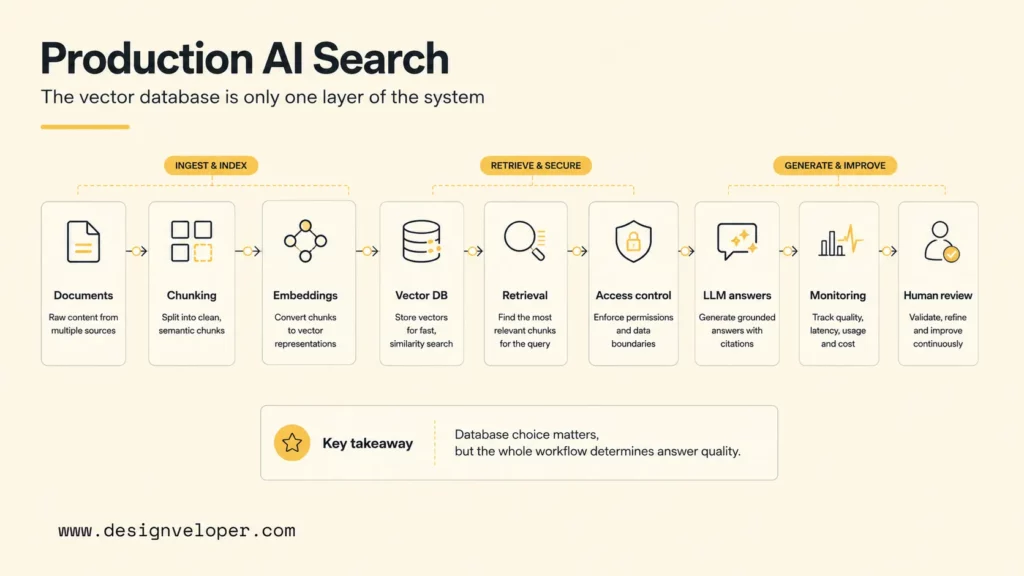
A vector database is only one component in a production retrieval-augmented generation system. The application must also handle source ingestion, chunking, embeddings, access checks, ranking, prompt construction, citations, answer evaluation, monitoring, and fallback behavior. A new store cannot repair weak source documents, stale embeddings, or an authorization rule that the application never applies.
For sensitive or multi-tenant content, enforce permission checks before retrieval and recheck them before exposing citations or generated text. Log enough to investigate missing or incorrect results, but limit personal or confidential content in logs. Define what the system should do when it finds no suitable source: ask a clarifying question, return a bounded “not found” response, or hand the request to a person.
A practical rollout starts with one workflow and one measurable user need. Document the source data, user roles, expected query types, freshness requirement, review owner, and rollback condition. If your team needs help shaping that work into a production AI workflow, explore Designveloper’s AI development services. The database decision should fit that end-to-end plan, not substitute for it.
FAQs About ChromaDB Alternatives
These answers cover practical questions that remain after shortlisting a tool, including embedding reuse, access boundaries, workload fit, and the migration decision.
Can ChromaDB Alternatives Use My Existing Embeddings?
Often, yes, if the destination accepts the same vector dimensions and distance metric and you preserve the document-to-vector mapping. Reuse is safest when the embedding model and chunking rules stay the same. Re-embed when the model, dimensions, normalization, or chunking changes, and compare retrieval results before replacing the old index.
Does A Vector Database Enforce Tenant Permissions By Itself?
No. Metadata filters can narrow results, but the application must authenticate users and apply filters from trusted permissions. Test cross-tenant queries, changed roles, revoked access, and deleted documents. Confirm that restricted records cannot enter the model prompt or appear in citations.
What Is The Difference Between FAISS And A Vector Database?
FAISS is a similarity-search library that an application embeds and operates. A vector database normally provides a service or database layer for shared access, persistence, updates, filtering, and operations. Choose FAISS when your team wants to build those surrounding functions; choose a database when the application needs them as managed or built-in capabilities.
Is pgvector Enough For A Production RAG Application?
It can be, when PostgreSQL meets the workload’s query, access, update, and latency requirements. Test vector search alongside normal database traffic, including filters, index maintenance, and recovery. Keep authorization in PostgreSQL policies and application logic; do not assume the extension creates access control automatically.
How Can I Compare Managed And Self-Hosted Costs?
Compare the same workload and include service usage, storage, network transfer, backups, monitoring, model calls, migration effort, and engineering time. Managed hosting can lower the work your team owns while adding usage charges. Self-hosting can reduce vendor fees but adds infrastructure and on-call duties. Confirm current prices and license terms with each provider.
Before choosing, define the workload and mandatory constraints, run the same benchmark across shortlisted options, and proceed only when retrieval quality and security gates pass. That evidence should decide whether to keep ChromaDB with a different deployment or adopt another engine.
Also published on

Share post on










Related Articles


9 Best ChromaDB Alternatives for RAG and Vector Search In 2026
9 Best ChromaDB Alternatives for RAG and Vector Search In 2026 Published October 21, 2026
How To Build A RAG System: Step-By-Step (New Guide)
How To Build A RAG System: Step-By-Step (New Guide) Published October 19, 2026
8 Best AI Onboarding Tools For Faster Employee Ramp-Up In 2026
8 Best AI Onboarding Tools For Faster Employee Ramp-Up In 2026 Published October 19, 2026


















