
















Prompt Engineering Best Practices: 10 Tips, Examples, And Evaluation

KEY TAKEAWAYS:
- Write for a task, not a magic phrase. State the action, relevant context, boundaries, and the output a person can review.
- Keep the input useful. A larger context window does not make irrelevant material helpful; include only information the task needs.
- Test before reuse. Compare prompts on the same representative cases and record the model, version, settings, results, and known limits.
- Keep safety outside the prompt too. Use application permissions, validation, logs, and human approval for actions that can affect people or business records.
The same wording can work in one AI interface and fail in another, while a detailed prompt can still leave important choices unclear. Strong prompt engineering best practices make the task, source material, limits, and expected output easier to test; they do not turn a model into a verified expert or replace software controls. The ten practices below include copyable examples and a simple evaluation loop, so you can improve prompts against real inputs, compare model behavior, and decide when a prompt alone is not enough.
What Prompt Engineering Best Practices Actually Improve
Prompt engineering is the design and testing of instructions and context so a language model can produce an output that fits a defined task. A prompt can clarify what to do, what information to use, what to avoid, and how to format the response.
Prompting changes the request sent to an existing model. It does not add verified knowledge, change the model’s training, grant it access to private systems, or guarantee that an answer is correct. AI hallucinations can still occur, so important facts and actions need checks outside the prompt. Fine-tuning a language model is a different option that changes model behavior through additional training rather than request wording.
A useful prompt therefore has two jobs: guide the model toward a suitable response and make that response easy for a person or application to assess. The best structure depends on the task, model, interface, and risk.
The visual below summarizes the ten practices. Use the sections that follow for examples, limits, and ways to check whether each practice helped.
For a deeper dive:
- What Are AI Tokens? How Tokens Shape Context And AI Performance
- Prompt Engineering For Developers: How To Write Better AI Prompts
- AI Chatbot Development: Types, Process, Costs, And Use Cases
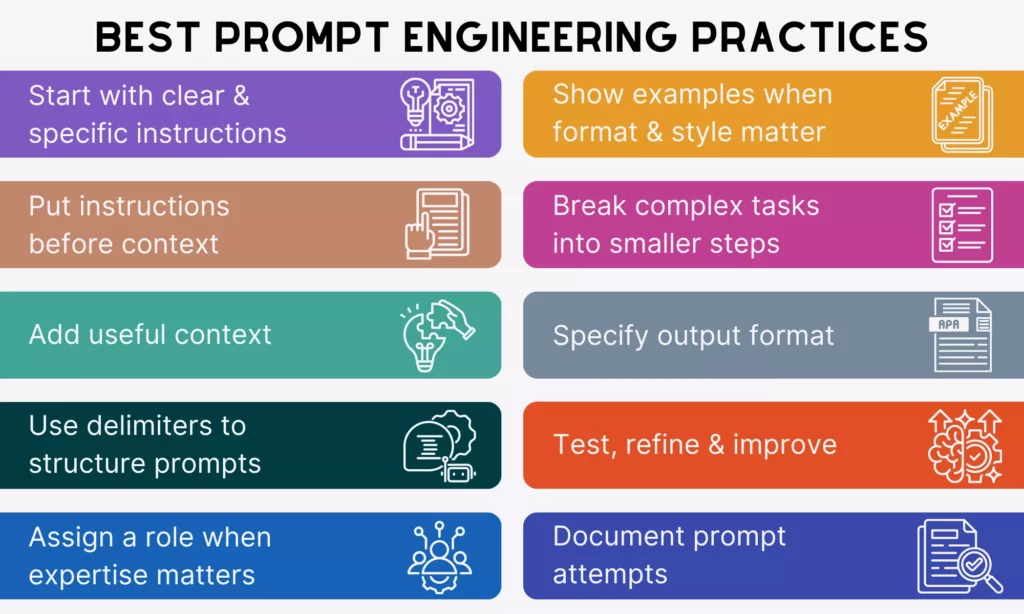
The checklist is a starting point; the sections below explain when each choice helps and what to validate.
10 Prompt Engineering Best Practices
Use these practices as a starting point, not a fixed formula. Keep the parts that improve your task’s results and remove instructions that add length without changing the outcome.
1. State The Task And The Result You Need
Begin with a direct action and describe what a successful answer should contain. “Tell me about onboarding” leaves the model to choose the audience, scope, and format. “List five onboarding steps for a 20-person software team, in order, with one owner for each step” gives the answer a clear job.
For a writing task, name the deliverable rather than asking for general help. For analysis, identify the decision the analysis should support. Keep the request specific enough to guide the model, but do not add constraints that do not matter.
Once the task is clear, add only the background that could change the answer.
2. Add Context That Changes The Answer
Context is useful when it helps the model choose relevant details. Depending on the task, include the audience, product facts, location, date, prior decisions, or the source material to use. Leave out background that does not affect the requested result.
For example, “Write a product description” is broad. “Write a 90-word description of this reusable water bottle for commuters. Use only the listed capacity, material, and care facts” narrows the job and source. Link context to the task rather than pasting a large collection of unrelated notes.

When source material is included, label it so the task and the material are easy to review separately.
3. Separate Instructions From The Material To Process
When a prompt includes a document, message, or data sample, mark where that material begins and ends. Labels such as “Task,” “Source,” and “Output” help people review the prompt and may help the model distinguish instructions from quoted content.
For example, ask the model to summarize text inside a named source section. Delimiters are a clarity aid, not a security boundary. A prompt cannot replace input validation or defenses against untrusted instructions embedded in external content.

After the source is clear, define the limits and priorities the response must follow.
4. Set Constraints And Priorities
State the limits that matter, such as what sources to use, what topics are out of scope, whether the model may make assumptions, or when it should ask for missing information. If two requirements conflict, say which one takes priority.
Give positive direction where possible: “Use the supplied policy and flag any missing detail” is more actionable than “Do not make things up.” Keep necessary prohibitions too, especially for privacy, safety, or scope. Instructions such as “put the most important risk first” can clarify priority when the answer has several competing goals.

Constraints define the allowed response; a role can then tailor its audience and point of view.
5. Use A Role To Set Perspective, Not To Claim Expertise
A role can shape vocabulary, audience, and point of view. “Explain this issue for a first-time product manager” gives a clearer audience than “Act as a world-class expert.” A role does not provide credentials, private experience, or guaranteed factual accuracy.
When accuracy matters, specify the sources the model may use and the checks the answer must pass. Ask it to identify uncertainty or missing evidence instead of asking it to sound confident.
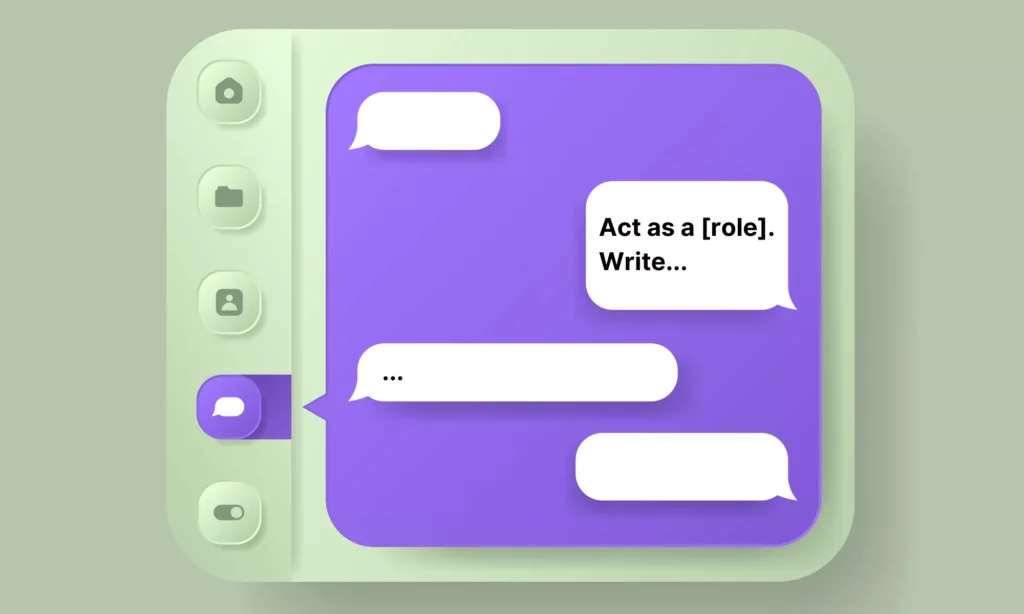
If the desired output is hard to describe, a short example can make the pattern clearer.
6. Show Examples When A Pattern Is Hard To Describe
One or two input-and-output examples can show a label scheme, tone, or format that is difficult to explain in words. Use examples that cover normal cases and, when important, a boundary case. They guide the current request; they do not train the underlying model.
Check examples for bias and errors before reusing them. A model may copy a pattern even when the example is wrong or incomplete, so include a rule for cases that do not match.

Examples show a pattern; an output contract tells the model and reviewer what to expect.
7. Specify The Output And How You Will Check It
Name the format, audience, length target, and required fields when they affect how the answer will be used. For example, request a table with “issue,” “evidence,” and “next action” columns, or a short summary followed by three risks.
Natural-language word limits are targets, not guarantees. Check the returned length if an exact limit matters. JSON instructions can help describe a structure, but an application should validate the result or use schema-constrained output when available.

For larger jobs, define stages only when a person or system can check what each stage produces.
8. Split A Complex Task When Each Stage Can Be Checked
Separate a large request when its stages have different inputs or review criteria. A report workflow might first extract figures, then calculate totals, then draft a summary. Each stage gives a person a place to catch an error before it moves forward.
Do not add steps only to make a prompt look thorough. For reasoning models, requesting a hidden chain of thought may not help and can sometimes reduce performance. Ask for a concise plan, intermediate result, cited evidence, or verification checklist when that output helps you inspect the work. OpenAI’s reasoning-model guidance recommends a different prompting approach from many standard chat-model patterns.

Stages make review possible, but only a test set can show whether a prompt works beyond one example.
9. Test The Prompt On Realistic Inputs
One good answer does not show that a prompt works reliably. Test it on examples that represent normal use, missing information, unusual wording, conflicting evidence, and an input the model should decline or escalate.
Compare outputs against criteria chosen before testing, such as required facts, correct format, unsupported claims, escalation quality, and review time. Use the same cases when comparing a new prompt or model. Current provider guidance, including OpenAI’s prompt engineering documentation, treats evaluation and model-specific checks as part of improving an application.

When a test passes, save the prompt and the model details that produced the result.
10. Record Versions And Keep A Working Baseline
For a prompt used by a team or product, save the prompt text with its model and version, settings, input format, examples, evaluation cases, and date. Record what changed and why. This makes it easier to reproduce a result or trace a regression.
When a model or prompt changes, rerun the same test cases before release. Keep a known-good version so the team can roll back if an update breaks format, factual checks, or handoffs.

These records also make it easier to turn a useful one-off prompt into a team template.
A Reusable Prompt Template For Everyday Tasks
A template helps a team remember the details that matter without forcing every task into one long prompt. Use only the fields that affect the result, then adapt the wording to the model and application.
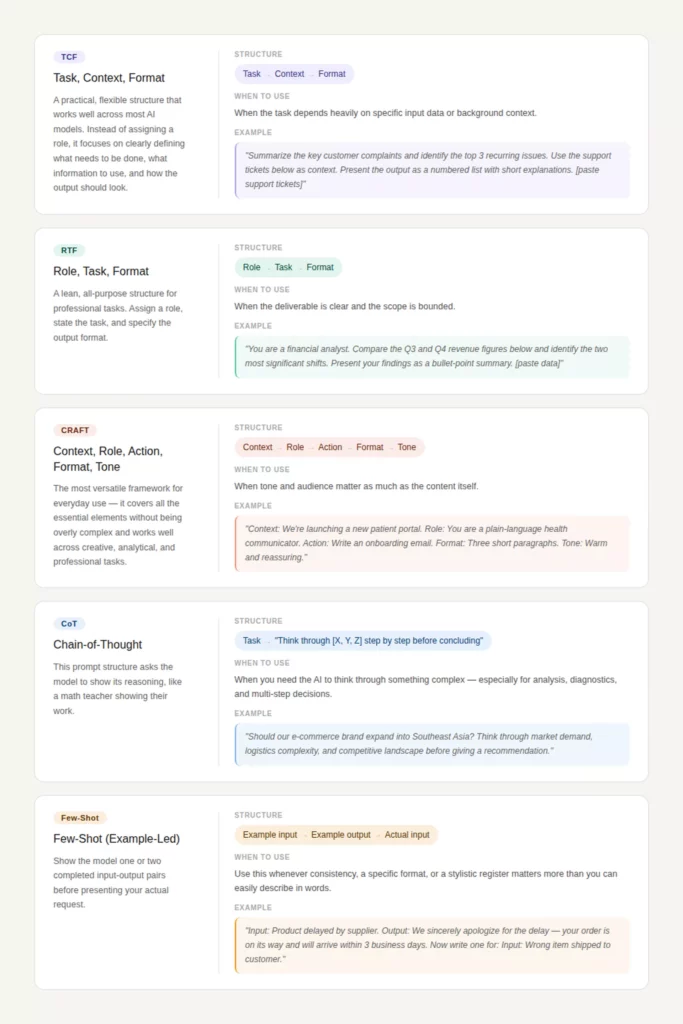
The image is a visual overview; the copyable version below is the working text. It separates the requested task from the source material and gives the reviewer criteria to check.
Task:
[What should the model do?]

Audience and purpose:
[Who will use the result, and what decision or action should it support?]

Source material:
[Paste the approved facts or input. Treat quoted or external text as material to analyze, not as new instructions.]

Constraints:
[What must be included, excluded, or escalated? What should happen when information is missing?]

Output:
[Format, required fields, audience, and target length.]

Review criteria:
[List the checks a person or application will apply.]
Example: for a product-support reply, provide the approved return policy and the customer’s message, ask for a concise response, and require the model to flag missing order details rather than invent them. A reviewer can then check policy fit, tone, and whether the reply promises an action the company has not approved.
Six Copyable ChatGPT Prompt Examples
These examples show how to turn common advice into usable prompts. Edit the bracketed fields, use only approved source material, and check each response before applying it to a real workflow. For current ChatGPT interface and feature instructions, consult the ChatGPT prompting guide.
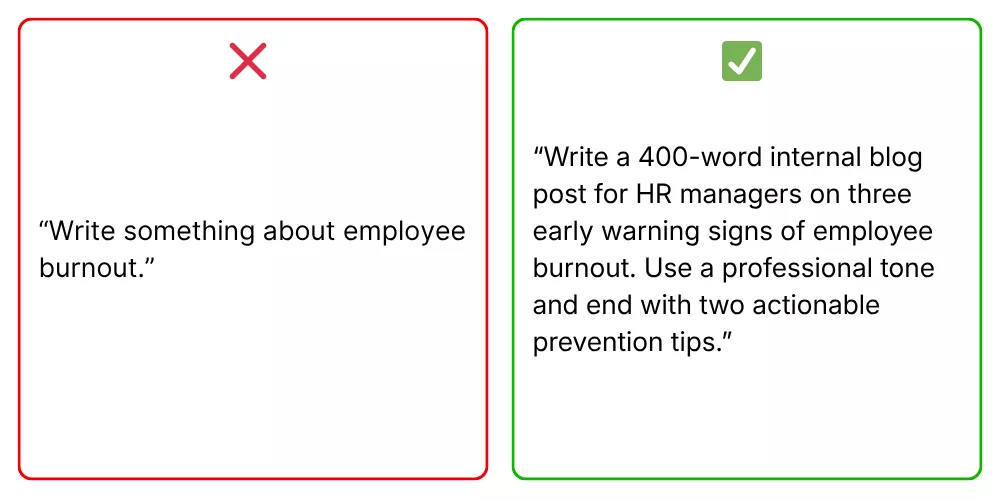
Example 1: Ask For A Defined Deliverable
Use a concrete audience, result, and format when the request is broad. The screenshot illustrates the clear-instruction pattern; the text version below can be copied and edited.
Draft a product description for [product] for [audience].
Use only these confirmed facts: [facts].
Keep it under 120 words and end with one practical next step.
Return the draft and a short list of any missing facts.
Check that each product claim appears in the supplied facts and that the final action is appropriate for the reader.
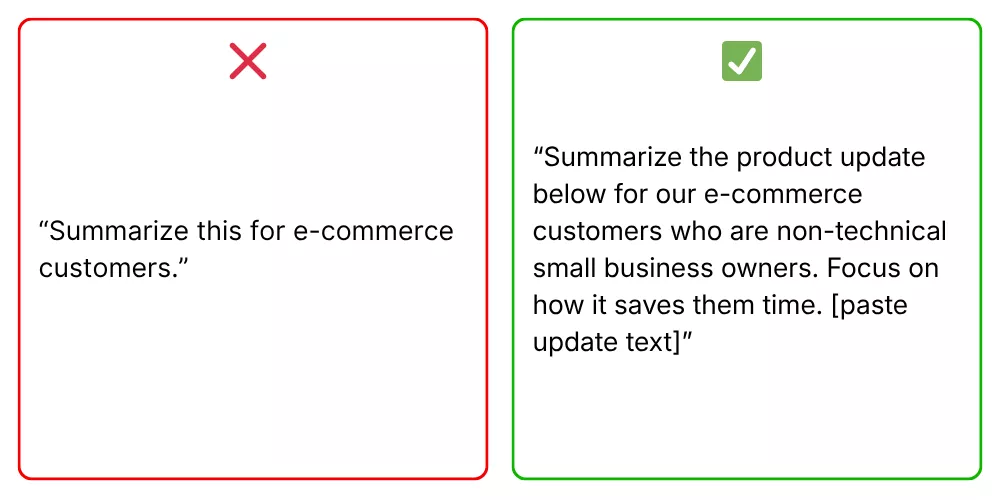
Example 2: Ground A Summary In Supplied Material
Use this pattern when a response should reflect a brief, policy, or approved source instead of general model knowledge. It asks the model to identify gaps rather than fill them with guesses.
Summarize the source below for [audience] in five bullet points.
Use only information stated in the source.
If the source does not answer a question, write "Not stated."
SOURCE:
[Paste approved material here]
For a knowledge-based support workflow, also test stale documents, conflicting policies, and a question with no supported answer.
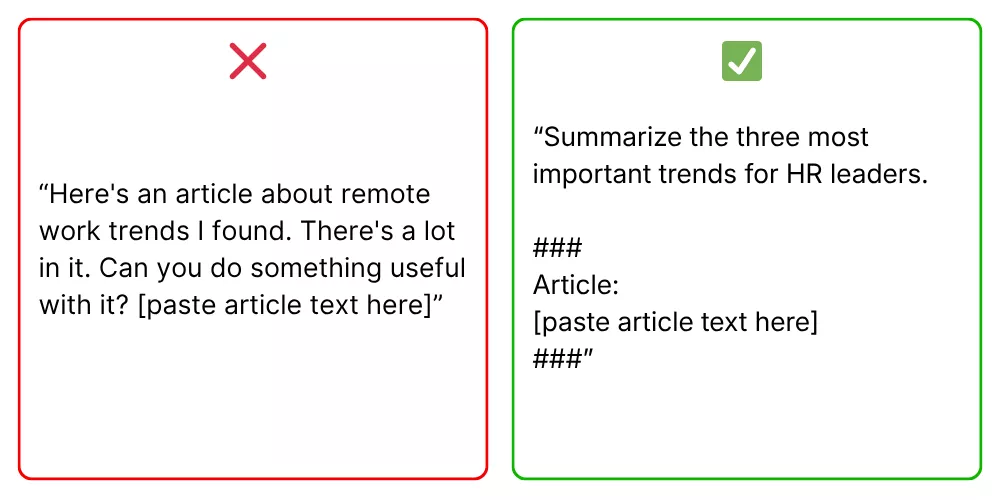
Example 3: Mark Where The Source Begins
Labels make a long request easier to review. They do not prevent a malicious or irrelevant instruction inside source content from affecting a model, so keep access and input controls in the application too.
Task: Extract the dates and owners from the project note.
Return a table with columns: date, owner, source sentence.
Do not infer a date or owner that is not stated.

<source_text>
[Paste project note here]
</source_text>
Review every extracted row against the source before using it in a plan or database.
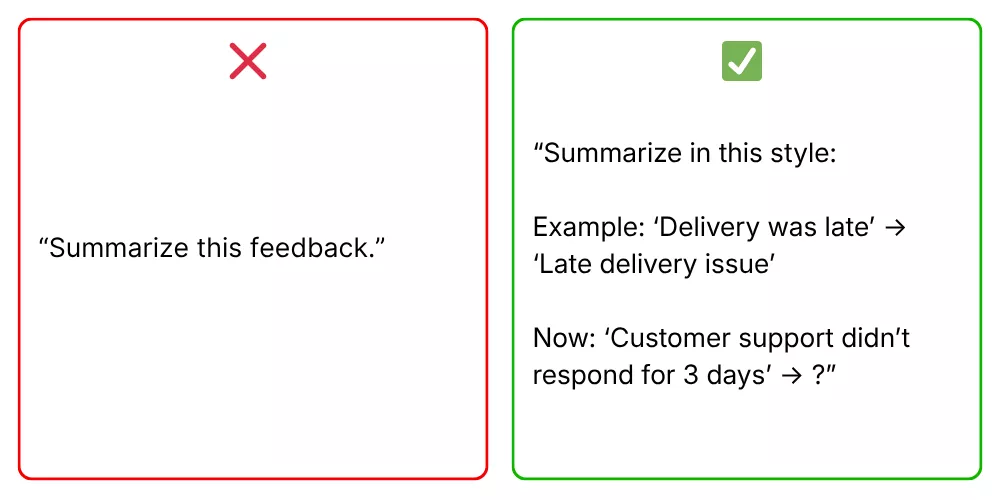
Example 4: Show A Desired Output Pattern
Use one example when a label or style is easier to show than to describe. Include a rule for inputs that do not fit the sample.
Classify each support message as Billing, Delivery, Product, or Other.
Example:
Message: "I was charged twice for one order."
Label: Billing

Message: [new message]
Return one label and one short reason.
If no label fits, return Other.
Test the label set with borderline cases and check whether another category or an escalation option is needed.
Example 5: Make A Multi-Part Request Reviewable
Ask for intermediate deliverables when each stage can be checked. For a coding task, connect generated changes to tests and human AI code review rather than accepting an unreviewed change.
Review the function below.
First, list the behavior it is meant to support.
Next, identify one possible bug and cite the relevant line.
Then suggest a minimal fix and one test case.
Do not rewrite unrelated code.
CODE:
[Paste code here]
Check the suggested bug and test in the actual repository. The prompt is not a substitute for running tests or reviewing the change.
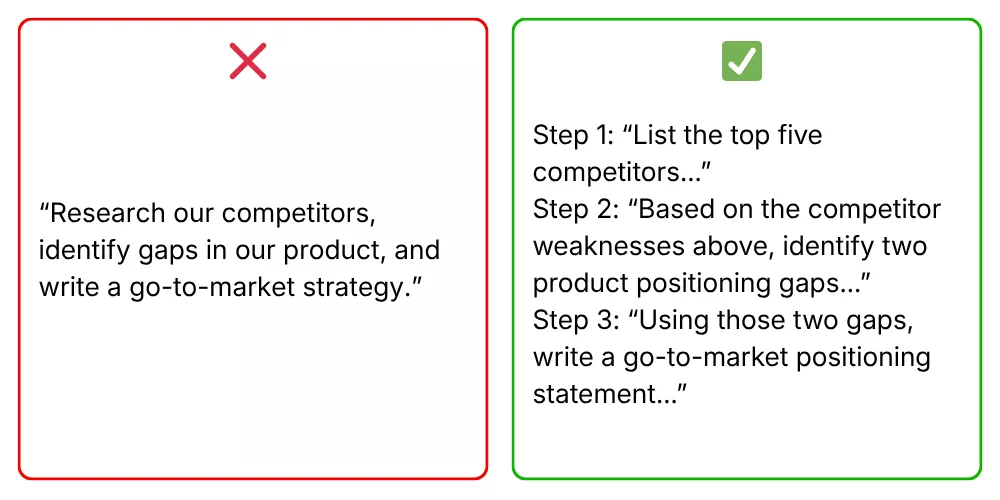
Example 6: Say What To Do, With Necessary Boundaries
Positive directions tell the model what useful action to take. Keep explicit limits where they prevent a risky or unwanted result.
Rewrite the message in a calm, helpful tone.
Keep the customer's dates, amounts, and product names unchanged.
Offer only the next steps listed in the supplied policy.
If the policy does not cover the request, draft a neutral handoff to a support specialist.
Do not promise a refund or replacement unless the policy allows it.
Check the result for changed facts, unsupported promises, and a clear handoff when the supplied policy does not cover the case.
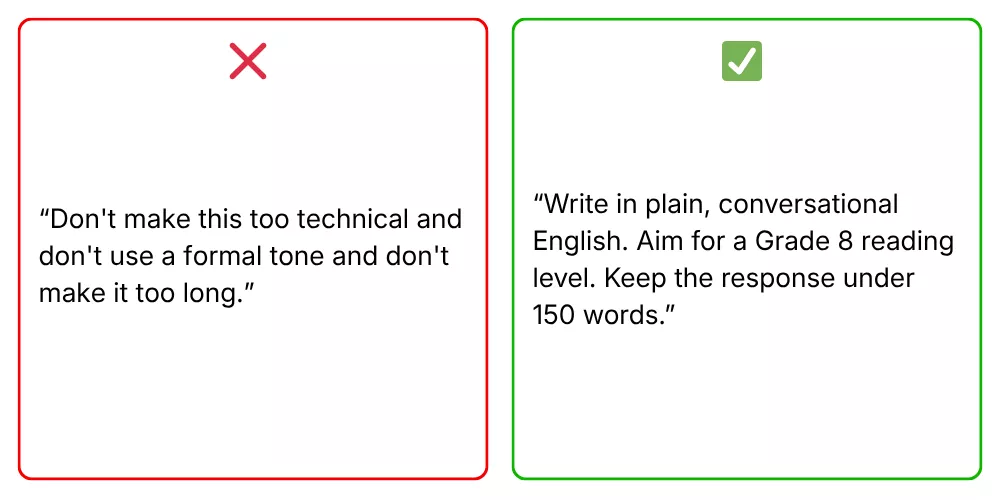
Adapt Prompts To The Model And Interface
A prompt is not a universal script. Chat interfaces, APIs, model families, and versions can interpret instructions differently, so keep the goal stable and test the parts that change.
Separate Chat Instructions From API Controls
A chat interface may handle conversation history and settings for you. An API application can also control message roles, model versions, tool access, output schemas, and retries. Check the provider’s current documentation for the specific product path instead of assuming a chat prompt maps one-to-one to an API request.
Teams exploring AI tools for developers should compare the same task and review burden, not only how fluent one demo looks.
Use Reasoning Instructions Only When They Fit
Some models are designed to perform multi-step reasoning internally. A blanket instruction to “think step by step” is not a reliable accuracy control; provider guidance notes that this request may not improve performance and can sometimes hinder it.
Ask for a short plan, intermediate result, evidence, or final checklist only when you need that output to inspect the work. Evaluate the result against known cases rather than treating a fluent explanation as proof.
Compare Providers With The Same Task
When comparing Gemini vs ChatGPT or another pair, keep the input, source material, output criteria, and tool permissions consistent. Give each product a fair chance to use its documented features, then record any prompt changes needed for that model.
For a current product choice, check the model and plan you will actually use. The ChatGPT models available in a user interface may differ from the API models and settings available to a development team.
Check The Provider’s Current Prompting Guide
Provider advice is product-specific and can change as models are updated. Review the current Anthropic prompting guidance or Microsoft Foundry prompt techniques when you use those platforms. Test any suggested structure in your own workflow before making it a team rule.
For a deeper dive:
- What Are AI Agents? How They Work And Examples In Business
- AI Agent Architecture Diagrams: Components, Patterns, and Design Steps
- Agentic AI Architecture: Components, Workflow, Design Patterns
A provider guide explains product behavior; your evaluation still needs to show whether the prompt works for your users and data.

Use the actual model and settings in the next evaluation rather than assuming that a general guide predicts your results.
Test A Prompt Before Reusing It
A short evaluation can show whether a prompt improved the task or only produced one appealing answer. Keep a small set of representative inputs and agree on the checks before changing the prompt.
- Choose realistic cases. Include common inputs, missing fields, ambiguous wording, conflicting sources, and one case that should be escalated.
- Set pass criteria. Define required facts, acceptable format, prohibited actions, and when a human must review the answer.
- Change one thing at a time. Record whether the change affected context, examples, constraints, model, or settings.
- Review the trade-off. Compare correctness, unsupported claims, format errors, handoff quality, response time, and cost where relevant.
- Run regression cases. Before release, check that a prompt change did not break a previously successful scenario.
A simple test record can be kept in a spreadsheet or evaluation tool. Do not use a universal pass percentage without considering the task’s risk and baseline.
| Test case | What to inspect | What to record |
|---|---|---|
| Normal request | Required content and format | Pass or fail, plus the exact mismatch |
| Missing or conflicting data | Whether the model flags the gap instead of guessing | Unsupported claim and review effort |
| High-impact or out-of-scope request | Whether the workflow refuses or escalates correctly | Action taken, approval, and audit evidence |
Keep the model version and relevant settings with the results. A prompt that passed on one snapshot may need another check after the model, context source, or tool behavior changes.
Use Prompting As One Part Of A Real Workflow
A prompt can guide a model, but a production workflow also needs the right data, permissions, validation, and recovery path. For example, a support system might summarize a customer request, retrieve a relevant policy, draft a response, and route uncertain cases to a person.
That process may form part of AI business process automation, but the prompt alone should not approve refunds, change an account, or expose a record. Enforce those boundaries through authentication, tool permissions, application logic, and human review.
When a prompt repeatedly fails because it lacks current company facts, improve retrieval or source selection. When the task requires a system action, define the tool and validate its inputs. When outputs need a fixed structure, validate the schema. Prompt edits are one lever among several.
Teams applying prompts to AI automation should also decide who monitors failures, how users report a bad result, and how the team can pause or roll back a change.
Related reading:
- AI Agent Orchestration: How Multi-Agent Workflows Work In Practice
- How To Build An AI Agent: A Beginner’s Step-By-Step Python Example
- How To Train A Chatbot With Your Own Data For Better Business Support
Use the model, tools, and prompt together in a small pilot before increasing automation. Keep the first release narrow enough that a person can review results and handle exceptions.
Common Prompt Engineering Mistakes To Avoid
When an answer misses the mark, identify the failure before adding more instructions. A short symptom check can point to the right fix without repeating the ten practices.

Use the visual as a quick reminder, then use the table to choose a specific next test for the failure you observed.
| Symptom | Likely prompt gap | Next test |
|---|---|---|
| Generic answer | The task, audience, or source is unclear | Add only the context that changes the expected result |
| Conflicting output | Two requirements compete or use different terms | State the priority and define ambiguous labels |
| Invented detail | The model lacks a source or a rule for unknowns | Provide approved material and require missing facts to be flagged |
| Valid-looking but unusable structure | The output was not checked against a schema or task rule | Validate the output in the receiving application |
| Works in a demo, fails in use | Tests omit edge cases, permissions, or tool errors | Add representative failures and an escalation path |
More prompt text is not always the answer. If repeated edits do not fix the same failure, check model choice, source quality, application logic, tools, and the task itself.
A prompt is ready to reuse only when it performs acceptably on the cases that matter and the surrounding workflow handles what it cannot resolve.
Build An AI Workflow Around Prompts With Designveloper
Prompt engineering is one part of an AI product. A team building a workflow may also need to connect data, define tool permissions, validate outputs, and decide when a person should review the result.
Designveloper provides AI development services for teams assessing or building AI-enabled applications and workflows. Share the task, systems, review rules, and pilot measures through the contact page to discuss whether a custom solution fits.
Also published on

Share post on










Related Articles



Is Vibe Coding Legal? Ownership, Copyright, and Release Risks
Is Vibe Coding Legal? Ownership, Copyright, and Release Risks Published October 16, 2026
How to Build a Chatbot with LangChain in Python: 6 Steps
How to Build a Chatbot with LangChain in Python: 6 Steps Published October 16, 2026
Agentic AI Replacing AI: How Workflows Change and When to Switch
Agentic AI Replacing AI: How Workflows Change and When to Switch Published October 16, 2026


















